Location sharing helps you coordinate meetups, check on family members, follow someone’s trip, and stay connected in real time. iPhone and Android devices can both share location, but they do not track each other automatically just because one person uses iOS and the other uses Android. Cross-platform tracking only works when both people use a compatible app or share a location link with permission.
The key point is consent. An iPhone cannot secretly track an Android phone through Apple’s built-in Find My network, and an Android phone cannot automatically track an iPhone through Google services without setup. For safe cross-platform location sharing, use trusted tools such as Google Maps, WhatsApp, Facebook Messenger, Life360, or similar apps that clearly show who can see your location and for how long.
Quick Answer
An iPhone cannot directly track an Android phone through Apple’s built-in Find My feature. To share location between iPhone and Android, both users need a cross-platform app such as Google Maps, WhatsApp, Messenger, Life360, or another service that supports live location sharing with permission.
Key Takeaways
- Location sharing on mobile devices lets users share their real-time location with trusted friends, family members, or contacts for safety, convenience, and coordination.
- iPhone and Android devices estimate location using GPS, Wi-Fi, cellular networks, and device settings that control app access.
- Cross-platform location sharing between iPhone and Android works through compatible apps and services, not through Apple Find My alone.
- Privacy risks include misuse of location data, unauthorized access, stalking, harassment, exposure of sensitive places, and excessive data collection by apps.
- The safest method is to share location temporarily, review permissions often, and only share with people you fully trust.
At a Glance
| Best Overall Method | Google Maps location sharing |
| Works Between iPhone and Android? | Yes, when both users use a compatible app or location-sharing link |
| Needs Permission? | Yes. Safe and legitimate location sharing should always be permission-based. |
| Main Privacy Risk | Sharing with the wrong person, leaving live sharing on too long, or giving apps unnecessary location access |
How iPhone and Android Devices Track Location
Location Tracking Technologies
At the core of mobile location tracking is the Global Positioning System, usually called GPS. GPS estimates location by using signals from satellites. When GPS is weak, especially indoors or around tall buildings, phones may also use Wi-Fi signals, cellular tower data, Bluetooth signals, and device sensors to improve the location estimate.
Accuracy depends on several factors. Open outdoor areas usually provide better GPS accuracy, while dense cities, underground spaces, low battery modes, poor data connections, or disabled permissions can make location updates slower or less precise.
Location sharing is not one single technology. Your phone may combine GPS, Wi-Fi, cellular data, and app permissions to estimate and share where you are.
Customizing Location Settings
On iPhones, Location Services are built into iOS. Apps must request permission before using location data, and users can choose whether an app gets access never, while using the app, or always. Some apps may also offer a precise location option, which gives a more exact position when enabled.
Android devices also let users manage location access by app. Depending on the Android version and device brand, users can usually allow location all the time, only while using the app, ask every time, or deny access. Android also lets users manage approximate or precise location for supported apps.
Note: If location sharing is not working, check both the app permission and the phone’s main location setting. A sharing app cannot update location reliably when location access, mobile data, or background activity is blocked.
Location History and Personalized Recommendations
Both platforms can support location-based history or personalized recommendations, depending on the user’s settings and the apps installed. Google Maps can use location activity for features such as Timeline and place recommendations when the user allows it. Apple devices may also use location-related settings for system services, suggestions, and location-based features.
These tools can be useful, but they also deserve regular review. If you do not want long-term location history stored, open your phone and app settings and turn off location history features you do not use.
Cross-Platform Location Sharing Between iPhone and Android

Cross-platform location sharing means an iPhone user and an Android user can share locations even though they use different operating systems. This is usually done through an app that works on both platforms. Google Maps, WhatsApp, Facebook Messenger, Life360, and Glympse are common examples because they are available on both iPhone and Android.
This setup is different from Apple Find My. Find My is designed mainly for Apple devices and Apple accounts, so it is not the best direct solution for tracking an Android device from an iPhone. For an iPhone user to see an Android user’s live location, the Android user typically needs to share it through a cross-platform app.
Messaging apps such as WhatsApp and Facebook Messenger can send a current location or share a live location for a limited time. This works well when you only need short-term coordination, such as meeting a friend, following someone’s ride home, or helping a family member find your location in a crowded area.
Google Maps is often the most practical option because it supports real-time sharing, estimated arrival information, contact-based sharing, and link-based sharing. It also works across iPhone and Android as long as the right permissions and account settings are enabled.
Pro Tip: Use temporary sharing whenever possible. A one-hour or trip-based sharing window is safer than leaving permanent live location access on for every contact.
Privacy Concerns and Risks of Cross-Platform Location Sharing
| Privacy Concerns and Risks of Cross-Platform Location Sharing |
|---|
| 1. Data Breaches |
| 2. Unauthorized Access to Personal Information |
| 3. Stalking and Harassment |
| 4. Identity Theft |
| 5. Location Tracking by Malicious Actors |
| 6. Exposure of Sensitive Locations |
| 7. Lack of Control Over Data Sharing |
While cross-platform location sharing offers many benefits, it also raises serious privacy concerns. Sharing location means revealing sensitive information about where you live, work, study, travel, and spend time. If that data reaches the wrong person, it can lead to stalking, harassment, unwanted contact, or other safety problems.
Data breaches are another risk. Some apps collect location data for service features, analytics, advertising, fraud prevention, or business purposes. Users should review privacy settings and app policies before giving any app ongoing access to location information.
Lack of control is also a common problem. Someone may share location once for a short trip and forget to turn it off. Over time, this can expose routines, sensitive places, and personal habits. Regular permission checks help reduce that risk.
Warning: Do not use tracking apps to monitor someone without their knowledge or consent. Legitimate location sharing should be transparent, permission-based, and easy for the other person to stop.
How to Share Location Between iPhone and Android Devices
Sharing location between iPhone and Android devices can be done in several simple ways. The best method depends on whether you need a quick one-time location, live tracking for a short period, or ongoing family location sharing.
[Amazon Products Picked for You]

【REAL-TIME LOCATION TRACKING】This tracking device for kids connects to your phone with simple one-step pairing, helping you know your loved ones’ location anytime, anywhere. View real-time updates, daily routes, and location history to stay connected with your child or children who need extra care.
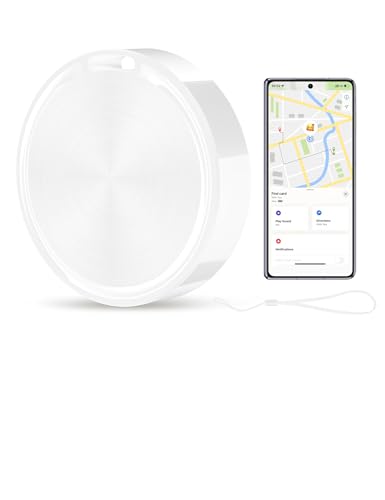
【Google Find My Device Compatibility】 Designed exclusively for Android 9 and above, it is compatible with all Android devices. It is not applicable to iOS devices or Huawei devices, and achieves precise tracking relying on Google's official network.

☑️ STOP FORGETTING YOUR PHONE - GET A RELIABLE PHONE SEPARATION ALERT BEFORE YOU LEAVE YOUR PHONE BEHIND (NOT A TRACKER): Using patented Advanced Alert Technology, alerting only when the Prox PRD is moving, the PRD will alert you when leaving proximity of your phone; typically 50ft to 150ft away. Alert distance range can vary greatly and may be shorter (w/obstructions) or farther when outdoors. The PRD does not alert at very short distances such as 10 feet. (Phone not included.)
Method 1: Share Location With Google Maps
Google Maps is one of the easiest choices because it works on both iPhone and Android. Both users should have the Google Maps app installed, location access enabled, and a working internet connection.
- Open Google Maps on the phone that will share location.
- Tap the profile picture or account icon.
- Select Location sharing.
- Choose how long to share the location.
- Select a contact or create a shareable link.
- Send the location through the chosen app or contact method.
- Stop sharing when the other person no longer needs access.
This feature is useful for coordinating travel plans, checking estimated arrival times, or helping someone follow your route during an outing.
Method 2: Share Location Through WhatsApp
WhatsApp can share either a current location or live location inside a chat. Current location sends a fixed point on the map. Live location updates as you move for the selected time period.
- Open the WhatsApp chat with the person you trust.
- Tap the attachment or plus icon.
- Select Location.
- Choose Send Your Current Location or Share Live Location.
- Select the duration if you choose live sharing.
- Stop live sharing from the chat when finished.
Method 3: Share Location Through Facebook Messenger
Facebook Messenger also supports location sharing between iPhone and Android users. This can be helpful when both people already use Messenger and need a quick way to coordinate.
- Open the Messenger conversation.
- Tap the location option from the chat tools.
- Choose live location sharing or send a specific location.
- Confirm the sharing request.
- End the sharing session when it is no longer needed.
Method 4: Use a Family Location App
Family-focused apps such as Life360 are designed for ongoing location sharing among approved group members. These apps can be helpful for families, caregivers, or groups that want a shared map, location alerts, and safety features.
Because these apps may collect more data and run in the background, review the privacy settings carefully. Only invite trusted people, turn off features you do not need, and avoid using permanent tracking when temporary sharing is enough.
Apps and Services for Cross-Platform Location Sharing

A variety of apps and services support cross-platform location sharing. The right option depends on how long you want to share, who needs access, and whether you want simple map sharing or family safety features.
| App or Service | Best For | Important Notes |
|---|---|---|
| Google Maps | Real-time cross-platform location sharing | Strong general option for iPhone and Android users |
| Temporary live sharing inside a chat | Useful when both people already use WhatsApp | |
| Facebook Messenger | Quick sharing with Messenger contacts | Best for casual coordination |
| Life360 | Family and group location circles | Review privacy settings before using ongoing tracking |
| Glympse | Temporary location sharing | Helpful when you want sharing to expire automatically |
Google Maps stands out as one of the most widely used options because it is available on both platforms and supports real-time sharing. Users can share their location with friends or family members directly through the app, making it useful for meetups, travel coordination, and safety check-ins.
Life360 is designed mainly for families and private groups. It allows members of a circle to see one another’s locations on a map and may include features such as alerts and driving-related tools. This can be helpful, but it should be used with clear agreement among everyone in the group.
Glympse focuses on temporary location sharing. It can be useful when you want someone to follow your location for a limited time without creating a permanent tracking setup.
[Amazon Products Picked for You]

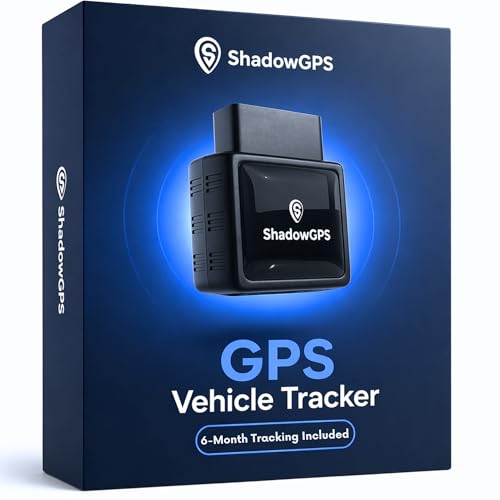
REAL-TIME GPS TRACKING & LOCATION Track your vehicle live with pinpoint accuracy using the ShadowGPS app. See real-time location, detailed trip history, and animated route replays. Monitor speed, distance, idle time, and more—ideal for parents, families, and small business fleets.
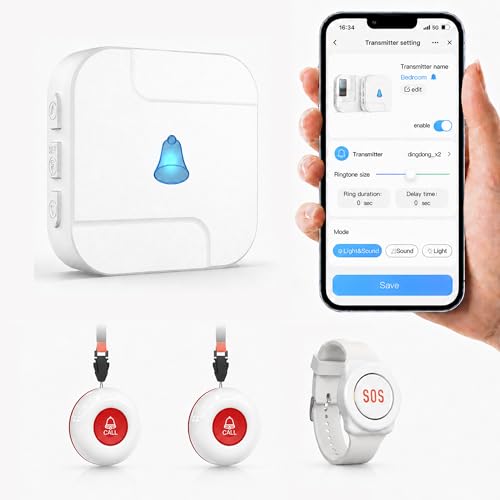
【Long Range & 2.4GHz WI-FI】This Wi-Fi caregiver pager uses 433MHz technology, providing a wireless range of up to 328 ft (100 m) between the call button and receiver. Walls, doors, and other obstacles may reduce the actual range. Connect the receiver to your home 2.4GHz Wi-Fi to receive remote App notifications on your phone.Note: 2.4GHz Wi-Fi only; 5GHz is not supported.
Tips for Secure and Responsible Cross-Platform Location Sharing
To use location sharing safely, start by limiting access. Only share with people you trust, and avoid sharing your live location in large group chats or with contacts you do not know well.
- Use temporary sharing: Choose a time limit whenever the app allows it.
- Review app permissions: Remove location access from apps that do not need it.
- Turn off sharing after the trip: Do not leave live location on by habit.
- Check who can see you: Review active sharing lists in Google Maps, family apps, and messaging apps.
- Avoid oversharing sensitive places: Be careful when sharing from your home, workplace, school, hotel, or private appointments.
- Use strong account security: Enable strong passwords and two-factor authentication where available.
Both iOS and Android provide settings that allow individuals to manage which applications have access to their location data. By disabling location access for apps that do not require it or are not frequently used, users can reduce unwanted tracking and unnecessary data collection.
Temporary sharing options can add another layer of safety because they reduce the chance of forgetting that your location is still visible. When possible, choose an app that lets you set a clear end time.
Troubleshooting: Why Location Sharing May Not Work
If an iPhone and Android user cannot see each other’s location, the issue is usually caused by settings, permissions, connectivity, or app limitations. Try these fixes before switching apps.
- Check location permissions: Make sure the app has permission to access location on the sharing device.
- Enable precise location: If the app supports it, precise location may improve accuracy.
- Turn on mobile data or Wi-Fi: Live location needs an internet connection to update.
- Disable battery restrictions: Battery saver modes may stop background location updates.
- Update the app: Older app versions may have bugs or outdated sharing features.
- Check background refresh: Some phones limit apps from updating location in the background.
- Confirm the link or contact: Make sure the location was shared with the correct person or account.
- Restart the phone: A restart can fix temporary GPS, network, or app glitches.
If the location still does not update, stop sharing and start a new session. For family apps, confirm that everyone is logged into the correct account and has accepted the group or circle invitation.
[Amazon Products Picked for You]

Keep Your Info Private, Not on Your Luggage: No more exposing details on your luggage. If bag gets lost, finders simply scan QR code & send a secure, private message via our platform - no personal info is ever revealed. A must-have privacy essential for modern travelers

【 Broad Compatibility】Works with iOS and Android devices via Bluetooth. Does not require a SIM card or a subscription. Ready to use straight out of the box for vehicles, pets, and everyday items.

375,000+ MILES OF OFF-ROAD TRAILS NATIONWIDE: Access the largest off-road trail database in the country, with over 375,000 miles of mapped roads and trails across all 50 states. Built for 4x4 drivers, overlanders, ATV and UTV riders, dirt bikers, snowmobilers, and side-by-side enthusiasts.
The Future of Cross-Platform Location Sharing and Interoperability
As technology continues to evolve, cross-platform location sharing will likely become more flexible, accurate, and privacy-focused. Users want easier ways to share location across devices, but they also want clearer controls over who can see them and when sharing ends.
Future apps may offer more detailed privacy settings, smarter temporary sharing, better safety alerts, and stronger controls for families or groups. Wearables such as smartwatches and fitness trackers may also play a larger role because they can share movement, safety, and emergency information across connected devices.
Interoperability between different platforms will likely become more important as people use more connected devices. As developers focus on apps that work smoothly across iOS, Android, and wearable platforms, users should expect better cross-platform sharing options that still prioritize permission and privacy.
In short, iPhone and Android devices can work together for location sharing, but not through automatic built-in tracking between the two systems. The safest approach is to use a trusted cross-platform app, set a clear sharing duration, and review permissions regularly.
If you are interested in learning more about how technology can bridge the gap between different devices, you may want to check out an article on mastering the art of charcoal smoking. That article looks at how different tools and techniques can work together to create a better result. In a similar way, cross-platform location sharing depends on compatible tools, correct settings, and responsible use.
Related Guides
Frequently Asked Questions
What is the article “Can iPhone track Android” about?
The article explains whether an iPhone can track an Android device, how cross-platform location sharing works, which apps can help, and what privacy risks users should understand before sharing live location.
Can an iPhone track the location of an Android device?
No. An iPhone cannot directly track an Android device through Apple’s built-in Find My feature. To see an Android user’s live location on an iPhone, the Android user must share it through a compatible app or service.
Are there third-party apps or services that can help track an Android device with an iPhone?
Yes. Cross-platform apps such as Google Maps, WhatsApp, Facebook Messenger, Life360, and Glympse can help an iPhone user view an Android user’s shared location. These apps usually require permission, installation, account access, or a location-sharing link.
What are some popular third-party apps for tracking Android devices with an iPhone?
Popular options include Google Maps, WhatsApp, Facebook Messenger, Life360, Glympse, and family locator apps. These apps may offer live location sharing, temporary sharing, location history, group maps, or safety alerts depending on the service.
What are the limitations of using third-party apps to track an Android device with an iPhone?
Limitations may include the need for both devices to have the app installed, active location permissions, mobile data or Wi-Fi, background app access, and the correct privacy settings. Battery saver mode, poor GPS signal, or outdated apps can also reduce accuracy.
Can someone track my phone without me knowing?
Legitimate location sharing apps should show active sharing, permissions, or account activity. If you suspect unwanted tracking, review your app permissions, remove unknown apps, check active location sharing in your map and messaging apps, update your passwords, and turn off location access for apps you do not trust.
Is Google Maps better than Apple Find My for iPhone-to-Android location sharing?
For iPhone-to-Android sharing, Google Maps is usually more practical because it works on both platforms. Apple Find My is useful for Apple devices and Apple users, but it is not a direct built-in solution for tracking Android phones.
