
⚡ TL;DR — Quick Verdict
🏆 Fire Max 11 — Best Overall: 11″ vivid screen, built-in fingerprint unlock, Dolby Atmos stereo, 4 GB RAM, and USI 2.0 stylus. List price ~$229.99 (64 GB) — frequently 20–40% off during Prime Day and holiday sales.
💰 Fire HD 10 — Best Value: Sharp 10.1″ Full HD screen and dependable everyday performance. List price ~$139.99 (32 GB) — on sale for as low as $79–$99 several times a year.
Fire Max 11 vs Fire HD 10 — which Amazon Fire tablet is the smarter buy in 2026? This quick, no-fluff guide compares the latest models on what actually matters for everyday life: display quality for binge-watching and ebooks, battery life for travel days, performance for multitasking, storage (plus micro-SD), and accessories like the stylus and keyboard. Whether you’re a parent sharing a tablet with kids, a student taking handwritten notes, or a casual streamer who wants a bright screen at a great price, we break down the pros, cons, and best use cases.
You’ll see why the Fire Max 11 shines for note-taking and a larger, more immersive screen, and where the Fire HD 10 wins on value with a sharp 10.1″ Full HD display and dependable all-day battery. We’ll also cover lockscreen ads, real-world performance, and how long each tablet is likely to last with Amazon’s security updates. By the end, you’ll know exactly which Fire tablet fits your routine — and your budget.
✅ This guide is for you if…
- You want a budget-friendly tablet for streaming, reading, or kids’ apps
- You’re deciding between a 10″ and an 11″ screen size
- You want to use a stylus for notes or sketching
- You care about battery life for travel or long couch sessions
- You already use Amazon services like Prime Video, Kindle, or Alexa
❌ This guide is NOT for you if…
- You need full Google Play Store access out of the box
- You want a tablet for heavy creative work, video editing, or coding
- You need a tablet with a cellular data plan (neither supports it)
- You want an Apple or Samsung device
- You need the fastest processor on the market
💲 Price Tier Guide
- $ — Budget (approx. under $100) — Entry-level Fire tablets, ad-supported
- $$ — Mid-range (approx. $100–$160) — Fire HD 10 (~$139.99 list, 32 GB)
- $$$ — Premium (approx. $160–$230) — Fire Max 11 (~$229.99 list, 64 GB), larger display, stylus support
- $$$$ — Top-tier (approx. $230+) — Fire Max 11 128 GB (~$279.99 list), or Fire Max 11 with accessories (keyboard, stylus)
💡 Sale tip: Amazon typically discounts Fire tablets 20–40% during Prime Day, Black Friday, and Cyber Monday. Prices above are list prices and may vary.
Top Picks
| Category | Product | Score | Price Tier |
|---|---|---|---|
| 🏆 Best Overall | Amazon Fire Max 11 (64 GB, With Lockscreen Ads) | 90/100 | $$$ |
| 💰 Best Value | Amazon Fire HD 10 (32 GB, With Lockscreen Ads) | 88/100 | $$ |
📊 How Scores Are Calculated (out of 100)
- Display Quality (25 pts): Screen resolution, brightness, size, and certified features like low blue light
- Performance & RAM (20 pts): Processor speed, RAM, and how well it handles multitasking and streaming
- Battery Life (15 pts): Manufacturer-rated hours and real-world performance from user reports
- Storage & Expandability (15 pts): Internal storage options and micro-SD support
- Accessories & Features (15 pts): Stylus support, keyboard compatibility, family features, Wi-Fi version
- Value for Money (10 pts): Price vs. real-world experience based on verified user reviews
How We Chose These Tablets
You want a tablet that feels good to use and keeps up with your day. We focused on real-world benefits: display quality, battery life, performance, storage, accessories, and overall value.
Display: We prioritized a screen that makes streaming and reading enjoyable. The Fire HD 10 has a 10.1″ Full HD screen (1920 x 1200) for crisp video and text. The Fire Max 11 steps up to an 11″ vivid panel (2000 x 1200) that feels closer to a small laptop or TV.
Performance & RAM: Responsiveness matters when you multitask or play games. The Fire HD 10 comes with 3 GB RAM (the memory that keeps apps running smoothly), which is solid for browsing, streaming, and light apps. The Fire Max 11 pairs an octa-core CPU (an 8-core processor) with 4 GB RAM for smoother multitasking and better stylus support.
Storage & Expandability: Both tablets support micro-SD expansion up to 1 TB. The HD 10 is available in 32 GB and 64 GB, and the Max 11 starts at 64 GB. If you keep a lot of media, the extra space makes a real difference.
Battery Life & Portability: You’ll get up to 13 hours on the HD 10 and up to 14 hours on the Max 11 during mixed use — enough for a travel day or a long work session.
Accessories & Productivity: The Max 11 supports an optional USI 2.0 stylus (a standardized digital pen that works with pressure sensitivity) and keyboard. These turn it into a capable note-taking device. Reviewers praised the handwriting experience and palm rejection (the tablet ignoring your hand while you write).
Price & Ads: Both models are offered “With Lockscreen Ads” to lower the entry price. You can pay to remove ads if you prefer a clean lock screen.
Final breakdown: Fire Max 11 — best if you want the larger, more capable device for stylus work and richer visuals. Fire HD 10 — best if you want a Full HD 10.1″ screen, reliable battery life, and the most affordable everyday tablet.
⚠️ Common Mistakes to Avoid
- Buying the cheapest storage option without checking your needs. A 32 GB model usually shows about 24 GB free after the OS. If you download a lot of videos or apps, fill up the micro-SD slot early or you’ll run out of space quickly.
- Forgetting about the Amazon App Store limitations. Fire tablets don’t come with Google Play. You can sideload (manually install) the Play Store, but it takes extra steps. If you rely on specific Android apps, check first whether they’re available on Amazon’s store.
- Not buying the stylus at the same time as the Max 11. If stylus note-taking is your main reason for choosing the Max 11, order the USI 2.0-compatible stylus with the tablet. It’s sold separately and some buyers are surprised by this.
- Ignoring the lockscreen ad option. The ad-supported version saves money. But if ads on your lock screen will bother you, budget for the ad-free version upfront rather than paying to remove them later.
- Expecting laptop-level performance. Both tablets handle streaming, reading, and light gaming well. But they’re not built for heavy creative work, video editing, or running demanding desktop apps.
- Not checking garage clearance — wait, wrong article. Seriously though: don’t skip the USB-C cable check. Both tablets charge via USB-C, but neither includes a fast charger in the box. The Fire Max 11 supports up to 15W USB-C fast charging — use a compatible 15W USB-C charger (sold separately) for the fastest charge times. A 9W or higher charger works on both tablets.
- Skipping the screen protector and case. Fire tablets are tough, but a drop on a hard floor can still crack the screen. A basic case and tempered glass protector extend the life of your investment.
Amazon Fire Max 11 $$$
Editor’s Pick
🏆 Best Overall

You’ll find the Fire Max 11 a comfortable middle ground between a media tablet and a casual productivity device. Built by Amazon and tuned for the Amazon ecosystem, the newest model pairs a vivid 11″ screen with an octa-core processor (an 8-core chip) so streaming, reading, and light multitasking feel smooth. The aluminum body includes a built-in fingerprint sensor in the power button — the first fingerprint scanner on any Fire tablet — for fast, secure unlock.
The stylus support and good palm rejection make it useful for note-taking. The lightweight aluminum body is easy to hold during long reading sessions or relaxing on the couch. If you want something that works well for families, travel, and everyday use — and that plays nicely with optional accessories like a keyboard and stylus — this tablet is worth trying.
Pros and Cons
| Pros | Cons |
|---|---|
| ✅ Excellent stylus feel and handwriting experience | ❌ Lockscreen Ads option can be intrusive for some users |
| ✅ Sharp, vivid 11″ display certified for low blue light | ❌ Amazon app store is limited unless you sideload the Play Store |
| ✅ Solid multitasking for everyday apps thanks to octa-core performance | ❌ Stylus and keyboard case sold separately — add to your budget |
| ✅ Lightweight aluminum build and good battery life — up to 14 hours | |
| ✅ Built-in fingerprint sensor in power button for fast, secure unlock — a first for Fire tablets | |
| ✅ Dual stereo speakers with Dolby Atmos for immersive, room-filling audio |
What People Say
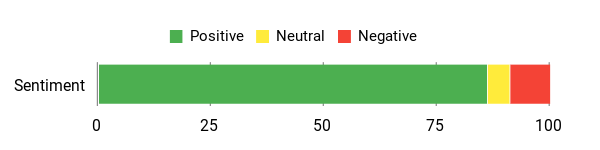
You’ll see people praising the pen experience and the brighter, sharper screen. Reviewers also point out the speed boost from the octa-core processor. The main concerns are the Lockscreen ad option and app-store limitations.
Overall Sentiment: Positive
🗣️ IMScrat
Stylus performance stood out: reviewers praised the pen feel, strong palm rejection, and improved handwriting apps after sideloading the Play Store. One user said the pen made the tablet far more useful for notes and for helping a family member with disabilities.
🗣️ Emotionally Flammable
Many buyers highlighted the display and overall speed. The screen is brighter and sharper than older Fire models, and the faster processor and Wi-Fi 6 kept multitasking and streaming fluid in everyday use.
Long-Term Cost Benefits
You get four years of guaranteed security updates and a durable aluminum build. The tablet stays useful longer, so you won’t need to replace it as soon.
Return On Investment
If you use it for daily reading, streaming, note-taking, and light productivity, the Fire Max 11 can replace a couple of single-purpose devices and earn its keep as a versatile household tablet.
Situational Benefits
| Situation | How It Helps |
|---|---|
| Travel | Slim profile and 14-hour battery make it easy to watch movies or read during long trips. |
| Note-taking and study | Stylus support with good palm rejection turns the tablet into a reliable surface for handwritten notes or sketches. |
| Family use | Amazon Kids and parental controls make it easy to hand the tablet to kids for learning apps or videos safely. |
| Relaxation at home | A vivid screen and comfortable weight make it ideal for reading or streaming without arm fatigue. |
Versatility
You can switch between reading, streaming, light productivity with an optional keyboard, and stylus-driven tasks. It works as both a family tablet and a personal device.
Practicality
Daily tasks like browsing, video calls, and note-taking are simple. Dual-band Wi-Fi (including Wi-Fi 6) and micro-SD expansion (up to 1 TB) keep it practical for storing media and working on the go.
Travel Friendliness
Compact size, light weight, and a long battery make it easy to pack in a bag or carry-on.
Speed & Response
The octa-core processor keeps apps responsive and makes switching between streaming and simple productivity feel smooth.
Key Benefits
-
- Vivid 11″ display (2000 x 1200) for comfortable watching and reading
- Octa-core processor and 4 GB RAM for responsive everyday performance
- Great stylus support (USI 2.0 compatible) with palm rejection for notes and doodling
- Long battery life — up to 14 hours of mixed use
- Durable, lightweight aluminum body that’s easy to carry
-
- Built-in fingerprint sensor for fast, secure unlock
-
- Dual stereo speakers with Dolby Atmos for richer, more immersive audio
- Supports up to 15W USB-C fast charging (15W charger sold separately)
Rating: 4.4 (total: 13,859+)
Check Today’s Price on Amazon →
Amazon Fire HD 10 $$

You’ll find the Fire HD 10 a reliable, easy-to-live-with tablet that’s built for everyday enjoyment. The newest model in the Fire line pairs a 10.1″ Full HD display with an octa-core processor and 3 GB RAM, so streaming, reading, and light gaming feel smooth.
It comes in Black and other colors. It offers 32 GB or 64 GB of internal storage with micro-SD expansion. It even supports Amazon’s stylus accessories if you want to jot or sketch — the Made for Amazon Stylus Pen works with 4,096 pressure levels. For daily use it’s great for binge-watching, cozy reading with the built-in Kindle app, video calls, and casual gaming. If you want something simple that handles media and family use without fuss — and that gives you the option to keep or remove Lockscreen ads — this Fire tablet is a solid, low-drama pick.
Pros and Cons
| Pros | Cons |
|---|---|
| ✅ Clear, bright Full HD 10.1″ display — great for shows and ebooks | ❌ Lockscreen Ads can bother some users |
| ✅ Responsive for streaming, browsing, and light gaming — octa-core CPU and 3 GB RAM | ❌ Amazon app store can feel limited unless you add other app sources |
| ✅ Expandable storage and useful family features | ❌ Speakers are serviceable but not exceptional for audiophiles |
| ✅ Sturdy build with aluminosilicate glass (a tough, scratch-resistant screen material) that stands up to everyday knocks | ❌ Echo Show Mode quick toggle removed in Fire OS 8 — smart home buyers expecting Show Mode functionality will need a separate Echo Show device |
What People Say
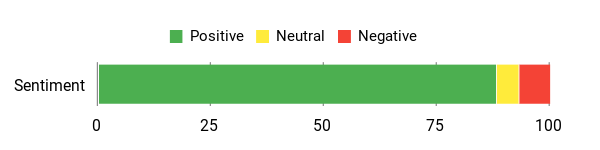
People spotlight the tablet’s value: the screen, dependable battery life, and how well it handles kids’ apps and streaming. Several reviewers also mention the Lockscreen ad option as something to think about before buying.
Overall Sentiment: Positive
🗣️ Steven W.
One reviewer bought the 64 GB for a 6-year-old and said it handled YouTube Kids, learning apps, and light gaming like a champ. They noted the HD screen is great for videos, the tablet is responsive, durable enough for kids, and the battery lasted for hours.
🗣️ Ms. Finch
Another buyer loved the size for a cozy hobby room: downloads were fast, the built-in Kindle made reading easy, charging felt speedy, and overall the tablet was sleek and reliable. They did call out the Lockscreen ads as annoying but removable for a fee.
Long-Term Cost Benefits
Guaranteed software security updates for at least four years and a durable build mean the tablet stays useful longer. This reduces the need for replacements and stretches your money further.
Return On Investment
If you use it for reading, streaming, kids’ apps, and light productivity, the Fire HD 10 covers multiple needs. It can replace single-purpose gadgets around the house.
Situational Benefits
| Situation | How It Helps |
|---|---|
| Travel | Lightweight size and up to 13 hours of battery life make it easy to watch movies or read on the go. |
| Family use | Amazon Kids, parental controls, and a tough aluminosilicate glass screen make it kid-friendly for apps and videos. |
| Reading and relaxation | Built-in Kindle support and a comfortable 10.1″ Full HD screen make long reading sessions pleasant. |
| Kitchen or workshop | Compact form and a stable screen make following recipes or watching tutorial videos easy while you work. |
Versatility
You can switch between streaming, reading, light gaming, and note-taking with an optional stylus. It works well for family entertainment and casual personal use.
Practicality
Dual-band Wi-Fi, USB-C charging, and micro-SD expansion (up to 1 TB) keep everyday tasks like downloads, media storage, and web browsing simple.
Travel Friendliness
Thin, light, and easy to slip into a bag. The battery life and compact screen size suit flights and commutes.
Speed & Response
The octa-core processor helps apps open quickly and keeps switching between streaming and light multitasking feeling snappy.
Key Benefits
- 10.1″ 1080p Full HD display (1920 x 1200) for crisp video and reading
- Octa-core processor with 3 GB RAM for smooth everyday use
- Options for 32 GB or 64 GB storage with micro-SD expansion up to 1 TB
- Up to 13 hours of mixed-use battery life for long days
- Durable, lightweight design with strengthened aluminosilicate glass
- Family-friendly features like Amazon Kids and easy parental controls
- Optional Lockscreen Ads you can keep or remove for a small fee
Rating: 4.5 (total: 22,501+)
Check Today’s Price on Amazon →
🏆 Fire Max 11 (Best Overall)
-
- Score: 90/100 · Price tier: $$$
- 11″ vivid display (2000 x 1200, 213 PPI)
- Octa-core + 4 GB RAM
- Up to 14 hours battery
- USI 2.0 stylus support
- Optional keyboard case
- Low blue light certified
- Aluminum build
- Wi-Fi 6 support
-
- Built-in fingerprint sensor (power button)
-
- Dolby Atmos dual stereo speakers
-
- 8 MP front (1080p) / 8 MP rear with autofocus
- Widevine L1 — full HD on Netflix, Prime & Disney+
💰 Fire HD 10 (Best Value)
-
- Score: 88/100 · Price tier: $$
- 10.1″ Full HD display (1920 x 1200, 224 PPI)
- Octa-core + 3 GB RAM
- Up to 13 hours battery
- Stylus support (4,096 pressure levels)
- 32 GB or 64 GB storage options
- Aluminosilicate glass screen
- Lower price point
- More user reviews
-
- No fingerprint sensor
-
- 2 MP front (720p HD) / 5 MP rear camera
- Widevine L1 — full HD on Netflix, Prime & Disney+
FAQ
Which Tablet Should You Choose For Streaming, Reading, And Everyday Use?
You’ll find two clear winners this fall: the Amazon Fire Max 11 and the Amazon Fire HD 10. If you want a larger, more capable tablet for note-taking, light drawing, and multitasking, the Fire Max 11 is the better pick. Its vivid 11″ display, optional stylus and keyboard, built-in fingerprint sensor, Dolby Atmos speakers, and higher RAM set it apart. Its aluminum build also feels more premium.
If you want a compact, comfortable device for reading, streaming, and everyday apps, the Fire HD 10 is well-suited to leisure and travel. Its 10.1″ Full HD screen, octa-core processor, and 3 GB RAM handle casual use very well. Both tablets support micro-SD expansion, dual-band Wi-Fi, and the familiar Amazon Fire software. Your choice comes down to whether you value a larger, stylus-friendly display and extra performance — or a lighter, more relaxed viewing experience at a lower price.
Will Lockscreen Ads, Storage, And RAM Affect Your Day-To-Day Experience?
Lockscreen ads don’t slow the device down. But they do change how the device looks when you wake it. You can remove them if you prefer a clean lock screen. Storage is the bigger everyday limit. A 32 GB model often shows about 24 GB free for your apps and data. Plan to use the micro-SD slot or cloud storage for photos, video downloads, and large files.
RAM matters for multitasking. 3 GB RAM on the Fire HD 10 handles streaming, browsing, and reading well. The higher RAM in the Fire Max 11 helps if you keep many apps open or use a stylus often. Practical tip: offload media to the micro-SD card, clear app caches (temporary data that can slow things down) when things get sluggish, and keep the OS updated for smooth performance.
How Long Will These Tablets Last And What Should You Buy To Protect Your Investment?
You should get several years of useful life from both tablets. Amazon provides guaranteed software security updates for at least four years after each model was last sold as new. Both include a 1-year limited warranty, with optional extended plans in the U.S.
To extend the life of your tablet, use a protective case and a tempered screen protector. Avoid extreme temperatures. Follow gentle charging habits — avoid draining the battery to zero regularly. If you plan to use the tablet for productivity or note-taking, get the official stylus and a keyboard for the Fire Max 11. For the Fire HD 10, a sturdy folio case and a micro-SD card for media storage are the most practical accessories.
Do These Tablets Support Google Play Store?
Not out of the box. Both tablets use Amazon’s own app store (the Amazon Appstore), which has a large but smaller selection than Google Play. You can sideload (manually install) the Google Play Store and other Android apps, but it takes a few extra steps and isn’t officially supported by Amazon. If you rely on specific apps that are only on Google Play, check whether they’re available on Amazon’s store before buying.
Can Kids Use These Tablets Safely?
Yes. Both tablets support Amazon Kids, Amazon’s child-friendly subscription service. This gives parents full control over what content kids can see. You can set screen time limits, filter content by age, and block purchases. Amazon Kids+ (a paid subscription) gives access to thousands of kid-friendly books, apps, videos, and games. The Fire HD 10 has a tougher aluminosilicate glass screen, which handles drops and knocks better. Amazon also sells a separate Kids edition of the Fire HD 10 that comes with a protective case and a worry-free guarantee.
What’s The Difference Between Wi-Fi 6 And Standard Wi-Fi?
Wi-Fi 6 is the newer, faster version of Wi-Fi. It handles more devices on the same network at once and delivers faster speeds if your router supports it. The Fire Max 11 supports Wi-Fi 6. The Fire HD 10 uses dual-band Wi-Fi (2.4 GHz and 5 GHz) but does not support Wi-Fi 6. In everyday use the difference is small for most households. But if you have a modern router and a busy home network, the Fire Max 11 may stream more smoothly.
Can I Use These Tablets For Video Calls?
Yes. Both tablets have a front-facing camera and support video calls through apps like Amazon Alexa, Zoom, and other video calling apps available on the Amazon Appstore. The Fire Max 11 has an 8 MP front camera with 1080p HD video and an 8 MP autofocus rear camera — making video calls look noticeably sharper. The Fire HD 10 has a 2 MP front camera with 720p HD video and a 5 MP rear camera, which is adequate for casual calls. The Fire Max 11’s larger screen also makes video calls feel more natural. Both tablets have microphones and speakers for audio.
What Buyers Prefer
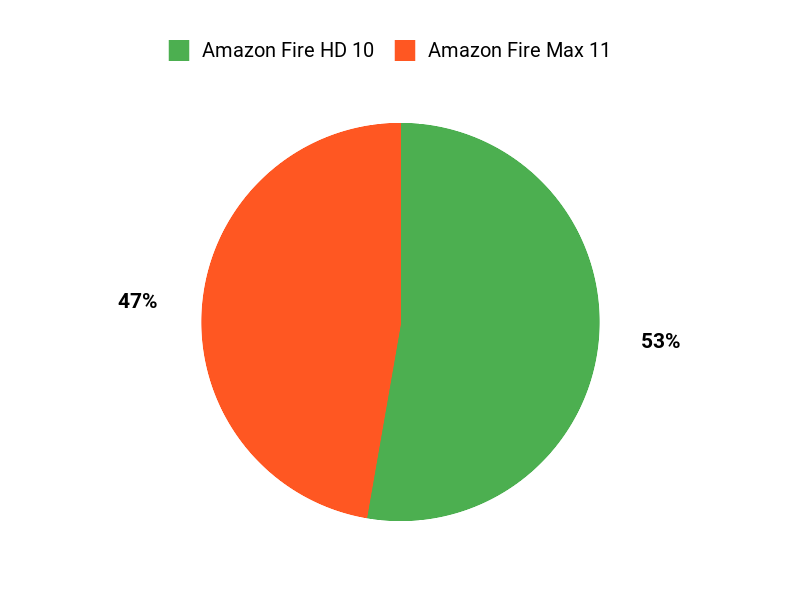
You’ll pick based on whether you want a bigger, more powerful tablet for multitasking and crisp visuals — or a lighter, more budget-friendly device for everyday streaming and browsing. Most buyers prioritize screen size and performance versus price, battery life, and portability. Choose the Fire Max 11 if power and a larger display matter most. Choose the Fire HD 10 if value, compactness, and everyday comfort are your priorities.
Wrapping Up
Which one should you pick? If you want the most capable Fire tablet for streaming, writing with a stylus, fingerprint unlock, Dolby Atmos audio, and a larger, vivid display, the Amazon Fire Max 11 (64 GB) is the best overall pick. If you want great value, a bright 10.1″ Full HD screen, and a dependable everyday tablet at a lower price, the Amazon Fire HD 10 (32 GB) is the best value.
Both deliver solid battery life, expandable storage, Widevine L1 certification (unlocking full 1080p streaming on Netflix, Prime Video, and Disney+), and easy access to Amazon services. Choose based on screen size, RAM, audio quality, and whether you plan to use a stylus, keyboard, or fingerprint unlock.
| Amazon Fire Max 11 Tablet | Amazon Fire HD 10 Tablet | |
|---|---|---|
 |
 |
|
| Rating | 4.4/5 (13,859+ reviews) | 4.5/5 (22,501+ reviews) |
| Price Tier | $$$ (~$229.99 list, 64 GB) | $$ (~$139.99 list, 32 GB) |
| Display Quality |
|
|
| Processing Power |
|
|
| Battery Life | Up to 14 hours; varies with usage | Up to 13 hours; varies with usage |
| Storage | 64 GB internal; micro-SD up to 1 TB | 32 GB or 64 GB; micro-SD up to 1 TB |
| Camera | 8 MP front (1080p HD video) · 8 MP rear with autofocus (1080p HD video) | 2 MP front (720p HD video) · 5 MP rear |
| Fingerprint Sensor | ✅ Yes — built into power button | ❌ No |
| Audio | Dual stereo speakers with Dolby Atmos | Dual stereo speakers |
| Streaming Quality | Widevine L1 — full HD (1080p) on Netflix, Prime Video & Disney+ | Widevine L1 — full HD (1080p) on Netflix, Prime Video & Disney+ |
| Stylus Support | Yes — USI 2.0 compatible stylus (sold separately) | Yes — Made for Amazon Stylus Pen, 4,096 pressure levels (sold separately) |
| Wi-Fi | Wi-Fi 6 (dual-band) | Dual-band Wi-Fi (2.4 GHz + 5 GHz) |
| Charging | USB-C; supports up to 15W fast charging (9W charger included; 15W charger sold separately) | USB-C; no fast charger in box |
| Check Today’s Price on Amazon → | Check Today’s Price on Amazon → |
This Roundup is reader-supported. When you click through links we may earn a referral commission on qualifying purchases.

2 thoughts on “Amazon Fire Max 11 vs Fire HD 10 (2026): Which Should You Buy?”