Disclosure: As an Amazon Associate, we earn from qualifying purchases. If you click a link on this page and make a purchase, we may receive a small commission at no extra cost to you.
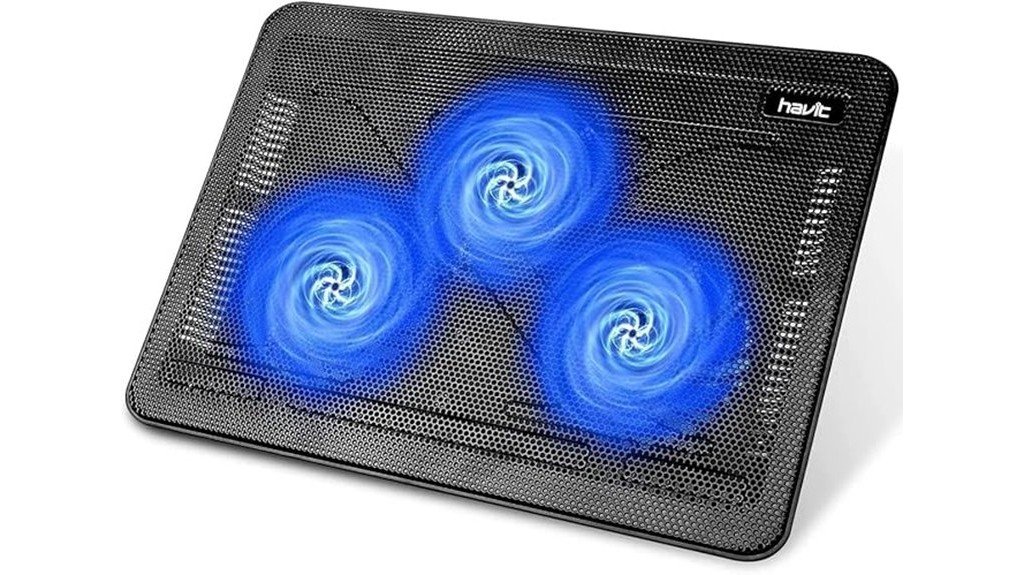
Laptop heat can slow performance, make typing uncomfortable, and shorten long work or gaming sessions. The Havit HV-F2056 Laptop Cooler is built to solve that problem with a slim frame, three quiet fans, and USB-powered cooling for laptops up to 17 inches. This review looks at its cooling design, portability, comfort, setup, and real drawbacks so you can decide if it fits your desk, travel bag, or gaming setup. It performs well for everyday heat control, but the bright blue LED lights and rear power switch may not suit every user.
Quick Verdict
Rating: 8.4/10
Best For: Students, remote workers, gamers, and laptop users who want a slim cooling pad with quiet airflow.
Bottom Line: The Havit HV-F2056 is a strong value if you want better airflow, a lightweight build, and a more comfortable typing angle. Skip it if you need fully dark operation, front-facing controls, or advanced fan-speed features.
| Specification | Detail |
|---|---|
| Brand | Havit |
| Model | HV-F2056 |
| Product type | Laptop cooling pad |
| Cooling system | Three ultra-quiet fans |
| Dimensions | 14.96 x 1.18 x 11.02 inches |
| Weight | 1.54 pounds |
| Material | Metal mesh surface with slim support frame |
| Power | USB powered |
| Connectivity | Dual USB ports |
| Compatibility | Best suited for common laptop sizes, including larger laptops up to 17 inches when the footprint fits securely |
| Best use | Desk work, study, gaming, streaming, video editing, and travel setups |
| Notable limitation | Bright blue LED lighting, rear power switch, and possible need for a Type-C adapter on newer laptops |
Overview
The Havit HV-F2056 Laptop Cooler is a slim, USB-powered cooling pad designed to help move heat away from the bottom of your laptop. Its 14.96 x 1.18 x 11.02-inch frame gives it enough surface area for many everyday laptops while keeping the profile thin enough for storage and travel. At 1.54 pounds, it is light enough to move between your desk, dorm room, office, or travel bag without much effort.
The main appeal is its three-fan cooling layout. The fans are described as ultra-quiet, and the article-supported cooling claim says they can reduce laptop temperature by up to 15 degrees during normal use. That makes the pad useful when your laptop gets warm during gaming, video calls, spreadsheets, browser-heavy work, or light creative tasks.
The supplied article also notes that this model is rated 4.5 stars from over 43,000 users and is listed as a #1 laptop cooling pad. Treat those figures as helpful social proof, not a substitute for checking the current listing before you buy. Ratings and availability can change over time.
Before You Buy: Check your laptop’s port type and underside vent layout. This cooler uses USB power and may need a Type-C adapter for newer laptops that no longer include standard USB-A ports.
What Is the Havit HV-F2056 Laptop Cooler?
The Havit HV-F2056 is an add-on laptop cooling pad, not a repair tool for a failing fan or blocked internal vent. You place your laptop on top of the metal mesh surface, plug the cooler into a USB port, and let the three fans push airflow toward the underside of the laptop. This can help reduce surface heat and support steadier performance when your laptop is working hard.
It is best for users who want a simple cooling upgrade without buying a bulky stand. The slim design gives you lift, airflow, and a more comfortable typing angle while still keeping the setup easy to carry. The metal mesh surface also helps with heat dissipation and gives the laptop a more stable base than a soft bed, blanket, or couch cushion.
Detailed Features
The Havit HV-F2056 combines a slim frame, triple-fan airflow, a metal mesh surface, adjustable height settings, and two USB ports. Each feature matters because laptop cooling pads work best when airflow, stability, and user comfort all support each other.
[Amazon Products Picked for You]

Ultra-Portable: Slim, portable, and light weight allowing you to protect your investment wherever you go

9 Super Cooling Fans: The 9-core laptop cooling pad can efficiently cool your laptop down, this laptop cooler has the air vent in the top and bottom of the case, you can set different modes for the cooling fans.

Whisper-Quiet Operation: Enjoy a noise-free and interference-free environment with super quiet fans, allowing you to focus on your work or entertainment without distractions.
Triple Fan Cooling Performance
The biggest reason to choose this model is the triple ultra-quiet fan system. Three fans spread airflow across more of the laptop base than a single small fan can. That helps if your laptop’s heat zones are spread across the bottom panel.
The article-supported claim says the cooler can lower temperatures by up to 15 degrees during normal use. Real results will depend on your laptop model, vent location, workload, room temperature, and whether your internal fans are clean. For best results, use it on a flat surface with open space around the laptop.
Slim Design and Portability
The 1.18-inch height makes this cooler easy to store under a monitor shelf, beside a desk, or in a backpack sleeve. At 1.54 pounds, it adds little bulk compared with many larger cooling stands. That makes it a smart option for students, remote workers, and users who move between rooms.
The slim build also keeps the desk setup simple. You get extra lift without turning your laptop into a tall workstation. If you prefer a high eye-level stand, though, this design may feel too low without a separate keyboard and mouse.
Metal Mesh Build
The metal mesh surface is useful because it supports airflow and gives the laptop a firm platform. It also helps spread heat better than plastic surfaces that block the bottom of the machine. This is especially helpful if you often use your laptop on a desk for long sessions.
The main thing to check is laptop stability. The original article notes that missing non-slip pads may compromise grip for some users. If your laptop slides easily, use the cooler on a level desk and avoid pushing the laptop forward while typing.
Adjustable Height and Ergonomics
The adjustable height settings let you raise the laptop slightly for a better typing angle. This can reduce wrist strain compared with placing the laptop flat on a desk. It also creates more space under the laptop, which can improve airflow.
For long writing sessions, pair the cooling pad with an external keyboard if the raised angle feels too steep. For gaming or editing, the added tilt can make the screen easier to view while keeping the laptop cooler than a flat desk setup.
USB Power and Dual USB Ports
The cooler runs through USB power, so you do not need a separate wall adapter. That keeps the setup clean and makes it easier to use in dorm rooms, offices, or travel situations. The two extra USB ports help offset the port used to power the cooling pad.
The limitation is modern laptop compatibility. If your laptop only has USB-C ports, you may need a Type-C adapter. Also, because the rear power switch is not front-facing, turning the cooler on or off may be less convenient if your laptop sits close to a wall.
Pro Tip: Place the laptop so its bottom vents line up with the fan area as much as possible. A small shift forward or backward can improve airflow more than raising fan speed alone.
Who Should Buy It?
Best For
- Users whose laptops get warm during work, streaming, gaming, or video editing.
- Students and remote workers who want a slim cooling pad that is easy to move.
- Buyers who prefer quiet airflow and a simple USB-powered setup.
Skip If
- You need a cooling pad with no visible LED lighting.
- You want front-facing controls or advanced fan-speed controls.
- Your laptop only has USB-C ports and you do not want to use an adapter.
How It Performs in Real Use
For Daily Work
For everyday browsing, email, documents, video calls, and spreadsheets, the Havit HV-F2056 gives your laptop a cooler, more open base. This is a clear upgrade over using a laptop flat on a desk or on a soft surface that blocks vents. The quiet fan design also helps keep noise low during calls or study sessions.
For Gaming
Gaming laptops often heat up quickly because the CPU and GPU work harder than they do during normal tasks. The triple-fan layout can help move more air across the bottom panel, which may reduce heat buildup during longer sessions. It will not replace your laptop’s internal cooling system, but it can support better airflow around the machine.
For Video Editing and Creative Work
Video editing, photo editing, and rendering can push a laptop for long periods. A cooling pad like this is useful because it keeps air moving under the laptop while the internal fans handle the main heat load. You may still hear your laptop’s built-in fans, but the cooling pad can help reduce the heat trapped under the chassis.
For Travel and Shared Spaces
The slim, lightweight build makes this model easy to carry between workspaces. It is also helpful in shared spaces because the fans are designed to stay quiet. The bright LED lights may be the bigger concern in a dark bedroom, dorm room, or shared office.
Setup Tips Before First Use
Set the cooling pad on a hard, flat surface before placing your laptop on it. Avoid beds, blankets, thick rugs, and soft couches because they can block airflow and reduce stability. Plug the USB cable into your laptop, then use the rear power switch to turn the fans on.
Keep your laptop centered on the mesh surface. If the machine feels unstable, adjust the angle or move it back slightly. For the best cooling, leave space behind and beside the laptop so hot air can escape instead of building up around the device.
Compatibility and Safety
The Havit HV-F2056 is an electronics accessory, so basic setup matters. Use it with a compatible USB port or a proper adapter, and avoid forcing the connector into the wrong port. If your laptop is already overheating badly, shutting down suddenly, or showing fan errors, treat that as a service issue and not just a cooling-pad problem.
The metal mesh surface is a practical choice for airflow, but the laptop still needs to sit securely. Do not use the cooler on an unstable surface, and do not block the fans while they are running. Keep dust, loose paper, and fabric away from the fan intake area.
Pros and Cons
Pros
- Three ultra-quiet fans help move heat away from the laptop base.
- Slim 14.96 x 1.18 x 11.02-inch frame is easy to store and carry.
- Lightweight 1.54-pound build works well for students and travel use.
- Metal mesh surface supports airflow and gives the laptop a firm base.
- Dual USB ports help replace the port used to power the cooler.
Cons
- Blue LED lights may be too bright for dark rooms or shared spaces.
- Rear power switch is less convenient than a front or side control.
- Some users may need a USB-C adapter for newer laptops.
Is It Worth the Price?
The Havit HV-F2056 is best viewed as a budget-friendly cooling upgrade for everyday laptop users. It gives you a slim frame, three fans, metal mesh support, adjustable height, and USB power without adding much bulk to your setup. That makes it a strong value for the price if your main goal is better airflow and a more comfortable desk angle.
You get the most value if you use your laptop for long sessions and notice heat building up under the chassis. It is also worth considering if you want a portable cooler that can move between home, school, and work. It is not the best fit if you want premium controls, a dark no-light design, or a full ergonomic stand for eye-level screen height.
[Amazon Products Picked for You]

【12-Core Deep Cooling Fans】The Trullypine F12 Laptop Cooling Pad is equipped with 12 high-speed silent fans, providing excellent cooling effect and temperature control, 360 degrees all-round dynamic cooling; The large metal mesh provides great heat dissipation performance. Four diamond-shaped groove designs bring better heat dissipation space, being built to accelerate heat dissipation.At the same time, these high-end laptop cooling fans are all equipped with capacitor components to reduce working noise, very quiet and create a low noise environment for you!

Intelligent AI Temperature Control with Myth.cool Software: Three smart modes (Low/Medium/High) auto-adjust fan speed to your laptop's workload. Download the latest version at “ llanolife.com/pages/support-download ” for seamless control, or go manual with the built-in scroller

👪 【3 Powerful Cooling Fans 】 - This laptop cooling pad is a must-have computer accessory for the whole family’s devices! Equipped with three large, ultra-silent fans, this laptop cooling fan rapidly cools down any laptop—whether it’s your work device running nonstop, your kid’s gadget for online classes, or your husband’s gaming laptop cooling pad go-to during weekend marathons. The maximum fan noise stays about 40dB, so it won’t disrupt family movie nights, your focused work time, or the kids’ bedtime routines. Adjusting the fan speed is a total breeze with the simple wheel switch on top—no confusing buttons, just hassle-free control for busy moms.
How It Compares to Alternatives
Compared with larger laptop cooling stands, the Havit HV-F2056 focuses more on slim portability than heavy-duty adjustability. Some bulkier alternatives may offer larger fans, stronger height adjustment, or more control options, but they can take up more room and feel less travel-friendly.
Compared with basic laptop risers, this Havit model adds active airflow through its three fans. A simple riser can improve air gap under the laptop, but it will not push air across the base. The HV-F2056 makes the most sense if you want a simple middle ground between a passive stand and a large cooling station.
[Amazon Products Picked for You]

Powerful Cooling Performance: Experience rapid cooling with the llano New Upgraded Version ice cooler, featuring a robust 5.5-inch (14CM) turbo external fan. Achieve an impressive temperature drop of 44℃ (111℉) for both CPU and GPU in just 90 seconds. Perfect for intense gaming sessions and demanding tasks, it ensures uninterrupted cooling without delays or screen flickers

👍【Triple Efficient Fans】TECKNET laptop cooling pad with 3 powerful fans works at 1200 RPM to pull in cool air from the bottom to prevent your laptop, notebook, netbook, Ultrabook, Apple MacBook Pro cool from overheating during extended use or intense gaming.

Ultra-Portable Cooling pad: Slim, portable, and light weight allowing you to protect your investment wherever you go
Related Guides
Frequently Asked Questions
Does the Havit HV-F2056 really cool a laptop?
It can help reduce heat by moving air across the underside of your laptop. The supplied article notes a temperature drop of up to 15 degrees during normal use, but your result will depend on your laptop, workload, vent layout, and room temperature.
What size laptop fits this cooling pad?
The cooling pad measures 14.96 x 1.18 x 11.02 inches, so it works best when your laptop sits securely on that footprint. Larger laptops may still fit, but you should check the base size and make sure the laptop remains stable.
Is the Havit HV-F2056 quiet enough for work or study?
The fans are described as ultra-quiet, which makes the cooler suitable for studying, writing, video calls, and office work. You may still hear some fan whirring in a silent room, especially if your laptop’s internal fans are also running hard.
Does it need a wall outlet?
No, it is USB powered, so it runs from your laptop’s USB port. If your laptop only has USB-C ports, you may need a Type-C adapter to connect it.
Are the LED lights distracting?
They can be distracting for some users, especially in a dark room. If you want a cooling pad for nighttime use beside someone else, the blue LED lighting is one of the main reasons to think carefully before buying.
Can it fix a laptop that overheats badly?
It can help improve external airflow, but it should not be treated as a repair for serious overheating. If your laptop shuts down, shows warning messages, or has a failing internal fan, clean or service the laptop first.
Where should you place the laptop on the cooler?
Place the laptop centered on the mesh surface and line up the bottom vents with the fan area when possible. Keep the cooler on a flat desk or table so the laptop does not slide.
Who should skip the Havit HV-F2056?
Skip it if you want no LED lighting, advanced fan controls, or a taller ergonomic stand. It is also less ideal if you dislike rear controls or do not want to use a USB-C adapter with a newer laptop.
Concluding Thoughts
The Havit HV-F2056 stands out because it keeps the core buying points simple: slim size, quiet triple-fan cooling, metal mesh support, USB power, and portable weight. It is a smart buy for everyday users who want less heat and a better laptop angle without spending on a bulky cooling station.
The main drawbacks are practical rather than performance-related. The blue LED lights may bother you in dark rooms, the rear power switch is not the easiest to reach, and newer USB-C laptops may need an adapter. If those issues are minor for your setup, the HV-F2056 is easy to recommend as a budget-friendly laptop cooling pad.
