Last checked: September 11, 2026 · Source: Amazon
Disclosure: As an Amazon Associate, we earn from qualifying purchases. This does not change what you pay.
Quick Verdict
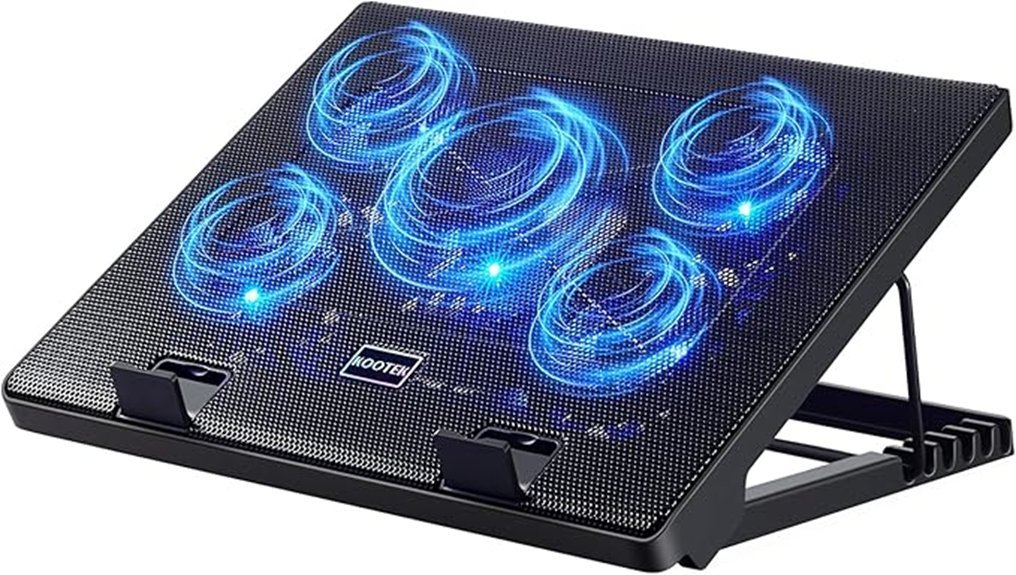
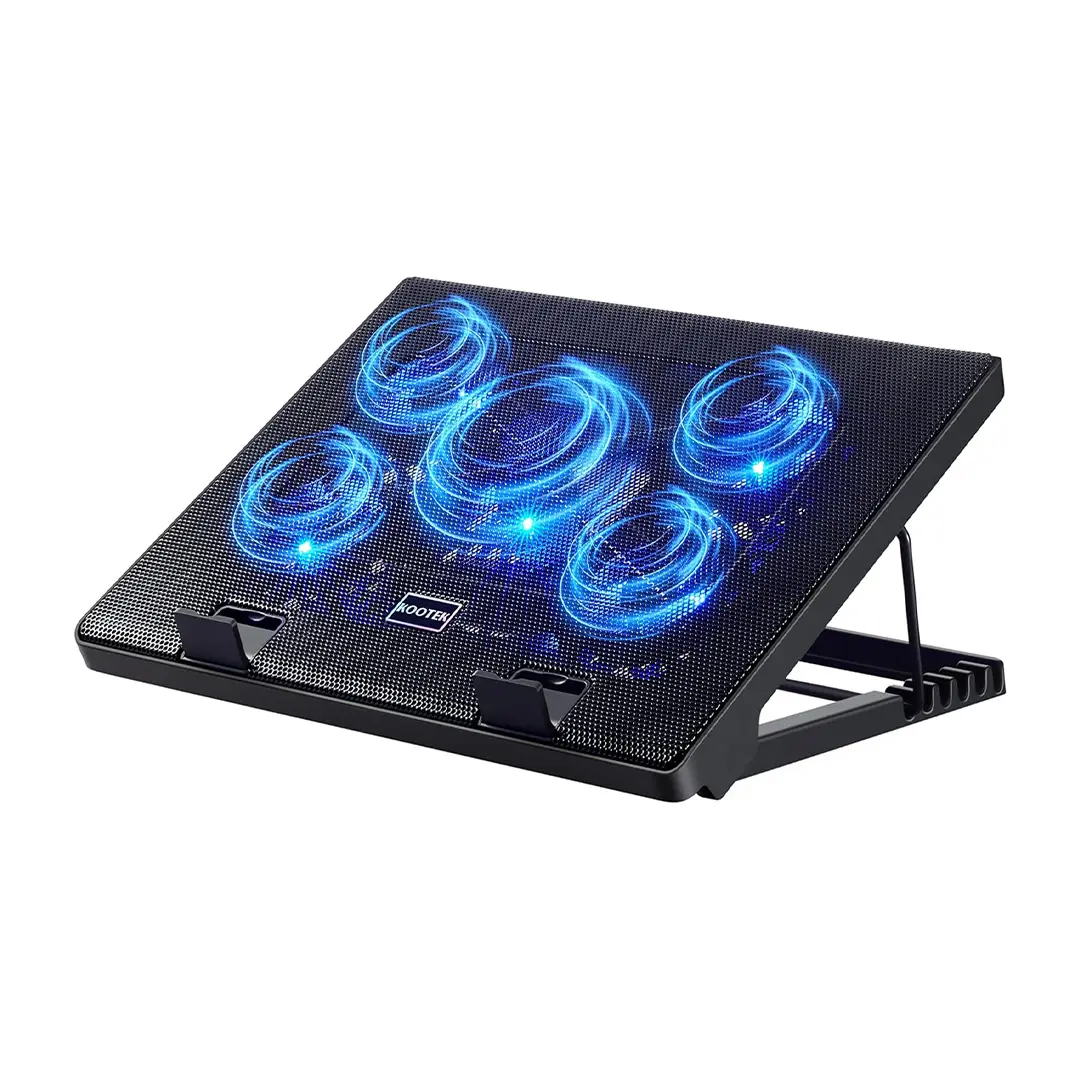
A hot laptop can become uncomfortable during long work, gaming, or editing sessions, but a cooling pad only helps when its size, airflow, and ports fit your setup. The Kootek Laptop Cooling Pad LCP04 combines five fans, six height settings, a metal-mesh deck, and two USB 2.0 ports in a desk-focused design for 12- to 17-inch laptops. Its strongest points are broad airflow and simple controls, while the always-on fan lighting and built-in USB-A cable are the main tradeoffs. This review helps you decide whether those compromises make sense for your laptop and desk.
Quick Verdict
Rating: 9/10, recommended with compatibility caveats.
Best For: 14- to 17-inch laptops used for gaming, editing, streaming, office work, or other long desk sessions.
Bottom Line: You get five-fan cooling, six height settings, and simple physical controls without software. You should skip it if you need native USB-C power, lights that can be switched off independently, or a very slim travel cooler.
The LCP04 makes the most sense as an add-on cooling stand, not as a repair for a laptop with blocked vents, failing fans, or another hardware problem. Its broad 14.96 by 11.81-inch surface works especially well for mid-size and larger notebooks, and the front stoppers help keep a laptop in place when you raise the stand.
Key Specs
| Specification | Detail |
|---|---|
| Brand | Kootek |
| Model / ASIN | LCP04 / B01469DJLM |
| Product Type | USB-powered laptop cooling pad and adjustable stand |
| Fan Layout | 5 fans: 1 large center fan plus 4 smaller surrounding fans |
| Fan Modes | Center fan, 4 outer fans, or all 5 fans |
| Height Adjustment | 6 levels, with maximum rear lift listed at about 5.4 inches |
| Dimensions | 14.96 × 11.81 × 1.38 inches |
| Weight | 1.16 kg, about 2.56 lb |
| Main Surface Material | Metal mesh |
| Power and Cable | Built-in USB-A cable, approximately 21 inches long |
| Ports | 2 × USB 2.0 ports |
| Laptop Compatibility | 12- to 17-inch laptops |
| Stability Features | 2 front stoppers and adjustable stand positions |
| Included Item | 1 laptop cooling pad |
| Color Options Shown | Blue, Green, Purple, and Red |
| Warranty | Specific warranty duration is not clearly stated on the current Amazon listing |
| Amazon Rating | See reviews on Amazon |
| Price | Varies by seller and availability, so check the Amazon page for the current offer |
Prices, seller availability, ratings, and product options can change. Check the Amazon page before buying.
What Is the Kootek Laptop Cooling Pad?
The Kootek LCP04 is a USB-powered cooling pad that also works as an adjustable laptop stand. Its five-fan layout pushes air upward through a metal-mesh surface, while six tilt positions let you raise the rear of your laptop for a higher viewing angle.
The controls are intentionally simple. Two physical switches let you run the center fan, the four outer fans, or all five together, and the pad includes two USB 2.0 ports for connecting basic peripherals. You do not need an app, driver, or software profile.
Before You Buy: The built-in power cable uses USB-A. If your laptop only has USB-C ports, you need a compatible USB-C to USB-A adapter. The fan lights also run with the fans, so you cannot switch the lighting off while keeping the cooling on.
What You Can Expect in Daily Use
Setup is straightforward: place the pad on a hard, stable desk, choose a tilt level, position your laptop behind the front stoppers, connect the built-in USB-A cable, and select a fan mode. The metal-mesh surface gives the fans a clear path to move air toward the laptop base, while the wide deck provides enough room for larger notebooks.
The stand function is just as important as the cooling function. Raising the rear of the laptop can bring the screen closer to eye level, but a high tilt also changes your typing angle. If you type directly on the laptop for hours, start with a lower setting and increase it only if your wrists stay comfortable.
The design is better suited to a desk than frequent travel. At roughly 15 by 12 inches and about 2.56 pounds, it takes more bag space than a thin three-fan cooler. The tradeoff is a larger surface, more fan coverage, and six height positions.
Performance & Features
Cooling Performance With Five Fans
The LCP04 uses one large center fan and four smaller surrounding fans. That layout spreads airflow across more of the laptop base than a single-fan design, which is useful when heat is concentrated in more than one area. The three fan combinations also let you use less airflow for lighter work and all five fans for heavier loads.
A cooling pad can improve airflow around the chassis, but it does not replace a laptop’s internal cooling system. If your machine is overheating because its vents are blocked, its internal fan has failed, or it needs service, the pad may reduce surface heat without fixing the root cause.
Noise and LED Lighting
Kootek markets the fans as quiet, and the current listing emphasizes low-noise operation. The bigger practical issue for many buyers is the lighting: the LEDs operate with the fans, so there is no separate light-off mode. That matters if you work in a dark room, record video near your desk, or prefer a no-light setup.
Ergonomics, Stand, and Build
The six height settings make this more useful than a flat cooling mat. You can raise the back of the laptop up to about 5.4 inches, and the two front stoppers help prevent the computer from sliding forward. The metal-mesh deck provides a firm support surface, while the rest of the design remains focused on light-duty desktop use rather than premium materials.
Ports, Power, and Compatibility
The built-in USB-A cable is about 21 inches long, and Amazon lists two USB 2.0 ports on the pad. That gives you basic connectivity for devices such as a mouse or flash drive, but it is not a high-speed dock and it does not add native USB-C.
Amazon lists compatibility with 12- to 17-inch laptops. Larger 14- to 17-inch models make better use of the wide surface, while very small devices can sit on the pad but may not align as neatly with the fan layout.
Pro Tip: Check where your laptop pulls in cool air before choosing a fan mode. Center the hottest intake area over the pad’s main airflow, then use the lowest tilt that keeps the laptop stable and comfortable to type on.
How It Performs in Real Use
For Daily Office Work
For browsing, documents, spreadsheets, video calls, and streaming, the LCP04’s stand function may matter as much as maximum cooling. The center-fan mode gives you a simpler setup for light workloads, while the raised screen can make a fixed desk arrangement more comfortable.
For Gaming and GPU-Heavy Loads
For gaming, rendering, or other sustained loads, all five fans give the laptop the broadest airflow the pad can provide. You should still leave the laptop’s own intake and exhaust vents unobstructed, because the pad supports the internal cooling system rather than replacing it.
For Large Laptops
The 14.96 by 11.81-inch deck is a good match for many 15- to 17-inch notebooks. The front stoppers become more important at steeper angles, so confirm that the chassis sits securely before you start typing or gaming.
For Travel or Shared Workspaces
The LCP04 can travel, but it is not a compact-first design. Its size and weight make more sense for a home office, dorm desk, or regular workstation than for a backpack you carry every day. The always-on lighting can also be distracting in dim shared spaces.
Setup Tips Before First Use
- Use a hard, flat surface: A desk or table gives the fans room to pull in air and keeps the stand stable.
- Check your laptop’s intake vents: Position the laptop so its intake area sits over useful airflow instead of blindly centering the chassis.
- Start with a lower tilt: Increase the height only if the laptop stays secure and your wrists remain comfortable.
- Keep the mesh clear: Dust buildup can restrict airflow, so clean the surface and fan openings regularly with the pad unplugged.
- Plan for USB-C-only laptops: Keep a suitable USB-C to USB-A adapter with the built-in cable if your computer has no USB-A port.
Compatibility and Safety Notes
Use the cooling pad on a stable surface and make sure your laptop does not slide at the chosen tilt. Avoid soft bedding or thick fabric that can block the pad’s airflow or make the stand unstable. Keep the laptop’s own vents open, because covering an exhaust or intake can work against the cooling system.
The power cable is built in, so avoid sharp bends, pulling, or routing it where a chair can catch it. Amazon states that the pad can also be powered from a wall outlet with a suitable USB power source, but you should still use a compatible USB power adapter and inspect the cable for damage before use.
Who Should Buy It?
Best For
- You use a 14- to 17-inch laptop that runs warm during long desk sessions.
- You want cooling plus six stand heights in one accessory.
- You prefer simple physical fan controls instead of software or an LCD control panel.
Skip If
- You need native USB-C power and do not want to use an adapter.
- You need a cooling pad with lights that can be turned off independently.
- You carry your setup daily and want the thinnest, lightest cooler possible.
Pros and Cons
Pros
- Five-fan layout spreads airflow across a broad laptop base.
- Six height settings make it useful as both a cooler and a desk stand.
- Two USB 2.0 ports add basic peripheral connectivity.
- Three fan combinations give you simple control without software.
- Front stoppers help secure larger laptops at raised angles.
Cons
- The fan lighting cannot be turned off separately.
- USB-C-only laptops need an adapter for the built-in USB-A cable.
- The wide 2.56-pound design is less convenient for frequent travel.
Comparison Snapshot
| Model | Kootek LCP04 | havit HV-F2056 | TopMate C5 |
|---|---|---|---|
| Fan Setup | 5 fans | 3 × 110 mm fans | 5 fans |
| Height Control | 6 levels | 2 height settings | 5 height settings |
| Controls | 2 physical switches, 3 fan combinations | Basic power control | LCD controller, 6 speeds, 3 fan modes |
| Listed Laptop Size | 12-17 inches | 15.6-17 inches | 10-15.6 inches |
| Best Match | Desk users who want more height adjustment with simple controls | Buyers who prioritize a slimmer, lighter three-fan design | Buyers who want more fan-speed control and an LCD interface |
How It Compares to Alternatives
The havit HV-F2056 is the simpler travel-oriented alternative: it uses three 110 mm fans, offers two height settings, and is lighter than the Kootek. The TopMate C5 goes in the opposite direction with five fans, five height settings, an LCD controller, six speed levels, and three fan modes.
The Kootek sits between those two approaches. It gives you more height adjustment than the havit and simpler controls than the TopMate C5, so it is a strong fit when you want a desk cooler that is adjustable without adding an LCD control system.
Is It Worth the Price?
The Kootek LCP04 is best judged as a budget-to-mid-range desk accessory that combines cooling and stand functions. You get five fans, six height settings, a metal-mesh deck, front stoppers, and two USB 2.0 ports in one unit, which can be more useful than buying a basic flat cooler if you also want screen height adjustment.
Its value drops if portability, native USB-C, or light control matters more than fan coverage. Because seller offers can change, compare the current Amazon price with simpler three-fan pads and more adjustable LCD-controlled models before deciding.
Related Guides
Frequently Asked Questions
Can the Kootek LCP04 fix an overheating laptop?
It can add airflow under the chassis, but it is not a repair for blocked vents, failed internal fans, or another hardware problem. Treat it as an add-on cooling aid for a laptop that is otherwise working correctly.
Can you turn off the LED lights while keeping the fans on?
No. Amazon states that the lights work with the fans, so the lighting stays on whenever the fans are running. If you need a completely dark setup, this model is a poor fit.
What laptop sizes does the Kootek LCP04 support?
Amazon lists support for 12- to 17-inch laptops. The 14.96 by 11.81-inch deck is especially well suited to mid-size and larger notebooks that can use most of the surface.
Does it work with USB-C-only laptops?
Yes, but not directly. The built-in cable is USB-A, so a USB-C-only laptop needs a compatible USB-C to USB-A adapter for power.
How do the fan controls work?
Two physical switches let you use the large center fan, the four surrounding fans, or all five fans together. There is no variable-speed dial or LCD controller on this model.
How long is the USB cable?
Amazon’s product FAQ lists the cable at approximately 21 inches. Because the cable is built in, route it carefully and avoid sharp bends or pulling at the connection point.
Can you power the cooling pad from a wall outlet?
Amazon says the pad can be powered from a wall outlet using a suitable USB power source. Use a compatible USB adapter, keep the cable undamaged, and place the pad on a stable surface.
Who should skip the Kootek LCP04?
Skip it if you need native USB-C, independent light control, or a very slim cooler for daily travel. It is better suited to a fixed desk where its wide surface and six height settings are useful.
The Bottom Line
The Kootek LCP04 earns its 9/10 recommendation for buyers who want a five-fan cooling pad that also gives them six stand heights and simple physical controls. Its biggest strengths are broad airflow and desk adjustability, while the always-on lighting, USB-A power cable, and travel bulk are the reasons to skip it.
If those tradeoffs fit your setup, it is a practical choice for 12- to 17-inch laptops, especially larger notebooks used for long desk sessions.

