Disclosure: As an Amazon Associate, we earn from qualifying purchases. If you click a link on this page and make a purchase, we may receive a small commission at no extra cost to you.
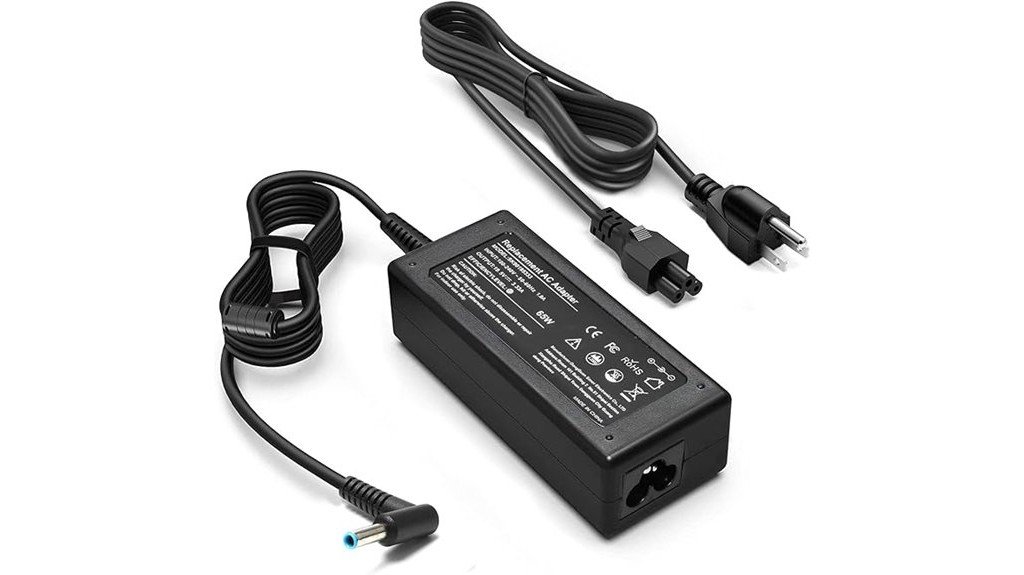
Replacing an HP laptop charger is mostly a compatibility decision, not a brand-name decision. The KAQIAR 65W Laptop Charger is a third-party replacement for many HP notebooks that use the 4.5×3.0 mm smart blue-tip barrel connector, with a rated output of 19.5V ⎓ 3.33A (65W). Its strongest appeal is straightforward 65W barrel charging, while its main limitation is that it will not replace a USB-C charger or a higher-wattage adapter. This review helps you check the connector, power rating, supported HP families, safety features, and everyday use before you buy.
Quick Verdict
Rating: 8/10, Recommended with caveats
Best For: HP laptop owners who need a 65W replacement or spare for a compatible 4.5×3.0 mm blue-tip charging port.
Bottom Line: The KAQIAR 65W charger is a practical match when your HP laptop needs 19.5V, up to 65W, and the smart blue-tip barrel connector. Its limitation is narrow compatibility: the correct wattage and connector must match, and USB-C-only laptops need a different charger.
Before You Buy: This charger uses a round 4.5×3.0 mm HP smart blue-tip connector, not USB-C. Match your original adapter’s voltage, wattage, connector, and laptop model or compatible part number before ordering.
Overview
The KAQIAR adapter is designed around HP’s 4.5×3.0 mm smart blue-tip charging system. Amazon lists a maximum DC output of 19.5V at 3.33A, or 65W, and an AC input range of 100–240V, 1.7A, 50/60Hz. That wide input range makes the power brick suitable for common mains voltages, although you may still need a physical plug adapter for the wall outlet in another country.
Amazon lists selected HP Pavilion x360, Envy, EliteBook, ProBook, Chromebook, Stream, Spectre, Notebook, and ZBook models, plus part references such as 710412-001, 709985-002, 709985-004, and AD9043-022G2. Use those only as cross-checks and confirm your own laptop and original charger label.
Key Specifications
| Specification | Detail |
|---|---|
| Brand | KAQIAR |
| Product Type | Replacement AC laptop charger for compatible HP laptops |
| Maximum Output | 65W, DC 19.5V ⎓ 3.33A |
| AC Input | 100–240V ~ 1.7A, 50/60Hz |
| Connector | HP smart blue tip, 4.5 mm outer diameter / 3.0 mm inner diameter |
| Charging Interface | Round barrel connector, not USB-C |
| Primary Compatibility | Selected HP Pavilion x360, Envy, EliteBook, ProBook, Chromebook, Stream, Spectre, Notebook, and ZBook models using the same blue-tip input |
| Example HP Part References | 710412-001, 709985-002, 709985-004, AD9043-022G2 |
| Included in Box | 65W AC adapter and AC power cord |
| Protection Features | Listing states protection against short circuiting, overvoltage, overcurrent, and internal overheating |
| Seller Service | Amazon listing states 12-month replacement service from KAQIAR |
| Best Use | Replacement charger, desk charger, office or school spare, and travel backup for a compatible HP laptop |
What Is the KAQIAR 65W Laptop Charger?
The KAQIAR 65W Laptop Charger is a replacement AC adapter for HP laptops that use a circular smart blue-tip power jack. It converts AC wall power to a 19.5V DC output and can supply up to 3.33A, giving it a 65W maximum rating. It is meant to replace or supplement a compatible HP barrel-style charger rather than serve as a universal charger for every HP notebook.
Its main selling point is specificity. Instead of including a bag of interchangeable tips, it uses the HP-style 4.5×3.0 mm connector directly. That can make setup simple when your laptop already uses this port, but it also means you must confirm fit before buying.
Amazon also lists compatible 45W and 65W HP blue-tip models. Some compatible 45W laptops can use this 65W adapter, but the 19.5V requirement, connector, and exact model still need to match.
Who Should Buy It?
Best For
- You have an HP laptop with a 4.5×3.0 mm smart blue-tip charging port and a compatible 19.5V power requirement.
- You want a second 65W charger to leave at a desk, office, school location, or another regular workspace.
- You need a replacement for a lost or damaged compatible HP adapter and can match the model or part reference before ordering.
Skip If
- Your laptop charges only through USB-C Power Delivery.
- Your original adapter uses a different barrel size, voltage, or HP connector style.
- Your laptop normally requires more than 65W, especially a higher-power workstation or performance model.
Fit and Compatibility
Compatibility is the most important part of this purchase. The charger physically fits HP laptops built for the 4.5 mm outer diameter / 3.0 mm inner diameter smart blue-tip connector. A laptop can carry the HP logo and still use a different barrel jack or USB-C, so brand alone is not enough.
Amazon lists examples across Pavilion x360, Envy, EliteBook, ProBook, Chromebook, Stream, Spectre, Notebook, and ZBook families. It also lists specific generations such as EliteBook 840 G3/G4/G8, ProBook 430 G8 and 440 G8, Stream 11 Pro G3/G4 EE, and several Chromebook models. Because HP reused family names across different years and charging systems, match your exact model rather than assuming every laptop in a family uses the same charger.
Pro Tip: Check the original charger’s label and your laptop’s charging port before you order. A strong match is 19.5V output, 65W or a listed compatible 45W configuration, and the same 4.5×3.0 mm blue-tip connector.
Power Output and Daily Performance
The rated output is 65W at 19.5V and 3.33A. For a compatible HP notebook, that is the power class used for ordinary charging while you browse the web, work in office apps, attend video calls, stream media, or handle school tasks. A laptop originally designed for a matching 65W adapter is the clearest fit.
A charger does not force the full 65W into the laptop at all times. The device draws power according to its design, provided the adapter voltage and charging interface are correct. That is why the Amazon listing can include compatible 45W blue-tip models while selling a 65W adapter.
The limitation is headroom. If an HP laptop expects a larger adapter, such as a higher-power workstation configuration, a 65W charger may trigger a power warning, charge more slowly, or fail to keep up while the computer is under heavier load. In that case, use the wattage specified for your exact laptop.
Design and Build
The charger uses a conventional two-part laptop-adapter design. The AC power cord connects the brick to the wall, while the fixed DC lead ends in the HP smart blue-tip barrel plug. That layout is familiar and useful when you want a dedicated charger at a desk instead of repeatedly moving your original adapter.
The direct HP-style connector is simpler than a universal multi-tip kit because there are no removable tip adapters to select or lose. The tradeoff is flexibility: this charger is useful only for devices that match its output and connector. It is not a multi-device USB-C charging brick for phones, tablets, and newer laptops.
Compatibility and Safety
The Amazon listing states protection against short circuiting, overvoltage, overcurrent, and internal overheating. These safeguards do not make an incorrect power or connector match safe, so use the charger only with a supported HP laptop and a sound outlet.
KAQIAR advises stopping use if the casing is cracked or wiring is exposed, and avoiding sharp bending or pulling during storage. Also stop if the connector becomes loose, the laptop reports a charger error, or the brick behaves abnormally.
For travel, the 100–240V input rating means you normally need only the correct physical plug adapter for the destination’s outlet type. Do not assume a plug adapter changes an incompatible charger into a compatible one. The laptop-side connector and power requirements still have to match.
Setup and Use Tips
- Compare labels first: Match the original charger’s voltage and connector before use.
- Check the port visually: Confirm that your laptop uses the small round HP blue-tip jack rather than USB-C or a larger barrel port.
- Insert the tip gently: The connector should seat without force. If it does not fit smoothly, stop and recheck the charger type.
- Keep the brick ventilated: Do not cover the adapter with bedding, clothing, papers, or a closed bag while it is connected to power.
- Protect the cable: Avoid winding the lead tightly around the brick or creating a sharp bend next to either connector.
- For travel: The brick accepts 100–240V, but wall plug shapes vary by country.
How It Performs in Real Use
For Home Desk Use
As a fixed desk charger, the KAQIAR makes the most sense when your HP laptop already uses a matching 65W blue-tip adapter. Leaving one charger at your desk means your original can stay in a laptop bag, which reduces daily unplugging and the chance of forgetting it elsewhere.
For Office or School Use
For work or school, the adapter can serve as a practical second power setup for compatible EliteBook, ProBook, Pavilion, Chromebook, Stream, and related HP models. The 65W rating is suited to many mainstream notebooks, but you should confirm the exact model because similar-looking generations can use different chargers.
For Travel
The 100–240V, 50/60Hz input is the travel-friendly feature here. It supports common mains voltages without a separate voltage converter, but you may need a country-specific plug adapter. You still need to protect the cable in transit and avoid packing it with a hard bend at the brick or blue-tip end.
For Emergency Backup
If your original adapter is lost, damaged, or left at another location, this charger can restore normal charging for a compatible HP laptop. It is a better emergency option when you have already verified the model and port, rather than buying it only because the listing says “HP charger.”
Common Mistakes to Avoid
- Buying by brand only: HP uses USB-C and several barrel-style chargers, so the HP name by itself does not confirm compatibility.
- Ignoring voltage: Match the voltage stated for your laptop or original adapter. Connector fit alone is not enough.
- Ignoring wattage: A 65W adapter is not the right replacement for every HP notebook, particularly models designed for higher power.
- Confusing the blue tip with USB-C: This KAQIAR model has a circular barrel connector and cannot plug into a USB-C charging port.
- Assuming a family name guarantees fit: Pavilion, Envy, EliteBook, and ProBook lines span many generations, so check the full model number.
- Using damaged cables: Stop using the charger if insulation is cracked, wiring is exposed, or the plug becomes loose.
Pros and Cons
Pros
- Clear 65W output at 19.5V and 3.33A for compatible HP laptops.
- 4.5×3.0 mm smart blue tip directly matches a widely used HP barrel-charging format.
- 100–240V input supports use across common mains voltages.
- AC power cord included for a complete second charging setup.
- Multiple listed protection features, including short-circuit, overvoltage, overcurrent, and internal-overheating safeguards.
Cons
- Limited to compatible barrel-charge HP laptops: It does not work with USB-C-only charging.
- Model checking is required: Similar HP product families may use different connector sizes or power requirements.
- Not intended for higher-power systems: A laptop that needs more than 65W may require its original higher-wattage adapter.
What Sets It Apart?
The KAQIAR focuses on one HP charging format rather than trying to be universal. The listing gives a specific 4.5×3.0 mm connector, 19.5V/65W output, compatible model examples, HP part references, and named electrical protections, which gives you several details to cross-check before buying.
Is It Worth the Price?
The KAQIAR sits in the budget-oriented third-party replacement category. It is worth considering when you need a dedicated spare for a compatible HP blue-tip laptop and do not need multi-device USB-C charging.
You get the most value when you can confirm a direct match and use it as a desk, office, school, or travel spare. It is a poor fit if you want one charger for newer USB-C laptops, phones, and tablets.
How It Compares to Alternatives
Compared with an HP 65W Smart AC Adapter or HP’s 65W 4.5mm Smart Adapter, the KAQIAR is a third-party replacement rather than an OEM accessory. An HP-branded adapter may appeal more if you prefer first-party support and documented HP accessory specifications, while the KAQIAR makes sense when you want a simpler replacement option for the same general 4.5 mm smart-pin charging category.
Compared with a USB-C Power Delivery charger, the KAQIAR is much less flexible because it cannot charge USB-C-only devices. A USB-C charger is the better path for a laptop designed around USB-C PD, while this KAQIAR model is the relevant choice only when your HP laptop still relies on the round blue-tip jack.
Related Guides
Frequently Asked Questions
Is the KAQIAR 65W charger compatible with all HP laptops?
No. It is for selected HP laptops using the 4.5×3.0 mm smart blue-tip connector and compatible 19.5V power. Check the full model and original adapter label before buying.
Does this charger work with USB-C HP laptops?
Not if USB-C is the laptop’s only charging input. This KAQIAR model uses a round HP smart blue-tip connector, so a USB-C-only laptop needs a compatible USB-C Power Delivery charger instead.
Can I use it if my original HP charger was 45W?
Amazon lists compatible 45W and 65W HP blue-tip models for this adapter. A 65W adapter can work with some compatible 45W laptops, but the 19.5V requirement, blue-tip connector, and exact model compatibility still need to match.
Can I use the KAQIAR charger for international travel?
Yes, the listed input range is 100–240V at 50/60Hz, which covers mains voltages in many countries. You may still need a plug adapter that matches the destination’s wall outlet shape.
What safety protections does the listing claim?
The listing states short-circuit, overvoltage, overcurrent, and internal-overheating protection. Stop using the charger if the casing, wiring, connector, or charging behavior becomes abnormal.
What comes in the box?
The listing describes a 65W AC power adapter with an AC power cord. That makes it suitable as a complete second setup without needing to reuse the wall cord from your old charger.
What should I check before ordering?
Check your laptop model, the original charger’s 19.5V requirement, required wattage, and the 4.5×3.0 mm blue-tip connector. If any of those details differ, use the charger specified for your exact HP model instead.
The Bottom Line
The KAQIAR 65W Laptop Charger is a sensible replacement or backup for an HP laptop that uses the 4.5×3.0 mm smart blue-tip connector and a compatible 19.5V, up-to-65W charging setup. Its strengths are clear power specifications, broad listed HP compatibility, worldwide AC input, and stated electrical protection features, while its main limitation is that you must verify the exact connector and power requirement.
Buy it when you need a dedicated blue-tip spare or replacement and your HP model matches the listing. Skip it for USB-C-only laptops, different barrel connectors, or systems that require a higher-wattage adapter.
Ready to Buy?
Check the latest price, seller terms, and product details before you decide.
