
You want a PC case that keeps temperatures under control, fits your components, and does not turn assembly into a cable-management struggle. This roundup compares four airflow-focused gaming cases for 2026, from a compact value option to a full-tower chassis for demanding hardware.
Each pick explains its best use, verified compatibility highlights, included cooling, and the main limitation to check before you buy.
Quick Verdict
Best overall: The Lian Li LANCOOL 217 gives you five included fans, broad motherboard support, strong GPU clearance, and flexible PSU placement.
Best value-focused ATX option: The Lian Li LANCOOL 207 packs four included fans and direct GPU airflow into a smaller chassis, but its PSU and motherboard-width limits require careful checking.
Best for Micro ATX: The Corsair 2500D Airflow offers a clean dual-chamber layout and extensive cooling support, but it ships without fans.
Best for extreme builds: The Cooler Master HAF 700 EVO provides huge component and radiator capacity, though its full-tower size is excessive for many desks.
Top Picks
| Category | Product | Best Fit | Main Tradeoff |
|---|---|---|---|
| Best Overall | Lian Li LANCOOL 217 | High-airflow ATX and E-ATX gaming builds | Larger than compact mid-towers |
| Best Value Airflow | Lian Li LANCOOL 207 | Compact ATX, Micro ATX, and Mini ITX builds | ATX boards are limited to 244mm width; PSU limit is 160mm |
| Best for Micro ATX | Corsair 2500D Airflow | Showcase-style Micro ATX systems with custom cooling | No fans are included |
| Best for High-End Builds | Cooler Master HAF 700 EVO | E-ATX, oversized GPUs, and advanced liquid cooling | Very large and heavy |
Deal tip: Building a PC for racing sims? See direct drive picks like the MOZA R5 and Logitech G RS50 in our sim racing deals for October Prime Day.
Before You Buy
- Match the motherboard: Check the exact form factor and maximum board width, not only the ATX label.
- Measure the GPU: Leave extra room for power connectors, front radiators, and cable bend radius.
- Check the PSU: Compact layouts may limit PSU length or require a different mounting orientation.
- Plan the cooling budget: Some cases include several fans, while the Corsair 2500D Airflow includes none.
- Confirm radiator clearance: A supported radiator size may still conflict with tall memory, thick fans, or motherboard heatsinks.
How We Selected These Cases
We prioritized unrestricted mesh ventilation, included fan configuration, radiator support, GPU clearance, and motherboard compatibility. We also considered cable-routing space, dust management, front I/O, and whether the layout solves a clear problem for a specific builder.
This comparison is based on published manufacturer specifications and current product-listing details, not on claimed hands-on laboratory testing. Exact thermals still depend on your CPU, GPU, cooler, fan curves, room temperature, and component placement.
Lian Li LANCOOL 217: Best Overall
The LANCOOL 217 is the most balanced choice in this group. Its two 170mm front fans, two 120mm fans above the PSU shroud, and one 140mm rear fan create a complete stock airflow setup. You can also reposition the front fans to favor CPU or GPU cooling.
Compatibility is another strength. The chassis supports Mini ITX, Micro ATX, ATX, E-ATX up to 280mm wide, and EEB boards up to 330mm wide. It also allows GPUs up to 380mm and CPU coolers up to 180mm, which covers many large gaming components.
Why You’ll Like It
- Five PWM fans are included.
- Top radiator support reaches 360mm.
- Flexible PSU placement can improve cable access.
- Back-connect ATX and Micro ATX boards are supported.
Who Should Avoid It
- Builders needing a small desktop footprint.
- Anyone who dislikes wood-accented case styling.
- Users planning a front-mounted radiator, since radiator support is focused on the top.
Buyer Feedback Snapshot
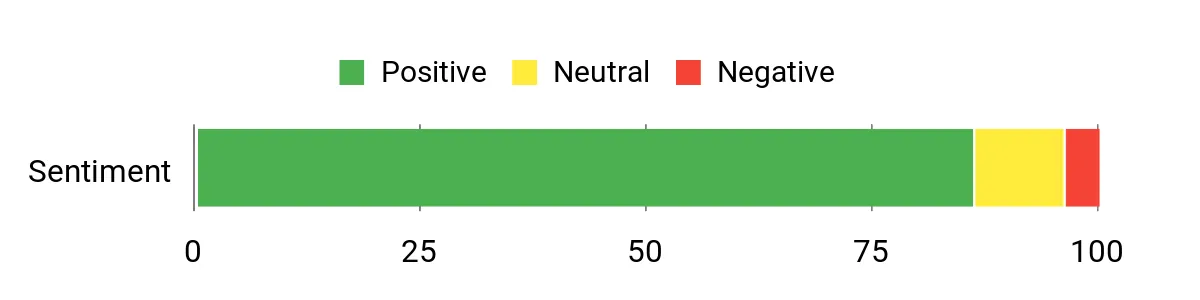
Buyer feedback commonly highlights the roomy interior, included cooling, wood accents, and flexible cable-routing options. The main hesitation is size: this is a substantial mid-tower, so measure your desk or floor space first.
Overall Sentiment: Positive, with individual experiences varying by build configuration.
Key Benefits
- Five pre-installed fans provide a complete out-of-box airflow layout.
- Real wood accents create a more understated appearance than many RGB-heavy cases.
- Up to 380mm GPU clearance and 180mm CPU-cooler clearance suit large components.
- Two PSU orientations help you adapt cable routing to the power-supply size.
Check Product Details on Amazon
Corsair 2500D Airflow: Best for Micro ATX
The 2500D Airflow separates the display side from the power supply, drives, and much of the cabling. That dual-chamber structure helps you create a cleaner visible build while keeping access to multiple cooling locations.
It supports Mini ITX and Micro ATX motherboards, GPUs up to 400mm, CPU coolers up to 180mm, and ATX power supplies up to 225mm. Radiator support includes up to 360mm at the top and bottom, 280mm at the front, and 240mm at the side.
Why You’ll Like It
- Dual-chamber layout hides the PSU and helps separate cables from the main compartment.
- Supports reverse-connector Micro ATX motherboards for a cleaner front view.
- Offers broad radiator placement for a case limited to Micro ATX and Mini ITX boards.
- Front USB Type-C and two USB Type-A ports improve everyday connectivity.
Who Should Avoid It
- ATX or E-ATX motherboard users.
- Buyers who expect usable stock airflow immediately after assembly.
- Anyone wanting the narrowest possible Micro ATX case, since the dual-chamber design is relatively wide.
Buyer Feedback Snapshot
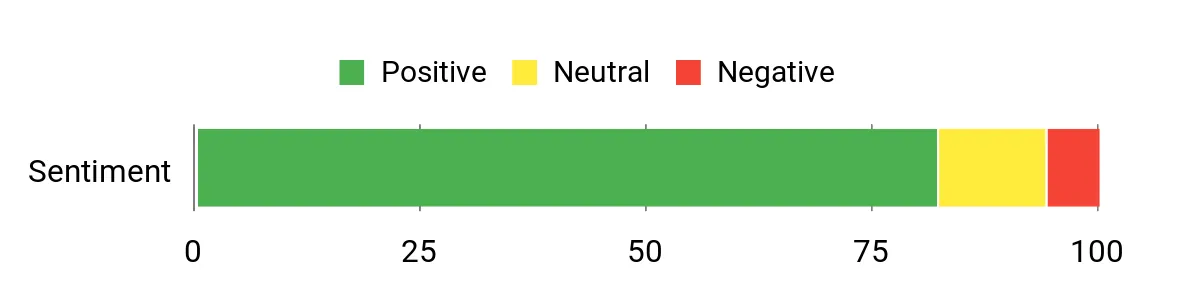
Feedback usually centers on the clean dual-chamber presentation, generous cooling flexibility, and roomy cable area. The most important buying concern is the fanless package, followed by the width of the chassis compared with traditional single-chamber Micro ATX cases.
Overall Sentiment: Positive, especially among builders planning custom cooling.
Key Benefits
- Dual-chamber design improves visual cable management.
- Up to 400mm GPU clearance supports many large graphics cards.
- Multiple 360mm radiator locations provide strong custom-cooling flexibility.
- Two-year manufacturer warranty adds a clearer support window.
Check Product Details on Amazon
Lian Li LANCOOL 207: Best Value Airflow
The LANCOOL 207 uses an unusual front-mounted PSU layout to fit ATX hardware into a chassis closer to Micro ATX dimensions. Its two bottom fans direct air toward the graphics card, while the two 140mm front fans handle the main intake.
You can install a GPU up to 375mm, a CPU cooler up to 180mm, and a top radiator up to 360mm. However, standard ATX motherboards are limited to 244mm width, and the PSU must be under 160mm long.
Why You’ll Like It
- Four pre-installed fans reduce the need for immediate cooling upgrades.
- Bottom fans send direct airflow toward the GPU.
- An adjustable anti-sag bracket supports long graphics cards.
- Top-mounted 360mm radiator support gives you room to upgrade cooling.
Who Should Avoid It
- Users with ATX motherboards wider than 244mm.
- Builders with power supplies longer than 160mm.
- Anyone who wants a standard rear-mounted PSU layout.
Buyer Feedback Snapshot
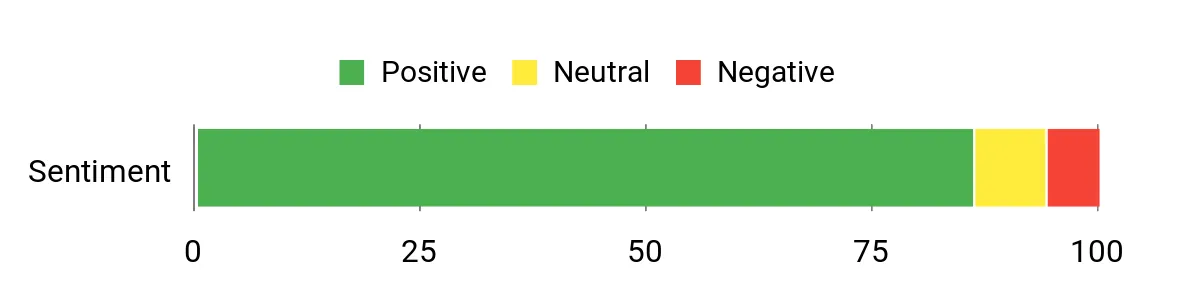
Buyer feedback commonly praises the airflow-to-size ratio, included fans, and solid component support. The main concerns involve tighter cable routing and the need to verify PSU, motherboard-header, and cable dimensions before assembly.
Overall Sentiment: Positive when component measurements are checked first.
Key Benefits
- Four included fans provide focused CPU and GPU airflow.
- Compact 45.5-liter layout accepts standard-width ATX boards.
- Up to 375mm GPU clearance supports many full-size cards.
- Front USB Type-C and a tempered-glass side panel add modern convenience.
Check Product Details on Amazon
Cooler Master HAF 700 EVO: Best for High-End Builds
The HAF 700 EVO is built for builders who need capacity rather than compactness. It supports GPUs up to 490mm, E-ATX and SSI-EEB motherboards, and multiple large radiator positions, including up to 480mm on the side and 420mm at several other locations.
Cooling starts with two 200mm front fans, two 120mm rear fans, and one 120mm bottom fan. The removable top panel and rotatable brackets make complex cooling installation easier, while the IRIS LCD adds system monitoring and visual customization.
Why You’ll Like It
- Exceptional room for large motherboards, GPUs, storage, and custom cooling.
- Five fans are included, led by two 200mm front intakes.
- Removable and rotatable cooling brackets improve access during complex builds.
- The included vertical GPU holder and PCIe 4.0 riser cable support showcase builds.
Who Should Avoid It
- Builders using a basic ATX system with modest cooling needs.
- Anyone with limited desk, floor, or lifting space.
- Users with very tall air coolers, since CPU-cooler clearance is 166mm.
Buyer Feedback Snapshot
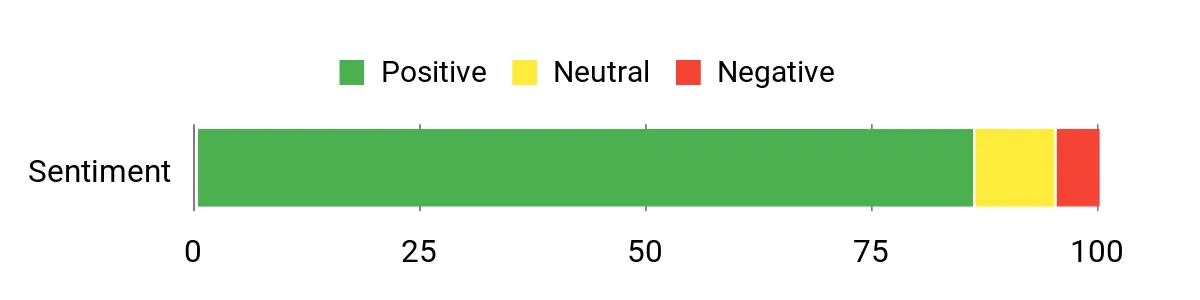
Feedback typically emphasizes the huge cooling capacity, accessible interior, and flexible cable-management space. Size and weight are the repeated cautions, making this case better for a fixed workstation than a PC you move regularly.
Overall Sentiment: Positive among enthusiasts who need its scale and features.
Key Benefits
- Up to 490mm GPU clearance provides exceptional graphics-card flexibility.
- Wide radiator support suits advanced liquid-cooling configurations.
- Five included fans create a strong base cooling setup.
- IRIS LCD, ARGB controls, and vertical GPU hardware support a showcase build.
Check Product Details on Amazon
Quick Comparison
| Product Name | Image | Motherboard Compatibility | Included Fans | GPU Clearance | Best For |
|---|---|---|---|---|---|
| Lian Li LANCOOL 217 |
 |
Mini ITX, Micro ATX, ATX, E-ATX, EEB | 5 | Up to 380mm | Balanced high-airflow builds |
| CORSAIR 2500D Airflow |
 |
Mini ITX, Micro ATX | 0 | Up to 400mm | Dual-chamber Micro ATX builds |
| LIAN LI LANCOOL 207 |
 |
Mini ITX, Micro ATX, standard ATX up to 244mm wide | 4 | Up to 375mm | Compact value-focused airflow |
| Cooler Master HAF 700 EVO |
 |
Mini ITX, Micro ATX, ATX, E-ATX, SSI-CEB, SSI-EEB | 5 | Up to 490mm | Extreme hardware and custom cooling |
FAQ
How do I choose a PC case for better cooling?
Start with a ventilated front panel, clear intake paths, and enough fan mounts for balanced intake and exhaust. Then check whether the included fans cover your needs or whether you must budget for more.
Case design matters, but your cooler, fan direction, fan curves, cable placement, and room temperature also affect results.
How can I tell whether my parts will fit?
Compare your motherboard form factor, motherboard width, GPU length, CPU-cooler height, PSU length, and radiator thickness with the case specifications. Leave extra clearance for power cables and radiator fans.
Do more included fans always mean better cooling?
No. Fan position, panel restriction, fan quality, and airflow balance matter as much as fan count. Included fans can improve value, but a well-planned setup with fewer good fans may perform better than a poorly arranged high-count setup.
Is a dual-chamber case easier to build in?
A dual-chamber case can make cable management cleaner because the PSU, drives, and extra wiring sit in a separate area. However, the case may be wider, and radiator or GPU clearance can still depend on the exact configuration.
Should I choose ATX or Micro ATX?
Choose ATX when you need more expansion slots or broad motherboard options. Choose Micro ATX when a smaller system meets your expansion needs. Always confirm that the case supports your exact board and component sizes.
Final Recommendation
Choose the Lian Li LANCOOL 217 for the strongest overall mix of included cooling, component support, and build flexibility.
Choose the Lian Li LANCOOL 207 when you want a smaller, value-focused ATX case and your motherboard and PSU meet its tighter limits.
Choose the Corsair 2500D Airflow for a clean Micro ATX dual-chamber build, especially when you already plan to buy your own fans.
Choose the Cooler Master HAF 700 EVO only when you genuinely need full-tower space, oversized cooling support, and enthusiast-level expansion.
Check the current Amazon listing before ordering because seller, stock status, package contents, and product revisions can change. Reconfirm your motherboard, GPU, CPU cooler, PSU, and radiator measurements against the manufacturer’s latest specifications.
