You’ve just upgraded to the iPhone 13, or you found an iPhone 13 case you like, and now you want to know if it will work on an iPhone 12. The phones look almost identical, but case fit depends on more than screen size. Camera cutouts, thickness, button feel, and edge grip all matter.
A case that almost fits can still leave your phone less protected. It may press on buttons, sit loose around the frame, or expose the camera area in the wrong spot. Before you reuse a case or buy one labeled for another model, check the fit details below so you can protect your iPhone properly.
Quick Answer
An iPhone 13 case usually does not fit an iPhone 12 properly. The two phones have similar height and width, but the iPhone 13 is slightly thicker and has a different rear camera layout. A soft case may go on, but the camera cutout, buttons, and overall grip may not line up well.
Key Takeaways
- The iPhone 12 and iPhone 13 both have 6.1-inch displays, but they are not identical in body design.
- The iPhone 13 is slightly thicker, which can affect how tightly a case grips an iPhone 12.
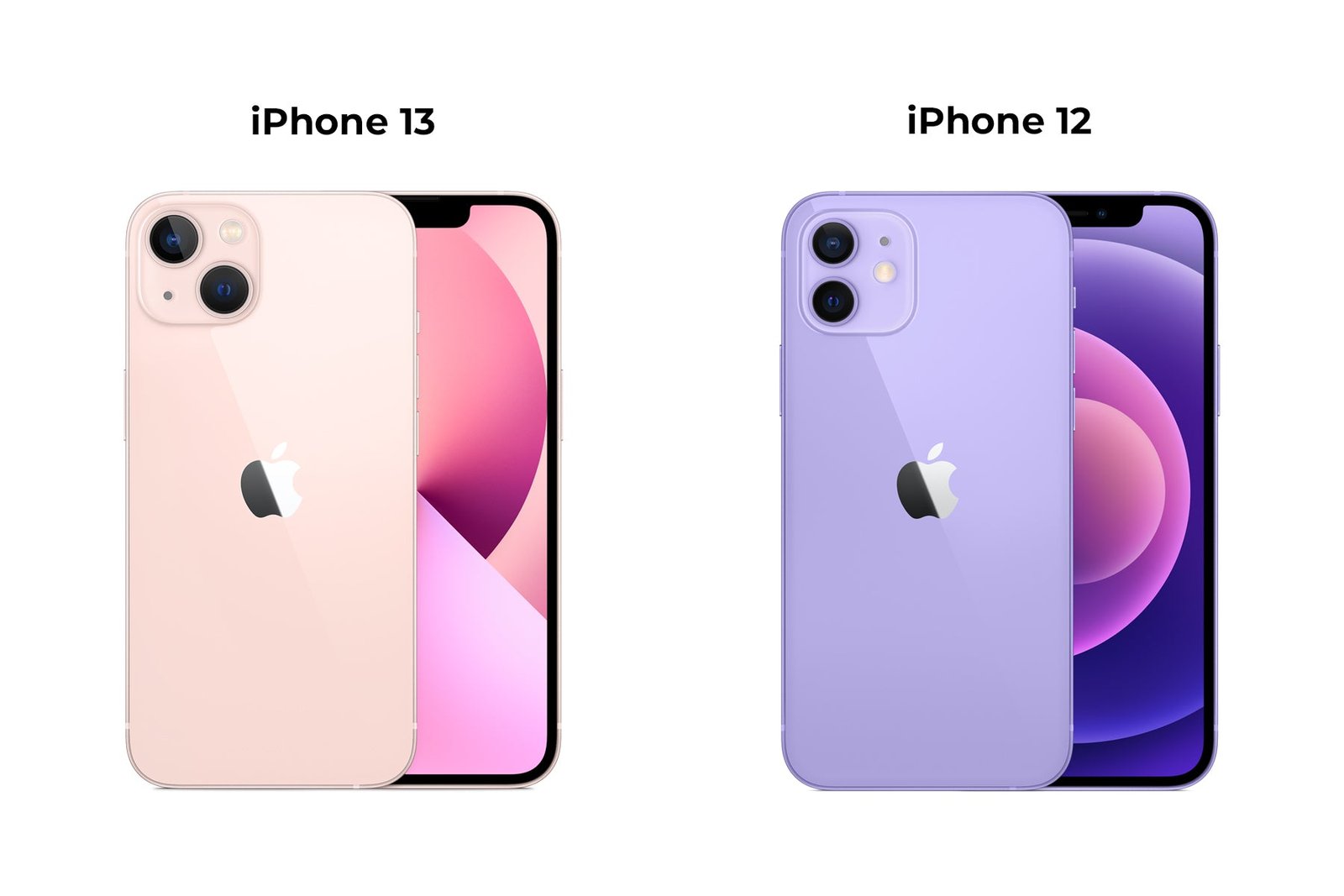
- The biggest problem is the rear camera area because the iPhone 13 uses a diagonal camera layout, while the iPhone 12 uses a vertical layout.
- Flexible silicone or TPU cases may physically slide on, but that does not mean they protect the phone correctly.
- For the best fit, choose a case made specifically for the exact iPhone model you own.
Compatibility Overview
Choosing the right case for your iPhone matters because it protects the device, keeps buttons easy to use, and helps your phone feel secure in your hand. The iPhone 12 and iPhone 13 look very similar, so many people assume their cases are interchangeable. In real use, that assumption can lead to a poor fit.
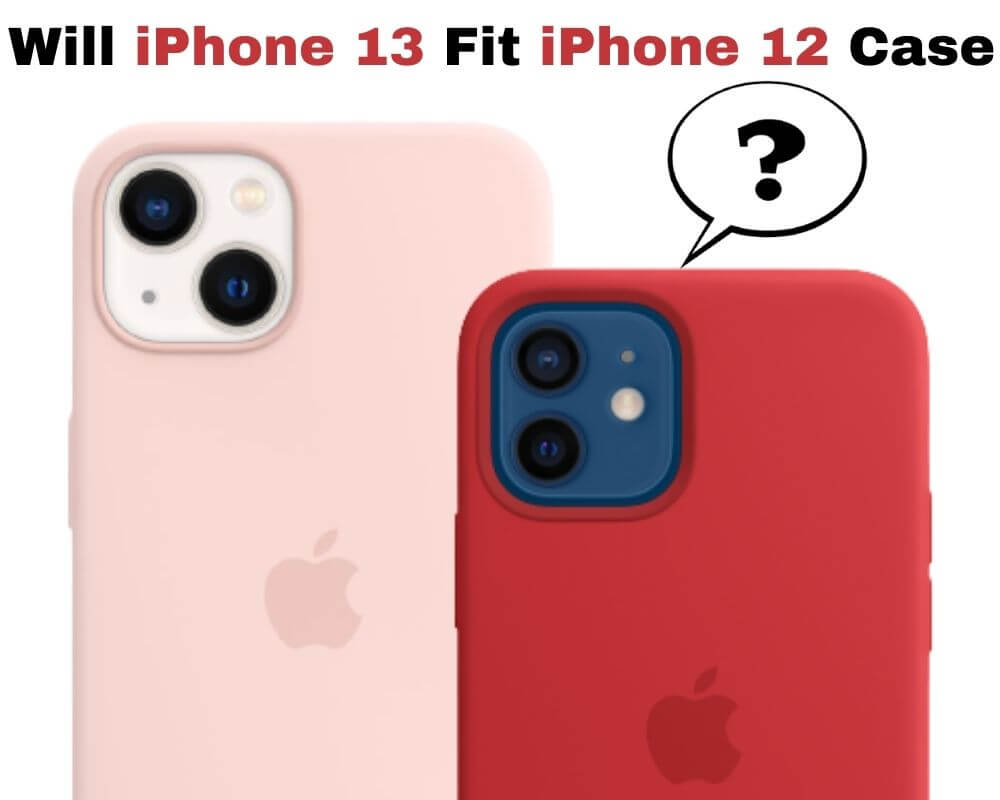
The iPhone 13 case may fit over an iPhone 12 in some situations, especially if the case uses soft, flexible material. Still, the fit is usually not ideal. The phone may feel loose, the camera cutout may look too large or slightly misplaced, and the buttons may not press as cleanly as they should.
Warning: Do not judge case compatibility only by screen size. A case can slide onto the phone and still fail to protect the corners, camera bump, or side buttons correctly.
Size And Dimensions
The iPhone 13 has slightly different dimensions than the iPhone 12. The height and width are very close, which is why the phones can look nearly identical from the front. The important difference is thickness. The iPhone 13 is slightly thicker than the iPhone 12, and that small change affects case tension.
A case designed for the thicker iPhone 13 may not hug the iPhone 12 as tightly. On a flexible case, this can feel like a mild looseness around the edges. On a rigid case, the difference can create uneven pressure or small gaps. Either issue can reduce the secure, snug fit you want from a protective case.
Camera Placement
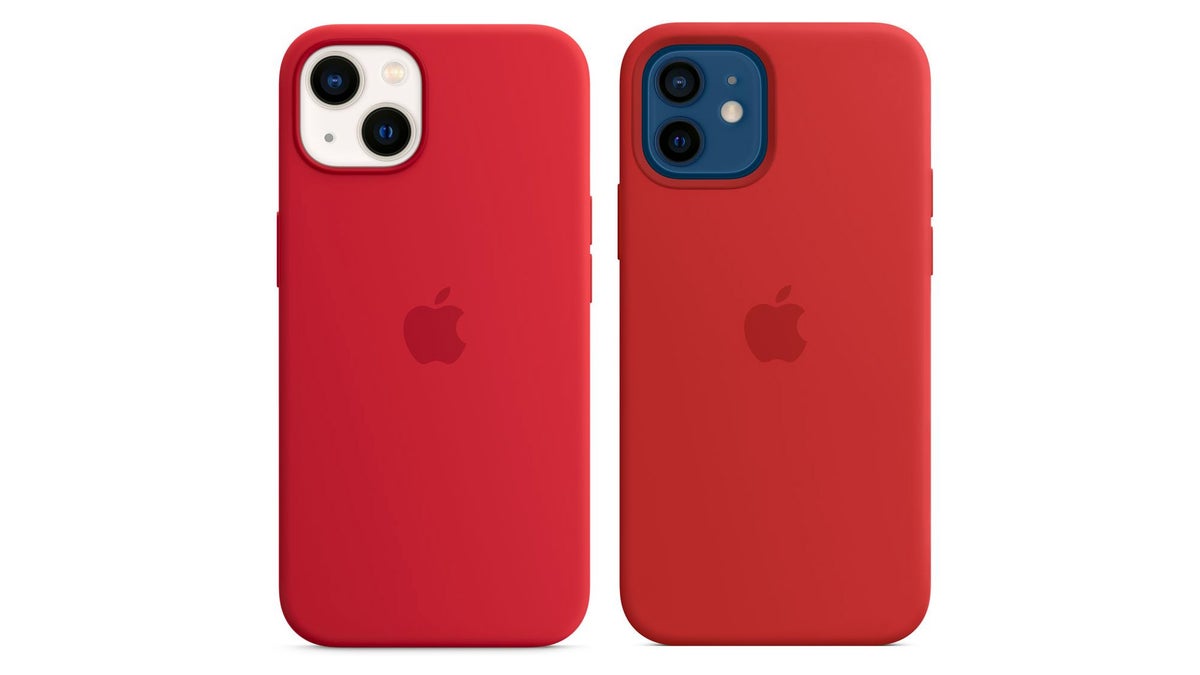
The rear camera layout is the most obvious compatibility issue. The iPhone 13 has two rear lenses arranged diagonally. The iPhone 12 has two rear lenses arranged vertically. Because case makers shape the camera opening around the phone’s exact camera module, the cutout on an iPhone 13 case does not match the iPhone 12 as neatly.
In many cases, the larger iPhone 13 camera opening will still expose the iPhone 12 camera, so photos may not be blocked. But the cutout can look awkward, leave more open space than needed, and reduce the clean protective lip around the camera area. That matters if you set your phone on rough surfaces often.
Button And Port Alignment
The button and port locations are similar on both models, but case compatibility depends on precision. Even a small difference can make the volume buttons, side button, mute switch, or speaker area feel slightly off. A poorly aligned button cover can make buttons harder to press or cause accidental pressure.
The Lightning port opening is less likely to cause a major problem, but it still needs enough clearance for your charging cable. Thick charging connectors can become harder to use if the case sits unevenly on the phone.
Material And Design
Case material plays a major role in whether a case can stretch across different models. Soft silicone, TPU, and flexible clear cases have more give. These may slide onto an iPhone 12 even when designed for the iPhone 13. Hard plastic, hybrid rugged, MagSafe, wallet, and snap-on cases need a more exact fit.
Even when a flexible iPhone 13 case fits an iPhone 12, you should not assume it offers full protection. The edges may flex away from the phone, the raised camera lip may not sit where it should, and MagSafe magnets may not align as cleanly as they would in a model-specific case.
User Experience
Using a case that does not fit well can become frustrating. The phone may shift slightly inside the case, the case may collect dust around gaps, or the side buttons may feel mushy. A snug, model-specific case gives better grip and more predictable protection from everyday drops, scratches, and bumps.
If you already own the case, you can test it carefully for temporary use. If you are buying a new case, choose one made for your exact phone instead of relying on “close enough” compatibility.
Design Differences
The iPhone 13 and iPhone 12 look similar at first glance, but their small design differences are important for case shopping. A phone case is molded around the exact body shape, camera bump, speaker openings, and buttons. That is why a small design change can make a big difference.
Dimensions And Size
The iPhone 12 measures about 146.7 mm tall, 71.5 mm wide, and 7.4 mm thick. The iPhone 13 measures about 146.7 mm tall, 71.5 mm wide, and 7.65 mm thick. The height and width are the same, but the iPhone 13 is slightly thicker.
That small thickness change is enough to affect how the case wraps around the side frame. An iPhone 13 case may feel slightly loose on an iPhone 12, especially near the corners or side rails. A loose case can pop off more easily during a drop, which defeats the purpose of using one.
The iPhone 12 and iPhone 13 share the same height and width, but the iPhone 13 is about 0.25 mm thicker. That small difference can still affect case grip.
Camera Bump Variations
The camera bump is where the difference becomes easiest to see. The iPhone 13 uses a larger camera area with diagonal lenses. The iPhone 12 uses a more compact camera bump with vertical lenses. A case made for the iPhone 13 must leave room for that larger diagonal layout.
When you put that case on an iPhone 12, the camera opening may leave extra exposed space. That may not stop the camera from working, but it can look uneven and may give the camera area less precise protection. If you care about a clean fit, this mismatch is usually the deal breaker.
Material And Construction
The material and construction of phone cases greatly affect compatibility. Some cases bend enough to tolerate small size differences, while others need exact measurements. That is why one person may say an iPhone 13 case “works” on an iPhone 12, while another person finds that it feels wrong immediately.
Impact On Fitting
iPhone 13 cases are molded for the iPhone 13 body. Because the iPhone 12 is slightly thinner, some cases may not grip it as firmly. The result can be a case that feels acceptable at first but shifts during daily use.
Camera cutouts also affect fit. A large cutout may not block the iPhone 12 camera, but it can expose more of the back glass than needed. That extra exposure may matter if you want full coverage around the camera bump.
Durability Considerations
Material choice affects both durability and protection. A strong case only works well when it stays firmly attached to the phone. If the case is designed for another model and does not sit tightly, the protective materials cannot absorb impact as intended.
Hard cases are the least forgiving because they do not stretch much. Rugged cases with multiple layers can also fit poorly if the inner shell and outer bumper are molded for a different phone. Slim silicone cases are more forgiving, but they still may not protect the camera and buttons correctly.
Credit: www.phonearena.com
User Experiences
User experiences show why this question creates so much confusion. Some people try the case and say it fits because the phone slides in. Others notice the problems only after using the phone for a few days. The truth depends on the case material, brand, and how precise you expect the fit to be.
Personal Anecdotes
Lisa tried using an iPhone 12 case on her new iPhone 13. At first, she thought it fit well because the phone went into the case without much effort. Then she noticed the camera cutout did not line up cleanly. The mismatch made the back of the phone look awkward and reduced the clean camera protection she expected.
Mark had a different experience. He owned a soft third-party case that had a larger camera opening and flexible sides. When he switched between models, the case seemed usable for light, temporary protection. Still, it did not feel as secure as a case made for the exact model.
These examples show why “fits” can mean different things. A case may physically go on the phone, but a good case should also protect the corners, line up with the camera, keep buttons responsive, and stay tight during daily use.
Customer Reviews
Customer reviews often mention the same problem areas: camera bump fit, button feel, and edge grip. Some users report that buttons are harder to press when a case is used on the wrong model. Others say the camera opening looks oversized or uneven.
Another common issue is looseness. Because the iPhone 12 is slightly thinner than the iPhone 13, some iPhone 13 cases can feel less secure on the older model. A loose fit may not bother you for desk use, but it matters if you drop your phone or carry it in a bag or pocket all day.
Despite these issues, some flexible cases work well enough for short-term use. Reviews that mention both the iPhone 12 and iPhone 13 can help, but the safest choice is still a case designed for your specific device.
Expert Opinions
With the launch of the iPhone 13, many users wondered whether their iPhone 12 cases could carry over. Tech reviewers, case makers, and everyday users generally agree on one point: the two models are close, but not close enough for a guaranteed perfect case fit.
Tech Community Insights
Tech communities often point to two main differences: thickness and camera placement. The iPhone 13 is slightly thicker, and its rear camera design changed from a vertical lens arrangement to a diagonal layout. These changes affect case molds, especially around the back camera opening.
Some users say soft cases can work in a pinch. That may be true for temporary use, but it is not the same as a proper fit. If you want reliable protection, the case should be built for your exact iPhone model.
Manufacturer Recommendations
Case manufacturers usually list exact model compatibility for a reason. A case labeled for iPhone 13 is designed around the iPhone 13 body, camera bump, and button positions. A case labeled for iPhone 12 is designed around the iPhone 12.
When shopping, check the product title, compatibility section, and packaging. Avoid vague listings that only say “fits 6.1-inch iPhone” without naming the exact model. The screen size alone does not confirm case compatibility.
Credit: www.wawcase.com
Alternative Solutions
Finding the perfect fit for your iPhone 12 can be tricky if you already own an iPhone 13 case. The case may seem close, but small design differences can affect protection. Instead of forcing a poor fit, consider safer alternatives that still match your budget and style.
Use A Model-Specific Case
The best solution is simple: buy a case made for the exact phone you own. If you have an iPhone 12, choose an iPhone 12 case. If you have an iPhone 13, choose an iPhone 13 case. A model-specific case gives you better camera coverage, cleaner button alignment, and a more secure grip around the frame.
This is especially important if you use your phone outdoors, carry it without a screen protector, or often place it on rough surfaces. A precise fit gives your case the best chance to protect the phone during daily use.
Customizable Cases
A customizable case can work well if you want a specific look without sacrificing fit. Many online case sellers let you choose the exact iPhone model before adding colors, text, photos, or design elements. This gives you a personalized case that still matches your phone’s dimensions.
Think about your daily use before choosing the design. If you drop your phone often, choose a case with raised edges and corner protection. If you care more about looks, a slim custom case may be enough. Either way, choose the correct iPhone model first.
Universal Fit Options
Universal phone cases can work for some users, but they come with trade-offs. These cases often use adjustable corners, elastic grips, wallet-style holders, or pouch designs. Because they do not rely on exact camera and button cutouts, they can fit more than one phone model.
Still, not all universal cases offer the same protection as a fitted shell. Check that the phone sits securely, the camera is not blocked, and the side buttons remain easy to use. A universal case may be useful for temporary protection, but it is not always the best long-term choice.
Pro Tip: If a case listing says it fits both iPhone 12 and iPhone 13, read the reviews carefully and look for photos from buyers. Pay close attention to comments about the camera cutout and button feel.
How To Check If A Case Fits Safely
If you already have an iPhone 13 case and want to test it on an iPhone 12, do it carefully. A quick fit check can help you decide whether the case is safe for temporary use or should be replaced.
Check The Corner Grip
Place the phone inside the case and press each corner gently. The case should hold the phone firmly without gaps. If the corners lift, flex outward, or pop off easily, the case is too loose for dependable protection.
Check The Camera Cutout
Look at the rear camera area. The camera, flash, and microphone should be fully visible. The raised lip should protect the camera area without covering any part of the lens. If the opening is too large or uneven, the case may not protect the back as well.
Check The Buttons
Press the side button and volume buttons several times. They should feel responsive and natural. If they feel stiff, mushy, or constantly pressed, the case is not aligned well enough.
Check Charging And Speakers
Plug in your charger and make sure it connects fully. Then check the speaker and microphone openings along the bottom edge. The case should not block sound, charging, or microphone performance.
Check MagSafe Alignment
If you use MagSafe accessories, test them before trusting the case. A case designed for the wrong model may not align perfectly with magnetic chargers, wallets, or mounts. If the accessory feels weak or shifts easily, use the correct case instead.
Note: A case that works for a few minutes during a test may still perform poorly during a drop. Use a mismatched case only as a short-term option, not as your main protection.
Market Availability
Finding a case for either the iPhone 12 or iPhone 13 is easy because both models remain popular. The challenge is not availability. The challenge is choosing the correct listing and avoiding cases that use unclear compatibility language.
Retailer Offerings
Many popular retailers offer separate case sections for each iPhone model. Stores often group cases by device name, such as iPhone 12, iPhone 12 Pro, iPhone 13, or iPhone 13 Pro. This makes it easier to choose the right case if you check the label carefully.
Some retailers also sell cases labeled for more than one model. That can be convenient, but you should double-check the details. A case may fit multiple models only because it uses a larger camera cutout or flexible design. That does not always mean it gives the cleanest fit.
Online Shopping Tips
Online shopping gives you many choices, but it also makes compatibility mistakes easier. Product titles can be long, and some listings mention several iPhone models for search visibility. Always read the compatibility section before buying.
Customer reviews can help you spot real fit problems. Look for reviews that mention your exact phone model. Photos from buyers are especially useful because they show how the camera cutout and edges actually line up.
You should also check the return policy. A flexible return policy protects you if the case arrives and does not fit as promised. Do not keep a case that feels loose, blocks buttons, or leaves the camera area poorly protected.

Credit: www.pickr.com.au
Related Guides
Frequently Asked Questions
Is the iPhone 13 and iPhone 12 the same size?
The iPhone 13 and iPhone 12 have the same 6.1-inch display size and very similar height and width. They are not exactly the same body size, though. The iPhone 13 is slightly thicker, and its rear camera layout is different.
Does an iPhone 13 case fit an iPhone 12?
An iPhone 13 case may slide onto an iPhone 12 if the case is flexible, but it usually does not fit perfectly. The camera cutout, thickness, and button feel may not match well enough for dependable everyday protection.
Does an iPhone 13 screen protector fit the iPhone 12?
Some screen protectors may appear similar because both phones use a 6.1-inch display, but you should buy one listed for your exact model. Small differences around the notch, edges, and alignment can affect installation and coverage.
Will an iPhone 13 case fit an iPhone 11?
No. An iPhone 13 case does not fit an iPhone 11 properly. The body shape, camera area, and dimensions are different. Choose a case made for the iPhone 11 if that is the phone you own.
Are iPhone 12 Pro and iPhone 13 cases interchangeable?
iPhone 12 Pro and iPhone 13 cases are not the safest interchangeable choice. The phones have similar front sizes, but their camera layouts and body details differ. For proper fit and protection, use a case designed for the exact model.
Can I use a mismatched case temporarily?
You can use a mismatched case temporarily if it holds the phone firmly, does not block the camera, and keeps buttons usable. Still, replace it with a model-specific case as soon as possible for better protection.
Conclusion
iPhone 13 cases do not fit the iPhone 12 perfectly in most situations. The phones look similar and share the same screen size, but small design differences matter. The iPhone 13 is slightly thicker, and its camera layout is different from the iPhone 12.
A flexible iPhone 13 case may go onto an iPhone 12, but that does not guarantee proper protection. The case can feel loose, the camera opening can look wrong, and the buttons may not line up as cleanly as they should.
For the safest choice, use a case made for your exact iPhone model. It gives your phone better corner grip, cleaner camera protection, and a more secure feel every day.
Sources
- Apple iPhone 12 Technical Specifications — supports iPhone 12 dimensions and display size.
- Apple iPhone 13 Technical Specifications — supports iPhone 13 dimensions and display size.
- Apple iPhone Cases and Protection — supports choosing cases by exact iPhone model.

