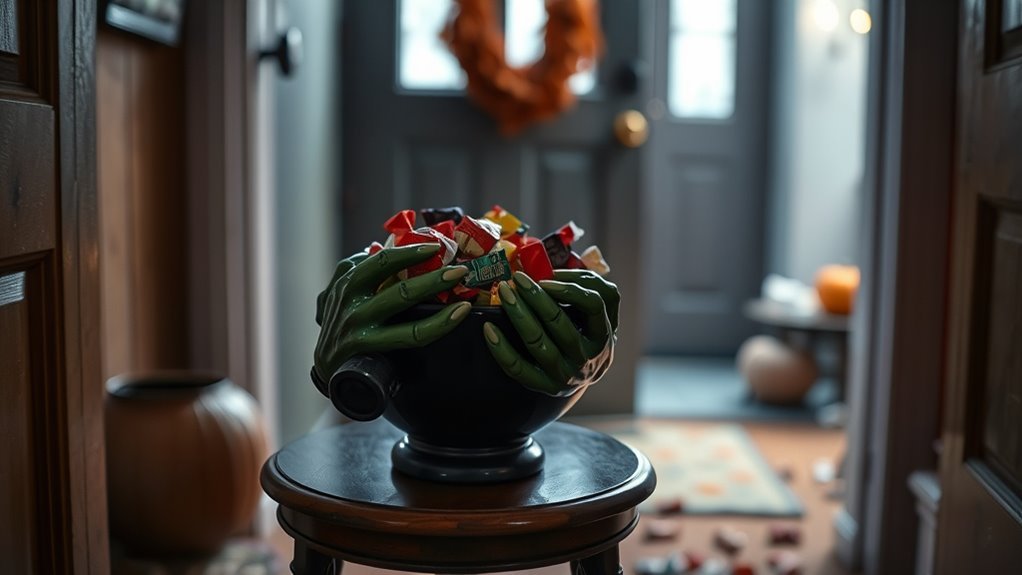
A witch candy bowl motion sensor turns an ordinary Halloween candy station into an interactive decoration. When someone approaches or reaches toward the treats, the sensor can trigger spooky laughter, glowing eyes, or sudden animatronic movement. The best setup depends on sensor placement, reliable power, bowl capacity, and weather protection. Here’s what to check before buying and how to make your Halloween display work reliably.
Quick Answer
A witch candy bowl motion sensor detects movement near Halloween candy and triggers a programmed scare. For reliable operation, position the detection area where visitors naturally reach, choose the correct power supply, and keep the decoration dry. Test the activation before Halloween night and make sure moving parts cannot strike anyone reaching for treats.
Key Takeaways
- Check the trigger type: Some animated witches respond to motion, while others also react to sounds or optional footpads.
- Position the sensor carefully: Aim it toward reaching hands or the approach path, depending on the manufacturer’s design.
- Verify the bowl capacity: A 32-ounce capacity is mentioned for some setups, but exact dimensions and removability vary.
- Match the power supply: Certain seated witch models use four AA batteries or a 6V 2A adapter. Other models may differ.
- Protect the electronics: A covered outdoor location is safer for props that are not waterproof.
- Test before Halloween: Check activation, sound, stability, power connections, and safe access to the candy.
What Is a Witch Candy Bowl Motion Sensor?
)
A witch candy bowl motion sensor is part of an interactive Halloween decoration that reacts when someone approaches or reaches for candy. It connects the action of collecting treats with lights, sound, or movement, creating a surprise without requiring someone to operate the decoration manually.
Many designs feature a seated witch holding a candy bowl. Some have glowing eyes and recorded laughter, while animated versions can raise their heads suddenly or make frightening sounds.
For example, the 3.5-foot Animatronic Seated Witch Holding Candy Bowl is listed at 42 inches tall. Its published specifications describe sound and motion activation, a head that snaps upward, and screaming and laughing effects.
The decoration is designed to create a brief scare as someone reaches toward the candy. A separate trigger can also be part of the setup, depending on the model.
There are two main approaches:
- Built-in sensor models: The detection system comes with the animated witch. You assemble and operate the prop according to its instructions.
- Separate sensor setups: An infrared or proximity sensor is installed near a candy bowl and connected to compatible electronics that produce sound, light, or animation.
Built-in systems are generally simpler for casual Halloween decorating. Separate sensors allow more customization, but require careful matching of the sensor, controller, power supply, and effect.
Neither type should automatically be considered weatherproof. The manufacturer’s intended location and electrical requirements determine where it can be used.
How Does the Motion Sensor Trigger?
A motion-activated witch candy bowl reacts when its sensor detects movement inside a designated area. On a reach-in design, the intended trigger is usually a hand moving toward the candy. Other decorations detect people approaching from farther away.
The activation system then starts a programmed sequence. Depending on the prop, that sequence may include movement, laughter, a scream, flashing lights, or glowing eyes.
Different trigger systems work in different ways:
- Infrared proximity detection: Detects an object approaching a sensor within its supported range.
- Passive infrared detection: Responds to changes in infrared radiation from moving objects, such as people.
- Sound activation: Responds to nearby sounds, which may include voices, clapping, or other loud noises.
- Footpad activation: Uses a compatible floor switch to trigger the decoration when stepped on.
Not every witch candy bowl uses all four systems. Check the exact product instructions rather than assuming every model has adjustable sensor sensitivity or interchangeable trigger modes.
Sensor positioning is more important than maximum range for a reach-in candy bowl. A detector aimed too far outward can activate before visitors reach the treats. One aimed poorly may miss the movement completely.
The best activation happens when the scare begins at the intended moment and the mechanism finishes its movement without contacting visitors.
Best Placement for a Candy Bowl Setup
Place the candy bowl on a stable, level surface where visitors can see and reach the treats easily. A covered porch or indoor entryway is usually better than an exposed lawn for a decoration containing electronics.
For a seated witch, position the bowl where hands can reach it without touching the moving head or other mechanical parts. If a separate sensor controls the effect, aim it toward the natural approach or reaching motion.
Use the following placement options to plan your display.
| Placement | Effect | Result |
|---|---|---|
| Stable, sheltered deck or porch | Keeps the display visible and protected | Easier access and less moisture exposure |
| Candy bowl in front of the figure | Encourages a natural reaching motion | Better timing for reach-in activation |
| Clear, well-lit walkway | Guides visitors toward the display | Fewer trip hazards and easier movement |
Avoid placing the decoration on unstable tables, narrow steps, or surfaces where a sudden movement could knock it over.
For larger displays, you can place gentler decorations near the beginning of the route and the animated witch closer to the candy station. This allows young children and more cautious visitors to avoid the strongest scare.
The US Consumer Product Safety Commission’s Halloween safety recommendations advise removing obstacles from lawns, steps, and porches and inspecting electrical decorations for damage.
Warning: Keep guests, especially small children, clear of moving animatronic parts. Never block a prop’s mechanism or position it where a sudden movement could strike someone’s face or hands. Keep the walkway unobstructed and avoid open flames near costumes or decorations.
If visitors appear frightened or hesitant, offer candy from a separate bowl without requiring them to approach the animatronic.
How Much Candy Can It Hold?
The original witch candy bowl setup is described as holding up to 32 ounces of treats. However, capacity is not standardized across animated witch decorations, and the exact bowl measurement should be confirmed for the model being considered.
Bowl size affects how often you need to refill candy. The number of pieces it can hold also depends on packaging, shape, and the type of treats you provide.
Small wrapped candies generally fit differently from large chocolate bars or bulky treat packages. A bowl that looks large may also have less usable space if part of the sensor or mechanism occupies the interior.
Before choosing a candy bowl, consider these practical details:
- Usable depth: Make sure the candy will not spill easily when someone reaches inside.
- Sensor clearance: Do not let piled treats cover the detection area.
- Refill access: Check whether you can refill the bowl without moving the entire animatronic.
- Removability: Some bowls may detach, while others are integrated into the decoration.
- Cleaning: Choose a surface that can be kept clean and dry according to the manufacturer’s instructions.
A removable bowl makes refilling easier, but it should not be assumed to be included with every model. Some designs use fixed arms or an integrated candy holder.
For a busy trick-or-treating location, keeping a separate supply of wrapped treats nearby may be more practical than filling the animated bowl to the top.
A second candy station is also useful for visitors who prefer to avoid the moving witch.
Power Options and Battery Life
Power options determine where you can position a witch candy bowl and how consistently it can operate throughout Halloween night.
Some seated witch animatronics operate using four AA batteries or a 6V 2A power adapter. These specifications apply to certain models, not every motion-activated candy bowl.
Battery runtime depends on the batteries, sound volume, motor activity, and number of activations. Without manufacturer runtime data for the exact model, a reliable operating duration cannot be guaranteed.
Battery vs Adapter Power
Battery power is convenient when you want to position the witch away from an electrical outlet. Adapter power is usually more practical for a fixed display that operates for an extended period.
Each option has different advantages and limitations.
| Power option | Main advantage | What to check |
|---|---|---|
| 4 AA batteries | Portable placement without a power cord | Correct battery type, polarity, and replacement access |
| 6V 2A adapter | Continuous power without replacing batteries | Correct adapter specifications and safe outlet access |
| Rechargeable AA batteries | Can reduce disposable battery use | Manufacturer compatibility and adequate operating voltage |
Use only the voltage, connector, and power supply specified for your decoration. Do not assume that any adapter marked 6V will be compatible.
Likewise, rechargeable AA batteries are not automatically suitable for every battery-operated prop. Follow the instructions for the exact model.
Some packages include an adapter, while others require one to be purchased separately. Check the included accessories before planning your display.
Runtime and Reliability
Battery-operated decorations may become less responsive as their batteries weaken. A prop that activates repeatedly can use power faster than one triggered only occasionally.
If your display must operate through a busy evening, test the power system before guests arrive.
- Install the correct batteries or connect the approved adapter.
- Switch the decoration to its intended operating mode.
- Trigger the sensor several times under normal conditions.
- Check that the sound and movement complete each cycle.
- Allow the mechanism to reset, then test another activation.
- Inspect the battery compartment and connectors for loose contacts or damage.
Weak sound, incomplete movement, or missed activations may indicate a power problem. These symptoms can also result from blocked sensors or mechanical faults.
For storage, turn the decoration off and remove disposable batteries to reduce the risk of leakage.
How to Mount the Sensor Securely
Sensor mounting depends on whether your candy bowl has a factory-installed detector or uses a separate add-on. A factory sensor should remain in its intended position unless the manufacturer’s instructions specifically allow adjustment.
For an add-on infrared sensor, removable mounting materials such as Velcro may help secure it without permanently altering the bowl.
One starting arrangement places the sensor near the reaching area, potentially within 12 inches above the bowl. That is a suggested setup position, not a confirmed detection specification. The correct location depends on the sensor’s actual range and field of view.
The Adafruit Screaming Cauldron project demonstrates mounting a separate infrared distance sensor near the inside rim of a candy container and adjusting its position to detect approaching hands.
For a compatible separate-sensor installation:
- Disconnect the power. Do not adjust electrical connections while the system is energized.
- Identify the detection area. Determine where visitors are expected to move their hands.
- Choose the mounting position. Avoid locations that could be blocked by candy or moving decorations.
- Secure the sensor. Use an appropriate removable mounting method that does not obstruct its sensing surface.
- Protect the wiring. Keep wires away from mechanical parts, sharp edges, and the candy itself.
- Reconnect and test. Verify that reaching into the bowl triggers the intended effect.
Do not splice or modify an animatronic’s wiring unless the components are designed for that connection and you understand the electrical requirements.
Adding tape or a plastic cover does not make an indoor-only sensor waterproof. Moisture protection must follow the actual product rating and instructions.
Pro Tip: Test the sensor with the bowl partially filled and then more fully filled. Candy can block a poorly positioned detector, even if the sensor works perfectly when the bowl is empty.
Best Features for Bigger Scares
The most effective witch candy bowl combines clear visual effects with well-timed activation. A frightening design alone is not enough if the sensor triggers too early or the mechanism misses visitors.
Look for features that suit your preferred Halloween display.
- Glowing eyes: Improve the witch’s visibility and create an eerie appearance in dim lighting.
- Recorded laughter or screams: Add an audio surprise when the sensor activates.
- Sudden head movement: Creates a stronger jump scare than a stationary decoration.
- Adjustable volume: Helps control the sound level, if supported by the model.
- Multiple activation options: Motion, sound, or compatible footpad triggers allow different display arrangements.
- Accessible controls: Make it easier to switch the decoration off or change modes.
A witch with a black pointed hat, skeletal hands, and a sinister expression can create a convincing display even while inactive.
Some animated witches suddenly raise their heads and play laughter when a visitor approaches the candy. Others may use more subtle lighting or sound effects.
Choose the intensity that suits your audience. A powerful jump scare may entertain older visitors but overwhelm young children.
For a family-oriented setup, a gentler sound level and a clearly visible decoration may work better than an unexpected loud scream.
Common Problems to Check Before Buying
The main problems to investigate are sensor compatibility, inconsistent triggering, and unsuitable placement. These issues can make an otherwise appealing Halloween decoration frustrating to use.
Inspect the exact model’s specifications, operating instructions, and available replacement parts before purchase.
Pay particular attention to the sensor’s detection method, the power requirements, and whether the product can be used in a covered outdoor location.
Sensor Compatibility Checks
A replacement sensor must be electrically compatible with the animatronic it controls. Matching the appearance of a connector is not enough to establish compatibility.
Before adding or replacing a sensor, check the following:
- Power requirements: Confirm the voltage, current requirements, polarity, and connection type.
- Trigger interface: Determine whether the animatronic accepts an infrared detector, footpad switch, or another specified trigger.
- Detection method: Verify whether the sensor detects reaching hands, general movement, or sound.
- Mounting: Make sure the sensor can be attached securely without interfering with moving parts.
- Environmental suitability: Confirm whether the sensor is rated for the intended indoor or outdoor conditions.
Many complete animatronics use built-in control electronics. A generic replacement sensor may not work with them, even if the plug appears similar.
If the manufacturer provides no compatibility information, avoid guessing or modifying electrical connections.
Trigger Reliability Issues
Missed or unexpected activations often result from blocked detection areas, weak power, unsuitable positioning, or environmental conditions.
The exact cause depends on the sensor technology. For example, an infrared proximity sensor may behave differently from a passive infrared motion detector.
Use this troubleshooting table to identify common problems.
| Factor | Possible effect | What to check |
|---|---|---|
| Light interference | Inconsistent detection on some optical sensors | Test under expected lighting conditions |
| Obstructions | Reduced detection | Clear the sensor’s field of view |
| Moisture | Unreliable operation or electrical damage | Inspect for dampness with power disconnected |
| Temperature extremes | Possible response or operating problems | Check the manufacturer’s operating limits |
| Weak batteries | Missed or incomplete activation | Use the correct fresh batteries |
| Incorrect operating mode | No motion-triggered response | Check the switch and mode instructions |
If the witch does not activate, begin with the simplest checks: power, operating mode, and sensor obstruction.
Next, try a normal approaching or reaching motion within the intended detection area. Some mechanisms require the previous animation to finish before they can activate again.
If the sensor works but the witch does not move, stop operating the decoration and inspect it according to the manufacturer’s instructions. Do not force the head or mechanism into motion.
Setup and Placement
Proper setup should make the animated bowl easy to approach while keeping its electronics and mechanical parts protected.
Before Halloween night, check these final details:
- Shelter: Use a dry, covered location for decorations that are not weatherproof.
- Sensor reach: Confirm that the intended hand movement activates the effect.
- Stable support: Secure the witch and bowl so visitors cannot accidentally tip them over.
- Candy access: Keep the treats reachable without contact with moving machinery.
- Power routing: Prevent cords from crossing walking areas.
If using an adapter outdoors, connect only through a suitable GFCI-protected outlet and use equipment rated for the environment. Keep all electrical connections dry.
For a decoration that must stay dry, an exposed outdoor position is unsuitable even if you temporarily cover part of its electronics.
After the event, turn off the decoration, disconnect its power, and store it in a dry location.
Frequently Asked Questions
How Many Pieces of Candy Should I Give Each Trick or Treater?
Giving two or three small, individually wrapped pieces per visitor is a reasonable choice, but there is no required amount. You can offer one larger treat or adjust portions based on your available supply. For children with allergies, offer a clearly labeled alternative or a nonfood treat.
What to Do With Switch Witch Candy?
Switch Witch candy can be saved, shared, or exchanged for a small gift as part of a family Halloween tradition. Some families donate unopened treats, but organizations have different donation policies. Contact a local charity before dropping off candy, and provide only acceptable, properly packaged items.
How to Check if Halloween Candy Is Safe?
Inspect Halloween candy before children eat it. Check that commercially wrapped treats have intact packaging, readable ingredient information, and no suspicious changes in appearance. Review allergen labels carefully. Keep hard candy, gum, and other choking hazards away from very young children, and discard anything suspicious.
What Are the Signs of Candy Tampering?
Possible warning signs include torn or opened wrappers, unusual discoloration, tiny holes, damaged seals, or packaging that appears altered. These signs do not always indicate deliberate tampering, but suspicious treats should not be eaten. Discard questionable items rather than attempting to repair their packaging.
Can a Witch Candy Bowl Motion Sensor Work in Rain?
Only use a witch candy bowl in rain if its manufacturer explicitly rates it for that exposure. Many animated seated witches are designed for indoor or covered outdoor use and must remain dry. A plastic covering does not automatically make electrical components waterproof. Bring an unsuitable decoration indoors before wet weather.
Why Is My Witch Candy Bowl Motion Sensor Not Working?
Start by checking the power supply and operating mode. Make sure candy, clothing, or decorations are not blocking the detector. Test movement within the intended detection area and allow the animation to reset. If the electronics work but the mechanical parts do not move, stop and consult the manufacturer’s troubleshooting instructions.
Can I Use Rechargeable Batteries in a Witch Candy Bowl?
Rechargeable batteries may work in some witch candy bowl decorations, but compatibility depends on the model. Some rechargeable cells provide a different nominal voltage from disposable alkaline batteries. Follow the manufacturer’s instructions and use the specified battery type. Do not mix batteries of different chemistries, ages, or charge levels.
Conclusion
A witch candy bowl motion sensor can add an entertaining surprise to your Halloween candy display. Reliable operation depends on using the right trigger system, secure placement, suitable power, and proper protection from moisture.
Before buying, confirm the bowl dimensions, sensor activation method, and power requirements for the exact model. Then test the complete setup before Halloween night. A clear walkway, accessible treats, and a carefully positioned sensor will help create a memorable scare without sacrificing visitor safety.
Sources
- Halloween.com: 3.5FT Animatronic Seated Witch: Supports the listed height, trigger types, power options, animation, and covered outdoor use.
- Adafruit: Screaming Cauldron Assembly Guide: Demonstrates mounting and positioning an infrared sensor inside a candy bowl.
- US Consumer Product Safety Commission: Halloween Safety Tips: Supports walkway safety, electrical inspection, and decoration precautions.
- US Food and Drug Administration: Halloween Food Safety Tips for Parents: Supports candy inspection, allergy awareness, and choking-hazard guidance.

