
If you own a Ford Focus, a reliable OBD2 scanner can save you time, reduce guesswork, and help you understand what your car is trying to tell you. The right scanner can read check-engine codes, show live engine data, check emissions readiness, and help you decide whether a repair is simple DIY work or a shop visit.
In this guide, you’ll find a mix of budget code readers, beginner-friendly handheld tools, battery-check scanners, live-data tools, and deeper diagnostic options. Some are basic engine-code readers, while others offer broader system coverage on supported vehicles, so always confirm your exact Focus model year and needed functions before buying.
This roundup is reader-supported. When you click through Amazon links, we may earn a referral commission on qualifying purchases. As an Amazon Associate I earn from qualifying purchases.
Quick Verdict
Best overall for Ford Focus owners: KONNWEI KW470, because it is the most Ford-focused option in this list and is aimed at deeper supported diagnostics and battery-related tasks.
Best budget pick: MOTOPOWER MP69033, because it is simple, compact, and useful for reading and clearing basic engine codes.
Best for deeper all-system checks: Innova SD35, because it is built for broader diagnostics such as engine, transmission, ABS, SRS, and TPMS on supported vehicles.
Best for live data: FOXWELL NT301, because it gives clear engine data graphs and I/M readiness checks, but it should be treated as a basic OBD2 reader, not an ABS or airbag scanner.
Top Picks
|
Category |
Product |
Best For |
|---|---|---|
|
🏆 Best Overall |
Ford-focused diagnostics and battery functions |
|
|
💰 Best Value |
Color screen, live data, and emissions checks |
|
|
🎯 Best Budget / Pocket-Friendly |
Basic check-engine code reading |
|
|
🎯 Best for Beginners |
Simple plug-and-play use |
|
|
✅ Best for Emissions & Readiness |
Quick I/M readiness checks |
|
|
⚙️ Best for Full-System Diagnostics |
Broader diagnostics on supported vehicles |
|
|
🔧 Best for Quick Checks |
Glove-box check-engine scans |
|
|
💡 Best Innovation (Battery + Diagnostics) |
Battery health plus engine codes |
|
|
⚡ Best Performance / Live Data |
Engine live-data graphs |
|
|
🚀 Most Advanced Basic OBDII Feature Set |
Advanced OBDII-level checks |
Before You Buy
- Match the tool to the job. A basic reader is enough for check-engine codes, but ABS, SRS, TPMS, EPB, oil reset, and battery registration usually require a scanner that specifically supports those functions.
- Confirm Focus compatibility. Check the scanner’s compatibility notes for your exact model year, engine, and region before you buy.
- Do not clear codes too early. Save the code and freeze-frame data first. Clearing codes can erase useful diagnostic clues and reset emissions monitors.
- Be careful with safety systems. Airbag, brake, immobilizer, and EPB work can be safety-critical. Use the scanner instructions carefully or consult a technician.
How We Picked These OBD2 Scanners
You want a scanner that actually helps with a Ford Focus, so we prioritized tools that solve common owner problems: check-engine lights, emissions readiness, live data, freeze-frame information, battery checks, and deeper system diagnostics where supported. We also looked at ease of use, screen clarity, portability, update options, and whether each tool is honest about its limits. Basic OBD2 readers are useful for engine and emissions checks, but they should not be confused with full-system scan tools. That distinction matters because it helps you avoid buying a scanner that cannot access the system you need.
KONNWEI KW470
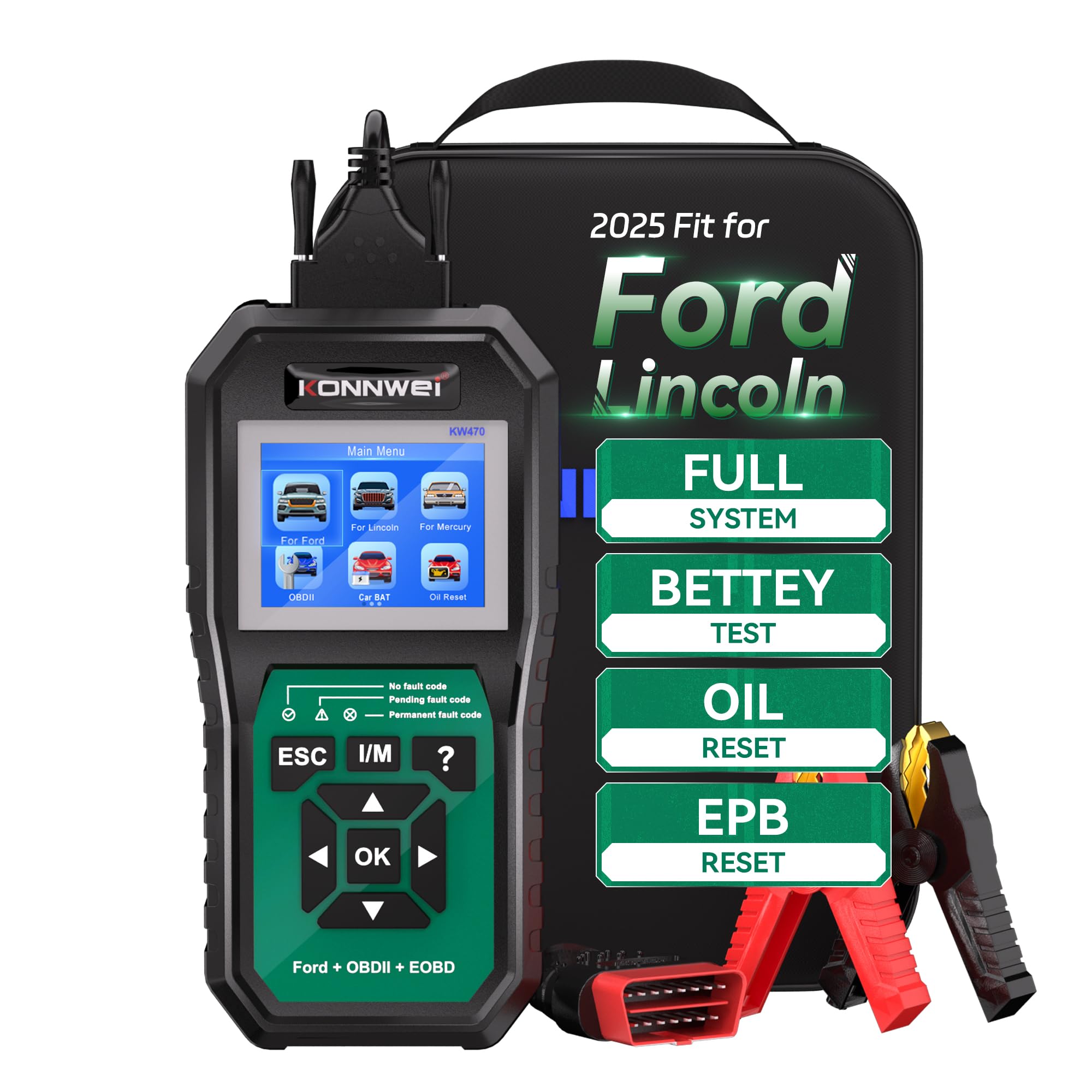
If you want one scanner that feels more tailored to Ford-family vehicles, the KONNWEI KW470 is the strongest fit in this roundup. It is aimed at owners who want more than a simple check-engine reader, including supported module scans, battery checks, and maintenance reset functions.
Who should buy this: Ford Focus owners who do their own maintenance and want a tool that may handle deeper Ford-related tasks than a basic code reader.
Who should avoid this: Anyone who only needs a cheap tool for occasional check-engine codes, or anyone who has not confirmed support for their exact model year and function needs.
What People Say
Owners say it’s easy to use, especially for reading/clearing codes, resetting service lights, and checking battery health on Ford vehicles.
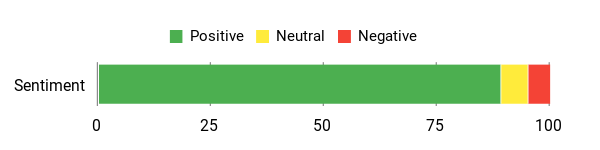
Overall Sentiment: Positive

🗣️ RadiantCrescendo
I chose this for my nephew, he has a Ford and always has issues with the check engine light coming on. He’s used this a few times and really likes it, it’s been very helpful in figuring out what needs attention. It’s easy to use and he very much appreciates being able to do the diagnosing himself instead of taking his car to an auto parts store. He’s very happy with it!
🗣️ Aaa
This KONNWEI KW470 scanner is a game changer. It worked perfectly with my Ford and gave me access to full system diagnostics, not just basic OBDII codes. I was able to reset my oil light, check the battery health, and even test the key sensor. The interface is easy to use, and the screen is clear and responsive.
Versatility
Use it for daily troubleshooting, battery checks, and supported maintenance tasks such as oil reset or EPB service. Confirm exact Focus coverage before relying on it for advanced module access.
Speed & Response Time
Designed for quick code reads and menu navigation, with a color screen that makes it easier to view results than a very small basic reader.
Key Benefits
- Ford/Lincoln/Mercury-oriented coverage for deeper supported diagnostics
- Advertised full-system scanning for supported modules
- Battery testing and battery registration support on compatible vehicles
- Maintenance reset functions where supported
- Color screen and update support
Check Product Details on Amazon
SHRINLUCK Y2
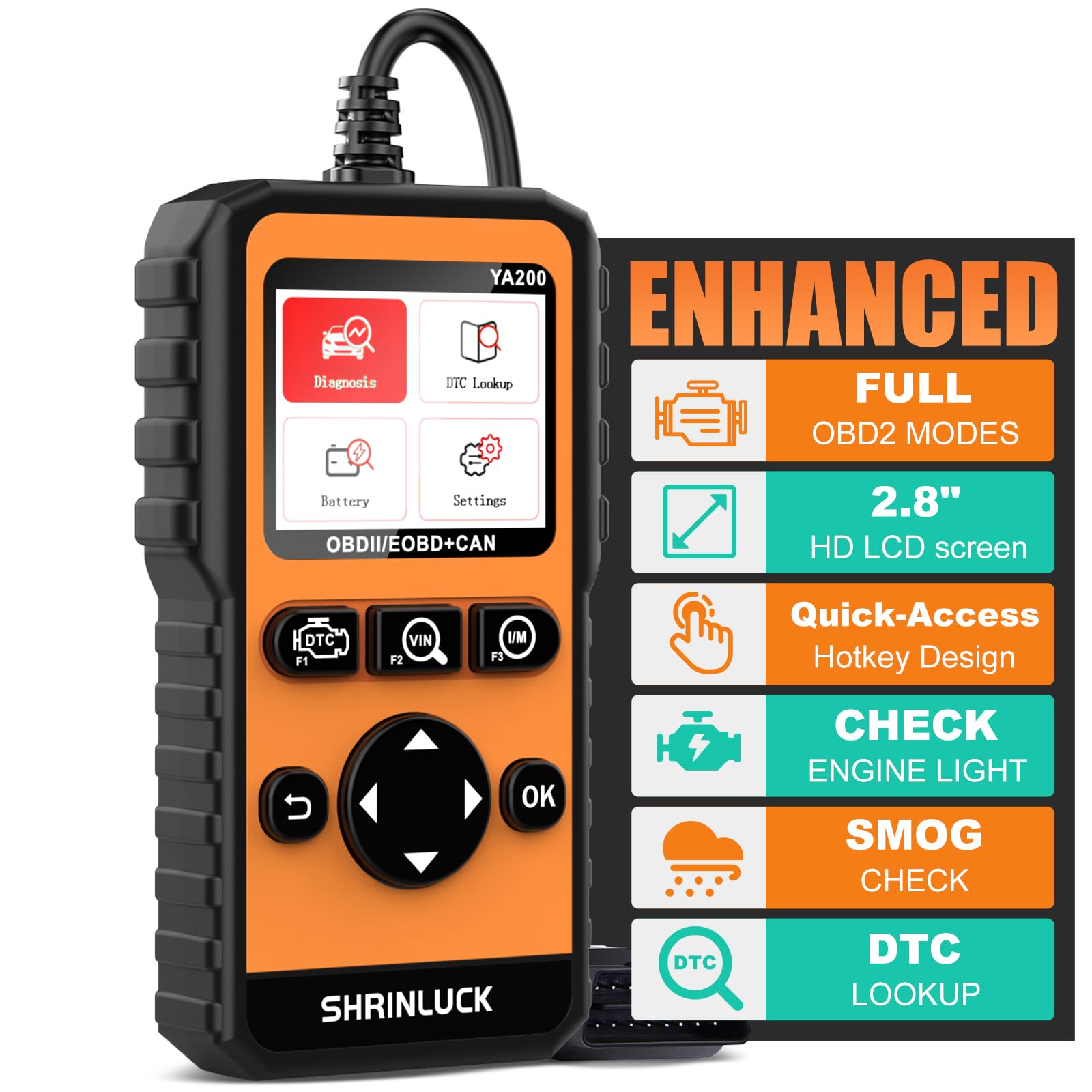
If you like seeing live data instead of just a plain trouble code, the SHRINLUCK Y2 is a useful step up from the cheapest readers. The color graphing screen makes it easier to watch oxygen sensor data, freeze-frame details, and readiness status before an emissions test.
Who should buy this: Focus owners who want a budget-friendly scanner with a better screen, graphing, and more OBDII-level test modes.
Who should avoid this: Anyone who needs ABS, airbag, EPB, or other non-engine module diagnostics. This is still an OBDII-focused tool.
What People Say
You’ll hear owners say it’s easy to use, accurate, and especially helpful for emissions readiness and saving trips to the shop.
Overall Sentiment: Positive

🗣️ Dariel Rodriguez
After buying this I was able to identify and fix an issue without a shop visit — it basically paid for itself. No subscriptions, no batteries required, easy to use out of the box, and gives clear, detailed readings.
🗣️ Salas
Very helpful for emission inspections — the scanner guided drive cycles and helped get monitors to green. Large screen is easier to navigate than older units and makes reading live data and codes simpler.
Versatility
Use it for check-engine lights, emissions readiness, O2 sensor checks, freeze-frame review, and live engine data. It is better suited to engine and emissions troubleshooting than safety-system diagnostics.
Speed & Response Time
It is built for quick code reading and simple graphing, so you can compare live values without needing a phone app.
Key Benefits
- 2.8″ color graphing screen for easier live data review
- Reads and clears engine codes with DTC lookup
- Supports freeze frame, O2 sensor testing, I/M readiness, Mode 6, and Mode 8
- Portable plug-in design with no battery charging needed
- Good value for owners who want more than a basic text-only reader
Check Product Details on Amazon
MOTOPOWER MP69033

If you want a no-nonsense tool to keep your Focus in check, this MOTOPOWER reader is the kind of gadget you plug in, read the code, and act on. It is not meant for advanced Ford module work, but it is practical for everyday engine diagnostics.
Who should buy this: Owners who want a low-cost glove-box scanner for check-engine lights and basic emissions readiness.
Who should avoid this: Anyone who needs ABS, SRS, TPMS, battery registration, bidirectional tests, or service resets.
What People Say
You’ll hear owners praise how easy it is to use, how reliably it pulls codes, and how useful it is for avoiding unnecessary shop visits.
Overall Sentiment: Positive

🗣️ Rich
Bought it to clear a CEL and other dash lights after an ECU flash on a 2024 ZX10R — it worked flawlessly when used with a Tuner Toys euro5 6-pin to OBD adapter. Straightforward out of the box, clear display, and simple directions if you’re not tech savvy.
🗣️ RealDealReviews
Reliable and easy to use: compact plug-and-play design, reads and clears fault codes quickly, and the bright yellow case is handy to spot in a toolbox. Reviewer notes it lacks advanced features like ABS diagnostics and has a shorter cable, but for basic engine diagnostics it performed consistently.
Versatility
Use it for check-engine lights, freeze-frame review, readiness checks, and simple live data. It is a practical tool to keep in the glove box or toolbox.
Speed & Response Time
Code reads and clears are quick, and basic live-data refresh is suitable for simple troubleshooting.
Key Benefits
- Reads and clears engine codes with built-in DTC lookup
- Shows freeze frame, I/M readiness, vehicle information, and live data
- Works with many OBDII and CAN vehicles
- Plug-and-play design powered from the car
- Compact yellow housing is easy to find in a toolbox
Check Product Details on Amazon
VDIAGTOOL VD10

If you want a simple scanner that does not require an app, the VD10 is easy to understand. Plug it into the OBD2 port, follow the prompts, and you can read engine codes, view live data, check readiness, and save freeze-frame details.
Who should buy this: New DIYers who want a clear, affordable scanner for basic Focus engine diagnostics.
Who should avoid this: Owners who want professional-level system coverage or special reset functions.
What People Say
You’ll see owners appreciate how straightforward it is, plug it in, read codes, clear the light, and watch live values while you drive.
Overall Sentiment: Positive
🗣️ Eligijus
VDIAGTOOL VD10 is easy to use with no apps required — plug it into the OBD2 port and it starts. It explains error codes, shows real-time data, captures freeze frame, and clears the Check Engine Light; the reviewer says it saved time and money.
🗣️ Amazon Customer
Used on a 2.2 litre Vauxhall Astra with a check emissions light: ran battery and start-up checks, then started the engine and found no error codes. The reviewer reset the light and then checked live vehicle data — tool did the job and saved a trip to the garage.
Versatility
Use it for check-engine lights, readiness checks, freeze-frame review, and used-car pre-checks. It is best for basic OBDII diagnostics.
Speed & Response Time
Reads and clears codes quickly, and the live-data refresh is practical for everyday troubleshooting.
Key Benefits
- Plug-and-play operation from the vehicle OBD2 port
- Reads and clears engine codes with built-in DTC lookup
- Shows freeze frame, live data, and I/M readiness
- Useful for beginners who do not want a phone app
- Compact enough for glove-box storage
Check Product Details on Amazon
Autel MS309
If your main goal is to understand a check-engine light or see whether your Focus is ready for an emissions test, the Autel MS309 keeps things simple. It is a basic OBDII reader, so its strength is quick engine-code and readiness information rather than deep system diagnostics.
Who should buy this: Owners who want a trusted, compact reader for check-engine and smog-prep tasks.
Who should avoid this: Anyone who needs TPMS, ABS, airbag, battery registration, or service reset functions.
What People Say
You’ll hear owners praise how quickly it gives readable codes and clears the Check Engine Light after repairs.
Overall Sentiment: Positive
🗣️ Markesha
Saved a trip to the shop — reviewer used it on a 2011 Ford Fusion Hybrid, found the exact problem and said the codes were accurate with clear instructions; worked on first try and avoided a $250 diagnostic fee.
🗣️ Michael G.
Initially had trouble locating the manual via the included QR code, but after finding the guide the scanner gave two specific codes (P0441 and P0455) on a Tacoma with descriptions; reviewer says it worked great and was easy on first use.
Versatility
Use it for check-engine lights, freeze-frame data, I/M readiness, and quick vehicle information checks. It is not a full-system scanner.
Speed & Response Time
Reads and clears engine codes quickly, with straightforward menus for fast basic troubleshooting.
Key Benefits
- Simple plug-and-play design
- Reads and clears engine fault codes
- Shows I/M readiness and freeze-frame data
- Useful before emissions inspections
- Compact enough to store in the car
Check Product Details on Amazon
Innova SD35
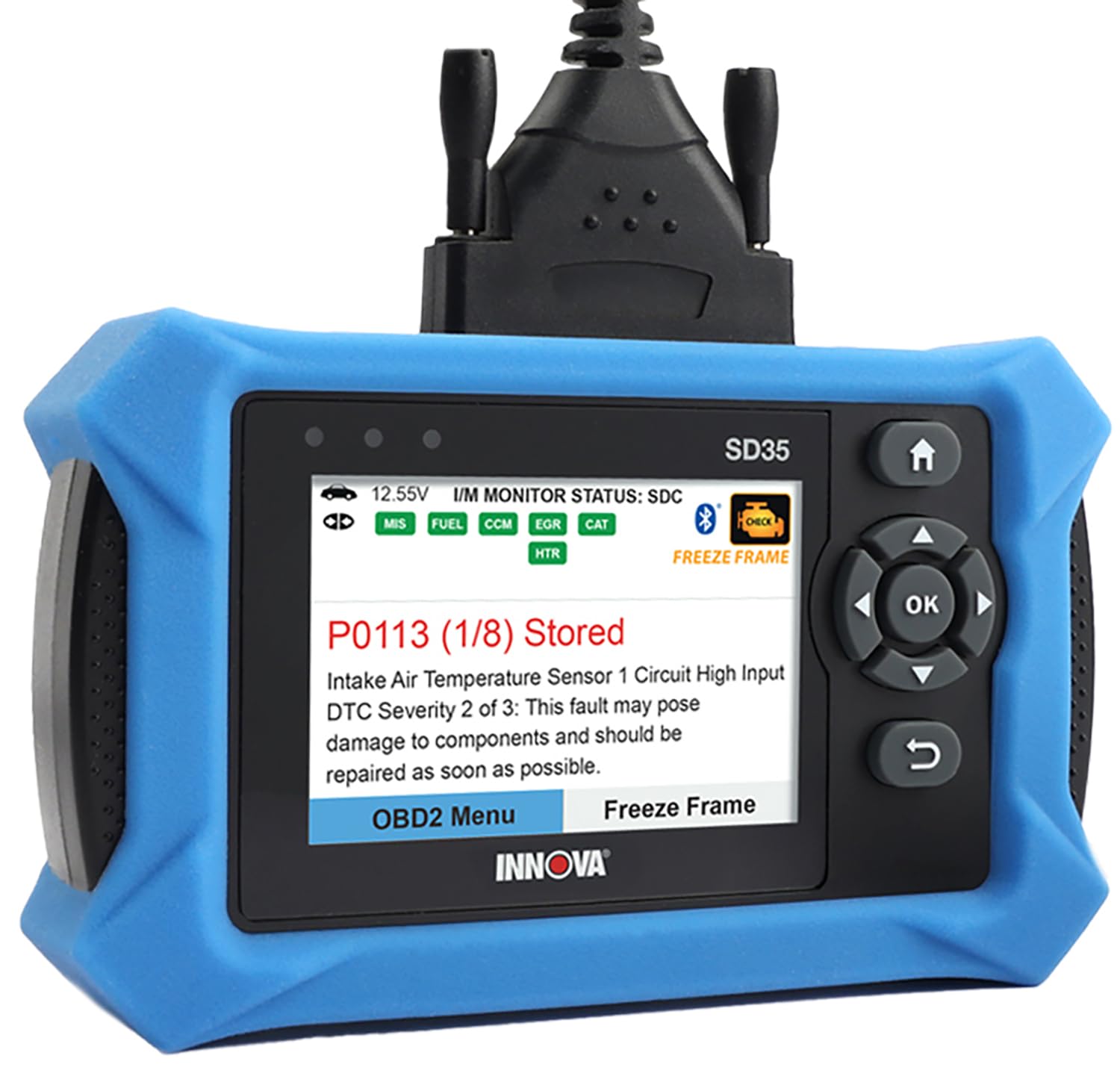
If you like having a diagnostic tablet rather than a tiny handheld reader, the Innova SD35 is the deeper option in this list. It is built for owners who want broader system coverage, live data, and repair guidance beyond a basic check-engine scan.
Who should buy this: DIYers who maintain multiple vehicles or want a stronger chance of accessing ABS, SRS, TPMS, transmission, and service information.
Who should avoid this: Buyers who only need a cheap code reader, or anyone who has not checked Innova’s vehicle coverage for their exact Focus.
What People Say
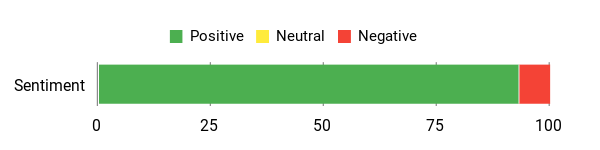
You’ll hear owners say it’s solidly built, pairs reliably over Bluetooth, and reads systems that simpler readers miss. People also note it saved them a shop visit, though a few found the software interface a bit clunky at first.
Overall Sentiment: Positive
🗣️ GTD
Good quality. Unit seems to be built well. Works well. Bluetooth connection flawless. Code explanations were clear. Cleared codes without a problem. Software was somewhat clumsy. Paid for itself on first use.
🗣️ RCsubman
This replaces my old dongle-and-phone setup. The long OBD connector cord makes it easy to use, it gives a lot of useful info, and I’ve already started checking the extended family’s cars. Easy to use and quick.
Versatility
Use it for check-engine diagnostics, readiness checks, live data, service resets, battery/alternator tests, and deeper supported system scans. Coverage can vary by vehicle.
Speed & Response Time
Designed for fast code pulls and readable live-data displays, with a tablet-style interface that is easier to scan than tiny handheld screens.
Key Benefits
- Broader supported system coverage than basic readers
- Can read check-engine, ABS, SRS, TPMS, transmission, and other supported systems
- Live data and service functions for more serious DIY work
- Battery and alternator testing support
- Useful app-based repair guidance with no required subscription for core guidance
Check Product Details on Amazon
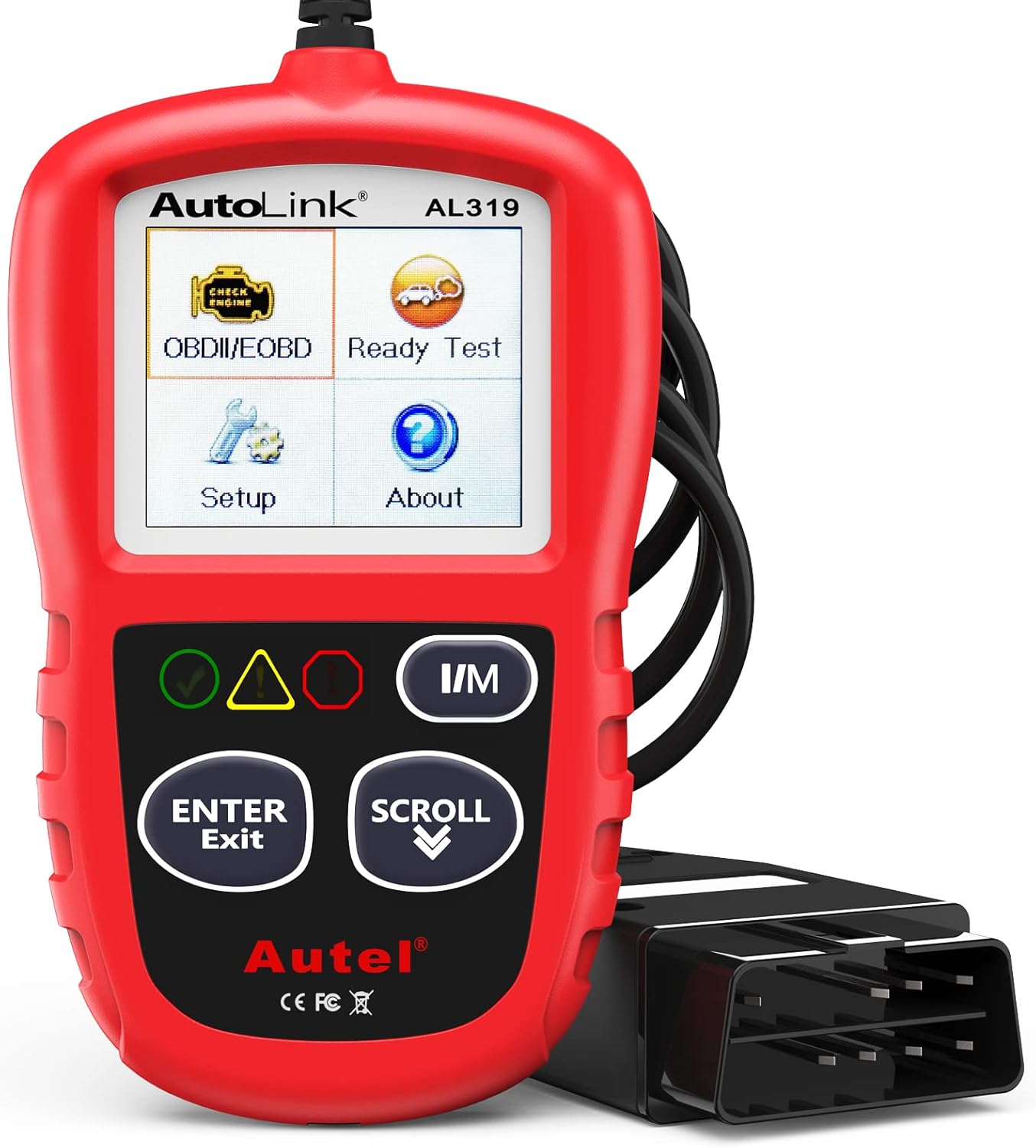
Autel AL319

If you want a simple tool to keep in your glove box, the Autel AL319 is a dependable quick-check option. It is especially useful when a check-engine light appears and you want the code, freeze-frame details, and readiness status without using your phone.
Who should buy this: Focus owners who want a compact, simple, name-brand reader for quick engine-code checks.
Who should avoid this: Anyone expecting advanced module access, service resets, or bidirectional controls.
What People Say
You’ll hear owners say it’s straightforward to use, dependable in the glove box, and great for getting a quick read on a check-engine light without needing a phone or paid service.
Overall Sentiment: Positive

🗣️ JTrend
I recently had a valve failure on my turbo and the car kept going into limp mode. I needed something on a road trip and this did everything I needed — no subscription, just plug in, read codes and clear them. Compact design so I keep it in the glove box.
🗣️ Nuris Grau Brull
I’ve used this scanner for three years, testing cars and checking live data. It communicates with every vehicle I’ve tried, is very durable (even survived being submerged in rainwater) and still works like new. Extremely reliable and tough.
Versatility
Use it for engine-code checks, quick live data, freeze-frame review, and one-click I/M readiness before an inspection.
Speed & Response Time
Scans and displays codes quickly, which makes it a good tool when you want fast answers rather than deep diagnostic menus.
Key Benefits
- Simple plug-and-play operation
- Reads and clears engine DTCs
- Shows live data, freeze frame, and I/M readiness
- Compact, durable glove-box design
- Useful across many post-1996 OBDII vehicles
Check Product Details on Amazon
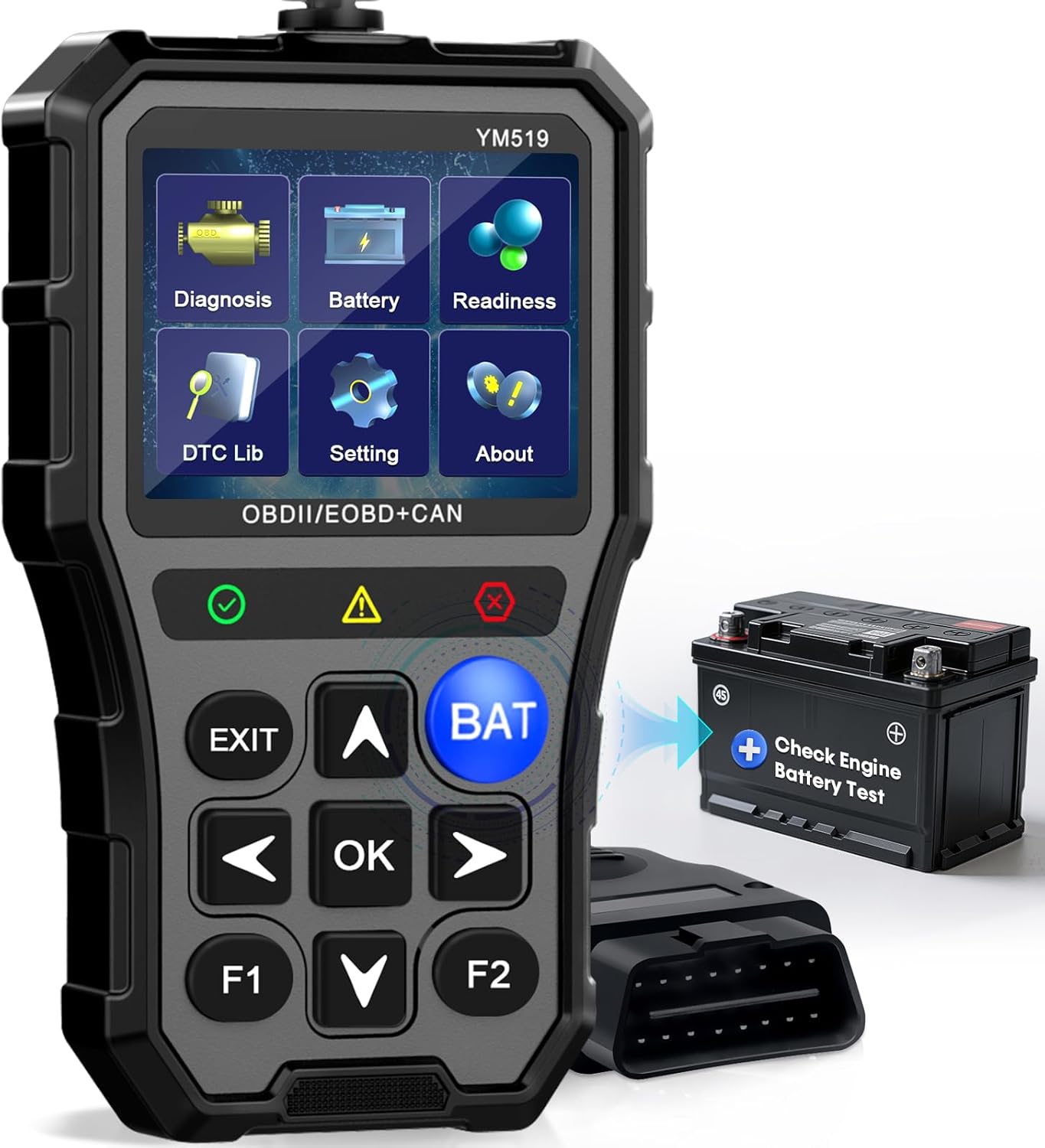
AMTIFO OBD2 Scanner

You plug this straight into the OBD port and get a color screen that walks you through engine codes, live-data graphs, emissions readiness, and battery checks. That makes it helpful if your Focus has starting issues, weak-battery symptoms, or occasional check-engine lights.
Who should buy this: Owners who want one compact tool for basic diagnostics plus battery health and voltage checks.
Who should avoid this: Anyone who needs a true full-system Ford scanner for ABS, SRS, EPB, immobilizer, or module coding.
What People Say
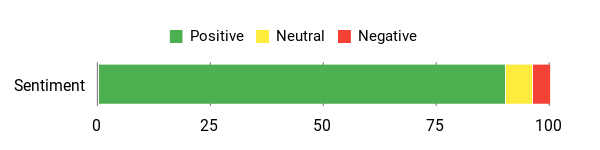
Users say it’s easy to use, reliably finds simple faults, and the battery test is handy for avoiding surprises on the road.
Overall Sentiment: Positive
🗣️ 8Ball
My wife’s new car threw a check-engine light and we couldn’t get to the dealer. I plugged this in, read the single code, and found a loose gas cap — saved us a trip and the wait. Easy screens and lets you clear codes once fixed.
🗣️ June Park
Very simple and easy to use, gives the important info you need including the battery test. No need for professional help and customer service was helpful—made routine checks painless.
Versatility
Use it for quick pre-drive checks, battery voltage checks, check-engine codes, live data, and emissions readiness before inspection.
Speed & Response Time
Scans and displays trouble codes quickly, while the color screen helps make basic data easier to read.
Key Benefits
- Combines OBDII code reading with battery health checks
- Reads and clears check-engine codes
- Displays live data with graph-style views
- Checks emissions readiness before inspections
- Compact design for glove-box storage
Check Product Details on Amazon
FOXWELL NT301 OBD2 Scanner

You plug the NT301 into your Focus’s OBD2 port and get fast, readable check-engine codes, live sensor graphs, and readiness checks. It is a good choice if you want stronger live-data viewing than very basic readers.
Who should buy this: DIYers who want clear engine live data, graphing, readiness checks, and printable data for troubleshooting.
Who should avoid this: Buyers who need ABS, SRS, EPB, special resets, or bidirectional functions. This is a basic OBD2 reader, not a full professional scan tool.
What People Say
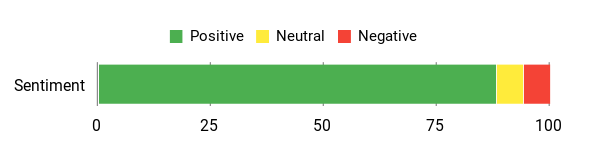
You’ll find owners praise how easy it is to use, plug in, read codes, and clear them after repairs. Many DIYers say it saved time and trips to the shop; techs respect the live data and accurate codes.
Common gripes are the screen can be tougher to read in direct sun, it lacks some extra tests like battery load testing, and it doesn’t include a bank of OBD adapters for non-standard plugs.
Overall Sentiment: Positive
Versatility
You can use this on most OBD2-equipped cars, light trucks, and many 12V diesels for routine engine diagnostics and emissions readiness. It does not handle ABS or SRS systems, and coverage can vary by vehicle.
Speed & Response Time
Reads codes and shows live data quickly, with live-data graphing that helps you watch sensor behavior while revving or driving.
Key Benefits
- Fast check-engine code reading with helpful DTC explanations
- Live sensor data with simple graph views
- I/M readiness key for smog-test prep
- Powered from the vehicle, so no batteries are needed
- USB data export for reports or deeper logging
Check Product Details on Amazon
WEJOWE OBD2 Scanner

You plug this WEJOWE into your Focus’s OBD2 port and get check-engine codes, live data, I/M readiness, VIN retrieval, and battery voltage without a subscription. It is a useful compact scanner if you want more OBDII-level information than the most basic readers provide.
Who should buy this: Owners who want Mode 6, Mode 8, live data, battery voltage, and report export in a handheld tool.
Who should avoid this: Anyone who needs guaranteed access to Ford-specific body, ABS, SRS, or service modules.
What People Say
You’ll see owners praising how it works right out of the box, reads and clears codes quickly, and avoids subscription traps. Users like the live data logging and the large DTC library.
Common downsides mentioned are occasional compatibility issues with specific older or non-standard vehicles, and a few reports where the scanner wouldn’t connect to certain models.
Overall Sentiment: Positive
🗣️ KirksBadBrain
Lots of functionality, works on car voltage, easy to use — indispensable if you work on your own car. Does NOT require WiFi or a subscription; works right out of the box and gave everything needed on a 2014 Ford Escape.
🗣️ JEREMY A
Arrived quickly, diagnosed and reset codes very fast. Connected easily to the 16-pin OBD II connector and was simple to use — great to keep in the car for quick checks.
Versatility
Designed for most OBDII vehicles, it handles routine engine diagnostics, readiness checks, live data, battery voltage, and VIN retrieval. Older or unusual models may need extra compatibility checks.
Speed & Response Time
Code reads and clears happen quickly, and live data updates are useful for watching sensor changes while revving or test driving.
Key Benefits
- Large built-in DTC library for code explanations
- Read and clear codes with no WiFi or subscription required
- Live data stream and battery voltage checks
- I/M readiness, VIN retrieval, Mode 6, and Mode 8 support
- PC export and storage bag for practical use
Check Product Details on Amazon
FAQ
Which OBD2 Scanner Is Best For My Ford Focus?
Choose based on the job you need to do. If you only need to read and clear check-engine codes, a basic scanner such as the MOTOPOWER MP69033, Autel MS309, Autel AL319, or VDIAGTOOL VD10 can work well. If you want better live data, look at the SHRINLUCK Y2, FOXWELL NT301, or WEJOWE. If you want broader system diagnostics on supported vehicles, the KONNWEI KW470 or Innova SD35 are stronger options.
Always check the scanner’s compatibility notes for your exact Ford Focus model year, engine, and region. A scanner may support standard OBDII engine codes but still not support ABS, SRS, TPMS, battery registration, EPB, or other special functions on your car.
What Is The Difference Between A Basic OBD2 Reader And A Full-System Scanner?
A basic OBD2 reader usually focuses on engine and emissions data: check-engine codes, freeze frame, live data, VIN, and I/M readiness. A full-system scanner may also access modules such as ABS, SRS, transmission, TPMS, parking brake, or body systems, but only when the tool and vehicle both support those functions.
How Do I Use An OBD2 Scanner Safely And Effectively On My Ford Focus?
Start by locating the OBD2 port, usually under the dashboard. Plug in the scanner, follow the device prompts, and use the ignition position recommended by the tool. Read and save the codes before clearing anything. Freeze-frame data can show what was happening when the fault appeared, so take a photo or write it down before erasing codes.
Do not clear codes just to turn off the light. If the issue remains, the light can come back, and you may lose useful diagnostic information. After repairs, clear the codes and complete a drive cycle so readiness monitors can run again.
Can These Scanners Reset ABS, Airbag, Or TPMS Lights On A Ford Focus?
Some scanners in this list are basic OBDII readers and are not meant for ABS, airbag, or TPMS work. For those systems, choose a tool that specifically lists ABS, SRS, TPMS, or full-system Ford coverage for your exact model year. Even then, support can vary, so confirm compatibility before buying.
What Are Common Mistakes When Buying An OBD2 Scanner?
The biggest mistake is buying a scanner based only on price or star ratings. A cheap reader may be fine for check-engine codes, but it may not access the system you need. Another common mistake is assuming every “professional” scanner can do dealer-level programming. Most consumer scanners cannot do deep coding, module programming, or advanced calibration.
Also check practical details such as cable length, screen size, update method, app requirements, subscription terms, language support, and warranty.
Focus Owners Picks
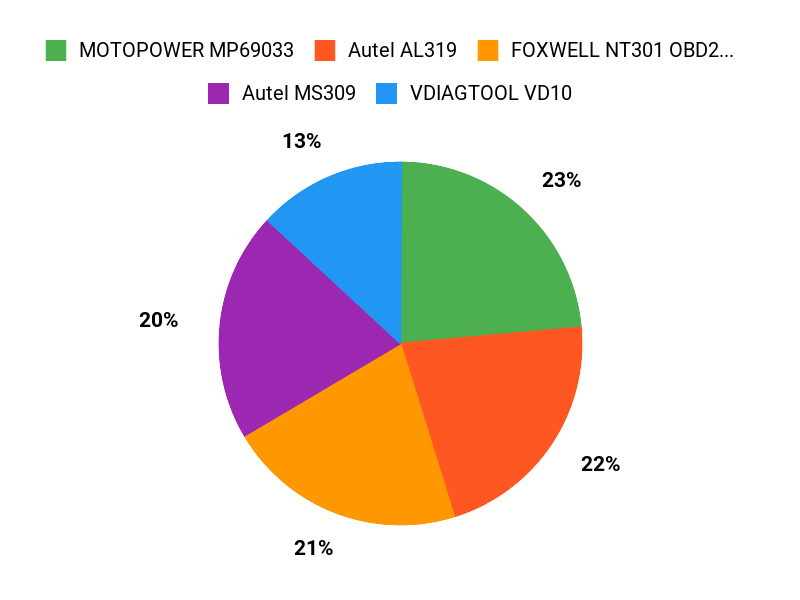
You’ll usually prioritize Ford Focus compatibility, ease of use, and the diagnostic functions you need. If you want Ford-focused features, start with the KONNWEI KW470. If you want a simple and affordable code reader, the MOTOPOWER MP69033 is the budget-friendly choice. If you want stronger live data, consider the FOXWELL NT301 or SHRINLUCK Y2. If you want broader system coverage on supported vehicles, the Innova SD35 is the deeper option.
Wrapping Up
By choosing the right scanner, you give yourself more control over maintenance and reduce unnecessary guesswork. If you want the most Ford-focused option in this list, the KONNWEI KW470 is the best starting point. If you want a low-cost basic reader, the MOTOPOWER MP69033, Autel MS309, Autel AL319, or VDIAGTOOL VD10 can handle everyday check-engine tasks.
If you care most about live data, the FOXWELL NT301, SHRINLUCK Y2, and WEJOWE scanners are stronger choices. If you want broader diagnostics on supported vehicles, the Innova SD35 is the more capable pick. Match the scanner to your exact Focus, confirm compatibility, and choose the tool that fits the kind of troubleshooting you actually plan to do.
| Product | Image | Best For | Dimensions (L x W x H) | Special Highlights |
|---|---|---|---|---|
| KONNWEI OBD2 Scanner |
 |
Ford-focused DIY diagnostics | 3.94 x 1.38 x 7.83 inches |
|
| Y2 OBD2 Scanner |
 |
Color-screen live data | 1.2 x 6.7 x 3.4 inches |
|
| MOTOPOWER MP69033 Scanner |
 |
Budget engine-code checks | 2.75 x 0.91 x 6.02 inches |
|
| VDIAGTOOL VD10 OBD2 Scanner |
 |
Beginner-friendly scanning | 9.8 x 6.69 x 1.58 inches |
|
| Autel MS309 OBD2 Scanner |
 |
Emissions readiness | 2.74 x 0.8 x 4.34 inches |
|
| Innova SD35 OBD2 Scanner |
 |
Deeper diagnostics | 10.43 x 7.36 x 2.24 inches |
|
| Autel AL319 Professional OBD2 Scanner |
 |
Quick glove-box checks | 4.61 x 2.83 x 0.71 inches |
|
| AMTIFO OBD2 Scanner with Battery Tester |
 |
Battery checks plus engine codes | 9.9 x 5.2 x 1.4 inches |
|
| FOXWELL NT301 OBD2 Scanner |
 |
Live engine data | 8.66 x 3.15 x 6.69 inches |
|
| WEJOWE OBD2 Scanner |
 |
Advanced OBDII functions | 7.87 x 5.2 x 1.69 inches |
|
This roundup is reader-supported. When you click through links we may earn a referral commission on qualifying purchases.

