Disclosure: As an Amazon Associate, we earn from qualifying purchases. If you click a link on this page and make a purchase, we may receive a small commission at no extra cost to you.
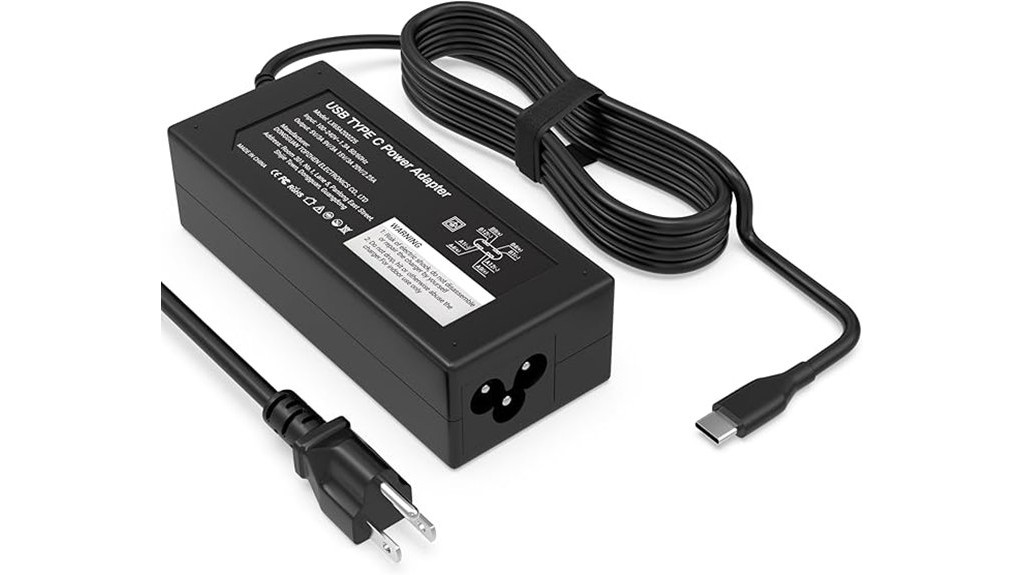
A USB-C laptop charger is easy to overlook until your original adapter is lost, damaged, or too short for your desk setup. This 45W USB-C Laptop Charger is built for USB-C laptops, including compatible HP Chromebook models, and offers multiple power delivery outputs for everyday charging. Its main strengths are the 45W output, 100-240V input range, 6-foot Type-C power cord, and basic protection features. The main limitation is simple: it is not the right pick for laptops that require more than 45W, so you should check your device’s charging requirement before buying.
Quick Verdict
Rating: Recommended with caveats
Best For: USB-C laptop and HP Chromebook users who need a 45W replacement or backup charger.
Bottom Line: This charger makes sense if your laptop supports USB-C charging and needs up to 45W. Skip it if your device needs a higher-wattage adapter or a non-USB-C connector.
| Specification | Detail |
|---|---|
| Product Type | USB-C laptop power adapter |
| Connector Type | USB Type-C |
| Wattage | 45W |
| Power Delivery Output | 5V-3A, 9V-3A, 15V-3A, 20V-2.25A |
| Input Voltage | 100-240V, 50-60Hz |
| Cord Length | 6-foot Type-C power cord |
| Compatibility | USB-C laptops, including compatible HP Chromebook models |
| Safety Features | Over-voltage protection and short-circuit protection |
| Best Use | Replacement, travel, desk, school, or backup charging for compatible USB-C laptops |
Overview
The 45W USB-C Power Adapter is a replacement-style charger for USB-C laptops that support power delivery charging. It is especially useful if you need a spare charger for a desk, backpack, dorm room, office, or travel bag. The 45-watt output gives it enough power for many lightweight USB-C laptops and Chromebooks, but it is not meant for every laptop.
The charger supports several voltage outputs: 5V-3A, 9V-3A, 15V-3A, and 20V-2.25A. That output range helps it adjust to compatible devices instead of using one fixed voltage. It also supports a 100-240V input range, which makes it suitable for international voltage standards when paired with the correct plug adapter for your destination.
The included 6-foot Type-C power cord is one of its more practical details. A longer cord gives you more room to work from a couch, bed, desk, or airport seat without sitting right beside the wall outlet. For everyday laptop use, that small convenience can matter as much as the wattage.
Before You Buy: Check your laptop’s required wattage and connector type before ordering. This charger is for USB-C laptops that can charge at up to 45W, so it may not work well for higher-powered laptops that need 60W, 65W, 90W, or more.
Who Should Buy It?
Best For
- HP Chromebook users whose model supports USB-C charging and 45W power input.
- Students or remote workers who need a backup charger for school, office, or travel.
- Buyers who want a USB-C charger with a 6-foot cord for more flexible placement.
Skip If
- Your laptop requires more than 45W for normal charging.
- Your device uses a barrel connector, magnetic connector, or another non-USB-C charging port.
- You need a charger from your laptop’s original manufacturer only.
Detailed Features
45W USB-C Charging Performance
The main feature is its 45W power delivery output. For many Chromebooks and lighter USB-C laptops, that is enough for normal daily charging. It can help you keep a laptop powered during schoolwork, browsing, email, streaming, or basic office tasks.
The charger supports 5V, 9V, 15V, and 20V output levels, which gives it more flexibility than a basic fixed-output adapter. That matters because USB-C devices do not all request power the same way. A compatible laptop, tablet, or phone can draw the supported level it needs within the charger’s output range.
Compatibility With USB-C Laptops
This adapter is made for USB-C laptops, including specific HP Chromebook models. The key word is compatible. Your laptop must support charging through USB-C, and its required wattage should match the charger’s 45W limit.
This is also why it can be useful as a shared household charger for some USB-C devices. You may be able to use it with phones or other USB-C electronics, but the device must be designed to accept USB-C charging within the supported output range. Always check the device label or manufacturer guidance before relying on one charger for everything.
Universal Input for Travel
The 100-240V, 50-60Hz input range is helpful if you travel between regions with different voltage standards. You may still need a physical plug adapter depending on the outlet shape in that country. The charger’s voltage support reduces the need to carry separate voltage-specific laptop adapters.
6-Foot Type-C Power Cord
The included 6-foot cord improves daily usability. Short cords can force you to sit near the outlet, especially in classrooms, hotel rooms, offices, or shared spaces. A 6-foot cord gives you more freedom to place your laptop where you actually want to work.
Built-In Protection Features
The charger includes over-voltage protection and short-circuit protection. These features are meant to reduce risk during normal charging. They do not remove the need for proper use, but they add a useful safety layer for a device that may be plugged in often.
Pro Tip: Before you buy, check the wattage printed on your old laptop charger. If the original adapter says 45W or less and uses USB-C, this charger is more likely to be a suitable match.
How It Performs in Real Use
For Daily Laptop Charging
For a compatible USB-C Chromebook or lightweight laptop, this charger should cover normal daily charging needs. It is a practical fit for browsing, writing, online classes, video calls, and basic productivity. If your laptop is under heavy load, charging speed may depend on how much power the device is using at the same time.
For School or Office Use
The 6-foot cord makes it easier to use at a desk, classroom table, or shared workspace. You can keep one charger in your bag and another at your desk, which helps avoid unplugging your main setup every day. This is especially useful if your original charger is still working but you want a backup.
For Travel Use
The universal input range helps when you travel internationally. You should still bring the right outlet adapter for the country you visit. The 45W output and USB-C design also make it easier to pack than carrying several device-specific chargers, as long as your devices are compatible.
For Emergency Backup Use
This charger can be a smart backup if your original charger is misplaced or damaged. It is not a guaranteed replacement for every laptop, but it can keep a compatible USB-C device usable when you need power quickly. For families with several USB-C laptops or Chromebooks, a spare charger can reduce daily charging conflicts.
Compatibility and Safety
Compatibility is the most important buying factor. The charger must match your device’s connector type and power requirement. A USB-C port does not always mean a laptop supports charging through that port, so you should confirm the model’s charging specification before purchase.
The 45W output is best for devices designed around lower-power USB-C charging. Larger laptops, gaming laptops, and workstation-style devices often need more wattage. Using an underpowered charger may lead to slow charging, charging only while sleeping, or no charging at all.
For safety, use the charger with properly rated outlets and avoid damaged cords, loose wall sockets, or wet areas. Do not cover the charger during use, and unplug it if you notice overheating, unusual odor, visible damage, or inconsistent charging. Follow your laptop manufacturer’s guidance when replacing a power adapter.
Setup Tips Before First Use
Start by checking the power rating on your old adapter or your laptop’s manual. Look for wattage, voltage, and connector details. If the original adapter is 45W and uses USB-C, this charger is more likely to fit your needs.
Plug the adapter into the wall first, then connect the USB-C end to your laptop. Watch for the charging icon or battery indicator. If the laptop does not show charging after a short moment, disconnect it and confirm the model compatibility before continuing.
When using it for phones or smaller USB-C devices, avoid assuming faster is always better. The device should control how much power it draws, but you should still use chargers that match the device maker’s charging guidance.
Pros and Cons
Pros
- 45W output is suitable for many compatible USB-C laptops and Chromebooks.
- Multiple voltage outputs support a wider range of USB-C charging needs.
- 100-240V input range is useful for travel with the right plug adapter.
- 6-foot Type-C cord gives you more reach than many short charging cables.
- Over-voltage and short-circuit protection add a useful safety layer.
Cons
- Not suitable for laptops that need more than 45W.
- You must confirm USB-C charging support before buying.
- May not replace an original manufacturer charger for every device.
Is It Worth the Price?
This charger is worth considering if you need a simple 45W USB-C replacement or backup charger. Its value comes from the combination of USB-C power delivery, multiple voltage outputs, global input support, and a 6-foot cord. For many Chromebook and lightweight laptop users, those details make it a smart buy for everyday use.
It is not the best fit if you need higher power. A laptop that requires 65W or more may charge too slowly or fail to charge properly with a 45W adapter. The best value is for buyers who already know their laptop works with 45W USB-C charging.
How It Compares to Alternatives
Compared with a basic low-watt phone charger, this 45W USB-C adapter is better suited for compatible laptops because it supports higher power delivery outputs. Compared with a 65W USB-C charger, it is less powerful but may be enough for many Chromebooks and lighter laptops.
If you want one charger for a more demanding laptop, a higher-watt USB-C adapter may be better. If you only need a practical replacement for a compatible HP Chromebook or similar USB-C laptop, this 45W charger keeps the setup simple.
Concluding Thoughts
The 45W USB-C Power Adapter brings together the main things many users need in a replacement charger: USB-C connectivity, 45W output, a 6-foot cord, and support for 100-240V input. It is best used with compatible laptops that do not require more than 45W.
| Attribute | Description |
|---|---|
| Connector Type | USB Type-C |
| Wattage | 45W |
| Output Range | 5V to 20V |
| Safety Features | Over Voltage, Short Circuit |
| Compatibility | USB-C laptops, including compatible HP models |
This adapter stands out by combining everyday charging convenience with basic safety features. The biggest buying check is compatibility. If your device matches the 45W USB-C requirement, it can be a useful charger for home, school, work, or travel.
Related Guides
Frequently Asked Questions
Is the charger compatible with non-HP laptops?
Yes, it can work with non-HP laptops if the laptop supports USB-C charging and matches the charger’s 45W power range. Check your laptop’s required wattage and charging-port type before buying.
Does the charger support international voltage ranges?
Yes. It supports 100-240V, 50-60Hz input, which makes it suitable for different voltage standards. You may still need a physical plug adapter for the outlet shape in another country.
Can this charger be used for other USB-C devices like phones?
It can charge other USB-C devices that support compatible charging within its output range. For phones, tablets, and smaller electronics, follow the device maker’s charging guidance.
Is 45W enough for every USB-C laptop?
No. Many lightweight laptops and Chromebooks can use 45W, but larger laptops may need 60W, 65W, 90W, or more. If your laptop needs more power, choose a charger that matches the original adapter’s rating.
How long does it take to fully charge a laptop?
Charging time depends on the laptop’s battery size, current battery level, and power use during charging. For a compatible USB-C laptop, the article’s original estimate is around two hours, but real results can vary.
What should you check before buying this charger?
Check your laptop’s charging port, required wattage, and supported voltage or power delivery requirements. The safest approach is to compare this charger’s 45W rating with the rating printed on your original charger.
Is a warranty included with the charger purchase?
The original article states that a warranty is included with the purchase. Warranty terms can vary by seller, so check the product page details before ordering.
The Bottom Line
The 45W USB-C Laptop Charger is a practical pick if you need a replacement or backup charger for a compatible USB-C laptop or HP Chromebook. Its strongest points are the 45W output, 6-foot cord, universal input range, and built-in protection features. Skip it if your laptop needs more than 45W or does not support USB-C charging.
