
You spend hours at the keyboard, so choosing the right wireless mechanical keyboard can affect typing comfort, gaming responsiveness, desk space and daily productivity. This roundup compares four distinct options for portable typing, premium low-profile gaming, enthusiast customization and compact full-layout use.
Use the connectivity, switch, layout, battery and software guidance below to find the model that best matches how you work and play. Availability and product configurations can change, so confirm the current listing details before ordering.
Affiliate disclosure: This roundup is reader-supported. When you purchase through qualifying links, we may earn a referral commission at no additional cost to you.
Top Picks
|
Category |
Product |
Why It Stands Out |
|---|---|---|
|
🎯 Best For Portable Typing |
Ultra-slim 84-key design with low-profile tactile switches |
|
|
💼 Best Premium Low-Profile Pick |
Premium materials, tri-mode connectivity and extensive key control |
|
|
🔧 Best For Deep Customization |
Adjustable magnetic switches, QMK Launcher and full-metal construction |
|
|
🚀 Best For Full-Layout Gaming |
Compact 96% layout with a number pad and low-latency wireless |
Quick Decision Guide
- Choose the Keychron K3 if portability, a laptop-like profile and tactile typing feel matter most.
- Choose the Logitech G915 X TKL if you want premium low-profile construction, polished media controls and long battery options.
- Choose the Keychron Q1 HE if you want adjustable actuation, rapid-trigger features and extensive key customization.
- Choose the ASUS ROG Strix Scope II 96 Wireless if you need a number pad without the width of a conventional full-size keyboard.
How We Chose
We compared the linked models by layout efficiency, wireless and wired connectivity, switch technology, material quality, battery specifications, operating-system support, programmability and ease of daily use. We also considered whether each keyboard solves a distinct buyer problem rather than duplicating another recommendation.
Special attention went to Bluetooth convenience for multi-device typing, 2.4 GHz responsiveness for gaming, USB-C wired operation, low-profile comfort, hot-swap limitations and the software required for remapping, macros or lighting changes.
Before You Buy
- Choose the layout first: A 75% board is compact, TKL removes the number pad, and a 96% layout retains most full-size functions in less space.
- Check the exact switch variant: Linear, tactile and clicky switches feel different, and an Amazon listing may offer more than one configuration.
- Confirm hot-swap compatibility: A hot-swappable board may still accept only a specific switch family.
- Match the connection to your use: Bluetooth favors device switching, while 2.4 GHz or wired USB-C is generally preferable for latency-sensitive gaming.
- Read battery claims carefully: RGB brightness, connection mode, sleep settings and daily usage can substantially affect runtime.
Detailed Reviews
The K3 is designed for people who like a laptop-style typing height but still want the feedback of mechanical switches. Its slim 75% layout keeps arrow keys and a function row without taking up the space of a full-size board.
Bluetooth pairing makes it convenient for switching among compatible computers and mobile devices, while USB-C provides a dependable wired option. The linked Brown-switch version offers tactile feedback, although buyers who prefer a completely smooth keypress may favor a linear-switch configuration.
Best for: Writers, students, remote workers and travelers who prioritize a lightweight, low-profile keyboard.
Consider another option if: You need low-latency 2.4 GHz wireless, extensive QMK programming or a number pad.
Common Buyer Feedback
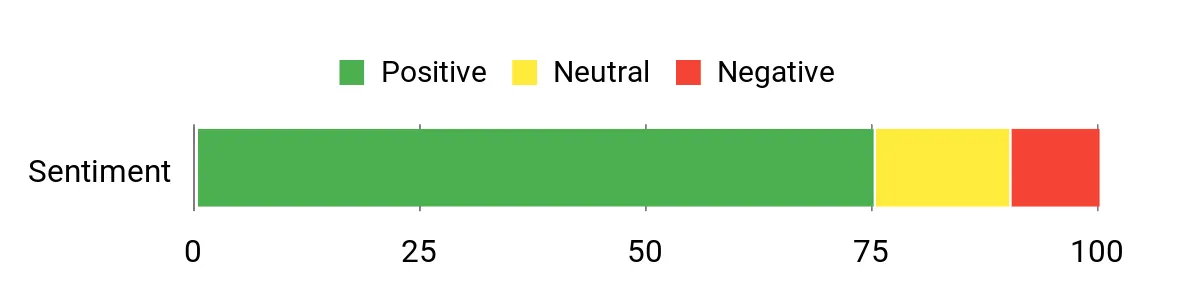
Recurring feedback commonly highlights the slim footprint, familiar Mac and Windows support and comfortable low-profile keys. Battery life and Bluetooth behavior can vary with lighting, connected devices and individual setups, so the published maximum should not be treated as guaranteed everyday runtime.
Overall review theme: Positive, with portability and typing comfort as the main strengths.
Versatility
This is a natural pick for a laptop, tablet or compact home-office setup. Its light weight and slim dimensions make it easier to transport than the heavier metal and gaming-focused keyboards in this comparison.
Key Benefits
- Ultra-slim 84-key layout for compact desks and travel
- Low-profile tactile switches provide noticeable typing feedback
- Bluetooth 5.1 and USB-C wired connectivity
- White backlighting keeps legends visible without elaborate RGB
- Mac and Windows keycaps are included with the supported configuration
Check Current Amazon Availability
The G915 X LIGHTSPEED TKL combines a thin tenkeyless layout with dedicated media controls and three connection methods. Its brushed aluminum top plate and double-shot PBT keycaps give it a more refined construction than many lightweight plastic gaming boards.
The linked GL Red switches are low-profile linear switches intended for smooth, rapid keypresses. Logitech’s KEYCONTROL system can assign multiple functions to individual keys, while LIGHTSYNC RGB and other settings are managed through G HUB.
Best for: Gamers and desk-focused users who want a premium low-profile keyboard with dedicated media controls.
Consider another option if: You prefer standard-height switches, extensive physical switch swapping or a less software-dependent setup.
Common Buyer Feedback
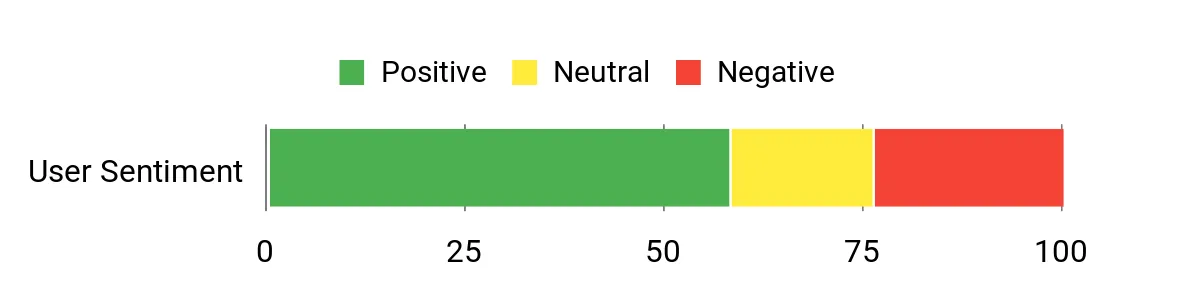
Common feedback favors the slim construction, media controls, wireless stability and low-profile key feel. The main hesitation is usually value: this is a premium-positioned keyboard, and some buyers may not need its materials, RGB system or extensive software features.
Overall review theme: Mixed to positive, with build quality praised more consistently than value.
Versatility
This board works well for gaming, streaming and focused desk work. Its TKL layout saves horizontal space, although it is more appropriate for a permanent workstation than frequent travel.
Key Benefits
- Low-latency LIGHTSPEED wireless, Bluetooth and USB-C wired data mode
- Low-profile GL Red linear switches with short actuation travel
- Double-shot PBT keycaps and a brushed aluminum top plate
- KEYCONTROL supports multiple programmable functions per key
- Rechargeable battery with substantially longer runtime when RGB brightness is reduced
Check Current Amazon Availability
The Q1 HE is the most specialized keyboard in this comparison. Its magnetic Hall effect switches allow adjustable actuation, rapid-trigger behavior and multiple actions based on key travel, giving gamers and power users much more control than a conventional fixed-actuation mechanical switch.
The aluminum case gives it a substantial desktop feel, while 2.4 GHz, Bluetooth 5.2 and USB-C cover gaming, multi-device and wired use. Keymaps, lighting and magnetic-switch behavior can be configured through Keychron’s browser-based Launcher.
Compatibility note: Hot-swappable does not mean universal in this case. The Q1 HE supports compatible Gateron double-rail magnetic switches rather than ordinary MX mechanical switches or every Hall effect switch.
Best for: Competitive players, programmers and enthusiasts who will use its adjustable actuation and remapping features.
Consider another option if: You want a lightweight travel board, a simple plug-and-play experience or broad compatibility with conventional mechanical switches.
Common Buyer Feedback
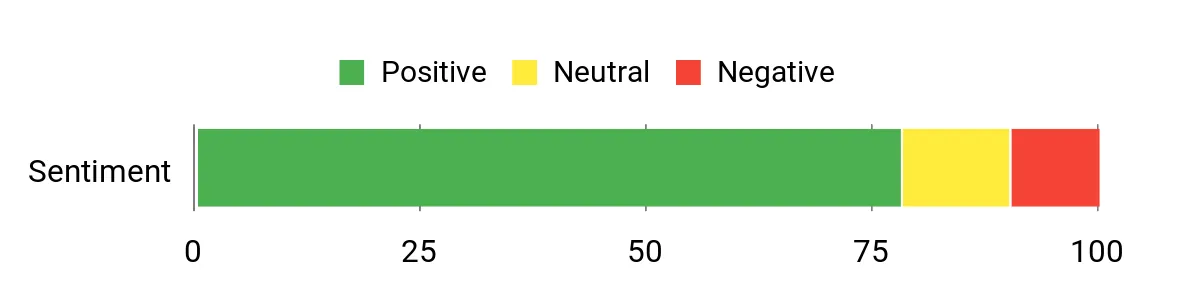
Recurring feedback emphasizes the heavy metal construction, smooth magnetic switches and depth of customization. The most common reservations involve the keyboard’s weight, premium positioning and the learning curve associated with actuation, rapid-trigger and advanced key settings.
Overall review theme: Positive among enthusiasts, but potentially excessive for buyers who only need basic wireless typing.
Versatility
The Q1 HE handles gaming, programming and everyday typing well, but its weight and specialized switches make it a desktop keyboard rather than a practical travel companion.
Key Benefits
- Adjustable-actuation magnetic switches and rapid-trigger functionality
- 2.4 GHz, Bluetooth 5.2 and USB-C connectivity
- Browser-based QMK Launcher for keymaps, macros and switch settings
- Full-metal construction with an 82-key 75% layout
- Hot-swappable support for compatible Gateron double-rail magnetic switches
Check Current Amazon Availability
The ROG Strix Scope II 96 Wireless compresses nearly all the functions of a full-size keyboard, including a number pad, into a footprint only slightly wider than many TKL boards. It is the strongest fit here for buyers who use spreadsheet shortcuts or numeric entry but still want more mouse room.
ROG SpeedNova provides the latency-focused 2.4 GHz connection, while Bluetooth and wired USB offer alternatives for secondary devices and charging. Pre-lubed stabilizers, sound-dampening material and hot-swappable NX Snow switches are intended to improve feel and acoustics without requiring immediate modifications.
Best for: Gamers and productivity users who want compact full-size functionality, a wrist rest and flexible connectivity.
Consider another option if: You want the lightest travel keyboard, an open-source customization platform or a simple board without gaming software.
Common Buyer Feedback
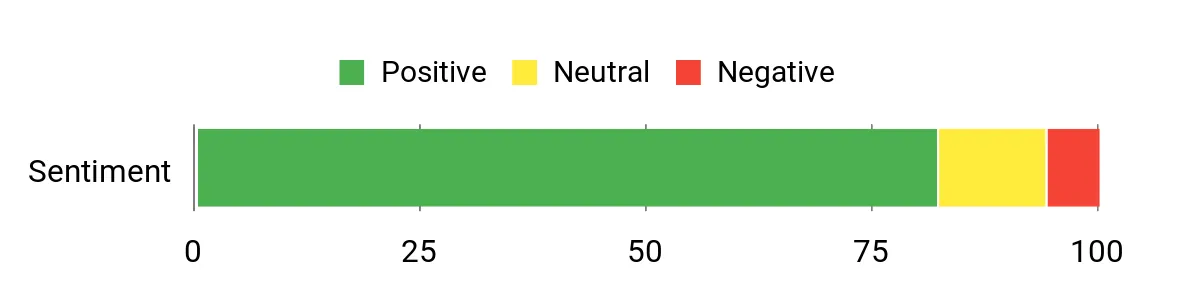
Common feedback favors the compact full-layout design, smooth linear switches, wireless responsiveness and typing acoustics. The primary reservation is usually the software experience, which may feel heavier than browser-based or onboard-only customization systems.
Overall review theme: Positive, particularly for buyers who need both gaming performance and a number pad.
Versatility
This board works well for gaming, office tasks and content creation where number-key access remains important. Its wrist rest and nearly full key set make it better suited to a primary desk than a mobile setup.
Key Benefits
- 96% layout retains a number pad and most full-size functions
- ROG SpeedNova 2.4 GHz, Bluetooth and wired USB connectivity
- Hot-swappable, pre-lubed ROG NX Snow linear switches
- PBT keycaps, sound dampening and pre-lubed stabilizers
- Multi-function controls, three tilt positions and a detachable wrist rest
Check Current Amazon Availability
FAQ
Which Wireless Connection Is Best For Gaming Or Typing?
For latency-sensitive gaming, a dedicated 2.4 GHz receiver is generally the better wireless choice. Bluetooth is convenient for pairing with laptops, phones and tablets, but it can have more latency and may behave differently across devices. Wired USB-C remains the most dependable option for uninterrupted use, firmware updates and charging.
How Do I Choose The Right Switch Type?
Linear switches move smoothly without a tactile bump, tactile switches add a noticeable feedback point, and clicky switches combine tactile feedback with an audible click. Noise depends on the complete keyboard construction as well as the switch, so a linear switch is not automatically silent.
Low-profile switches reduce overall keyboard height and key travel. Standard-height switches usually provide deeper travel and a wider selection of replacement options.
Do All Hot-Swappable Keyboards Accept The Same Switches?
No. Conventional hot-swap sockets may support certain three-pin or five-pin mechanical switches, while Hall effect keyboards require compatible magnetic switches and sensors. The Keychron Q1 HE, for example, is designed for supported Gateron double-rail magnetic switches rather than ordinary MX switches or every magnetic-switch design.
Which Keyboard Layout Should I Choose?
A 75% layout keeps the function row and arrow keys in a compact format. TKL removes the number pad for more mouse space. A 96% keyboard retains a number pad and most full-size functions but compresses the spacing. Choose according to the keys you use every day rather than selecting the smallest layout automatically.
How Should I Compare Battery-Life Claims?
Check whether the stated figure assumes maximum RGB brightness, reduced lighting or lighting turned off. Connection type, sleep settings, polling rate and daily usage can also affect runtime. Manufacturer figures are useful for comparison, but actual results will vary.
What Should I Know About Software And Customization?
Some keyboards use desktop applications for lighting, macros and remapping, while others use browser-based tools or QMK-compatible firmware. Desktop software may integrate more closely with a gaming ecosystem, whereas browser-based tools can reduce the need for a permanent background application.
Before buying, confirm that the required software supports your operating system and that the functions you need are available in your preferred wired or wireless mode.
Wrapping Up
These four wireless mechanical keyboards address different priorities rather than offering one universal answer. The ASUS ROG Strix Scope II 96 Wireless is the most practical choice for low-latency gaming with a number pad, while the Keychron Q1 HE offers the deepest magnetic-switch and actuation customization.
The Keychron K3 Version 2 is the easiest model to carry and favors compact, low-profile typing. The Logitech G915 X LIGHTSPEED TKL suits buyers who want premium construction, polished media controls and a thin gaming-focused design.
Choose the layout and switch feel first, then compare connectivity, software and battery conditions. Confirm the exact switch configuration and current Amazon availability before completing a purchase.
| Product Name | Image | Connectivity | Battery / Power | Switch Type | Unique Highlights |
|---|---|---|---|---|---|
| Keychron K3 Version 2 |
 |
Bluetooth 5.1, USB-C wired | Up to 34 hours with low backlighting or 70 hours with lighting off | Keychron Brown, low-profile tactile |
|
| Logitech G915 X LIGHTSPEED TKL |
 |
2.4 GHz LIGHTSPEED, Bluetooth, USB-C wired | Up to 42 hours at 100% RGB; longer with reduced or disabled lighting | GL Red low-profile linear |
|
| Keychron Q1 HE |
 |
2.4 GHz, Bluetooth 5.2, USB-C wired | 4,000 mAh rechargeable battery; runtime varies with use | Gateron double-rail magnetic linear |
|
| ASUS ROG Strix Scope II 96 Wireless |
 |
ROG SpeedNova 2.4 GHz, Bluetooth, wired USB | Up to 1,500 hours under qualifying manufacturer test conditions | ROG NX Snow linear |
|
This roundup is reader-supported. When you click through qualifying links, we may earn a referral commission at no additional cost to you.
