
The best iPad keyboards can turn your tablet into a more practical setup for writing, study, travel, and everyday work. Compatibility matters most because cases made for similar-size iPads can use different dimensions, magnets, cameras, and connectors.
Our best overall is the Apple Magic Keyboard for iPad Air 11-inch for its Smart Connector, glass trackpad, function row, and compact cantilever design. For compatible 10.2-inch iPads, the FINTIE Backlit Keyboard Case is our value-focused pick.
We checked current product listings, manufacturer compatibility information, connection methods, trackpads, case designs, and relevant owner feedback before updating these picks.
Best iPad Keyboards Compared
| Product | Best for | Connection | Trackpad | Form factor |
|---|---|---|---|---|
|
Premium
|
Apple-style laptop experience | Smart Connector | Yes | Magnetic cantilever keyboard |
|
Premium
|
Flexible keyboard-case modes | Smart Connector | Yes | Detachable keyboard and kickstand |
|
Mid-range
|
Protection plus a trackpad | Bluetooth | Yes | Detachable keyboard case |
|
Mid-range
|
Shared multi-device desks | Bluetooth for iPad | No | Standalone keyboard with cradle |
|
Budget
|
Budget typing and case protection | Bluetooth | No | Detachable keyboard and TPU case |
Best iPad Keyboards: Our Top Picks
Best iPad Keyboards Reviewed
1. Apple Magic Keyboard for iPad Air 11-inch

Bottom line: The Apple Magic Keyboard for iPad Air 11-inch is the strongest pick for compatible iPad Air owners who want laptop-style typing, precise cursor control, and no separate keyboard charging.
- Compatibility: iPad Air 11-inch M2, M3, M4; Air 4th/5th gen.
- Connection: Smart Connector, so pairing and keyboard charging are unnecessary.
- Trackpad: Yes, a glass trackpad supports iPadOS gestures.
- Form factor: Magnetic cantilever design with USB-C pass-through charging.
The Magic Keyboard attaches magnetically and uses the iPad’s Smart Connector for power and data. That removes the separate pairing and charging routine required by Bluetooth keyboard cases.
The floating cantilever design keeps the screen raised while letting you adjust its viewing angle. Apple also includes a 14-key function row on this iPad Air version, giving you quicker access to common controls.
The main trade-off is protection. The design covers the front and back when closed, but it does not surround the edges like a rugged shell. It also makes less sense if you frequently want the iPad lying flat for drawing while the keyboard remains attached.
- No Bluetooth pairing or separate keyboard charging
- Glass trackpad supports iPadOS gestures
- 14-key function row gives quick access to controls
- USB-C pass-through charging keeps the iPad port available
- Fit is highly model-specific
- Open-edge design provides less side protection than a shell case
- Not the most flexible setup for flat drawing
2. Logitech Combo Touch for iPad Pro 11-inch
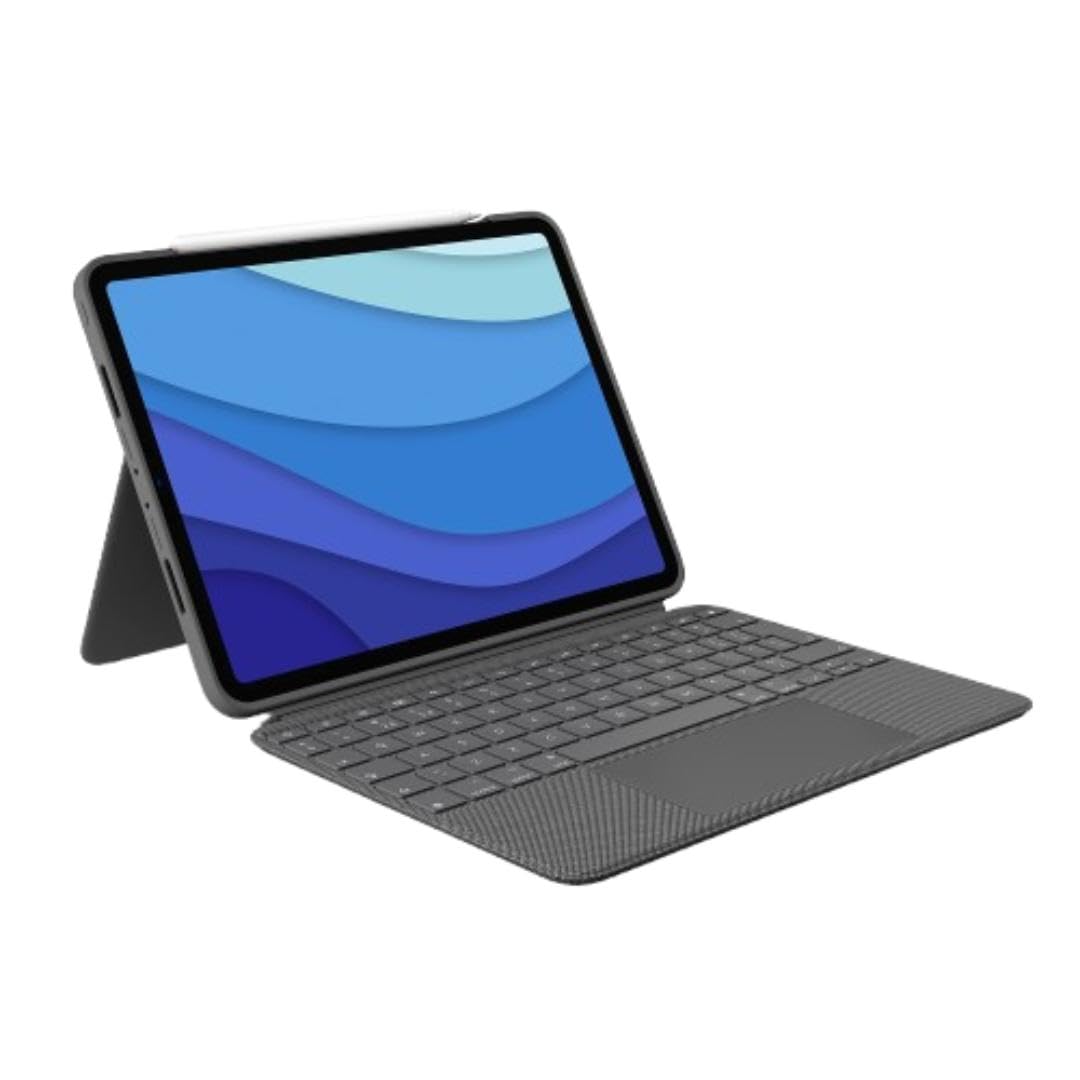
Bottom line: The Logitech Combo Touch for iPad Pro 11-inch is ideal when you want a trackpad keyboard without giving up easy sketching, reading, and viewing modes.
- Compatibility: iPad Pro 11-inch 1st, 2nd, 3rd, and 4th gen.
- Connection: Smart Connector, with no keyboard pairing or charging.
- Trackpad: Yes, click-anywhere trackpad with Multi-Touch gesture support.
- Form factor: Detachable backlit keyboard, protective case, and adjustable kickstand.
The keyboard pulls away from the case when you want to sketch, read, or use the iPad as a tablet. The rear kickstand stays with the protective shell and provides a wide range of viewing positions.
Logitech uses the Smart Connector, so the keyboard receives power through the iPad. Its backlit keys and shortcut row also make it better suited to long typing sessions than a basic Bluetooth folio.
The trade-off is space. A kickstand setup extends farther behind the iPad than a cantilever keyboard, which matters on a shallow desk, airplane tray, or your lap.
- Keyboard detaches without removing the protective case
- Smart Connector removes separate charging and pairing
- Click-anywhere trackpad supports iPadOS gestures
- Backlit keys and shortcut row aid everyday productivity
- Kickstand needs more surface depth
- Case and keyboard add noticeable bulk
- Some owners report long-term wear around case edges
3. ZAGG Pro Keys with Trackpad for iPad 10.2-inch

Bottom line: The linked ZAGG Pro Keys with Trackpad for iPad 10.2-inch combines a detachable keyboard, Bluetooth trackpad, backlighting, and protective shell for 7th-, 8th-, and 9th-generation iPads.
- Compatibility: iPad 10.2-inch 7th, 8th, and 9th generation.
- Connection: Bluetooth, so the keyboard requires its own battery.
- Trackpad: Yes, an integrated Bluetooth trackpad supports iPadOS control.
- Form factor: Detachable keyboard case with stand and backlit keys.
This is an important correction from the earlier version of the article: the linked ASIN is the Pro Keys with Trackpad, not the trackpad-free Pro Keys model.
The protective case remains on the iPad when the keyboard is removed, which suits students and travelers who often switch between typing and handheld use. ZAGG also includes multiple backlight colors and storage for a compatible stylus.
Unlike the Smart Connector models above, the keyboard communicates over Bluetooth. That gives it more flexibility but adds a separate battery and pairing step.
- Integrated trackpad adds cursor and gesture control
- Keyboard detaches for tablet-only use
- Backlit keys offer several color settings
- Protective case remains around the iPad
- Can pair with more than one device
- Bluetooth keyboard needs separate charging
- Only fits older 10.2-inch iPads
- Protective design is bulkier than a thin folio
4. Logitech K780 Multi-Device Wireless Keyboard

Bottom line: The Logitech K780 Multi-Device Wireless Keyboard makes the most sense when your iPad shares a desk with a computer and phone.
- Compatibility: Bluetooth-capable iPads plus supported computers and phones.
- Connection: Bluetooth for iPad; USB receiver supported on compatible computers.
- Trackpad: No, so pointer control stays on the iPad screen.
- Form factor: Standalone keyboard with number pad and integrated device cradle.
The K780 can stay on your desk while you move between several screens. Easy-Switch controls let you change among up to three paired devices without keeping a separate keyboard beside each one.
Its full-size layout includes a number pad, making it useful for spreadsheets, forms, email, and other desk-based work. The integrated cradle can support a tablet or phone at a practical viewing angle.
This is not an iPad case. It provides no protection when you leave the desk, and it lacks the trackpad found on the Magic Keyboard, Combo Touch, and linked ZAGG model.
- Switches among up to three paired devices
- Full-size layout includes a number pad
- Integrated cradle holds a tablet or phone
- Works without putting the iPad in a dedicated case
- No trackpad
- Provides no iPad protection
- Less portable than a fitted keyboard case
5. FINTIE Backlit Keyboard Case for iPad 10.2-inch
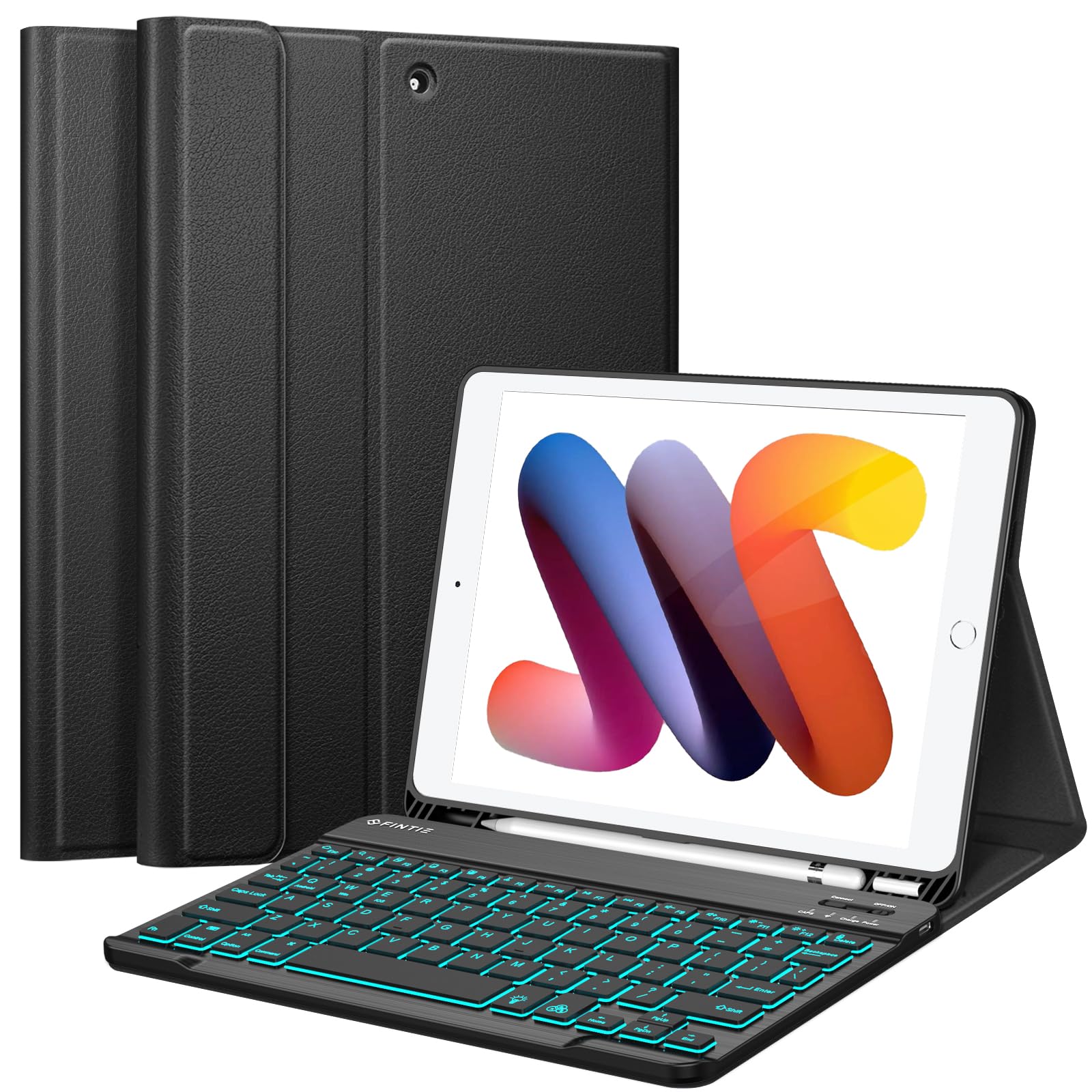
Bottom line: The FINTIE Backlit Keyboard Case for iPad 10.2-inch gives compatible older iPads a detachable keyboard, backlighting, stand, and basic case protection without moving into premium keyboard-case territory.
- Compatibility: iPad 10.2-inch 7th, 8th, and 9th generation.
- Connection: Bluetooth, with separate keyboard charging required.
- Trackpad: No, so navigation remains on the touchscreen.
- Form factor: Detachable backlit keyboard with soft TPU protective case.
The keyboard attaches magnetically to the case and can be removed when you want to read, draw, or hold the iPad without the extra typing surface. Seven-color backlighting also helps you see the keys in dim rooms.
The TPU back cover adds everyday scratch and bump protection, while the stand supports several viewing positions. FINTIE also provides storage for a compatible stylus.
The compromise is simpler hardware. You do not get a trackpad or Smart Connector, and the Bluetooth keyboard needs its own charge.
- Detachable keyboard supports tablet-only use
- Seven-color backlighting helps in dim rooms
- TPU case adds everyday protection
- Multiple viewing positions increase flexibility
- Built-in stylus storage keeps a compatible pen nearby
- No trackpad
- Bluetooth keyboard needs charging and pairing
- Only fits 7th-, 8th-, and 9th-generation 10.2-inch iPads
Detailed Compatibility Reference
| Product Name | Image | Compatibility | Connection | Trackpad | Amazon Link |
|---|---|---|---|---|---|
| Apple Magic Keyboard for iPad Air 11-inch |
|
iPad Air 11-inch M2, M3, M4; iPad Air 4th and 5th generation | Smart Connector | Yes | Check Price on Amazon |
| Logitech Combo Touch for iPad Pro 11-inch |
|
iPad Pro 11-inch 1st, 2nd, 3rd, and 4th generation | Smart Connector | Yes | Check Price on Amazon |
| ZAGG Pro Keys with Trackpad for iPad 10.2-inch |
|
iPad 10.2-inch 7th, 8th, and 9th generation | Bluetooth | Yes | Check Price on Amazon |
| Logitech K780 Multi-Device Wireless Keyboard |
|
Bluetooth-capable iPads plus supported computers and phones | Bluetooth for iPad | No | Check Price on Amazon |
| FINTIE Backlit Keyboard Case for iPad 10.2-inch |
|
iPad 10.2-inch 7th, 8th, and 9th generation | Bluetooth | No | Check Price on Amazon |
Apple Magic Keyboard for iPad Air vs FINTIE Backlit Keyboard Case: Is the Upgrade Worth It?
These products fit different iPad families, so they are not interchangeable upgrades for the same tablet. The useful comparison is what each design gives you once you have confirmed compatibility.
- Connection: The Apple Magic Keyboard uses the Smart Connector; FINTIE uses Bluetooth and needs separate charging.
- Pointer control: Apple includes a glass trackpad; the FINTIE case has no trackpad.
- Design: Apple uses a compact cantilever hinge, while FINTIE uses a detachable keyboard and protective TPU case.
- Backlighting: FINTIE includes seven-color key backlighting; Apple’s iPad Air model focuses on its function row and trackpad.
Which iPad Keyboard Should You Buy?
- Best all-around setup for a compatible iPad Air: get the Apple Magic Keyboard for iPad Air 11-inch.
- Want more tablet flexibility on an older 11-inch iPad Pro: get the Logitech Combo Touch.
- Want protection and a trackpad on a 10.2-inch iPad: get the ZAGG Pro Keys with Trackpad.
- Use several devices at one desk: get the Logitech K780.
- Want a budget keyboard case for a 7th-, 8th-, or 9th-generation iPad: get the FINTIE Backlit Keyboard Case.
How We Chose
- Compatibility: We checked model and generation support against current manufacturer information and linked product listings.
- Typing and control: We compared connection type, trackpad support, keyboard layout, backlighting, and shortcut access.
- Case design: We considered detachable keyboards, kickstands, cantilever hinges, tablet protection, and desk-space requirements.
- Ownership: We reviewed current manufacturer documentation, product listings, relevant owner-feedback trends across independent sources, and available safety information.
- No invented testing: This guide does not claim hands-on testing of every keyboard listed.
How to Choose the Best iPad Keyboard
Check Your Exact iPad Model First
Open Settings > General > About and check the model name and model number. This matters more than screen size alone. Two iPads can have similar screen measurements but different body dimensions, cameras, magnets, or Smart Connector positions. Fitted cases should always be checked against your exact generation.
Smart Connector or Bluetooth?
Smart Connector keyboards use the iPad for both power and communication, so you do not need to pair or charge the keyboard separately. The Apple Magic Keyboard and Logitech Combo Touch use this approach. Bluetooth is more flexible across devices but needs its own power.
Decide Whether You Need a Trackpad
A trackpad is useful if you work in documents, spreadsheets, email, browsers, or apps where precise cursor control saves repeated touchscreen taps. The Apple Magic Keyboard, Logitech Combo Touch, and linked ZAGG Pro Keys include trackpads. The Logitech K780 and FINTIE keyboard case rely on the iPad touchscreen.
Think About Protection
A keyboard does not automatically mean full case protection. The Logitech Combo Touch, ZAGG, and FINTIE designs keep the tablet inside a surrounding case. Apple’s Magic Keyboard covers the front and back when closed but leaves more of the iPad edges exposed. The K780 provides no tablet protection because it is a standalone desk keyboard.
Consider Desk and Lap Use
Cantilever designs use less rearward desk space and usually feel more contained on a lap. Kickstand cases need room behind the tablet but give you more freedom to remove the keyboard and change viewing angles. If you mostly work at a fixed desk, a standalone model such as the Logitech K780 can also make sense.
Backlighting and Power
Backlighting helps when you type in dim rooms, but Bluetooth backlighting can use additional battery power. The Logitech Combo Touch has adjustable backlit keys, while the FINTIE and ZAGG models provide colored backlighting. A Smart Connector keyboard removes the need to manage a separate keyboard battery.
Mistakes to Avoid When Buying an iPad Keyboard
- Buying by screen size alone: verify the iPad generation and model number before ordering.
- Assuming every Pro Keys model has the same features: ZAGG sells different configurations, so check whether the listing includes a trackpad.
- Ignoring desk depth: kickstand cases need more space behind the iPad than cantilever designs.
- Forgetting keyboard power: Bluetooth keyboards need batteries or charging; Smart Connector keyboards do not.
- Expecting a keyboard to protect the tablet: standalone keyboards and open-edge designs provide different levels of coverage.
FAQs
How Do I Choose the Right Keyboard for My iPad?
Start with exact compatibility, then decide whether you want an attached keyboard case or a standalone keyboard. Compare Smart Connector and Bluetooth options, trackpad support, protection, backlighting, portability, and the amount of desk space each design needs. Your iPad generation and model number should be confirmed before any fitted case is ordered.
Will Any Bluetooth Keyboard Work With My iPad?
Many standard Bluetooth keyboards can work with a Bluetooth-capable iPad, but fitted keyboard cases are different. The case itself must match the exact iPad dimensions, camera layout, buttons, and other physical features. Always check the keyboard maker’s compatibility list even when two iPads have similar screen-size names.
Is a Smart Connector Keyboard Better Than Bluetooth?
A Smart Connector keyboard is usually more convenient because it receives power and data through the iPad, avoiding separate pairing and charging. Bluetooth is more flexible because one keyboard may work with several devices. The better choice depends on whether you value an integrated iPad setup or wider device compatibility.
Do All iPad Keyboards Include a Trackpad?
No. The Apple Magic Keyboard, Logitech Combo Touch, and linked ZAGG Pro Keys with Trackpad in this guide include trackpads. The Logitech K780 and FINTIE keyboard case do not. A trackpad is helpful for cursor control and iPadOS gestures, but every compatible keyboard can still be used with the iPad touchscreen.
Can I Use an iPad Pro Keyboard Case on an iPad Air With the Same Screen Size?
Do not assume it will fit. Similar screen-size labels do not guarantee matching dimensions, camera openings, magnets, speaker positions, or Smart Connector placement. Check the accessory manufacturer’s exact compatibility list and your iPad model number before buying a fitted keyboard case, even when the two tablets appear physically similar.
How Should I Maintain an iPad Keyboard Case?
Keep connectors and charging ports clean and dry, and remove loose debris before attaching the iPad. Charge Bluetooth keyboards before travel and follow the manufacturer’s cleaning guidance for fabric, plastic, or metal surfaces. Check kickstands, hinges, magnets, and removable keyboard attachments periodically so dirt or damage does not affect normal use.
Final Verdict
Among these best iPad keyboards, the Apple Magic Keyboard is our best overall choice for compatible iPad Air users because it combines Smart Connector power, a glass trackpad, a function row, and a compact cantilever design.
For an older 10.2-inch iPad, consider the value-focused FINTIE Backlit Keyboard Case. For a compatible iPad Pro and more flexible tablet modes, consider the premium Logitech Combo Touch.
