
You want a Chromebook that stays responsive, secure, and easy to manage for classes, remote work, research, documents, and video calls. The best choice depends on whether you value a large screen, a premium display, a flexible 2-in-1 design, or maximum portability.
This guide compares four relevant Chromebooks for work and study, with clear notes on performance, internal storage, bundled memory cards, portability, and limitations so you can choose the right configuration with fewer surprises.
Affiliate disclosure: This roundup is reader-supported. When you click an affiliate link, we may earn a commission from qualifying purchases at no additional cost to you.
Quick Verdict
Best overall for productivity: Lenovo Flex 5i. Best large-screen value: Acer Chromebook Plus 515. Best display: Samsung Galaxy Chromebook Plus. Best portable 2-in-1: Lenovo Duet 11.
Top Picks
|
Category |
Product |
Why It Stands Out |
|---|---|---|
|
🏆 Best Overall |
Fast 14-inch convertible for study and work |
|
|
🖥️ Best Large Screen |
Roomy display and strong everyday performance |
|
|
🎨 Best Display |
Premium AMOLED screen in a thin clamshell |
|
|
💼 Best Portable 2-in-1 |
Detachable tablet design for travel and notes |
How We Picked These Chromebooks
We focused on the needs that matter most for school and browser-based work: responsive multitasking, keyboard and webcam quality, display comfort, battery practicality, portability, ports, and storage. We also separated built-in storage from bundled SD-card capacity, because removable storage is useful for files but does not perform exactly like internal storage.
Each pick solves a different problem. The Flex 5i prioritizes balanced productivity, the Acer provides more screen space, the Samsung emphasizes display quality and portability, and the Duet is designed for lightweight tablet-first use.
Before You Buy
- Choose 8GB RAM for heavier tab use. A 4GB model can handle light browsing and documents, but it has less headroom for multitasking.
- Check internal storage separately. Some marketplace bundles advertise a combined total that includes a removable SD card.
- Confirm the exact screen configuration. Touch support can vary by model number, and the Samsung Galaxy Chromebook Plus is a non-touch clamshell rather than a convertible.
- Verify your critical apps. Chromebooks are strongest with web apps, Google Workspace, Android apps, and supported Linux tools; Windows-only desktop programs generally require an alternative or remote access.
- Check the Auto Update Expiration date. Use the exact model number before purchasing, especially when comparing older, refurbished, or marketplace configurations.
The Lenovo Flex 5i is the strongest all-rounder in this group. Its 14-inch 1920 x 1200 touchscreen offers enough room for split-screen documents without becoming as bulky as a typical 15.6-inch laptop. The Core i3 processor and 8GB of memory are a practical match for browser-heavy schoolwork, remote work, and everyday multitasking.
The 360-degree hinge adds useful tablet, tent, and presentation modes, while the backlit keyboard and FHD webcam support late study sessions and video meetings. The advertised 256GB total includes a 128GB SD card, so buyers should understand that only 128GB is built-in eMMC storage.
Why You’ll Like It
It solves the common compromise between portability and workspace. You get a comfortable keyboard and productive screen size, plus touch and convertible modes when you need to read, present, or annotate.
Who Should Buy This
Choose it if you regularly keep multiple tabs open, work in Google Workspace, attend video calls, or want a flexible machine that can move between desk work and tablet-style use.
Who Should Avoid This
Skip it if you want the lightest possible tablet or if you need native Windows or macOS software. It is also worth choosing a different configuration if you specifically need more than 128GB of built-in storage.
Buyer Feedback
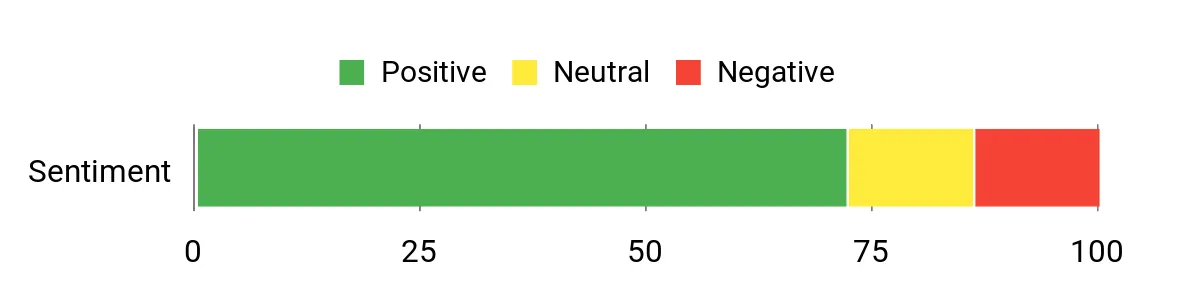
Feedback is generally favorable around the keyboard, convertible design, and everyday responsiveness. As with any marketplace configuration, read recent reviews for the exact seller bundle and check comments about hinge quality, packaging, and included accessories.
Overall Sentiment: Positive
Ease Of Use
|
Feature |
Ease Level |
|---|---|
|
Initial Setup |
Easy |
|
Typing/Keyboard |
Easy |
|
Multitasking |
Easy |
|
Portability |
Moderate |
|
Webcam/Calls |
Easy |
Key Benefits
- Convertible design supports laptop, tablet, tent, and presentation use
- Core i3 processor and 8GB RAM provide solid headroom for tabs, documents, and calls
- Backlit keyboard and FHD webcam improve everyday productivity
- Touchscreen and multiple ports make it adaptable for school, home, and remote work
Check Current Amazon Availability
The Acer Chromebook Plus 515 gives you more screen space than the other picks, making it easier to keep a document, research page, and communication app visible without constant window switching. The Core i3-1215U and 8GB of memory are well suited to everyday ChromeOS multitasking, while 128GB of UFS storage covers common offline files and apps.
Its 1080p webcam and built-in video-call tools are useful for remote classes and meetings. The larger chassis is less convenient in a small bag than a 14-inch or detachable model, and touch support can vary by configuration, so confirm the exact model before ordering.
Why You’ll Like It
It solves the cramped-screen problem. The 15.6-inch Full HD panel gives spreadsheets, side-by-side documents, and long research sessions more breathing room.
Who Should Buy This
Choose it if the laptop will spend most of its time on a desk, you regularly multitask in browser windows, or you prefer a full-size workspace over tablet flexibility.
Who Should Avoid This
Skip it if you commute with a very small bag, want a detachable tablet, or require guaranteed touchscreen support without checking the exact configuration.
Buyer Feedback
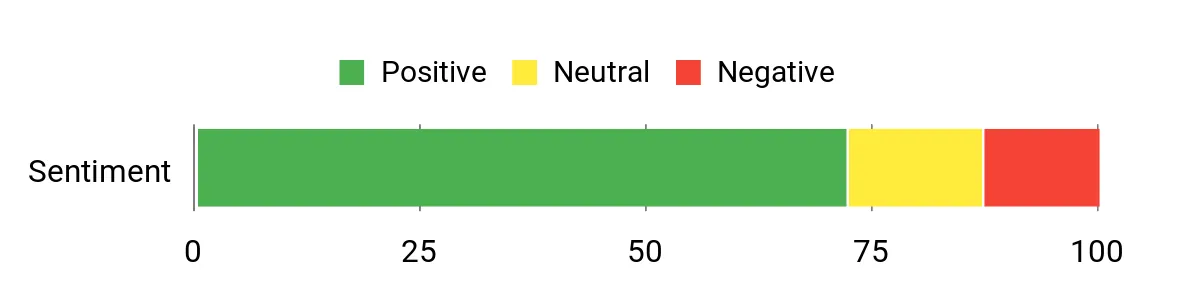
Buyers often focus on the large display, straightforward ChromeOS setup, and responsive everyday performance. Review the latest comments for the exact listing to check for configuration-specific issues such as touch support, ports, or seller fulfillment.
Overall Sentiment: Positive
Ease Of Use
|
Feature |
Ease Level |
|---|---|
|
Initial Setup |
Easy |
|
Multitasking/Tabs |
Easy |
|
Video Calls/Webcam |
Easy |
|
Touchscreen |
Configuration Dependent |
Key Benefits
- 15.6-inch Full HD screen offers more room for split-screen work
- Core i3 processor and 8GB RAM support smooth everyday multitasking
- 1080p webcam and Chromebook Plus video tools help with remote meetings
- Wi-Fi 6E and a practical port selection support desk-based productivity
Check Product Details on Amazon
The Samsung Galaxy Chromebook Plus stands out for its 15.6-inch AMOLED display, which is well suited to presentations, streaming, reading, and visual work where contrast and color quality matter. Its Intel Core 3 100U processor, 8GB of memory, and 256GB SSD provide a responsive Chromebook Plus experience for documents, browser apps, and media.
Despite the “Plus” name, this is not the older Samsung Chromebook Plus convertible line. It is a thin, traditional clamshell without a touchscreen or 360-degree hinge. That makes it a better fit for buyers who want a premium laptop-style Chromebook than for people seeking tablet or stylus use.
Why You’ll Like It
It solves the dull-display problem found on many budget Chromebooks. The AMOLED panel gives media, presentations, and everyday reading a more premium look while the chassis remains relatively easy to carry.
Who Should Buy This
Choose it if display quality, a full-size keyboard, and a slim design matter more than touch input. It is especially appealing for desk work, presentations, and entertainment.
Who Should Avoid This
Skip it if you need a touchscreen, stylus support, or tablet mode. Buyers should also ignore any listing bullet that describes this exact model as a 360-degree convertible, because that does not match the Galaxy Chromebook Plus design.
Buyer Feedback
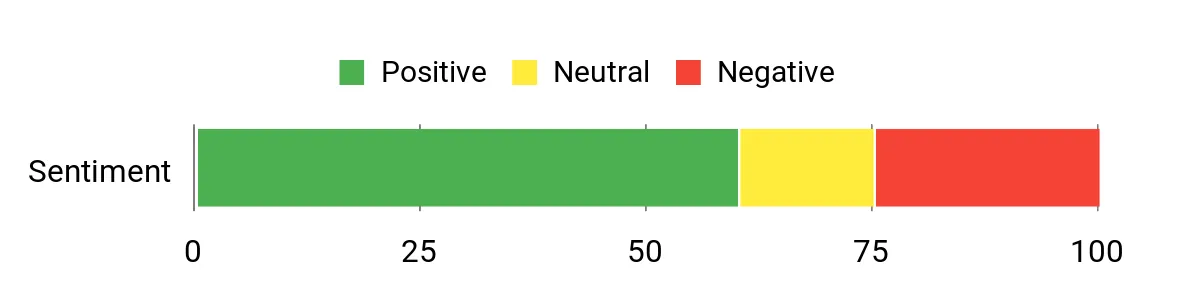
Feedback commonly emphasizes the thin design and standout display. Some buyers may find the premium screen more important than touch support, while others may prefer a convertible at this price level. Confirm that the listing title and model match the clamshell Galaxy Chromebook Plus before ordering.
Overall Sentiment: Neutral
Ease Of Use
|
Feature |
Ease Level |
|---|---|
|
Initial Setup |
Easy |
|
Portability |
Easy for a 15.6-inch Model |
|
Typing |
Easy |
|
Media/Streaming |
Very Easy |
|
Touch or Tablet Use |
Not Supported |
Key Benefits
- 15.6-inch AMOLED display offers strong contrast and rich media presentation
- Intel Core 3 processor and 8GB RAM support everyday Chromebook Plus workloads
- 256GB SSD provides more built-in storage than the other picks in this article
- Thin clamshell design and full-size keyboard suit desk work and presentations
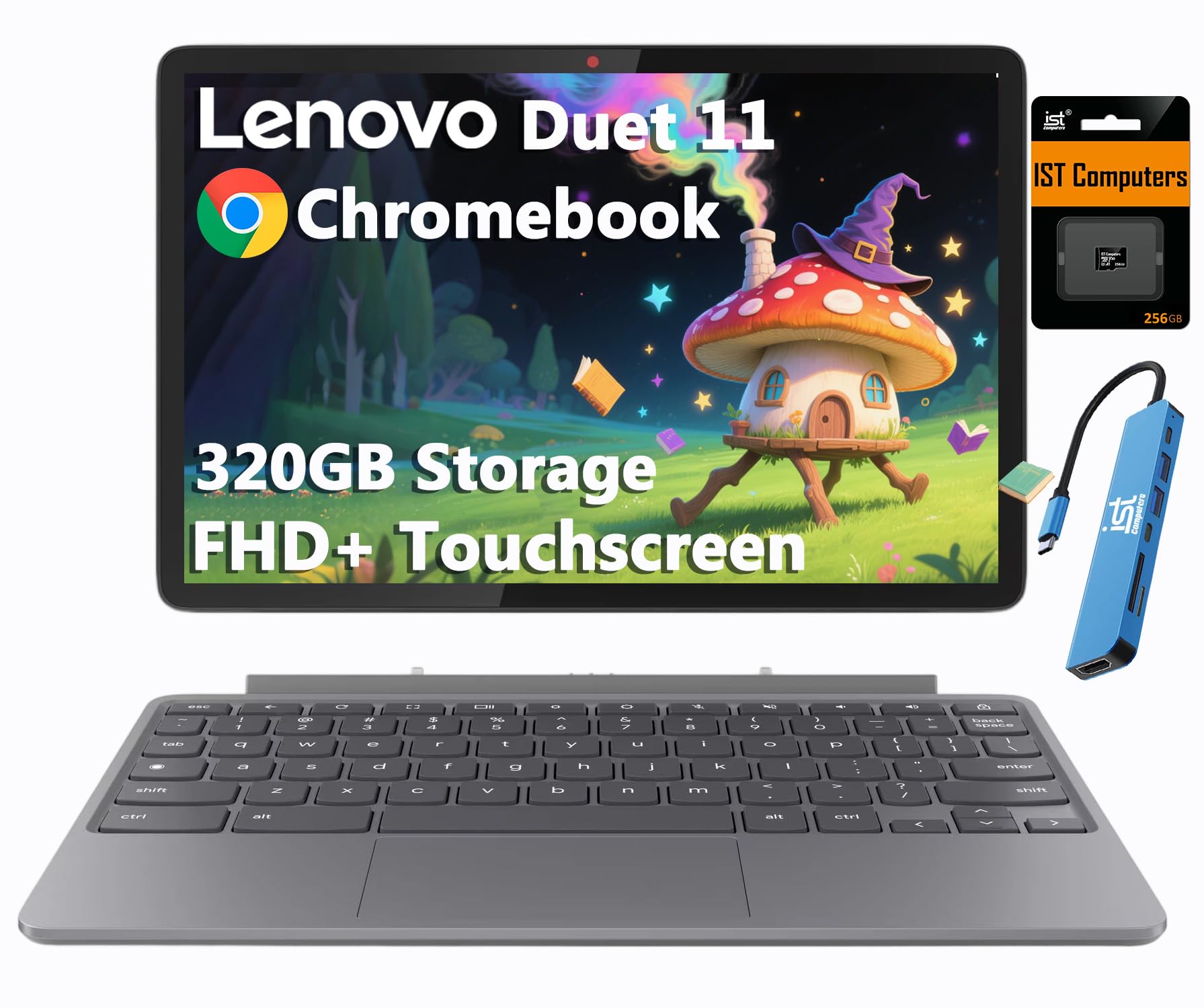
The Lenovo Duet 11 is the most portable option in the lineup. Its detachable keyboard lets it shift between a compact laptop and a tablet, while the 10.95-inch 1920 x 1200 touchscreen is a good size for reading, streaming, handwritten notes with a compatible stylus, and light document work.
The Kompanio 838 is designed for efficient everyday use, but the 4GB of RAM makes this a light-duty device rather than a heavy multitasking machine. The listing’s 320GB figure combines 64GB of internal eMMC storage with a bundled 256GB SD card; the SD card is removable file storage, not an internal 256GB drive.
Why You’ll Like It
It solves the portability problem. You can carry a tablet-sized device for reading and media, then attach the keyboard when you need to type notes, emails, or assignments.
Who Should Buy This
Choose it if you travel frequently, value tablet mode, or need a compact secondary computer for classes, meetings, and entertainment.
Who Should Avoid This
Skip it if you regularly use many tabs and apps at once, type for hours on a full-size keyboard, or need substantial built-in storage. The small screen and 4GB RAM are deliberate portability tradeoffs.
Buyer Feedback
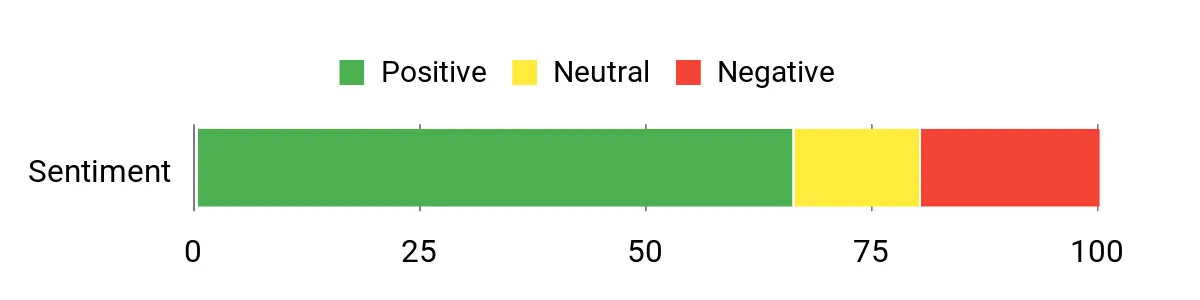
Buyers tend to value the compact design, clear touchscreen, and detachable flexibility. Pay close attention to reviews of the keyboard connection, seller-added accessories, and whether the included SD card and hub match the listing.
Overall Sentiment: Positive
Ease Of Use
|
Feature |
Ease Level |
|---|---|
|
Initial Setup |
Easy |
|
Portability |
Very Easy |
|
Detachable Keyboard |
Moderate |
|
Multitasking |
Limited |
Key Benefits
- Compact detachable design works as both a Chromebook and tablet
- Bright WUXGA touchscreen is useful for reading, notes, and streaming
- Dual USB-C ports support charging, data, and display output
- Front and rear cameras add flexibility for calls and document capture
- Bundled SD card expands file capacity, though internal storage remains 64GB
Check Product Details on Amazon
FAQ
How Long Will The Battery Last?
Battery life depends on the model, screen brightness, number of active tabs, video calls, Android apps, and connected accessories. Manufacturer estimates are useful for comparison, but real-world runtime can be lower. Reducing brightness, closing unused apps, and downloading work for offline use can help extend a charge.
Can Chromebooks Run My Apps?
Chromebooks run web apps and Google Workspace tools, and many models support Android apps and Linux development tools. Native Windows executables generally do not run directly, so check for a browser version, Android alternative, Linux equivalent, or remote-desktop option before purchasing.
Is SD Card Storage The Same As Internal Storage?
No. An SD card is removable storage that is useful for documents, media, and backups, but it is not the same as built-in eMMC, UFS, or SSD storage. When a listing advertises a combined capacity, check how much is internal and how much comes from an included memory card.
Is 4GB RAM Enough For School?
Four gigabytes can be enough for light browsing, online lessons, email, and basic documents. Choose 8GB if you often keep many tabs open, run Android apps alongside browser windows, or want more performance headroom over several years.
Which Chromebook Should I Choose For School And Work?
Choose the Lenovo Flex 5i for the best balance of performance and flexibility, the Acer Chromebook Plus 515 for a larger workspace, the Samsung Galaxy Chromebook Plus for its AMOLED display and thin clamshell design, or the Lenovo Duet 11 for maximum portability and tablet use.
Also compare keyboard size, built-in storage, touch support, port selection, and the exact model’s Auto Update Expiration date before making the final decision.
Wrapping Up
The Lenovo Flex 5i is the most balanced recommendation for buyers who need a capable Chromebook for research, documents, calls, and touch-based work. Its 14-inch convertible design offers a practical middle ground between portability and screen space.
Choose the Acer Chromebook Plus 515 when a large display matters most, the Samsung Galaxy Chromebook Plus when you want a premium AMOLED screen in a thin non-touch laptop, or the Lenovo Duet 11 when a detachable tablet design is more important than heavy multitasking.
Before ordering, verify the exact configuration, distinguish internal storage from bundled SD-card capacity, and confirm that your essential apps work on ChromeOS.
| Product Name | Image | Processor | RAM | Storage Capacity |
|---|---|---|---|---|
| Lenovo IdeaPad Flex 5i Chromebook Plus |
 |
Intel Core i3-1315U | 8GB LPDDR4x | 128GB eMMC internal + bundled 128GB SD card |
| Acer Chromebook Plus 515 Laptop |
 |
12th Gen Intel Core i3-1215U | 8GB LPDDR5X | 128GB UFS internal |
| Samsung Galaxy Chromebook Plus |
 |
Intel Core 3 100U | 8GB | 256GB SSD internal |
| Lenovo Chromebook Duet Gen 9 |
 |
MediaTek Kompanio 838 | 4GB LPDDR4X | 64GB eMMC internal + bundled 256GB SD card |
This roundup is reader-supported. When you click through affiliate links, we may earn a referral commission on qualifying purchases.
