
You want a dash cam that records reliably without making you reach for your phone on every drive. The two options below save footage locally to a microSD card, start recording automatically when powered, and protect important clips with a G-sensor. A phone can still be useful for setup or wireless clip review, but routine recording does not depend on keeping your phone connected.
Affiliate disclosure: This roundup is reader-supported. When you click through qualifying links, we may earn a referral commission at no additional cost to you.
Quick Verdict
Best overall: The 70mai M310 is the stronger choice for discreet, dependable front recording, clearer 1296p video, and well-documented microSD support. It has no built-in screen, so the app is the easiest way to adjust settings and review clips.
Best for front-and-cabin coverage: The Meiqils Dual records the road and vehicle interior, includes a 2-inch screen and a 32GB card, and is easier to use without a phone. Its specifications and long-term support are less thoroughly documented, so it is better suited to budget-conscious buyers who prioritize two-view coverage.
Top Picks
|
Category |
Product |
Best For |
|---|---|---|
|
🏆 Best Overall |
Discreet front recording |
|
|
🎯 Best Dual Cam |
Front-and-cabin coverage |
Selection Criteria
A useful phone-independent dash cam should save footage locally, begin recording automatically when the vehicle supplies power, overwrite old files through loop recording, and lock incident clips when the G-sensor detects an impact. We also considered video resolution, field of view, low-light processing, included storage, screen access, mounting, parking-mode requirements, and how clearly each seller documents the product.
“Works without a phone” in this guide means the camera can handle routine recording without an active phone connection. It does not necessarily mean that every setting or file-management task can be completed without an app, card reader, or computer.
70mai M310

You get a compact, screenless front dash cam designed to sit discreetly behind the rearview mirror. It records at 2304 × 1296p and uses WDR processing to balance bright and dark areas. Once configured and fitted with a compatible microSD card, it can record automatically, overwrite older files through loop recording, and place collision-triggered clips in a protected folder without a continuous phone connection.
The M310 is best for commuters and everyday drivers who value a tidy windshield and straightforward front-facing evidence. The tradeoff is that there is no onboard display. The 70mai app is the most convenient way to see a live view, change settings, and download clips, while removing the microSD card remains an alternative for computer-based file access.
Why You’ll Like It
- 1296p front recording provides more detail than standard 1080p video
- Compact, screenless body stays relatively unobtrusive
- Loop recording and G-sensor file locking support hands-off daily use
- Supports Class 10 microSD cards from 16GB to 256GB
Who Should Buy This
Choose the M310 if you want a small front camera that can record to local storage every time you drive and you are comfortable using an app occasionally for setup or wireless downloads.
Who Should Avoid This
Skip it if you require an onboard screen, need front-and-rear or cabin coverage, or want parking surveillance without buying and installing a separate hardwire kit.
What People Say
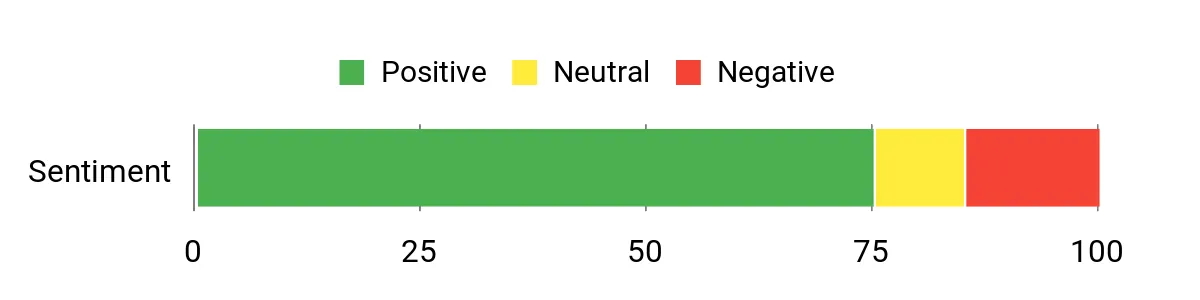
Review feedback in the source material is generally favorable toward the compact design, installation, daytime clarity, and convenient wireless downloads. Some buyers would prefer a built-in display or more advanced features. Treat the chart below as a historical review snapshot rather than a current Amazon rating.
Overall Sentiment: Positive
|
Pros |
Cons |
|---|---|
|
✅ 2304 × 1296p front recording |
❌ No onboard display |
|
✅ Small, discreet form factor |
❌ MicroSD card is sold separately |
|
✅ Built-in Wi-Fi for app-based clip review |
❌ App is the easiest route for setup and live view |
|
✅ Loop recording and G-sensor protection |
❌ Parking surveillance and time-lapse require the separately sold 70mai UP03 hardwire kit |
Ease Of Use
|
Feature |
Ease Level |
|---|---|
|
Installation |
Easy |
|
App Pairing |
Moderate |
|
Daily Recording |
Easy |
|
Reviewing Footage Without a Phone |
Moderate — remove the microSD card |
Safety and Evidence Features
The M310 combines continuous loop recording with a G-sensor that protects collision clips from routine overwriting. WDR and noise-reduction processing are intended to improve visibility in difficult lighting. Parking surveillance and time-lapse recording are optional functions that require the separately sold 70mai UP03 hardwire kit.
Before You Buy
- Add a Class 10 microSD card between 16GB and 256GB; one is not included
- Plan to use the app for the easiest initial alignment, settings changes, and downloads
- Purchase the correct hardwire kit separately if parked recording is important
- Confirm local laws before recording audio or passengers
Check Product Details on Amazon
Meiqils Dual
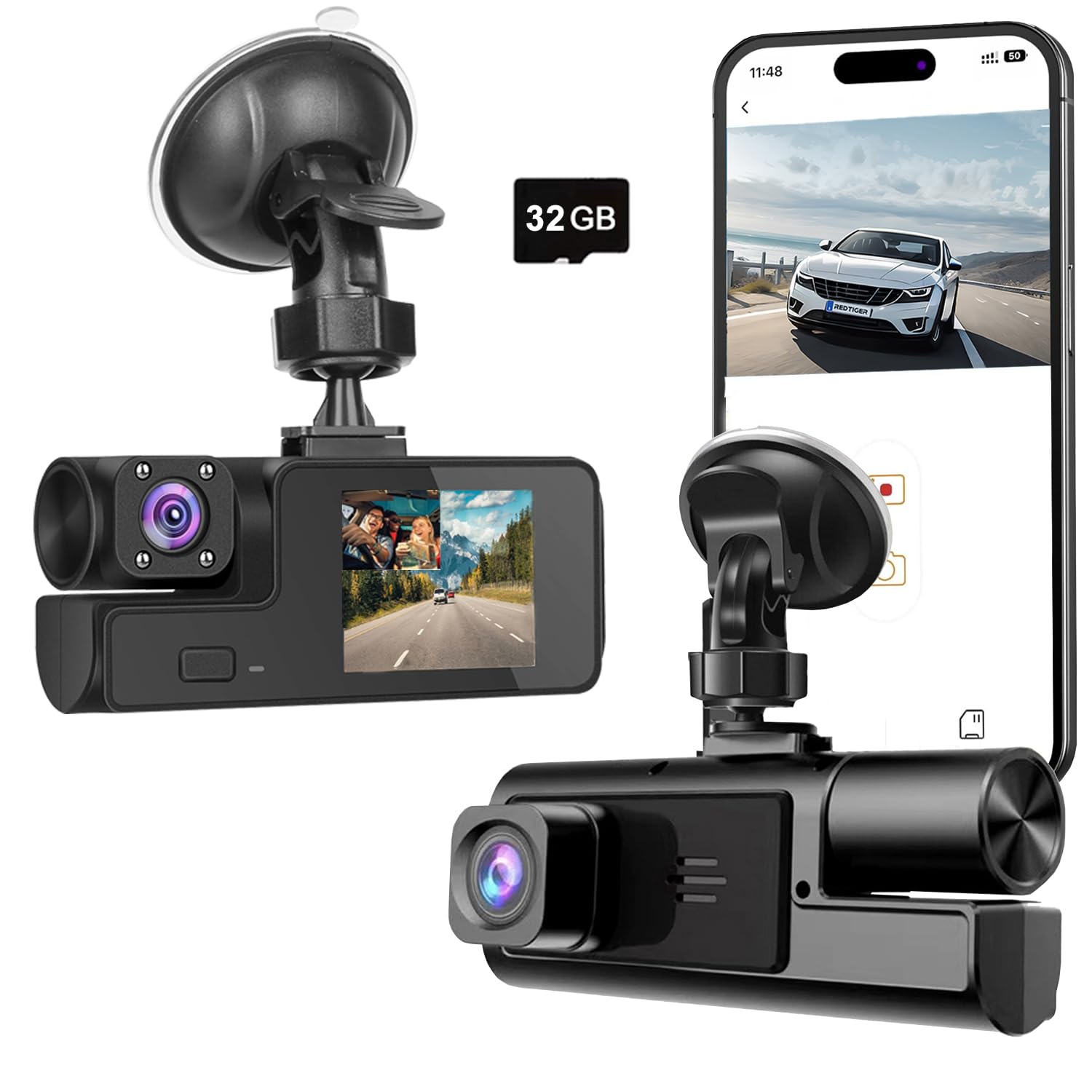
You get front-and-cabin recording in one compact unit, making this model relevant for rideshare drivers, families, instructors, and anyone who wants a record of activity inside the vehicle as well as the road ahead. The listing specifies 1080p recording, a 170° field of view, a 2-inch IPS screen, G-sensor file locking, loop recording, night vision, app access, and an included 32GB card.
The built-in display and included card make it easier to begin recording without depending on a phone. Wi-Fi and the app are optional conveniences for viewing clips on a mobile device. However, the listing does not document parking-power requirements or long-term support as clearly as the 70mai listing, so avoid treating motion detection as guaranteed around-the-clock parked protection.
Why You’ll Like It
- Records the road and vehicle interior at the same time
- Built-in 2-inch screen supports basic checks without a phone
- Includes a 32GB memory card for quicker setup
- Loop recording and G-sensor locking automate routine evidence capture
Who Should Buy This
Choose the Meiqils Dual if cabin coverage matters more than maximum front-camera detail and you prefer a built-in screen for basic operation.
Who Should Avoid This
Skip it if you need a rear-window camera, clearly documented hardwired parking surveillance, higher-resolution front footage, or a more established support ecosystem.
What People Say
The source review snapshot praises the two-camera layout and straightforward mounting, while also noting mixed feedback about video consistency, connectivity, and long-term reliability. Because review patterns change, check the most recent verified-purchase feedback before ordering.
Overall Sentiment: Neutral

|
Pros |
Cons |
|---|---|
|
✅ Simultaneous front-and-cabin recording |
❌ Cabin camera is not a rear-window camera |
|
✅ 170° listed field of view |
❌ 1080p offers less detail than the M310’s 1296p front video |
|
✅ Built-in screen and included 32GB card |
❌ Seller documentation is limited |
|
✅ App access is available but not needed for routine recording |
❌ Parking-mode power requirements are not clearly explained |
Ease Of Use
|
Feature |
Ease Level |
|---|---|
|
Installation |
Easy |
|
Dual-Camera Positioning |
Moderate |
|
Phone-Free Basic Operation |
Easy |
|
App Pairing |
Moderate |
Safety and Evidence Features
The built-in G-sensor is designed to lock clips after a sudden shake or collision, while loop recording replaces the oldest ordinary files as the card fills. Night-vision processing supports low-light recording. The seller also lists motion detection, but the product page does not clearly explain the power arrangement required for dependable recording while parked.
Before You Buy
- Confirm that you want an interior-facing second camera rather than a rear-window camera
- Check recent customer feedback for recording stability and app compatibility
- Do not rely on parked recording until you verify the required power setup with the seller
- Review local privacy and audio-recording rules before filming passengers
Check Product Details on Amazon
FAQ
Do I Need a Phone App?
You do not need to keep a phone connected for routine recording. Both cameras save video to a microSD card and use loop recording. The Meiqils model has a small screen for basic checks, while the screenless 70mai M310 relies more heavily on its app for live view, settings, and convenient downloads.
To review footage without an app, remove the memory card and open the files on a compatible computer or card reader. Always stop recording or power down the camera before removing the card.
Can These Cameras Record While Parked?
The 70mai M310 supports parking surveillance and time-lapse recording only when paired with the separately sold 70mai UP03 hardwire kit. The Meiqils listing mentions motion detection but does not clearly document its parked-recording power requirements, so confirm the setup before relying on it.
How Do I Ensure Reliable Recording?
Use a high-endurance memory card that meets the camera’s stated capacity and speed requirements, format it in the camera before use, and inspect sample recordings after installation. Recheck the mount, lens angle, power cable, date, and time after any firmware update or card replacement.
Review the card periodically because even protected folders can eventually fill. Save important incident files to a second device as soon as practical.
What Features Should I Prioritize?
Prioritize stable loop recording, G-sensor file protection, readable daytime and nighttime footage, dependable power, enough microSD capacity, and a field of view that captures adjacent lanes without excessive distortion. Decide whether you need front-only, front-and-cabin, or true front-and-rear coverage before comparing extras.
Is a Cabin Camera the Same as a Rear Camera?
No. A cabin-facing camera records occupants and may capture a limited view through the rear glass, but it is not equivalent to a dedicated rear camera mounted at the back window. Choose a true front-and-rear system when evidence behind the vehicle is the priority.
Buyer Preferences
Choose the 70mai M310 when front-video detail, compact installation, clearer storage specifications, and documented hardwire support matter most. Choose the Meiqils Dual when you need simultaneous cabin footage, want a built-in screen, and value an included starter card. Neither model is completely phone-free for every task: the distinction is that both can perform ordinary recording without maintaining a live phone connection.
Quick Comparison
| WiFi 1080P Dual Dash Camera | 70mai Dash Cam M310 | |
|---|---|---|
|
|
|
|
| Best For | Front-and-cabin coverage | Discreet front recording |
| Video Capture Resolution | 1080p listed | 1296p QHD (2304 × 1296p) |
| Field Of View | 170° listed | 130° listed in the product title and feature description |
| Onboard Screen | 2-inch IPS screen | No |
| Included Storage | 32GB card listed as included | Card not included; supports 16GB–256GB Class 10 microSD |
| Coverage | Front and cabin | Front only |
| Parking Recording | Motion detection is listed, but power requirements are unclear | Requires separately sold 70mai UP03 hardwire kit |
| Special Highlights |
|
|
| Check Details on Amazon | Check Details on Amazon |
Wrapping Up
The 70mai M310 is the safer overall recommendation for buyers who want compact front recording, better-than-1080p resolution, clearly stated microSD compatibility, and optional hardwired parking surveillance. Choose the Meiqils Dual when recording the cabin is essential and a built-in screen matters more than front-camera resolution or extensive product documentation.
Whichever model you choose, test the power behavior, date and time, G-sensor locking, and sample footage before relying on it for evidence. Save important clips promptly, and confirm local rules before recording audio or passengers.
This Roundup is reader-supported. When you click through links we may earn a referral commission on qualifying purchases.
