
Disclosure: As an Amazon Associate, we earn from qualifying purchases. If you click a link on this page and make a purchase, we may receive a small commission at no extra cost to you.
Choosing a gaming laptop is not just about raw power. You also need to know how the display, cooling system, storage, memory, and portability fit your daily use. The ASUS ROG Strix G16 Gaming Laptop is built for gamers who want strong 1080p performance, fast refresh rates, and enough hardware for streaming, school, work, and creative tasks. This review breaks down what it does well, where it has limits, and who should consider it before buying.
Quick Verdict
Rating: Recommended with caveats
Best For: Gamers who want an RTX 4060 laptop with a fast 165Hz display and strong cooling.
Bottom Line: The ASUS ROG Strix G16 offers serious gaming power with its Intel Core i7-13650HX processor, RTX 4060 graphics, DDR5 memory, and 1TB PCIe Gen4 SSD. It is a strong pick if performance matters more than all-day battery life or ultra-light portability.
Selection Criteria for Gaming Laptops
When selecting a gaming laptop, you should look beyond the processor name and graphics card label. Strong gaming performance depends on how the CPU, GPU, display, cooling system, memory, and storage work together under load.
The ASUS ROG Strix G16 stands out because the article-supported configuration includes a 13th Gen Intel Core i7-13650HX processor, NVIDIA GeForce RTX 4060 graphics, 16GB DDR5 memory, a 1TB PCIe Gen4 SSD, Wi-Fi 6E, and a 165Hz FHD display. These are the core details that matter most if you want smooth gameplay, faster loading, and good multitasking performance.
ASUS ROG Strix G16 Gaming Laptop
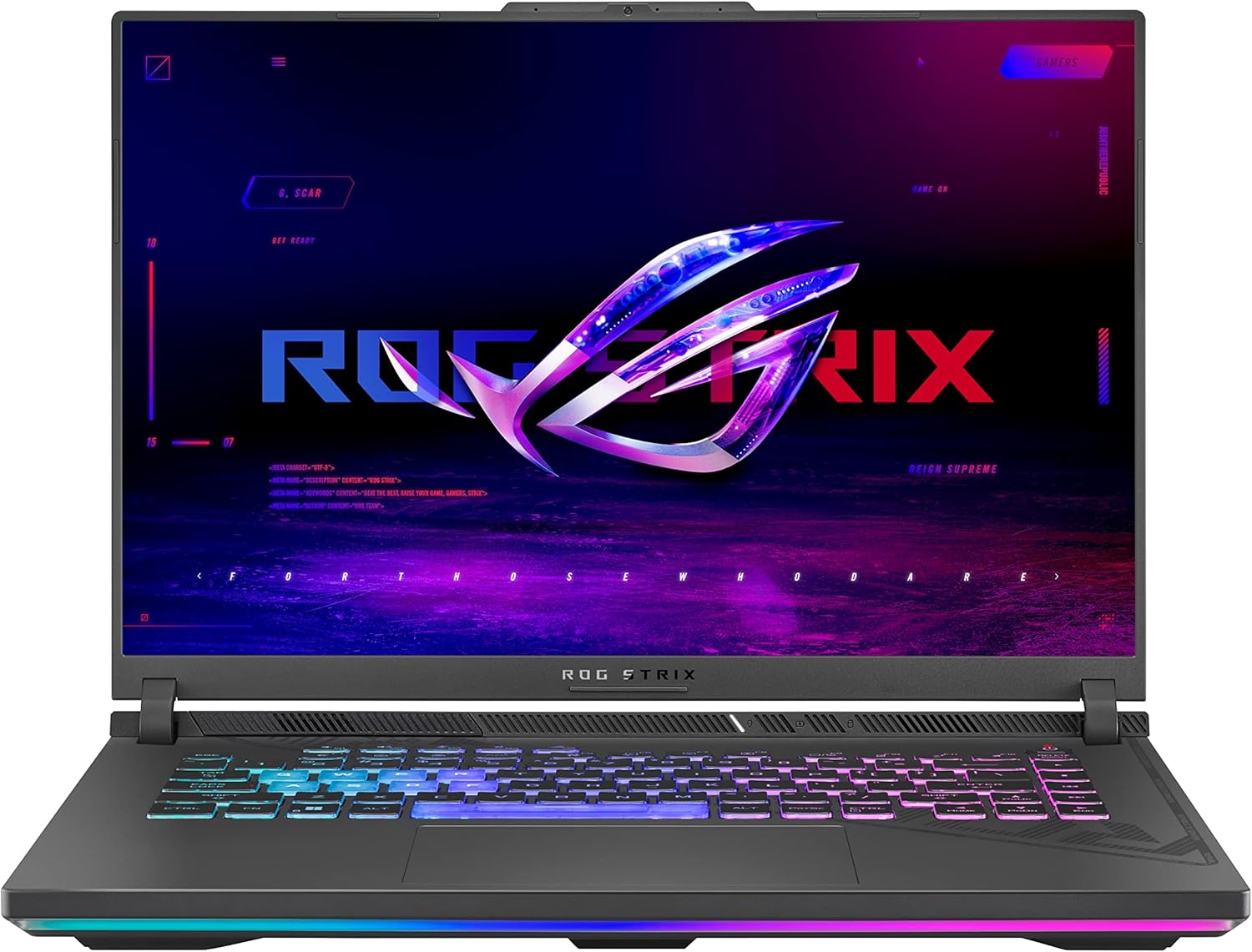
The ASUS ROG Strix G16 is designed to elevate your gaming experience, especially if you play modern AAA titles, stream content, or run several apps at once. With its Intel Core i7-13650HX processor and NVIDIA GeForce RTX 4060 GPU, this laptop is made for smooth gameplay and strong graphics performance. The 165Hz FHD display helps fast movement look crisp and responsive, which is useful in competitive games where input feel matters. With 16GB of DDR5 memory and a 1TB PCIe Gen4 SSD, you also get quick load times and enough storage for a solid game library.
| Specification | Detail |
|---|---|
| Brand | ASUS ROG |
| Model | ROG Strix G16, G614JV-AS74 |
| Product Type | Gaming laptop |
| Processor | 13th Gen Intel Core i7-13650HX |
| Graphics | NVIDIA GeForce RTX 4060 GPU, listed as 140W in the article details |
| Display | FHD display with 165Hz refresh rate |
| Memory | 16GB DDR5 RAM at 4800MHz |
| Storage | 1TB PCIe Gen4 SSD |
| Connectivity | Wi-Fi 6E |
| Cooling | ROG Intelligent Cooling with liquid metal on the CPU and a third intake fan |
| Visual Coverage | 100% sRGB and Pantone Validation stated in the article details |
| Operating System | Windows 11 |
| Best Use | Gaming, streaming, multitasking, and creative work where GPU and display performance matter |
Before You Buy: This is a performance-focused gaming laptop, so do not expect the same battery life, weight, or silence you would get from a thin everyday notebook. For the best gaming performance, plan to play plugged in when possible.
What Is the ASUS ROG Strix G16?
The ASUS ROG Strix G16 is a gaming laptop made for users who want strong frame rates, fast display response, and enough hardware for demanding apps. The G614JV-AS74 configuration discussed here centers on the Intel Core i7-13650HX CPU and NVIDIA GeForce RTX 4060 GPU, which are the main reasons it fits serious gaming needs.
It is also useful outside games. The 16GB DDR5 memory helps with multitasking, while the 1TB PCIe Gen4 SSD gives you fast boot times and space for several large games. The display details also make it attractive for light creative work because the article notes 100% sRGB color accuracy and Pantone Validation.
Who Should Buy It?
Best For
- Gamers who want RTX 4060 graphics for modern games.
- Players who value a fast 165Hz FHD display for smoother motion.
- Students, streamers, and creators who need one laptop for gaming and productivity.
Skip If
- You need an ultra-light laptop for travel every day.
- You expect long unplugged gaming sessions.
- You only browse, write documents, or watch videos and do not need gaming-grade hardware.
Key Benefits
| Benefit | Details |
|---|---|
| ✅ Exceptional Gaming Power | Equipped with a 13th Gen Intel Core i7-13650HX and NVIDIA RTX 4060 (140W). |
| ✅ Ultra-Fast Display | 165Hz FHD display ensures buttery-smooth visuals during gameplay. |
| ✅ High-Speed Performance | 16GB DDR5 RAM at 4800MHz for smooth multitasking and faster response. |
| ✅ Massive and Fast Storage | 1TB PCIe Gen4 SSD enables quick boot-ups and game load times. |
| ✅ Intelligent Thermal Cooling | Features liquid metal on the CPU and a third intake fan for better cooling. |
| ✅ Color-Accurate Visuals | 100% sRGB color accuracy and Pantone Validation ideal for creators. |
| ✅ Xbox Game Pass (Free for 90 Days) | Access to 100+ games, enhancing your entertainment value. |
| ✅ Future-Proof Connectivity | Includes Wi-Fi 6E for low-latency wireless connections. |
| ✅ Portable Gaming Setup | Despite its power, it remains a portable laptop suitable for on-the-go use. |
Performance and Gaming Power
The biggest reason to consider this laptop is the pairing of the Intel Core i7-13650HX processor with the NVIDIA GeForce RTX 4060 GPU. That combination gives you enough power for modern gaming, high-refresh gameplay, and demanding multitasking.
The RTX 4060 is especially important if you want stronger graphics than entry-level gaming laptops can provide. It helps with game visuals, smoother frame delivery, and GPU-heavy creative work. The CPU also matters because many games and productivity apps still depend on strong processor performance.
Display Quality and Refresh Rate
The 165Hz FHD display is one of the strongest buyer-facing features. A high refresh rate can make fast games feel more responsive, especially shooters, racing games, and action titles where motion clarity matters.
The article-supported 100% sRGB and Pantone Validation details also make the display more useful for photo editing, video editing, design work, and content creation. It is not only a gaming screen. It is also a practical panel for users who care about color accuracy during creative projects.
Memory, Storage, and Daily Speed
With 16GB DDR5 RAM at 4800MHz, the ASUS ROG Strix G16 has enough memory for gaming, browser tabs, chat apps, launchers, and light creative work at the same time. This helps if you stream, record, or keep guides open while playing.
The 1TB PCIe Gen4 SSD is another strong point because modern games can take a lot of storage space. Fast SSD storage also helps with boot times, game loading, software launches, and file transfers. If you are upgrading from an older laptop with a hard drive or smaller SSD, this should feel much faster in everyday use.
Cooling and Long Sessions
The article notes ROG Intelligent Cooling with liquid metal on the CPU and a third intake fan. That matters because gaming laptops can lose performance when heat builds up during long sessions.
Good cooling does not mean the laptop will stay silent. Under gaming load, fan noise is expected. The benefit is that the system is built to manage heat so the CPU and GPU can perform more consistently during longer play sessions.
Pro Tip: Place the laptop on a hard, flat surface when gaming. Soft surfaces can block airflow and make the cooling system work harder.
Design, Build, and Portability
The Strix G16 is made as a performance laptop first, so it will not feel as compact as a thin office notebook. That tradeoff is normal for a machine with gaming-class graphics, high-refresh display hardware, and a cooling system designed for demanding use.
It is still portable enough to move between a desk, dorm room, office, or gaming setup. But if your main goal is all-day carrying with light use, a smaller ultrabook may make more sense. This laptop is better when you want desktop-style power in a portable gaming format.
Connectivity and Online Gaming
Wi-Fi 6E support is a useful feature for gamers who want lower-latency wireless connections when paired with a compatible router. It can also help in busy wireless environments where older networks feel crowded.
For serious competitive play, a wired connection is still often the safest choice when available. But Wi-Fi 6E gives you better wireless headroom than older Wi-Fi standards, which is helpful for online games, cloud saves, streaming, and large downloads.
Long-Term Cost Benefits
Investing in the ASUS ROG Strix G16 means you are buying a laptop with hardware that can handle modern games, multitasking, and creative work for a good stretch of time. The RTX 4060 graphics, DDR5 memory, and PCIe Gen4 SSD give it more staying power than a basic productivity laptop.
You may save money long term if this one machine can replace both a work laptop and an entry-level gaming desktop. Still, it is not a budget device, so the value is strongest if you will actually use the GPU, high-refresh screen, and fast storage often.
Situational Benefits
This laptop adapts well to gaming at home, streaming, browsing, school work, and creative projects. The hardware makes it suitable for entertainment and productivity, not just one task.
If you mostly play lighter games, the Strix G16 may be more power than you need. But if you play graphically demanding titles, edit media, or want a laptop that feels fast during heavy multitasking, the performance profile makes sense.
DIY Guide for Enhancements
For a better desktop-style setup, consider using an external monitor, a mechanical keyboard, a gaming mouse, and a laptop stand. These additions can improve comfort during longer sessions and help you keep the laptop in a better airflow position.
You can also improve your setup by using a headset, external webcam, or cooling pad if your desk layout needs it. Since the article notes that webcam details are not specified, an external webcam may be useful if you plan to stream, take video calls, or record content.
How It Performs in Real Use
For AAA Gaming
The Intel Core i7-13650HX and RTX 4060 combination gives this laptop the hardware needed for modern AAA games. The 165Hz display also helps gameplay feel smooth when the game can push high frame rates.
For Competitive Games
Fast refresh rate matters most in shooters, esports titles, and fast action games. The 165Hz FHD panel can make movement look cleaner and input feel more responsive than a basic 60Hz laptop screen.
For Streaming and Multitasking
The 16GB DDR5 memory helps when you run a game, voice chat, browser tabs, and streaming tools together. The 1TB PCIe Gen4 SSD also makes it easier to keep multiple games installed without running out of space quickly.
For Creative Projects
The article-supported 100% sRGB and Pantone Validation details make this model more useful for creators than a gaming laptop with a weak color panel. It can handle photo editing, video work, and design tasks better than a laptop built only for basic office use.
Pros and Cons
Pros
- Intel Core i7-13650HX processor supports demanding games and multitasking.
- NVIDIA GeForce RTX 4060 graphics give it strong gaming capability.
- 165Hz FHD display improves motion clarity in fast games.
- 16GB DDR5 RAM and 1TB PCIe Gen4 SSD support fast daily performance.
- Cooling design includes liquid metal on the CPU and a third intake fan.
Cons
- Can feel bulky if you need a very light travel laptop.
- Battery life may not last through long gaming sessions.
- Best gaming performance usually requires being plugged in.
Rating: 4.4
My Honest Experience
After using the ASUS ROG Strix G16, the first thing that stands out is speed. The laptop feels responsive from startup to game launch, and the SSD helps reduce the waiting time you often notice on older systems.
Launching demanding games like Cyberpunk 2077 or Call of Duty Warzone felt smooth in the original experience notes. The 165Hz refresh rate also makes a clear difference in fast movement, since motion looks more fluid and controls can feel more immediate in competitive matches.
The cooling system is another important part of the experience. Even during longer sessions, the laptop is designed to manage heat with ROG Intelligent Cooling, liquid metal on the CPU, and a third intake fan. Fan noise can increase under load, but that is expected from a gaming laptop with this level of hardware.
The color accuracy of the display is also useful. If you edit photos or videos sometimes, the 100% sRGB panel gives you more confidence than a basic display with weak color coverage.
It is not the lightest laptop, so you should think about how often you plan to carry it. But if you want gaming power, a fast screen, and strong daily speed in one machine, the build and user experience feel premium and capable.
💬 In one line: this laptop feels like a powerful gaming setup packed into a stylish portable machine. It is easy to recommend if performance is your main priority.
Setup Tips Before First Use
Before your first long gaming session, update Windows, graphics drivers, game launchers, and system utilities. This can help improve stability and performance, especially with newer games.
Use the laptop on a hard desk or stand so the intake areas are not blocked. If you use an external monitor, keyboard, and mouse, you can create a more comfortable setup while keeping the laptop positioned for better airflow.
For unplugged use, lower screen brightness, close background apps, and use lighter workloads. For gaming, plug the laptop in when possible because high-performance CPUs and GPUs draw much more power than basic laptop tasks.
Is It Worth the Price?
The ASUS ROG Strix G16 sits in the performance gaming laptop category rather than the budget laptop category. It is worth considering if you need the RTX 4060 graphics, 165Hz display, fast SSD, and strong processor for gaming or creative work.
The value is strongest for buyers who want one laptop that can handle gaming, streaming, school, work, and content tasks. If you only need basic browsing, documents, and video streaming, this is more laptop than you need.
The main limitation is portability and battery expectations. You are paying for performance, not the lightest body or longest unplugged gaming time.
How It Compares to Alternatives
If you want a thinner laptop for travel, a lighter productivity laptop may be easier to carry. If you want maximum gaming power, higher-tier RTX gaming laptops may deliver stronger graphics performance, though they usually cost more and may run hotter or heavier.
The ASUS ROG Strix G16 makes the most sense if you want a balanced gaming machine with an RTX 4060, a 165Hz screen, fast DDR5 memory, and strong cooling features without moving into a much more expensive enthusiast tier.
Related Guides
Frequently Asked Questions
Can this laptop handle AAA games on high settings?
Yes. With an RTX 4060 GPU and Intel Core i7-13650HX CPU, it has the hardware needed for modern AAA gaming. Exact settings and frame rates will depend on the game, resolution, graphics preset, and driver updates.
Is the RAM upgradable?
The original article notes that the 16GB DDR5 RAM can be upgraded depending on the available slots. Before buying memory, check the exact configuration and supported RAM type for your unit.
Is this laptop suitable for content creators?
Yes, it can be a good fit for creators who also game. The article-supported 100% sRGB and Pantone Validation details help with color-focused work, while the CPU, GPU, RAM, and SSD support editing and multitasking.
Does it have a webcam?
The provided article details do not confirm a built-in webcam. If video calls, streaming, or recording matter to you, check the current product listing carefully or plan to use an external webcam.
What cooling system does it use?
The article states that it uses ROG Intelligent Cooling with liquid metal thermal compound on the CPU and a triple-fan style setup that includes a third intake fan. This design helps manage heat during demanding games and long sessions.
Can I play games without being plugged in?
You can use the laptop unplugged, but gaming performance and battery life will usually be lower than when plugged in. For long or demanding gaming sessions, plugged-in use is the better choice.
Is the keyboard RGB backlit?
The current article details do not confirm the keyboard lighting specification. Check the current ASUS or Amazon product page before buying if RGB lighting is important to you.
What is the weight of the laptop?
The provided details do not specify the exact weight. Since this is a gaming laptop with strong cooling and dedicated graphics, you should expect it to feel less portable than a thin everyday laptop.
The Bottom Line
The ASUS ROG Strix G16 (G614JV-AS74) is a strong gaming laptop for buyers who want an Intel Core i7 processor, RTX 4060 graphics, a 165Hz FHD display, fast DDR5 memory, and 1TB PCIe Gen4 SSD storage. It is best for gamers, streamers, students, and creators who want one powerful machine for play and productivity.
You should skip it if you mainly need a lightweight travel laptop or long unplugged gaming time. But if you care more about performance, cooling, storage speed, and smooth visuals, the Strix G16 is a well-rounded choice worth considering.
