Disclosure: As an Amazon Associate, we earn from qualifying purchases. If you click a link on this page and make a purchase, we may receive a small commission at no extra cost to you.
Choosing a lightweight laptop is easy until you have to balance speed, battery life, screen quality, and storage. The 2025 MacBook Air with the M4 chip is built for people who want strong everyday performance in a thin, travel-friendly design. Its 13.6-inch Liquid Retina display, 16GB of unified memory, MagSafe charging, and up to 18 hours of battery life make it a polished ultraportable. The main tradeoff is the 256GB SSD, which may feel tight if you store large photo, video, or project files locally.
Quick Verdict
Rating: Recommended with caveats
Best For: Students, remote workers, travelers, writers, and everyday users who want a fast Mac in a very light body.
Bottom Line: The 2025 MacBook Air gives you strong M4 performance, excellent portability, and long battery life in a clean 13-inch design. It is less ideal if you need lots of built-in storage, many ports, or a laptop focused mainly on heavy gaming.
Overview
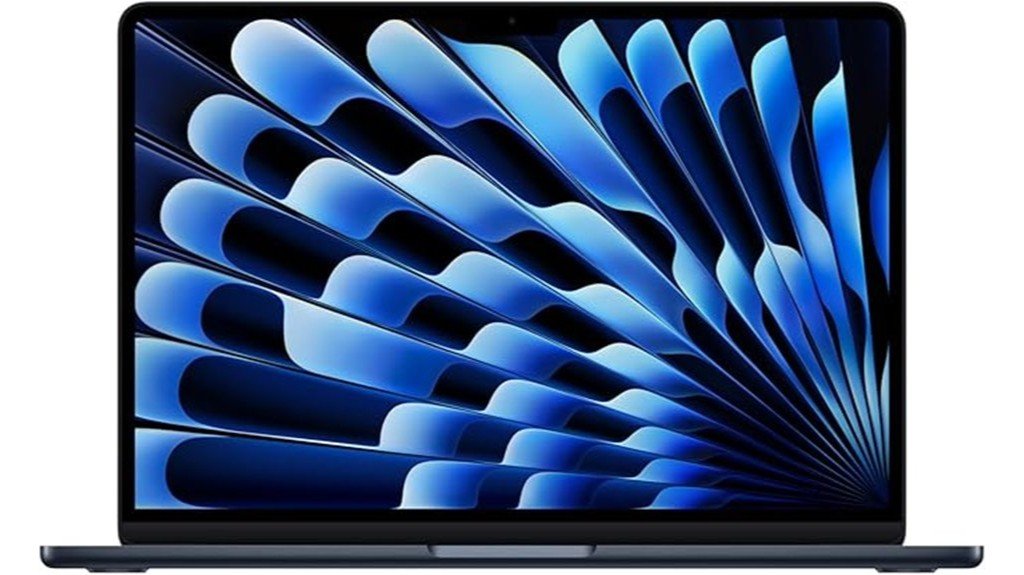
The 2025 MacBook Air, equipped with Apple’s M4 chip, stands out as a strong choice in the ultraportable laptop category. It combines fast everyday performance with a thin, simple design that is easy to carry between home, class, work, and travel. At just 2.73 pounds, it feels light enough for daily commuting without giving up the screen size many people need for writing, browsing, video calls, and creative work.
The 13.6-inch Liquid Retina display helps text look sharp and gives photos, videos, and documents a clean visual feel. With 16GB of unified memory and a 256GB SSD, this MacBook Air can handle multitasking well, but the storage size is something to consider before buying. Connectivity options such as Thunderbolt 4 and Wi-Fi 6E help it fit into a modern desk setup, especially if you already use USB-C accessories, external displays, or cloud storage.
| Specification | Detail |
|---|---|
| Brand | Apple |
| Product | 2025 MacBook Air 13-inch |
| Chip | Apple M4 chip |
| CPU | 10-core CPU |
| GPU | 8-core GPU |
| Neural Engine | 16-core Neural Engine |
| Memory | 16GB unified memory |
| Storage | 256GB SSD |
| Display | 13.6-inch Liquid Retina display |
| Weight | 2.73 pounds |
| Battery Life | Up to 18 hours |
| Connectivity | Thunderbolt 4, Wi-Fi 6E, MagSafe charging |
| Security | Touch ID |
| Build Material | Recycled aluminum chassis |
What Is the 2025 MacBook Air?
The 2025 MacBook Air is Apple’s 13-inch ultraportable laptop built around the M4 chip. It is designed for people who want a fast, quiet, and easy-to-carry computer for work, study, browsing, calls, writing, and media use. The 10-core CPU and 8-core GPU give it enough power for demanding everyday tasks while keeping the design slim and light.
This model includes a 13.6-inch Liquid Retina display, 16GB of unified memory, and a 256GB SSD. That combination makes it strong for multitasking, web apps, documents, streaming, light creative work, and general productivity. The SSD size is the main point to review before buying, because users with large media libraries may need external storage or cloud storage.
Who Should Buy It?
Best For
- Students and remote workers who need a lightweight laptop with long battery life.
- Mac users who want faster everyday performance from the M4 chip.
- Travelers who value a 2.73-pound design and a bright 13.6-inch display.
Skip If
- You need more than 256GB of built-in storage for large files.
- You want many built-in ports without using a USB-C hub.
- You mainly play heavy games and need a dedicated gaming laptop.
Before You Buy: The 256GB SSD is fine for cloud-based work, school use, and everyday apps, but it may fill quickly if you keep large videos, photo libraries, games, or project files on the laptop.
Detailed Features
The 2025 MacBook Air has several features that make it a practical choice for shoppers who want both power and portability. The M4 chip, with its 10-core CPU and 8-core GPU, supports smooth multitasking across browser tabs, office apps, calls, streaming, and light creative work. The 16-core Neural Engine also helps with AI-assisted tasks and on-device processing where supported.
The 13.6-inch Liquid Retina display is one of the strongest reasons to choose this model over cheaper basic laptops. It gives you sharp text, clean color, and a better viewing experience for work, movies, and photo editing. Touch ID makes sign-ins quick, while Spatial Audio support helps improve the listening experience for movies, music, and calls.
MagSafe charging is also useful for daily use because it keeps a charging port available and reduces stress on the cable connection. The Thunderbolt 4 ports add flexibility for external storage, displays, docks, and other USB-C accessories, but the limited number of ports means many users will still want a hub.
Design and Build Quality
The MacBook Air keeps the thin, clean look that makes Apple’s Air line popular. The recycled aluminum chassis gives it a premium feel while keeping the weight down to 2.73 pounds. That matters if you carry your laptop in a backpack or shoulder bag every day.
The lightweight design is not just about travel. It also makes the laptop easier to use around the house, move between rooms, or set up in small workspaces. The tradeoff is that thin laptops often have fewer ports, so you may need adapters if you use older accessories.
Performance
The M4 chip is the main performance upgrade in this MacBook Air. The 10-core CPU gives the laptop enough speed for multitasking, research, email, spreadsheets, video meetings, and creative apps. The 8-core GPU helps with visual tasks, casual gaming, photo work, and media playback.
For most everyday users, the 16GB of unified memory is one of the most practical strengths. It gives the laptop more breathing room than basic memory configurations when you keep many tabs, apps, and documents open. This helps the MacBook Air feel responsive during normal workdays.
Display and Audio
The 13.6-inch Liquid Retina display gives this laptop a strong balance of size and portability. It is large enough for writing, browsing, and split-screen work, yet compact enough for a small desk or travel bag. Text appears sharp, which helps if you spend hours reading, editing, or working in documents.
Spatial Audio support adds value if you use the laptop for movies, video calls, music, or online classes. It does not replace dedicated speakers or high-end headphones, but it improves the everyday media experience compared with basic laptop audio.
Battery Life and Charging
The claimed 18-hour battery life is one of the strongest reasons to consider this MacBook Air. It gives you more freedom to work away from an outlet during classes, travel days, meetings, or long writing sessions. Real battery life can vary based on brightness, apps, Wi-Fi use, and workload, but the long battery rating gives it a clear advantage for mobile use.
MagSafe charging is a practical feature because the connector attaches magnetically. This can help reduce accidental cable pulls, and it also keeps the Thunderbolt 4 ports available for accessories while the laptop charges.
Connectivity and Ports
The MacBook Air includes Thunderbolt 4 support and Wi-Fi 6E, which makes it suitable for modern wireless networks and USB-C accessories. Thunderbolt 4 is useful for external drives, docks, displays, and fast data transfer. Wi-Fi 6E is also helpful if your router and network support it.
The limitation is simple: only two Thunderbolt 4 ports may feel restrictive. If you connect a monitor, external drive, card reader, keyboard, or other accessories, a USB-C hub may become part of your setup.
Pro Tip: If you plan to use an external monitor, SD card reader, wired mouse, or multiple USB accessories, budget for a reliable USB-C or Thunderbolt hub before you buy.
How It Performs in Real Use
For Daily Work
For writing, browsing, email, spreadsheets, research, and video calls, the 2025 MacBook Air should feel fast and smooth. The M4 chip and 16GB of unified memory give it enough power for common productivity workflows without making the laptop bulky.
For Students
Students benefit from the light 2.73-pound body and long battery life. It is easy to carry between classes, and the 13.6-inch display is large enough for notes, PDFs, slides, and web-based assignments. The main storage warning still applies if you keep many videos or course files offline.
For Travel
This MacBook Air is well suited for travel because it is thin, light, and rated for long battery life. MagSafe charging also helps in tight spaces, such as airports, hotel desks, and coffee shops. A compact USB-C hub can make travel use easier if you connect external drives or accessories.
For Creative Work
The M4 chip, 8-core GPU, and Liquid Retina display make the laptop useful for light photo editing, writing, design drafts, and content planning. It is not the best match for users who work with large video projects every day, especially with only 256GB of internal storage.
Setup Tips Before First Use
Start by deciding how you want to manage storage. If most of your files live in cloud storage, the 256GB SSD may be enough. If you work with large media files, set up an external SSD early so your internal storage does not fill too quickly.
You should also review your accessory needs. The two Thunderbolt 4 ports are powerful, but they may not be enough if you use several wired devices. A USB-C hub can help with HDMI, USB-A, SD cards, and extra ports.
For battery care, avoid running at full brightness all day unless you need it. Screen brightness, video calls, and demanding apps can reduce battery life, so small adjustments can help you get more out of each charge.
Pros and Cons
Pros
- Speed: The M4 chip handles multitasking and demanding everyday tasks with ease.
- Portability: The 2.73-pound design is ideal for commuting, school, and travel.
- Display: The 13.6-inch Liquid Retina display improves text, media, and creative work.
- Battery Life: Up to 18 hours of battery life supports long workdays away from an outlet.
- Convenience: Touch ID, MagSafe charging, Wi-Fi 6E, and Thunderbolt 4 add useful daily flexibility.
Cons
- Storage: The 256GB SSD may require external storage or cloud storage for larger files.
- Ports: Only two Thunderbolt 4 ports could feel restrictive without a hub.
- Price: The premium cost may not suit buyers who only need a basic laptop.
Is It Worth the Price?
The 2025 MacBook Air sits in the premium ultraportable laptop category. It is worth considering if you want a thin Mac with strong M4 performance, long battery life, a sharp display, and a polished design. Buyers who work, study, travel, or multitask daily will get the most value from it.
The value is weaker if your needs are very basic. If you mainly browse the web, write short documents, and stream video, a cheaper laptop may be enough. It is also not the best fit if you need lots of storage built in, because the 256GB SSD is one of the main limitations.
How It Compares to Alternatives
Compared with many Windows ultraportables, the 2025 MacBook Air focuses on battery life, a light aluminum design, and tight integration with macOS. If you already use an iPhone, iPad, or other Apple devices, the MacBook Air may feel easier to fit into your workflow.
If you need more ports, upgradeable storage, or a lower price, some Windows laptops may be better to compare. If you want a Mac but need more power for heavier creative work, a MacBook Pro may be the better step up. The MacBook Air makes the most sense when portability, battery life, and everyday speed matter more than maximum performance.
Concluding Thoughts
Given its strong features and performance, the 2025 MacBook Air is a compelling option for many users. With the M4 chip, it offers fast everyday speed in a lightweight package that is easy to carry. The vivid display and improved audio support a strong multimedia experience, while the battery life helps reduce how often you need to charge during the day.
The biggest limitation is storage. The 256GB SSD can work well for cloud-first users, but it may not be enough for large local files. Overall, this MacBook Air balances power and portability very well, making it a smart buy for people who want a dependable Mac for daily work, study, and travel.
Related Guides
Frequently Asked Questions
Is the 2025 MacBook Air 13-inch compatible with older macOS versions?
No. This MacBook Air is built around the M4 chip and is designed for current macOS versions that support Apple silicon. If you rely on older apps, check software compatibility before buying.
Can the M4 chip handle heavy gaming titles smoothly?
The M4 chip can handle many demanding tasks and some games well, especially compared with basic laptops. However, this MacBook Air is not a dedicated gaming laptop, so buyers focused on heavy gaming should compare gaming-focused machines first.
How does MagSafe charging compare to USB-C charging?
MagSafe is convenient because it connects magnetically and helps reduce cable-pull accidents. USB-C charging is still useful for many setups, but MagSafe keeps the Thunderbolt 4 ports available for accessories while charging.
What materials are used in the MacBook Air’s construction?
The MacBook Air uses a recycled aluminum chassis. This helps keep the laptop light while still giving it a durable, premium feel for daily use.
Are there any third-party accessories specifically recommended for this model?
A USB-C hub is one of the most useful accessories for this MacBook Air. It can add extra ports for HDMI, USB-A devices, SD cards, and external storage, which helps balance the laptop’s limited built-in port selection.
Is 256GB of storage enough for the 2025 MacBook Air?
It can be enough if you mostly use cloud storage, web apps, streaming services, and everyday documents. It may not be enough if you store large videos, photo libraries, games, or work projects directly on the laptop.
Who should skip the 2025 MacBook Air?
Skip it if you need many built-in ports, large internal storage, or a laptop mainly for heavy gaming. It is also not the best choice for buyers who want the lowest possible price over premium design and battery life.
The Bottom Line
The 2025 MacBook Air is a strong fit for buyers who want a light, fast, and long-lasting Mac for daily work, school, travel, and media use. Its biggest strengths are the M4 chip, 13.6-inch Liquid Retina display, 2.73-pound body, and up to 18 hours of battery life. Skip it if you need more built-in storage, more ports, or a dedicated gaming laptop.

1 thought on “2025 MacBook Air Review: Performance Meets Portability”