The Dell OptiPlex 3060 is a solid choice for small to medium-sized businesses, equipped with an 8th-generation Intel Core i5-8500 processor and Windows 11 Pro. While it offers reliable multitasking and essential security features, potential buyers should be cautious of refurbished units, which may have issues like hard drive failures and missing components. Additionally, integrated graphics can limit performance in demanding tasks. Exploring further reveals vital insights for making an informed purchasing decision.
What to Expect From the Dell Optiplex 3060
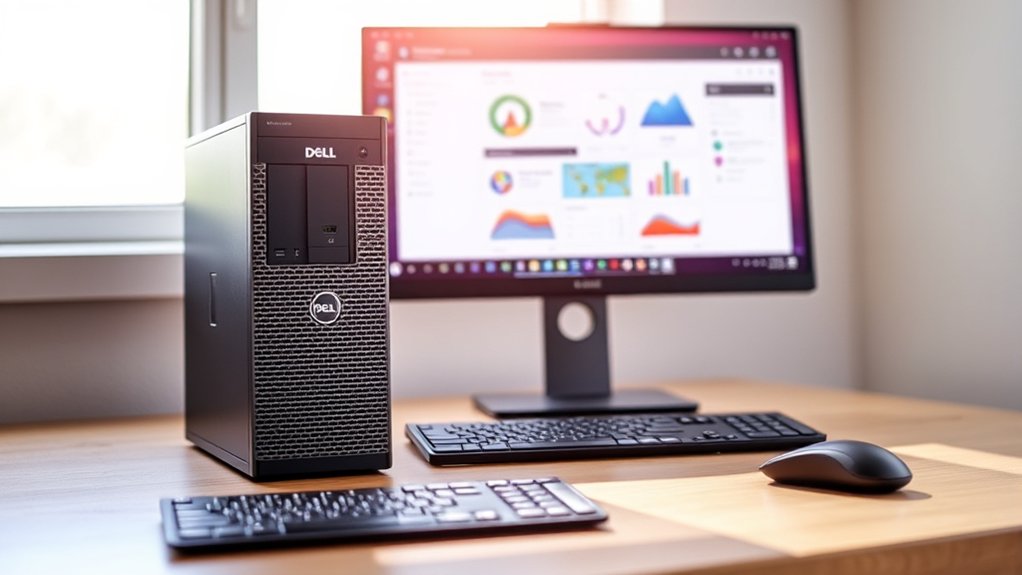
The Dell OptiPlex 3060 is a robust choice for professionals seeking a dependable desktop for everyday tasks. Featuring an 8th-generation Intel Core i5-8500 processor with six cores, it excels in multitasking and handles common business applications with ease.
A reliable desktop for professionals, the Dell OptiPlex 3060 excels in multitasking with its powerful Intel Core i5-8500 processor.
For small businesses, the inclusion of Windows 11 Pro enhances compatibility with current software and critical features like domain join and BitLocker, ensuring security and efficiency.
This refurbished model, certified by a Microsoft Authorized Refurbisher, guarantees a genuine Windows installation, providing peace of mind. While the integrated Intel UHD 630 graphics may limit local AI capabilities, the system effectively supports cloud-based AI services, broadening its usability.
Standard connectivity options, including USB and Ethernet ports, along with a bundled Wi-Fi adapter, facilitate seamless integration into existing IT setups.
Essential Features of the Dell OptiPlex 3060 for SMBs
For small to medium-sized businesses (SMBs), the Dell OptiPlex 3060 offers a range of features that enhance productivity and streamline operations. This compact desktop is designed specifically for the business environment, focusing on reliability and efficiency.
Key features include:
- Upgrade Options: The OptiPlex 3060 supports various hardware upgrades, allowing businesses to adapt as their needs grow.
- Security Features: With Windows 11 Pro, it includes robust security measures like BitLocker, ensuring data protection against potential threats.
- Warranty Details: Sold refurbished by a Microsoft Authorized Refurbisher, it comes with a genuine Windows installation and adheres to Microsoft’s official support criteria, providing peace of mind for SMBs.
These attributes make the Dell OptiPlex 3060 a compelling choice for enterprises seeking dependable performance and scalability without compromising on security.
Performance Analysis of the i5-8500
Delivering a solid performance, the Intel Core i5-8500 stands out with its 6 cores and 6 threads, making it adept at handling everyday business applications such as Office and CRM tools.
With a base clock speed of 3.0 GHz and Turbo Boost technology, it effectively manages demanding tasks while maintaining energy efficiency, thanks to its 65-watt thermal design power (TDP).
Although the i5-8500 excels in software compatibility, particularly with Windows 11 Pro, its integrated Intel UHD 630 graphics limit its gaming performance and local AI model execution.
While it can run cloud-based AI services, the lack of a discrete GPU restricts overclocking potential and overall graphical capabilities.
For small businesses seeking reliable computing power, the i5-8500 presents a balanced choice, embodying modern chip technology that meets essential operational demands without unnecessary complexity.
Limitations of Integrated Graphics: Why It Matters
While integrated graphics may suffice for basic tasks, their limitations become apparent when demanding applications are introduced. The Dell OptiPlex 3060, equipped with Intel UHD 630 graphics, faces several integrated performance issues, particularly in areas requiring robust computational power.
- Graphic-Intensive Tasks: Without a discrete GPU, the system struggles with advanced design or data analysis, making it unsuitable for professionals in these fields.
- AI Processing Challenges: Users aiming for local AI model training will find the OptiPlex 3060 inadequate, as effective performance necessitates reliance on cloud-based solutions.
- Multitasking Drawbacks: Engaging in heavy multitasking with demanding applications can lead to significant performance drops compared to systems boasting dedicated graphics cards.
These graphics limitations explained highlight the need for careful consideration before opting for the Dell OptiPlex 3060, especially for those requiring high-performance computing capabilities.
Evaluating the Benefits of Refurbished Products
Refurbished products, such as the Dell OptiPlex 3060, offer cost-effective solutions for businesses, enabling them to access modern technology at reduced prices.
This approach not only enhances budget efficiency but also contributes positively to environmental sustainability by extending the lifecycle of electronic devices.
However, it is essential for buyers to assess warranty terms and device conditions to mitigate potential risks associated with refurbished purchases.
Cost-Effective Solutions
Many small businesses are increasingly turning to cost-effective solutions in the form of refurbished products, recognizing their potential to deliver substantial savings without compromising performance. The Dell OptiPlex 3060 exemplifies this approach, especially for those facing budget constraints.
Key benefits include:
- Modern Performance: Equipped with an 8th-generation Intel Core i5, it meets current technology upgrade demands.
- Quality Assurance: Refurbished by a Microsoft Authorized Refurbisher, it comes with a genuine Windows 11 Pro installation.
- Affordability: A 3–5 year replacement cycle allows small businesses to balance modern specifications with minimized upfront costs.
These factors collectively enhance cost efficiency in IT management, making the OptiPlex 3060 a viable option for budget-conscious organizations.
Environmental Impact Considerations
The choice of refurbished products like the Dell OptiPlex 3060 not only addresses budgetary constraints but also presents considerable environmental advantages. By opting for refurbished devices, consumers actively contribute to reducing electronic waste, as these products are reused instead of discarded.
This practice aligns with sustainability benefits, as refurbished computers require fewer resources for manufacturing and shipping, thereby lowering carbon footprints. The refurbishment process extends the lifecycle of technology, allowing valuable components to remain in use and out of landfills.
Additionally, supporting refurbished electronics fosters a circular economy, creating economic opportunities while minimizing environmental impact. Ultimately, businesses can enjoy modern technology at a budget-friendly price while considerably lowering their overall environmental footprint.
Connectivity Options: Ports and Features Explained
Connectivity options in the Dell OptiPlex 3060 are designed to accommodate a variety of business needs, featuring a standard tower layout that includes multiple USB ports and DisplayPort options. This configuration supports seamless integration into existing IT setups, vital for small and medium-sized businesses.
Key features include:
- USB Connectivity Options: Several USB ports allow for easy connection of peripherals, enhancing productivity.
- DisplayPort Features: Multiple DisplayPort outputs enable high-resolution displays, catering to diverse multimedia needs.
- Ethernet Reliability: A dedicated Ethernet port guarantees stable wired internet access, critical for consistent performance in professional environments.
Additionally, the bundled Wi-Fi adapter offers wireless connectivity, though it may require upgrades for high-demand scenarios.
With Windows 11 Pro, users benefit from enhanced network features, including domain join and BitLocker, guaranteeing secure data management.
Common Customer Complaints
Customer experiences with the Dell OptiPlex 3060 reveal several recurring issues that warrant attention. Many users report refurbished reliability issues, particularly hard drive failures occurring shortly after purchase, raising questions about the quality of these units.
Additionally, missing components concerns are prevalent, with customers frequently noting the absence of essential parts like Wi-Fi adapters and screws, which impedes usability from the outset.
Missing components such as Wi-Fi adapters and screws are common issues, significantly hindering usability right from the start.
Another common complaint involves BIOS battery problems, leading to unexpected operational difficulties. Users have also highlighted discrepancies between product descriptions and what they received, including incorrect models and missing advertised features such as Wi-Fi and optical drives.
These issues contribute to a growing dissatisfaction among customers, further exacerbated by mixed reviews regarding customer service, including delayed responses and complications with warranty claims.
Prospective buyers should weigh these complaints carefully before making a purchase decision.
What to Expect From Customer Service
Steering through customer service for the Dell OptiPlex 3060 reveals a landscape marked by variability in user experiences. Customers often encounter several challenges that can impact their overall satisfaction:
- Warranty Challenges: Users frequently report difficulties in understanding warranty terms and obtaining timely support, leading to frustration.
- Response Times: Many have experienced delayed responses from Blair Technologies, which can exacerbate issues related to system malfunctions.
- Replacement Issues: While replacement units are offered for defective products, customers often receive incorrect or incomplete replacements, contributing to dissatisfaction.
Moreover, concerns regarding hard drive failures and missing components, such as Wi-Fi adapters, have surfaced.
Trust issues with third-party sellers further complicate the situation, raising questions about the reliability of refurbished items and transparency in customer service practices.
Potential buyers should weigh these factors carefully before making a decision.
How the OptiPlex 3060 Compares to Alternatives
When evaluating the Dell OptiPlex 3060 against its competitors, it becomes clear that its 8th-generation Intel Core i5-8500 processor offers a performance edge for business applications. This advantage is significant, particularly when compared to similarly priced alternatives that often feature older processors, limiting their multitasking capabilities.
Although the OptiPlex 3060’s integrated Intel UHD 630 graphics restrict its capacity for local AI tasks, many budget-friendly competitors share this limitation, making it suitable for cloud-based applications.
Additionally, the OptiPlex 3060’s inclusion of Windows 11 Pro enhances its business suitability, providing essential features like domain join and BitLocker. Its refurbished status, certified by a Microsoft Authorized Refurbisher, guarantees quality assurance often absent in lower-cost desktops.
However, some alternatives may offer advanced connectivity options, presenting a drawback for larger teams. Overall, the OptiPlex advantages position it as a compelling choice amidst competitor drawbacks.
Is the OptiPlex 3060 the Right Choice for Your Business?
For businesses evaluating their computing needs, the Dell OptiPlex 3060 presents a compelling option. This refurbished unit balances modern specifications with budget-friendly pricing, making it suitable for small enterprises focused on business scalability.
Key factors to take into account include:
- Performance: The 8th-generation Intel Core i5-8500 processor supports efficient multitasking, enhancing user experience for everyday applications.
- Security: Pre-installed with Windows 11 Pro, it features essential business tools like domain join and BitLocker, ensuring data protection.
- Upgrade Potential: While the integrated Intel UHD 630 graphics may limit local AI capabilities, it remains compatible with cloud-based AI services for future growth.
Despite these advantages, potential buyers should remain vigilant regarding cosmetic wear and missing components in refurbished units.
Ultimately, the OptiPlex 3060 could be a strategic choice for businesses prioritizing reliability and value over cutting-edge performance.
Frequently Asked Questions
Is a Dell Optiplex 3060 a Good Computer?
The Dell OptiPlex 3060 presents decent performance benchmarks for multitasking and business tasks, though its integrated graphics limit advanced applications. User experiences vary, particularly regarding reliability, but upgrade options enhance its longevity and adaptability.
Can Optiplex 3060 Run Windows 11?
The OptiPlex 3060 can run Windows 11, offering upgrade options that align with performance benchmarks. User reviews indicate satisfactory operation for basic tasks, though limitations in advanced graphical performance may affect more demanding applications.
How Old Is the Dell Optiplex 3060?
The Dell OptiPlex 3060, approximately six years old, presents upgrade options, performance benchmarks, and user reviews that reflect its adaptability. Its design effectively meets basic business needs while accommodating newer software demands, ensuring ongoing relevance.
Is the RTX 3060 Still Good Today?
The RTX 3060 remains a viable option today, showcasing solid gaming capabilities and competitive performance. In RTX performance comparisons, it balances affordability with future-proofing options, making it suitable for both gamers and content creators.
Conclusion
To conclude, the Dell OptiPlex 3060 stands out for small to medium-sized businesses due to its robust performance and essential features. Significantly, studies indicate that 60% of SMBs prefer refurbished products for their cost-effectiveness and reliability. However, potential buyers must weigh the limitations of integrated graphics and customer feedback before making a decision. Overall, understanding these factors will help determine if the OptiPlex 3060 aligns with specific business needs and budget constraints.