Disclosure: As an Amazon Associate, we earn from qualifying purchases. If you click a link on this page and make a purchase, we may receive a small commission at no extra cost to you.
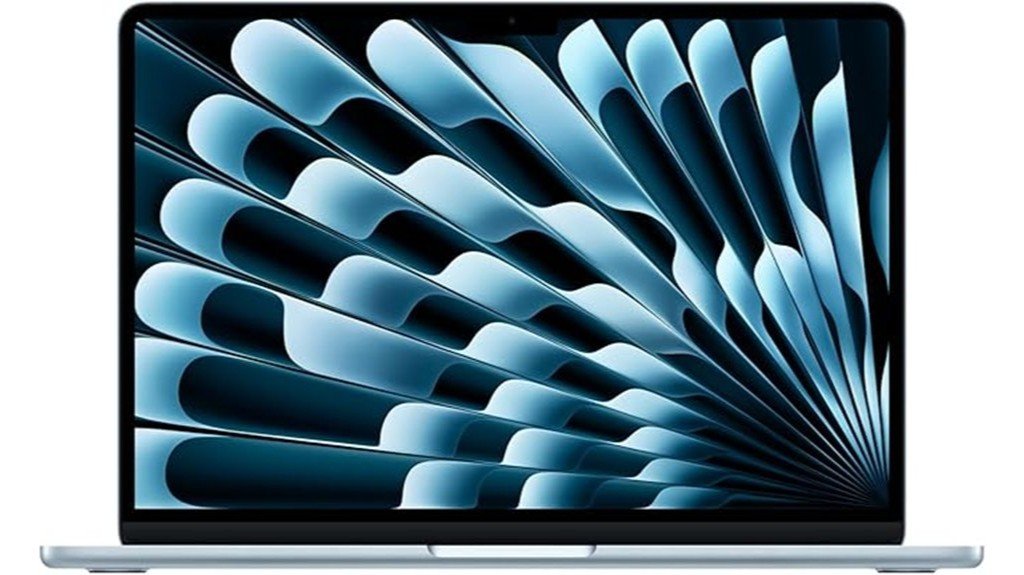
Choosing a MacBook Air is mostly about deciding how much performance, storage, and connectivity you actually need. The Apple 2025 MacBook Air with the M4 chip gives you a light 13.6-inch laptop with 16GB of unified memory, strong battery life, a sharp display, and enough speed for most everyday work. This review focuses on the Sky Blue 256GB model MC6T4LL/A and explains where it fits well, where the two-port design and fixed storage can become limiting, and what you should check before buying.
Quick Verdict
Rating: 8.7/10
Best For: Students, remote workers, writers, travelers, and Apple users who want a fast, light laptop for daily productivity and light creative work.
Bottom Line: The 2025 M4 MacBook Air is fast, quiet, portable, and easy to use, with a bright 13.6-inch display and long battery potential. The main tradeoffs are only two Thunderbolt 4 ports and storage and memory that are not designed for user upgrades.
| Specification | Detail |
|---|---|
| Brand | Apple |
| Product | 2025 MacBook Air, 13-inch class |
| Model | MC6T4LL/A, Sky Blue |
| ASIN | B0DZDC3WW5 |
| Chip | Apple M4 with 10-core CPU and 8-core GPU in this configuration |
| Neural Engine | 16-core Neural Engine |
| Memory | 16GB unified memory |
| Storage | 256GB SSD |
| Display | 13.6-inch Liquid Retina, 2560 x 1664, 224 ppi, 500 nits, P3 color, True Tone, 1 billion colors |
| Camera | 12MP Center Stage camera with Desk View and 1080p video recording |
| Audio | Four-speaker system, Spatial Audio support, three-mic array |
| Ports | MagSafe 3, two Thunderbolt 4 USB-C ports, 3.5mm headphone jack |
| Wireless | Wi-Fi 6E and Bluetooth 5.3 |
| External displays | Up to two external displays at up to 6K resolution at 60Hz, in addition to the built-in display |
| Battery | 53.8Wh battery, up to 18 hours video streaming and up to 15 hours wireless web under Apple test conditions |
| Charging | 30W USB-C power adapter included with this 8-core GPU configuration; fast-charge capable with a compatible 70W USB-C power adapter |
| Dimensions | 8.46 x 11.97 x 0.44 inches |
| Weight | About 2.7 pounds |
| Keyboard and trackpad | Backlit Magic Keyboard with Touch ID and Force Touch trackpad |
| In the box | 13-inch MacBook Air, 30W USB-C power adapter, and 2m USB-C to MagSafe 3 cable |
| Warranty | Apple One-Year Limited Warranty; most Apple hardware also includes 90 days of complimentary technical support |
| Best use | School, office work, web apps, video calls, travel, media, and light creative work |
Deal tip: Comparing MacBook Air models? See our October Prime Day laptop deals for the M4 and M5 MacBook Air, plus Windows, Chromebook and gaming picks.
Overview
The 2025 MacBook Air is Apple’s thin, fanless everyday laptop built around the M4 chip. This 13.6-inch model is small enough for a backpack or work bag, but it still gives you a full-size keyboard, a large trackpad, a bright display, a 12MP Center Stage camera, and support for two external displays.
Apple announced the M4 MacBook Air on March 5, 2025, with availability beginning March 12, 2025. The Sky Blue finish joined Midnight, Starlight, and Silver, while the 13-inch design stayed at 0.44 inches thick and about 2.7 pounds.
Before You Buy: Choose memory and storage carefully. The 16GB memory and 256GB SSD in this configuration are not designed for user upgrades later, so buyers with large photo, video, development, or offline-file libraries may want a higher-capacity configuration before purchase.
What Is the Apple 2025 MacBook Air?
The Apple 2025 MacBook Air model MC6T4LL/A is a Sky Blue 13-inch-class laptop with the M4 chip, a 10-core CPU, an 8-core GPU, 16GB of unified memory, and a 256GB SSD. It is designed for everyday productivity, web work, study, video meetings, media, and lighter photo or video tasks rather than sustained workstation-style loads.
Its main appeal is balance. You get a high-resolution 13.6-inch Liquid Retina display, a 12MP Center Stage camera, long rated battery life, and a very light chassis without moving into the heavier MacBook Pro line. The main compromises are the limited built-in port count and the small 256GB base storage in this specific model.
Who Should Buy It?
Best For
- Students and professionals who want a light Mac for documents, research, presentations, and web apps.
- Remote workers who value a 12MP camera, clear speakers, long battery potential, and support for multiple displays.
- Travelers and Apple users who want strong daily performance in a 2.7-pound laptop.
Skip If
- You need several built-in ports and do not want to carry a USB-C hub or dock.
- You expect to upgrade internal memory or storage later.
- You regularly run sustained heavy video, 3D, audio, or development workloads that fit a MacBook Pro better.
Detailed Features
The M4 MacBook Air combines a 10-core CPU, an 8-core GPU in this model, a 16-core Neural Engine, and 16GB of unified memory. Apple also lists 120GB/s memory bandwidth for the M4 configuration, giving you a strong platform for everyday multitasking, media work, and Apple Intelligence features supported by macOS.
The display, camera, microphones, and external-display support make the laptop especially useful for hybrid work. You can use the built-in 13.6-inch screen on the move, then connect up to two external displays at a desk without closing the laptop.
Design and Build Quality
Portability is the design advantage. The 13-inch M4 MacBook Air measures 8.46 x 11.97 x 0.44 inches and weighs about 2.7 pounds, so it is practical for commuting, classrooms, cafés, and air travel. Its fanless design also keeps normal use quiet because there is no cooling fan spinning up during routine tasks.
The Sky Blue finish is a pale metallic blue rather than a bright saturated color. Apple also sold the M4 Air in Midnight, Starlight, and Silver. The thin body is easy to carry, but it also explains why you get a small selection of built-in ports.
Performance
The M4 chip is well suited to writing, spreadsheets, research, browser-heavy work, video calls, streaming, photo management, and light editing. The 10-core CPU gives you plenty of headroom for everyday multitasking, while the 8-core GPU in this 256GB configuration handles general graphics work and lighter creative tasks.
The limit is sustained heavy work. A fanless MacBook Air can be fast in short bursts, but buyers who spend long periods rendering large video projects, compiling large codebases, working in complex 3D scenes, or running demanding professional audio sessions may get better long-term performance from a MacBook Pro.
Display and Audio Quality
The 13.6-inch Liquid Retina display has a 2560 x 1664 native resolution at 224 pixels per inch, 500 nits of brightness, P3 wide color, True Tone, and support for 1 billion colors. That combination works well for sharp text, spreadsheets, presentations, photo viewing, streaming, and casual creative work.
Audio comes from a four-speaker system with Spatial Audio support, while a three-mic array improves voice pickup for calls and recordings. You also keep a 3.5mm headphone jack, which is useful if you use wired headphones or audio gear.
Camera and Video Calls
The 12MP Center Stage camera is a practical upgrade for remote work and classes. Center Stage can keep you framed as you move, and Desk View can show you and a top-down view of your workspace during supported video calls. The camera supports 1080p HD video recording.
This makes the M4 Air easier to recommend for frequent video meetings than older MacBook Air models with lower-resolution cameras. Lighting still matters, but the camera and three-mic array give you a stronger built-in meeting setup without requiring extra accessories.
Battery Life and Charging
Apple rates the 13-inch M4 MacBook Air for up to 18 hours of video streaming and up to 15 hours of wireless web use under its test conditions. The built-in battery is rated at 53.8Wh. Actual runtime depends on brightness, wireless activity, browser tabs, apps, video calls, and connected displays.
This 8-core GPU configuration includes a 30W USB-C power adapter and a USB-C to MagSafe 3 cable. The laptop is also fast-charge capable with a compatible 70W USB-C power adapter, which can be useful if you often need a short charging window between classes, meetings, or flights.
Ports and Connectivity
You get MagSafe 3 for charging, two Thunderbolt 4 USB-C ports, and a 3.5mm headphone jack. Each Thunderbolt 4 port supports charging, DisplayPort, Thunderbolt 4 up to 40Gb/s, and USB 4 up to 40Gb/s. Wireless connectivity includes Wi-Fi 6E and Bluetooth 5.3.
Two USB-C ports are enough for a simple setup, but they can feel restrictive if you use storage drives, card readers, Ethernet, cameras, microphones, or several displays and accessories. A hub or dock becomes almost essential for some desk setups.
Pro Tip: List every wired accessory you use before buying. If you need HDMI, USB-A, Ethernet, an SD card reader, and external storage, choose a Thunderbolt or USB-C dock that covers those connections instead of buying several separate adapters.
External Display Support
The M4 MacBook Air can support up to two external displays at up to 6K resolution and 60Hz while the built-in screen remains active. That is a meaningful upgrade for desk users who want a three-screen workspace made up of the MacBook display plus two monitors.
Your real setup still depends on the monitors, cables, adapters, and dock you use. Check each monitor’s input type and resolution before buying accessories, especially if you plan to run two high-resolution displays at the same time.
Keyboard, Trackpad, and Daily Comfort
The backlit Magic Keyboard includes Touch ID for sign-in and purchases, while the Force Touch trackpad supports pressure-sensitive clicks and Multi-Touch gestures. The large trackpad is useful for document editing, web browsing, and app switching without a mouse.
For long desk sessions, a laptop stand plus an external keyboard and mouse can improve screen height and posture. On the move, the low weight and compact footprint are the stronger benefits because you can carry the laptop without adding much bulk to a bag.
How It Performs in Real Use
For Students
The 2.7-pound body, long rated battery life, and 13.6-inch display make the M4 Air easy to carry between classes. It has enough performance for research, notes, presentations, browser tabs, video lessons, and typical productivity apps, while Touch ID makes quick sign-ins convenient.
For Remote Work
The 12MP Center Stage camera, three-mic array, four-speaker system, Wi-Fi 6E, and support for two external displays make this a strong remote-work setup. The main extra cost may be a dock if your desk uses Ethernet, multiple USB-A devices, or several wired peripherals.
For Travel
At 0.44 inches thick and about 2.7 pounds, the Air is easy to carry through airports, hotels, and coworking spaces. Battery life is a major advantage away from outlets, but 256GB of local storage can feel tight if you keep large photo or video libraries offline.
For Light Creative Work
The M4 chip, 16GB of unified memory, P3 display, and hardware media engines make the laptop useful for photo work, design, short video edits, and content production. For long high-resolution video exports, complex 3D work, or other sustained professional workloads, a MacBook Pro gives you more thermal and performance headroom.
Setup Tips Before First Use
Start by checking storage needs before moving your files. A 256GB SSD can work well if most of your documents live in cloud storage and you stream media, but local photo libraries, video footage, games, virtual machines, and development tools can fill it quickly.
Next, plan your accessories around the two Thunderbolt 4 ports. If you need HDMI, USB-A, Ethernet, SD cards, or several external drives, a single good dock is usually cleaner than a chain of adapters. If you use external displays, confirm the monitor resolution, refresh rate, and cable standard before ordering a dock.
Finally, keep the included 30W charger for light travel or everyday charging, but consider a compatible higher-power charger if fast charging matters to your routine. Follow Apple’s charging and battery guidance, and use reputable USB-C accessories that meet the required specifications.
Compatibility and Safety Notes
The M4 MacBook Air uses Apple silicon and runs macOS. It does not natively boot Windows in the same way older Intel-based Macs did, so buyers who depend on Windows-only software should confirm that their apps work through a compatible virtualization solution, web service, or separate Windows computer before purchase.
For hardware compatibility, check docks, displays, storage devices, and specialty peripherals for macOS and Apple-silicon support. For battery, charging, or repair issues, follow Apple’s documentation and use qualified service when needed rather than opening the laptop yourself.
Pros and Cons
Pros
- M4 chip with 10-core CPU gives strong everyday performance and efficient multitasking.
- Very portable at about 2.7 pounds and 0.44 inches thick.
- 13.6-inch 2560 x 1664 Liquid Retina display with 500-nit brightness and P3 color.
- 12MP Center Stage camera, three-mic array, and four-speaker system work well for calls and media.
- Supports up to two external 6K displays while keeping the built-in screen active.
Cons
- Only two Thunderbolt 4 ports, so accessory-heavy setups often need a hub or dock.
- Memory and internal storage are not designed for user upgrades after purchase.
- The 256GB SSD can feel restrictive for large local media libraries, games, or professional project files.
Is It Worth the Price?
The 2025 M4 MacBook Air sits in the premium lightweight-laptop category. Its value comes from the combination of low weight, long battery potential, a high-quality display, strong Apple-silicon performance, a good built-in camera, and tight integration with macOS and other Apple devices.
The 16GB memory configuration is a good fit for typical school and office workloads, but the 256GB SSD is the part most buyers should think about carefully. This model offers the best value when portability and battery life matter more than built-in ports or large local storage.
How It Compares to Alternatives
Compared with the earlier M3 MacBook Air, the M4 model gives you a newer chip, a 12MP Center Stage camera, and improved external-display support. If you want more screen space without moving to a Pro, the 15-inch M4 MacBook Air keeps the same general design approach in a larger size.
A MacBook Pro is the better direction for sustained heavy creative or development work, while a Windows ultrabook may make more sense if you need native Windows software, broader port selection, or specific gaming support. The 13-inch M4 Air is strongest when low weight, battery life, macOS, and everyday speed are your priorities.
Long-Term Buying Considerations
The strongest long-term choice is the configuration that gives you enough storage from day one. Since internal memory and storage are not designed for user upgrades, paying for more capacity before purchase can be easier than depending on external drives later if your workload is growing.
Support for two external displays also gives the Air more room to grow into a desk setup. The MacBook Air excels for those prioritizing portability and performance, but buyers who need more ports or sustained professional performance should compare it closely with a MacBook Pro before deciding.
Related Guides
Frequently Asked Questions
Is the Apple 2025 MacBook Air good for students?
Yes. The M4 chip, 16GB of unified memory, light 2.7-pound body, and long rated battery life fit note-taking, research, presentations, video classes, and typical school apps. Check storage needs first if your coursework includes large media or development files.
Can the 2025 MacBook Air be upgraded with more RAM or storage?
The memory and internal SSD are not designed for user upgrades after purchase. Choose the capacity you expect to need for the life of the laptop, especially if you keep large files locally.
Is 256GB storage enough?
It can be enough for documents, web apps, streaming, and cloud-based workflows. It is easier to outgrow if you store large photo libraries, video footage, games, virtual machines, or many offline project files.
How many ports does the M4 MacBook Air have?
It has MagSafe 3, two Thunderbolt 4 USB-C ports, and a 3.5mm headphone jack. If you use HDMI, USB-A, Ethernet, SD cards, or several wired devices, plan on adding a compatible hub or dock.
Can it run two external monitors?
Yes. Apple specifies support for up to two external displays at up to 6K resolution and 60Hz while the built-in display remains active. Your cables, adapters, and dock still need to support the monitors you plan to use.
Does the M4 MacBook Air support Windows?
It does not natively boot Windows the same way older Intel Macs did. If you depend on Windows-only software, confirm compatibility with virtualization, browser-based tools, or another Windows computer before buying.
What charger comes with this 256GB Sky Blue model?
The 8-core GPU configuration includes a 30W USB-C power adapter and a 2m USB-C to MagSafe 3 cable. Apple also lists the laptop as fast-charge capable with a compatible 70W USB-C power adapter.
What warranty and support does Apple provide?
Apple provides a one-year limited hardware warranty, subject to the applicable warranty terms and local consumer law. Most Apple hardware products also include complimentary technical support during the first 90 days of ownership.
The Bottom Line
The Apple 2025 MacBook Air MC6T4LL/A is a strong choice if you want a light 13.6-inch Mac with M4 performance, a sharp display, a 12MP camera, long battery potential, and support for two external displays. Skip this 256GB configuration if you need lots of local storage, many built-in ports, or sustained workstation-level performance.
