Disclosure: As an Amazon Associate, we earn from qualifying purchases. If you click a link on this page and make a purchase, we may receive a small commission at no extra cost to you.
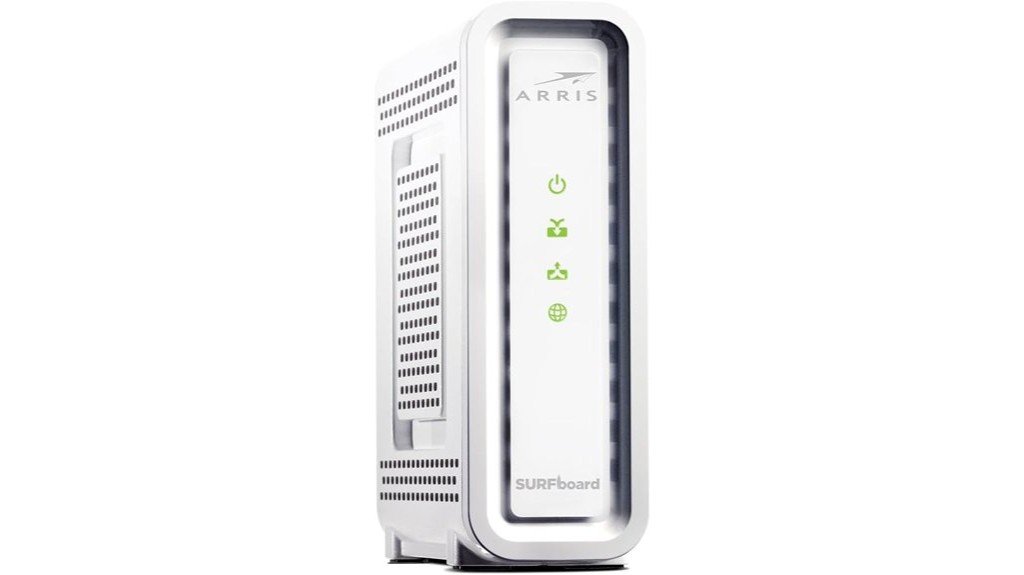
A cable modem can affect your internet bill, gaming latency, streaming quality, and the way your home network grows over time. The ARRIS SURFboard SB8200 is built for buyers who want a DOCSIS 3.1 cable modem with gigabit-class performance, but it is not an all-in-one Wi-Fi gateway. In this review, you’ll see where the SB8200 makes sense, where it has limits, and what you should check before replacing your ISP rental modem.
Quick Verdict
Rating: Recommended with caveats
Best For: Cable internet users who want DOCSIS 3.1 speed support and prefer using their own separate Wi-Fi router.
Bottom Line: The ARRIS SURFboard SB8200 is a strong pick if your cable provider supports it and you want a compact modem with dual Gigabit Ethernet ports. Skip it if you need built-in Wi-Fi, voice phone service, or a single gateway device.
Overview
The ARRIS SURFboard SB8200 stands out because it uses DOCSIS 3.1 technology, which helps support high-speed cable internet plans and better network efficiency than older DOCSIS 3.0 modems. The article-supported maximum speed is up to 2 Gbps, but your real speed depends on your internet plan, provider support, network equipment, and local cable service conditions.
Its compact body measures 1.75 x 5.13 x 5.25 inches and weighs 1.46 pounds, so it does not need much shelf space. It supports 2 downstream x 2 upstream OFDM channels and includes dual Gigabit Ethernet ports. The key tradeoff is simple: this is a modem only, so you still need a separate Wi-Fi router or mesh system.
| Specification | Detail |
|---|---|
| Brand | ARRIS SURFboard |
| Model | SB8200 |
| Product Type | Cable modem |
| Technology | DOCSIS 3.1 |
| Max Speed | Up to 2 Gbps |
| OFDM Channels | 2 downstream x 2 upstream OFDM channels |
| Ethernet Ports | Dual Gigabit Ethernet ports |
| Dimensions | 1.75 x 5.13 x 5.25 inches |
| Weight | 1.46 pounds |
| Wi-Fi | Not built in, separate router required |
| Compatibility | Major U.S. cable providers, including Comcast Xfinity, Cox, and Spectrum as stated in the source article |
| Estimated Energy Use | Approximately 6 watts |
What Is the ARRIS SURFboard SB8200?
The ARRIS SURFboard SB8200 is a standalone cable modem made for cable internet users who want to stop renting a modem from their provider and use their own networking gear. It is designed around DOCSIS 3.1, which is the main reason buyers consider it for gigabit or near-gigabit internet plans.
This modem does not create a Wi-Fi network by itself. Instead, it connects your cable service to a separate router, mesh Wi-Fi system, or other network setup through Ethernet. That design gives you more control over your router choice, but it also means the SB8200 is not the right fit if you want one box that handles both modem and Wi-Fi duties.
Before You Buy: Check your cable provider’s approved modem list before ordering. Even if the SB8200 supports DOCSIS 3.1, activation and speed tiers depend on your ISP and your plan.
Detailed Features
The SB8200 uses DOCSIS 3.1, which is designed for faster cable internet performance and better network handling than older cable modem standards. For gaming, 4K streaming, video calls, and large downloads, this matters most when your ISP plan and router can also support higher speeds.
The modem’s 2 downstream x 2 upstream OFDM channels help manage high-speed data flow. In plain English, this can support smoother performance under the right service conditions, but it cannot fix a weak internet plan, poor coax signal, or overloaded Wi-Fi router.
Its dual Gigabit Ethernet ports add flexibility for advanced setups. Some users may use these ports for supported multi-gig configurations, but many home users will connect only one Ethernet port to a router. Always confirm your ISP and router support the setup you plan to use before expecting multi-gig results.
Who Should Buy It?
Best For
- Cable internet users with a supported DOCSIS 3.1 plan.
- Gamers and streamers who want a modem that can support high-speed service.
- Buyers who already own, or plan to buy, a separate router or mesh Wi-Fi system.
Skip If
- You need built-in Wi-Fi and do not want to buy a separate router.
- Your internet provider does not list the SB8200 as an approved modem.
- You need a modem with built-in voice phone ports.
Design and Build Quality
The SB8200 is small enough for a desk, shelf, or network cabinet, thanks to its 1.75 x 5.13 x 5.25-inch footprint. At 1.46 pounds, it is easy to place, move, or reposition when you are organizing your modem, router, and power cables.
The vertical modem-style shape helps it fit into tighter home office or entertainment center setups. Like most cable modems, it still needs open airflow around it, so avoid pressing it tightly against a wall, stacking items on top, or placing it inside a closed cabinet without ventilation.
Performance for Gaming and Streaming
For gaming and streaming, the biggest appeal is the modem’s DOCSIS 3.1 capability and up to 2 Gbps article-supported speed rating. That makes it better suited for high-speed cable plans than older DOCSIS 3.0-only modems, especially if several people in your home stream, play online games, download large files, or work on video calls.
The SB8200 can help reduce modem-side bottlenecks when paired with the right internet plan and router. Still, latency is affected by more than the modem. Your ISP routing, local network congestion, coax signal quality, router performance, and Wi-Fi coverage can all affect ping times and streaming stability.
Connectivity and Router Setup
The SB8200 includes dual Gigabit Ethernet ports, but it does not include Wi-Fi. You connect the modem to a router, then your router handles wireless coverage for phones, laptops, smart TVs, consoles, and smart home devices.
This setup is useful if you want to choose a stronger router than the basic gateway your ISP might rent. It also gives you more flexibility for mesh Wi-Fi systems, advanced parental controls, guest networks, and future router upgrades.
Pro Tip: For the best results, pair the SB8200 with a router that matches your internet plan speed and home size. A fast modem cannot overcome a weak router or poor Wi-Fi placement.
Compatibility and Activation
The source article lists compatibility with major U.S. cable providers, including Comcast Xfinity, Cox, and Spectrum. This broad compatibility is one of the main reasons the SB8200 remains a popular modem choice for buyers moving away from monthly rental fees.
Before you buy, check your provider’s current approved modem page and confirm the exact model. After that, activation usually requires your ISP account, the modem’s device details, and a direct connection during setup. Some providers allow app-based activation, while others may require a support call.
Energy Use and Daily Operation
The SB8200 modem consumes approximately 6 watts according to the article-supported note. That is useful for a device that normally stays powered on all day and night.
In daily use, the most important care step is placement. Keep the modem in a dry, open area with enough airflow. Also keep the coax cable, Ethernet cable, and power adapter firmly connected, since loose cables can cause speed drops or activation problems that look like modem failure.
How It Performs in Real Use
For Gaming
The SB8200 is a good fit for gaming households that already have a strong router and a cable plan that benefits from DOCSIS 3.1. It can support fast wired connections to a router, but your actual ping still depends on your ISP, router, server distance, and network traffic.
For 4K Streaming
For streaming, the modem’s high-speed support helps when several devices are active at once. It is especially useful if your home has smart TVs, tablets, phones, and computers using the same internet connection during evening hours.
For Work From Home
For video meetings, cloud backups, and large uploads, the SB8200 gives you a stronger modem foundation than many older rental units. Your upload speed still depends on the cable plan, so check your ISP tier if video calls or file uploads are your main concern.
For Long-Term Use
The value improves the longer you use it instead of renting a modem. The main long-term concern is ISP support, so keep firmware expectations realistic because cable modem firmware updates are usually controlled by the internet provider.
Setup Tips Before First Use
Start by confirming that the SB8200 is approved for your exact cable internet provider and plan. Then place it near the coax outlet, connect the coax cable, connect power, and connect Ethernet from the modem to your router or computer during activation.
After activation, restart your modem and router if your speeds look lower than expected. Test with a wired Ethernet connection before blaming the modem, because Wi-Fi speed can vary based on distance, walls, interference, and router limits.
Pros and Cons
Pros
- DOCSIS 3.1 support makes it suitable for high-speed cable internet plans.
- Up to 2 Gbps article-supported speed rating gives it room for faster service tiers.
- Dual Gigabit Ethernet ports add flexibility for supported network setups.
- Compact size makes it easy to place near a router or cable outlet.
- Rental-fee savings can improve value over time if your ISP supports customer-owned modems.
Cons
- No built-in Wi-Fi, so you must use a separate router or mesh system.
- ISP approval and plan support are required for best results.
- Firmware updates are typically controlled by the cable provider, not manually installed by the user.
Concluding Thoughts
Considering the main strengths and limitations of the ARRIS SURFboard SB8200, it is a strong cable modem for buyers who want DOCSIS 3.1, high-speed plan support, and freedom from rental hardware. It works best when paired with a good router and a provider-supported cable internet plan.
Here’s a quick summary:
| Feature | Detail |
|---|---|
| Technology | DOCSIS 3.1 |
| Max Speed | Up to 2 Gbps |
| Compatibility | Comcast, Cox, Spectrum |
| Cost Savings | Up to $168/year |
| Customer Rating | See reviews on Amazon |
This modem can help you move away from rental fees and build a stronger home network, but it does not include built-in Wi-Fi. For many buyers, that is a fair tradeoff because a separate router gives more control over coverage, speed, and features.
Is It Worth the Price?
The ARRIS SURFboard SB8200 is worth considering if you have a supported cable provider and want to stop paying monthly modem rental fees. The value is strongest for users who plan to keep their cable internet service for a while and already have, or want to choose, a separate router.
It is not the best fit if you want the simplest possible setup with modem and Wi-Fi in one device. It is better for buyers who care about DOCSIS 3.1 support, compact hardware, and long-term ownership savings.
How It Compares to Alternatives
Compared with older DOCSIS 3.0 modems, the SB8200 is better suited for high-speed cable plans and heavier home network use. Compared with modem-router gateways, it gives you more router flexibility but requires an extra device for Wi-Fi.
If you want an all-in-one setup, a cable gateway may be easier. If you want more control over router performance, mesh coverage, and future upgrades, the SB8200 makes more sense as a standalone modem.
Frequently Asked Questions
Does the ARRIS SURFboard SB8200 support IPv6?
Yes, the ARRIS SURFboard SB8200 supports IPv6. That helps keep it ready for modern internet routing and provider networks that use IPv6 alongside IPv4.
How do you update the firmware on the SB8200?
Cable modem firmware updates are usually handled by your ISP. If you suspect outdated firmware or connection problems, contact your provider rather than trying to install firmware manually.
Can the SB8200 be used with a mesh Wi-Fi system?
Yes, the SB8200 can work with a mesh Wi-Fi system because it is a modem, not a Wi-Fi router. You connect the modem to the main mesh router with Ethernet, then the mesh system handles wireless coverage.
What is the energy consumption of the SB8200 modem?
The SB8200 modem consumes approximately 6 watts. Since a modem usually runs all day, low power use can be a practical daily-use benefit.
Is the SB8200 suitable for small business use?
The SB8200 can suit small business needs when the business uses a supported cable internet plan and a separate router or firewall. It is not an all-in-one business gateway, so plan your router, Wi-Fi, and security setup separately.
Does the ARRIS SB8200 include Wi-Fi?
No, the SB8200 does not include built-in Wi-Fi. You need a separate router or mesh system to create a wireless network in your home.
Will the SB8200 automatically make my internet faster?
Not by itself. The SB8200 can support faster cable internet service, but your actual speed depends on your ISP plan, provider activation, router, Ethernet cables, Wi-Fi quality, and local network conditions.
Who should skip the ARRIS SURFboard SB8200?
Skip it if your cable provider does not approve it, if you need built-in Wi-Fi, or if you need voice phone ports. It is also not useful for fiber, DSL, or satellite internet because it is made for cable internet service.
The Bottom Line
The ARRIS SURFboard SB8200 is a smart buy for cable internet users who want DOCSIS 3.1 support, a compact modem, and the option to use their own router. It is best for gaming, streaming, work-from-home setups, and long-term rental-fee savings, but you should skip it if you need built-in Wi-Fi or your ISP does not support the model.
