Disclosure: As an Amazon Associate, we earn from qualifying purchases. If you click a link on this page and make a purchase, we may receive a small commission at no extra cost to you.
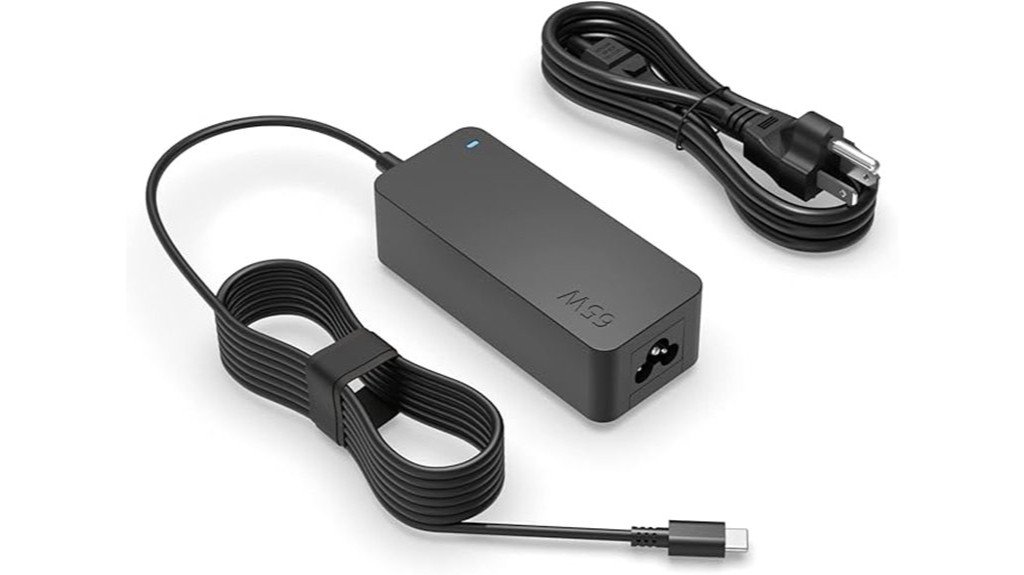
A replacement charger only helps if it matches your laptop’s connector and power needs. The Superer 65W/45W USB C Laptop Charger is made for compatible Lenovo laptops that charge through USB-C, including select ThinkPad, IdeaPad, Yoga, ThinkBook, Flex, and Chromebook models. It gives you up to 65W through USB Power Delivery 3.0, plus a long 10-foot cable and a charging indicator for easier everyday use. The main limitation is compatibility: it is not the right choice for Lenovo laptops that use round-tip or slim-tip connectors, or models that need more than 65W.
Quick Verdict
Rating: 8/10
Best For: Lenovo owners who need a spare or replacement 45W or 65W USB-C laptop charger with extra cable reach.
Bottom Line: The Superer charger offers the right power range for many Lenovo USB-C productivity laptops, with PD 3.0, UL safety certification, a charging indicator, and a 10-foot cable. Skip it if your laptop uses a non-USB-C Lenovo connector or requires more than 65W.
| Specification | Detail |
|---|---|
| Brand | Superer |
| ASIN | B07BKXMBHJ |
| Product type | USB-C AC laptop charger |
| Maximum output | 65W |
| 45W laptop support | Yes, for compatible Lenovo USB-C models |
| Charging technology | USB Power Delivery 3.0 |
| Output profiles | 5V, 9V, 12V, and 15V at 3A; 20V at 3.25A |
| Input | 100-240V, 50-60Hz |
| Connector | USB-C |
| Lenovo compatibility | Select ThinkPad, IdeaPad, Yoga, ThinkBook, Flex, and Chromebook models that use 45W or 65W USB-C charging |
| Charging indicator | Built-in indicator light |
| Safety certification | UL certified |
| Cable length | 10 feet |
| Adapter dimensions | About 3.74 × 1.57 × 0.73 inches |
| Color | Black |
Overview
The Superer charger is designed around a simple use case: replacing or duplicating a Lenovo 45W or 65W USB-C power adapter. Its 65W maximum comes from a 20V/3.25A profile, while lower USB-C PD profiles let compatible devices request less power when needed.
The 100-240V, 50-60Hz input is useful for international travel because the adapter can accept common mains voltages. You may still need a physical plug adapter for the wall outlet in your destination. The 10-foot cable is also a meaningful advantage when hotel, classroom, or office outlets are not close to your desk.
Before You Buy: Check your exact Lenovo model, USB-C charging support, and required wattage. This charger is for compatible 45W and 65W USB-C laptops, not older round-tip or slim-tip Lenovo charging ports and not laptops that require more than 65W.
What Is the Superer 65W/45W USB C Laptop Charger?
The Superer 65W/45W USB C Laptop Charger is a corded replacement-style AC adapter for Lenovo laptops that accept power through USB-C. It is intended for compatible ThinkPad, IdeaPad, Yoga, ThinkBook, Flex, and Chromebook models in the 45W to 65W charging range.
Its main features are USB Power Delivery 3.0, a 65W ceiling, a built-in charging indicator, UL safety certification, and a 10-foot cable. That combination makes it especially practical as a second charger that stays at a desk, dorm, or travel location.
This is not a universal Lenovo charger. Lenovo has used several connector types and power levels across different generations, so the brand name or laptop family alone is not enough to confirm fit.
Detailed Features
The feature set is focused on charging rather than extra ports or multi-device hub functions. You get one USB-C laptop charging connection, multiple PD voltage profiles, long cable reach, and an indicator that helps confirm the adapter is receiving power.
| Feature | Why It Matters |
|---|---|
| 65W maximum output | Matches many Lenovo productivity laptops that use a 65W USB-C adapter. |
| 45W compatibility | Lets compatible lower-power Lenovo USB-C laptops request the power they need. |
| 10-foot cable | Gives you more freedom when the nearest outlet is across a desk, beside a bed, or behind furniture. |
| Charging indicator | Provides a quick visual check that the adapter has power. |
The long cable is useful, but it also creates more cord to manage in a small travel bag. If compact packing matters more than outlet reach, a shorter USB-C charger may be easier to carry.
Who Should Buy It?
Best For
- Lenovo owners whose laptop charges through USB-C and normally uses a 45W or 65W adapter.
- Students, office workers, and remote workers who want a second charger that can stay in one location.
- Travelers who value a 100-240V input range and extra-long 10-foot cable reach.
Skip If
- Your Lenovo uses a round-tip, slim-tip, or another non-USB-C charging connector.
- Your laptop requires more than 65W for normal charging or full performance.
- You specifically want a compact multi-port charger for several devices at the same time.
Power Delivery and Charging Performance
The charger supports USB-C PD 3.0 with 5V, 9V, 12V, and 15V at up to 3A, plus 20V at 3.25A. The 20V/3.25A profile provides the full 65W output. A compatible 45W Lenovo laptop can request a lower power level rather than being forced to take the full 65W.
For office work, browsing, video calls, schoolwork, and other normal laptop tasks, a charger that matches the laptop’s original 45W or 65W requirement should provide the intended charging performance. Charging speed can slow when a laptop is under heavy load, especially if the computer itself is close to the charger’s 65W ceiling.
Do not assume that a 65W charger is automatically suitable for a laptop that shipped with a 90W, 100W, or higher-power adapter. A higher-power system may charge slowly, show a warning, or reduce performance when the adapter cannot meet demand.
Compatibility and Fit
The Superer listing targets compatible Lenovo ThinkPad, IdeaPad, Yoga, ThinkBook, Flex, and Chromebook laptops with USB-C power input. That still does not mean every model in those families will work. Lenovo often sells different generations under the same family name, and connector type and wattage can change between them.
Before ordering, compare three things: the connector on your current charger, the wattage printed on its label, and your laptop’s official charging specification. A match on USB-C plus a 45W or 65W requirement is a much stronger compatibility check than matching only the words “ThinkPad” or “Yoga.”
Pro Tip: Take a photo of your original charger’s label before you shop. Compare its wattage and connector with this Superer adapter, then check your laptop model’s Lenovo support page if anything is unclear.
Safety and Build Considerations
Power adapters handle wall voltage for long periods, so safety matters as much as charging speed. This Superer charger is listed as UL certified, which is a stronger buying signal than a generic adapter with no stated electrical safety certification.
The 100-240V, 50-60Hz input range supports common international voltage systems. That does not change the physical plug shape, so you may need a travel plug adapter. A simple plug adapter changes the connection shape only; it does not increase the charger’s 65W power limit.
Inspect the cable, USB-C connector, and adapter housing before use. Stop using the charger if the cord is cut, the connector is badly bent, the casing is cracked, or the connection becomes unusually loose or hot.
Cable Length and Everyday Convenience
The current product listing describes a 10-foot cable, which is much longer than the 6-foot length stated in the older article version. That extra reach can be useful when an outlet is behind a desk, beside a hotel bed, across a classroom table, or low on a wall.
The tradeoff is portability. A 10-foot cord takes more space and can tangle more easily than a short travel charger. If you plan to carry it daily, coil the cable loosely instead of making tight bends near the adapter or USB-C plug.
Charging Indicator and Ease of Use
A built-in charging indicator gives you a quick way to confirm that the adapter has power. This is useful when you are troubleshooting a dead battery or an outlet that may be controlled by a wall switch.
The indicator does not confirm that your laptop is charging at the maximum possible rate. Your laptop still controls how much power it requests, so check the battery icon or system charging status if you suspect slow charging.
How It Performs in Real Use
For Office and Desk Use
The 65W output and 10-foot cable make this charger well suited to a fixed workstation. You can route the cord from a distant outlet and leave the charger in place instead of moving your original adapter between home and work.
For School or Travel
The 100-240V input range is useful when you travel between countries with different mains voltages. Carry the correct wall-plug adapter for your destination, and confirm that the laptop itself falls within the charger’s 45W or 65W USB-C range.
For Backup Charging
As a backup, the Superer makes the most sense when it closely matches the wattage of your original Lenovo charger. Keeping a second adapter in a travel bag, dorm, or office can reduce the chance of being stuck without power.
For Phones and Tablets
USB-C PD support can also power compatible phones and tablets, with the device requesting an appropriate profile. Still, this is best viewed as a Lenovo laptop charger first. Phone and tablet charging speed depends on the device’s own USB-C PD support and charging limit.
Setup Tips Before First Use
First, confirm the laptop’s required wattage and that the USB-C port supports charging. Some laptops have USB-C ports used mainly for data or display, so use the charging-capable port identified by the laptop manual or support page.
Plug the charger into a stable wall outlet, check the indicator, and then connect the USB-C end to the laptop. If the laptop reports slow charging, verify that it normally uses a 45W or 65W adapter and disconnect power-hungry accessories while you troubleshoot.
Do not force the USB-C connector. It should insert smoothly and sit securely. Repeated disconnects can point to a damaged plug, worn laptop port, debris in the port, or an incompatible connection.
Pros and Cons
Pros
- 65W maximum output with support for compatible 45W Lenovo USB-C laptops.
- USB Power Delivery 3.0 with multiple voltage profiles.
- UL safety certification adds a useful trust point for a wall-powered accessory.
- 10-foot cable gives you much more outlet reach than many standard laptop chargers.
- Built-in charging indicator makes basic power checks easier.
Cons
- Limited to USB-C charging, so it will not replace Lenovo round-tip or slim-tip adapters.
- Not suitable for Lenovo laptops that require more than 65W.
- The 10-foot cable is convenient at a desk but adds bulk and cord management when traveling.
Is It Worth the Price?
The Superer charger is worth considering as a budget-friendly replacement or second adapter if your Lenovo laptop uses 45W or 65W USB-C charging. Its value comes from combining a 65W PD output, UL certification, a charging indicator, and a 10-foot cable rather than from extra ports or premium compactness.
You get the most value if you want a charger that can stay at a desk, office, dorm, or frequent travel location. The main reason to spend more on another option is if you prefer an official Lenovo adapter, need a smaller multi-port GaN charger, or need more than 65W.
How It Compares to Alternatives
An official Lenovo 65W USB-C adapter may appeal more if you prefer a first-party accessory and exact Lenovo branding. A compact multi-port 65W USB-C charger may be better if you want to charge a laptop plus a phone from one wall adapter, though port sharing can reduce the power available to the laptop.
The Superer option makes the most sense when your priority is straightforward Lenovo USB-C compatibility, a long attached cable setup, and a 65W ceiling without paying for features you do not need.
Concluding Thoughts
The strongest parts of this Superer charger are its practical 65W USB-C PD output, 10-foot cable, charging indicator, and UL certification. Those details make it a useful second or replacement adapter for the right Lenovo laptop.
The buying decision still comes down to fit. Match the USB-C connector and wattage requirement first, then decide whether the long cable is a benefit for your setup or extra bulk you would rather avoid.
Frequently Asked Questions
Will this charger work with every Lenovo ThinkPad, Yoga, or IdeaPad?
No. Lenovo uses different connectors and power levels across models and generations. Confirm that your exact laptop supports USB-C charging and normally uses a 45W or 65W adapter.
How long is the charging cable?
The current listing describes a 10-foot cable. That gives you useful reach for desks, classrooms, hotel rooms, and outlets behind furniture, but it also takes more space in a travel bag.
Can I use it with a Lenovo laptop that came with a 45W charger?
Yes, if the laptop accepts USB-C power and is compatible with the charger’s PD profiles. The charger can supply up to 65W, while a compatible device requests the power level it needs.
Can it replace a Lenovo charger rated above 65W?
It is not the best choice for a laptop that requires more than 65W. Use an adapter that meets the laptop’s required power rating to avoid slow charging or reduced performance.
Does the charger work internationally?
Its 100-240V, 50-60Hz input supports common international voltage systems. You may still need a plug adapter so the charger’s wall plug fits the outlet in your destination.
Can I charge a phone or tablet with it?
Compatible USB-C PD phones and tablets can request supported power profiles from the charger. Actual charging speed depends on the device’s own charging standard and maximum input.
What does the charging indicator tell me?
The built-in indicator helps confirm that the adapter has power. It does not guarantee maximum charging speed, so check your laptop’s battery status if charging seems unusually slow.
What is the most common mistake to avoid before buying?
Do not buy based only on the Lenovo family name. Match the USB-C connector and required wattage to your exact laptop, and check Lenovo’s support information if your current charger label is unclear.
The Bottom Line
The Superer 65W/45W USB C Laptop Charger is a solid replacement or backup for compatible Lenovo laptops that use 45W or 65W USB-C charging. Its main strengths are PD 3.0, UL certification, a charging indicator, and a 10-foot cable; its main limitation is that it cannot cover non-USB-C Lenovo models or laptops that need more than 65W.

