
As an Amazon Associate I earn from qualifying purchases.
If you commute by bike and want navigation without constantly checking your phone, the Garmin Edge 830 combines onboard mapping, ride data, connected features, and sensor support in a compact cycling computer. It is especially useful for riders who want turn-by-turn guidance during daily commutes while also tracking training and performance data.
This is an older-generation Garmin model, so current availability can vary. The guide below focuses on what the Edge 830 does well, its important limitations, and the specifications you should check before deciding whether it still fits your riding needs.
Quick Verdict: The Garmin Edge 830 is best for regular cyclists who want detailed onboard navigation plus performance and sensor data in one device.
Best for: Bike commuting, road riding, training, and riders already using compatible Bluetooth or ANT+ sensors.
Skip it if: You only need occasional basic directions or would prefer a simpler, newer-generation device.
Top Pick
|
Category |
Product |
Best For |
|---|---|---|
|
🏆 Cycling GPS |
Navigation + ride data |
Selection Criteria
For a cycling computer used on regular commutes, dependable navigation matters more than simply having a long feature list. Key considerations include onboard mapping, battery life, screen readability, weather resistance, smartphone connectivity, sensor compatibility, mounting options, and how easily the device fits into a normal riding routine.
We also considered whether advanced training functions provide useful extra value without overlooking the basics commuters need: clear directions, reliable ride recording, practical battery life, and a compact handlebar-mounted design.
Garmin Edge 830

If you ride regularly and want one handlebar-mounted device for navigation and ride tracking, the Edge 830 offers onboard maps, a color touchscreen, route guidance, and cycling-focused data without requiring you to keep your phone screen exposed throughout the ride.
The device supports Bluetooth, ANT+, and Wi-Fi connectivity, making it useful if you already have compatible cycling sensors. Garmin specifies battery life of up to 20 hours under typical use, although real-world runtime can vary with screen use, navigation, connected sensors, settings, temperature, and battery age.
Why You’ll Like It: It combines navigation and detailed cycling data in one compact unit, which can reduce how often you need to stop and check directions on your phone.
What to Know Before Buying
The Edge 830 is feature-rich, which is useful for riders who want mapping, sensors, and performance tools but can be more functionality than a basic commuter needs. It is also an older-generation cycling computer, so check current marketplace availability and seller details before purchasing.
Some connected safety and tracking functions rely on compatible devices, appropriate settings, and smartphone connectivity. Treat these tools as supplemental riding features rather than a substitute for safe riding practices or emergency services.
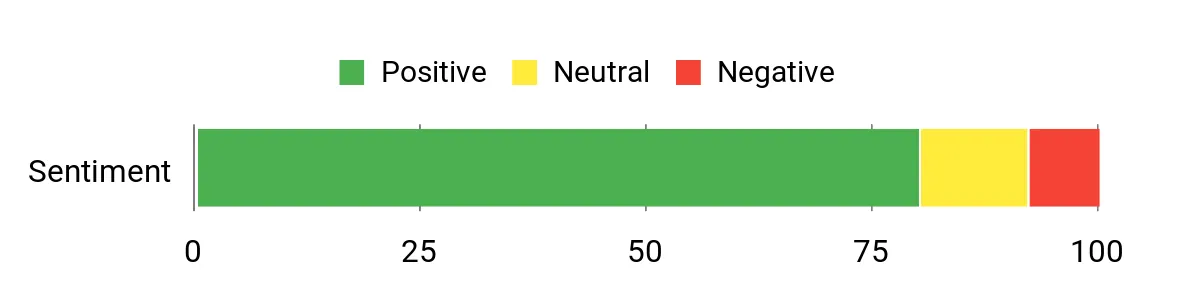
Historical Review Sentiment Snapshot
The chart below comes from the review data previously used for this article. Because marketplace reviews and review counts change over time, treat it as a historical snapshot rather than a live measurement of current Amazon sentiment.
|
Pros |
Cons |
|---|---|
|
✅ Color touchscreen with onboard cycling maps |
❌ More features and setup than basic-navigation riders may need |
|
✅ Bluetooth, ANT+, and Wi-Fi connectivity |
❌ Some connected functions depend on a compatible smartphone and setup |
|
✅ Up to 20 hours of stated battery life under typical use |
❌ Actual battery life varies with settings, usage, and battery condition |
|
✅ Compact 2.8 oz design with IPX7 water rating |
❌ Older-generation model, so availability may be inconsistent |
Long-Term Cost Benefits
The Edge 830 combines navigation, ride recording, sensor connectivity, and training information in one cycling-specific device. For frequent riders who would otherwise buy or use several separate tools, that integration can make the device more practical over time.
Value depends heavily on how often you ride and which features you actually use. An occasional rider who only needs simple directions may not benefit enough from the advanced functions to justify a dedicated cycling computer.
Return on Investment
There is no reliable way to claim that a cycling computer will financially pay for itself. Its strongest value is convenience: regular riders can keep navigation visible, record rides, connect compatible sensors, and review cycling data without relying entirely on a phone mounted to the handlebars.
Use Cases
|
Situation |
How It Helps |
|---|---|
|
Daily Bike Commute |
Keeps route guidance visible on the handlebars while recording your ride, so you do not need to repeatedly pull out your phone. |
|
Long Training Ride |
Combines route navigation with compatible sensor data and performance metrics, while Garmin specifies up to 20 hours of battery life under typical use. |
|
Gravel or Adventure Ride |
Provides onboard mapping in a compact unit and supports cycling-focused navigation features that are useful when riding unfamiliar routes. |
|
Sensor-Based Training |
Supports compatible Bluetooth and ANT+ accessories, allowing riders to build a more detailed cycling-data setup. |
Versatility
The Edge 830 can serve commuters, road riders, and riders who train with cycling sensors. You can use it primarily for navigation or take advantage of its deeper performance and ride-data functions when you want more information.
Safety and Connected Features
The Edge 830 supports Garmin connected features such as LiveTrack, incident detection, and a bike alarm. Availability and operation of connected functions can depend on compatible devices, account setup, smartphone connection, network coverage, and settings, so they should not be treated as guaranteed emergency protection.
Navigation and Training Tools
Onboard mapping, cycling navigation, route features, and performance monitoring are the main reasons to choose the Edge 830 instead of a basic speed computer. Riders who regularly follow unfamiliar routes or track training data are most likely to benefit from the extra capability.
On-Bike Usability
The device measures about 1.9 × 3.2 × 0.8 inches and weighs about 2.8 oz (79.1 g), keeping it relatively compact on the handlebars. Its 2.6-inch color touchscreen provides a dedicated display for navigation and ride information.
Battery and Charging
Garmin rates the Edge 830 for up to 20 hours of battery life under typical use. Actual runtime will depend on navigation, wireless connections, display settings, connected accessories, temperature, battery age, and other usage conditions. Recharge it before longer rides rather than relying on the maximum figure as a guarantee.
Key Benefits
- Onboard cycling maps and navigation for commuting and longer rides
- Color touchscreen in a compact handlebar-mounted design
- Bluetooth, ANT+, and Wi-Fi connectivity
- Support for compatible cycling sensors and performance data
- Up to 20 hours of stated battery life under typical use
- IPX7 water rating for added weather resistance
Before You Buy
- Confirm that you want advanced cycling and navigation features rather than basic directions only.
- Check compatibility with any sensors or accessories you already own.
- Remember that some connected features require a compatible smartphone and setup.
- Check current seller, condition, return policy, and availability because this is an older-generation model.
- Do not treat the stated maximum battery runtime as guaranteed real-world performance.
Check Current Amazon Availability
FAQ
Is the Garmin Edge 830 Good for Commuting?
Yes, it can be a useful commuter cycling computer if you regularly need route guidance and want ride data in the same device. Its onboard mapping means you can keep directions visible without continuously using your phone screen.
If you already know your route and only want basic speed or distance information, its advanced mapping and training functions may be more than you need.
How Long Does the Garmin Edge 830 Battery Last?
Garmin specifies up to 20 hours of battery life under typical use. That is a maximum-style specification rather than a guarantee. Navigation, display use, wireless connections, sensors, temperature, battery condition, and settings can all affect real-world runtime.
What Connectivity Does the Edge 830 Support?
The Edge 830 supports Bluetooth, ANT+, and Wi-Fi. This allows it to work with compatible smartphones, cycling sensors, and Garmin services depending on the feature being used.
Is the Garmin Edge 830 Waterproof?
Garmin lists the Edge 830 with an IPX7 water rating. That provides useful resistance to rain and incidental water exposure, but it should still be used and cared for according to Garmin’s water-rating guidance.
Does the Edge 830 Work Without a Phone?
Core cycling-computer and onboard navigation functions do not require you to keep your phone screen active. However, certain connected functions, notifications, tracking features, syncing, or other services may require a compatible paired smartphone or network connection.
How Should I Set Up and Maintain It?
Before your first important ride, update the device software, configure your preferred data screens, pair any compatible sensors, and test your route and connected functions. Use the supplied or compatible mount securely, recharge before longer rides, and periodically check for software and map updates.
Who This Cycling Computer Fits Best
The Edge 830 makes the most sense for riders who commute frequently, explore unfamiliar routes, train with cycling data, or already own compatible sensors. Its strength is the combination of navigation and cycling-specific information rather than one single feature.
For someone who rides only occasionally or needs nothing more than basic directions, a feature-rich dedicated cycling computer may be unnecessary. The buying decision should come down to how often you will use its maps, connected sensors, and training tools.
Wrapping Up
The Garmin Edge 830 remains a capable cycling computer for riders who value onboard navigation, a color touchscreen, sensor connectivity, and detailed ride data. Its compact size, IPX7 water rating, Bluetooth/ANT+/Wi-Fi support, and stated battery life of up to 20 hours make it practical for commuting as well as longer recreational rides.
The main caution is age: it is an older-generation model, so check current availability, seller information, and product condition before buying. If the features match how you actually ride, it can still provide a useful dedicated alternative to navigating and recording every ride solely with your phone.
Final Recommendation: Choose the Edge 830 if you ride regularly and specifically want onboard cycling navigation plus detailed ride and sensor data.
Think twice if: You need only occasional basic directions, prefer minimal setup, or want to avoid buying an older-generation device.
| Garmin Edge 830 | |
|---|---|
|
|
|
| Best For | Bike navigation, commuting, training, and sensor data |
| Battery Life | Up to 20 hours under typical use |
| Connectivity | Bluetooth, ANT+, Wi-Fi |
| Display | 2.6-inch color touchscreen |
| Water Rating | IPX7 |
| Weight | 2.8 oz (79.1 g) |
| Dimensions | 1.9″ × 3.2″ × 0.8″ |
| Buying Note | Older-generation model; check current availability and seller details |
| Check Current Amazon Availability |
This Roundup is reader-supported. When you click through links we may earn a referral commission on qualifying purchases.

