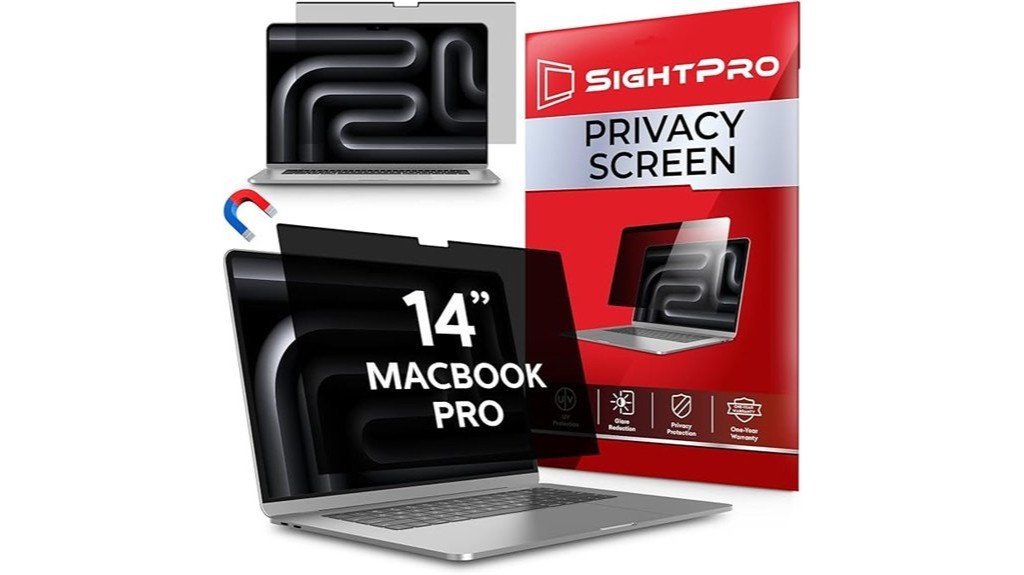
Disclosure: As an Amazon Associate, we earn from qualifying purchases. If you click a link on this page and make a purchase, we may receive a small commission at no extra cost to you.
Working on a MacBook Pro in airports, offices, classrooms, cafés, or shared workspaces can expose private information to people sitting beside you. The Magnetic Privacy Screen for MacBook Pro (2021-2024) is made for users who want side-view privacy without using adhesive strips or a permanent screen cover. It uses a magnetic snap-on design, filters UV and blue light, and can be removed when you need a clear open display. The main tradeoff is simple: it protects side viewing better than rear viewing, so your work setup still matters.
Quick Verdict
Rating: Recommended with caveats
Best For: MacBook Pro users who often work in public places and want a removable privacy filter.
Bottom Line: This magnetic privacy screen is a practical add-on if you want quick side-view privacy and easier removal than adhesive filters. It is not ideal if you need full protection from people standing directly behind you or if your MacBook model is outside the supported range.
| Specification | Detail |
|---|---|
| Product Type | Magnetic privacy screen filter |
| Compatible Device | MacBook Pro models from 2021 to 2024, based on the article’s stated compatibility |
| Attachment Style | Instant snap-on magnetic attachment |
| Privacy Direction | Blacks out side views while keeping frontal viewing clear |
| Eye Protection | Filters harmful UV and blue light |
| Included Accessories | Magnetic privacy screen, storage folder, and cleaning cloth |
| Best Use | Public workspaces, travel, offices, classrooms, and shared desks |
| Important Limitation | Does not block visibility from directly behind the screen |
Overview
The Magnetic Privacy Screen for MacBook Pro is a removable screen filter made for users who want more privacy while using their laptop in shared spaces. It is designed to fit MacBook Pro models from 2021 to 2024 and is intended for specific model numbers, so checking compatibility before buying is essential.
Unlike adhesive privacy filters, this screen uses a magnetic attachment. That makes it easier to install, remove, and store when you do not need privacy. The package includes a magnetic privacy screen, a storage folder, and a cleaning cloth, which helps if you travel often or move between private and public work areas.
The product also focuses on eye comfort. Its film filters UV and blue light while helping reduce side visibility. This makes it useful for professionals, students, remote workers, and travelers who handle emails, documents, spreadsheets, client files, or personal information on their MacBook Pro.
Before You Buy: Confirm your exact MacBook Pro model before ordering. This screen is described for 2021-2024 MacBook Pro models, and a privacy screen that does not match your model may fit poorly or interfere with normal use.
Detailed Features
The biggest feature is the instant snap-on magnetic attachment. You do not need adhesive strips, mounting tabs, or a permanent setup. This is helpful if you want privacy during travel or meetings but prefer the uncovered display when working at home.
The multi-layered film is designed to black out side views while keeping the front view usable. That means someone sitting beside you should have a much harder time reading your screen, while you can still view your laptop from a normal working angle.
The screen also filters harmful UV and blue light. This does not replace healthy screen habits, but it can add comfort for long work sessions, especially if you spend hours reading documents or working under bright indoor lighting.
Privacy Performance
This screen is best for side-view privacy. It helps when you are sitting beside strangers on a plane, working at a coffee shop, attending a conference, or using your laptop in a shared office. The privacy effect is most useful when your screen is facing you directly and people are positioned to your left or right.
The main limitation is rear visibility. The product does not obscure the screen from someone looking directly over your shoulder or standing behind you. You still need to position your laptop wisely when handling sensitive information.
Design and Build Quality
The magnetic design gives this screen a cleaner setup than many adhesive filters. Since it can be removed and reattached, it is better suited for users who do not want a privacy filter on the display all day. This also helps if you sometimes need full screen brightness, better color visibility, or an uncovered display for visual work.
The included storage folder is a practical detail. Privacy screens can collect dust, bend, or get scratched when tossed into a bag without protection. Storing it in the folder helps protect the filter when it is not attached to the MacBook Pro.
Eye Protection and Screen Comfort
The privacy screen filters UV and blue light, which may make long sessions feel more comfortable. This is useful if you spend much of the day reading text, working on spreadsheets, writing reports, or using your laptop under office lights.
Like most privacy filters, it may slightly change the display experience. Depending on lighting and screen brightness, the display may look different than it does without the filter. If color accuracy matters for design, photo editing, or video work, you may prefer removing it during those tasks.
Installation and Removal
The snap-on magnetic attachment is simple. Place the privacy screen along the MacBook Pro display area so the magnetic edge catches, then adjust it until it sits correctly. Because it does not rely on glue, removal is also quick.
This makes the screen useful for people who switch environments often. You can keep it off at home, attach it before a flight, use it during a meeting, and store it again when privacy is no longer needed.
Pro Tip: Clean both your MacBook Pro display and the privacy screen before attaching it. Dust or fingerprints can make the screen look hazy and may reduce comfort during long work sessions.
Who Should Buy It?
Best For
- MacBook Pro users who work in public or shared spaces.
- Travelers who need a removable privacy filter for planes, airports, hotels, or coworking areas.
- Professionals who handle documents, emails, client information, or private work on-screen.
Skip If
- Your MacBook Pro model is not within the supported 2021-2024 range stated in the article.
- You need privacy from people standing directly behind you.
- You do color-sensitive work and want the clearest possible display at all times.
How It Performs in Real Use
For Travel
For flights, trains, airport lounges, and hotel lobbies, the magnetic design is a strong advantage. You can attach it only when needed and keep it in the storage folder when you are working in a private place.
For Office and Coworking Spaces
In shared offices, it helps reduce casual side glances from nearby desks. This is useful when working with emails, HR files, financial documents, client notes, or private dashboards.
For School or Study Use
Students using a MacBook Pro in libraries or classrooms may appreciate the side-view privacy. It can help keep research, messages, assignments, and personal browsing less visible to people nearby.
For Creative Work
For writing, browsing, research, and business tasks, the screen makes sense. For photo editing, graphic design, or video color work, you may want to remove it because privacy filters can affect how the display looks.
Setup Tips Before First Use
Start by checking your MacBook Pro model number and year. The article describes compatibility with MacBook Pro models from 2021 to 2024, so this step helps avoid a poor fit.
Next, clean the laptop display and the privacy screen with the included cleaning cloth. Place the screen carefully and avoid forcing it into position. If the screen looks misaligned, remove it and reattach it rather than pressing hard.
Store the privacy screen in the included folder when it is not in use. This helps reduce dust, scratches, and bending while it is in your bag or desk drawer.
Compatibility and Safety
This privacy filter is an add-on accessory for a MacBook Pro display. It does not require power and should not affect battery life because it is passive. It also should not affect touch sensitivity on a MacBook Pro, based on the article’s stated product behavior.
Do not use harsh chemicals, rough towels, or abrasive cleaners on the screen. These may damage the film and reduce clarity. Use the provided cleaning cloth and follow the product instructions for care.
If you already use a separate screen protector, check fit and lid closure carefully. Layering accessories can sometimes affect how a laptop closes or how the display looks, even when both accessories can physically sit together.
Pros and Cons
Pros
- Magnetic attachment makes installation and removal quick.
- No adhesive strips are needed, so it is easier to use only when needed.
- Side-view privacy helps protect sensitive information in public spaces.
- UV and blue light filtering add extra screen comfort for long sessions.
- Includes a storage folder and cleaning cloth for travel and maintenance.
Cons
- Does not block someone looking directly from behind.
- Compatibility is limited to specific MacBook Pro models.
- Display brightness or color appearance may vary under different lighting conditions.
Is It Worth the Price?
The Magnetic Privacy Screen is worth considering if you often use your MacBook Pro outside a private room. Its strongest value comes from the removable magnetic design, because you can use privacy only when you need it instead of keeping a filter on the display all the time.
It is a smart buy for everyday use if your main concern is side-view privacy in public places. You also get practical extras, including a storage folder and cleaning cloth, which support travel use and regular maintenance.
It is not the best fit if you need full privacy from every angle. The screen helps with side viewing, but it does not replace careful laptop positioning, especially when someone can stand directly behind you.
How It Compares to Alternatives
Compared with adhesive privacy filters, this magnetic screen is easier to remove and reuse. That makes it better for users who only need privacy during travel, meetings, or shared workspace sessions.
Compared with built-in privacy settings or software dimming tools, a physical privacy screen provides a more direct side-view barrier. However, it can also affect the look of the display, so users who need color accuracy may prefer to attach it only for privacy-focused tasks.
Concluding Thoughts
The Magnetic Privacy Screen for MacBook Pro gives you a cleaner and more flexible way to add privacy in public settings. The magnetic attachment is the standout feature because it lets you attach the screen quickly and remove it when you want your display uncovered.
Its privacy filter helps protect sensitive information from side views, while the UV and blue light filtering can make long work sessions more comfortable. The main limitation is that it does not protect from direct rear viewing, so you still need to stay aware of where you sit.
Related Guides
Frequently Asked Questions
How do I clean the magnetic privacy screen properly?
Gently wipe the screen with the provided cleaning cloth. Avoid abrasive materials and harsh chemicals because they can damage the film and reduce clarity.
Does the screen affect touch sensitivity on my MacBook?
The article states that the magnetic privacy screen does not affect MacBook Pro touch sensitivity. It is a passive screen filter designed to add privacy and protection without changing normal laptop use.
Can the privacy screen be used with a screen protector?
The article indicates that the privacy screen can be used with a screen protector. Still, you should check fit, display clarity, and lid closure because stacked accessories can change how your MacBook feels in daily use.
Is there a warranty for the magnetic privacy screen?
The article states that the product typically includes warranty coverage for defects in materials and workmanship. Check the manufacturer or retailer terms before buying because warranty details can vary by seller.
How does the privacy screen impact battery life?
Its impact on battery life should be negligible because the privacy screen is passive and does not use power. You may adjust screen brightness based on comfort, but the filter itself does not drain the battery.
Will it stop people from seeing my screen from behind?
No. The article notes that the screen blocks side views but does not obscure visibility from directly behind, so you should still avoid sitting with your back exposed when viewing sensitive information.
Who should skip this privacy screen?
Skip it if your MacBook Pro is outside the stated 2021-2024 compatibility range or if you need privacy from all viewing angles. It may also be less ideal for color-sensitive creative work where the clearest display matters most.
The Bottom Line
The Magnetic Privacy Screen for MacBook Pro is a practical choice if you want removable side-view privacy for travel, shared offices, classrooms, or public workspaces. Its magnetic design, included storage folder, and cleaning cloth make it easy to use on demand, while UV and blue light filtering add comfort. Skip it if you need rear-view privacy or if your MacBook Pro model is not supported.
