Disclosure: As an Amazon Associate, we earn from qualifying purchases. If you click a link on this page and make a purchase, we may receive a small commission at no extra cost to you.
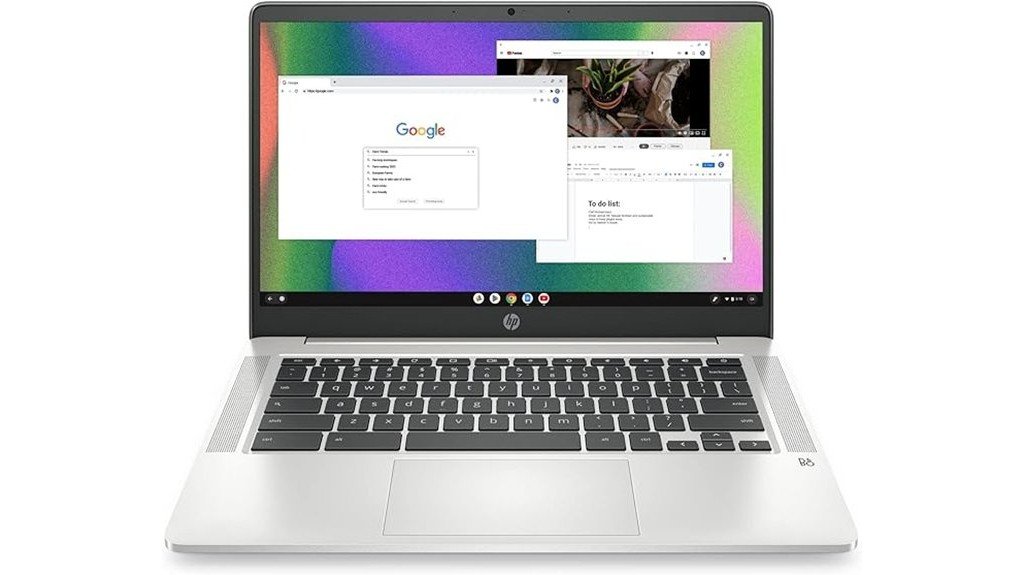
Choosing a Chromebook is mostly about matching simple daily needs with the right limits. The HP Chromebook 14 (14a-na0226nr) is built for portability, web browsing, schoolwork, streaming, email, and light productivity, with a 14-inch HD anti-glare display, Intel Celeron N4120 processor, 4 GB of RAM, and 64 GB eMMC storage. Its biggest strengths are its lightweight 3.24-pound design, Chrome OS simplicity, and up to 14 hours of battery life. Its main tradeoff is that the storage and memory are modest, so it is not the best fit for heavy multitasking, large local files, or demanding gaming.
Quick Verdict
Rating: Recommended with caveats
Best For: Students, casual users, remote workers, and anyone who mainly uses web apps and cloud storage.
Bottom Line: The HP Chromebook 14 is a practical everyday laptop if you want long battery life, a light body, and easy Chrome OS performance. Skip it if you need strong processing power, upgradeable parts, or a large amount of built-in storage.
Overview
The HP Chromebook 14 Laptop, specifically the 14a-na0226nr model released in 2022, takes a simple approach to affordable computing. It weighs 3.24 pounds and measures 12.82 x 8.6 x 0.7 inches, so it is easier to carry than many full-size laptops. The Mineral Silver finish gives it a clean, basic look that fits school, home, and work settings without feeling flashy.
This Chromebook runs on Chrome OS, which is designed around Google apps, browser-based work, Android app support, and cloud storage. That makes it useful if you mostly work in Google Docs, Gmail, Google Classroom, YouTube, web dashboards, or other online tools. It is less ideal if you depend on Windows-only software, large offline programs, or local storage-heavy workflows.
| Specification | Detail |
|---|---|
| Brand | HP |
| Model | HP Chromebook 14, 14a-na0226nr |
| Product Type | 14-inch Chromebook laptop |
| Operating System | Chrome OS |
| Display | 14-inch HD anti-glare micro-edge display |
| Processor | Quad-core Intel Celeron N4120 |
| Graphics | Intel UHD Graphics 600 |
| Memory | 4 GB DDR4 RAM |
| Storage | 64 GB eMMC storage |
| Battery Life | Up to 14 hours |
| Charging | Fast charging supported |
| Dimensions | 12.82 x 8.6 x 0.7 inches |
| Weight | 3.24 pounds |
| Color | Mineral Silver |
| Best Use | Browsing, schoolwork, video streaming, email, writing, and light productivity |
What Is the HP Chromebook 14?
The HP Chromebook 14 is a compact 14-inch laptop made for simple, cloud-friendly computing. It uses Chrome OS instead of Windows, so it works best when your routine is built around the browser, Google Workspace, streaming apps, and online tools. The Intel Celeron N4120 processor and 4 GB of DDR4 RAM are enough for basic tasks, but they are not meant for heavy editing, advanced software, or demanding multitasking.
The 64 GB eMMC storage gives you space for essential files and apps, but the laptop works better when you use cloud storage for documents, photos, and backups. The 14-inch HD anti-glare display helps reduce reflections during daily use, and Intel UHD Graphics 600 supports basic visuals and video playback. Its 3.24-pound body and 0.7-inch thickness make it easy to move from room to room, carry to class, or pack for travel.
Before You Buy: This Chromebook is best for web-based work and cloud storage. Do not choose it as a main laptop if you need Windows programs, heavy local storage, upgradeable RAM, or strong gaming performance.
Who Should Buy It?
Best For
- Students who need a light laptop for Google Classroom, Docs, email, and research.
- Casual users who mostly browse the web, stream videos, and manage everyday online tasks.
- Remote workers who use browser-based tools and want long battery life for basic productivity.
Skip If
- You need Windows-only software or desktop programs that do not run in Chrome OS.
- You store many large files locally and do not want to rely on cloud storage.
- You expect fast performance for gaming, video editing, or heavy multitasking.
Detailed Features
The HP Chromebook 14 Laptop focuses on the essentials: a portable body, a 14-inch display, modest but usable internal hardware, and strong battery life. Its hardware is not built to compete with high-performance laptops, but it makes sense for shoppers who want a simple machine for school, browsing, writing, and streaming.
Design and Portability
At 3.24 pounds and 12.82 x 8.6 x 0.7 inches, the HP Chromebook 14 is easy to carry in a backpack or laptop sleeve. The 14-inch size gives you more screen space than an 11-inch Chromebook while still staying compact enough for daily travel. The Mineral Silver finish keeps the design clean and practical.
This is a good size if you move between a desk, couch, classroom, library, or coffee shop. It is not as tiny as the smallest travel laptops, but the wider screen can feel more comfortable when you are writing, reading long pages, or working with multiple browser tabs.
Display and Graphics
The 14-inch HD display uses anti-glare and micro-edge design features. The anti-glare finish helps when you work near windows or bright indoor lighting, while the micro-edge style helps the screen feel less boxed in. Intel UHD Graphics 600 supports everyday visuals, including web videos, basic streaming, and light image viewing.
This display is best for routine use, not professional color work. If you edit photos, create graphics, or want a sharper premium screen, you may want a laptop with a higher-resolution panel. For school notes, browsing, email, and streaming, the screen is practical enough for the price-focused buyer.
Performance
The quad-core Intel Celeron N4120 processor and 4 GB DDR4 RAM are suitable for light workloads. You can use it for Google Docs, online classes, web research, email, video calls, and a few browser tabs. Chrome OS also helps because it is lighter than a traditional Windows setup.
The main limit is multitasking. If you open too many tabs, run several apps at once, or use demanding web tools, the 4 GB memory can feel restrictive. This Chromebook is better when you keep your workflow simple and close unused tabs.
Storage
The 64 GB eMMC storage gives you quick access for basic local files and apps, but it is limited compared with larger SSD laptops. This is one of the biggest tradeoffs of the HP Chromebook 14. It works best when you store documents, school files, and photos in cloud services instead of keeping everything on the device.
For many Chromebook users, this is not a deal-breaker because Chrome OS is built around online storage. Still, buyers who download many videos, keep large media folders, or need lots of offline files may feel limited quickly.
Battery Life and Charging
The article-supported battery claim is up to 14 hours, which is one of the strongest reasons to consider this model. That makes it useful for school days, travel, light work sessions, and use around the home without staying close to an outlet. Fast charging also helps if you need to top up the battery between tasks.
Actual battery life can vary based on screen brightness, streaming, video calls, connected devices, and how many tabs you keep open. For best results, lower the brightness when possible and close unused apps or tabs.
Connectivity and External Displays
The article states that the HP Chromebook 14 supports external monitors through its available USB-C and HDMI ports. This can help if you want a larger screen at a desk for writing, spreadsheets, research, or online work. External monitor support is useful for users who like the portability of a Chromebook but still want more screen space at home.
Before buying any adapter or monitor cable, check the exact port layout on the model and seller listing. Chromebook model names can be similar, and port selection may matter if your setup depends on a specific cable type.
Pro Tip: Use this Chromebook with cloud storage and keep only your most-needed files offline. That helps the 64 GB eMMC storage feel less restrictive and keeps the device easier to manage.
How It Performs in Real Use
For Schoolwork
The HP Chromebook 14 fits student tasks well because it is light, simple, and built around browser-based tools. Google Docs, email, research, classroom portals, and streaming lectures are the kinds of tasks this laptop handles best. The 14-inch screen also gives you enough room for reading and writing without carrying a bulky laptop.
For Work From Home
For light remote work, this Chromebook can handle browser dashboards, email, writing, and cloud documents. It is most useful if your workplace already uses online platforms and does not require Windows-only software. If your work includes advanced spreadsheets, large files, video editing, or many apps at once, the processor and 4 GB RAM may feel limited.
For Streaming and Browsing
The HD anti-glare display and Intel UHD Graphics 600 support casual streaming, YouTube, web browsing, and social media. The 14-inch display size is more comfortable than a phone or small tablet for longer sessions. The speakers and display are not positioned as premium entertainment hardware, so buyers who want a rich media laptop may prefer a stronger model.
For Travel
The 3.24-pound weight and long battery life make it useful for travel, commuting, and moving between locations. It can fit into many backpacks and does not require constant charging during light use. The main travel limitation is storage, especially if you want to keep many offline videos, documents, or large media files saved locally.
Setup Tips Before First Use
Start by signing in with the Google account you use most often. This helps sync Chrome bookmarks, Google Drive files, Gmail, and other settings. After setup, install only the apps you need and remove anything that adds clutter.
Next, review offline access settings for important files. This is helpful for school, flights, travel, or weak Wi-Fi situations. Since the laptop has 64 GB eMMC storage, choose offline files carefully and keep large backups in the cloud.
Finally, adjust display brightness, sleep settings, and app permissions. These small changes can help battery life and keep the Chromebook easier to use day to day.
Chrome OS: What to Expect
Chrome OS is simple, fast to learn, and easier to maintain than many traditional laptop systems. It updates in the background and is designed around the Chrome browser, Google apps, and cloud storage. For users who already live in Google services, that makes the HP Chromebook 14 feel familiar almost right away.
The limitation is software compatibility. This is not a Windows laptop, so some desktop software will not run the way it would on a PC. Before buying, make sure your school, workplace, printer, or required apps work with Chrome OS.
Pros and Cons
Pros
- Light 3.24-pound body makes it easy to carry for school, work, or travel.
- Up to 14 hours of battery life supports long sessions away from an outlet.
- 14-inch HD anti-glare display is practical for browsing, writing, and streaming.
- Chrome OS is simple for Google apps, cloud storage, and web-based tasks.
- Fast charging and ENERGY STAR certification add everyday convenience and efficiency.
Cons
- 64 GB eMMC storage can feel tight if you keep many local files.
- 4 GB RAM is not ideal for heavy multitasking or many open browser tabs.
- Intel Celeron N4120 performance is best for basic tasks, not demanding apps or gaming.
Is It Worth the Price?
The HP Chromebook 14 is best viewed as a budget-friendly everyday laptop, not a performance machine. Its value comes from the portable body, long battery life, Chrome OS simplicity, and enough hardware for basic daily tasks. For students and casual users, that can make it a smart buy for everyday use.
You get the most value if you already use Google services and do not need a large amount of local storage. The 64 GB eMMC drive and 4 GB RAM are the clear limits, so this model makes more sense for light use than for buyers who want a laptop that can grow with heavier needs.
How It Compares to Alternatives
Compared with larger Windows laptops, the HP Chromebook 14 is usually simpler, lighter, and easier to manage, but it gives up Windows software support. Compared with higher-end Chromebooks, it is more basic in performance, storage, and display quality. It makes the most sense if you want a straightforward Chromebook for browsing, schoolwork, and cloud-based productivity.
If you want stronger performance, a laptop with more RAM and SSD storage may be better. If you care more about low maintenance, long battery life, and simple daily use, this HP Chromebook remains worth considering.
Concluding Thoughts
Balancing performance and practicality, the HP Chromebook 14 is a competent choice for users who prioritize portability and simple function. Its lightweight design and efficient Chrome OS setup help you avoid the weight, cost, and complexity of a heavier laptop. The Intel Celeron N4120 processor, 4 GB RAM, and 64 GB eMMC storage are enough for basic tasks, but they are not built for demanding workloads.
The 14-inch HD screen, Intel UHD Graphics 600, up to 14-hour battery life, and fast charging all support everyday use. This Chromebook fits best in homes, classrooms, dorm rooms, and light work setups where web-based productivity matters more than raw power.
Frequently Asked Questions
Can I upgrade the RAM or storage on the HP Chromebook 14?
The HP Chromebook 14’s RAM and storage are soldered onto the motherboard and cannot be upgraded. If you need more space, plan to use cloud storage or choose a laptop with larger built-in storage from the start.
What type of warranty support is available after the first year?
After the first year, warranty support shifts to user responsibility or third-party service unless extended coverage has been purchased. Check the seller and HP support terms before buying if long-term coverage matters to you.
Does the HP Chromebook 14 support external monitors?
The article states that the HP Chromebook 14 supports external monitors through available USB-C and HDMI ports. Before buying a cable or adapter, confirm the exact port layout on the 14a-na0226nr listing you choose.
Are there color options other than Mineral Silver?
The HP Chromebook 14, model 14a-na0226nr, is primarily presented in Mineral Silver in this article. If color matters to you, check the seller listing carefully before purchase because variant options can differ by seller.
Is the HP Chromebook 14 suitable for gaming?
The HP Chromebook 14 is not a strong choice for demanding gaming. Its Intel Celeron N4120 processor, Intel UHD Graphics 600, and 4 GB RAM are better suited to basic tasks, web games, streaming, and light app use.
Is 64 GB of eMMC storage enough?
It can be enough if you mainly use cloud storage, Google Drive, web apps, and streaming services. It may feel too small if you download many large files, keep lots of offline media, or want a laptop for storage-heavy work.
Who should skip this Chromebook?
Skip it if you need Windows software, heavy multitasking, video editing, high-performance gaming, or a large SSD. This Chromebook is better for simple online work than for demanding creative or technical tasks.
Is the HP Chromebook 14 good for students?
Yes, it can be a good fit for students who use Google Classroom, Docs, email, research tools, and streaming lessons. The lightweight body and long battery life are helpful for class, home study, and travel between locations.
The Bottom Line
The HP Chromebook 14 is a good choice if you want a light, simple, affordable laptop for web-based work, school tasks, email, streaming, and cloud storage. Its strongest points are portability, Chrome OS ease of use, and up to 14 hours of battery life, while its main limits are 64 GB eMMC storage, 4 GB RAM, and basic Celeron performance. Choose it for everyday simplicity, but skip it if you need a powerful or highly upgradeable laptop.
