Understanding your home’s energy use can help you spot waste, manage high-demand appliances, and make better decisions about your electric bill. A good home energy monitoring system gives you clearer visibility into how much power your home or individual devices use, so you can adjust habits, check problem appliances, and track usage over time.
This guide focuses on electricity monitoring products only. You will find whole-home monitors for circuit-level tracking and smart plugs for single-appliance energy monitoring. The best choice depends on whether you want a panel-based system for your entire home or a simple plug-in monitor for lamps, fans, dehumidifiers, coffee makers, and other outlet-powered devices.
Affiliate disclosure: This roundup is reader-supported. As an Amazon Associate, we may earn from qualifying purchases when you click through product links, at no extra cost to you.
Top Picks
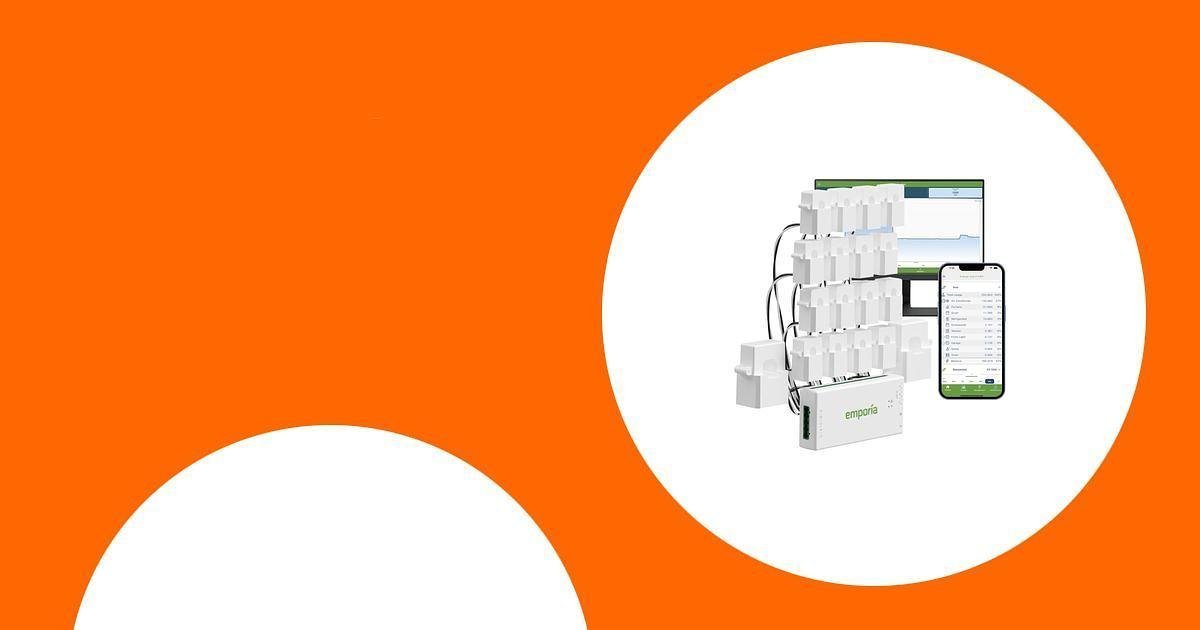
- Best Overall: Emporia Gen 3 Smart Home Energy Monitor with 16 Circuit Level Sensors
- Best Smart Plug Value: Govee Smart Plug with Energy Monitoring
- Best Budget Smart Plug: Kasa Smart Plug Mini with Energy Monitoring
- Best Smaller Whole-Home Kit: Emporia Gen 3 Smart Home Energy Monitor with 8 Circuit Sensors
Quick Verdict
If you want the most detailed home electricity view, choose the Emporia Gen 3 with 16 sensors. It is the strongest fit for larger homes, solar users, and anyone who wants circuit-level visibility. If you only need to measure one appliance at a time, the Govee or Kasa smart plug is easier to install and costs much less than a panel monitor. The Emporia Gen 3 with 8 sensors is a better match if you want whole-home monitoring but only need to track a smaller set of priority circuits.
How to Choose the Right Energy Monitoring System
Before buying, decide how much detail you need. A whole-home monitor connects inside your electrical panel and can show circuit-level trends, but installation is more involved. A smart plug is much easier because you plug it into a wall outlet, then plug one device into it. The tradeoff is that a smart plug only measures the appliance connected to that outlet.
- Choose a whole-home monitor if you want to track major circuits such as HVAC, water heater, washer, dryer, range, or solar production.
- Choose an energy-monitoring smart plug if you want to check one device, automate a lamp, or measure the power draw of appliances that use a standard outlet.
- Check Wi-Fi requirements because many smart energy devices require 2.4 GHz Wi-Fi.
- Consider installation comfort because panel-based systems should be installed carefully, and many buyers may prefer a qualified electrician.
- Avoid relying on old prices or ratings because Amazon pricing, review counts, and availability can change often.
Safety note: Whole-home energy monitors are installed in or near an electrical panel. If you are not experienced with electrical panels, hire a qualified electrician. Smart plugs are easier, but you should still follow the device’s current rating and avoid overloading outlets.
Emporia Gen 3 Smart Home Energy Monitor with 16 50A Circuit Level Sensors

The Emporia Gen 3 with 16 circuit sensors is the strongest choice here if you want a deeper look at electricity use across your home. Instead of only measuring one outlet, it uses clamp-on sensors in your electrical panel to help show how much power key circuits are using. That makes it useful for tracking high-demand areas such as HVAC, kitchen appliances, laundry equipment, or other major loads.
This model is best for homeowners who want a serious energy dashboard, solar or net metering support, and enough sensors for a more detailed circuit layout. It is more involved than a plug-in monitor, but it gives you a broader view of your home’s electrical behavior.
Best For
- Whole-home electricity monitoring
- Homes with several important circuits to track
- Solar and net metering visibility
- Users who want real-time app-based energy data
What to Know Before You Buy
- Installation happens at the electrical panel, so professional help may be the safer choice.
- The app and cloud features require internet access.
- It is more advanced than a smart plug, so setup takes more planning.
Key Benefits
- Real-time electricity monitoring
- Sixteen 50A branch sensors for circuit-level insight
- Supports solar and net metering
- Useful for identifying high-use circuits and usage patterns
- App-based tracking for day-to-day energy awareness
Who Should Buy This
Choose this monitor if you want the most complete electricity picture in this roundup and are comfortable with a panel-based setup.
Who Should Avoid This
Skip it if you only want to test one appliance or if you need a simple plug-and-play option with no panel installation.
Govee Smart Plug with Energy Monitoring

The Govee Smart Plug with Energy Monitoring is a practical pick if you want to measure and control individual plug-in devices. It can track power, current, and voltage through the Govee Home app, which is helpful when you want to see how much energy a specific appliance uses during the day, week, or month.
This is a good fit for renters, apartment dwellers, and homeowners who want a simple way to monitor lamps, fans, coffee makers, dehumidifiers, or other compatible outlet-powered devices. It also works with Alexa and Google Assistant, making it useful for voice control and basic home automation.
Best For
- Single-appliance energy tracking
- Voice control with Alexa or Google Assistant
- Scheduling and basic automation
- Users who want easy setup without opening an electrical panel
What to Know Before You Buy
- This is not a whole-home monitor. It only tracks the device plugged into it.
- It is designed for 2.4 GHz Wi-Fi, not 5 GHz Wi-Fi.
- Always check the smart plug’s current rating before using it with higher-demand appliances.
Key Benefits
- Real-time energy monitoring for connected devices
- Wi-Fi and Bluetooth connectivity
- Works with Alexa and Google Assistant
- Scheduling, timer, and group control features
- No hub required
Who Should Buy This
Choose the Govee plug if you want an easy smart plug that combines energy tracking, remote control, and voice assistant support.
Who Should Avoid This
Skip it if you need to monitor hardwired appliances, multiple circuits, or your entire electrical panel.
Check Current Amazon Availability
Kasa Smart Plug Mini with Energy Monitoring

The Kasa Smart Plug Mini with Energy Monitoring is a compact option for tracking and controlling one plug-in device at a time. It is a good step up from a basic outlet timer because it adds app control, scheduling, voice control, and energy monitoring in one small device.
This is a strong budget-friendly choice if you want to check power use for a lamp, fan, charger, small appliance, or seasonal device. The compact shape also helps leave the second outlet open on many standard wall plates.
Best For
- Budget-friendly appliance monitoring
- Compact outlet setups
- Alexa and Google Home users
- Simple schedules and remote on/off control
What to Know Before You Buy
- It measures one outlet-connected device, not your full home.
- It requires 2.4 GHz Wi-Fi for setup.
- It is best for compatible household electronics within the plug’s rated load.
Key Benefits
- Energy monitoring in a small smart plug
- Remote control through the Kasa app
- Voice control with Alexa and Google Assistant
- Easy scheduling and automation
- Compact design that helps save outlet space
Who Should Buy This
Choose the Kasa Smart Plug Mini if you want an affordable, compact way to track individual device energy use without installing a panel monitor.
Who Should Avoid This
Skip it if you need solar monitoring, circuit-level data, or whole-home electricity reporting.
Check Product Details on Amazon
Emporia Gen 3 Smart Home Energy Monitor with 8 Circuit Sensors

The Emporia Gen 3 with 8 circuit sensors is a better match if you want whole-home electricity monitoring but do not need as many branch sensors as the 16-sensor kit. It gives you a panel-based view of your electrical usage and can monitor up to eight selected circuits, which may be enough for smaller homes or buyers who only care about the biggest energy users.
Like the larger Emporia kit, this model is aimed at people who want deeper energy insight than a smart plug can provide. It is especially useful when you want to monitor major loads, review usage trends, and keep an eye on solar or net metering data.
Best For
- Smaller whole-home monitoring setups
- Tracking up to eight priority circuits
- Users who want panel-level insight without the larger sensor kit
- Solar and net metering visibility
What to Know Before You Buy
- It tracks fewer circuits than the 16-sensor version.
- Panel installation is more involved than using a smart plug.
- You should plan which circuits matter most before choosing the 8-sensor kit.
Key Benefits
- Whole-home electricity monitoring
- Eight 50A branch sensors for selected circuits
- Supports solar monitoring
- Useful app-based energy insights
- Good fit when you do not need sixteen circuit sensors
Who Should Buy This
Choose this version if you want whole-home monitoring but only need to track a smaller group of important circuits.
Who Should Avoid This
Skip it if you want the broadest circuit coverage from the start or if you only need a plug-in appliance monitor.
Whole-Home Monitor vs Energy-Monitoring Smart Plug
The biggest difference is scope. A whole-home monitor is made for broader electrical tracking, while a smart plug is made for one outlet-powered device. If your goal is to understand your entire home’s power use, an Emporia monitor is the better fit. If your goal is to test a few appliances or automate a device, a Govee or Kasa smart plug is simpler and easier to move around.
- Choose whole-home monitoring for circuit-level visibility, solar tracking, and larger energy questions.
- Choose smart plugs for portable, low-effort monitoring of individual devices.
- Use both together if you want a broad home view plus extra detail on specific plug-in appliances.
FAQ
What should I consider when buying a home energy monitoring system?
Start with the type of monitoring you need. If you want to track several circuits, choose a whole-home monitor with enough sensors for your electrical panel. If you only want to monitor one appliance, an energy-monitoring smart plug is easier and faster to set up. You should also check Wi-Fi requirements, app features, installation difficulty, safety certifications, and whether the product supports solar or net metering if that matters for your home.
Do I need an electrician for a whole-home energy monitor?
Many whole-home monitors use clamp-on sensors inside the electrical panel. Some experienced DIY users may be comfortable with that, but a qualified electrician is the safer choice if you are unsure. Never work inside an electrical panel unless you understand the risks and local requirements.
Can a smart plug monitor my whole house?
No. A smart plug only tracks the device plugged into it. It is useful for checking individual appliances, setting schedules, and learning how much power one device uses. For whole-home or circuit-level monitoring, choose a panel-based energy monitor.
Can these devices lower my electric bill?
They do not lower your bill by themselves. They help you see energy patterns, spot high-use devices, and make informed changes. Savings depend on your habits, utility rates, appliances, and how you use the data.
Why do many smart energy devices require 2.4 GHz Wi-Fi?
Many smart plugs and energy monitors use 2.4 GHz Wi-Fi because it often has better range through walls than 5 GHz. Before buying, check your router settings and make sure your phone can connect the device during setup.
Wrapping Up
A home energy monitoring system can make your electricity use easier to understand. For the most complete view, the Emporia Gen 3 with 16 sensors is the best overall fit because it can track more circuits and supports solar and net metering. For a smaller whole-home setup, the Emporia Gen 3 with 8 sensors is a practical alternative. If you only want to monitor one appliance at a time, the Govee and Kasa smart plugs are simpler, more affordable, and easier to move from device to device.
The right choice depends on your home, your installation comfort, and how much detail you want. Whole-home monitors are better for serious energy tracking. Smart plugs are better for quick appliance-level insight.
| Product | Image | Best For | Monitoring Type | Pros | Cons | Check Price |
|---|---|---|---|---|---|---|
| Emporia Gen 3 Smart Home Energy Monitor with 16 Circuit Sensors |
|
Best overall for detailed whole-home electricity tracking. | Panel-based whole-home and circuit-level monitoring. | Sixteen 50A sensors, real-time app data, solar and net metering support. | More involved installation and may require an electrician. | Check Price |
| Govee Smart Plug with Energy Monitoring |
|
Best value smart plug for single-device energy tracking. | Plug-in appliance monitoring. | Tracks power, current, and voltage; supports Alexa and Google Assistant. | Not a whole-home monitor and does not support 5 GHz Wi-Fi. | Check Price |
| Kasa Smart Plug Mini with Energy Monitoring |
 |
Best compact budget option for one outlet-powered device. | Plug-in appliance monitoring. | Compact design, Kasa app control, scheduling, Alexa and Google Assistant support. | Limited to one connected device and requires 2.4 GHz Wi-Fi. | Check Price |
| Emporia Gen 3 Smart Home Energy Monitor with 8 Circuit Sensors |
|
Best smaller whole-home kit for selected priority circuits. | Panel-based whole-home and circuit-level monitoring. | Eight 50A sensors, solar monitoring, app-based energy tracking. | Tracks fewer circuits than the 16-sensor version. | Check Price |
This roundup is reader-supported. When you click through links, we may earn a referral commission on qualifying purchases.

