Disclosure: As an Amazon Associate, we earn from qualifying purchases. If you buy through links on this page, we may earn a commission at no extra cost to you.
By: GoMyReview Editorial Team | Updated: October 10, 2026
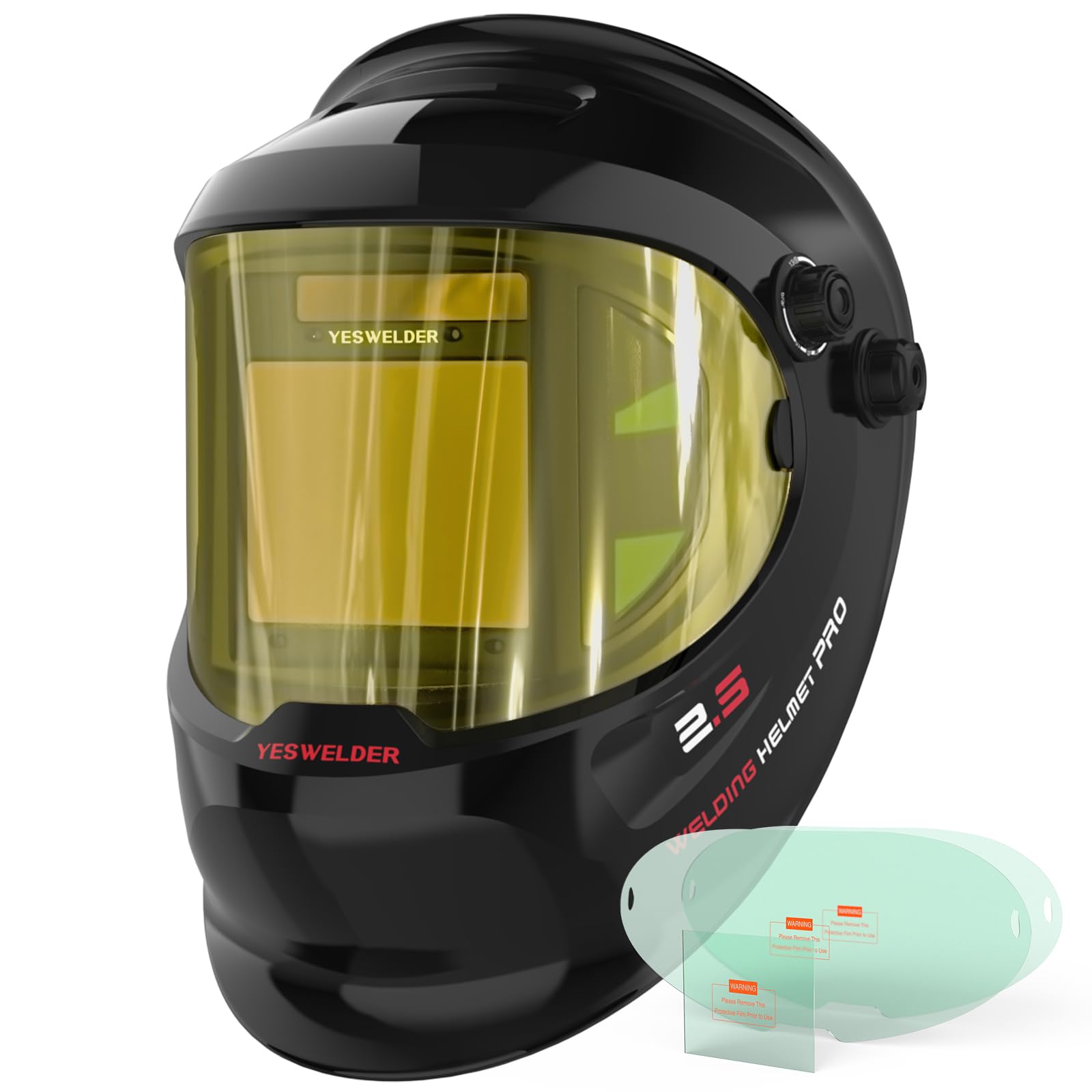
The YESWELDER LYG-Q800D welding helmet combines a large 3.93 × 3.23-inch auto-darkening lens with fixed side windows for a wider view of your work area. Its 1/1/1/1 true-color optical rating, four arc sensors, and adjustable welding and cutting shades make it a practical option for TIG, MIG, stick welding, plasma cutting, and grinding.
Its main appeal is visibility. You can see more around the weld without lifting your hood as often. However, the side panels stay at DIN 5 and never auto-darken, and the plastic headgear may need occasional adjustment. Those trade-offs matter before you buy.
YESWELDER LYG-Q800D at a Glance
| Feature | Assessment |
|---|---|
| Main viewing area | 3.93 × 3.23 inches, with additional fixed side windows |
| Optical clarity | 1/1/1/1 true-color rating for the main filter |
| Darkening speed | Manufacturer-listed response faster than 1/30,000 second |
| Operating modes | Weld, cut, and grind |
| Power | Solar-assisted system with replaceable CR2450 battery |
| Main limitation | Side windows do not auto-darken |
Who Should Buy the YESWELDER LYG-Q800D?
Best for: DIY welders, hobby fabricators, automotive repair users, and tradespeople who want a large viewing area without giving up basic adjustment controls. The extra peripheral view can help when positioning metal, checking fixtures, or working around a crowded bench.
Consider another helmet if: You want electronic darkening across every viewing panel, advanced digital memory settings, integrated respiratory protection, or a different headgear system for long industrial shifts.
This helmet may work as a primary hood for regular shop projects or as a backup for an experienced welder. Its value depends on how much you benefit from the side windows.
Before You Buy: Four Things to Know
- The side windows are permanently shaded at DIN 5. They are not electronic welding filters for directly viewing the arc.
- Grind mode keeps the main lens at DIN 4 and must not be used for arc welding.
- The headgear has several adjustment points, so proper fitting takes more than tightening the rear knob.
- Check the exact Q800D variant and included accessories before ordering. Graphic versions can have different model suffixes.
Jump to Review Sections
YESWELDER LYG-Q800D Key Specifications
The current YESWELDER product specifications describe a four-sensor auto-darkening helmet with a large main filter, fixed side panels, and separate operating modes. The following table uses those consumer-facing specifications.
| Specification | Details |
|---|---|
| Model | LYG-Q800D, classic black |
| Main viewing area | 3.93 × 3.23 inches (100 × 83 mm) |
| Side windows | Fixed DIN 5, non-auto-darkening |
| Optical rating | 1/1/1/1, true-color main lens |
| Main light state | DIN 4 |
| Welding shades | DIN 9–13 |
| Cutting shades | DIN 5–9 |
| Grinding | Fixed DIN 4 main lens |
| Arc sensors | 4 |
| Light-to-dark response | Less than 1/30,000 second, claimed |
| Dark-to-light delay | 0.1–0.8 second, per series manual |
| Power | Solar cell and replaceable CR2450 lithium battery |
| UV/IR filter | Manufacturer-listed DIN 16 protection |
| Shell | Polypropylene (PP) |
| Additional functions | ADF self-check, sensitivity control, low-battery indicator |
| Standards listed for series | ANSI Z87.1, EN379, CSA Z94.3 |
The main viewing size and light-state figures differ slightly from some older reseller descriptions. Use the manufacturer’s current consumer listing and the label on your exact helmet when checking compatibility and safety markings.
What’s in the Box?
The manufacturer lists the following items with the LYG-Q800D package:
- One auto-darkening welding helmet
- Two replacement outer lens covers
- One replacement inner lens cover
- One replacement battery
- One storage bag
- One headgear assembly
- One user manual
These spare covers are useful because surface scratches, dust, and welding spatter can reduce visibility. Check the seller’s package description before ordering, especially when selecting a graphic variant.
What Do Owners Say About the YESWELDER LYG-Q800D?
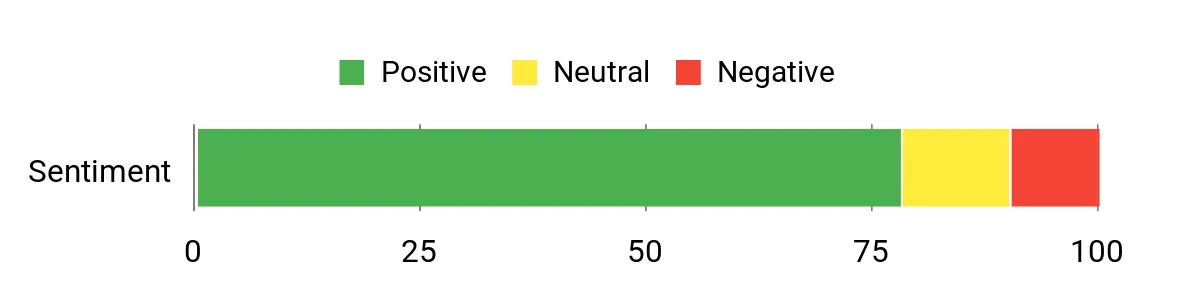
Customer feedback commonly emphasizes the broad viewing area, clear lens, and adjustable fit. Owners also describe several limitations, especially headgear comfort, fit adjustments, and the fact that the side windows do not darken.
Recent manufacturer-hosted reviews include a returning welder who appreciated the updated helmet design and another owner who liked the clear view but found the filter tint more yellow than expected. Other retailer feedback mentions occasional headgear wear and differences in comfort during long use.
Overall reported sentiment: Generally positive, with meaningful fit and durability concerns.
These are customer-reported experiences, not results from our own laboratory testing. Individual results vary with welding process, work environment, helmet fit, and maintenance.
YESWELDER LYG-Q800D Pros and Cons
The strongest reasons to consider this helmet are its optical clarity, panoramic layout, and replaceable power source. Its limitations center on the passive side windows and the practical demands of fitting and maintaining a plastic headgear system.
| Pros | Cons |
|---|---|
| Wide main lens with fixed side panels | Side panels never auto-darken |
| True-color 1/1/1/1 main filter | Plastic headgear may need adjustment |
| Replaceable CR2450 battery | No integrated respiratory protection |
| Weld, cut, and grind modes | Grind mode does not darken for welding |
The viewing system is the key selling point. If you mainly want reliable basic auto-darkening at the lowest possible cost, the extra side panels may not justify choosing this model over a simpler helmet.
How Good Is the True-Color Optical Performance?
The LYG-Q800D uses a main filter rated 1/1/1/1 for optical clarity. This is a favorable classification covering optical distortion, light diffusion, shade consistency, and angular dependence.
True-color lens technology aims to make the weld area look more natural than it does through some older green-tinted filters. Better color separation can make it easier to identify the joint, filler wire, and nearby metal.
However, an optical rating is not a guarantee that every welder will prefer the lens. The perceived tint, brightness, and clarity can still depend on lighting, shade selection, and individual eyesight.
What the Optical Rating Means in Practice
The four numbers assess different aspects of optical performance. A rating of 1 is the strongest class in each category.
- Optical quality: How accurately the lens presents the image.
- Diffusion of light: How much unwanted scattering affects clarity.
- Variation in luminous transmittance: How evenly the lens appears shaded.
- Angular dependence: How consistent the shade remains from different viewing angles.
This makes the optical specification a useful comparison point, although it does not replace real-world comfort or fit testing.
Does the 180-Degree Panoramic View Help?
The panoramic design adds fixed-shade side windows around the electronically controlled main filter. YESWELDER markets this as a 180-degree viewing experience, designed to improve peripheral awareness.
Those panels can help you notice nearby tools, workpieces, and movement without repeatedly lifting the helmet. This is useful when repositioning a part or preparing for the next weld.
The extra windows are not the same as having one electronically darkening lens across the whole field of view.
Safety warning: The side windows remain at DIN 5 during welding. Keep the welding arc within the properly shaded main viewing filter. Never rely on the side panels as a substitute for the correct arc-welding shade.
This distinction matters when comparing the Q800D with a standard large-screen helmet. A wide passive view is helpful for awareness, but it does not create a fully auto-darkening panoramic filter.
Welding Shades, Sensors, and Switching Performance
The LYG-Q800D includes three main operating modes. Each serves a different task, so choosing the correct mode is essential before starting work.
| Mode | Main Lens Shade | Typical Use |
|---|---|---|
| Weld | DIN 9–13 | TIG, MIG, stick welding |
| Cut | DIN 5–9 | Suitable cutting processes within the selected shade range |
| Grind | Fixed DIN 4 | Grinding, not arc welding |
Four arc sensors detect the welding arc. The manufacturer specifies a light-to-dark response faster than 1/30,000 second. That is a published product claim, not a switching-speed measurement performed for this review.
Sensitivity and Delay
The sensitivity control lets you adjust how readily the filter responds to light. The delay control determines how long the lens stays dark after the arc ends.
The series manual lists a delay range of 0.1 to 0.8 second. Longer delay can be useful when the weld pool stays bright after welding stops.
For shade selection, follow the process-specific recommendations and the OSHA guidance on welding filter shades. Start with an adequately dark lens and adjust only within safe limits.
Comfort, Headgear, and Durability
The helmet uses a polypropylene shell with pivot-style headgear. The design provides adjustment for fit, viewing angle, and distance between your face and the filter.
The original review highlights comfortable wear and practical extras, while some customer feedback points to headgear loosening or needing repeated adjustment. Both experiences can occur because head shape, work position, and usage patterns vary.
Headgear Adjustment
The manufacturer’s manual recommends keeping both sides of the headgear aligned when changing the distance or fit. Uneven positioning can cause discomfort and put extra stress on the adjustment mechanism.
The rear adjustment knob is only one part of the fit. You can also adjust the top band, helmet angle, and distance from your face.
How Durable Is the Shell?
Polypropylene offers a practical balance of weight, flexibility, and everyday resistance to minor bumps. However, surface scratches, worn headgear parts, and damaged lens covers remain possible.
Do not treat any welding helmet as impact-proof. Inspect the shell and lens assembly regularly, especially after a drop or strong impact.
Long-Term Ownership Costs
The LYG-Q800D uses replaceable cover lenses and a CR2450 battery. This makes routine upkeep more manageable than on a design with a sealed, nonreplaceable battery.
The included spare covers reduce the need to order replacements immediately. However, ongoing costs depend on welding frequency, spatter exposure, and local availability of compatible parts.
Replacement headgear may also become necessary after prolonged use. Check compatibility before purchasing parts because similarly named Q800D designs and other YESWELDER helmets may use different accessories.
Best Uses for the LYG-Q800D
The helmet supports a range of common welding and metalworking tasks. Its benefits are strongest when you combine the appropriate filter shade with the correct mode and fit.
TIG Welding
The true-color main filter can make it easier to position the tungsten and filler rod. Adjustable sensitivity helps you tune the filter to the arc and lighting conditions.
For very low-current TIG work, confirm that the filter switches reliably under your actual conditions before starting a full job.
MIG and Stick Welding
The large main viewing area helps when following a joint or moving along a longer weld. Four sensors support arc detection, although your hands, torch, or workpiece can still block their view.
Choose the proper shade for the process and amperage instead of relying on one setting for every weld.
Plasma Cutting
Cut mode offers adjustable DIN 5–9 shades. Check that the selected shade is appropriate for the cutting current and process before working.
Grinding and Surface Preparation
Grind mode lets you use the hood for certain grinding tasks while keeping the main lens light. Wear suitable impact-rated safety glasses underneath.
Always switch back to weld mode before striking an arc.
How to Set Up and Maintain the Helmet
Correct setup affects both comfort and safety. The LYG-Q800D series operator’s manual explains the adjustment points, controls, battery replacement, and lens-cover procedure.
- Inspect the helmet: Check the shell, headgear, lens covers, and filter for cracks or other damage.
- Fit the headgear: Adjust the top band, rear tension, viewing angle, and face-to-lens distance. Keep left and right adjustments even.
- Select the mode: Use weld for arc welding, cut for suitable cutting work, or grind for grinding.
- Choose a safe shade: Match the welding process and current to the manufacturer’s shade chart.
- Adjust sensitivity and delay: Start with the manual’s recommended range and fine-tune for your lighting conditions.
- Test the auto-darkening filter: Press the reset or self-check button. The lens should darken and return to its light state as described in the manual.
- Put on additional protective equipment: Wear approved safety glasses with side shields and suitable welding clothing.
- Begin work only after confirming correct operation: Stop immediately if the filter fails to darken, flickers unexpectedly, or shows damaged areas.
Cleaning and Lens Replacement
Use a soft cloth and mild soap-and-water solution on the protective lens covers. Let them dry before use. Do not use abrasive cleaners or immerse the filter assembly in water.
Replace scratched, cracked, or heavily spattered covers. Never operate the helmet without the required inner and outer covers installed.
Replacing the Battery
The manual specifies a replaceable CR2450 lithium battery. Remove the lens assembly and battery tray as directed, install the replacement with the correct polarity, and test the filter before welding.
The solar cell assists the power system, but it does not eliminate the need to maintain the battery.
Troubleshooting Common Problems
| Problem | What to Check |
|---|---|
| Lens does not darken | Stop welding. Check mode, battery, self-check, sensors, and sensitivity. |
| Lens flickers | Stop and inspect sensor obstruction, sensitivity, and dirty covers. |
| Lens stays dark | Check ambient light and sensitivity adjustment. |
| Uneven fit | Align both headgear sides and adjust the top band and rear tension. |
| Poor visibility | Inspect lens covers for dirt, scratches, and spatter. |
YESWELDER LYG-Q800D vs. Other Welding Helmets
The best alternative depends on whether you prioritize side visibility, a larger main filter, or more advanced electronic controls.
| Helmet | Main Viewing Area | Key Difference |
|---|---|---|
| YESWELDER LYG-Q800D | 3.93 × 3.23 in. | Fixed DIN 5 side windows |
| YESWELDER LYG-M800H | 3.93 × 3.66 in. | Larger main lens without Q800D-style side panels |
| ESAB Sentinel A60 | 4.65 × 2.80 in. | Digital controls and programmable settings |
| Miller Digital Infinity | 13.4 sq. in. | Digital controls and X-Mode arc detection |
YESWELDER LYG-M800H
The LYG-M800H is a logical alternative if you prefer one larger forward-facing viewing window. Its published 3.93 × 3.66-inch main filter offers greater vertical viewing space without the Q800D’s passive side panels.
It suits someone who wants clear optics but does not need panoramic peripheral viewing.
ESAB Sentinel A60
The Sentinel A60 provides a 4.65 × 2.80-inch viewing area, adjustable shade settings, digital controls, and multiple memory positions. It may appeal to welders who switch settings frequently.
Its design emphasizes electronic control and front-facing visibility rather than fixed panoramic windows.
Miller Digital Infinity
The Digital Infinity offers a published 13.4-square-inch viewing area and several operating modes, including X-Mode. Miller describes X-Mode as detecting the weld electromagnetically, which can help under certain obstructed-sensor conditions.
It is worth considering when advanced controls and specialized arc detection matter more than side-window visibility.
Is the YESWELDER LYG-Q800D Worth the Price?
The LYG-Q800D is worth considering when panoramic visibility is a feature you will use regularly. Its true-color main filter, four sensors, replaceable battery, and included lens covers make it a practical package.
However, there is no verified evidence that the helmet automatically improves weld quality, reduces rework, or pays for itself through faster welding. Those outcomes depend on the operator and work conditions.
If you mostly weld in a fixed position and prefer a conventional forward view, a helmet with one larger main lens may offer better value for your needs.
Value verdict: A sensible choice for visibility-focused buyers, provided you understand the fixed side-window limitation.
Compare Current Price on Amazon
How We Evaluated This Helmet
This review combines the manufacturer’s published specifications, available operator instructions, public customer feedback, and a feature comparison with other welding helmets.
We focused on optical clarity, viewing area, shade options, controls, battery maintenance, headgear design, and safety limitations. Manufacturer claims are identified as specifications rather than independent laboratory findings.
No hands-on welding test, switching-speed measurement, or long-term durability test was supplied for this review. The editorial assessment reflects the documented feature set and identified limitations, not personal testing.
Related Guides
Frequently Asked Questions
Is the YESWELDER LYG-Q800D good for beginners?
The YESWELDER LYG-Q800D can be a good option for beginners who want a wide viewing area and adjustable welding shades. Its controls support common welding processes. However, you must learn to select the correct shade, test the filter, and use proper protective equipment before welding.
Do the side windows auto-darken?
No. The side windows remain at DIN 5 and do not darken when the welding arc starts. Only the main filter uses automatic darkening. The side panels provide extra peripheral awareness, but you must view the welding arc through the correctly shaded main lens.
Can you use this helmet for TIG welding?
Yes. The LYG-Q800D supports TIG welding with adjustable welding shades and sensitivity control. Its four arc sensors detect the arc when properly exposed. For low-amperage TIG work, confirm reliable filter activation under your actual welding conditions and follow the manufacturer’s shade recommendations.
What battery does the LYG-Q800D use?
The helmet uses a replaceable CR2450 lithium battery supported by a solar cell. The battery powers the auto-darkening electronics, and the helmet includes a low-battery indicator. Follow the operator’s manual when replacing it, then use the self-check function before welding again.
Can you weld while the helmet is in grind mode?
No. Grind mode holds the main lens at DIN 4 instead of allowing it to auto-darken for welding. Using that mode while striking an arc is unsafe. Change to weld mode, choose the proper shade, and confirm the filter operates correctly before welding.
Does the helmet meet welding safety standards?
The manufacturer lists ANSI Z87.1, EN379, and CSA Z94.3 for the Q800D series. You should confirm the markings on your exact helmet and follow the relevant workplace requirements. You still need approved safety glasses, protective clothing, and suitable ventilation while welding. More information about standards is available from ANSI.
What should you do if the lens stops darkening?
Stop welding immediately. Check that the helmet is in weld mode, inspect the battery and sensor area, and perform the manufacturer’s self-check procedure. If the lens still does not work reliably, do not continue welding with it. Arrange inspection, repair, or replacement.
Are replacement lenses available?
Yes. The manufacturer lists replacement outer and inner lens covers for the LYG-Q800D, and the package includes spare covers. Confirm the exact part fit before ordering additional replacements. Always install the required protective covers because welding spatter can damage an exposed auto-darkening filter.
Why Customers Choose the LYG-Q800D
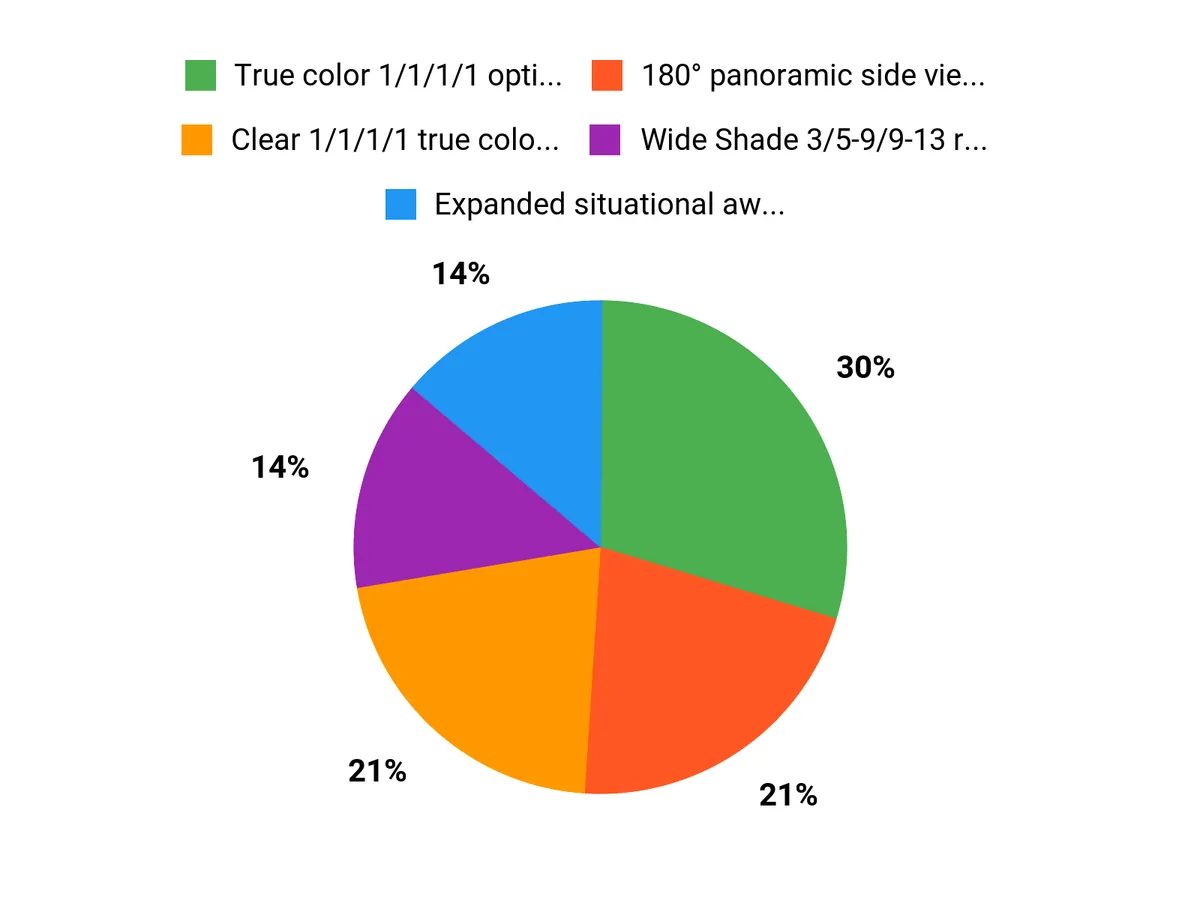
Customers interested in this helmet often focus on three features: the panoramic side view, the true-color main lens, and the ability to switch between welding, cutting, and grinding tasks.
The replaceable battery and included spare lens covers also make routine upkeep more convenient. The trade-off is a less sophisticated control system than some advanced digital helmets and passive side panels that cannot replace the main protective filter.
Final Verdict: Should You Buy the YESWELDER LYG-Q800D?
The YESWELDER LYG-Q800D is a practical panoramic welding helmet for people who want clear main-lens optics and improved awareness of the surrounding work area.
Its four sensors, adjustable shades, replaceable battery, and included spare covers support everyday welding and maintenance. The main compromise is that the side windows stay at DIN 5, so they are not suitable for directly viewing an active welding arc.
Our verdict: A strong option for hobby fabrication and general shop work, especially when side visibility is a priority. For advanced digital controls or different headgear requirements, compare the alternatives before deciding.
Ready to Compare the LYG-Q800D?
Check the current listing, select the correct model, and confirm the included accessories before ordering.
This review is reader-supported. We may earn a referral commission from qualifying purchases made through affiliate links.

