Disclosure: As an Amazon Associate, we earn from qualifying purchases. If you click a link on this page and make a purchase, we may receive a small commission at no extra cost to you.
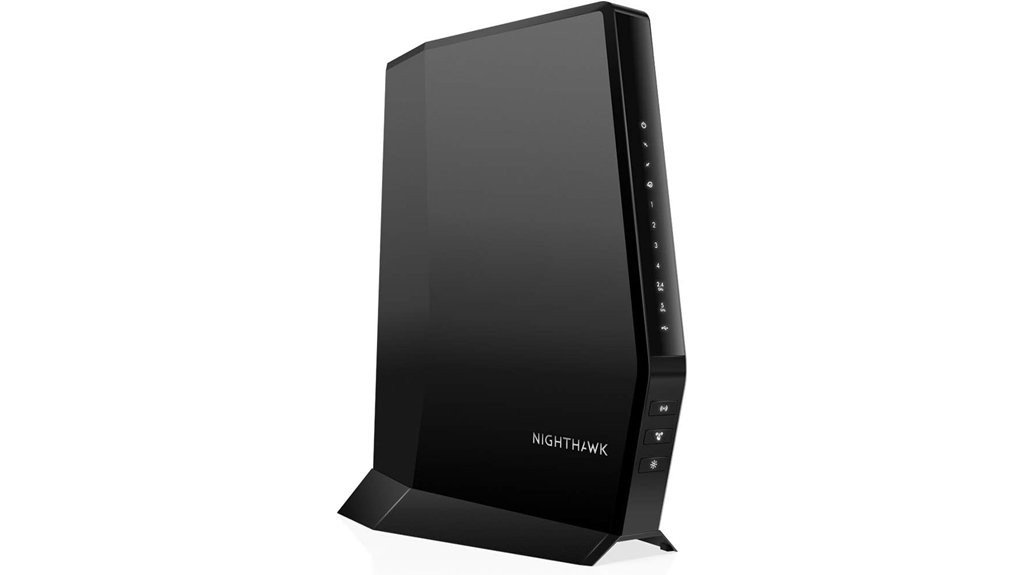
A cable modem router combo can save space, reduce rental fees, and simplify your home network, but only if it matches your cable provider and internet plan. The NETGEAR Nighthawk CAX30 combines a DOCSIS 3.1 cable modem with a WiFi 6 router, giving you one device for wired and wireless internet. It is built for cable internet users who want strong speed, wide home coverage, and modern device support. The main tradeoff is compatibility: it is made for cable providers, not fiber, DSL, satellite, Verizon, or AT&T services.
Quick Verdict
Rating: Recommended with caveats
Best For: Cable internet users who want a DOCSIS 3.1 modem and WiFi 6 router in one device.
Bottom Line: The NETGEAR Nighthawk CAX30 is a strong pick if you use a compatible cable provider and want up to 2,000 sq. ft. of WiFi 6 coverage. Skip it if you have fiber, DSL, satellite internet, or you need official wall-mount support.
Before You Buy: This model is for cable internet service. It does not work with Verizon Fios, AT&T Fiber, DSL, or satellite internet, and approved plan speeds can vary by provider.
| Specification | Detail |
|---|---|
| Brand | NETGEAR |
| Model | Nighthawk CAX30, CAX30-200NAS variant |
| Product type | Cable modem router combo |
| Modem standard | DOCSIS 3.1 cable modem |
| WiFi standard | WiFi 6 dual-band router |
| Maximum combined speed claim | Up to 2.7 Gbps |
| Cable plan support | Listed for cable plans up to 2 Gbps, with actual approved speeds depending on the ISP |
| Coverage | Up to 2,000 sq. ft. |
| Device support | Up to 25 devices |
| Wired ports | Four Gigabit Ethernet ports |
| Extra connectivity | Link aggregation support and USB 3.0 port |
| Compatible service type | Cable internet providers such as Xfinity, Spectrum, and Cox |
| Not compatible with | Verizon, AT&T, DSL, fiber, and satellite internet services |
| Security | NETGEAR Armor, 30-day trial included, subscription required after trial |
| Placement | Vertical tabletop placement, wall-mounting is not advertised for this model |
Overview
The NETGEAR Nighthawk Modem Router Combo, particularly the CAX30 model, combines a DOCSIS 3.1 cable modem with WiFi 6 router technology. This setup is useful if you want one device instead of a separate modem and router. It supports speeds up to 2.7 Gbps and is positioned for cable plans up to 2 Gbps, though your real approved speed depends on your cable provider and plan.
The CAX30 is made for cable internet from providers such as Xfinity, Spectrum, and Cox. It does not support Verizon, AT&T, DSL, fiber, or satellite connections. That makes compatibility the first thing you should check before you buy it.
For home use, the biggest strengths are WiFi 6 support, coverage up to 2,000 sq. ft., support for up to 25 devices, and four Gigabit Ethernet ports. It also includes link aggregation support and a USB 3.0 port, which can help users who want stronger wired performance or local network flexibility.
What Is the NETGEAR Nighthawk CAX30?
The NETGEAR Nighthawk CAX30 is a modem router combo. That means it replaces a separate cable modem and wireless router with one unit. It connects to your cable internet line, then shares the connection through WiFi 6 and wired Ethernet ports.
This model is best for homes that already use cable internet and need better speed handling for streaming, work, gaming, smart TVs, laptops, phones, tablets, and other connected devices. The advertised coverage of up to 2,000 sq. ft. makes it a better fit for apartments, small homes, and medium-size homes than very large houses with thick walls or many dead zones.
Because it includes both modem and router functions, setup and troubleshooting may be simpler than managing two separate devices. The tradeoff is flexibility. If you later want to upgrade only your router or only your modem, a separate modem and router setup gives you more control.
Detailed Features
The NETGEAR Nighthawk CAX30 integrates a DOCSIS 3.1 cable modem with a WiFi 6 router, giving you a single unit for cable internet and home WiFi. The device supports speeds up to 2.7 Gbps, but your actual speed depends on your internet plan, provider approval, wiring, signal quality, connected devices, and home layout.
It uses dual-band technology to help manage wireless traffic across different types of devices. This matters if you have streaming devices, phones, laptops, tablets, game consoles, and smart home products active at the same time. The listed support for up to 25 devices gives it enough room for many everyday households.
The four Gigabit Ethernet ports are useful for devices that benefit from a more stable wired connection, such as a desktop PC, gaming console, smart TV, or network switch. Link aggregation gives advanced users another performance option when their setup supports it.
NETGEAR Armor adds security features, but the full feature set is not permanently free. A 30-day trial is included, and a paid subscription is required after the trial if you want to keep using those features.
Who Should Buy It?
Best For
- Cable internet users who want one device instead of a separate modem and router.
- Homes that need WiFi 6 coverage for up to 2,000 sq. ft. and up to 25 devices.
- Users who want four Gigabit Ethernet ports for wired devices such as TVs, consoles, or desktop PCs.
Skip If
- You use fiber, DSL, satellite internet, Verizon, or AT&T service.
- You want separate modem and router upgrades in the future.
- You need a router that is officially advertised for wall mounting.
[Amazon Products Picked for You]


MAXIMIZE YOUR CABLE INTERNET AND WHOLE-HOME WIFI: A cable modem and WiFi router in one device unlocks the full potential of your home internet with faster downloads, smoother WiFi for gaming and video calls, and reliable coverage in every room.

MultiGig speed for today & tomorrow: DOCSIS 3.1 performance supports cable internet plans up to 2.5 Gbps, delivering ultrafast streaming, gaming, and downloads.
Design and Build
The CAX30 uses a vertical tabletop design. That keeps the unit upright and helps it fit on a desk, media cabinet, shelf, or networking stand. NETGEAR does not advertise wall-mounting for this model, so it is better to plan for a stable flat surface with open airflow around the device.
Since this is a modem router combo, cable placement matters. You need access to your coax cable outlet, a power outlet, and enough room for Ethernet cables if you plan to wire devices directly. The design works best when placed in a central, open area rather than hidden inside a closed cabinet.
WiFi 6 Performance
WiFi 6 is one of the CAX30’s main reasons to buy. It is built for modern homes where several devices may be online at the same time. The listed support for up to 25 devices makes it suitable for regular household use, including browsing, streaming, video calls, smart home devices, and gaming.
The advertised coverage is up to 2,000 sq. ft. That should be enough for many apartments and medium-size homes, but coverage depends on your walls, floor plan, distance from the router, interference, and where you place the unit. If your home has thick walls, multiple floors, or known WiFi dead zones, you may still need a mesh system or extender.
Cable Modem Capability
The built-in DOCSIS 3.1 modem is designed for high-speed cable internet. It is more future-ready than older DOCSIS 3.0 modem-only devices and pairs well with modern cable internet plans. The article-supported speed claim is up to 2.7 Gbps, while cable plan support is listed up to 2 Gbps.
The key point is that modem performance is not controlled by the device alone. Your provider must approve the modem for your plan, and speed support can vary by Xfinity, Spectrum, Cox, and other cable providers. Always confirm compatibility with your provider before replacing your current equipment.
Wired Connectivity
The four Gigabit Ethernet ports give you more stable connections for devices that should not rely only on WiFi. A wired connection is useful for a desktop computer, game console, streaming box, smart TV, or network switch. This helps reduce wireless congestion in busy homes.
Link aggregation is also available for advanced setups. This feature is not needed by every buyer, but it can help when compatible devices and network conditions support it. Most everyday users will simply use the Ethernet ports for stable wired connections.
Security and Parental Controls
The CAX30 supports NETGEAR Armor security features. This can help add another layer of protection for connected devices, but it is important to understand the subscription model. The device includes a 30-day trial, and continued use requires payment after that trial.
The Nighthawk app also supports NETGEAR Smart Parental Controls. These controls can help manage internet access, set schedules, and filter content. Like Armor, parental control features may include a trial period and may require a paid subscription for continued full access.
Pro Tip: Before setup, write down your cable provider login details and check whether your provider requires modem activation through an app, website, or phone call. This can make installation much smoother.
Setup Tips Before First Use
Place the CAX30 near your main coax cable outlet, but avoid hiding it behind a TV, inside a closed cabinet, or near thick metal objects. WiFi coverage is usually better when the unit is upright, open, and as central as your cable outlet allows.
After connecting the coax cable and power, you may need to activate the modem with your cable provider. Some providers let you activate through an app or website, while others may require support. Keep your account details ready before disconnecting your old modem.
If you are replacing rented ISP equipment, do not return the old modem until the CAX30 is activated and working well. Test WiFi, wired Ethernet, video streaming, and your highest-priority devices first.
How It Performs in Real Use
For Work-from-Home Setups
The CAX30 makes sense for home offices where you need stable internet for video calls, cloud apps, file uploads, and browser-heavy work. For best results, connect your main work desktop or docking station to one of the Gigabit Ethernet ports when possible.
For Streaming and Smart TVs
The combination of WiFi 6 and wired ports is useful for streaming. A smart TV can use WiFi, but a wired Ethernet connection may offer better stability for 4K streaming if the TV is close to the router.
For Gaming
Gaming performance depends on your internet plan, provider network, home wiring, and local network traffic. The CAX30 gives you Gigabit Ethernet ports, which are useful for consoles and gaming PCs where lower latency and stability matter.
For Multi-Device Homes
The listed support for up to 25 devices helps if your household has phones, tablets, laptops, smart speakers, cameras, TVs, and consoles connected at once. Still, very busy homes with more devices or larger floor plans may benefit from a mesh WiFi system instead.
Pros and Cons
While evaluating the NETGEAR Nighthawk Modem Router Combo, you should look at both its strong performance potential and its service limitations. The device is most useful when your cable provider, plan, and home size match what the CAX30 is built to support.
Pros
- High-speed connectivity: Supports speeds up to 2.7 Gbps, which can help with gaming, streaming, and busy home networks.
- DOCSIS 3.1 modem: Built for modern cable internet plans and stronger long-term cable performance than older modem standards.
- WiFi 6 coverage: Covers up to 2,000 sq. ft. and supports up to 25 devices.
- Good wired options: Four Gigabit Ethernet ports help you connect TVs, consoles, desktops, and other fixed devices.
- Security options: NETGEAR Armor and Smart Parental Controls are available through the NETGEAR ecosystem.
Cons
- Limited compatibility: Not suitable for Verizon, AT&T, DSL, fiber, or satellite internet users.
- Subscription costs: NETGEAR Armor and Smart Parental Controls require payment after the included trial period.
- Placement limits: The CAX30 is intended for vertical tabletop use and is not advertised as a wall-mounted model.
Is It Worth the Price?
The NETGEAR Nighthawk CAX30 is best viewed as a premium-leaning cable modem router combo. It can be worth considering if you want to stop using separate equipment and you need DOCSIS 3.1, WiFi 6, four Ethernet ports, and coverage for a typical home.
It offers strong value for the price if your cable provider supports it and your home fits within the listed coverage range. The value is weaker if you already own a strong standalone router or if you prefer upgrading your modem and router separately.
The subscription model is also part of the cost. Security and parental control tools may be useful, but you should factor in the paid subscription after the trial if those features matter to you.
[Amazon Products Picked for You]

Fast, Reliable Connection: Enjoy high-speed streaming, gaming, and browsing with a trusted brand used in over 260 million homes.

Fast, Reliable Connection: Enjoy high-speed streaming, gaming, and browsing with a trusted brand used in over 260 million homes.
How It Compares to Alternatives
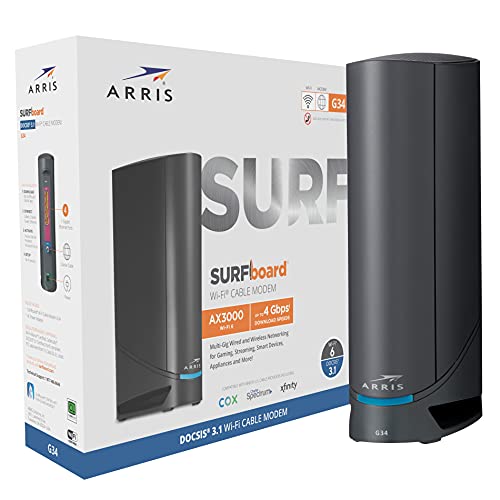
Compared with a separate cable modem and router setup, the CAX30 is simpler and takes less space. A separate setup can be better if you want more upgrade flexibility, stronger custom router features, or a mesh WiFi system for a large home.
Compared with older DOCSIS 3.0 modem router combos, the CAX30 is more attractive for higher-speed cable plans because it uses DOCSIS 3.1 and WiFi 6. Compared with mesh systems, it may be simpler, but mesh can be better for multi-floor homes or areas with dead zones.
[Amazon Products Picked for You]

Mid/high-split DOCSIS 3.1 cable modem delivers up to 2Gbps of download speeds and 1Gbps of upload speeds

Approved for Cox, Spectrum and Xfinity internet along with other US cable internet providers. Is NOT compatible with ATT, CenturyLink, Verizon, Frontier or other Fiber Optic, DSL or Satellite internet service providers.
Fast, Reliable Connection: Enjoy high-speed streaming, gaming, and browsing with a trusted brand used in over 260 million homes.
Concluding Thoughts
Ultimately, the NETGEAR Nighthawk Modem Router Combo presents itself as a robust solution for cable internet users who want high-speed performance and broad coverage in one device. With DOCSIS 3.1 and WiFi 6 technology, it supports modern connectivity needs, multiple devices, and a more secure online experience when paired with NETGEAR’s optional subscription services.
| Feature | Benefit | Limitation |
|---|---|---|
| DOCSIS 3.1 | High-speed cable internet support | Not compatible with DSL, fiber, or satellite service |
| WiFi 6 | Better support for modern multi-device homes | Limited to up to 2,000 sq. ft. coverage |
| NETGEAR Armor | Adds security features for connected devices | 30-day trial, then subscription required |
Its features affirm its value, though compatibility constraints should be checked before purchase. The best buyer is someone with supported cable internet who wants one device for modem, WiFi, and wired networking.
Related Guides
Frequently Asked Questions
Is the NETGEAR Nighthawk CAX30 compatible with fiber internet services?
No. The NETGEAR Nighthawk CAX30 is not compatible with fiber internet services. It is designed for cable providers like Xfinity, Spectrum, and Cox, and it does not support Verizon Fios, AT&T Fiber, DSL, or satellite connections.
Can the NETGEAR Nighthawk CAX30 be wall-mounted?
The CAX30 is intended for vertical tabletop placement. NETGEAR does not advertise wall-mounting for this model, though third-party brackets may exist. Use a stable, open surface unless the manufacturer or a qualified installer confirms another safe setup.
How does the Nighthawk app help with parental controls?
The Nighthawk app integrates NETGEAR Smart Parental Controls to manage and monitor internet access, set schedules, and filter content. A 30-day trial is typically included, and continued use requires a paid subscription.
What is the power consumption of the NETGEAR Nighthawk CAX30?
NETGEAR does not publish a typical wattage figure for the CAX30 in the article source. Power use varies based on workload, connected devices, wireless activity, and network conditions. The device should not exceed its AC adapter’s rating.
Are there any known issues with firmware updates for the CAX30?
NETGEAR has released multiple firmware updates for the CAX30, including v2.2.2.2 in March 2024 and later test builds like v2.2.4.x. If you notice problems after an update, NETGEAR commonly recommends a factory reset, setup without restoring old backups, and contacting support if issues continue.
How many devices can the CAX30 support?
The CAX30 is listed to support up to 25 devices. That is enough for many normal households, but heavy smart home setups or large families may need stronger WiFi planning or a mesh system.
Does the CAX30 replace both a modem and router?
Yes, the CAX30 combines a cable modem and WiFi router in one unit. It can replace separate cable modem and router equipment if your cable provider supports this model.
Who should skip the NETGEAR Nighthawk CAX30?
Skip it if you do not use cable internet, if your provider does not approve this model, or if you need a wall-mounted router. You may also prefer separate modem and router devices if you want more upgrade flexibility later.
The Bottom Line
The NETGEAR Nighthawk CAX30 is a strong choice if you use supported cable internet and want a DOCSIS 3.1 modem with a WiFi 6 router in one device. It is best for homes that need up to 2,000 sq. ft. of coverage, support for up to 25 devices, and four Gigabit Ethernet ports. Skip it if you have fiber, DSL, satellite internet, Verizon, AT&T, or a layout that needs mesh coverage.
