
You care about picture quality, gaming performance, and a TV that fits your room and budget. OLED remains a strong choice when you want deep blacks, wide viewing angles, and fast pixel response. This guide compares five OLED TVs across value, movie performance, bright-room viewing, design, and gaming so you can match a model to your setup.
Top Picks
| Category | Product | Best For |
|---|---|---|
| 🏆 Best Premium Picture | Sony A95L | Movies, color volume, and Sony processing |
| 🎨 Best Premium All-Rounder | LG G4 | Bright HDR, wall mounting, and gaming |
| ☀️ Best for Bright Rooms | Samsung S95D | Glare reduction, sports, and PC gaming |
| 🎮 Best for PlayStation and Movies | Sony A80L | Large-screen cinema and PS5 features |
| 💰 Best Value | LG B4 | Affordable OLED and four-device gaming setups |
How We Picked
We prioritized the factors that most affect daily viewing: black levels, HDR impact, color performance, motion handling, gaming support, smart-TV usability, sound, design, and connection flexibility. We also considered the main tradeoffs buyers face, including room brightness, screen size, port limits, Dolby Vision support, included mounting hardware, and the risk of paying too much for an older model.
These recommendations are use-case labels, not laboratory scores. Performance can vary by screen size, firmware, picture mode, room lighting, and source quality, so compare the exact size and model number before buying.
Before You Buy an OLED TV
- Measure your space: Confirm screen width, stand width, wall clearance, and viewing distance.
- Check the exact port layout: Not every HDMI input on every TV supports the same refresh rate, VRR, or eARC features.
- Match HDR formats: LG and Sony support Dolby Vision, while Samsung uses HDR10+ instead of Dolby Vision.
- Confirm what is included: Some premium TVs may ship with a stand, wall mount, or separate connection box depending on the exact variant.
- Compare old and new generations: A discounted older flagship can be excellent value, but only when the price gap is meaningful.
OLED TV Reviews
The Sony A95L is the strongest fit here when your priority is cinematic color, natural image processing, and a large 77-inch screen. Its QD-OLED panel combines self-emissive black levels with strong color volume, while Sony’s processing focuses on texture, gradation, and motion that look natural rather than exaggerated.
Acoustic Surface Audio+ uses the screen area to help anchor dialogue and effects to the picture. Google TV also gives you a familiar app and voice-search experience. This model suits movie rooms, premium living spaces, and console gaming where picture fidelity matters more than having the widest possible gaming-port flexibility.
Why You’ll Like It
- QD-OLED color volume and deep OLED blacks
- Cognitive Processor XR for refined contrast, detail, and motion
- Acoustic Surface Audio+ for screen-centered sound
- Large 77-inch size for home-theater viewing
- Google TV and PlayStation-focused features
Main Limitation
The A95L is an older premium model, so value depends heavily on its current price compared with newer Sony and competing OLEDs. Confirm the exact HDMI feature support you need before connecting several high-bandwidth gaming devices.
Design and Setup
The thin-bezel panel has a restrained, premium look that suits a dedicated theater or modern living room. Because the 77-inch version is large and heavy, use furniture or a wall mount rated for the TV and follow the installation instructions carefully.
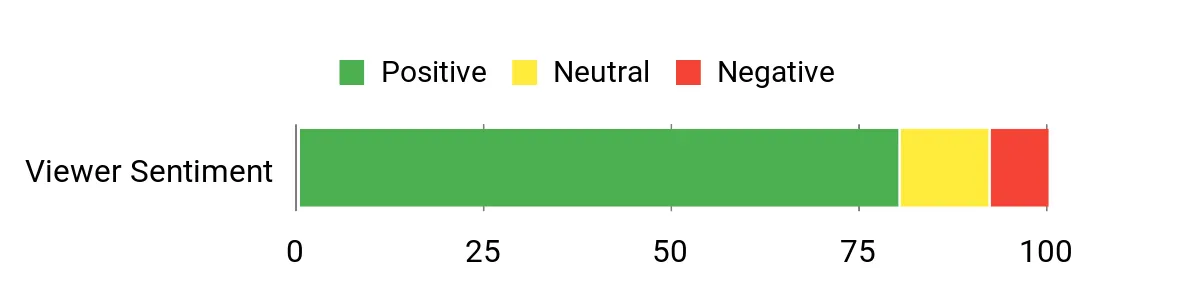
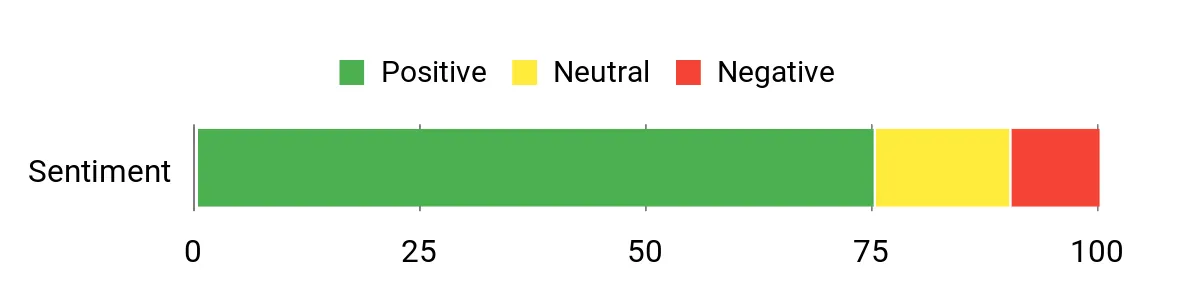
Original Article Sentiment Graphic
The visual below was included in the source article. It is not an independently verified customer-review sample, so read current retailer reviews before relying on sentiment claims.
The LG G4 is a strong choice when you want a brighter OLED image without giving up broad gaming support. Its OLED evo panel and α11 processor target brighter HDR highlights, cleaner upscaling, and more refined picture control than LG’s entry-level models.
It also fits multi-device gaming setups well because LG provides a flexible HDMI 2.1 feature set, VRR support, and a gaming dashboard. The gallery-style design works especially well on a wall, but you should check the exact package because stand and mounting accessories can vary by model number and seller.
Why You’ll Like It
- Brighter HDR presentation than entry-level OLED models
- Up to 4K 144Hz support with a compatible PC
- Dolby Vision, Dolby Atmos, and FILMMAKER MODE
- Flexible HDMI 2.1 gaming features and VRR support
- Slim gallery-style design
Main Limitation
The G4 carries a premium position, and its value depends on the discount compared with newer LG models. LG’s limited panel-warranty terms can vary by country and purchase channel, so confirm the exact coverage instead of assuming every component has five years of full protection.
Design and Setup
The slim profile and narrow bezels make the G4 a natural wall-mount option. Check whether your exact listing includes the stand or wall-mount hardware you need before ordering.
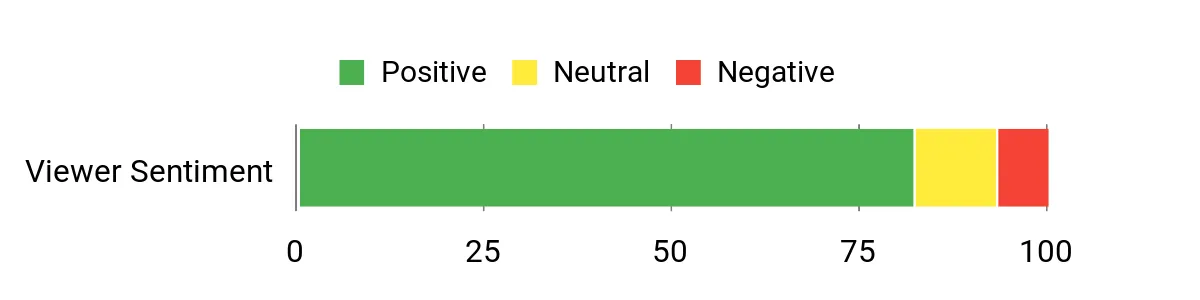
Original Article Sentiment Graphic
The visual below was included in the source article. It is not an independently verified customer-review sample, so read current retailer reviews before relying on sentiment claims.
The Samsung S95D is the best match in this group for a room with windows, lamps, or daytime sports viewing. Its glare-reducing screen helps control reflections, while the QD-OLED panel delivers strong color and bright HDR highlights.
PC gamers can also use refresh rates up to 144Hz with compatible hardware. Samsung’s One Connect Box keeps most source cables away from the panel, which can simplify a clean wall-mounted setup.
Why You’ll Like It
- OLED Glare Free treatment for reflection control
- QD-OLED color and strong HDR brightness
- Up to 144Hz support for compatible PC gaming
- One Connect Box for a cleaner installation
- Object Tracking Sound+ and Dolby Atmos support
Main Limitation
Samsung does not support Dolby Vision on this model, so Dolby Vision content falls back to another supported HDR format. The matte anti-glare finish can also look different from a glossy OLED in a dark room, so choose based on your actual lighting conditions.
Design and Setup
The thin panel and external One Connect Box create a clean look, especially when wall mounted. Plan a ventilated, accessible location for the connection box and its cable.
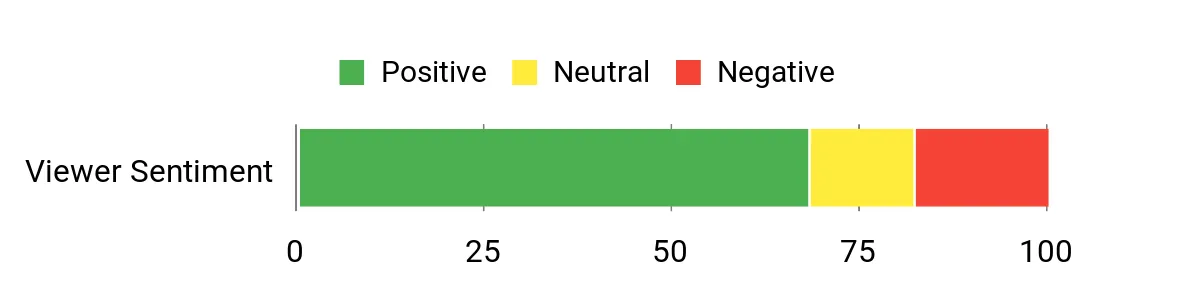
Original Article Sentiment Graphic
The visual below was included in the source article. It is not an independently verified customer-review sample, so read current retailer reviews before relying on sentiment claims.
The Sony A80L makes sense when you want a large, movie-focused OLED with strong motion handling and sound that feels connected to the picture. The Cognitive Processor XR emphasizes natural color, upscaling, and scene-by-scene contrast, while Acoustic Surface Audio+ helps dialogue come from the screen area.
Its 120Hz panel and console features support modern gaming, especially with a PlayStation. However, it is not the strongest choice for a very bright room or a setup with several devices that all need the highest-bandwidth HDMI features at the same time.
Why You’ll Like It
- Large 77-inch OLED image with deep blacks
- Cognitive Processor XR for natural detail and motion
- Acoustic Surface Audio+ for screen-centered sound
- Google TV with broad streaming-app support
- PlayStation-focused setup and picture features
Main Limitation
The A80L is a previous-generation OLED and is less suited to bright-room viewing than the Samsung S95D or LG G4. Compare its current price with newer Sony OLEDs before deciding.
Design and Setup
The thin bezels keep attention on the large screen, while the dark finish works in living rooms and theaters. Measure the stand footprint and furniture width carefully because a 77-inch TV needs more space than its diagonal measurement suggests.
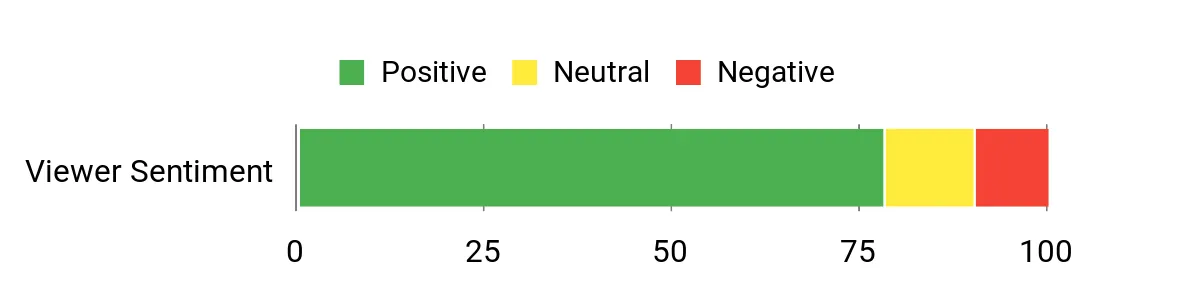
Original Article Sentiment Graphic
The visual below was included in the source article. It is not an independently verified customer-review sample, so read current retailer reviews before relying on sentiment claims.
The LG B4 is the practical pick when you want OLED black levels and current-console gaming features without paying for a flagship panel. The 120Hz display, VRR support, and broad HDMI connectivity make it easy to connect consoles, a soundbar, and another source without constant cable swapping.
Movies benefit from Dolby Vision and FILMMAKER MODE, while webOS covers major streaming apps. Its tradeoff is lower brightness and more modest built-in sound than the premium models in this guide.
Why You’ll Like It
- OLED contrast and deep black levels at a lower tier
- Native 120Hz refresh with VRR support
- Dolby Vision, Dolby Atmos, and FILMMAKER MODE
- Four HDMI inputs for consoles and accessories
- webOS streaming and gaming controls
Main Limitation
The B4 is not as bright as the G4 or S95D, so it performs best when you can control room light. A soundbar may also improve bass and dialogue weight in a larger room.
Design and Setup
The simple black finish and narrow bezel fit most rooms without drawing attention away from the picture. Verify stand width and VESA mounting requirements for the exact screen size you buy.
Original Article Sentiment Graphic
The visual below was included in the source article. It is not an independently verified customer-review sample, so read current retailer reviews before relying on sentiment claims.
OLED TV Comparison Table
| Product Name | Image | Screen Size | Panel / Resolution | Maximum Refresh | Best Use and Main Tradeoff |
|---|---|---|---|---|---|
| Sony QD-OLED 77 Inch BRAVIA XR A95L Series 4K Ultra HD TV |
 |
77 Inches | QD-OLED / 4K | 120Hz | Premium movies and color; older model with less gaming-port flexibility than LG or Samsung |
| LG 55-Inch Class OLED evo G4 Series Smart TV |
 |
55 Inches | OLED evo / 4K | Up to 144Hz with compatible PC | Premium gaming and wall mounting; higher cost than value OLEDs |
| Samsung 55-Inch Class OLED 4K S95D Series Smart TV |
 |
55 Inches | QD-OLED / 4K | Up to 144Hz with compatible PC | Bright rooms and PC gaming; no Dolby Vision |
| Sony OLED 77 Inch BRAVIA XR A80L Series 4K Ultra HD TV |
 |
77 Inches | OLED / 4K | 120Hz | Movies and PlayStation; less bright than premium OLEDs |
| LG 55-Inch Class OLED B4 Series Smart TV |
 |
55 Inches | OLED / 4K | 120Hz | Value and console gaming; lower brightness and modest built-in sound |
How to Choose the Right OLED TV
Choose for Room Lighting
A dark or moderately lit room lets any of these OLEDs show its strongest contrast. For frequent daytime viewing, the Samsung S95D’s anti-glare treatment and the brighter LG G4 are more suitable than the LG B4 or Sony A80L.
Choose for Gaming
Look beyond the panel refresh rate. Check how many HDMI ports support 4K at high refresh rates, whether VRR works with your console or PC, and which port carries eARC for a soundbar. The LG G4 and Samsung S95D offer up to 144Hz for compatible PC gaming, while all five models support 120Hz-class console use.
Choose for Movies and HDR
The Sony A95L emphasizes premium color and processing, while the A80L offers a more traditional movie-first Sony OLED experience. LG supports Dolby Vision on the B4 and G4. Samsung supports HDR10+ instead of Dolby Vision, which matters when you use services or discs mastered in a specific format.
Choose for Value
Compare the current selling price with the newer replacement model, not only with the original launch price. An older flagship can be a strong buy when the discount is large and the warranty is clear. A small price gap usually favors the newer model.
FAQ
How Do I Choose the Right OLED Size for My Room?
Start with seating distance, furniture width, and the type of content you watch. A 55-inch TV works well in many smaller living rooms, while a 77-inch screen creates a more cinematic effect from farther away. Use the manufacturer’s dimensions for the exact model because stand width and panel width vary.
Should I Worry About OLED Burn-In?
OLED image retention risk is highest with repeated static logos, news tickers, game HUDs, or desktop elements shown for long periods at high brightness. Enable the TV’s panel-care tools, vary content, allow automatic compensation cycles to finish, and avoid unplugging the TV immediately after every use.
Are OLED TVs Good for Gaming and Sports?
Yes. OLED pixels change quickly, which supports clear motion and low-latency gaming. For the best result, use a compatible HDMI cable, enable the TV’s game mode, and confirm 120Hz or 144Hz support for the exact input and source device.
Is Dolby Vision Essential?
No single HDR format is essential for every buyer, but format support should match your content. Sony and LG models in this guide support Dolby Vision. Samsung supports HDR10+ instead. Standard HDR10 content works across all five models.
Is an Older OLED Model Still Worth Buying?
It can be worth buying when the price is meaningfully lower than the replacement, the seller is reputable, and the warranty is clear. Avoid paying near-new-model pricing for older stock, and check whether the listing includes the stand, remote, connection box, or wall-mount hardware you expect.
Final Recommendation
Choose the Sony A95L when premium movie performance and QD-OLED color matter most.
Choose the LG G4 when you want bright HDR, broad gaming support, and a gallery-style design.
Choose the Samsung S95D for a bright room, anti-glare viewing, and high-refresh PC gaming.
Choose the Sony A80L for a large 77-inch movie setup with PlayStation-focused features.
Choose the LG B4 when value and 120Hz console gaming matter more than flagship brightness.
These five TVs all match the OLED buyer intent, but they solve different problems. Compare the exact model number, current price, room lighting, HDR format support, and connection needs before ordering.
This roundup is reader-supported. When you click through links, we may earn a referral commission on qualifying purchases.