Buying a PS5 involves more than choosing a console and paying the advertised price. You need to consider physical versus digital games, available storage, performance, and the cost of building your game library. The PS5 Pro adds another option for players who want improved visuals, while used and refurbished consoles offer ways to reduce upfront spending.
Quick Answer
For most buyers, the PS5 with a disc drive offers useful flexibility for physical and digital games. The Digital Edition costs less upfront, while PS5 Pro targets players who prioritize visual performance. US recommended prices are $649.99, $599.99, and $899.99 respectively, effective April 2, 2026. Include games, subscriptions, and accessories in your budget.
Last checked: September 26, 2026. Dates and figures were verified against official sources.
Key Takeaways
Key Takeaways
- The standard PS5 and Digital Edition deliver essentially the same gaming performance. Disc support and storage are their main differences.
- The current disc-equipped Slim has 1TB storage; the standard Digital Edition has 825GB. PS5 Pro includes 2TB.
- Most PS4 games work on PS5, but physical PS4 discs require a compatible disc drive.
- PlayStation Plus Essential costs $79.99 annually in the US, although many free-to-play games do not require membership for online multiplayer.
- Buying a used PS5 can save money, but you should test its internet connection, controller, ports, and disc drive before paying.
Which PS5 Model Should You Buy?
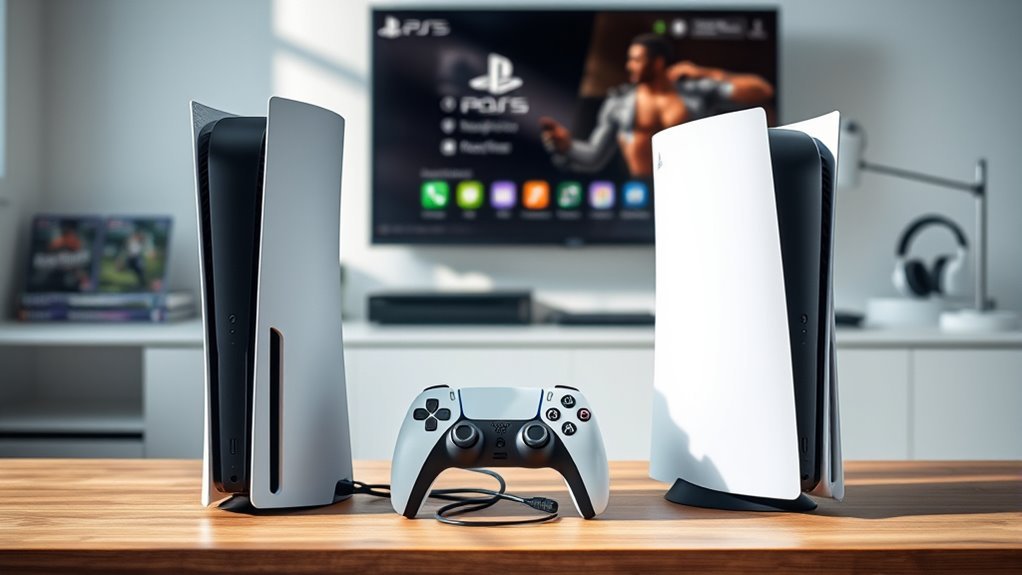
The main PS5 choices are the standard disc-equipped console, the Digital Edition, and PS5 Pro. They share the PlayStation game ecosystem, but differ in price, storage, disc support, and graphics performance.
The original PS5 launched in November 2020. Sony later introduced the smaller Slim design and the more powerful PS5 Pro.
According to Sony’s official PS5 model specifications, the current US disc-equipped model has 1TB storage, while the standard Digital Edition has 825GB.
| PS5 model | US MSRP | Storage | Disc support |
|---|---|---|---|
| PS5 Slim with disc drive | $649.99 | 1TB | Included |
| PS5 Slim Digital Edition | $599.99 | 825GB | Optional compatible drive |
| PS5 Pro | $899.99 | 2TB | Optional compatible drive |
These are US recommended retail prices, not guaranteed sale prices. Tax, bundles, and regional pricing can change your total.
Standard PS5: For Physical and Digital Games
The disc-equipped PS5 lets you buy downloads, use supported PS4 and PS5 discs, borrow games, and purchase secondhand physical copies.
Its drive also plays compatible Blu-ray movies, including 4K Ultra HD Blu-ray discs. This makes it useful if you already own a physical media collection.
The current Slim is smaller than the original PS5. It offers the same core gaming performance as the Digital Edition.
PS5 Digital Edition: For Download-Only Libraries
The Digital Edition removes the included disc drive. You purchase and download games through PlayStation Store or access eligible titles through subscriptions.
It saves $50 compared with the standard PS5 at current US MSRP. However, you cannot use physical discs without adding a compatible drive.
The current Slim Digital Edition supports Sony’s separately sold disc drive. It is compatible with the supported Slim model groups and PS5 Pro, not the original launch Digital Edition.
An internet connection is required to pair the drive with the console during setup.
Check the exact model before buying a removable drive or a used Digital Edition.
PS5 Pro: For Higher Visual Performance
PS5 Pro is the premium model for players who want improved graphics and more storage. It includes a 2TB SSD but does not include a disc drive.
Sony’s PS5 Pro specifications highlight three major improvements:
- PlayStation Spectral Super Resolution, or PSSR, uses AI-assisted image reconstruction to improve image clarity.
- Advanced ray tracing improves supported lighting, reflections, and shadows.
- Enhanced games can deliver higher or more consistent frame rates.
Not every game receives the same improvement. Results depend on the title, its Pro enhancements, and your display.
The standard PS5 still plays the same general PS5 game library. The Pro is an upgrade in performance, not a separate generation requiring different games.
How Much Does a PS5 Cost?
A new PS5 costs between $599.99 and $899.99 at Sony’s current US recommended retail prices, depending on the model. The standard disc-equipped console is $649.99.
These prices took effect April 2, 2026, according to Sony’s official pricing announcement.
The original $399 Digital Edition and $499 standard PS5 prices were launch-era figures, not current US MSRP.
For budgeting, separate the console price from software, subscriptions, accessories, and any applicable sales tax.
Many major PS5 games have a standard price around $69.99. However, actual prices vary by title, edition, retailer, and promotion.
Bundles may offer savings when you want everything included. Compare their total cost against buying the console and each included item separately.
A higher bundle price does not automatically mean a worse deal. Likewise, an included game has little value if you do not want to play it.
Where Can You Buy a PS5 Right Now?
You can buy PS5 consoles through PlayStation Direct and major US gaming retailers. Amazon, GameStop, Target, Walmart, Best Buy, and Newegg are useful places to compare new consoles and bundles.
Inventory differs by store, model, location, and delivery method. Do not assume that a past shortage or resale premium still applies.
Major Retailers
Major retailers provide a straightforward way to purchase a new PS5 with an order record, return policy, and manufacturer warranty information.
PlayStation Direct provides a manufacturer-operated purchasing channel. Other retailers may offer local pickup, trade-in programs, or game bundles.
Before placing an order, confirm these details:
- The exact console model and included storage.
- Whether a disc drive is included.
- Whether the listing is new, refurbished, or used.
- The actual seller, especially on third-party marketplaces.
- The return policy, warranty, shipping cost, and final checkout price.
For Amazon and Walmart marketplace listings, check who sells and ships the item rather than relying only on the retailer’s name.
Restock Alerts
Restock alerts can help when a particular PS5 model, color, bundle, or refurbished unit is unavailable. They are not necessary for every purchase.
Use retailer notifications, product-page alerts, or reputable stock-tracking accounts on X, formerly Twitter.
Prioritize notifications from the retailer itself when possible. A social media alert may be delayed, inaccurate, or linked to an unrelated third-party listing.
Avoid paying above retail solely because a post claims that stock is about to disappear.
Resale Market Options
Used PS5 consoles can cost less than new hardware, but the condition and seller matter more than the advertised discount.
eBay, StockX, and Swappa are possible resale channels. GameStop and other retailers may also carry pre-owned or refurbished consoles.
Before buying, compare the used price with the current new-console price, including any missing controller, cables, stand, or disc drive.
Follow Sony’s official used-console buying guidance and test the following:
- Confirm that the console powers on and displays an image correctly.
- Connect to the internet and verify access to PlayStation services.
- Test the controller’s buttons, sticks, charging, and wireless connection.
- Inspect the HDMI, USB, and power connections.
- Insert a compatible game disc if the console includes a drive.
- Check for unusual shutdowns, overheating, visible damage, or missing serial numbers.
- Confirm that the previous owner has removed their account and deactivated the console.
Warning: A console reported lost or stolen may be permanently suspended from PlayStation services. Do not buy a used PS5 without verifying its ability to connect to the network.
Sony also sells certified refurbished products. Its refurbishment program includes inspection, testing, necessary accessories, and a one-year limited warranty.
That is different from an ordinary third-party used listing, which may not include manufacturer warranty coverage.
Should You Wait for Better PS5 Deals?
Waiting can make sense if you do not need a console immediately. Seasonal promotions, game bundles, and certified refurbished inventory can reduce the total cost.
However, discounts are not guaranteed, and a future price reduction should not be assumed.
Consider waiting when:
- You already have a working PS4 and mainly play compatible older games.
- You want a particular bundle rather than the console alone.
- Your preferred game is not yet available.
- You can use the extra time to compare refurbished and new prices.
Buying sooner makes more sense when the games you want are available, the console fits your budget, and you have found a suitable offer.
Black Friday, holiday sales, and retailer promotions are reasonable shopping periods to watch. Compare actual savings rather than assuming every seasonal bundle is discounted.
Pro Tip: Compare the total price of the console plus your intended first game and subscription. A bundle is useful only when its included items replace purchases you would otherwise make.
Which PS5 Games Should You Buy First?
Start with games that match your interests rather than buying several expensive titles immediately. The PS5 has action-adventure games, role-playing games, platformers, racing games, and compatible PS4 releases.
ASTRO’s Playroom comes pre-installed on PS5 consoles and provides an introduction to the DualSense controller.
It demonstrates haptic feedback, adaptive triggers, and other controller features without requiring a separate game purchase.
Useful starting choices include:
- Demon’s Souls: For players who enjoy challenging action RPG combat.
- Ratchet & Clank: Rift Apart: For colorful platforming, action, and fast transitions between environments.
- Marvel’s Spider-Man: Miles Morales: For accessible superhero action and city exploration.
- Marvel’s Spider-Man 2: For a larger superhero adventure built around PS5 hardware.
- Ghost of Tsushima: For open-world exploration and sword-based combat.
- The Last of Us Part II: For a story-focused action experience.
- ASTRO BOT: For players who prefer platforming and family-friendly adventure.
The official PlayStation Studios catalog shows available editions and current digital pricing.
If you already own compatible PS4 games, install those first. Some offer free or paid PS5 upgrades, while others benefit from improved performance through backward compatibility.
PlayStation Plus Extra can also provide access to a rotating game catalog. Check whether the titles you want are included before subscribing.
Subscription catalog games are not permanent purchases. Your access can end when a title leaves the service or your membership expires.
Will Your PS4 Games Work on PS5?
Yes, the overwhelming majority of PS4 games work on PS5. This makes the console useful for players upgrading from an existing PlayStation library.
Sony’s backward compatibility documentation confirms support for thousands of PS4 games, with a small number of exceptions.
| Item | Support |
|---|---|
| PS4 games on PS5 | The overwhelming majority are compatible |
| Digital purchases | Download eligible games from your existing PlayStation account |
| Disc-based PS4 games | Require a PS5 with a compatible disc drive |
| Digital Edition | Supports digital games; physical discs require a supported optional drive |
For physical games, insert the PS4 disc and install any required updates. Keep the disc inserted whenever you play that game.
Digital purchases are associated with the account that owns them. Sign in with that account to access eligible games in your library.
Some PS4 titles benefit from Game Boost, which may improve frame-rate stability or performance. Results vary by game.
PS3, PS2, and original PlayStation discs do not work natively in the PS5. Selected older games may be available through remasters, digital releases, or PlayStation Plus Premium.
PS4 accessories also have limitations. A DualShock 4 can work with supported PS4 games on PS5, but native PS5 games require a compatible PS5 controller.
What PS5 Features Matter Most?
The features that matter most are storage capacity, game compatibility, DualSense controls, and display performance. The console model determines how much storage and graphical headroom you receive.
For many players, game availability and media format have a greater practical impact than raw specifications.
Storage and Game Library
PS5 storage fills up quickly when you keep several large games installed. Advertised SSD capacity is not the same as usable space because system software reserves part of the drive.
The original PS5 includes an 825GB SSD. Current standard Slim models differ by edition, while PS5 Pro provides 2TB.
Game sizes vary widely, so there is no reliable single average that predicts how many titles you can install.
Check individual game requirements and leave additional room for updates.
Sony’s storage management guide explains three useful options:
- Internal SSD: Stores and runs PS5 and compatible PS4 games.
- Compatible M.2 SSD: Expands storage and can run installed PS5 games directly.
- USB extended storage: Can store PS5 games and directly run compatible PS4 games.
PS5 games stored on an external USB drive must be moved back to internal or compatible M.2 SSD storage before playing.
You can inspect remaining space under Settings > Storage. Deleting an installed digital game does not remove the purchase from your account.
For the Digital Edition, dependable internet access is especially useful because downloads are the main way to install games.
PS5 Models and Performance
The standard PS5 and Digital Edition use the same underlying CPU and GPU architecture. Their main difference is how you access physical media.
The original hardware uses an eight-core AMD Zen 2 CPU and a custom RDNA 2 GPU rated at approximately 10.3 TFLOPS.
The Slim design reduces the console’s physical size without introducing a separate performance tier.
PS5 Pro provides additional graphics capability and image-enhancement technology for supported games.
All models support key PlayStation features, including:
- Fast loading from SSD storage.
- 4K output on compatible displays.
- Up to 120fps in supported games with compatible displays.
- Ray tracing in supported titles.
- DualSense haptic feedback and adaptive triggers.
- Compatible PS4 games and the wider PS5 library.
Not every PS5 game runs at native 4K and 120fps simultaneously. Developers choose different performance and visual settings.
A compatible 120Hz television or monitor is needed to benefit from 120Hz output.
What Extra Costs Should You Expect?
The console price is only your starting expense. Games, subscriptions, additional controllers, headsets, and storage upgrades can increase the cost of ownership.
Not every accessory is necessary. A new PS5 already includes one DualSense wireless controller and the cables needed for basic setup.
PlayStation Plus Subscription Costs
PlayStation Plus is required for online multiplayer in most purchased games. It is not required simply to own the console or play ordinary offline games.
The official US PlayStation Plus plans have these standard annual prices:
| Plan | Annual US price | Main benefits |
|---|---|---|
| Essential | $79.99 | Online multiplayer, monthly games, discounts, cloud storage |
| Extra | $134.99 | Essential benefits plus Game Catalog access |
| Premium | $159.99 | Extra benefits plus eligible classics, trials, and cloud streaming |
Monthly and quarterly subscriptions are also available. Memberships renew automatically unless canceled.
Most free-to-play online titles, including Fortnite and Apex Legends, do not require PlayStation Plus.
Accessories and Storage Upgrades
Additional accessories depend on how you intend to play.
- Extra DualSense controller: useful for local multiplayer.
- Wireless headset: useful for voice chat and private listening.
- Compatible M.2 SSD: useful when the built-in storage becomes insufficient.
- Vertical stand: sold separately for current Slim and Pro models.
- Disc drive: an additional purchase for supported Digital and Pro models.
Buying a compatible disc drive separately can make a Digital Edition more expensive overall than purchasing a disc-equipped model initially.
Plan for accessories you will actually use instead of purchasing everything at once.
Example First-Year Budget
Consider a buyer who purchases a standard PS5, one $69.99 game, and an annual Essential subscription.
| Purchase | Cost |
|---|---|
| Standard PS5 | $649.99 |
| One game | $69.99 |
| PlayStation Plus Essential | $79.99 |
| Total before tax | $799.97 |
This example excludes additional games, optional accessories, shipping, and applicable sales tax.
You can reduce the initial expense by starting with ASTRO’s Playroom, existing compatible PS4 games, or free-to-play titles.
Is PS5 the Best Console for You?
The PS5 is a practical choice if you want its game library, DualSense features, and support for existing PS4 purchases. Other platforms may suit different budgets, games, or ways of playing.
Consider what you actually play before comparing technical specifications.
PS5 Cost Considerations
Think about the total cost over several years rather than the initial console purchase alone.
If you buy physical games regularly, a disc drive gives you access to used copies, borrowing, and resale options.
If you prefer digital games, the Digital Edition avoids an included drive you may never use.
For buyers considering PS5 Pro, the extra expense mainly buys improved visuals, performance features, and additional storage.
A trade-in program or refurbished purchase may lower the cost of upgrading from a previous console.
Game Library Fit
Your preferred games should guide the purchase. A powerful console offers little value if the games you enjoy are unavailable on it.
PS5 provides access to PlayStation titles such as Spider-Man 2 and Ratchet & Clank, alongside major multiplatform releases.
Its backward compatibility also helps existing PS4 owners retain much of their library.
Before switching platforms, consider:
- Which games you already own.
- Which upcoming or existing titles interest you.
- Which platform your friends use for multiplayer.
- Whether cross-platform play is supported by your preferred games.
- Whether you prefer physical ownership or digital purchases.
Some PlayStation titles are also available on PC, while others remain limited to PlayStation consoles. Check individual game availability rather than assuming every title is exclusive.
Better Alternatives Available
Xbox, Nintendo Switch, and gaming PCs offer different advantages. The right alternative depends on whether you prioritize price, portability, performance, or a particular game library.
| Option | Key advantage |
|---|---|
| PS5 | PlayStation library, DualSense features, and PS4 compatibility |
| Xbox Series X | Xbox library, supported older games, and Game Pass options |
| Xbox Series S | Compact, all-digital Xbox gaming |
| Nintendo Switch | Portable and television-based play |
| Gaming PC | Hardware flexibility, upgrades, and multiple game storefronts |
Xbox Game Pass may appeal to players who prefer subscription access to a rotating game library.
Nintendo Switch and Switch 2 suit players who want portable gaming and Nintendo titles.
A gaming PC can provide more customization and access to several digital stores, although cost and setup complexity vary widely.
Compare the actual games and services you want, not just advertised processing power.
What’s the Final PS5 Buying Recommendation?
The standard disc-equipped PS5 is a flexible choice for buyers who want both physical and digital games. The Digital Edition suits buyers committed to downloads, while PS5 Pro is designed for those prioritizing enhanced visuals.
Before making your purchase, work through this checklist:
- Choose your media format: Decide whether you need physical disc support.
- Check storage: Compare the capacity of the exact model being sold.
- Review your library: Confirm that your existing games and preferred titles are supported.
- Set a complete budget: Include games, subscriptions, accessories, and tax.
- Compare offers: Evaluate new, refurbished, and bundle prices.
- Verify the seller: Review warranty coverage and return conditions before payment.
One important long-term consideration is Sony’s announced move toward digital-only new PlayStation game releases beginning in January 2028. Previously released compatible discs will remain playable.
That change makes the disc drive especially relevant to existing physical collections, used games, and movie playback.
If none of those features matter to you, a Digital Edition may provide everything you need at a lower initial price.
Frequently Asked Questions
What Are the Key Things to Consider When Buying a PS5?
Consider the model, disc support, storage, game library, and total ownership cost. Decide whether you need PS5 Pro performance or standard PS5 hardware. Include subscriptions, games, and accessories in your budget, and compare the exact models offered by different sellers.
How to Check a PS5 Before Buying?
Inspect the console, controller, ports, and disc drive if fitted. Confirm that it starts correctly, connects to the internet, and accesses PlayStation services. For used hardware, verify the serial number, seller reputation, accessories, warranty status, and return policy before paying.
Do We Need to Buy Games Separately for PS5?
Most PS5 games are purchased separately, although some bundles include a game. ASTRO’s Playroom comes pre-installed, and free-to-play titles are available. You can also use compatible games you already own or access eligible titles through an active PlayStation Plus membership.
Is the PS5 Old Now?
The PS5 originally launched in November 2020, but it remains an actively supported gaming platform. Sony has introduced smaller hardware revisions and PS5 Pro since launch. The existing game library, available features, and purchase price matter more than the original release date alone.
Can You Add a Disc Drive to the PS5 Digital Edition Later?
Yes, supported Slim Digital Edition models can use Sony’s separately sold disc drive. PS5 Pro also supports it. The original launch Digital Edition does not support this removable drive. An internet connection is required to pair the accessory during initial setup.
Do You Need PlayStation Plus to Use a PS5?
No, PlayStation Plus is not required for basic console use or ordinary offline gaming. Most purchased games require it for online multiplayer, but many free-to-play games do not. Membership also provides benefits such as monthly games, discounts, and cloud storage.
Conclusion
Buying a PS5 is easier when you start with your game library and budget. Choose the disc-equipped model for physical media flexibility, the Digital Edition for download-focused gaming, or PS5 Pro for enhanced visuals and additional storage.
Compare the complete cost, confirm the exact model, and review the seller’s warranty and return policy before completing your purchase.
Sources
- Sony Interactive Entertainment: PS5 Pricing Announcement: US console prices effective April 2, 2026.
- PlayStation: PS5 Console Specifications: Model differences, storage, compatibility, and announced digital distribution changes.
- PlayStation: PS5 Pro: Graphics enhancements, storage, and supported performance features.
- PlayStation Direct: Disc Drive: Compatible models and setup requirements.
- PlayStation Plus: Membership pricing, benefits, and multiplayer requirements.
- PlayStation Support: Backward Compatibility: Supported PS4 games, disc requirements, and accessory limitations.
- PlayStation Support: Storage Management: Internal SSD, M.2 SSD, and USB storage behavior.
- PlayStation Support: Buying Guide: Used-console inspection, warranty considerations, and purchasing safety.
- PlayStation Direct: Certified Refurbished: Refurbishment standards and limited warranty coverage.
- PlayStation Store: PlayStation Studios: Game availability, editions, and digital pricing.

