
If you are comparing a wireless all-in-one printer for schoolwork, forms, household documents, labels, and occasional photos, refillable ink can reduce how often you replace supplies. The Canon G3270 combines printing, scanning, copying, a flatbed scanner, and refillable MegaTank ink in a compact home-focused design.
Canon now marks the MegaTank PIXMA G3270 as discontinued and no longer available directly from Canon. The original Amazon link still points to the white G3270 variant, so this guide keeps the model as a legacy reference rather than naming it a current top pick.
The model was checked against Canon specifications, the linked Amazon listing, safety information, and owner-feedback patterns from multiple non-Amazon sources.
Wireless All-in-One Printer Comparison
| Product | Best for | Print speed | Document handling |
|---|---|---|---|
| Existing owners and legacy-model comparison | Approx. 11 ipm black / 6 ipm color | Flatbed scanner; single-sided printing; no ADF |
Wireless All-in-One Printer: Our Top Picks
No current pick is shown from the source list because the only product in the article, the Canon G3270, is marked discontinued by Canon. The section below keeps its verified specifications and practical limitations so you can evaluate any remaining marketplace listing accurately.
1. Canon G3270
Bottom line: The Canon G3270 remains a useful reference for light home printing because it combines refillable ink, a flatbed scanner, and wireless connectivity. For a new purchase, however, its discontinued status is the main consideration.
- Print speed: Approx. 11 ipm black / 6 ipm color, aimed at home workloads
- Paper handling: 100-sheet rear tray, suitable for routine household jobs
- Scan type: 600 x 1200 dpi flatbed, suited to single-page originals
- Connectivity: USB plus 2.4/5 GHz Wi-Fi, with wireless direct support
- Duplex: Single-sided printing only, so two-sided jobs need manual handling
The four-color MegaTank system uses pigment black ink and dye-based cyan, magenta, and yellow inks. Canon specifies keyed bottle tips, which help match each bottle to the correct tank. The printer also supports borderless output on compatible media up to letter size.
Paper handling is intentionally simple. The rear tray holds up to 100 sheets of plain paper, while scanning and copying use an 8.5-inch by 11.7-inch flatbed. There is no automatic document feeder, so a stack of originals must be handled one page at a time.
Connectivity includes Hi-Speed USB, dual-band 2.4/5 GHz Wi-Fi, Wireless Direct, AirPrint, Mopria, and Canon’s mobile-printing software. Canon lists a 1.35-inch backlit LCD rather than a touchscreen.
- Refillable four-color MegaTank ink system
- 100-sheet rear tray for routine home printing
- USB plus dual-band 2.4/5 GHz Wi-Fi
- Borderless printing on compatible media up to letter size
- User-replaceable print heads and maintenance cartridge
- Canon has discontinued the model
- No automatic two-sided printing or automatic document feeder
- Small 1.35-inch LCD and no wired Ethernet connection listed
Why The G3270 Was Originally Attractive
The refillable tanks address a common frustration with cartridge printers: frequent small-cartridge replacements. Canon specifies a four-color continuous ink system with a pigment black bottle for text and dye-based color bottles for graphics and photos.
The printer also covers the basic three functions most households need. You can print, copy, and scan without adding another device, while USB and wireless connections give you several ways to send jobs.
Who This Configuration Was Designed For
- Households printing school assignments, forms, recipes, labels, and craft pages
- People who prefer refillable tanks to conventional ink cartridges
- Users who scan photos, receipts, worksheets, and other single-page originals
- Homes that rely mainly on Wi-Fi, phones, tablets, Chromebooks, or laptops for printing
Who Needs More Printer
- Users who regularly print long two-sided documents and need automatic duplexing
- Anyone who scans or copies multi-page packets and needs an automatic document feeder
- Offices that require Ethernet, fax capability, or larger paper capacity
- Photo enthusiasts who want a photo-focused printer with an expanded ink set and more advanced color controls
What People Say
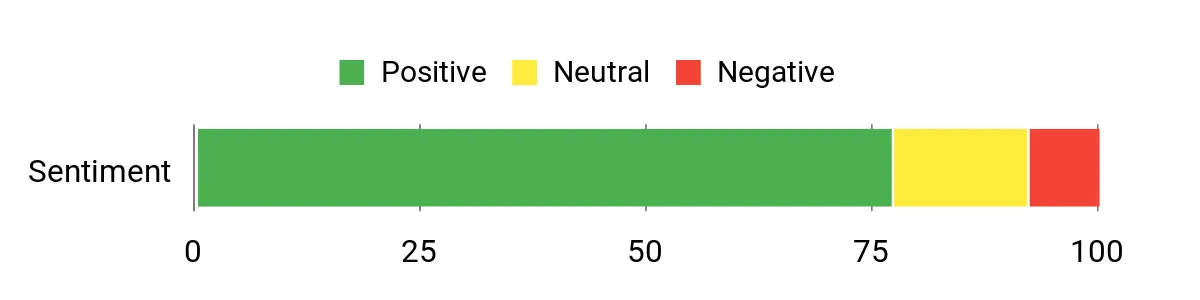
Across non-Amazon retailer feedback, owners commonly mention refillable ink, everyday print quality, and ease of routine use as positives. Setup experiences are more mixed, with some users reporting extra work during wireless connection or software installation.
The chart below is retained from the original article for continuity. It is not used as evidence that the discontinued G3270 should be a current recommendation.
When It Helps Most
|
Situation |
How It Helps |
|---|---|
|
Homework And School Projects |
You can print assignments, charts, and project pages without replacing small cartridges as frequently. |
|
Small Apartment Or Kitchen Desk |
Its compact closed dimensions make it easier to fit into a shared household workspace, although you still need clearance for the rear tray and open output area. |
|
Occasional Photo Prints |
Borderless support and dye-based color inks make it useful for casual photos, greeting cards, and craft projects on compatible media. |
|
Light Scanning Needs |
The flatbed handles receipts, worksheets, photos, and single-page documents without requiring a separate scanner. |
|
Shared Wireless Printing |
Wi-Fi, wireless direct, AirPrint, Mopria, and the Canon PRINT app give household members several ways to send a job. |
Before You Consider A Remaining G3270 Listing
- Confirm that the listing is the exact Canon G3270 rather than another MegaTank variation.
- Check seller, warranty, return, and manufacturer-support terms because Canon marks the model discontinued.
- Confirm that manual duplex printing is acceptable for your workflow.
- Remember that multi-page scanning requires placing each sheet on the flatbed individually.
- Allow extra depth behind and in front of the printer when the rear feed and output areas are open.
- Check current operating-system and app compatibility for every device you plan to use.
Practicality
Canon lists closed dimensions of about 16.4 inches wide by 13.3 inches deep by 7 inches high, with a weight of about 13.2 pounds. With its trays open, the listed dimensions increase to about 16.4 by 21.9 by 10.6 inches, so measure the working space rather than only the closed footprint.
The rear tray holds up to 100 sheets of plain paper. Connectivity includes Hi-Speed USB and 2.4/5 GHz Wi-Fi. Canon also lists Wireless Direct, AirPrint, Mopria, and the Canon PRINT app among its supported mobile-printing options.
The printer uses a 1.35-inch backlit LCD. Canon identifies its print heads and maintenance cartridge as customer-replaceable, which gives existing owners serviceable maintenance components without requiring replacement of the whole printer for those specific parts.
Key Benefits
- Four-color refillable MegaTank ink system
- Print, scan, and copy functions in one compact unit
- Dual-band Wi-Fi plus USB connectivity
- Borderless printing on compatible sizes up to letter
- 100-sheet plain-paper rear tray
- ENERGY STAR certification and automatic power controls
Main Limitations
- Discontinued by Canon
- No automatic document feeder
- No automatic two-sided printing
- No wired Ethernet connection listed
- Flatbed-only scanning slows multi-page jobs
- Small 1.35-inch LCD rather than a larger touchscreen
Check Product Details on Amazon
The legacy comparison table below is retained from the source layout. Canon’s discontinued status should take priority when judging whether a remaining listing makes sense for a new purchase.
| Product Name | Image | Maximum Print Speed | Best For | Key Limitation | Check Details |
|---|---|---|---|---|---|
| Canon MegaTank G3270 |
 |
Approx. 11 ipm black / 6 ipm color | Home documents, schoolwork, light scanning, and casual photos | Manual duplex and flatbed-only scanning | Check Amazon Availability |
Specification note: Product features, operating-system support, included supplies, warranty terms, and retailer availability can change. Confirm current details before purchase.
Which Wireless All-in-One Printer Should You Buy?
Because the Canon G3270 is the only source product and Canon now marks it discontinued, there is no current model in this article that can be named as the best buy. Use these requirements to narrow a current replacement.
- You print long reports: choose a current printer with automatic two-sided printing instead of manual duplexing.
- You scan document stacks: look for an automatic document feeder rather than a flatbed-only design.
- You mainly print household pages: a refillable-ink all-in-one with roughly 100-sheet-class paper handling may be enough for light use.
- You need wired networking: choose a model that explicitly lists Ethernet in addition to Wi-Fi.
- You print casual photos: verify borderless sizes, supported photo media, and the ink configuration before ordering.
- You want long-term support: favor a current manufacturer-listed model with clear warranty, supplies, and software support.
How We Chose
- Exact product match: The linked Amazon ASIN was checked to confirm it points to the Canon G3270 white variant.
- Manufacturer specifications: Print speed, paper capacity, scanner type, connectivity, dimensions, ink system, and warranty information were checked against Canon documentation.
- Current product status: Manufacturer availability and discontinuation information were checked before deciding whether the product could remain recommended.
- Owner feedback: Recurring usage patterns were considered only when similar themes appeared across multiple non-Amazon sources.
- Safety: Recall and safety information was checked separately from retailer marketing and owner comments.
Wireless All-in-One Printer Buying Guide
Refillable Tanks Vs. Cartridges
Ink-tank printers store ink in refillable reservoirs instead of relying on small disposable cartridges. They make the most sense when you print often enough to value fewer supply changes. If you print only rarely, also consider maintenance needs because any inkjet can require nozzle cleaning after long idle periods.
Automatic Duplex Printing
Automatic duplexing flips the paper inside the printer so you can print both sides without manually reloading sheets. It is especially useful for school packets, reports, manuals, and longer documents. The Canon G3270 is a single-sided printer, so two-sided jobs require manual paper handling.
Flatbed Scanner Vs. Automatic Document Feeder
A flatbed is useful for photos, books, identification cards, receipts, and occasional documents. An automatic document feeder is much more convenient when you routinely scan or copy several loose pages. The G3270 uses an 8.5-inch by 11.7-inch flatbed and does not include an ADF.
Paper Capacity And Media Support
A 100-sheet tray is usually manageable for ordinary household printing, but frequent high-volume users may want a larger cassette. Also check the media path if you print envelopes, labels, photo paper, or cardstock. Canon lists several specialty media types and borderless sizes for the G3270.
Wi-Fi And Device Compatibility
Check both the network hardware and the software you actually use. The G3270 supports 2.4 GHz and 5 GHz Wi-Fi, Wireless Direct, USB, AirPrint, Mopria, and Canon mobile-printing software. For any current printer, confirm support for the operating-system versions running on your computers, phones, tablets, and Chromebooks.
Photo Printing
A general-purpose four-color inkjet can handle family photos, greeting cards, and craft projects, but it is not automatically a substitute for a dedicated photo printer. If photo quality is a priority, compare ink count, media support, borderless sizes, color-management features, and the type of prints you plan to make.
Maintenance And Warranty
Inkjet maintenance includes keeping ink above required levels, using the correct media settings, and running cleaning procedures only when print quality calls for them. Canon lists the G3270’s print heads and maintenance cartridge as customer-replaceable and specifies a one-year U.S. limited warranty subject to its warranty terms.
Mistakes to Avoid When Buying A Wireless All-in-One Printer
- Ignoring discontinued status: check the manufacturer’s current product page instead of relying only on marketplace availability.
- Assuming every all-in-one has an ADF: confirm how multiple pages are fed into the scanner.
- Assuming duplex means automatic: verify that the specification explicitly says automatic two-sided printing.
- Checking only closed dimensions: leave room for open paper trays, output areas, lids, and cable access.
- Ignoring software support: confirm compatibility with every computer and mobile device you plan to use.
FAQs
Is The Canon G3270 Discontinued?
Yes. Canon’s U.S. product page currently marks the MegaTank PIXMA G3270 as discontinued and says it is no longer available from Canon. Marketplace listings may still exist, so check the exact model, seller, return terms, and support status before ordering. This article keeps the G3270 only as a legacy comparison, not as a current top pick.
Is The Canon G3270 An All-In-One Printer?
Yes. The Canon G3270 prints, scans, and copies. Scanning and copying use a flatbed that accepts originals up to about 8.5 inches by 11.7 inches. It does not have an automatic document feeder, so several-page documents must be placed on the scanner glass one page at a time.
Does The Canon G3270 Print Double-Sided Automatically?
No. Canon specifies single-sided printing for the G3270. You can create two-sided documents by manually reinserting the paper, but the printer does not flip sheets automatically. If you frequently print reports, school packets, or manuals on both sides, compare current models that explicitly include automatic duplex printing.
Does The Canon G3270 Have An Automatic Document Feeder?
No. The G3270 uses a flatbed scanner and does not include an automatic document feeder. That layout works well for photos, receipts, IDs, worksheets, and occasional documents. It becomes slower when you need to scan or copy many loose pages because every original has to be positioned manually.
Can The Canon G3270 Print Photos?
Yes. Canon lists photo printing and borderless printing on compatible media, with borderless sizes extending up to letter size. The four-color system uses pigment black and dye-based color inks. It is designed for general home documents and casual photos rather than the wider ink sets and controls found on dedicated photo printers.
What Connections Does The Canon G3270 Support?
The G3270 supports Hi-Speed USB, 2.4 GHz and 5 GHz Wi-Fi, and Wireless Direct. Canon also lists AirPrint, Mopria Print Service, and the Canon PRINT app among its mobile options. Because operating systems and apps change over time, existing owners should check Canon’s current support information for their exact devices.
Is The Canon G3270 A Good Choice For A Home Office?
Its specifications can handle light document printing, copying, and single-page scanning, but it lacks automatic duplexing, an ADF, and listed Ethernet connectivity. More importantly for a new purchase, Canon now marks the G3270 discontinued. A current home-office model is the better comparison point when ongoing manufacturer availability and workflow features matter.
Final Verdict
The Canon G3270 has useful home-printer specifications, including refillable ink tanks, a 100-sheet rear tray, a flatbed scanner, dual-band Wi-Fi, and borderless printing. Its main issue in September 2026 is not the basic feature set: Canon now lists the model as discontinued.
For existing owners, this guide remains useful for understanding the printer’s capabilities and limits. For a new purchase, compare current wireless all-in-one printers rather than treating the G3270 as this roundup’s best overall choice.
No Best value or Premium pick is named in this revision because the source article contains no verified current products.
