
A dedicated GPS navigator can keep directions visible without tying up your phone, but the right model depends on where you drive. A daily commuter needs clear road guidance and traffic information, while an overlanding or UTV setup needs rugged hardware, off-road mapping, and secure vehicle power.
This guide compares five GPS devices for cars, trucks, overlanding rigs, UTVs, and ATVs. You can quickly compare screen size, connectivity, mapping focus, mounting needs, and the type of driver each unit suits best.
Quick Verdict
Best overall: Garmin DriveSmart 86 for drivers who want a large, easy-to-read road navigator with voice features and connected traffic tools.
Best value: Garmin DriveSmart 66 for a more compact balance of screen size, voice control, and everyday road-trip features.
Best compact option: Garmin Drive 53 for straightforward road navigation on a smaller dashboard.
Best for overlanding: Garmin Tread 2 for rugged mounting and off-pavement mapping.
Best for UTVs and ATVs: Trail Tech Voyager Pro Kit for riders who want navigation alongside compatible vehicle data.
Top Picks
|
Category |
Product |
Best For |
|---|---|---|
|
🏆 Best Overall |
Large-screen road navigation and connected features |
|
|
💰 Best Value |
Daily driving, commuting, and road trips |
|
|
🎯 Best Compact |
Small dashboards and simple road guidance |
|
|
🚀 Best for Overlanding |
Unpaved routes, topo maps, and rugged installations |
|
|
💼 Best for UTVs & ATVs |
Trail navigation and compatible vehicle telemetry |
How We Picked
We compared the article-listed features that matter most in real use: display readability, mapping type, traffic options, voice control, mounting, power needs, ruggedness, and vehicle compatibility. Road-focused models were judged mainly on clear directions and convenience. Off-road models were judged more heavily on topo mapping, trail use, secure mounting, and vehicle integration.
This is an editorial comparison, not a claim of laboratory or hands-on testing. Product bundles, map coverage, compatible accessories, and connected services can change, so confirm the current Amazon listing and manufacturer documentation before buying.
Before You Buy
- Match the GPS to your use: road navigators and off-road navigators are not interchangeable.
- Check the exact bundle: traffic cables, mounts, wiring, sensors, and accessory-control hardware may vary.
- Plan for vehicle power: use the internal battery mainly for short setup or off-vehicle use unless the manufacturer states otherwise.
- Confirm map coverage: maps, updates, traffic services, and app features can differ by region.
- Mount it safely: keep the display out of your main sightline and away from airbag deployment zones.
Best GPS Device Reviews
The DriveSmart 66 gives you a useful middle ground between a compact GPS and an oversized display. Its 6-inch screen is easier to glance at than a phone-sized navigator, but it should still fit most dashboards without dominating the windshield.
Voice assistance can reduce the need to tap the screen while moving. Connected traffic, parking, weather, fuel, and calling features may depend on a compatible smartphone, app permissions, data service, region, and the exact product bundle.
Buyer Feedback Themes
The source article summarizes buyer feedback as generally positive, especially around the display, familiar Garmin interface, voice control, and road-trip information. It also notes occasional complaints about setup, map-region purchases, or packaging. Review the newest verified-purchase feedback because software and bundles can change.
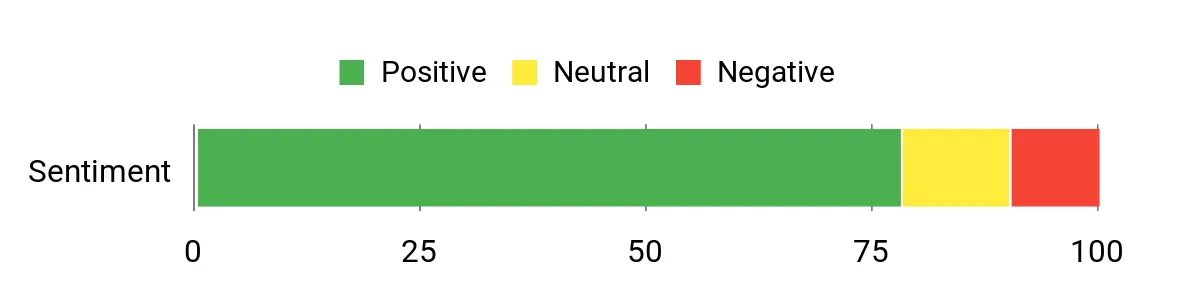
Chart retained from the source article. Its sampling method was not provided, so treat it as a general summary rather than independent testing.
Who Should Buy This
Choose the DriveSmart 66 when you want a dedicated road GPS with a balanced screen size, spoken guidance, and connected travel information. It makes the most sense when you prefer leaving your phone free for calls, music, or emergencies.
Who Should Avoid This
Skip it if you need topo maps, trail routing, weather-sealed hardware, or hard-mounted vehicle telemetry. Those needs are better served by the Tread 2 or Voyager Pro Kit.
Key Benefits
- Bright 6-inch display that balances visibility and dashboard space
- Garmin Voice Assist and Alexa features listed for hands-free interaction
- Driver alerts and road-trip points of interest
- Connected traffic and local information through compatible services
- Good fit for commuting, family travel, and highway trips
The Drive 53 keeps the experience simple. The smaller display works well when dashboard space is limited, and the interface focuses on turn-by-turn road navigation, driver alerts, and useful directories for stops.
Do not assume it has the same smartphone, Bluetooth, or voice-assistant features as the DriveSmart models. Traffic delivery and included accessories can vary by listing and region, so check whether you are buying the Drive 53 or the Drive 53 & Traffic bundle.
Buyer Feedback Themes
The source article describes positive feedback about the clear display, simple menus, traffic alerts, and driver warnings. The main limitations mentioned are the smaller screen and limited off-power runtime. Use recent product-specific reviews to confirm current software behavior.
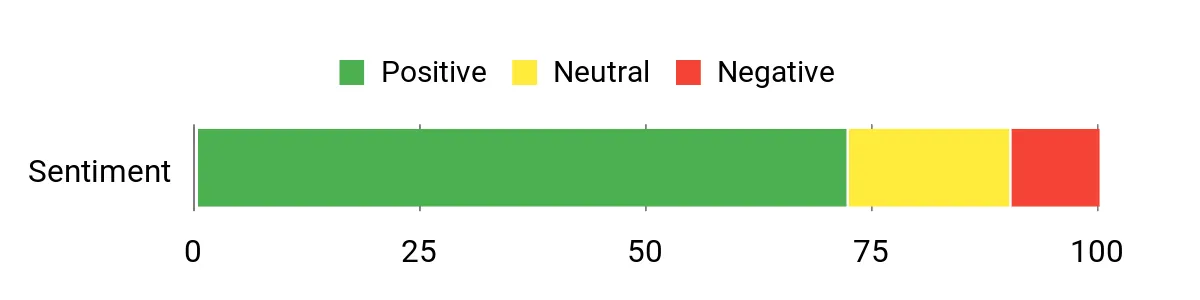
Chart retained from the source article. Its sampling method was not provided, so treat it as a general summary rather than independent testing.
Who Should Buy This
Pick the Drive 53 when you want uncomplicated road directions and a compact screen. It is a practical option for commuters, occasional road-trippers, older vehicles, and drivers who do not need advanced connected features.
Who Should Avoid This
Choose another model if you want a large display, broad voice control, off-road mapping, rugged construction, or vehicle telemetry.
Key Benefits
- Compact 5-inch high-resolution touchscreen
- Simple menus for quick route entry
- Driver alerts for selected road conditions and changes
- Tripadvisor and national parks points of interest listed in the source
- Traffic guidance on the applicable Traffic bundle
The Tread 2 is built for a different job than a standard car GPS. Its large, glove-friendly display and off-road mapping features are intended for drivers who leave paved highways and need a clearer view of terrain, tracks, campgrounds, and unpaved routes.
Compatible Garmin accessory-control systems may add vehicle integration, but extra hardware can be sold separately. Satellite imagery, mapping coverage, group features, and accessory compatibility can vary by region, software version, and bundle.
Buyer Feedback Themes
The source article highlights the rugged design, readable screen, topo maps, terrain views, and campground information as strengths. It also mentions possible mount noise, setup concerns, and packaging complaints. Confirm that the listing is new, includes the expected mount and power hardware, and matches your vehicle.
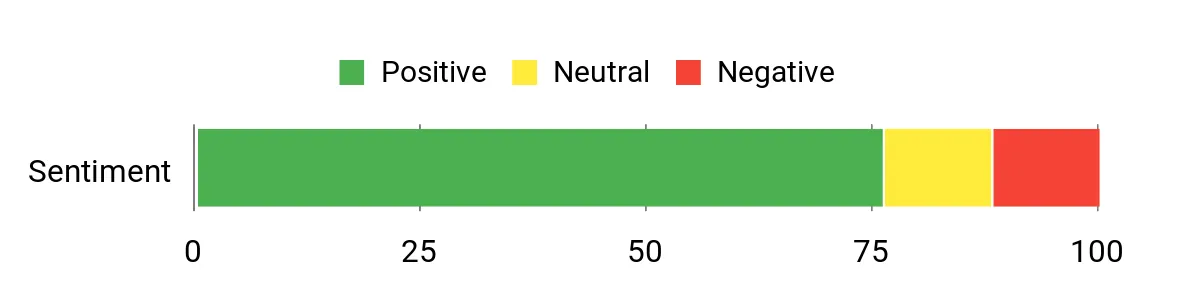
Chart retained from the source article. Its sampling method was not provided, so treat it as a general summary rather than independent testing.
Who Should Buy This
Choose the Tread 2 when overlanding, trail access, remote campsites, or rough-road travel are central to your trips. The larger display also helps when you need more map detail at a glance.
Who Should Avoid This
Skip it for basic commuting unless you specifically want the rugged hardware and larger display. A DriveSmart model will usually be simpler for paved-road navigation and connected traffic use.
Key Benefits
- Large 8-inch glove-friendly display
- Routing and map tools aimed at unpaved travel
- Topo maps and 3D terrain views listed in the source
- Wi-Fi access to supported map and imagery content
- Rugged mounting focus for adventure vehicles
The Voyager Pro Kit is more than a portable windshield GPS. It is designed around off-road vehicle installation, with navigation and compatible sensor inputs that can place ride information and vehicle data on one screen.
Buddy tracking and telemetry depend on compatible equipment, correct installation, and the exact kit. Before buying, confirm that the included mount, power connection, sensors, and vehicle-specific hardware match your machine.
Buyer Feedback Themes
The source article reports positive feedback about vehicle integration, group-riding tools, removable docking, and rugged use. It also notes a learning curve for maps and possible display or sensor limitations in bright, dusty conditions.
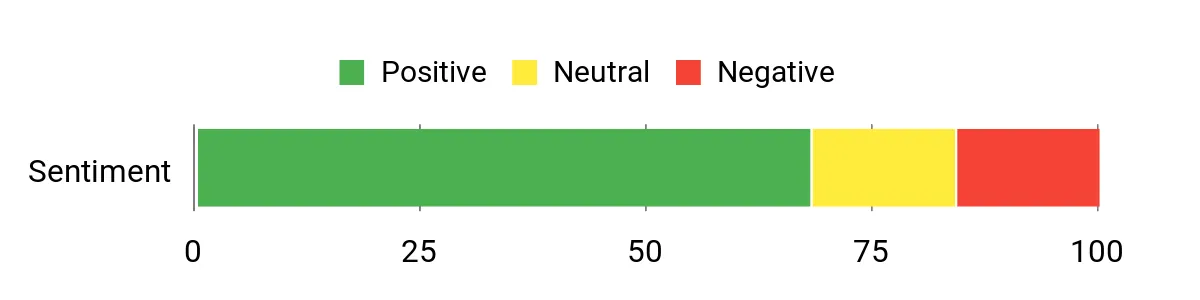
Chart retained from the source article. Its sampling method was not provided, so treat it as a general summary rather than independent testing.
Who Should Buy This
Buy the Voyager Pro Kit when you want a dedicated trail display that can combine navigation with compatible engine or ride data. It is especially useful for riders who prefer a semi-permanent installation instead of moving a car GPS between machines.
Who Should Avoid This
Skip it when you need simple highway directions, a large road-navigation screen, or plug-and-play use in a passenger car. Installation and sensor setup require more planning than a suction-mounted road GPS.
Key Benefits
- Trail-focused navigation in a compact vehicle display
- Compatible inputs for RPM, temperature, and voltage data
- Buddy-tracking features for supported group setups
- Quick-removal dock for security and transfer
- Kit-based installation for off-road vehicles
The DriveSmart 86 stands out because its 8-inch screen gives maps, lane guidance, alerts, and upcoming turns more room. Dual orientation can help you fit the display to a wide dashboard, although the unit may feel oversized in a compact car.
Voice assistance and compatible connected services can reduce screen tapping and add traffic, parking, fuel, weather, or calling information. Those connected functions can require a compatible phone, app, data plan, permissions, and regional support.
Buyer Feedback Themes
The source article summarizes buyer feedback as favorable toward the large screen, voice control, traffic information, and trip-planning directories. The main concern is physical size, especially when the mount could block part of a small windshield.
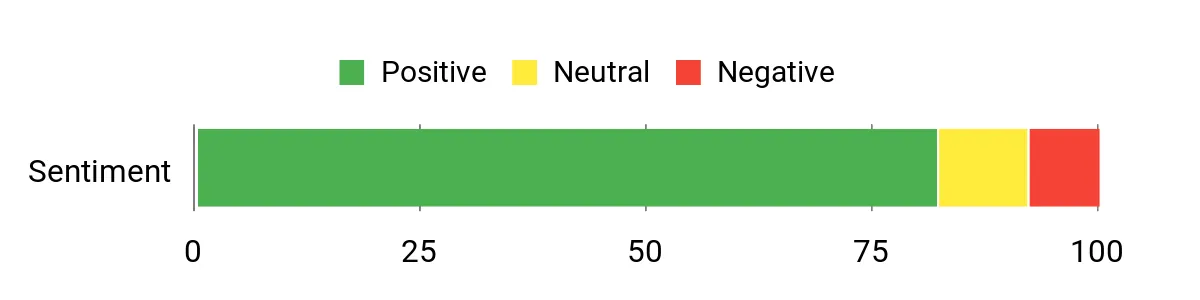
Chart retained from the source article. Its sampling method was not provided, so treat it as a general summary rather than independent testing.
Who Should Buy This
Choose the DriveSmart 86 when screen readability is your top priority. It suits frequent travelers, drivers who prefer larger text and map elements, and families who share navigation duties.
Who Should Avoid This
Pick a smaller model if your dashboard is tight, you frequently move the GPS between vehicles, or you only need basic turn-by-turn directions.
Key Benefits
- Large 8-inch dual-orientation display
- Garmin Voice Assist and Alexa features listed in the source
- Driver alerts and road-trip points of interest
- Connected traffic and local information through compatible services
- Strong fit for long trips and drivers who value larger on-screen details
GPS Buying Guide
Choose Road or Off-Road Mapping First
A road navigator prioritizes street routing, addresses, lane guidance, traffic, and points of interest. An off-road navigator focuses more on topo maps, tracks, unpaved routes, terrain, and rugged mounting. Decide which map type matches most of your driving before comparing secondary features.
Pick a Screen That Fits Your Dashboard
A larger display is easier to read, but it also takes more space and can block your view when mounted poorly. Measure the intended mounting area and check whether landscape or portrait orientation works better in your vehicle.
Understand Traffic and Phone Requirements
Some GPS devices receive traffic through a compatible cable or built-in service. Others rely on a paired phone and companion app. Check the exact model and bundle rather than assuming every version supports the same traffic method, hands-free calling, or voice assistant.
Check Mounting, Wiring, and Included Accessories
Road GPS units often use a windshield or dashboard mount and vehicle power cable. Off-road systems may require a stronger cradle, direct wiring, sensors, antennas, or separate accessory-control hardware. Confirm everything included before you compare value.
Treat Battery Life as Backup Power
Most vehicle GPS devices work best while connected to vehicle power. Internal batteries are useful during setup, route planning, or short off-vehicle use, but runtime can change with screen brightness, wireless features, temperature, and battery age.
FAQ
How Do I Choose the Right GPS?
Start with your main use. Choose a road navigator for commuting and highway trips, an overlanding model for topo maps and unpaved routes, or a vehicle-integrated trail unit for UTV and ATV use. Then compare screen size, mounting, power, traffic delivery, map region, and included accessories.
Does a Dedicated GPS Work Without Cell Service?
Core satellite positioning and preloaded offline maps generally do not require cellular service. Connected traffic, weather, fuel, parking, voice-assistant, or cloud features may require a paired phone, app, data connection, subscription, or regional service.
Do I Need to Pair the GPS With My Phone?
Not for basic offline navigation on a unit with preloaded maps. Pairing may be needed for connected traffic, hands-free calling, smartphone notifications, weather, or other online services. Check the exact model because the Drive 53 and DriveSmart models do not necessarily share the same connectivity features.
Is a Dedicated GPS Better Than a Phone?
A dedicated GPS can keep maps visible without using your phone, preserve phone battery, and provide vehicle-specific mounts or off-road maps. A phone may be better when you want one device, frequent app updates, and broad online search. The better choice depends on coverage, mounting, and how often you drive.
Which GPS Is Best for Off-Road Driving?
The Garmin Tread 2 is the stronger fit here for overlanding and large-screen off-road mapping. The Trail Tech Voyager Pro Kit is more suitable when you want trail navigation and compatible vehicle data in a UTV, ATV, or off-road motorcycle installation.
How Should I Mount and Use a GPS Safely?
Place the display where you can glance at it without blocking your primary view. Keep it away from airbag zones, secure all cables, and enter destinations before moving. Use spoken directions or voice features when available, but remain responsible for road signs, closures, conditions, and safe driving decisions.
Final Recommendations
The Garmin DriveSmart 86 is the best overall choice when you want a large road-navigation display and broad convenience features. The DriveSmart 66 offers a more dashboard-friendly balance for daily driving and road trips.
Choose the Garmin Drive 53 when simplicity and compact size matter most. Pick the Garmin Tread 2 for overlanding and off-pavement mapping. The Trail Tech Voyager Pro Kit makes the most sense for UTV, ATV, and off-road motorcycle riders who want navigation with compatible vehicle data.
Best Choice by Use Case
- Large-screen road GPS: Garmin DriveSmart 86
- Balanced everyday value: Garmin DriveSmart 66
- Compact road GPS: Garmin Drive 53
- Overlanding and topo maps: Garmin Tread 2
- UTV and ATV vehicle integration: Trail Tech Voyager Pro Kit
| Product Name | Image | Screen Size | Power Notes | Special Highlights | Amazon |
|---|---|---|---|---|---|
| Garmin DriveSmart 66 |
 |
6 Inches | Vehicle power recommended for continuous use |
|
Check Price |
| Garmin Drive™ 53 with Traffic |
 |
4.95 Inches | Internal battery for short use; vehicle power recommended |
|
Check Price |
| Garmin Tread® 2 – Overland Edition |
 |
8 Inches | Rechargeable battery; use vehicle power for long trips |
|
Check Price |
| Trail Tech Voyager Pro Kit, UTV |
 |
4 Inches | Designed for a 12V vehicle power connection |
|
Check Price |
| Garmin DriveSmart 86 |
 |
8 Inches | Vehicle power recommended for continuous use |
|
Check Price |
