
You rely on accurate diagnostics to keep your vehicle running safely and to avoid unnecessary repair costs. OBD-II scanners put that insight in your hands so you can read and clear codes, monitor live data, and decide whether a trip to the shop is required.
Choosing the right scanner matters because interfaces, vehicle coverage, and update support vary widely; the right tool helps you diagnose faster, protect your budget, and plan repairs with confidence.
Affiliate disclosure: This roundup contains Amazon affiliate links. If you buy through a qualifying link, we may earn a commission at no extra cost to you.
Top Picks
|
Best For |
Product |
Why It Stands Out |
|---|---|---|
|
🏆 Advanced DIY Diagnostics |
Bidirectional tests, broad system coverage, live data, and special functions on supported vehicles. |
|
|
🚀 Maintenance Resets |
Multi-system diagnostics with live-data graphing and reset functions; exact functions depend on the hardware/version and vehicle. |
|
|
🔰 ABS, SRS & Transmission |
Focused four-system diagnostics for engine, transmission, ABS, and SRS plus standard OBD-II functions. |
|
|
💰 Budget Handheld |
Simple plug-in code reading, live PCM data, freeze-frame information, and I/M readiness checks. |
|
|
⭐ No-Subscription Bluetooth |
Phone-based diagnostics with live data and ABS/SRS support on compatible vehicles. |
|
|
🎯 Bluetooth Value |
Compact app-based scanning with standard OBD-II data, live readings, and battery-related checks. |
|
|
💡 Entry-Level Code Reading |
Basic engine-code diagnostics, live data, freeze-frame data, and readiness information without an app. |
|
|
🔍 App-Guided Checks |
Easy phone-based check-engine explanations; some guidance and support features are tied to FIXD Premium. |
|
|
🛠️ Broad Brand Coverage |
Bluetooth diagnostics with OBD-II, ABS, manufacturer-code support, and coverage across many brands. |
How We Picked
You need a scanner that matches both your vehicle and the depth of work you plan to do. We prioritized OBD-II compatibility, diagnostic depth, live-data usefulness, system coverage, reset or active-test capability where applicable, interface clarity, software support, and long-term usability.
We also separated basic code readers from multi-system and bidirectional tools. Advanced features are often vehicle-specific, so a scanner can be excellent overall and still lack a particular reset, active test, or module on your exact year, make, model, or trim.
Compatibility note: Before buying, use the manufacturer’s coverage checker or current product documentation for your exact vehicle. Standard OBD-II engine/emissions functions are much more universal than ABS, SRS, transmission, service resets, special functions, and bidirectional controls.
ANCEL BD310
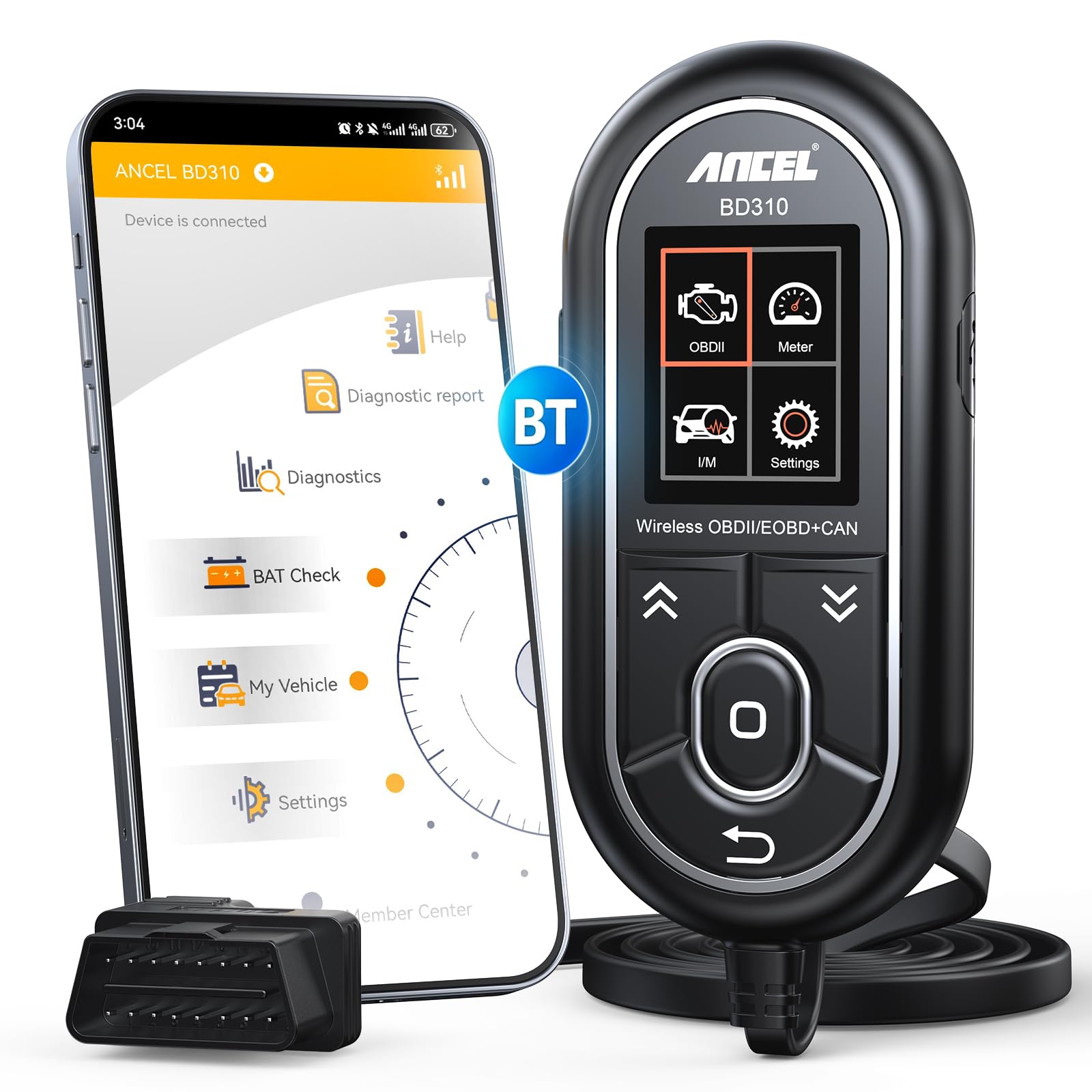
You get a compact Bluetooth scanner that pairs with a phone app to read and clear standard OBD-II codes, monitor live data, and access battery-related checks. It is small enough for convenient everyday use while giving you more context than a basic code-only reader.
Use it for routine checks before a long trip, to troubleshoot a stubborn check engine light in your driveway, or to track battery health across seasons. If you want reliable, smartphone-driven diagnostics without a steep learning curve, this is a practical choice.
[Amazon Products Picked for You]

【Comprehensive Performance Testing】V011 OBD2 Scanner provides a complete diagnostic solution, giving you a thorough understanding of your vehicle's condition. It supports a variety of performance tests, support 9 protocols,👍automotive fault clearing,including fast reading of DTCs, access to electronic emission readiness, turning off CEL or MIL, resetting monitors, reading live data and retrieving the vehicle's VIN, freeze frame, sensor data, data streaming, diagnostic reports, onboard monitoring, live data streaming, and more. With these features, you can monitor your car's performance in real time and discover potential problems before they become major issues.

CEL Doctor: The ANCEL AD310 is one of the best-selling OBD II scanners on the market and is recommended by Scotty Kilmer, a YouTuber and auto mechanic. It can easily determine the cause of the check engine light coming on. After repairing the vehicle's problems, it can quickly read and clear diagnostic trouble codes of emission system, read live data & hard memory data, view freeze frame, I/M monitor readiness and collect vehicle information

Bi-Directional Control, Quickly Locate Problems: Turn your phone into a professional diagnostic tool. You can send commands from your phone to the ECU to test injectors, cooling fans, headlights, A/C clutch, windows, wipers, and more. See which one doesn't respond. Helps you quickly locate the problem and save time. No need to tear things apart, avoid blind disassembly.
What People Say
Customers frequently praise the BD310 for its ease of use and solid Bluetooth connectivity through the ANCEL app. Many note that it explains fault codes clearly, provides useful live data, and includes battery testing that helps catch issues early.
A common theme is that it offers excellent value for the features it delivers, though a few users mention a learning curve when interpreting some raw data.
Overall Sentiment: Positive

When It Helps
|
Situation |
How It Helps |
|---|---|
|
Driveway Troubleshooting |
You can plug it in and get immediate fault codes and simple descriptions so you know whether a DIY fix is possible or you need a shop. |
|
Pre-Trip Checks |
You can run quick battery and performance tests to spot weak systems before a long drive and avoid being stranded. |
|
Ongoing Monitoring |
You can leave the dongle connected and use the app to log trips and view live parameters over time, which helps spot intermittent faults. |
|
Buying a Used Car |
You can scan for stored or pending engine-related fault codes before purchase, which can reveal issues worth investigating further. A clean scan does not guarantee a problem-free vehicle. |
Ease Of Use
|
Feature |
Ease Level |
|---|---|
|
Setup & Pairing |
Easy |
|
Reading/Clearing Codes |
Easy |
|
Interpreting Live Data |
Moderate |
|
Battery Testing |
Easy |
Versatility
It is designed for many OBD-II vehicles, including typical 1996-and-newer U.S.-market cars and light trucks. Basic engine and emissions functions are broadly compatible, while app features and enhanced data can vary by vehicle.
Safety
While not a safety device itself, the scanner helps you spot critical engine or battery faults early so you can address issues before they become hazardous on the road.
Problem Solving
It excels at identifying and clearing standard engine codes and delivering live data to narrow down problems; for manufacturer-specific diagnostics you may need a dealer-level tool.
Speed
The Bluetooth link and app usually return codes and live data promptly, though some advanced live-parameter reads can take a few seconds depending on vehicle response.
Key Benefits
- Bluetooth pairing with app for convenient phone-based diagnostics
- Reads and clears standard OBD-II codes and shows live data
- Includes battery test and trip/performance logging
- Compact, lightweight design that’s easy to store or leave installed
GEARWRENCH GWSCAN

You get a compact Bluetooth scanner aimed at drivers who want broader coverage than a basic engine-code reader without stepping up to a large professional tablet. The GWSCAN app supports standard OBD-II functions, ABS code access, manufacturer fault-code definitions, and broader system scanning on supported vehicles. It is a practical everyday option if you value wireless diagnostics across multiple makes.
[Amazon Products Picked for You]

Multi-Functions - Practical Multi-Functions OBD2 code reader features built-in OBD2 DTC lookup library, which help you to determine the cause of the engine light, read code, erase code, view freeze frame, I/M ready, vehicle information, data flow, real-time curve, get vehicle speed information, calculate load value, engine coolant temperature, get engine speed.

Your Car's Personal Doctor: Say Goodbye to Check Engine Light Troubles! The YM319 OBD2 scanner swiftly reads and clears engine fault codes, pinpointing the root cause of issues. Monitor your engine's every "breath" like a pro—view freeze frame data, check I/M readiness status, run oxygen sensor tests, and more. With a built-in database of over 63,000 fault codes, it delivers precise and reliable diagnostics, making it your trusted partner for vehicle maintenance and repair.

【TURN OFF CEL】 This AL319 car scanner diagnostic tool supports Reading and Clearing DTCs, DTC Look Up, displaying Live Data, Freeze Frame & I/M Readiness, view vehicle information, etc., to figure out the root cause of the Check Engine Light (CEL) and turn it off, helping you catch any potential issues early and avoid excessive costs from unnecessary repairs.
What People Say
Common buyer themes favor the GWSCAN’s small footprint, wireless app workflow, and broad brand coverage. As with any enhanced scanner, exact module access and vehicle identification can vary by year, make, and model, so checking coverage before purchase is more useful than assuming every feature works on every vehicle.
Overall Sentiment: Neutral

When Useful
|
Situation |
How It Helps |
|---|---|
|
Driveway Diagnosis |
You can pull quick scans and see if a warning light is caused by a simple issue you can address yourself. |
|
Deep Troubleshooting |
When a basic engine scan is not enough, broader system and manufacturer-code access can give you more diagnostic context on supported vehicles. |
|
Multi-Vehicle Households |
You can switch between different makes without needing brand-specific tools, useful if you own or maintain varied models. |
|
Occasional Shop Alternative |
If you want to confirm a shop’s diagnosis or avoid a trip in for a simple code read, this lets you verify the issue at home. |
Ease Of Use
|
Feature |
Ease Level |
|---|---|
|
Setup & Pairing |
Moderate |
|
Standard Code Reads |
Moderate |
|
System Scans |
Moderate |
|
Vehicle Identification |
Moderate |
Versatility
It aims to cover 85+ manufacturers, so it’s versatile across many makes, though performance can vary by model and year.
Safety
Not a safety device by itself, but it helps you detect engine and battery faults that could lead to breakdowns or unsafe driving conditions.
Problem Solving
The GWSCAN can read and clear standard OBD-II trouble codes and access additional manufacturer and ABS information on supported vehicles. For service resets, coding, or bidirectional controls, choose a tool that explicitly lists those functions for your vehicle.
Speed
Response time can vary by phone, vehicle ECU, and the scope of the scan, so broader system scans may take longer than a simple engine-code read.
Key Benefits
- Bluetooth connectivity for phone-based diagnostics
- ABS and manufacturer-code support on compatible vehicles
- Supports a wide range of manufacturers
- Two-year manufacturer warranty and updates
Innova 5610

You get a full-featured handheld that bridges consumer ease and workshop capability. It can scan multiple vehicle systems, show OEM live data, and run bidirectional active tests and special functions where your vehicle supports them. Use it for routine checks, component testing, and repair verification when a basic code reader no longer gives you enough information.
If you work on your own vehicles regularly, it’s a tool that helps you diagnose faster and make better repair decisions.
[Amazon Products Picked for You]

NOTE: This device requires a compatible third-party app to operate and is primarily designed for standard OBD-II diagnostics (excluding ABS/SRS, oil light or service reset, etc.). Please check the product description for compatible apps and supported functions.

Compact but Powerful Tool: Providing fault codes along with definitions makes it easy for even owners unfamiliar with car trouble conditions to keep track of vehicle information. This OBD2 scanner Bluetooth code reader integrates code reading, live data stream, oxygen sensor test, battery voltage test, I/M readout, vehicle information, freeze frame, EVAP test (fuel evaporation system), and DTC library, and other powerful features in 16 languages including Spanish.

[Scanner Function] The internal information of the vehicle can be accessed via Bluetooth devices such as a mobile phone, tablet or laptop for diagnosing engine lights and monitoring the car. It can read trouble codes and understand their meaning, clear car trouble codes, and turn your phone or tablet into a professional diagnostic tool.
What People Say
You’ll notice reviewers consistently praise the 5610 for its bidirectional capabilities and how much more diagnostic insight it provides compared with basic readers. Many point out the clean live-data displays and the ability to save vehicle records, which makes follow-up troubleshooting easier. A recurring note is that there’s a learning curve, but owners say the tool pays back that effort when it helps avoid unnecessary parts swaps.
Overall Sentiment: Positive

When Useful
|
Situation |
How It Helps |
|---|---|
|
DIY Repairs |
You can test components and confirm fixes with bidirectional commands rather than guessing at replacements. |
|
Pre-Repair Diagnosis |
Detailed live data and freeze-frame info help you pinpoint the failing system before you start disassembling parts. |
|
Shop Verification |
You can validate a shop’s diagnosis or show a technician recorded data to speed up the repair process. |
|
Ongoing Maintenance |
Saved vehicle records and logs let you track recurring issues across service intervals. |
Ease Of Use
|
Feature |
Ease Level |
|---|---|
|
Setup & Connection |
Moderate |
|
Menu Navigation |
Moderate |
|
Running Bidirectional Tests |
Advanced |
|
Saving & Reviewing Data |
Easy |
Versatility
Designed to handle engine, ABS, SRS and other modules, it’s versatile for both passenger cars and light trucks and supports saving multiple vehicle profiles.
Safety
Not a safety device itself, but its diagnostics can reveal critical faults such as airbag, ABS, or severe engine issues so you can address hazards before driving.
Problem Solving
Strong at isolating faults thanks to bidirectional control and rich live data; it narrows root causes and reduces parts swapping, though dealer-level, manufacturer-specific functions may still require OEM tools.
Speed
Reads and displays standard codes and live data quickly; some advanced tests and recordings take longer depending on the system and vehicle ECU response.
Key Benefits
- Bidirectional controls for testing actuators and systems
- Comprehensive multi-system coverage and live data logging
- Optional RepairSolutions2 app support plus handheld operation
- US-based technical support and useful data storage per vehicle
MOTOPOWER MP69033

You get a no-nonsense handheld scanner that powers from the vehicle port and gives you immediate access to stored trouble codes and basic live readings. It’s the kind of tool you grab when a check engine light pops on or when you want a quick status check before a drive.
The bright screen and straightforward menus make scanning quick, and it’s small enough to keep in your glovebox for spontaneous troubleshooting. If you want a reliable, easy-to-use unit for routine checks and simple fixes, this is a practical pick.
What People Say
Users consistently highlight how easy the MP69033 is to use and how quickly it displays codes after connection. People like the readable screen and straightforward menus that make pulling and clearing codes simple, and many recommend it as a dependable basic tool for daily checks and quick troubleshooting.
Overall Sentiment: Positive

When Useful
|
Situation |
How It Helps |
|---|---|
|
Check Engine Light |
You can pull the stored code instantly so you know whether the issue is minor or needs a mechanic. |
|
Quick Pre-Drive Check |
A fast scan confirms there are no active engine faults before a long trip or weekend run. |
|
Beginner Diagnostics |
The simple interface helps you identify a problem without needing advanced tools or training. |
|
Post-Repair Verification |
After a repair you can clear codes and verify they don’t return, saving a follow-up trip to the shop. |
Ease Of Use
|
Feature |
Ease Level |
|---|---|
|
Setup & Connection |
Easy |
|
Reading/Clearing Codes |
Easy |
|
Screen Navigation |
Easy |
|
Interpreting Codes |
Moderate |
Versatility
Best suited to basic engine diagnostics across OBD-II vehicles; it handles standard codes reliably but lacks advanced manufacturer-specific functions.
Safety
Not a safety device, but it helps you spot engine or emissions faults early so you can avoid driving with a potentially worsening problem.
Problem Solving
Great for identifying and clearing standard DTCs and confirming temporary glitches; for deeper system diagnostics you may need a more advanced scanner.
Speed
Connection and code retrieval are typically instant, with results appearing as soon as the vehicle ECU responds.
Key Benefits
- Plug-and-play operation powered from the OBD port
- Clear display that shows trouble codes and basic data
- Simple menu structure suited to beginners
- Reliable code reading and clearing for routine checks
FIXD
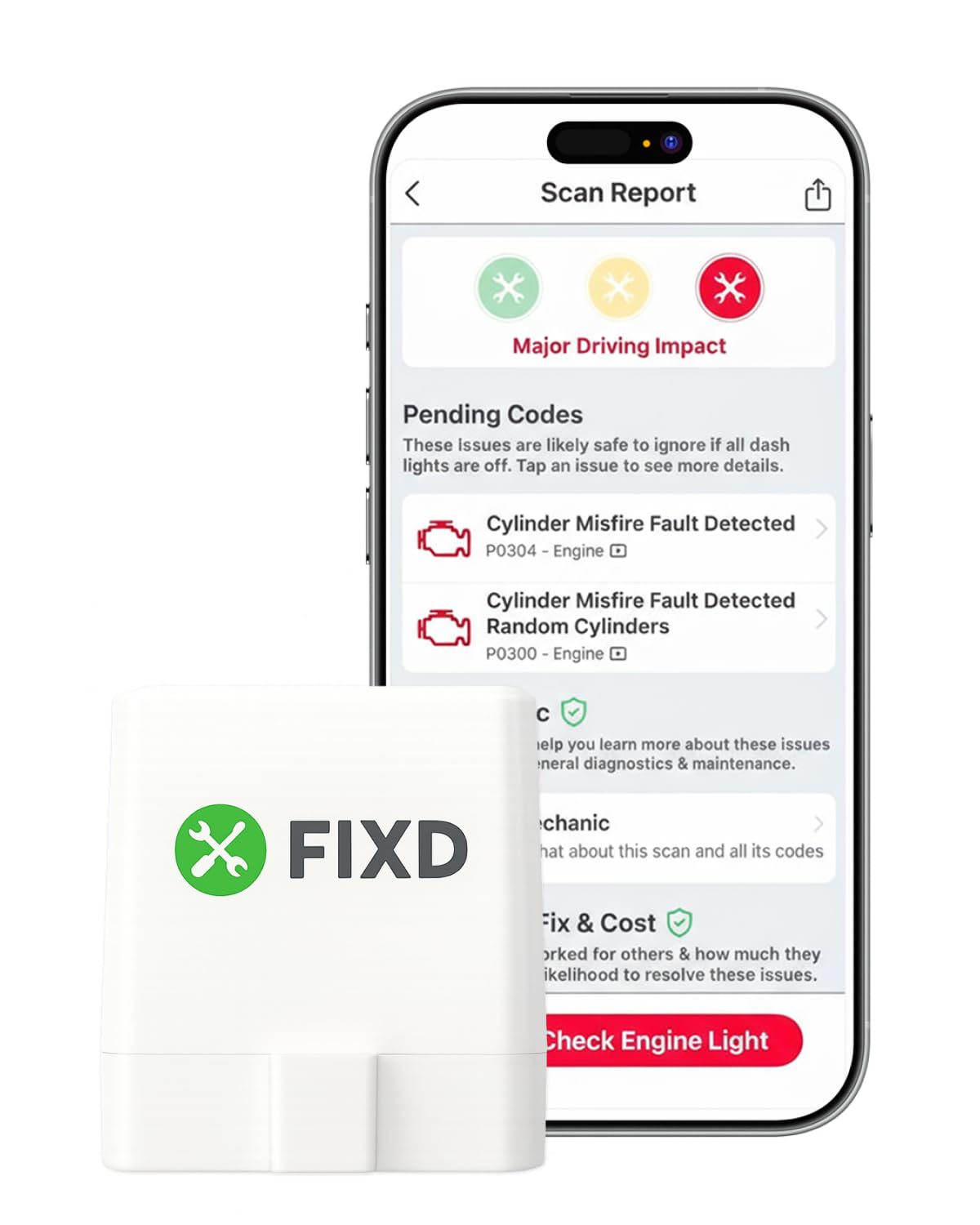
You get a pocket-sized Bluetooth dongle that turns your phone into a diagnostic tool. Plug it in, pair to the FIXD app, and you can read and clear engine codes, see prioritized severity, and get manufacturer-specific guidance.
It is useful for quick check-engine-light checks, basic pre-purchase scanning, and ongoing app-based monitoring. FIXD emphasizes plain-language issue severity, while some repair-cost, mechanic-support, and additional guidance features are part of FIXD Premium. If you value mobile convenience, the sensor makes basic diagnostics approachable.
What People Say
People often praise FIXD for making diagnostics accessible through a clean app interface and clear severity labels that help prioritize repairs. Many users like that it flags issues you might miss on a test drive and appreciate how portable it is.
The main limitations noted are that advanced live-data options can be restricted without a subscription and a few vehicles can present pairing glitches.
Overall Sentiment: Positive

When Useful
|
Situation |
How It Helps |
|---|---|
|
Check Engine Light |
You can pull a quick scan with your phone to understand severity and decide whether to drive or seek service. |
|
Used Car Inspection |
You can check for stored or pending engine-related codes before purchase, giving you another data point alongside a physical inspection and service-history review. |
|
On-the-Go Monitoring |
Keep it plugged in to log occasional faults and track patterns between service visits. |
|
Family Vehicles |
Share the device among drivers to quickly relay diagnostic info when someone reports a problem. |
Ease Of Use
|
Feature |
Ease Level |
|---|---|
|
Setup & Pairing |
Moderate |
|
Reading/Clearing Codes |
Easy |
|
Interpreting Manufacturer Data |
Easy |
|
Accessing Advanced Live Data |
Moderate |
Versatility
Works with most 1996-or-newer OBD-II vehicles and is handy for basic to intermediate checks across makes, though deep manufacturer-specific functions may be limited.
Safety
Not a safety device, but it highlights serious faults early so you can avoid driving with critical engine or emissions issues.
Problem Solving
Strong at surfacing stored and pending codes and giving actionable next steps; for in-depth diagnostics or ECU-level programming you’ll need a more advanced tool.
Speed
The app returns codes quickly after connection, though some live-parameter reads can take a few seconds depending on vehicle response.
Key Benefits
- Straightforward Bluetooth pairing to iOS and Android
- App shows prioritized fault severity and manufacturer-focused info
- Compact, easy to carry and leave plugged in
- Good for pre-purchase checks and routine monitoring
Innova 1000
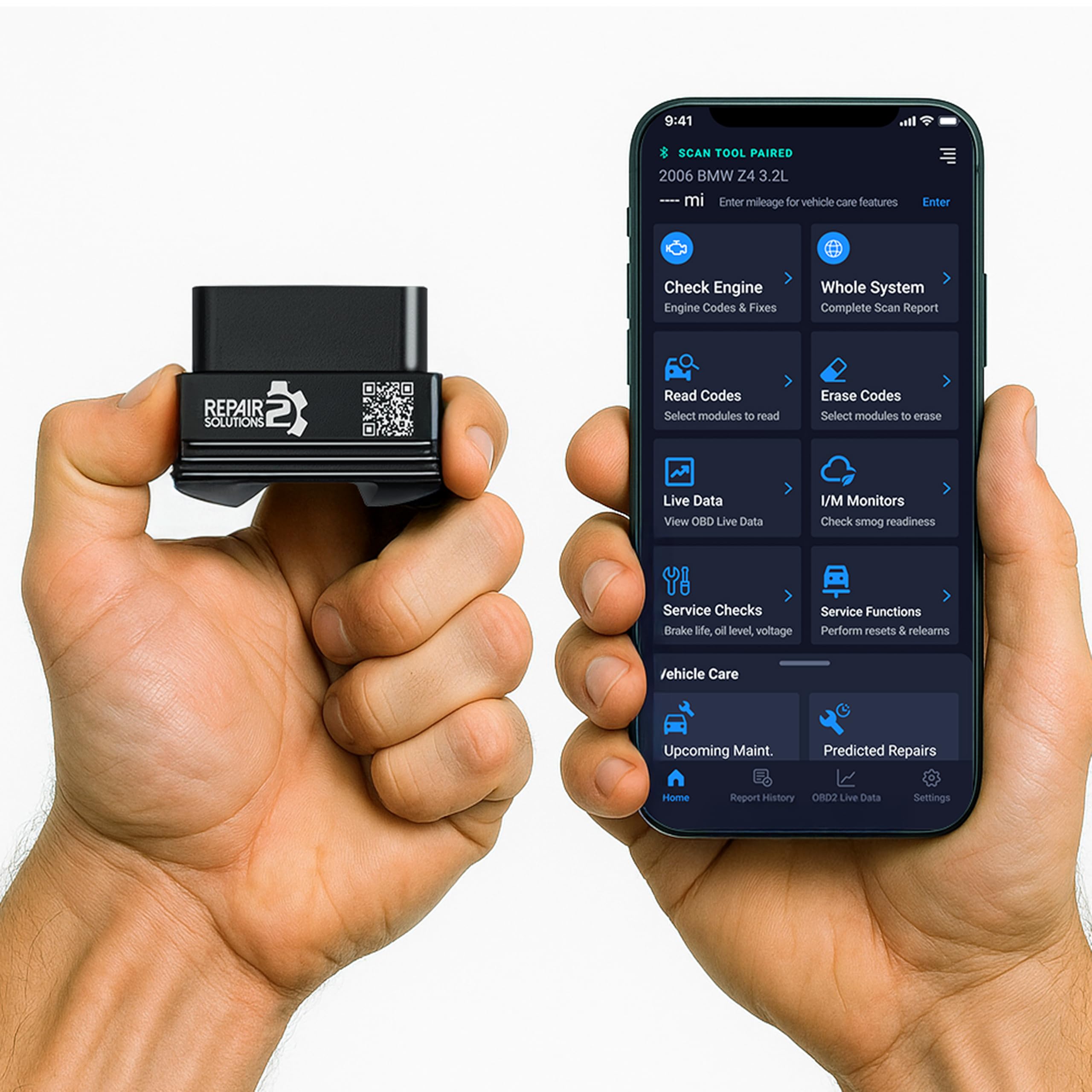
You get a Bluetooth dongle that turns your phone into a capable diagnostic tool. It supports engine, ABS, and SRS diagnostics, live data, and saved vehicle information through Innova’s app, with additional system coverage depending on the vehicle. It is handy for driveway checks, project cars, and confirming diagnostic information before approving repairs.
If you want wireless convenience with reliable basics and straightforward app feedback, this is a practical choice.
What People Say
Users commonly highlight how quickly the Innova 1000 returns results and how accessible the app makes the information. Many appreciate the ability to save vehicles and the clarity of live-data displays, which makes follow-up troubleshooting easier.
A few owners mention a short setup step, but most find the overall experience smooth and dependable.
Overall Sentiment: Positive

When Useful
|
Situation |
How It Helps |
|---|---|
|
Driveway Diagnosis |
You can pull codes and live readings quickly to decide if a problem needs immediate attention or can wait. |
|
Project Vehicles |
Saved profiles and live data lets you track recurring issues as you work through repairs. |
|
Pre-Trip Checks |
A fast scan of engine and safety systems helps you catch problems before a long drive. |
|
Verifying Repairs |
After a fix you can confirm codes are cleared and monitor live parameters to ensure the repair worked. |
Ease Of Use
|
Feature |
Ease Level |
|---|---|
|
Setup & Pairing |
Easy |
|
Reading/Clearing Codes |
Easy |
|
Live Data |
Moderate |
|
Saving Vehicle Profiles |
Easy |
Versatility
Covers core systems across most 1996-or-newer OBD-II vehicles and fits owners who need both basic checks and useful live-data for troubleshooting.
Safety
Not a direct safety device, but it helps you identify critical faults in engine, ABS or airbags so you can avoid driving with hazardous issues.
Problem Solving
Strong for identifying and clearing common DTCs and for providing live-data to narrow root causes; manufacturer-level, dealer-only functions remain outside its scope.
Speed
Connection and code retrieval are generally fast, with most results appearing within seconds of pairing and requesting a scan.
Key Benefits
- Bluetooth connectivity for phone-based diagnostics
- Detects engine, ABS and SRS fault codes
- Saves vehicle profiles for repeat use
- Quick code reads with intuitive app interface
Autel AL319

You get a straightforward handheld scanner built for quick, reliable checks. Plug it into the OBD-II port, and the unit reads and clears fault codes, shows live data and freeze-frame info, and runs one-click I/M readiness tests. It’s the sort of tool you reach for when you want immediate answers without pairing a phone or wrestling with complex menus. Use it for routine checks, pre-repair verification, or to avoid an unnecessary trip to the shop—if you want an easy, dependable reader, this fits the bill.
What People Say
Most users note how quickly the AL319 works straight out of the box and how easy the interface is to use. Reviewers often praise the clear display and the ability to read, clear and verify codes without extra apps.
Many people call out the live-data and freeze-frame features as especially useful for confirming repairs.
Overall Sentiment: Positive

When Useful
|
Situation |
How It Helps |
|---|---|
|
Quick Shop Alternative |
You can confirm a fault at home and avoid a shop visit just to get a code read. |
|
Post-Repair Check |
You can verify that a repair cleared the fault by checking live data and freeze-frame results. |
|
Pre-Drive Confirmation |
A fast scan shows I/M readiness and any active codes before a long trip. |
|
Older Vehicle Diagnostics |
Works well on many legacy OBD-II systems where you need basic but reliable fault data. |
Ease Of Use
|
Feature |
Ease Level |
|---|---|
|
Setup & Connection |
Easy |
|
Reading/Clearing Codes |
Easy |
|
Live Data |
Moderate |
|
I/M Readiness |
Easy |
Versatility
Designed for universal OBD-II coverage, it handles engine, emissions and basic live-data tasks across most post-1996 vehicles, making it useful for commuters and hobby mechanics alike.
Safety
Not a safety device, but it helps you detect serious engine or emissions faults early so you can avoid driving with dangerous or damaging conditions.
Problem Solving
Strong for identifying and clearing standard DTCs, checking readiness monitors and reviewing freeze-frame data; it helps narrow causes quickly though dealer-level programming and advanced module coding remain outside its scope.
Speed
Connection and code retrieval are typically instantaneous once plugged in, with live-data updates appearing within seconds depending on ECU response.
Key Benefits
- Plug-and-play operation with clear color display
- Reads and clears codes, shows live data and freeze-frame
- One-click I/M readiness and CAN protocol support
- Simple menus that make diagnostics accessible
Launch CRP123X
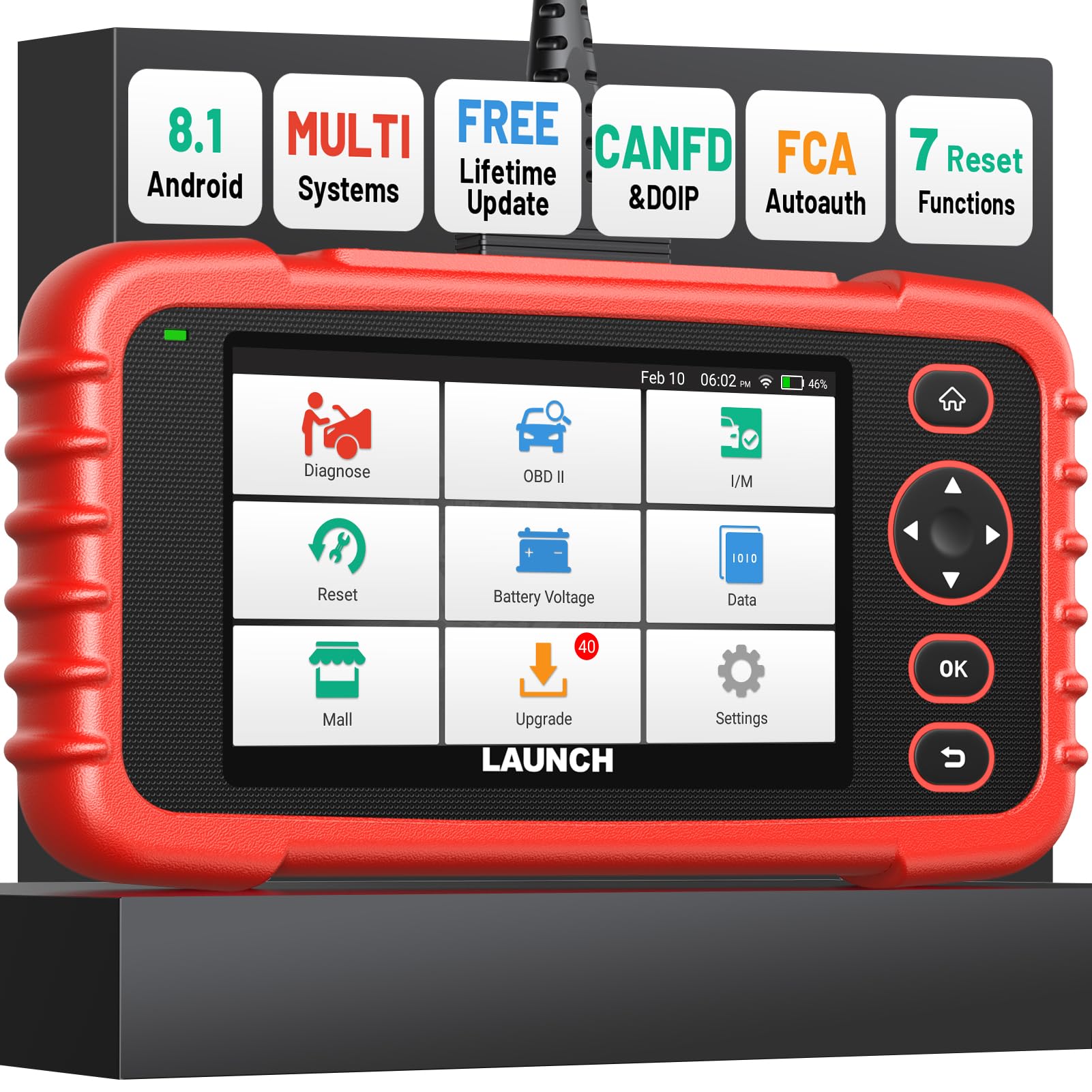
You get a compact tablet-style scanner that sits between a basic code reader and pro-level tools. Current CRP123X V3.0 Elite versions advertise four-system diagnostics, live-data graphing, AutoVIN, and seven common reset functions. Older CRP123X versions can differ, so confirm the exact hardware/version on the linked listing before buying.
Use it for routine troubleshooting, recording a failing sensor during a test drive, or resetting maintenance lights after a service. If you want more diagnostic context without a massive tool cart, this is a practical device that scales from weekend DIY jobs to more involved diagnostics.
What People Say
Reviewers often highlight the CRP123X for offering deep insight beyond basic code reading, especially praising the live-data graphs and reset functions. Many users appreciate that it records sessions you can review later, which helps diagnose intermittent faults.
A common note is that updates and some features require Wi-Fi and a bit of learning, but owners say the extra capability is worth the initial setup.
Overall Sentiment: Positive

When Useful
|
Situation |
How It Helps |
|---|---|
|
Intermittent Faults |
You can record live parameters while driving to capture a fault that doesn’t show up in a quick static scan. |
|
Maintenance Resets |
Use the reset functions to clear service lights and recalibrate systems after routine maintenance. |
|
Brake/ABS Troubleshooting |
Live data and targeted tests help you isolate ABS or wheel-speed sensor issues before part replacement. |
|
Shop Verification |
Bring recorded data to a technician to demonstrate the exact symptoms and reduce diagnostic guesswork. |
Ease Of Use
|
Feature |
Ease Level |
|---|---|
|
Initial Setup |
Moderate |
|
Running Scans |
Easy |
|
Live Data Recording |
Moderate |
|
Reading/Clearing System Codes |
Easy |
Versatility
It is built around engine, transmission, ABS, and SRS diagnostics plus standard OBD-II functions. Reset-function support depends on the exact CRP123X version and the vehicle, so verify coverage for the service task you actually need.
Safety
Not a safety device, but its ability to surface ABS and airbag codes quickly helps you identify serious faults that affect vehicle safety.
Problem Solving
Strong at narrowing root causes with recorded live data and system-specific tests; it reduces parts swapping and helps you confirm repairs, though some advanced OEM functions remain outside its scope.
Speed
Scans and live-data updates are timely; recording and some system tests can take longer depending on the vehicle ECU and the extent of data logged.
Key Benefits
- Multi-system scans with graphic live-data recording
- Up to seven listed reset functions on current V3.0 Elite versions, with vehicle-specific coverage
- Auto VIN and battery test for faster setup
- Lifetime software updates and broad vehicle support
Foxwell NT604

You get a solidly built handheld scanner that focuses on practical multi-system diagnostics without fuss. The bright 4.3-inch screen and straightforward menus make it easy to move between engine, ABS, SRS and transmission tests, and the live-data views help you confirm symptoms in real time. Use it for targeted troubleshooting after a warning light, to verify airbag or ABS repairs, or to record data before you take a car to a shop. If you want a dependable tool that gives clear system-level insight without a steep learning curve, this one is a strong option.
What People Say
Owners commonly praise the NT604 for its sturdy feel, easy-to-read screen and the ability to handle airbag and ABS faults that simpler readers miss. Many reviewers mention it’s straightforward to use across multiple vehicles and appreciate the clear live-data presentation. A recurring note is that updates can take time and occasional update hiccups have been reported, but most say the scanner delivers reliable diagnostics once set up.
Overall Sentiment: Positive

When Useful
|
Situation |
How It Helps |
|---|---|
|
Airbag Or ABS Faults |
You can read and clear SRS/ABS codes and view related live parameters to verify sensor or wiring issues before replacing parts. |
|
Post-Repair Verification |
Use freeze-frame and live-data to confirm repairs resolved the underlying fault and that no new codes appear. |
|
Intermittent Problems |
Viewing or saving live parameters can help capture intermittent faults that do not appear in a quick static scan; have a passenger handle the tool if data must be observed while the vehicle is moving. |
|
Multi-Vehicle Use |
Universal OBD-II coverage makes it suitable if you work on different makes and need a single tool for several cars. |
Ease Of Use
|
Feature |
Ease Level |
|---|---|
|
Initial Setup & Updates |
Moderate |
|
Menu Navigation |
Easy |
|
Live Data Views |
Moderate |
|
Reading/Clearing System Codes |
Easy |
Versatility
It focuses on four-system diagnostics—engine, transmission, ABS, and SRS—along with standard OBD-II functions. That makes it a strong fit for owners who need those systems without paying for a full all-system or bidirectional platform.
Safety
Not a safety device, but it surfaces airbag and ABS faults quickly so you can address issues that directly affect occupant safety.
Problem Solving
Strong at reading and clearing faults in its supported systems and using live data to narrow causes. It is not positioned as a bidirectional coding tool, so advanced service resets, programming, and OEM coding may require a different scanner.
Speed
Scans and live-data updates are generally responsive, though software updates and large data downloads can extend wait times.
Key Benefits
- Wide multi-system coverage including ABS, SRS and transmission
- Clear, bright 4.3-inch display for easy navigation
- Live-data and freeze-frame support to confirm symptoms
- Solid build quality with useful included cables and case
Before You Buy: OBD-II Scanner Checklist
- Confirm your vehicle: Check year, make, model, engine, and region. Basic OBD-II coverage does not guarantee access to ABS, SRS, transmission, TPMS, or body modules.
- Match the tool to the job: A code reader is enough for check-engine diagnostics; service resets, all-system scans, and bidirectional tests require a more capable scanner.
- Check recurring costs: Some scanners include free updates or app features, while others place advanced guidance behind a subscription.
- Choose your interface: Bluetooth dongles save space and use your phone; handheld and tablet scanners are better if you want a dedicated screen and fewer pairing steps.
- Verify special functions: Oil reset, ABS bleeding, BMS registration, DPF regeneration, SAS calibration, and active tests are often vehicle-specific.
Safety note: Reading or clearing a code does not repair the underlying fault. Do not clear ABS, airbag, engine, or transmission warnings just to make a light disappear. Diagnose the cause first, and avoid interacting with a scan tool while driving unless a second person safely handles the device.
FAQ
Which OBD-II Scanner Should I Buy?
Start by matching the tool to how you use it: for simple code reads and clearing you’ll be fine with a basic handheld or dongle, while more involved troubleshooting benefits from a scanner with bidirectional tests, live-data logging, and multi-system coverage. Prioritize compatibility with your vehicle and the platforms you intend to use, check for regular software updates and a reliable warranty, and choose Bluetooth if you want phone convenience or a standalone unit if you prefer a dedicated device.
Will A Bluetooth Dongle Work With My Phone?
Bluetooth dongles generally work with Android and iOS, but you should confirm the specific app supports your phone and vehicle before relying on it. Some apps offer free basic reads while advanced features require a subscription, and iOS pairing can differ from Android, so check the app’s compatibility notes for connection requirements and available features.
How Do I Use A Scanner To Diagnose Problems?
Plug the scanner into the OBD port, run a scan to capture stored and pending codes, then use the code descriptions plus appropriate repair information to narrow likely causes. Move on to live-data and freeze-frame readings to confirm symptoms, reproduce the fault if safe, and record results before clearing codes so you can verify a fix or share data with a technician.
Use battery and readiness tests where available, and only clear warnings after you understand their cause to avoid masking real safety issues.
Can An OBD-II Scanner Read ABS, Airbag, Or Transmission Codes?
Only if the scanner specifically supports those modules for your vehicle. Standard OBD-II functions mainly cover powertrain and emissions data. Enhanced ABS, SRS, transmission, body-module, reset, and bidirectional functions vary by tool and vehicle, so check the manufacturer’s coverage information before buying.
Will One Scanner Work On Every 1996-And-Newer Vehicle?
No. Many U.S.-market vehicles from 1996 onward support standard OBD-II engine and emissions functions, but enhanced diagnostics are not universal. Coverage can change by make, model, year, engine, trim, region, and software version.
Customer Preferences
If you want the easiest phone-based experience, start with a Bluetooth option such as the ANCEL BD310, Innova 1000, FIXD, or GEARWRENCH GWSCAN. If you prefer a dedicated handheld with no phone pairing, the Autel AL319 and MOTOPOWER MP69033 are simpler choices. For deeper multi-system work, the Foxwell NT604 and Launch CRP123X move beyond basic engine codes, while the Innova 5610 is the strongest fit here when bidirectional tests and special functions are priorities on a supported vehicle.

Wrapping Up
Choose your scanner by diagnostic depth, not by the longest feature list. The Innova 5610 is the best fit in this group for advanced DIYers who specifically need bidirectional controls, richer system data, and special functions on supported vehicles.
The Launch CRP123X is a strong middle-ground choice when you want multi-system diagnostics and maintenance resets, but confirm the exact CRP123X version because capabilities can differ. The Foxwell NT604 is easier to recommend when your priority is engine, transmission, ABS, and SRS diagnostics rather than advanced coding or bidirectional work.
For straightforward engine-code work, the Autel AL319 and MOTOPOWER MP69033 keep the process simple. If you prefer phone-based diagnostics, compare the Innova 1000, ANCEL BD310, FIXD, and GEARWRENCH GWSCAN based on app experience, supported modules, subscription policy, and coverage for your vehicle.
Whichever model you choose, verify your exact vehicle and required function before purchase. That single step is the best way to avoid paying for features your car cannot use—or buying a basic reader that cannot reach the system you need to diagnose.
| Product | Image | Format | Core Coverage | Best For | Amazon |
|---|---|---|---|---|---|
| Innova 5610 |
|
Handheld | Multi-system + bidirectional on supported vehicles | Advanced DIY diagnostics | Check Price on Amazon |
| Launch CRP123X |
|
Tablet-style handheld | Engine / Transmission / ABS / SRS + version-dependent resets | Maintenance and live-data work | Check Price on Amazon |
| Foxwell NT604 |
|
Handheld | Engine / Transmission / ABS / SRS | Four-system diagnostics | Check Price on Amazon |
| Autel AL319 |
|
Handheld | Standard OBD-II + live PCM data | Basic code reading and emissions readiness | Check Price on Amazon |
| Innova 1000 |
|
Bluetooth dongle | Engine / ABS / SRS + additional supported systems | No-subscription phone diagnostics | Check Price on Amazon |
| ANCEL BD310 |
|
Bluetooth dongle | Standard OBD-II + live data and battery-related checks | Compact app-based monitoring | Check Price on Amazon |
| MOTOPOWER MP69033 |
|
Handheld | Standard OBD-II engine/emissions functions | Entry-level standalone use | Check Price on Amazon |
| FIXD |
|
Bluetooth dongle | Standard OBD-II with app guidance | Plain-language check-engine help | Check Price on Amazon |
| GEARWRENCH GWSCAN |
|
Bluetooth dongle | OBD-II + ABS + manufacturer codes on supported vehicles | Broad-brand wireless diagnostics | Check Price on Amazon |
Affiliate disclosure: This roundup is reader-supported. When you click qualifying affiliate links and make a purchase, we may earn a referral commission at no extra cost to you.
