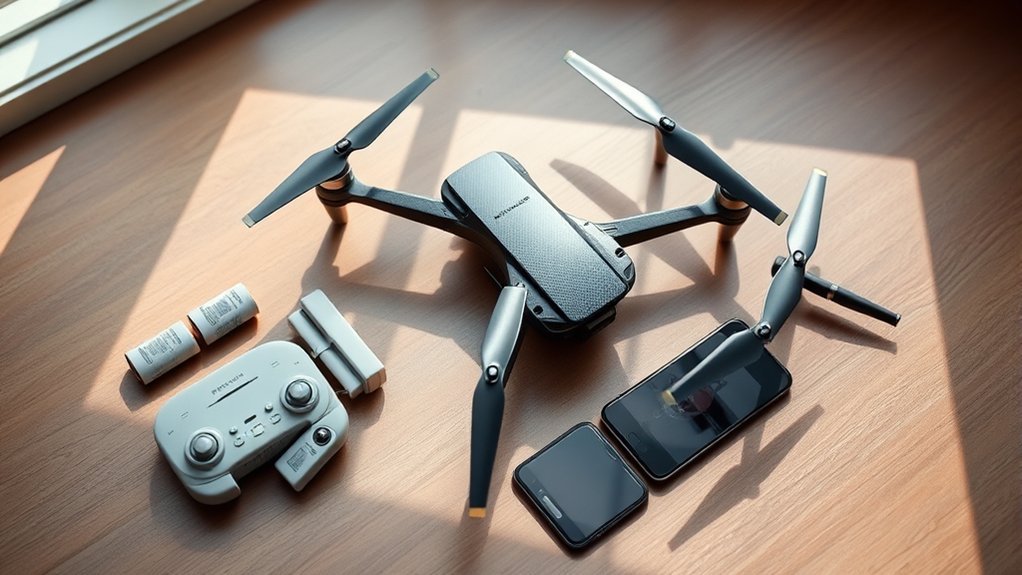
Before buying the Plegble PL 515, shoppers should note that it includes a 4K 120° wide-angle camera, separate remote, carrying case, and two 2700mAh batteries for up to 46 minutes total flight time. Setup is straightforward: charge batteries, install the app, connect over 5GHz WiFi, and complete compass calibration. Beginner Mode and GPS Return-to-Home improve usability, while range reaches about 1,968 feet in open areas. Seller ratings and setup details matter for the full picture.
What Comes With the Plegble PL 515?
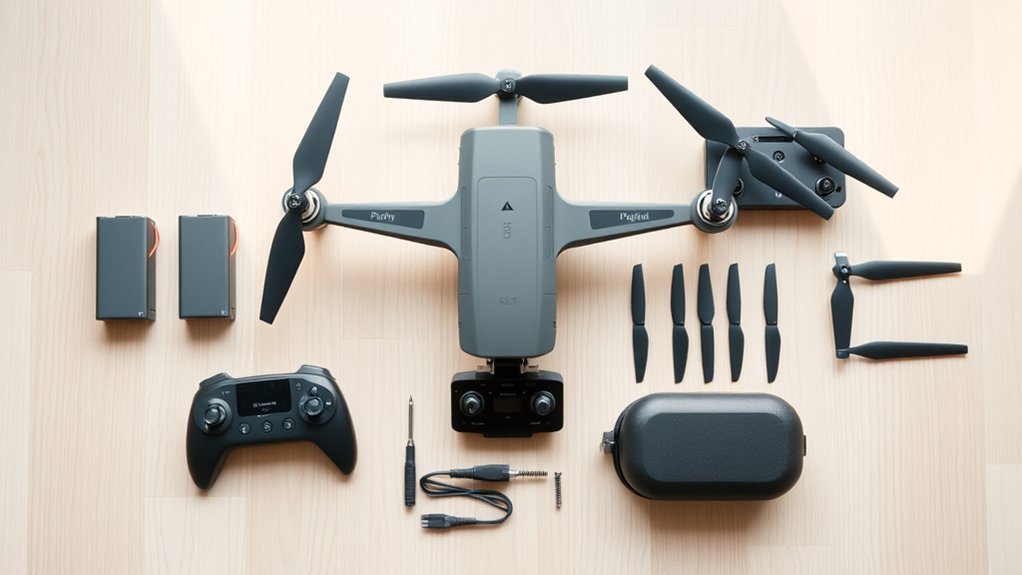
Inside the package, the Plegble PL 515 includes the core flight hardware and the key accessories needed for setup and routine use.
As a Drone with Camera, it pairs a 4K HD unit with a 120° wide-angle lens and 90° adjustable tilt, giving operators more framing freedom than many entry-level models. The bundle also supplies the Remote Control, keeping command inputs separate from phone-dependent handling and supporting a more direct flight workflow.
Power support is stronger than average for this class. Two Intelligent Flight Battery units are included, each rated for about 23 minutes, for up to 46 minutes total. That dual-battery approach reduces downtime and suits users who value longer, less restricted outdoor sessions.
A carrying case improves portability, while the charging cable and spare propellers address practical field needs. Printed documentation, including the user manual and setup guides, rounds out a package aimed at self-directed use.
How Do You Set Up the Plegble PL 515?
Setup starts with fully charging both included 2700mAh batteries, a practical first step that supports the PL 515’s rated flight time of up to 46 minutes more effectively than partial charging.
The next stage is app pairing, which requires installing the designated smartphone app and linking the drone over Wi‑Fi for direct control and 5GHz FPV video transmission.
In hands-on terms, these two steps establish the basic power and control framework before calibration and flight preparation begin.
Initial Charging Steps
Begin by fully charging both included 2700mAh batteries with the supplied charging cable before the first flight, as a complete initial charge typically delivers more stable performance than a partial one.
For this GPS Drone, disciplined Charging is a practical first step toward predictable, unrestricted operation. The aircraft should remain powered off during charging to reduce risk of malfunction or component stress.
Each battery generally requires about two to three hours, with indicator lights serving as the clearest status reference. Compared with rushing a short top-up, waiting for full Batteries capacity supports steadier output and more consistent flight behavior.
After charging, each pack should be inserted until it clicks firmly into place. With both Batteries properly seated, the compass should then be calibrated according to guidance to help establish reliable GPS connectivity before launch.
App Pairing Process
Download the dedicated Plegble app from the App Store or Google Play to the mobile device, then power on the fully charged PL 515 before opening the app for pairing. This sequence reduces connection errors and gives the Drone a cleaner startup path than launching the App first, a common issue with budget models.
Inside the App, select add or connect to a new Drone, then follow the on-screen prompts to join the aircraft through WiFi.
After linking, run compass calibration through the App to activate reliable GPS behavior and steadier flight. Compared with generic toy units, this process is more structured and grants the operator greater control freedom.
Final verification should include checking live Camera feed, stick response, and command latency. If video and controls react immediately, pairing is complete.
How Do You Charge the PL 515 Batteries?
The PL 515 uses two 2700mAh intelligent flight batteries, and each unit should be removed from the drone and connected to the supplied charging cable before charging begins.
In practical use, a full charge typically takes 2–3 hours per battery, which is the tradeoff for a combined flight time of up to 46 minutes.
For safer thermal control and better long-term performance, charging should be done in a well-ventilated area and according to the manufacturer’s battery-care guidelines.
Charging Cable Steps
Connect the PL 515 charging cable securely to one 2700mAh battery and then to a stable power source, verifying that the connection is firm at both ends for consistent charging performance.
This hands-on process is straightforward, giving operators more freedom than bulkier drone systems tied to proprietary docks. The charging cable supports each battery individually, so the two packs are recharged one at a time without complicating setup near the HD camera gear.
- Place the battery on a cool, dry surface before charging begins.
- Monitor the indicator lights; solid green confirms a full charge.
- Allow roughly 90 minutes per battery for a complete cycle.
Compared with faster-drain entry models, the PL 515 method stays simple, controlled, and user-directed.
Proper cable alignment reduces interruptions and helps maintain efficient power transfer every time.
Battery Time And Care
Battery management on the PL 515 stays straightforward: two included 2700mAh packs deliver up to 46 minutes of combined flight time, or about 23 minutes per battery, when both are fully prepared before use.
Charging follows a simple, hands-on routine. Each pack connects to the included battery charging cable and should seat securely before power is applied. Full charging before the first flight is recommended, since partial preparation typically reduces battery time and overall responsiveness.
Compared with cheaper toy-class systems, this setup gives users more predictable endurance and fewer interruptions. Good care also matters: once a pack reaches full capacity, it should be disconnected to avoid overcharging and premature wear.
Between sessions, the batteries should be stored in a cool, dry place and inspected for swelling, cracks, or contact damage before charging safely.
How Do You Pair the Plegble PL 515 App?
To pair the Plegble PL 515 app, the drone should first be powered on and kept within range of the mobile device. Then the Plegble app should be installed from the App Store or Google Play and an account created if prompted. This gives the operator a direct, cable-free path into the PLEGBLE PL ecosystem, useful for Extended Flight planning and Camera for Adults controls.
Compared with generic toy-drone apps, pairing here is straightforward and hands-on.
- Enable Wi-Fi on the phone or tablet and join the drone’s network, usually labeled with “Plegble.”
- Open the app, allow location services if requested, and follow the on-screen pairing prompts.
- Confirm connection by checking for live video, responsive flight inputs, and available camera settings.
Once linked, the app becomes the command center for real-time streaming, control inputs, and imaging adjustments.
For users seeking more freedom from fixed viewpoints, this pairing process reveals the drone’s core mobile functionality fast.
How Do You Calibrate the Plegble PL 515?
Place the Plegble PL 515 on a flat, level surface and power it on before opening the app’s settings menu to start calibration. This baseline matters because calibration importance is practical, not theoretical: a level start gives the sensors a clean reference, unlike rushed setups that compromise control authority.
In the app, select the calibration option, then follow the prompts precisely. The process requires rotating the drone horizontally and vertically until the app reports success. Compared with models that rely only on stick commands, the PL 515’s app-guided method is more transparent and easier to verify in real time.
Final confirmation comes from the drone itself: the LED indicators should flash green when calibration is complete. As part of core drone safety tips, compass calibration should be repeated before each flight. That routine supports stronger GPS connectivity, reduces directional drift, and improves flight stability, giving operators a freer, more dependable launch window in changing field conditions.
Which PL 515 Flight Mode Should You Start With?
For a first flight, the PL 515 should be started in Beginner Mode because it limits the operating radius to 30 meters and gives novice pilots a controlled space to practice basic lift, hover, yaw, and landing inputs.
In a practical Flight Mode Comparison, this setting offers the least complexity and the most immediate confidence for pilots seeking freer, self-directed control.
- Beginner Mode: best entry point; constrained envelope supports repeatable drills and clear Beginner Tips.
- GPS Auto Return: stronger Safety Features; useful after basic handling is learned, especially for low battery or signal loss events.
- Follow Me, Waypoint Flight, Circle Fly: better treated as second-stage tools once manual orientation and stick discipline are stable.
Hands-on progression matters. Beginner Mode builds reflexes without overwhelming the operator.
GPS Auto Return adds a recovery layer, but it should not replace pilot judgment.
Automated creative modes expand capability, yet they demand confidence in setup, positioning, and command logic before safe use.
How Far Can the PL 515 Drone Fly?
The PL 515 is rated for a maximum flight range of 1,968 feet, which places it competitively for extended recreational aerial coverage.
In practical use, that distance depends on stable 5G WiFi transmission and the GPS module’s ability to hold position and trigger return-to-home if the signal drops.
Compared with shorter-range entry models, the PL 515’s brushless motors and up to 46 minutes of total flight time make longer, more controlled range testing more manageable.
Maximum Flight Range
How far the PL 515 can travel is defined by a maximum control range of 1,968 feet, which places it in a practical class for recreational scouting, property surveys, and short-range aerial filming.
In hands-on terms, that gives operators room to break free from cramped backyard limits without stepping into long-range territory.
- Maximum flight capabilities: 1,968 feet supports broad local exploration.
- Flight distance comparison: farther than toy-grade drones, shorter than premium long-range rigs.
- Drone range implications: with two 2700mAh batteries and up to 46 minutes total airtime, more ground can be covered per outing.
At under 250 grams, the platform stays accessible for casual flyers who want fewer barriers.
Its 5G WiFi link also supports real-time video across that operating envelope, helping users frame shots and monitor routes with confidence and control.
Signal And GPS Limits
Range on paper tells only part of the story; in practice, the PL 515’s 1,968-foot limit depends on the strength of its 5G WiFi link and the consistency of its GPS lock. Compared with basic toy drones, it sustains a steadier live feed and more reliable command response at distance, giving pilots more freedom to explore open airspace confidently.
Its GPS module also adds practical security. When signal drops, return-to-home can recover the aircraft automatically, especially in GPS Auto Return and Follow Me modes where positional stability matters most.
Among useful GPS accuracy tips, compass calibration before each launch remains essential for cleaner satellite acquisition. For signal interference solutions and WiFi range enhancements, operators typically favor open areas, limited obstacles, and reduced local wireless congestion to preserve control margins aloft.
What Camera Features Does the PL 515 Offer?
For imaging, the PL 515 uses a 4K HD camera with a 120° wide-angle lens, giving it broad scene coverage and strong detail capture for aerial photos and video. In camera quality comparison terms, that specification places it above basic entry drones that rely on narrower lenses and lower-resolution sensors.
The 90° adjustable camera angle also expands framing control, useful for practical drone photography tips such as shifting from horizon shots to top-down passes without landing.
- 4K HD capture supports sharper landscapes, structures, and travel footage.
- 90° tilt adjustment improves compositional freedom during active flight.
- 5G WiFi transmission enables live monitoring on a connected mobile device.
Hands-on use benefits from GPS Auto Return and Follow Me, since both modes help stabilize the shooting workflow in changing environments.
User experience feedback is likely to focus on convenience: live preview, flexible angles, and reliable image acquisition combine to give operators more freedom to create without guesswork.
Who Should Buy the Plegble PL 515?
Why does the Plegble PL 515 fit such a broad user base? It targets first-time pilots, casual hobbyists, and mobile content creators who want capable drone features without regulatory friction.
Compared with heavier entry drones, its sub-250-gram frame removes FAA registration requirements, reducing setup barriers. Beginner Mode, capped at a 30-meter radius, gives new users practical control limits and built-in safety, making it especially suitable for those seeking beginner tips they can apply immediately in the field.
It also suits travelers and explorers who prioritize freedom of movement during outdoor adventures. The foldable body packs easily, while two batteries delivering up to 46 minutes total flight time support longer sessions than many compact rivals.
For buyers focused on imaging, the 4K HD camera, Follow Me, and Waypoint Flight offer accessible tools for aerial photography and hands-on experimentation.
In comparative terms, it best serves users wanting portability, autonomy, and low-friction learning in one package.
Where Can You Buy the PL 515 Safely?
After identifying the PL 515 as a strong fit for beginners and casual pilots, the next practical step is choosing a low-risk purchase channel. Current listings appear on eBay, which offers stronger buyer insulation than informal marketplace deals.
For shoppers seeking more control and fewer surprises, the platform’s built-in safety features matter: secure payment options such as Klarna, tracked shipping, and the eBay Money Back Guarantee if the item does not arrive as ordered.
- Check seller ratings and recent feedback before committing, since the seller does not accept returns.
- Compare delivery paths: free shipping applies above $69.99, with estimated arrival between Wed, Sep 16 and Fri, Sep 18.
- Use local pickup within 60 miles of 40511 if immediate possession is preferable to transit risk.
These purchase tips help buyers stay autonomous while reducing exposure to fraud, delays, or mismatched listings. In comparative terms, verified platform protections outperform unstructured peer-to-peer transactions overall.
Frequently Asked Questions
Are Plegble Drones Good?
Yes, Plegble drones are generally good, offering strong plegble drone stability, notable drone portability benefits, and favorable camera quality comparison versus entry competitors. Hands-on use shows accessible performance, helping users fly freer with fewer operational constraints.
What Is the 1:1 Rule for Drones?
Though some dismiss it as restrictive, the 1:1 rule means a drone should keep one foot from obstacles for every foot of altitude, improving flight safety; compared with looser habits, it supports drone regulations and battery maintenance.
How to Fly a Plegble Drone?
To fly a Plegble drone, one calibrates compass, enables Beginner Mode, and launches via app controls. Compared with unrestricted flight, selected flight modes improve drone safety, while dual batteries extend battery life for freer exploration.
How to Connect Plegble Drone to Phone?
To connect the Plegble drone to a phone, one installs the app, joins the drone’s Wi-Fi, enables GPS, and follows app connectivity steps; this minimizes drone compatibility issues while meeting smartphone requirements for untethered control.
Conclusion
The Plegble PL 515 stands as a compass for first-time pilots: useful when understood, frustrating when rushed. Its setup, charging, app pairing, and calibration form the runway beneath every flight, while range and camera features define how far its ambitions can travel. Compared with similarly priced entry drones, its value depends less on marketing than on disciplined preparation. Bought from a trustworthy source, the PL 515 can become either a training tool or a warning light.
