Disclosure: As an Amazon Associate, we earn from qualifying purchases. If you click a link on this page and make a purchase, we may receive a small commission at no extra cost to you.
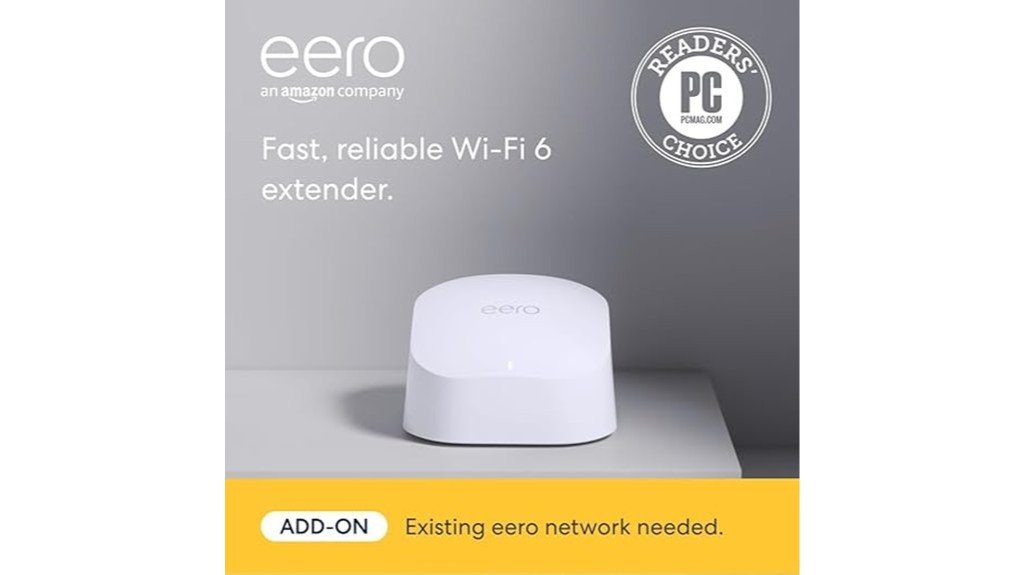
Dead zones, a weak signal upstairs, and choppy video calls in the back bedroom are usually coverage problems, not internet-plan problems. The eero 6 extender (Amazon eero 6 mesh Wi-Fi extender) is built to fix exactly that for homes that already run an eero network. It adds up to 1,500 sq. ft. of Wi-Fi 6 coverage, supports internet plans up to 500 Mbps, and sets up in minutes through the eero app, with no cables to run.
There is one catch you need to know up front: it is not a standalone router, it only works with eero routers, and it has no Ethernet ports. Below, we break down the specs, real-world use cases, placement tips, and who should (and shouldn’t) buy it.
Quick Verdict
Our Rating: 8/10 — Recommended with caveats
Best For: Existing eero users who need stronger Wi-Fi 6 coverage in bedrooms, home offices, hallways, or other weak-signal areas.
Not For: Anyone with a non-eero router, anyone who needs Ethernet ports, or buyers on gigabit plans who want full wireless speed.
Bottom Line: A simple, compact way to expand an eero mesh system by up to 1,500 sq. ft. Its biggest tradeoff is that it locks you into the eero ecosystem and offers no wired connections.
Overview
The eero 6 extender is an add-on mesh point for an existing eero system. Plug it in between your main eero router and the area with weak signal, and it extends the same network (same name, same password) further into your home. That makes it a good fit for upstairs bedrooms, basements, garages, and far corners where the main router can’t reach reliably.
With dual-band Wi-Fi 6 and an AX1800 rating, it is designed for internet plans up to 500 Mbps. The compact 3.9 x 3.8 x 2.4 inch body sits easily on a shelf, desk, or side table. Setup requires the eero app on an iOS or Android device, and security support includes WPA3, WPA2, VPN passthrough, and automatic updates.
Before You Buy: This is an extender, not a standalone router. It works only with an existing eero router or eero mesh network. If you use a router from another brand, this device will not work for you.
Key Specifications
| Specification | Detail |
|---|---|
| Brand | Amazon eero |
| Model | eero 6 Extender |
| Product type | Mesh Wi-Fi extender |
| Wi-Fi standard | Wi-Fi 6 (802.11ax) |
| Speed rating | AX1800 |
| Recommended internet speed | Up to 500 Mbps |
| Coverage | Adds up to 1,500 sq. ft. |
| Wireless bands | Dual-band |
| Ethernet ports | None (wireless backhaul only) |
| Dimensions | 3.9 x 3.8 x 2.4 inches |
| Processor | 1.2 GHz quad-core |
| Memory | 512 MB RAM, 4 GB flash |
| Security | WPA3, WPA2 support, VPN passthrough, automatic updates |
| Compatibility | Requires an existing eero network |
| Setup requirement | iOS or Android device with the eero app |
| Warranty and updates | 1-year limited warranty; security updates for at least 5 years after last new-unit availability |
What Is the Amazon eero 6 Mesh Wi-Fi Extender?
Think of the eero 6 extender as an extra “node” for your eero mesh network. It doesn’t replace your modem or main router. Instead, it connects wirelessly to your existing eero system and rebroadcasts that signal into areas the main unit can’t reach well.
Unlike many basic plug-in extenders, it doesn’t create a second network name. Your devices stay on one network and move between eero units automatically as you walk around the house, which is the main reason people choose mesh over traditional extenders.
The limitation is the ecosystem lock-in. If you want an extender that works with any brand of router, look elsewhere. If you already own eero, it is one of the easiest ways to add coverage without replacing anything.
Detailed Features
The extender focuses on three things: coverage, ease of use, and keeping the network stable. Here is how its core features translate into everyday benefits.
| Feature | Specification | What It Means for You |
|---|---|---|
| Coverage | Up to 1,500 sq. ft. | Reaches rooms your main router can’t cover well |
| Speed rating | AX1800, plans up to 500 Mbps | Enough for streaming, video calls, and most households |
| Processor | 1.2 GHz quad-core, 512 MB RAM | Handles many connected devices at once |
| TrueMesh | eero’s mesh routing software | Routes traffic around congestion to reduce drop-offs |
| Security | WPA3, WPA2, VPN passthrough | Modern encryption and work-VPN compatibility |
This device is about simple expansion, not advanced router controls. It suits people who want better reach and phone-based management, not users who want to fine-tune every network setting.
Who Should Buy It?
Best For
- Homes that already use an eero router or eero mesh network.
- Rooms with weak signal, such as upstairs bedrooms, home offices, basements, or far corners.
- Internet plans up to 500 Mbps.
- Buyers who prefer app-based setup over manual router configuration.
Skip If
- You need a standalone router.
- You use a non-eero router and want a universal Wi-Fi extender.
- You need Ethernet ports for wired backhaul, a TV, a console, or a desktop PC.
- You pay for a gigabit plan and want to use most of that speed over Wi-Fi.
Design and Build Quality
At 3.9 x 3.8 x 2.4 inches, the eero 6 extender is small enough to sit on a bookshelf or side table without looking like networking gear. There are no external antennas, so it blends into most rooms better than a traditional router.
That minimal design comes with a tradeoff: no Ethernet ports. The extender connects to your network wirelessly only. If your setup depends on wired connections, you’ll need a different eero model that includes ports.
Coverage and Performance
Coverage is the main reason to buy this device. It can add up to 1,500 sq. ft. of Wi-Fi 6 coverage to an existing eero network, which is often enough to eliminate dead spots in a medium-size home or fill a weak floor in a larger one.
Real-world results depend on wall materials, floor layout, interference from neighboring networks, and, most of all, how far the extender sits from your main eero. Because it relies on a wireless link back to the router, speeds in the extended area will usually be lower than right next to the main unit.
The AX1800 rating and 500 Mbps recommendation make it practical for browsing, HD and 4K streaming, video calls, smart home devices, and casual gaming. If you have a gigabit plan or want the fastest possible speeds in far rooms, compare higher-end eero models before buying.
How to Set It Up
Setup is handled entirely in the eero app and typically takes just a few minutes:
- Make sure your main eero router is already set up and online.
- Plug the extender into a power outlet roughly halfway between your main eero and the weak-signal area.
- Open the eero app and choose the option to add a new eero device to your network.
- Follow the on-screen prompts. The app will detect the extender and add it to your existing network.
- Check the app’s connection status. If it reports a weak connection, move the extender closer to the main eero and try again.
Connectivity and App Control
The eero app replaces the traditional browser-based router dashboard. From your phone, you can see connected devices, check network status, pause internet access for specific devices, and manage your mesh system from anywhere.
The tradeoff is control. eero’s cloud-connected, simplified approach can feel limiting to advanced users who want detailed local settings, custom DNS configurations, or granular DHCP options. For most households, though, the simplicity is the point.
Security and Updates
The eero 6 extender supports WPA3 and WPA2 encryption, and VPN passthrough is listed among its network features, which matters if you connect to a work VPN from home. Firmware updates are installed automatically, so basic security maintenance happens in the background.
Some extra features, such as enhanced security filtering and advanced parental controls, require an optional eero Plus subscription. The extender works fully as a coverage booster without it.
Pro Tip: Place the extender between your main eero router and the weak-signal area, not inside the dead zone itself. It needs a solid signal from the main network before it can extend coverage well.
Placement Tips for Better Results
Placement makes a bigger difference than most buyers expect. Follow these guidelines for the best results:
- Go halfway, not all the way. Put the extender where it still gets a strong signal from the main eero, roughly midway to the problem area.
- Keep it in the open. Hallways and open shelves work better than closed cabinets or behind a TV.
- Avoid signal blockers. Keep it away from thick walls, metal appliances, large mirrors, fish tanks, and clusters of electronics.
- Think vertically. For a weak upstairs, placing the extender near the top of the stairs often works better than a far corner downstairs.
- Test and adjust. Use the eero app’s connection status after placing it, and move it if the link is weak.
How It Performs in Real Use
For Home Offices
If your desk is far from the main router, the extender can steady everyday work like email, cloud documents, and video meetings. It helps most when your problem is weak coverage rather than a slow internet plan.
For Streaming and Smart TVs
In a streaming room with weak Wi-Fi, the added coverage can reduce buffering and quality drops. Since there are no Ethernet ports, your TV or streaming stick will need to connect over Wi-Fi.
For Smart Home Devices
Cameras, smart plugs, bulbs, and speakers often sit at the edges of a home where Wi-Fi is weakest. An extender nearby can give them a steadier connection, especially in garages, hallways, and outdoor-facing rooms.
For Multi-Room Family Use
In busy homes with phones, laptops, tablets, and TVs spread across rooms, the extender helps more areas access a reliable signal. It won’t make your internet plan faster, but it helps more of the house get the speed you already pay for.
Pros and Cons
The eero 6 extender does its core job well, but its limitations are significant depending on your setup. Here is the balanced view:
Pros
- Adds up to 1,500 sq. ft. of Wi-Fi 6 coverage to an existing eero network.
- Keeps one seamless network name across the whole home.
- AX1800 rating suits most internet plans up to 500 Mbps.
- Compact design is easy to place and blends into most rooms.
- App-based setup is simple for non-technical users.
- WPA3, VPN passthrough, and automatic updates included.
Cons
- Works only with eero routers.
- No Ethernet ports for wired backhaul or wired devices.
- Not ideal for gigabit plans.
- Some advanced security and parental controls require an eero Plus subscription.
- Cloud-based management may not suit users who want full local control.
Is It Worth the Price?
For existing eero owners, yes, in most cases. It’s usually a cheaper and simpler fix than replacing your whole system, and it integrates seamlessly with the network you already have. You get Wi-Fi 6 support, up to 1,500 sq. ft. of added coverage, and setup that takes minutes.
It’s poor value if you don’t already own eero, since you’d need to buy an eero router first. It’s also the wrong buy if you need Ethernet ports, advanced controls, or an extender that works with any router brand.
How It Compares to Alternatives
vs. basic plug-in Wi-Fi extenders: Traditional extenders work with more router brands, but they often create a separate network name, require manual switching, and cut speeds more noticeably. The eero 6 extender gives eero users a smoother, single-network experience.
vs. full eero routers and higher-end eero systems: Those models include Ethernet ports and can serve as your main router, and higher tiers are built for faster plans. If you need wired connections, gigabit-class speeds, or a full router replacement, compare those options instead of buying this extender alone.
Concluding Thoughts
For anyone already inside the eero ecosystem, the eero 6 extender is an easy, low-effort way to fix weak Wi-Fi in specific parts of the home, especially when placed correctly. Here is a quick summary:
| Area | Strength | Consideration |
|---|---|---|
| Coverage | Adds up to 1,500 sq. ft. | Requires an existing eero network |
| Performance | Suits plans up to 500 Mbps | Wireless-only link; not built for gigabit |
| Ease of use | Quick setup via eero app | Limited advanced/local settings |
| Security | WPA3, automatic updates | Some extras need eero Plus; cloud-managed |
| Warranty & support | Security updates for at least 5 years | Only a 1-year limited warranty |
Ultimately, for existing eero users, its strengths outweigh its limitations. The real decision isn’t whether it can improve coverage, but whether you’re comfortable staying inside the eero ecosystem.
Frequently Asked Questions
Is the eero 6 extender compatible with non-eero routers?
No. The eero 6 extender works only with an existing eero router or eero mesh network. If you use a router from another brand, choose a universal extender or switch to an eero system first.
Can the eero 6 extender be used as a standalone router?
No. It is designed only to extend an existing eero mesh network. To use eero as your main router, you need an eero router model.
How much coverage does the eero 6 extender add?
It can add up to 1,500 square feet of Wi-Fi 6 coverage to an existing eero network. Actual coverage varies based on walls, distance, floor layout, interference, and placement.
Does the eero 6 extender have Ethernet ports?
No. It is built for wireless mesh expansion only. If you need wired backhaul or want to plug in a desktop, TV, or game console, compare eero models with Ethernet ports.
Where should I place the eero 6 extender?
Place it roughly halfway between your main eero router and the area with weak signal, in an open spot away from thick walls and metal objects. Don’t put it inside the dead zone itself, because it needs a strong signal from the main eero to extend.
How does the eero 6 extender handle network congestion?
It uses eero’s TrueMesh technology to route traffic across the mesh network and reduce drop-offs. Overall performance still depends on your internet plan, home layout, and how many devices are active.
Are there subscription fees for advanced features?
Basic Wi-Fi extension does not require a subscription. Some advanced features, such as enhanced security and parental controls, require an optional eero Plus subscription.
How does the eero 6 extender manage firmware updates?
eero installs firmware updates automatically, so your network stays current without manual update steps. Amazon states security updates are provided for at least 5 years after the device is last available as a new unit.
Who should skip the eero 6 extender?
Skip it if you use a non-eero router, need a standalone router, want Ethernet ports, or prefer advanced manual network controls over app-based cloud management.
The Bottom Line
The Amazon eero 6 mesh Wi-Fi extender is a smart buy for existing eero users who want to push Wi-Fi 6 coverage into weak areas without replacing their whole network. Its main strength is simple, seamless mesh expansion of up to 1,500 sq. ft. Its main limitation is that it only works inside the eero ecosystem. Skip it if you need a universal extender, a standalone router, Ethernet ports, or advanced local controls.
Ready to Fix Your Dead Zones?
Check the latest price and availability before you decide.
