Disclosure: As an Amazon Associate, we earn from qualifying purchases. If you click a link on this page and make a purchase, we may receive a small commission at no extra cost to you.
Slow WiFi, weak room-to-room coverage, and dead zones can make a busy home frustrating. The TP-Link Deco S4 Mesh WiFi System is built to replace a traditional router-and-extender setup with one unified mesh network. This review helps you decide if its AC1900 speeds, three-unit coverage, app setup, and support for up to 100 devices are enough for your home. It is a strong choice for larger spaces that need reliable coverage, but it is not the best fit if you specifically want Wi-Fi 6 or advanced router controls.
Quick Verdict
Rating: Recommended with caveats
Best For: Homes that need wider WiFi coverage, simple setup, and one network name across rooms.
Bottom Line: The Deco S4 makes sense if you want dependable mesh coverage up to 5,500 square feet without juggling separate extenders. The main tradeoff is that it uses Wi-Fi 5 rather than Wi-Fi 6, so buyers with newer high-speed devices may want to compare newer mesh systems.
| Specification | Detail |
|---|---|
| Brand | TP-Link |
| Model | Deco S4 |
| Product Type | Mesh WiFi system |
| WiFi Standard | AC1900 WiFi, Wi-Fi 5 class |
| Coverage | Up to 5,500 square feet |
| Device Support | Up to 100 devices |
| Network Design | Three units create one unified mesh network |
| Setup Method | Deco app setup and management |
| Compatibility | Works with major ISPs, modem required for most internet services |
| Ethernet | Two Ethernet ports per unit, supports wired Ethernet backhaul |
| Controls | Parental controls and app-based network management |
| Best Use | Larger homes, multi-room coverage, families with many connected devices |
Overview
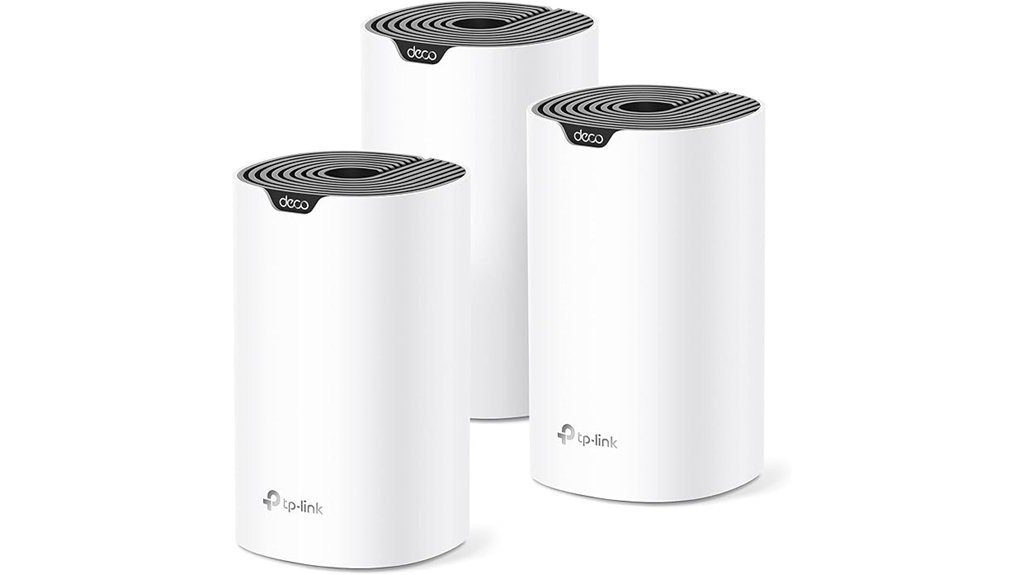
The TP-Link Deco S4 Mesh AC1900 WiFi System is designed to replace a basic router or a router-plus-extender setup. Instead of forcing your devices to hop between separate networks, the three Deco units create one shared network name and password. That makes it easier to move around your home while staying connected.
The system targets coverage up to 5,500 square feet, which makes it useful for larger homes, multi-floor layouts, and rooms that struggle with weak signal. It also supports up to 100 devices, so it can handle phones, laptops, TVs, smart speakers, tablets, cameras, and other connected gear in a busy household.
The Deco S4 is not the newest wireless standard, since it lacks Wi-Fi 6. Still, AC1900 performance can be enough for many homes that mainly need stronger coverage, fewer dead zones, and easier network management.
Before You Buy: The Deco S4 usually does not replace the modem from your internet provider. In most homes, you connect one Deco unit to your existing modem, then place the other Deco units around the home for better coverage.
What Is the TP-Link Deco S4?
The TP-Link Deco S4 is a three-unit mesh WiFi system. One unit connects to your modem, while the others are placed in different areas of your home to extend the network. Together, they help reduce dead zones and make WiFi coverage more consistent across rooms.
Its main appeal is simplicity. You manage the system through the Deco app, use one network name, and avoid the common extender problem where devices cling to a weak signal from the wrong room. For families, the built-in parental controls also add useful day-to-day management.
The Deco S4 is best viewed as a coverage-first upgrade. It is not aimed at buyers who want the newest Wi-Fi 6 features, but it can be a practical choice if your current router leaves bedrooms, offices, upstairs rooms, or far corners with weak signal.
Detailed Features
The TP-Link Deco S4 focuses on stable whole-home coverage, simple setup, and easy device management. Its three-unit design helps spread WiFi more evenly than a single router in many homes. The system is especially useful when your internet connection works near the router but drops or slows down in distant rooms.
- AC1900 speeds: The system uses 3×3 6 Stream AC1900 technology for fast, stable connections in everyday home use.
- Unified mesh network: You get one network name and password instead of separate extender networks.
- Large coverage area: The three units are designed to cover up to 5,500 square feet.
- Device support: The system supports up to 100 connected devices, which helps in homes with smart devices and multiple users.
- App setup: The Deco app guides installation and gives you control over common network settings.
- ISP compatibility: The system works with major internet providers, though most users still need a modem.
- Wired Ethernet backhaul: If your home has wired Ethernet, you can use it to improve speed and stability between Deco units.
Who Should Buy It?
Best For
- Homes with WiFi dead zones in bedrooms, offices, upstairs areas, or far rooms.
- Families that want one easy network name instead of separate router and extender networks.
- Buyers who need simple app setup, parental controls, and support for many connected devices.
Skip If
- You specifically want a Wi-Fi 6 or newer mesh system.
- You need many Ethernet ports on each unit without using a separate switch.
- You want outdoor WiFi coverage from weatherproof access points.
Design and Build Quality
The Deco S4 uses a clean, tower-style design that is easier to place around the home than a large router with external antennas. Each unit is meant to sit indoors on a shelf, desk, TV stand, or table. Because the units are separate, you can place them where coverage is weak instead of relying on one central router.
The system includes two Ethernet ports per unit. That is enough for basic wired connections or Ethernet backhaul, but it may feel limited if you want to plug in several wired devices near one Deco. In that case, a network switch may be needed.
Coverage and WiFi Performance
Coverage is the main reason to consider the Deco S4. A single router can struggle when walls, floors, distance, and furniture block the signal. The three Deco units work together to spread coverage across the home and reduce weak spots.
The system is rated for up to 5,500 square feet, but real-world coverage depends on your layout. Thick walls, concrete, metal, appliances, and distance between units can reduce performance. For best results, each Deco should be close enough to the next unit to keep a strong connection.
The AC1900 speed class is suitable for many normal tasks, including browsing, video streaming, video calls, smart home devices, and casual gaming. It may not be the best choice for buyers who want the newest Wi-Fi 6 features, very high local network speeds, or maximum performance with newer phones and laptops.
Connectivity and Device Support
The Deco S4 supports up to 100 devices, which is helpful for modern homes with many connected products. Phones, laptops, tablets, TVs, speakers, smart plugs, cameras, and gaming consoles can all share the same network. This matters because older routers can become less stable as more devices connect.
The system also uses one network name and password. That keeps daily use simple because you do not need to manually switch between a main router network and a separate extender network. Your devices can stay on the same mesh network as you move around your home.
App Setup and Controls
The Deco app is one of the most practical parts of the system. It guides setup, helps add the Deco units, and gives you control over common settings. For non-technical buyers, this is easier than logging into a traditional router dashboard.
The included parental controls are useful if you want more control over family internet use. They can help you manage access and create a safer network environment. These controls do not replace active supervision, but they add a helpful layer of management for households with children.
Pro Tip: Place the second Deco halfway between the main Deco and the weak-signal area, not directly inside the dead zone. A mesh unit needs a solid signal from another Deco before it can pass strong WiFi to nearby rooms.
Setup Tips Before First Use
Start by connecting the first Deco unit to your modem. Then use the Deco app to create your network and add the other units. Keep your network name and password simple enough for family members to use, but strong enough to avoid easy guessing.
Place each Deco in an open area when possible. Avoid hiding units behind TVs, inside cabinets, near large metal objects, or right beside thick appliances. Better placement can improve signal strength without changing your internet plan.
If your home has Ethernet wiring, consider using wired Ethernet backhaul. This can improve stability between Deco units, especially in larger homes or layouts with thick walls.
How It Performs in Real Use
For Large Homes
The Deco S4 is a practical upgrade when one router cannot cover the full home. The three-unit system helps reach rooms that may be too far from the modem or blocked by walls. It is especially useful in homes where the WiFi works near the router but weakens upstairs, downstairs, or at the opposite end of the house.
For Families With Many Devices
Support for up to 100 devices gives the Deco S4 enough room for a busy household. It can handle everyday connected devices such as phones, laptops, streaming boxes, smart TVs, tablets, smart speakers, and cameras. This makes it a better fit for modern homes than an older single router that struggles under device load.
For Work, Streaming, and Video Calls
Consistent coverage can matter more than peak speed when you work from home or join video calls from different rooms. The Deco S4 helps reduce weak-signal areas that can cause buffering, dropped calls, or slow browsing. For most everyday streaming and work tasks, its AC1900 class should be enough when your internet plan and placement are suitable.
For Wired Devices
Each Deco unit has two Ethernet ports, which is useful for connecting a desktop, gaming console, TV, or wired backhaul. The limitation is port count. If you have several wired devices in one room, you may need an Ethernet switch.
Compatibility and Safety
The Deco S4 works with major internet service providers, but most setups still require a modem. Cable, fiber, and DSL services often use different modem or gateway equipment, so you should confirm how your current internet hardware connects before replacing your router setup.
The Deco S4 units are designed for indoor use. They should not be placed outdoors, in wet areas, or in locations exposed to weather. For patios, yards, garages, or outdoor work areas, look for outdoor-rated WiFi equipment instead.
Pros and Cons
Pros
- Three-unit mesh system helps reduce dead zones across larger homes.
- Up to 5,500 square feet of coverage fits many multi-room layouts.
- Supports up to 100 devices for families with phones, laptops, TVs, and smart home gear.
- Deco app makes setup and basic management easier than many traditional routers.
- Wired Ethernet backhaul support can improve stability when Ethernet is available.
Cons
- Does not include Wi-Fi 6, which may matter for newer devices and faster plans.
- Most users still need a modem from their internet provider.
- Only two Ethernet ports per unit, so wired-heavy setups may need a switch.
- Not designed for outdoor use or weather exposure.
Is It Worth the Price?
The TP-Link Deco S4 is worth considering if your main problem is coverage, not chasing the newest WiFi standard. It gives you a three-unit mesh setup, a simple app, parental controls, and support for many devices. For a home with dead zones, that can offer strong value for the price.
It is better for buyers who care about whole-home coverage and easy setup than buyers who want advanced router controls or Wi-Fi 6. The value is strongest when your current router works in one area but fails to reach the rest of the home.
The main limitation is future-readiness. If you are upgrading for the fastest newer devices or a very high-speed internet plan, comparing Wi-Fi 6 mesh systems may be smarter before you decide.
How It Compares to Alternatives
Compared with a basic WiFi extender, the Deco S4 gives you a cleaner mesh experience with one network name and better room-to-room coverage. Extenders can help in small areas, but they often create separate networks and may feel less smooth in daily use.
Compared with newer Wi-Fi 6 mesh systems, the Deco S4 is less future-focused but can still be practical for many homes. If you want newer WiFi features, look at Wi-Fi 6 Deco models or other Wi-Fi 6 mesh systems. If you mostly want stable coverage and simple management, the Deco S4 remains a sensible option.
Common Mistakes to Avoid
Do not place every Deco unit too far apart. If a satellite Deco cannot get a strong signal from another unit, it cannot deliver strong WiFi to nearby devices. A good rule is to place units between the main Deco and the problem area, not at the farthest edge of the home.
Do not expect the Deco S4 to fix a slow internet plan by itself. Mesh WiFi can improve coverage inside your home, but it cannot make your provider’s internet speed faster than the plan you pay for. It also cannot remove all interference from thick walls, crowded wireless channels, or poor modem performance.
Do not use it outdoors. The Deco S4 units are indoor devices and are not built for rain, humidity, or direct weather exposure.
Concluding Thoughts
The TP-Link Deco S4 Mesh WiFi System is a strong option for buyers who want wider coverage and easier management than a traditional router setup. Its three-unit design, up to 5,500 square feet of coverage, and support for up to 100 devices make it practical for larger homes and busy families.
- Ease of Setup: The Deco app keeps installation simple and helps you manage the network from your phone.
- Wide Compatibility: It works with major ISPs, although most users still need a modem.
- Stable Home Coverage: The mesh design helps reduce weak spots and supports everyday devices across the home.
Frequently Asked Questions
Can Deco S4 units be used outdoors?
No. Deco S4 units are designed for indoor use and do not have weatherproof protection. For patios, yards, or exposed areas, use an outdoor-rated WiFi solution instead.
Does the Deco S4 replace my modem?
In most setups, no. The Deco S4 replaces your router or extender system, but you still connect it to a modem or provider gateway for internet service.
Is the Deco S4 system expandable with additional units?
Yes. The Deco S4 system can be expanded with additional compatible Deco units to extend coverage. This is useful if your home has extra floors, long hallways, or areas that remain weak after the first three units are placed.
Does Deco S4 support VPN connections?
The article-supported limitation is that Deco S4 does not natively support VPN connections. If you need VPN protection, you may need to configure VPN on individual devices or use another compatible VPN setup.
How many devices can the Deco S4 support?
The Deco S4 supports up to 100 devices. That makes it suitable for homes with phones, laptops, tablets, TVs, smart speakers, cameras, and other connected products.
How does Deco S4 handle firmware updates?
The Deco S4 can handle firmware updates through the Deco app system. Keeping firmware updated helps with security, stability, and performance improvements over time.
What is the warranty period for Deco S4?
The article states that the TP-Link Deco S4 Mesh WiFi System includes a two-year limited warranty. Check the seller and manufacturer terms before purchase because warranty handling can vary by region and seller.
Who should skip the Deco S4?
Skip it if you need Wi-Fi 6, outdoor-rated hardware, or many Ethernet ports on each unit. It is also not the right fix if your main problem is a slow internet plan rather than weak home coverage.
The Bottom Line
The TP-Link Deco S4 Mesh WiFi System is a good fit if you want simple whole-home coverage, one network name, app setup, and support for many connected devices. It is less ideal if you want Wi-Fi 6, outdoor coverage, or lots of wired ports. For homes with weak rooms and dead zones, it is recommended with caveats because its main strength is coverage, while its main limitation is older Wi-Fi 5 technology.

