Disclosure: As an Amazon Associate, we earn from qualifying purchases. If you click a link on this page and make a purchase, we may receive a small commission at no extra cost to you.
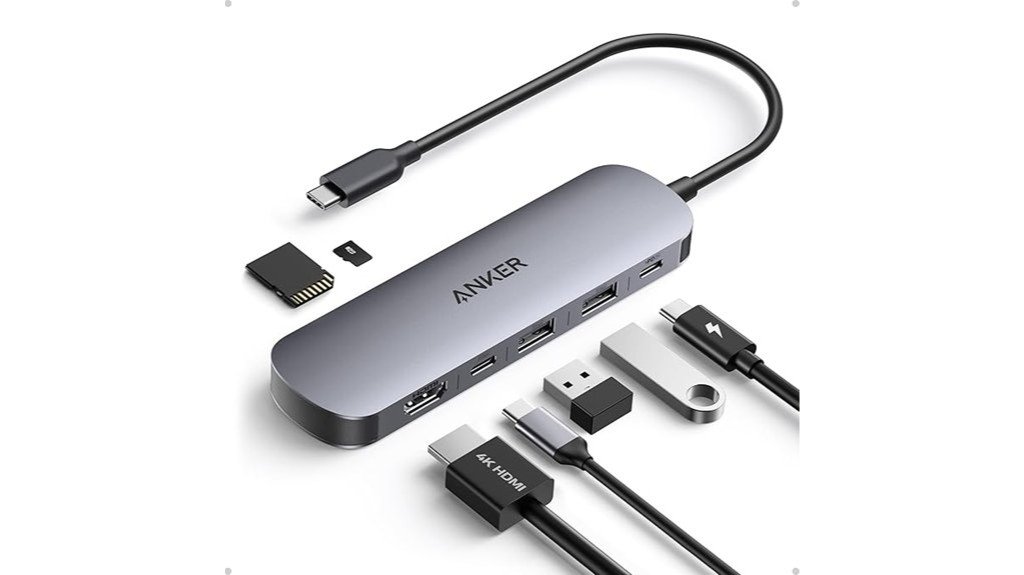
Running out of laptop ports can slow down your work fast, especially when you need HDMI, USB-A, USB-C charging, and memory card access from one compact adapter. The Anker USB C Hub is built to solve that problem with a 7-in-1 design that adds an HDMI port with 4K@60Hz support, dual USB-A 3.0 ports, a USB-C data port, a USB-C PD input, and SD/TF card slots. This review helps you decide whether it is the right hub for your laptop, desk setup, travel bag, or presentation kit. Its main strength is the wide mix of ports in a small body, while its main limitation is that the single HDMI port is made for one external display, not a multi-monitor workstation.
Quick Verdict
Rating: Recommended with caveats
Best For: Laptop users who need HDMI, USB-A, USB-C data, USB-C charging input, and SD/TF card access in one portable hub.
Bottom Line: The Anker USB C Hub is a practical pick if your laptop has limited ports and you want a compact adapter for work, travel, presentations, and file transfers. Skip it if you need multiple monitor outputs or a hub with more advanced docking-station features.
| Specification | Detail |
|---|---|
| Brand | Anker |
| Model | A83D2 |
| Product Type | 7-in-1 USB-C multi-port hub |
| Ports | HDMI, 2 USB-A 3.0 ports, USB-C data port, USB-C PD input port, SD card slot, TF card slot |
| HDMI Output | Up to 4K@60Hz through one HDMI port |
| Data Transfer | Up to 5Gbps through supported USB data ports |
| Charging Support | USB-C PD input supports up to 85W fast charging |
| Card Reader | SD and TF card slots for camera, drone, and mobile storage workflows |
| Weight | 2.36 ounces |
| Connecting Cable | Approximately 6 inches |
| Best Use | Expanding USB-C laptops for office work, presentations, storage access, travel, and single-monitor setups |
Overview
The Anker USB C Hub is a compact adapter that turns one USB-C port into a more complete connection point for your laptop. Its 7-in-1 multi-port adapter layout gives you HDMI output, two USB-A 3.0 ports, a USB-C data port, a USB-C PD input port, and SD/TF card slots. That mix makes it useful for people who work with external displays, flash drives, keyboards, mice, memory cards, and charging cables during the same session.
At 2.36 ounces, it is light enough for a laptop sleeve, backpack pocket, or small desk setup. The short connecting cable, listed at about 6 inches, helps keep the adapter close to your laptop and reduces desk clutter. Model A83D2 is also described as a well-reviewed option in the electronics category, which supports its appeal as a practical everyday hub.
What Is the Anker USB C Hub?
The Anker USB C Hub is a 7-in-1 USB-C adapter designed for modern laptops that rely on fewer built-in ports. It gives you the ports many slim laptops leave out, including HDMI, USB-A, USB-C data, USB-C power delivery input, and memory card slots.
It is made for users who need one portable accessory instead of several single-purpose adapters. For example, you can connect a monitor through HDMI, plug in a USB-A keyboard or flash drive, access an SD card, and keep your laptop powered through the USB-C PD input when your setup supports it.
The main selling point is convenience. Instead of carrying separate HDMI, USB-A, and card-reader dongles, you can keep one hub ready for work, school, travel, photo transfer, and presentations.
Before You Buy: This hub has one HDMI port, so it is best for a single external display. It is not the right choice if your main goal is to run multiple monitors at the same time from one adapter.
Who Should Buy It?
Best For
- Laptop users who need HDMI, USB-A, USB-C data, USB-C charging input, and SD/TF slots in one hub.
- Professionals who give presentations and need 4K@60Hz HDMI output for a single display.
- Creators, students, and office users who transfer files from USB drives, SD cards, or TF cards.
Skip If
- You need to connect multiple monitors at the same time.
- You want a full docking station with many more ports or a fixed desktop setup.
- Your device does not have a compatible USB-C port that supports the features you plan to use.
Detailed Features
With a focus on practical daily use, the Anker USB C Hub combines display output, fast data access, charging input, and card reading in one small adapter. Its HDMI port supports 4K@60Hz, which is useful when you want sharper motion and smoother display output than basic 4K@30Hz hubs provide.
The two USB-A 3.0 ports and USB-C data port support up to 5Gbps transfer speeds. That matters when you move large files, connect external storage, or use older USB-A accessories with a newer USB-C laptop. The USB-C PD input supports up to 85W fast charging, so you can keep power flowing through the hub while using the other ports, as long as your charger, cable, and laptop support the required power delivery setup.
The SD and TF card slots make the hub more useful for camera users, drone owners, content creators, and anyone who still works with removable memory cards. This is more flexible than a basic HDMI-only adapter because it can support several common tasks from one connection point.
Design and Build Quality
The hub is designed to stay portable. Its 2.36-ounce weight makes it easy to carry with a laptop without adding much bulk. The short cable also helps it sit close to your device, which is useful on small desks, classroom tables, hotel workstations, and shared office spaces.
The compact form is a clear advantage for travel, but it also means the ports are packed into a small body. If you often plug in bulky USB drives, wide adapters, or stiff cables, you may need to check spacing during real use. For most everyday accessories, the layout should be practical and easy to manage.
Display Performance
The HDMI port is one of the strongest features of this Anker USB C Hub. It supports 4K@60Hz, which can help when you connect to a monitor, TV, or projector that also supports that resolution and refresh rate. This is useful for slides, spreadsheets, editing timelines, streaming, and general laptop expansion.
The key limitation is display count. The hub has one HDMI port, so it is designed for one external display. If you want two or three monitors, you should compare dedicated docking stations or multi-display adapters instead.
Data Transfer and Storage Access
The dual USB-A 3.0 ports and USB-C data port support up to 5Gbps data transfer. This gives you room to connect common accessories such as flash drives, external drives, keyboards, mice, webcams, or other USB devices. It is especially helpful if your laptop has only USB-C ports and you still use older USB-A gear.
The SD and TF card slots add another layer of convenience. You can move photos, videos, documents, or project files from memory cards without carrying a separate reader. This makes the hub useful for photographers, students, remote workers, and creators who need quick file access away from a full desk setup.
Charging Support
The USB-C PD input supports up to 85W fast charging. This helps reduce the tradeoff of using your laptop’s only USB-C port for a hub, because you can still run power through the adapter when your setup is compatible.
For best results, use a charger and cable that match your laptop’s charging needs. The hub can support power input, but the final charging performance depends on your laptop, charger, cable, and the way your device handles USB-C power delivery.
Pro Tip: Before using the hub for a presentation, test the HDMI cable, display settings, charger, and any USB accessories at home. This helps you avoid display or power surprises when you are already in a meeting or classroom.
Compatibility and Safety
The hub is intended for devices with a compatible USB-C port. It can support MacBook Pro models and other USB-C laptops when the device supports the features you want to use, such as video output, data transfer, and power delivery. Some smartphones with USB-C may also work for certain accessories, but performance depends on the phone’s USB-C capabilities.
Do not assume every USB-C port supports every feature. Some devices support charging but not external display output, while others may support data but have limits with power delivery. Always check your laptop or device manual if you need HDMI output, high-speed transfer, or charging through the hub.
Setup Tips Before First Use
Start by connecting the hub directly to your laptop’s USB-C port. Then plug in one device at a time, such as the HDMI cable first, then USB accessories, then the charger through the USB-C PD input. This makes it easier to identify any device or cable that is not working as expected.
For HDMI use, check your laptop’s display settings after connecting the monitor or projector. You may need to choose mirror mode, extend mode, or the correct resolution. For SD and TF cards, insert the card carefully and wait for your operating system to detect it before removing files or ejecting the card.
Keep the hub on a flat surface when several cables are connected. This reduces stress on the laptop’s USB-C port and helps prevent accidental disconnects.
How It Performs in Real Use
For Office Work
In an office setup, the hub can handle common needs like connecting an external monitor, a USB-A mouse, a keyboard, and a charger. The 4K@60Hz HDMI support is useful for spreadsheets, browser windows, video calls, and presentations when your monitor supports it.
For Travel
The 2.36-ounce weight makes the hub easy to keep in a travel bag. It is useful in hotels, coworking spaces, classrooms, and meetings where you may need HDMI or USB-A access without knowing what ports will be available.
For Content Transfer
The SD and TF card slots help if you move files from cameras, drones, action cameras, or mobile storage cards. The 5Gbps data speed support also helps with external storage and large file transfers, though actual speed depends on the card, drive, cable, and device you use.
For Presentations
The HDMI port makes this hub a strong option for presentation work. You can connect to a projector or display while also using USB accessories. Since it supports only one HDMI output, it is best for simple single-screen presentation setups rather than complex multi-display rooms.
Pros and Cons
While evaluating the pros and cons of the Anker USB C Hub, it is clear that its strongest value comes from combining several everyday ports in one compact adapter. It can turn a single USB-C port into a more flexible workstation without requiring several separate dongles.
Pros
- Versatile 7-in-1 layout: Includes HDMI, USB-A, USB-C data, USB-C PD input, and SD/TF card slots.
- High-definition display support: HDMI supports up to 4K@60Hz for one external display.
- Fast data transfer: USB data ports support up to 5Gbps transfer speeds.
- Charging support: USB-C PD input supports up to 85W fast charging when your setup is compatible.
- Portable design: At 2.36 ounces, it is easy to carry for work, school, and travel.
Cons
- Does not support multiple monitors at the same time because it has one HDMI port.
- Performance depends on your laptop’s USB-C capabilities, charger, cables, and connected devices.
- The compact design may feel tight if you use bulky USB accessories or stiff cables.
Is It Worth the Price?
The Anker USB C Hub is best viewed as a practical everyday accessory rather than a full desktop docking station. It offers strong value for the price if you need a compact hub with HDMI, USB-A, USB-C data, USB-C PD input, and SD/TF card access in one device.
It is worth considering if you want fewer adapters in your bag and need a simple way to connect a laptop to a monitor, storage device, card reader, and charger. Buyers who only need one basic USB-A adapter may not need this many ports, while buyers who need multiple displays should compare more advanced docking solutions.
How It Compares to Alternatives
Compared with a basic USB-C to HDMI adapter, the Anker USB C Hub gives you far more flexibility because it also includes USB-A ports, USB-C data, USB-C PD input, and SD/TF card slots. That makes it better for users who need more than display output.
Compared with larger docking stations, this hub is more portable and easier to carry, but it has fewer advanced workstation features. The Anker USB C Hub makes the most sense if you want a small, travel-friendly adapter for one external display and common laptop accessories.
Concluding Thoughts
Despite its limitations, the Anker USB C Hub stands out as a versatile and efficient option for expanding laptop connectivity. It combines HDMI, USB-A, USB-C data, USB-C PD input, and SD/TF card access in a compact device that fits well into daily work and travel routines.
The hub is especially useful for users who want high-speed data transfer, one clear external display connection, and charging support from one adapter. Its 4K@60Hz HDMI output, 5Gbps data support, and 85W PD input make it more capable than many simple dongles, while the 2.36-ounce body keeps it easy to carry.
Related Guides
Frequently Asked Questions
Does the Anker USB C Hub support MacBook Pro models?
Yes, the Anker USB C Hub can support MacBook Pro models with compatible USB-C ports. For HDMI output, charging, and data transfer, your MacBook Pro must support those functions through its USB-C connection.
Can it connect to multiple monitors simultaneously?
No, this hub is not made for multiple monitors at the same time. It includes one HDMI port that supports up to 4K@60Hz for a single external display.
Is the hub compatible with smartphones?
The hub may work with smartphones that have a compatible USB-C port. Results can vary because not every phone supports external displays, USB accessories, storage access, or power functions in the same way.
How durable is the hub’s build quality?
The article describes the hub as compact and reliable for daily use, with strong customer feedback. Like any small adapter, it should be handled carefully, especially when several cables are connected at once.
What is the length of the connecting cable?
The connecting cable is approximately 6 inches long. This short cable helps keep the hub close to your laptop and supports a cleaner desk setup.
Can it charge a laptop while other ports are in use?
Yes, the USB-C PD input supports up to 85W fast charging when your laptop, charger, and cable support the required power delivery setup. Charging performance can vary based on your device and connected accessories.
Is it good for photographers or creators?
Yes, it can be useful for creators because it includes SD and TF card slots along with USB data ports. This helps with moving files from memory cards, cameras, drones, and external storage devices.
Who should skip this Anker USB C Hub?
Skip it if you need multiple monitor support, a full desktop docking station, or ports beyond the 7-in-1 layout. You should also check compatibility first if your laptop or phone has limited USB-C features.
The Bottom Line
The Anker USB C Hub is a strong choice if you want a compact 7-in-1 adapter for HDMI, USB-A accessories, USB-C data, USB-C PD charging input, and SD/TF cards. It is best for one-display laptop setups, travel, office work, and quick file transfers, but it is not ideal for users who need multiple monitors or a full docking station.
