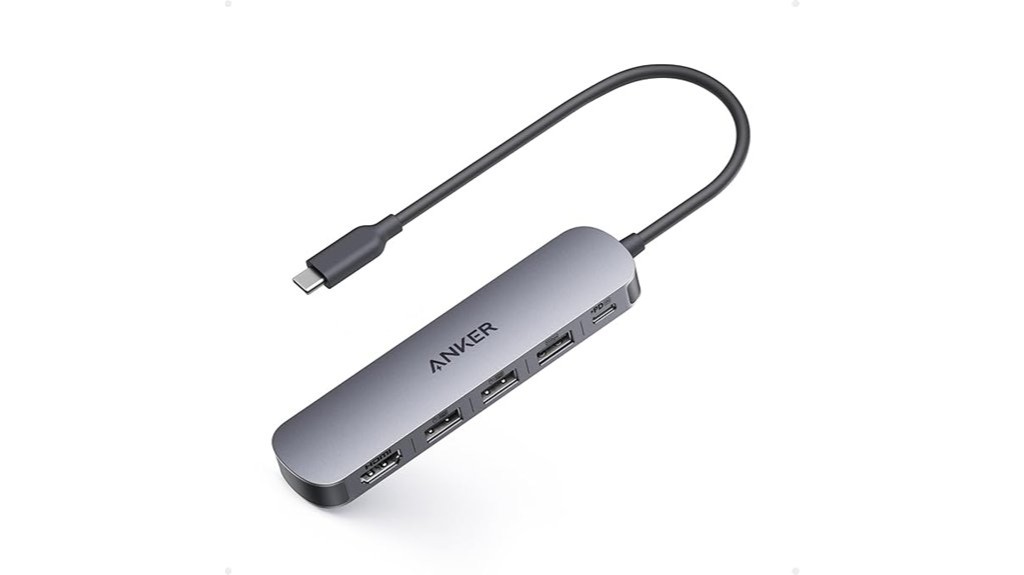
Disclosure: As an Amazon Associate, we earn from qualifying purchases. If you click a link on this page and make a purchase, we may receive a small commission at no extra cost to you.
Your laptop may have enough performance for work, but a thin port selection can make a monitor, mouse, flash drive, and charger harder to use together. The Anker USB-C Hub A8357 adds five connections through one compact adapter: HDMI, three USB-A ports, and a USB-C Power Delivery input. Its strengths are simple single-monitor expansion and up to 90W pass-through charging, while its main limits are 4K output at 30Hz, only one 5Gbps USB-A port, and no Linux support. This review helps you decide whether that mix fits your desk, travel bag, and everyday accessories.
Quick Verdict
Rating: 8/10, Recommended with caveats
Best For: Laptop users who need one HDMI display, several USB-A accessories, and USB-C pass-through charging in a compact hub.
Bottom Line: The Anker USB-C Hub A8357 covers the most common desk and travel connections without the bulk of a larger dock. You should skip it if you need 4K at 60Hz, multiple high-speed data ports, Ethernet, card readers, or Linux compatibility.
| Specification | Detail |
|---|---|
| Brand | Anker |
| Model | A8357 |
| Product Type | 5-in-1 USB-C hub for laptops |
| Color | Gray |
| Enclosure Material | Plastic |
| Approx. Dimensions | 4.8 x 1.2 x 0.46 inches |
| Approx. Weight | 0.06 kg, about 2.1 ounces |
| Port Layout | 1 x HDMI, 1 x USB-C PD input, 1 x USB-A 3.0, 2 x USB-A 2.0 |
| HDMI Output | Up to 4K at 30Hz, with mirror and extend modes |
| USB-A Data Speeds | 1 x 5Gbps USB 3.0 and 2 x 480Mbps USB 2.0 |
| Charging Support | Up to 90W pass-through from a 100W input, with 10W reserved for hub operation |
| PD Port Function | Charging input for an external wall charger; it is not a peripheral-power output |
| Compatibility | MacBook with macOS 12 or newer, Windows 10 and 11, ChromeOS, and compatible USB-C laptops with the required DP Alt Mode and Power Delivery support |
| Not Compatible With | Linux |
| Charger Included | No |
| In the Box | Anker USB-C Hub and welcome guide |
| Warranty | 18 months |
Before You Buy: HDMI only works when your laptop’s USB-C connection supports DisplayPort Alt Mode, and pass-through charging requires USB-C Power Delivery. The PD input is for an external charger, the charger is not included, and this hub is not compatible with Linux.
Overview
The Anker USB-C Hub A8357 is a compact port expander for laptops that have USB-C but not enough legacy connections. Its five-port layout combines one HDMI output, three USB-A data ports, and one USB-C Power Delivery input. That combination works well when your everyday setup includes a monitor plus a few USB-A devices such as a keyboard, mouse, receiver, flash drive, or printer.
What Is the Anker USB-C Hub A8357?
The Anker A8357 expands one compatible USB-C connection into five ports. You get an HDMI port for one external screen, one USB-A 3.0 port rated up to 5Gbps, two USB-A 2.0 ports rated up to 480Mbps, and a USB-C PD input that can accept up to 100W from a charger and pass up to 90W to the laptop.
The key detail is that the USB-C PD port is not a general-purpose USB-C data port. It is meant for connecting an external wall charger so the hub can pass power to a compatible laptop. If you need USB-C storage, USB-C peripherals, Ethernet, or memory-card readers, you need a different hub layout.
Who Should Buy It?
Best For
- You use a compatible MacBook, Windows laptop, or Chromebook and need one HDMI display plus USB-A accessories.
- You want one compact hub for a keyboard, mouse, flash drive, presentation display, and laptop charging connection.
- You travel or move between desks and prefer a smaller adapter instead of a larger multi-port docking station.
Skip If
- You use Linux or your laptop’s USB-C port does not support the video or Power Delivery features you need.
- You need 4K at 60Hz, dual monitors, Ethernet, SD card slots, or USB-C data connections.
- You regularly connect several fast external drives and need more than one 5Gbps USB-A port.
Detailed Features
The A8357 is built around a straightforward mix of display, data, and power. The HDMI port handles one external display up to 4K at 30Hz. The USB-A section gives you one faster 5Gbps port and two 480Mbps ports. The USB-C PD input accepts power from a separate charger and can pass up to 90W to a compatible laptop.
Design and Build Quality
The current Amazon listing describes a gray plastic enclosure measuring about 4.8 x 1.2 x 0.46 inches and weighing about 0.06 kg, or roughly 2.1 ounces. Those dimensions make it closer to a pocketable adapter than a desk dock, so it is easy to pack beside a laptop charger and HDMI cable.
HDMI Display Performance
The HDMI port supports up to 4K at 30Hz and works in mirror or extend mode. For spreadsheets, web browsing, video playback, presentations, and a static productivity setup, that resolution can be useful because you can add more screen space without a separate HDMI adapter.
The 30Hz ceiling is the main display limitation. Cursor movement and window animations can feel less fluid than 60Hz, especially on a large 4K screen. If you care about smoother motion, gaming, video editing timelines, or a 4K 60Hz desktop experience, choose a hub that explicitly supports 4K at 60Hz.
Your laptop also has to support video output through USB-C. A USB-C connector by itself does not guarantee HDMI functionality, so check the laptop manual or port specifications for DisplayPort Alt Mode before you buy.
USB-A Port Performance
The hub has three USB-A ports, but they serve different jobs. One USB-A 3.0 port supports up to 5Gbps, while the two USB-A 2.0 ports support up to 480Mbps. That split is fine for a mixed setup, but it is not ideal for three high-speed storage devices.
Use the 5Gbps port for an SSD, fast flash drive, or other device where transfer speed matters. Reserve the two slower ports for keyboards, mice, wireless dongles, printers, controllers, or similar accessories. This keeps the single faster connection available for the device that benefits from it most.
Charging and Power Delivery
The USB-C PD input accepts up to 100W from an external charger. Anker states that the hub reserves 10W for operation, leaving up to 90W pass-through charging for the connected laptop. Your actual charging rate still depends on the charger, cable, laptop power requirements, and the host device’s USB-C Power Delivery support.
The wall charger is not included. That matters if you expect the hub to replace a charger in your travel bag. You need to supply a compatible USB-C charger and cable, and the hub’s PD port should be treated as a charging input, not as a USB-C data port or a way to power other peripherals.
Pro Tip: Connect storage to the 5Gbps USB-A port first, then put your mouse, keyboard, or wireless receiver on the two 480Mbps ports. This makes better use of the hub’s mixed-speed layout.
Compatibility and Setup
Anker lists support for MacBook systems with macOS 12 or newer, Windows 10 and 11, and ChromeOS. For HDMI output, the laptop needs USB-C DisplayPort Alt Mode. For charging through the hub, both the laptop and the charging setup need USB-C Power Delivery support.
Compatibility and Power Safety
Because this hub carries display, data, and charging connections at the same time, use cables and chargers that match your laptop’s requirements. The hub does not turn a data-only USB-C port into a video-capable port, and its PD input does not provide a separate USB-C data connection.
How It Performs in Real Use
For Home Office Work
A basic home-office setup is where the A8357 makes the most sense. You can connect one HDMI monitor, use the 5Gbps USB-A port for storage, place a mouse and keyboard on the two slower USB-A ports, and feed a compatible charger into the PD input. That gives you a practical single-monitor desk without moving to a larger dock.
For Travel and Hybrid Work
The compact dimensions and roughly 2.1-ounce listed weight make the hub easy to carry between home, office, school, and travel locations. It is especially useful when you need a familiar HDMI and USB-A setup but your laptop only gives you a small number of USB-C ports.
For Presentations and Meeting Rooms
The HDMI output supports mirror mode for showing the same screen on an external display, which is useful for presentations. It also supports extend mode when you want the external display to act as extra workspace. Test the laptop, hub, HDMI cable, and display before an important meeting because the laptop still needs compatible USB-C video output.
For File Transfers and Accessories
The hub works best when only one connected device needs high-speed USB-A data. A fast external drive can use the 5Gbps port while the 480Mbps ports handle lower-bandwidth accessories. If your workflow regularly moves large files across two or three external drives at once, this port mix will feel restrictive.
Setup Tips Before First Use
Check your laptop’s USB-C specifications before buying. Look for DisplayPort Alt Mode if you need HDMI, and confirm USB-C Power Delivery support if you want the hub to charge the laptop. A USB-C port that supports only basic data will not provide all of the hub’s advertised functions.
Use a charger with enough output for your laptop. Even though the hub accepts up to 100W input and can pass up to 90W to the laptop, a lower-watt charger can only provide what it is rated to deliver. Heavy laptop workloads can also increase power demand, so charging speed may vary.
Pros and Cons
Pros
- Useful 5-in-1 layout: Combines HDMI, three USB-A data ports, and USB-C pass-through charging in one small adapter.
- Up to 90W pass-through: Can keep many compatible USB-C laptops powered from a suitable external charger.
- 4K HDMI support: Handles one external display at up to 4K 30Hz in mirror or extend mode.
- Clear port roles: One 5Gbps USB-A port handles faster transfers while two 480Mbps ports suit basic peripherals.
- Travel-friendly size: The listed dimensions and weight keep it much smaller than a full desktop dock.
Cons
- Only one 5Gbps USB-A port: The other two USB-A ports are limited to 480Mbps.
- 4K stops at 30Hz: It is not the best fit for buyers who want smoother 4K 60Hz output.
- Limited expansion: There is no Linux support, Ethernet, card reader, second display output, or USB-C data port.
Buying Decision Snapshot
| Feature | Specification | Buyer Impact |
|---|---|---|
| Power Delivery | Up to 90W pass-through from 100W input | Useful for a one-cable desk connection when your laptop and charger support USB-C PD |
| USB-A Ports | 1 x 5Gbps plus 2 x 480Mbps | Good for one fast storage device plus two lower-bandwidth accessories |
| HDMI Output | Up to 4K at 30Hz | Suitable for productivity and presentations, but less smooth than 4K 60Hz |
Is It Worth the Price?
The Anker USB-C Hub A8357 is worth considering if you want a compact, straightforward hub rather than a feature-heavy dock. Its value comes from combining an HDMI output, three USB-A ports, and up to 90W pass-through charging in a small design that can move easily with your laptop.
You get the most value if your setup uses one external display and a mix of one faster USB-A device plus basic peripherals. It is a weaker value if you already know you need 4K 60Hz, several fast drives, USB-C data, Ethernet, card readers, or more than one monitor because you would need another adapter or a larger dock to fill those gaps.
How It Compares to Alternatives
The Anker 332 USB-C Hub (A8355) is worth comparing if data-port speed matters more to you. That model includes two 5Gbps USB-A data ports plus a 5Gbps USB-C data port, while the A8357 reviewed here gives you one 5Gbps USB-A port and two 480Mbps USB-A ports. The 332’s listed laptop pass-through output is 85W, compared with up to 90W on the A8357.
The UGREEN Revodok 105 5-in-1 USB-C Hub is another compact five-port option to compare if you want a similar category from a different brand. The A8357 makes the most sense when you specifically want Anker’s simple one-HDMI, three-USB-A layout with 90W pass-through and you are comfortable with its 30Hz 4K limit.
Related Guides
Frequently Asked Questions
Will the Anker USB-C Hub A8357 work with a Chromebook?
Yes, ChromeOS is listed as a supported platform. Your Chromebook still needs the required USB-C features, including DisplayPort Alt Mode for HDMI and Power Delivery support if you want charging through the hub.
Does the A8357 work with Linux?
No. Anker specifically lists this hub as not compatible with Linux. If Linux support matters, choose a hub that clearly includes your distribution or Linux support in its compatibility information.
Can it run a 4K monitor at 60Hz?
No. The HDMI output is rated up to 4K at 30Hz. If you want a smoother 4K 60Hz desktop, you need a hub or dock that explicitly supports 4K at 60Hz with your laptop.
Are all three USB-A ports 5Gbps?
No. One USB-A 3.0 port supports up to 5Gbps, while the other two USB-A 2.0 ports support up to 480Mbps. Use the 5Gbps port for storage and the slower ports for accessories such as a mouse or keyboard.
Can the USB-C PD port transfer data or power peripherals?
No. Anker describes that port as a Power Delivery input for connecting an external wall charger to power the laptop through the hub. It should not be treated as a USB-C data port or a power output for peripherals.
Does the hub include a 100W charger?
No. The wall charger is not included. To use pass-through charging, you need to connect your own compatible USB-C charger and cable to the hub’s PD input.
How much power can reach the laptop?
Anker states that the hub can accept up to 100W input, reserve 10W for operation, and pass up to 90W to the laptop. The real charging rate depends on your charger, cable, laptop, and USB-C Power Delivery support.
What warranty does the Anker A8357 include?
Anker lists an 18-month warranty for this model. Keep your proof of purchase and check the applicable regional warranty terms if you need service because support procedures can vary by market.
The Bottom Line
The Anker USB-C Hub A8357 earns an 8/10, Recommended with caveats for buyers who need one 4K 30Hz HDMI output, three USB-A ports, and up to 90W pass-through charging in a compact adapter. Its biggest strength is a practical everyday port mix, while its biggest limitation is that only one USB-A port reaches 5Gbps and the display output stops at 4K 30Hz. Skip it if you need Linux support, 4K 60Hz, multiple monitors, Ethernet, card readers, or USB-C data.
