Disclosure: As an Amazon Associate, we earn from qualifying purchases. If you click a link on this page and make a purchase, we may receive a small commission at no extra cost to you.
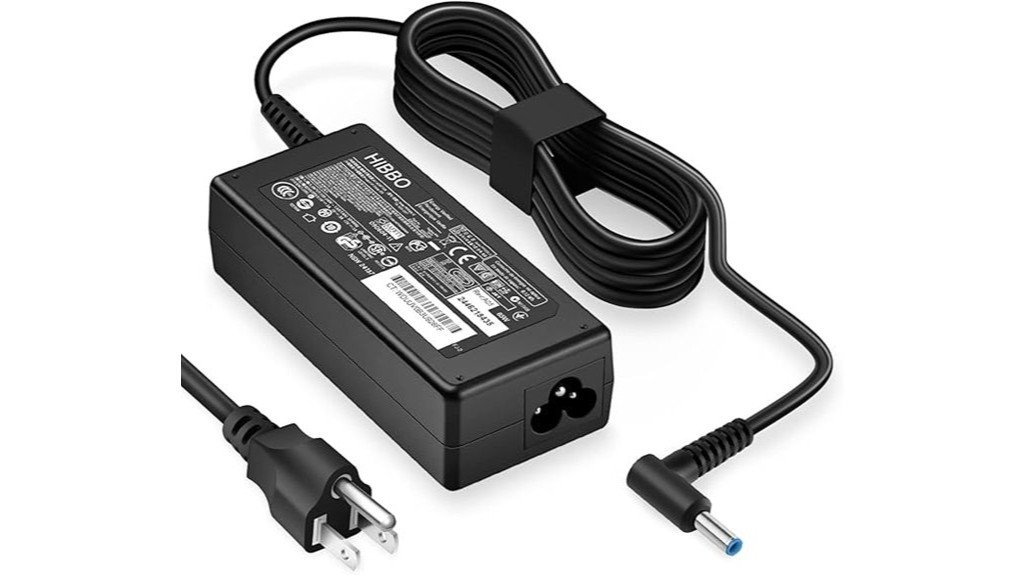
Choosing the right HP replacement charger is not just about wattage. You need the correct connector, safe power delivery, and enough output for your laptop model without carrying a bulky adapter. This HP Laptop Charger 65W/45W Smart Blue Tip Power Adapter is built for many HP laptops that use the blue-tip connector, including select EliteBook, ProBook, Pavilion, and Spectre models. It is a practical choice if you want one compact adapter for daily charging, travel, or backup use, but you still need to confirm your laptop’s connector and power requirement before buying.
Quick Verdict
Rating: Recommended with caveats
Best For: HP laptop owners who need a compact 65W or 45W blue-tip replacement charger.
Bottom Line: This adapter makes sense if your HP laptop uses the Smart Blue Tip connector and falls within the supported 45W or 65W power range. The main tradeoff is compatibility, because it is not a universal charger for every HP or non-HP laptop.
| Specification | Detail |
|---|---|
| Product Type | HP laptop replacement power adapter |
| Power Output | Supports 65W and 45W charging needs |
| Voltage Output | 19.5V |
| Input Voltage | 110-240V |
| Connector Style | HP Smart Blue Tip connector |
| Compatible Laptop Lines | Select HP EliteBook, ProBook, Pavilion, and Spectre models |
| Safety Features | Protection against short circuits, overvoltage, overcurrent, and overheating |
| Design | Compact and lightweight for travel or daily carry |
| Weight | Described as under a pound |
| Best Use | Replacement charger, travel charger, office backup, or spare power adapter |
Overview
The HP Laptop Charger, specifically the 65W/45W Smart Blue Tip Power Adapter, is designed for HP laptops that use the blue-tip charging connector. It delivers a reliable 19.5V output and supports both 65W and 45W charging requirements, which makes it useful for several HP laptop families.
Compatibility is the main reason to consider this charger. It is made for select HP EliteBook, ProBook, Pavilion, and Spectre laptops, giving you a focused replacement option instead of a generic adapter with uncertain fit. The 110-240V input range also makes it suitable for use in regions with different wall power standards, provided you use the correct plug adapter where needed.
The blue tip helps guide proper connection, but it also creates the biggest buying concern. If your laptop uses a different connector size, USB-C charging, or a higher wattage adapter, this product may not be the right match. Always compare your current charger label and laptop charging port before placing an order.
Before You Buy: This is not a universal HP charger. Check your laptop model, connector shape, original wattage, and voltage rating before buying, especially if your laptop is older or uses USB-C charging.
What Is the HP Laptop Charger 65W/45W Smart Blue Tip Adapter?
This HP Laptop Charger is a replacement power adapter for compatible HP laptops that need a 65W or 45W blue-tip charger. It is built to provide steady power for everyday laptop use, including work, school, browsing, video calls, and general productivity tasks.
The adapter is compact and lightweight, so it works well as a spare charger for a backpack, office desk, travel bag, or home workstation. Since it supports 110-240V input, it can be used in many countries when paired with the correct wall plug setup.
Its strongest feature is practical compatibility across several HP laptop lines. Its biggest limitation is that the blue-tip connector must match your device. A charger can have the right wattage and still be wrong if the connector or model support does not line up.
Who Should Buy It?
Best For
- HP users who need a replacement 65W or 45W Smart Blue Tip charger.
- Students, office workers, and travelers who want a lightweight spare adapter.
- Owners of compatible HP EliteBook, ProBook, Pavilion, or Spectre models.
Skip If
- Your laptop uses USB-C charging or a non-blue-tip HP connector.
- Your original charger requires a higher wattage than 65W.
- You need a confirmed cable length before buying, because the listed details do not specify it.
Detailed Features
A multitude of practical features distinguishes the HP Laptop Charger, especially for buyers who need a simple, portable replacement adapter. It supports both 65W and 45W outputs, so it can serve different compatible HP laptops without forcing you to carry separate chargers for every supported device.
The charger’s broad 110-240V input range is useful for travel and mixed power environments. This matters if you move between home, office, school, hotels, or international locations. You may still need the correct outlet adapter, but the power input range gives you more flexibility than a charger limited to one voltage region.
The design also prioritizes safety. Built-in protection against short circuits, overvoltage, overcurrent, and overheating helps reduce common charging risks. Those safeguards are especially useful if you use the charger daily or keep it plugged in near a desk setup.
Portability is another strength. The compact and lightweight build makes it easier to keep one charger at home and another in your bag. That can reduce wear on your original charger and prevent the common problem of leaving your only adapter behind.
Power Output and Charging Performance
The key charging detail is its support for 65W and 45W output needs. A 65W adapter can power many everyday HP laptops, while 45W support helps with lighter compatible models. This flexibility is helpful if your household or workspace includes more than one compatible HP laptop.
The 19.5V output is an important spec to compare with your existing charger. Before using any replacement adapter, check the label on your original power brick and confirm that the voltage and wattage are suitable for your laptop. Matching the connector alone is not enough.
For daily use, this charger should be most useful for regular productivity tasks such as writing, browsing, streaming, spreadsheets, and online meetings. If your laptop needs more power for gaming, workstation use, or heavy performance loads, confirm whether 65W is enough before relying on this adapter.
Compatibility and Fit
This charger is designed for HP laptops with the Smart Blue Tip connector. The article-supported compatibility includes select HP EliteBook, ProBook, Pavilion, and Spectre models. That range is broad enough for many buyers, but it does not cover every HP laptop.
Older HP laptops can be tricky because connector designs and wattage needs vary by generation. Some older models may use a different barrel connector, and newer models may use USB-C charging. For that reason, you should not assume compatibility based only on the HP brand name.
The safest approach is to compare three things before buying: your laptop model number, your original charger wattage, and the charging connector. If all three match the product requirements, this adapter is more likely to be a practical replacement.
Pro Tip: Take a photo of your current charger label and laptop charging port before shopping. Compare the wattage, 19.5V output, and blue-tip connector so you avoid ordering a charger that looks close but does not fit.
Design and Portability
The charger is described as compact and lightweight, with the unit weighing under a pound. That makes it easier to pack than a bulky adapter, especially if you carry a laptop between home, work, classes, or travel locations.
A portable charger also helps you build a cleaner routine. You can keep one adapter plugged in at your desk and use this one as a bag charger, or keep it as a backup in case your original adapter is lost or damaged.
The main missing detail is cable length. The provided information does not specify how long the power cable is, so buyers who need a long reach from wall outlet to desk should check the product listing or seller details before ordering.
Safety Features
Electronics safety matters with any laptop charger because a weak or poorly matched adapter can create heat, charging errors, or unstable power delivery. This charger includes protection against short circuits, overvoltage, overcurrent, and overheating.
Those safety mechanisms are useful for normal daily charging, especially if you leave your laptop plugged in for work or study sessions. They do not remove the need for proper use, though. You should still avoid damaged outlets, frayed cords, liquid exposure, and tight spaces that trap heat around the adapter.
Because this charger touches an electronic device and connects to wall power, correct compatibility is part of safety. Using it with a non-HP laptop or an unsupported HP model is not recommended because the fit and power requirements may not match.
How It Performs in Real Use
For Daily Work
For everyday tasks, this charger is best suited to compatible HP laptops that fall within the 45W or 65W power range. It gives you a practical power source for office documents, browser work, email, video calls, and general home use.
For Travel
The 110-240V input range and lightweight build make the adapter useful for travel. You can pack it as a spare charger without adding much bulk, though you may need a plug adapter depending on the country or outlet type.
For Backup Use
This charger also works well as a backup adapter. Keeping one at your desk, in a laptop bag, or at a second location can help you avoid downtime if your original charger is misplaced or damaged.
For Shared HP Households
If multiple people in your home use compatible HP blue-tip laptops, the 65W/45W support may make this charger more flexible. Still, each laptop should be checked before sharing the adapter, because not every HP model uses the same wattage or connector.
Setup Tips Before First Use
Before plugging it in, compare the charger tip with your laptop’s charging port. The blue tip should fit firmly without forcing it. If it feels loose, too tight, or misaligned, do not push it into the laptop.
Next, compare the adapter output with your original charger. The article-supported output is 19.5V with 65W and 45W support. If your original charger shows a higher wattage requirement, this may not be the right replacement.
During first use, place the power brick on an open surface where heat can escape. Avoid covering it with blankets, papers, or bags while charging. If you notice unusual heat, smell, buzzing, or charging interruptions, unplug it and stop using it.
Pros and Cons
Pros
- Supports both 65W and 45W charging needs for compatible HP laptops.
- Works with select HP EliteBook, ProBook, Pavilion, and Spectre models.
- 110-240V input range supports use in many regions.
- Includes protection against short circuits, overvoltage, overcurrent, and overheating.
- Compact, lightweight design is easy to carry as a travel or backup charger.
Cons
- Blue-tip compatibility is limited and will not fit every HP laptop.
- Not recommended for non-HP laptops due to fit and power concerns.
- Power cable length is not specified in the provided details.
- The 30-day return policy may feel short for buyers who want a longer trial period.
Is It Worth the Price?
This HP Laptop Charger is worth considering if you need a simple replacement or backup adapter for a compatible HP blue-tip laptop. Its value comes from the 65W/45W support, compact size, 110-240V input range, and built-in safety protections.
It is a smart buy for everyday use if your laptop model and connector match. It is especially useful for buyers who want a second charger for work, school, travel, or a home office setup without relying on one adapter all day.
It is not the best fit if you need a universal charger, a USB-C charger, a higher-wattage adapter, or a confirmed long cable. In those cases, you should compare your laptop’s official power requirements before buying.
How It Compares to Alternatives
Compared with generic universal laptop chargers, this HP Smart Blue Tip adapter is more focused on compatible HP models. That can be a strength if you want a cleaner fit and fewer adapter tips, but it is a limitation if you need one charger for multiple laptop brands.
Compared with USB-C chargers, this model is better only for HP laptops that still use the blue-tip barrel connector. If your laptop charges through USB-C, a USB-C power adapter with the correct wattage may be the better option. This charger makes the most sense when your current HP adapter uses the same blue-tip design and matching power range.
Concluding Thoughts
Reflecting on the pros and cons of the HP Laptop Charger reveals a product that balances function, portability, and basic charging safety. Its compatibility with several HP laptop families, including EliteBook, ProBook, Pavilion, and Spectre models, gives it strong appeal for users who need a focused HP replacement charger.
The charger’s safety protections and compact design make it practical for mobile, school, and office use. Customer feedback in the source article highlights reliable performance and value, and the article also notes a lifetime defect exchange policy, which adds confidence for buyers concerned about long-term reliability.
The product is not flawless, mainly because compatibility depends on the blue-tip connector and supported power needs. If you confirm your laptop model, wattage, and connector before buying, this charger can be a useful and dependable power solution.
Related Guides
Frequently Asked Questions
Is the charger compatible with older HP laptop models?
It may work with some older HP laptops, but it is not universally compatible. Older HP models can use different connector sizes or power requirements, so you should compare your laptop model and original charger label before buying.
How long is the power cable of the charger?
The provided details do not specify the cable length. If desk reach or outlet distance matters to you, check the seller listing or product packaging details before ordering.
Can this charger be used with non-HP laptops?
It is designed for HP laptops with Smart Blue Tip charging support. Using it with non-HP laptops is not recommended because the connector, voltage, and charging behavior may not match safely.
Does the charger work in regions with 220V power supply?
Yes, the charger supports an input voltage range of 110-240V. That makes it suitable for regions that use 220V power, although you may still need the correct plug adapter for the wall outlet.
What is the weight of the charger unit?
The charger is described as lightweight and under a pound. That makes it practical for laptop bags, travel, and backup use at work or school.
Is 65W enough for every HP laptop?
No. Many everyday HP laptops use 45W or 65W adapters, but some larger or higher-performance models may need more power. Check the wattage on your original charger before replacing it.
What should you check before buying this HP charger?
Check your laptop model number, the connector style, the original adapter wattage, and the 19.5V output requirement. These checks reduce the risk of buying a charger that looks similar but does not work with your laptop.
The Bottom Line
The HP Laptop Charger 65W/45W Smart Blue Tip Power Adapter is a practical choice for compatible HP laptop owners who want a compact replacement, travel charger, or spare adapter. Its main strengths are dual 65W/45W support, 110-240V input, portability, and built-in safety protections, while its main limitation is strict blue-tip compatibility.
Buy it if your HP laptop model, connector, voltage, and wattage requirements match. Skip it if you need USB-C charging, higher wattage, a non-HP charger, or guaranteed compatibility with an older HP model.

