
You spend a lot of time at your desk, so the sound from your setup matters. Better PC speakers can make music clearer, games more engaging, and voices easier to follow during videos, streams, and calls.
This guide compares five desktop speaker systems for different spaces and priorities. You will find a compact 2.0 pair, two 2.1 gaming systems, a monitor-friendly soundbar, and a true 5.1 surround setup.
Quick Verdict
Choose the Creative Pebble Pro for a small desk and simple USB-C or Bluetooth use. Choose the Logitech G560 for a balanced 2.1 gaming setup with strong bass and reactive lighting. Choose the Katana SE when you want to keep the area beside your monitor clear. Choose the Razer Nommo V2 Pro for premium PC-focused spatial audio. Choose the SteelSeries Arena 9 only when you have enough room for a full 5.1 layout.
Top Picks
| Category | Product | Best For | Main Tradeoff | Amazon |
|---|---|---|---|---|
| Best Compact Pick | Pebble Pro | Small desks, work, videos, and casual gaming | Limited deep bass without a subwoofer | Check Price |
| Best 2.1 Gaming Pick | Logitech G560 | PC gaming, movies, and bass-heavy playback | Subwoofer and satellites need more room | Check Price |
| Best Desk Soundbar | Katana SE | A clean monitor-centered setup | Virtual surround is not true rear-channel sound | Check Price |
| Best Premium Spatial Audio | Nommo V2 Pro | Windows gaming and a premium 2.1 setup | Advanced spatial features are PC-dependent | Check Price |
| Best True 5.1 Setup | Arena 9 | Dedicated gaming rooms and surround sound | Large footprint and more setup work | Check Price |
Selection Criteria
We compared each system by sound format, desk footprint, connectivity, bass design, software dependence, and ease of placement. We also considered whether the extra features solve a real problem or simply add cost and setup work.
The picks cover different buyer needs rather than one universal ranking. A compact 2.0 pair can be the better choice for a small office, while a 2.1 or 5.1 system makes more sense when you have room and want stronger bass or surround effects.
Before You Buy
- Measure the space beside and below your monitor.
- Check whether your device uses USB, USB-C, Bluetooth, optical, or 3.5mm audio.
- Confirm which surround and software features work on your operating system.
- Plan a floor location for any subwoofer and a power source for every component.
- Choose true 5.1 only when you can position rear speakers correctly.
The Pebble Pro is the easiest fit when you want better desktop audio without giving up much space. Its small angled speakers work well for music, videos, voice playback, and casual games. USB audio keeps the wired setup simple, while Bluetooth gives you an easy way to play from a phone or tablet.
Who should buy it: You have a small desk, prefer a simple 2.0 setup, and do not need deep subwoofer bass. Who should skip it: You want room-shaking low frequencies, true surround sound, or detailed app-based EQ control.
Source Feedback Snapshot
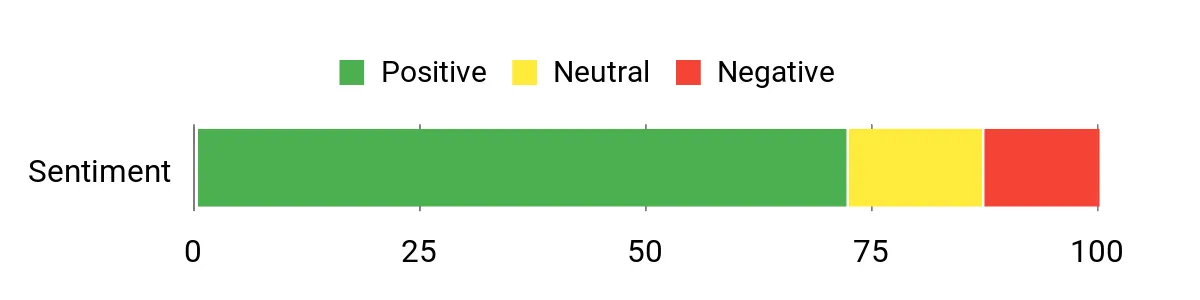
The original source describes the Pebble Pro as a major upgrade over laptop speakers, with praise for its small footprint and simple connections. Treat the chart below as a retained source snapshot, not a live measure of current Amazon reviews.
Source Sentiment: Positive
When It Helps
| Situation | How It Helps |
|---|---|
| Small Desk Setup | The compact enclosures leave more room for your monitor, keyboard, and work gear. |
| Everyday Listening | Voices and music sound fuller than typical built-in laptop or monitor speakers. |
| Casual Gaming | Stereo separation makes game effects easier to follow without a complex setup. |
| Phone or Tablet Audio | Bluetooth lets you play audio without moving the wired PC connection. |
Durability and Limitations
The lightweight plastic cabinets are suitable for normal home or office use. Keep them on a stable surface and do not treat them as portable outdoor speakers. Their compact size also limits deep bass compared with systems that include a separate subwoofer.
Key Benefits
- Small footprint for tight desks
- USB, Bluetooth, and 3.5mm connection options
- Simple front controls and RGB lighting
- Easy upgrade from built-in laptop or monitor audio
The G560 suits a dedicated gaming desk where you want stronger bass and a wider presentation than compact stereo speakers can provide. The separate subwoofer adds weight to games, movies, and bass-heavy music, while LIGHTSYNC lighting can match supported content and your desk theme.
Who should buy it: You want a full 2.1 PC setup, enjoy RGB, and have floor space for the subwoofer. Who should skip it: You live in a shared space, prefer neutral studio-style sound, or need a compact system with minimal cables.
Source Feedback Snapshot
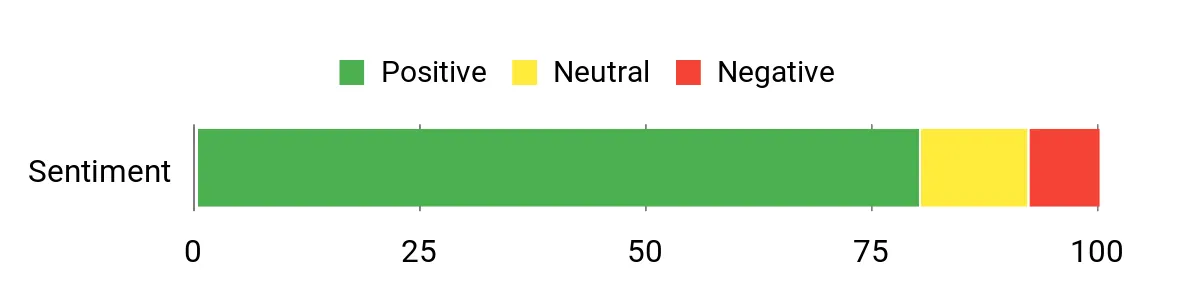
The source highlights deep bass, clear mids, simple setup, and reactive lighting. Bass strength and software behavior can depend on placement and settings, so use the chart as a source snapshot rather than a current retailer-wide rating.
Source Sentiment: Positive
When It Helps
| Situation | How It Helps |
|---|---|
| Action Games | The subwoofer adds impact to effects, while the satellites provide a broader stereo image. |
| Movies and Streaming | The 2.1 layout gives soundtracks and effects more weight than compact 2.0 speakers. |
| RGB Desk Builds | LIGHTSYNC adds rear-projected lighting that can react to supported games and audio. |
| Multiple Audio Sources | USB, Bluetooth, and 3.5mm input give you several ways to connect. |
Durability and Limitations
The satellites and substantial subwoofer are designed for a stationary desk setup. The system takes more room than compact speakers, and the strongest software and surround features are intended for compatible PC use. Check your available floor space before buying.
Key Benefits
- 2.1 layout with a dedicated down-firing subwoofer
- LIGHTSYNC RGB for a gaming-focused setup
- USB, Bluetooth, and 3.5mm connectivity
- DTS:X Ultra processing for supported PC configurations
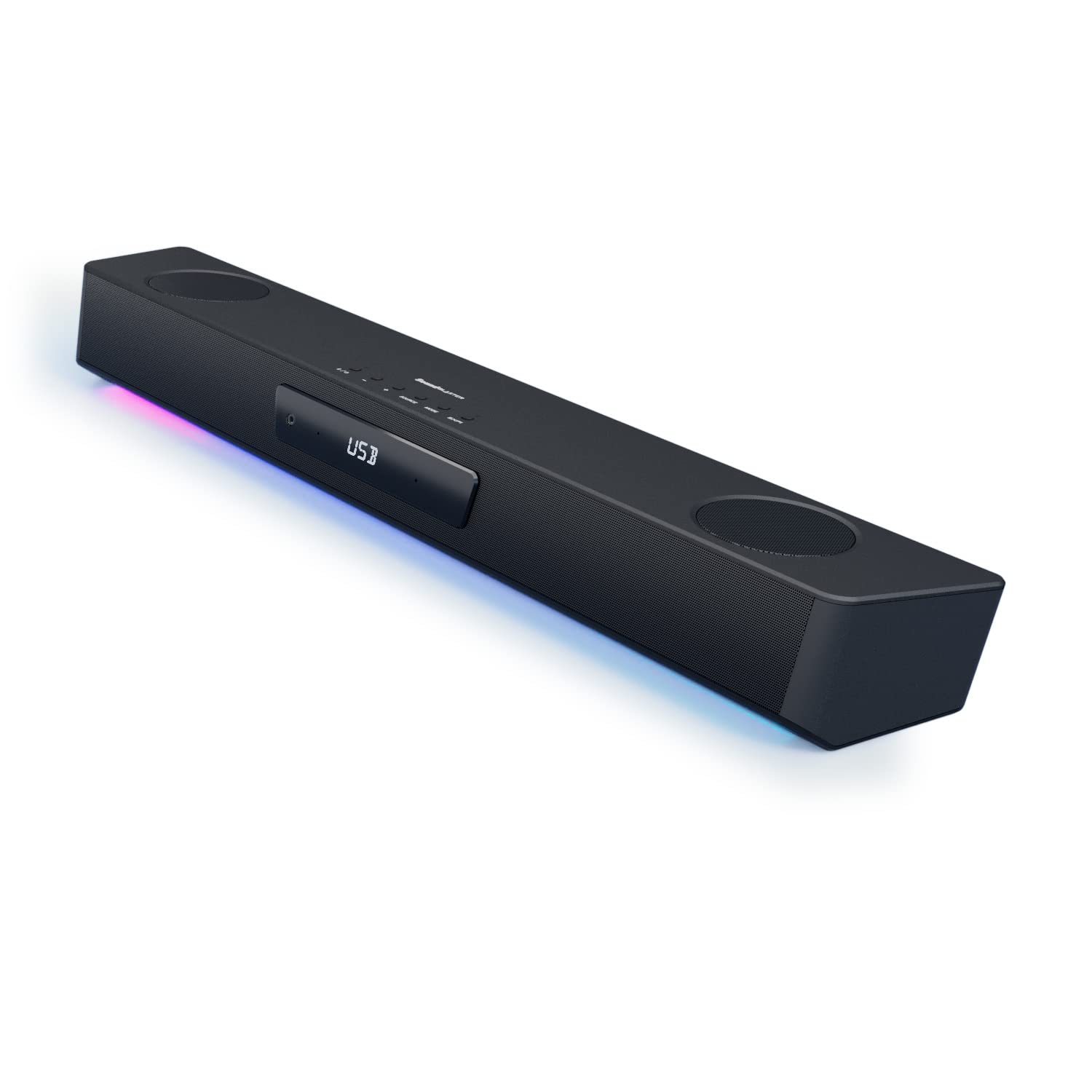
The Katana SE is a practical choice when you want wider desktop audio but do not want a speaker cabinet on each side of your monitor. It sits below many displays and keeps the main sound source centered. The multi-driver design and processing can make games and movies feel broader than basic monitor speakers.
Who should buy it: You want a tidy soundbar layout, several wired inputs, and software-based sound customization. Who should skip it: You want true rear-channel surround, a separate subwoofer, or a simple system with no software learning curve.
Source Feedback Snapshot
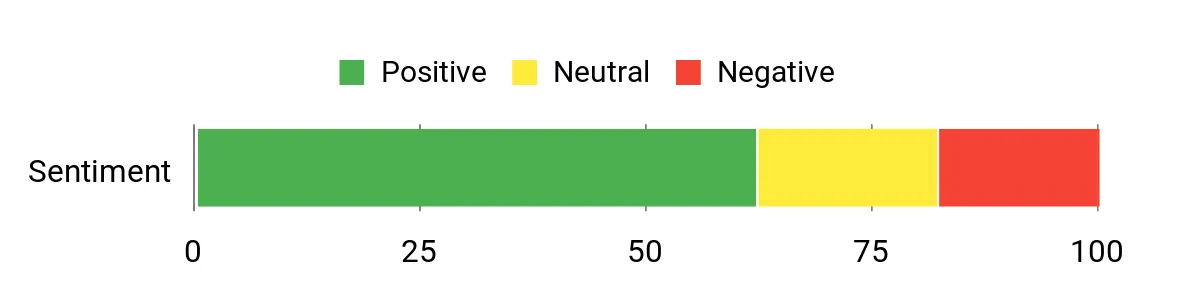
The source notes a broad presentation, useful midrange clarity, and convenient Bluetooth. It also says the surround settings may need adjustment. The chart remains from the original source and is not a live review summary.
Source Sentiment: Positive
When It Helps
| Situation | How It Helps |
|---|---|
| Tight Side-to-Side Space | The bar fits below a monitor and avoids separate left and right cabinets. |
| Story Games and Movies | A wide front soundstage gives dialogue, effects, and music more presence. |
| Mixed Device Setup | USB, optical, Bluetooth, and other supported inputs make source switching easier. |
| Headphone Use | Creative processing and front-access controls can support a desk-centered audio workflow. |
Durability and Limitations
The long tabletop enclosure is made for a permanent home or office setup. Check the space between your monitor stand and keyboard before buying. Its surround effects are processed from the front soundbar, so they do not replace a true multi-speaker rear-channel system.
Key Benefits
- Monitor-friendly soundbar layout
- Multi-driver, bi-amplified design
- USB, optical, Bluetooth, and other desk-friendly inputs
- RGB lighting and Creative audio customization
The Nommo V2 Pro is for buyers who want a premium 2.1 gaming setup with strong bass, large full-range drivers, and PC-based spatial processing. The wireless link between the speakers and subwoofer can simplify placement, although the system still needs power and enough physical space.
Who should buy it: You use a Windows PC, value spatial processing, and want a premium gaming-focused design. Who should skip it: You mainly use macOS or consoles, need true 5.1 speakers, or do not want to depend on companion software for advanced features.
Source Feedback Snapshot
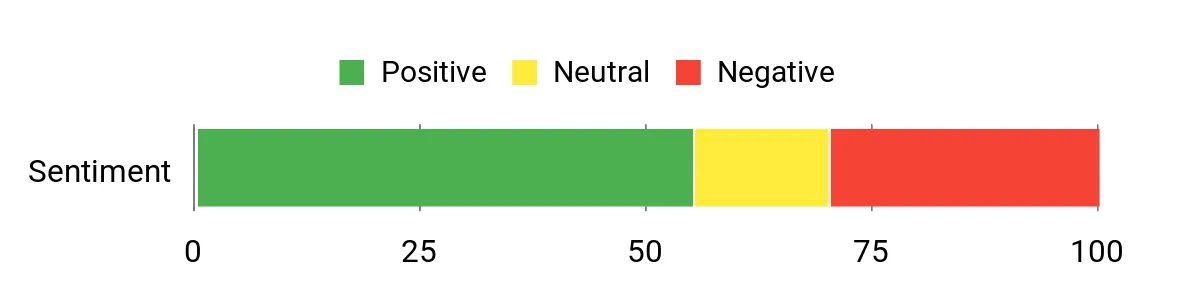
The source reports praise for a wide soundstage and strong bass, along with some complaints about software and connectivity. The retained chart is a source snapshot rather than a live analysis of current reviews.
Source Sentiment: Mixed
When It Helps
| Situation | How It Helps |
|---|---|
| Windows Gaming | THX Spatial Audio through Razer Synapse can create a wider virtual soundstage. |
| Bass-Heavy Media | The separate wireless down-firing subwoofer adds low-frequency impact. |
| RGB Gaming Setup | Rear-projection Chroma lighting adds ambient effects behind the speakers. |
| Phone or Switch Playback | Bluetooth supports simple wireless audio, but PC-only spatial features do not carry over. |
Durability and Limitations
The aluminum phase plugs and substantial speaker design suit a permanent premium desk setup. THX Spatial Audio requires a compatible Windows PC and Razer Synapse. Console and Bluetooth use do not provide the same full feature set.
Key Benefits
- Full-range satellite speakers with aluminum phase plugs
- Wireless down-firing subwoofer
- THX Spatial Audio for supported Windows PC use
- USB, Bluetooth, Chroma RGB, and included wireless control pod
The Arena 9 is the clearest choice here when you want real front, center, and rear speaker channels instead of virtual surround. The rear speakers connect wirelessly to the subwoofer, which reduces long signal cables across the room. You still need enough space, suitable power access, and correct speaker placement.
Who should buy it: You have a dedicated gaming room and want true 5.1 over a compatible USB setup. Who should skip it: You have a small desk, cannot place rear speakers behind you, or prefer a fast plug-and-play stereo system.
Source Feedback Snapshot
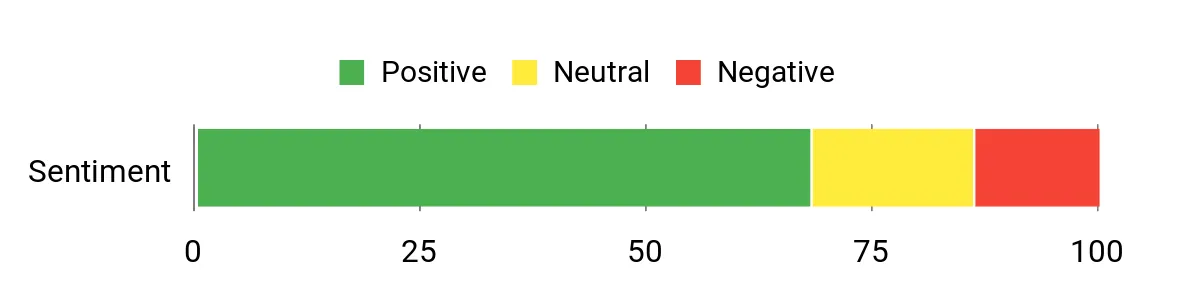
The source praises surround separation, bass weight, and reduced front-to-rear cable clutter. It also notes that the system needs space and setup time. The chart below is retained from the original source and is not a live review total.
Source Sentiment: Positive
When It Helps
| Situation | How It Helps |
|---|---|
| True Surround Gaming | Separate front, center, and rear channels place compatible audio around your seating position. |
| Dialogue-Heavy Games | A dedicated center channel can keep voices anchored near the screen. |
| Large Desk or Gaming Room | The multi-speaker layout can fill more space than a compact stereo pair. |
| Flexible Sources | USB, Bluetooth, optical, and 3.5mm inputs support several device types. |
Durability and Limitations
The Arena 9 is a stationary system with multiple cabinets, a control pod, and a large subwoofer. The rear speakers connect wirelessly to the subwoofer, but they are not completely cable-free. Confirm power and placement needs before buying.
Key Benefits
- True 5.1 speaker layout over a compatible USB connection
- Wireless audio link for the two rear speakers
- Dedicated center channel and 6.5-inch subwoofer
- USB, Bluetooth, optical, and 3.5mm connectivity
How to Choose the Right PC Speakers
Match the Speaker Format to Your Space
A 2.0 system is easiest to place. A 2.1 system adds a subwoofer for stronger bass. A soundbar clears the area beside your monitor. A 5.1 system offers real surround only when you can place rear speakers behind or beside your seating position.
Check Connections Before Features
USB audio can provide the simplest PC connection, while Bluetooth helps with phones and tablets. Optical and 3.5mm inputs can support TVs, monitors, consoles, and older devices. Do not assume every software feature works through every input.
Understand Virtual and True Surround
Virtual surround uses processing to create a wider sense of direction from front speakers. True 5.1 uses separate physical channels around you. Virtual processing is easier to install, but it cannot fully copy a correctly placed multi-speaker system.
Plan for Bass and Neighbors
A separate subwoofer can improve impact, but placement affects how smooth or boomy it sounds. Put it on the floor, avoid trapping it tightly in a cabinet, and lower the bass when you share walls or floors with other people.
FAQ
How Do I Choose the Right PC Speakers for My Desk?
Start with your available space and main use. Choose compact 2.0 speakers for everyday work and media, a 2.1 system for stronger bass, a soundbar for a clean monitor-centered layout, or 5.1 when you can place rear channels correctly. Then confirm your required inputs and operating-system support.
Will These Speakers Work With My Laptop, Phone, or Console?
They may work through USB, Bluetooth, optical, or 3.5mm audio, but support varies by product and device. Advanced surround, RGB, and EQ features often require Windows software. Confirm the connection and feature support for your exact laptop, console, phone, monitor, or TV before buying.
How Can I Get Better Sound From Desktop Speakers?
Place left and right speakers at similar distances from your ears and angle them toward you. Keep a soundbar centered below the monitor. Put a subwoofer on the floor and adjust its level to avoid boomy bass. Update supported software or firmware, then make small EQ changes instead of extreme boosts.
Do I Need a Subwoofer for PC Gaming?
No. A subwoofer adds impact to explosions, music, and movie effects, but compact stereo speakers can still provide clear dialogue and useful left-right separation. Choose a subwoofer only when you have room and can use the extra bass without disturbing others.
Is True 5.1 Better Than Virtual Surround?
True 5.1 can provide more convincing front-to-back placement when the game, connection, and room setup support it. Virtual surround is easier to install and works better on small desks. The best choice depends on your space and how much setup work you accept.
Final Recommendation
Best simple choice: Creative Pebble Pro for compact everyday use.
Best balanced gaming choice: Logitech G560 for a 2.1 PC setup with strong bass and RGB.
Best clean desk layout: Sound Blaster Katana SE for a monitor-centered soundbar setup.
Best premium 2.1 choice: Razer Nommo V2 Pro for Windows-based spatial audio and a wireless subwoofer link.
Best true surround choice: SteelSeries Arena 9 when you have room for a full 5.1 system.
| Product Name | Image | Audio Format | Main Connections | Best For |
|---|---|---|---|---|
| Creative Labs Pebble PRO Minimalist USB-C Computer Speakers |
 |
2.0 stereo | USB, Bluetooth, 3.5mm | Small desks and simple daily use |
| Logitech G560 PC Gaming Speaker System |
 |
2.1 with virtual surround processing | USB, Bluetooth, 3.5mm | PC gaming, movies, and bass |
| Creative Sound Blaster Katana SE Gaming Soundbar |
 |
Front soundbar with virtual surround | USB, Bluetooth, optical, 3.5mm | A clean monitor-centered setup |
| Razer Nommo V2 Pro Gaming Speakers |
 |
2.1 with PC-based THX Spatial Audio | USB, Bluetooth | Premium Windows gaming |
| SteelSeries Arena 9 Illuminated 5.1 Desktop Gaming Speakers |
 |
True 5.1 | USB, Bluetooth, optical, 3.5mm | Dedicated gaming rooms |