You want a massive, TV-like image without moving furniture to the back of the room or installing a ceiling mount. Ultra short throw laser projectors can create a large picture from close to the wall, but the best choice depends on room light, screen type, placement, streaming needs, and how much setup flexibility you want.
This guide compares three relevant UST laser projectors: the bright Epson LS650, the bundled-screen Hisense L9G, and the HDR-focused Formovie Theater. Use the quick verdicts, limitations, and comparison table to match the projector to your room rather than choosing by brightness alone.
Affiliate disclosure:. As an Amazon Associate I earn from qualifying purchases. This roundup is reader-supported. When you click an Amazon link, we may earn a referral commission from qualifying purchases at no extra cost to you.
Quick Verdict
Choose the Epson LS650 when brightness, easy tabletop placement, and an uncomplicated living-room setup matter most. Choose the Hisense L9G when you specifically want a matched 120-inch ALR screen and an all-in-one package, while understanding that it is an older-generation model. Choose the Formovie Theater when Dolby Vision, broad HDR support, and cinematic viewing in a light-controlled room matter more than maximum rated brightness.
Top Picks
|
Category |
Product |
Why It Fits |
|---|---|---|
|
🏆 Best for Brighter Living Rooms |
High rated color and white brightness, compact UST placement, and built-in Android TV. |
|
|
💎 Best Bundled-Screen Package |
Projector, 120-inch ALR screen, smart platform, and built-in audio in one older-generation package. |
|
|
🎯 Best for Cinematic HDR |
Dolby Vision, HDR10+, a triple-laser light engine, and support for images up to 150 inches. |
How We Chose These Projectors
We compared the factors that most affect day-to-day ownership: manufacturer-rated brightness, color and HDR support, throw distance, supported image size, screen requirements, smart-platform features, audio, connectivity, setup demands, warranty considerations, and overall fit for common living-room and home-cinema use. Brightness figures are not always reported under the same measurement standard, so they should be treated as directional rather than perfectly interchangeable.
This is an editorial comparison based on published specifications, product listings, and recurring buyer concerns. It does not claim hands-on testing of every unit. Always confirm the exact model, included screen, seller, return policy, app support, and warranty coverage before ordering.
The Epson LS650 is the easiest recommendation here for a shared living room. Its 3-chip 3LCD system is designed to deliver equal rated color and white brightness, and the UST layout lets you place it close to the wall instead of running cables across the room.
Its 4K PRO-UHD label refers to Epson’s pixel-shifting and image-processing system rather than a native 4K imaging panel. That distinction does not make it a poor choice, but it should be understood before comparing it with DLP-based 4K UHD projectors.
Android TV, the Epson Setting Assistant app, and Yamaha-tuned speakers reduce the amount of extra equipment needed on day one. For the strongest daytime contrast, pair it with a properly sized UST ALR screen and avoid direct sunlight on the image.
Who should buy it: Viewers who watch sports, streaming TV, and movies in a multipurpose room and want a bright, low-maintenance UST setup.
Who should avoid it: Buyers who need native 4K panels, extensive HDMI connectivity, Dolby Vision, or the deepest possible black levels in a dedicated dark theater.
What People Say
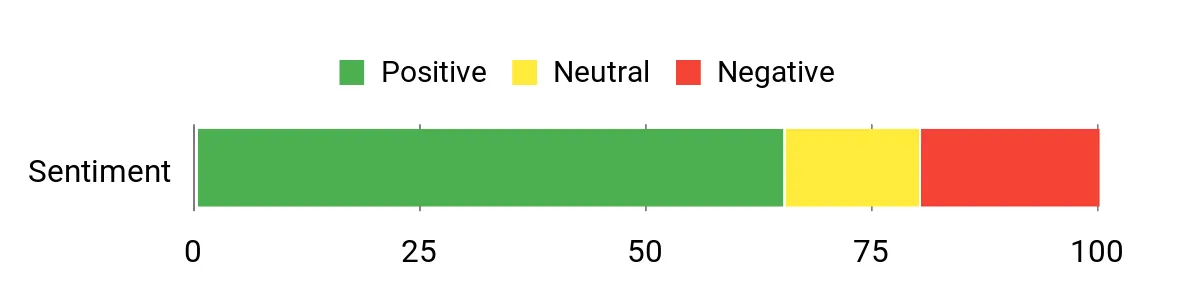
Recurring buyer-feedback themes include strong brightness, vivid color, convenient streaming, and useful built-in audio. Reported drawbacks include occasional interface sluggishness, motion-processing settings that may need adjustment, and alignment feet that can feel finicky.
Overall Sentiment: Mixed to positive. This is a qualitative snapshot, not a representative survey.
|
Pros |
Cons |
|---|---|
|
✅ High rated color and white brightness for a living-room projector |
❌ Android TV responsiveness can feel slow to some users |
|
✅ True ultra short throw placement close to the wall |
❌ Motion smoothing may need to be reduced or disabled |
|
✅ 3-chip 3LCD avoids the single-chip DLP rainbow effect |
❌ Only two HDMI inputs may be limiting for complex setups |
|
✅ Yamaha-tuned 2.1 speakers are usable out of the box |
❌ 4K PRO-UHD uses pixel shifting rather than a native 4K panel |
|
✅ Rated laser life of up to 20,000 hours reduces lamp maintenance |
Where It Works Best
|
Situation |
How It Helps |
|---|---|
|
Brighter Living Room |
The high rated brightness gives the image more punch with moderate ambient light, especially when paired with a UST ALR screen. |
|
Family Movie Night |
The large image, built-in streaming, and integrated speakers make it easier to start watching without a full AV rack. |
|
Casual Gaming |
Big visuals add immersion for console games, though competitive players should confirm input-lag expectations and supported refresh rates. |
Look & Fit
The LS650 has a low, boxy profile in black that can sit on a media console. Measure the cabinet depth, wall distance, and screen height before ordering because small placement changes can noticeably alter the image position.
Key Benefits
- 3,600 lumens of rated color and white brightness
- 60- to 120-inch image range from ultra short throw placement
- Android TV and Epson Setting Assistant for easier setup
- Yamaha-tuned 2.1 sound for a usable all-in-one start
- Laser light source rated for up to 20,000 hours
Check Product Details on Amazon
The Hisense L9G stands out because the package is built around a matched 120-inch ALR screen. That removes much of the guesswork involved in pairing a UST projector with the right screen material, and it helps the image retain more contrast in a normal living room than it would on a plain wall.
The triple-laser engine is designed for a wide color gamut, while Android TV, built-in voice assistants, and 40W audio make the system feel closer to a television replacement than a bare projector. The fixed 120-inch package also means your room and furniture must fit the system rather than the other way around.
This is an older-generation Hisense model. Before ordering, verify that the listing includes the correct 120-inch screen, confirm who provides warranty service, inspect the return policy, and compare the package with newer Hisense UST options.
Who should buy it: Viewers who want a large, integrated living-room package and value an included ALR screen more than the latest gaming or smart-TV hardware.
Who should avoid it: Buyers who need flexible screen sizing, the newest HDMI and gaming features, or manufacturer-direct availability with clearly current support terms.
What People Say
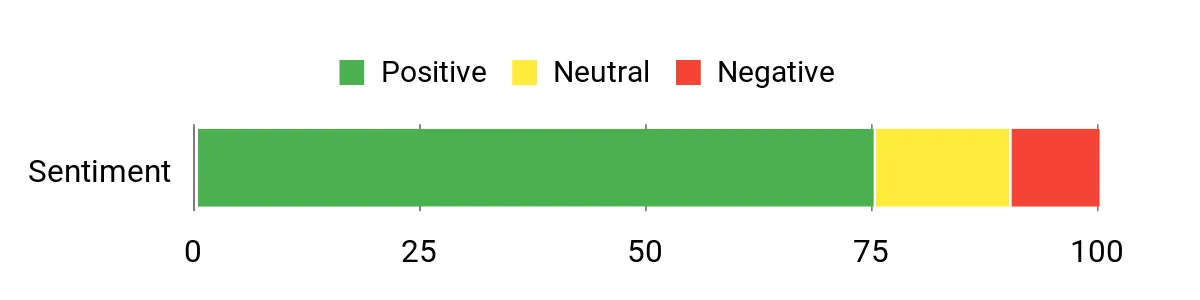
Commonly reported strengths include saturated color, the impact of the included ALR screen, and the convenience of built-in audio and streaming. Common cautions center on the system’s physical size, careful screen alignment, and the need to verify support for an older model.
Overall Sentiment: Generally positive, with ownership value depending heavily on the seller, included screen, and warranty terms.
|
Pros |
Cons |
|---|---|
|
✅ TriChroma triple-laser engine supports a wide color gamut |
❌ Older-generation model with availability and support that may vary by seller |
|
✅ Matched 120-inch ALR screen is included with the package |
❌ Fixed-size package offers less placement flexibility |
|
✅ Built-in 40W audio supports a simpler setup |
❌ Projector and screen require substantial wall and console space |
|
✅ Android TV and voice assistants provide integrated streaming |
❌ Precise alignment is still necessary for uniform geometry |
|
✅ All-in-one package reduces screen-selection guesswork |
Where It Shines
|
Situation |
How It Helps |
|---|---|
|
Living Room With Ambient Light |
The included UST ALR screen helps reject overhead light and preserve more image contrast than a plain wall. |
|
Single-Package Shopping |
You receive a projector and matched screen together, reducing compatibility research and separate shipping decisions. |
|
Group Movie or Sports Night |
The 120-inch picture and built-in audio create a large shared presentation without requiring speakers immediately. |
Look & Fit
The L9G has a low, wide projector chassis and a large fixed screen. Measure the full screen width, viewing distance, media-console depth, and projector-to-wall spacing before purchase.
Key Benefits
- TriChroma triple-laser light engine for broad color coverage
- Matched 120-inch UST ALR screen included with the package
- Integrated Android TV, voice control, and 40W audio
- 3,000-lumen manufacturer brightness rating
- Designed as a coordinated Laser TV system rather than a projector-only purchase
Check Product Details on Amazon
The Formovie Theater is the most cinema-oriented option in this comparison. Its support for Dolby Vision, HDR10+, HDR10, and HLG gives it broad HDR compatibility, while the 80- to 150-inch image range provides more sizing flexibility than the two 120-inch-focused alternatives.
Its official 1,800 ISO-lumen rating should not be compared as though it were measured identically to every competitor’s brightness claim. In practical terms, the Formovie is better suited to a dim or light-controlled room than to a sunlit living room.
Android TV 11, Google Assistant, and built-in speakers reduce setup friction, but app certification can vary. Confirm that the streaming services you use most are supported natively or plan to connect an external streaming device. Also verify seller-based warranty and service coverage before buying.
Who should buy it: Movie fans who value Dolby Vision, wide HDR support, a large image range, and strong built-in sound in a controlled-light room.
Who should avoid it: Buyers who need the brightest daytime image, guaranteed native support for every streaming app, or extensive local service coverage.
What People Say
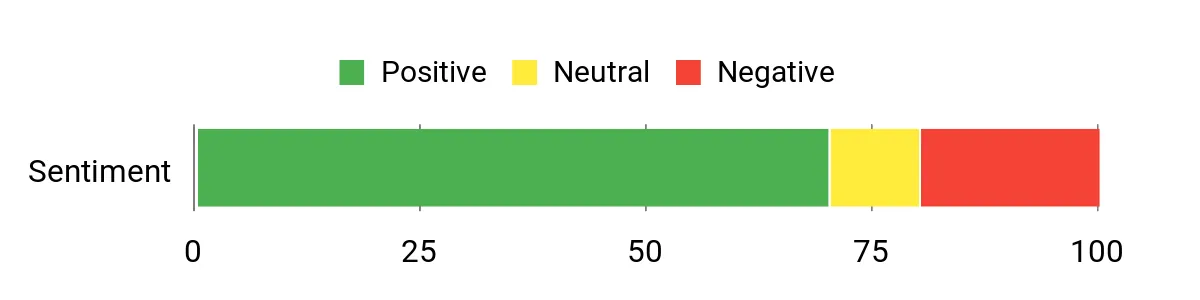
Recurring positive themes include contrast, color, HDR performance, large-screen immersion, and surprisingly capable onboard audio. Recurring concerns include software lag, remote-control problems, hardware reliability anecdotes, brightness expectations, and variable service experiences.
Overall Sentiment: Mixed to positive, with warranty and seller support playing an important role in the purchase decision.
|
Pros |
Cons |
|---|---|
|
✅ Dolby Vision plus HDR10+, HDR10, and HLG support |
❌ Lower official brightness rating than the other two models |
|
✅ Triple-laser light engine and wide BT.2020 color coverage claim |
❌ Software, remote, and reliability complaints appear in some buyer feedback |
|
✅ Supports images from 80 to 150 inches |
❌ Streaming-app support should be confirmed before purchase |
|
✅ Dual 15W speakers with Dolby Atmos support |
❌ Warranty and service experience can depend on seller and region |
|
✅ Tabletop UST design simplifies placement compared with long-throw projection |
Where It Works
|
Situation |
How It Helps |
|---|---|
|
Light-Controlled Home Cinema |
Broad HDR support and strong contrast are easier to appreciate when room light is controlled. |
|
Story-Driven Console Gaming |
The large image and vivid HDR presentation can improve immersion, though competitive players should verify latency and refresh-rate needs. |
|
Flexible Screen Sizing |
The 80- to 150-inch range gives you more freedom to match the image to the wall and seating distance. |
Look & Fit
The Theater uses a low, modern chassis in a neutral finish. As with every UST projector, it needs a flat wall or tensioned screen, a stable cabinet, and careful alignment to prevent visible geometry distortion.
Key Benefits
- Dolby Vision, HDR10+, HDR10, and HLG support
- Official 1,800 ISO-lumen brightness rating
- 80- to 150-inch image range for flexible sizing
- Android TV 11, Google Assistant, and Chromecast support
- Dual 15W speakers with Dolby Atmos support
Check Product Details on Amazon
Before You Buy a UST Laser Projector
|
Check |
Why It Matters |
|---|---|
|
Screen type and size |
A UST ALR screen can improve contrast in ambient light, while a fixed-size bundle may limit room flexibility. |
|
Cabinet depth and wall distance |
Even a few inches can change image height and size, so measure from the projector body and lens position. |
|
Wall flatness |
UST projection exaggerates ripples, texture, and uneven surfaces more than a conventional projector. |
|
Streaming app support |
Built-in Android TV does not guarantee every service is certified; an external streamer may be necessary. |
|
Seller and warranty |
Older or imported models may have different return, repair, and replacement terms. |
FAQ
Are UST Projectors Good in Bright Rooms?
They can work in moderately bright rooms, but no projector maintains television-like black levels in strong ambient light. Higher brightness helps, and a properly designed UST ALR screen can reject some overhead light, but direct sunlight on the screen will still wash out the image. For daytime viewing, prioritize screen quality, room-light control, and projector brightness together.
Do You Need a Special Screen?
A special screen is not mandatory, but a tensioned UST ALR screen is usually the best choice for a living room. It helps control light coming from above and keeps the surface flat. A smooth, carefully prepared wall can work in a dark room, but wall texture and waviness become more visible because the projector throws light at a steep angle.
Can You Compare ANSI, ISO, and Manufacturer Lumens Directly?
Not perfectly. ANSI and ISO measurements follow defined methods, while some product pages use a general lumen figure without enough detail. Treat brightness numbers as useful guidance, but compare measurement standards, independent reviews, screen size, picture mode, and room conditions before assuming one projector will look proportionally brighter than another.
What Should You Know About Setup and Maintenance?
Use the manufacturer’s throw-distance chart, level the projector carefully, and avoid relying heavily on digital keystone correction because it can reduce usable resolution. Keep vents clear, update firmware and apps, and protect the lens area from dust. Laser light sources are long-lived, but the projector still contains fans, electronics, and imaging components that may require service.
Are These Projectors Good for Gaming?
They can be excellent for immersive casual and single-player gaming, but competitive players should verify input lag, HDMI bandwidth, supported refresh rates, variable-refresh-rate support, and game-mode behavior. A large image does not automatically mean low latency.
Wrapping Up
Choose the Epson LS650 when you want the brightest and simplest living-room option in this group. Choose the Hisense L9G when the included 120-inch ALR screen and coordinated package are the main attraction, while carefully checking seller support for this older model. Choose the Formovie Theater when broad HDR support, Dolby Vision, and a flexible 80- to 150-inch image are more important than maximum brightness.
Your room matters as much as the projector. Measure the cabinet and wall, decide whether you need a UST ALR screen, confirm your streaming and gaming requirements, and check current seller and warranty terms before buying.
| Epson EpiqVision Ultra LS650 | Hisense 120L9G-CINE120A Laser TV | Formovie Theater Ultra Short Throw | |
|---|---|---|---|
 |
 |
 |
|
| Manufacturer-Rated Brightness | 3,600 color and white lumens | 3,000 lumens | 1,800 ISO lumens |
| Resolution Wording | 4K PRO-UHD with pixel shifting | 4K UHD | 4K UHD |
| Supported Image Size | 60 to 120 inches | Matched 120-inch package | 80 to 150 inches |
| Screen Included | No | Yes, 120-inch ALR screen | No |
| Best For | Brighter multipurpose living rooms | Turnkey 120-inch Laser TV setup | HDR-focused home cinema |
| Main Limitation | Pixel-shifted 4K, two HDMI inputs, no Dolby Vision | Older model, fixed package size, seller support varies | Lower brightness rating and variable app support |
| Special Highlights |
|
|
|
| Check Amazon | Check Amazon | Check Amazon |
Final recommendation: Start with room light and screen plans, then choose features. The Epson LS650 is the practical bright-room pick, the Hisense L9G is the bundled-screen option for buyers comfortable with an older model, and the Formovie Theater is the HDR-first choice for controlled lighting.
This roundup is reader-supported. When you click through links, we may earn a referral commission on qualifying purchases.
