As an Amazon Associate, GoMyReview earns from qualifying purchases. This doesn’t affect our recommendations.
A USB-C PD charger for DJI drones needs to match your drone’s charging wattage: about 30W for a Mini 4 Pro, 65W for a Mini 5 Pro, Avata 2 or Air 3S, and 100W for the fastest Air 3S or Mavic 4 Pro charging over USB-C. Any good USB Power Delivery wall charger that reaches that wattage on a single port will work.
Below is a model-by-model wattage table based on DJI’s published specs, followed by six 100W chargers: four general-purpose GaN chargers and two DJI-focused adapters.
Charging lots of batteries? Pair your charger with a DJI Mini charging hub, or see our Air 3S and Mavic 4 Pro charger guide for DJI’s higher-wattage options.
What USB-C PD Wattage Does Each DJI Drone Need?
| DJI model | Recommended PD wattage | DJI-listed charge time |
|---|---|---|
| Mini 4 Pro / Mini 3 series | 30W PD | About 58 min per battery in the Two-Way Hub; 70 min in the drone |
| Mini 5 Pro | 65W (hub input up to 15V/4.3A) | About 46 min per battery in the 2WAY hub with a 65W charger |
| Avata 2 | 65W PD | About 45 min in the Charging Hub; 88 min in the drone (30W max) |
| Air 3 / Air 3S | 65W to 100W PD | About 80 min with 65W; about 60 min with 100W + hub |
| Mavic 4 Pro | 100W PD (USB-C max) | About 80 min per battery with 100W; 115 min in the drone (65W max) |
| DJI RC 2 controller | At least 27W (9V/3A) | About 1.5 hours |
Figures are from DJI spec pages for each model (RC 2 from retailer spec sheets) and are measured at room temperature. A higher-wattage charger is safe: the drone negotiates only the power it supports.
Quick Comparison
| Charger | Image | Total output | Ports | Best for |
|---|---|---|---|---|
| Anker Prime 100W GaN Wall Charger |
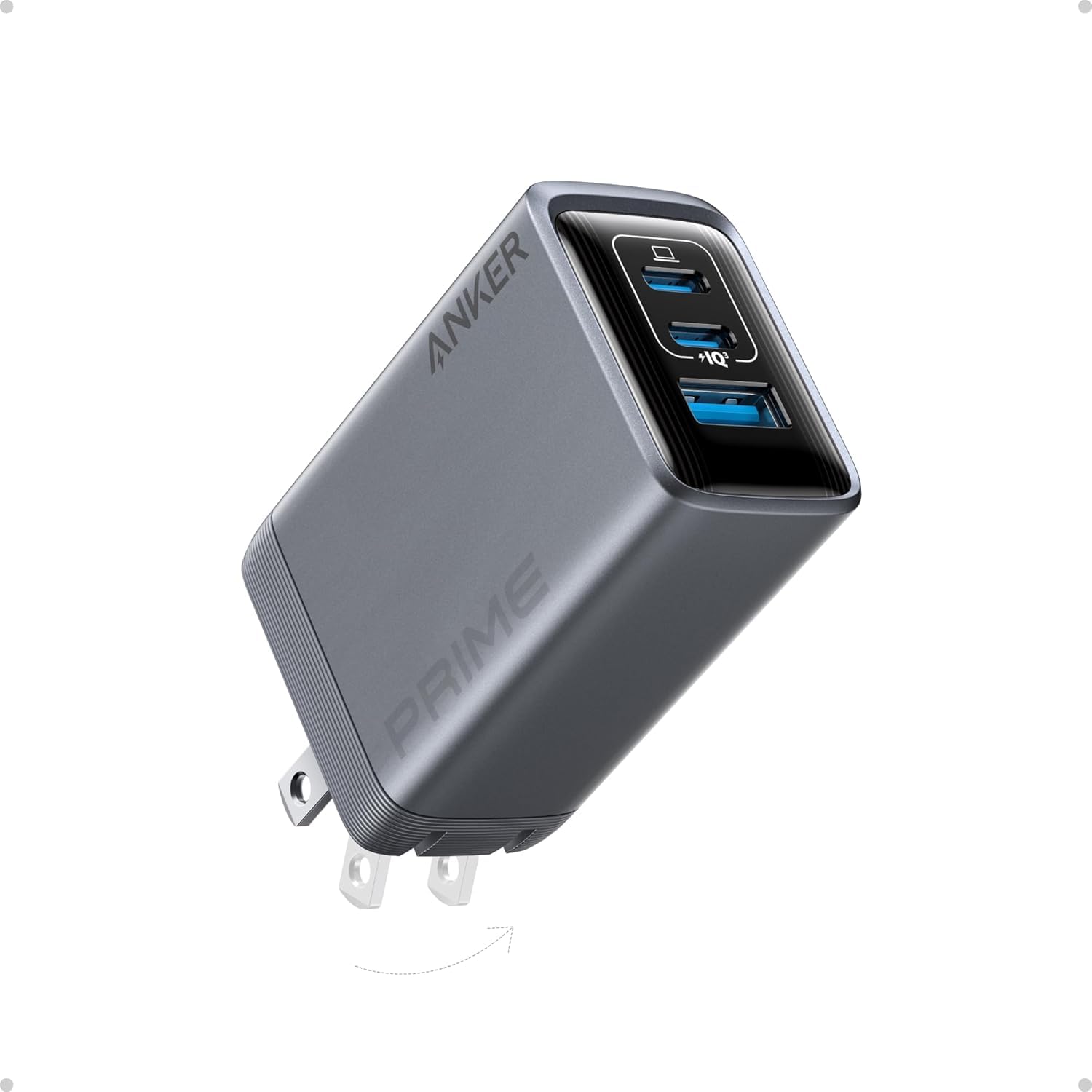 |
100W | 3 (per listing) | Drone battery + RC + phone |
| Anker 100W Foldable USB-C Charger |
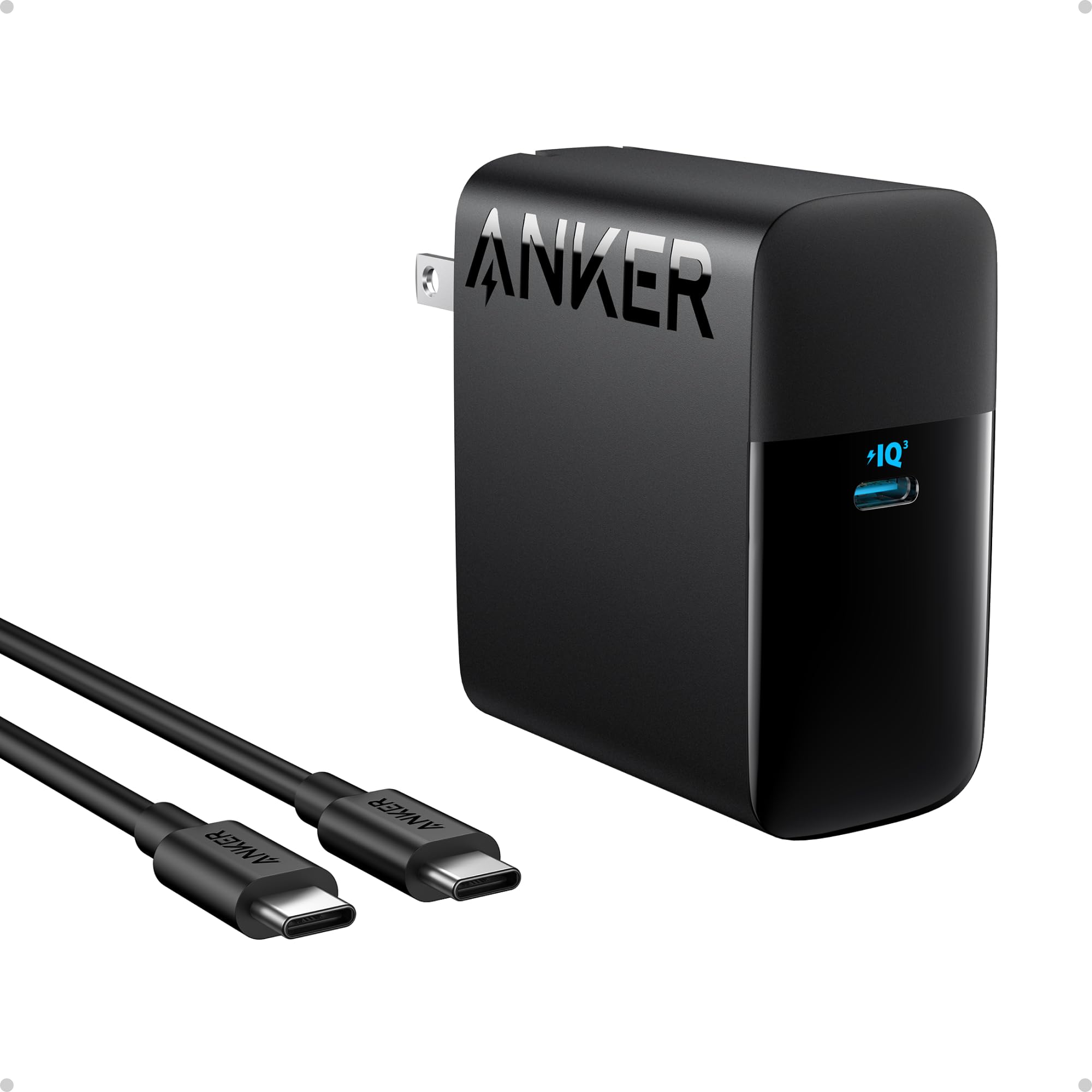 |
100W | 1, cable included (per listing) | Air 3S or Mavic 4 Pro at full speed |
| UGREEN Nexode 100W GaN Charger |
 |
100W | 4: 3 USB-C, 1 USB-A (per listing) | Charging a whole kit at once |
| Satechi 100W USB-C PD Compact GaN Charger |
 |
100W | 1 USB-C (per listing) | Smallest full-power brick |
| LKTOP 100W USB-C Power Adapter for DJI |
 |
100W (per listing) | 2 USB-C (per listing) | DJI-focused field charger |
| LKTOP 100W Replacement for DJI USB-C Adapter |
 |
100W (per listing) | 2 outputs, built-in cable (per listing) | Replacing a lost DJI 100W adapter |
Anker Prime 100W GaN Wall Charger
A three-port GaN charger that can send up to 100W to one device or split power across several, per the listing. It is a good single brick for charging a drone battery, the controller and your phone together.
DJI fit: Full speed for one Air 3S or Mavic 4 Pro device on one port; enough for a Mini hub plus RC at the same time.
- Pro: Three ports in a compact GaN body
- Pro: 100W available on a single port
- Limitation: Per-port power drops when several devices are plugged in
Anker 100W Foldable USB-C Charger
A single-port 100W charger with a foldable plug and an included USB-C cable, according to the listing. Single-port chargers never split power, so your DJI hub always gets the full output.
DJI fit: Ideal for the Air 3S Battery Charging Hub or Mavic 4 Pro hub over USB-C.
- Pro: Full 100W to one device
- Pro: Cable included
- Limitation: Only one device at a time
UGREEN Nexode 100W GaN Charger
UGREEN’s four-port Nexode (three USB-C, one USB-A) shares 100W across its ports, per the listing. It suits pilots charging a Mini hub, controller, goggles and phone overnight.
DJI fit: Great for Mini and Avata kits; for Air 3S or Mavic 4 Pro, keep other ports free to get the full 100W.
- Pro: Four ports
- Pro: Foldable plug
- Limitation: Power is shared, so simultaneous charging is slower
Satechi 100W USB-C PD Compact GaN Charger
Satechi’s compact GaN charger delivers up to 100W from one USB-C port, per the listing. It is the tidiest option if you only need to power one hub at a time.
DJI fit: Any DJI drone listed above, one device at a time.
- Pro: Small for its wattage
- Pro: No power splitting
- Limitation: Single port
- Limitation: Cable may be sold separately (check listing)
LKTOP 100W USB-C Power Adapter for DJI
LKTOP markets this two-port adapter specifically for DJI drones such as the Avata and Mavic series, per the listing. It is effectively a third-party take on DJI’s own 100W USB-C adapter.
DJI fit: Avata 2, Air 3S and Mavic 4 Pro hubs; check the listing for your exact model.
- Pro: Two USB-C outputs for battery and controller
- Pro: Sized for a drone bag
- Limitation: Third-party, not DJI-certified
- Limitation: Power split rules not always clear on the listing
LKTOP 100W Replacement for DJI USB-C Adapter
Sold as a replacement for DJI’s 100W USB-C Power Adapter, this unit has two outputs and a built-in cable, per the listing. It suits pilots who lost the original adapter.
DJI fit: DJI drones and RC controllers that charge over USB-C, per the listing.
- Pro: Built-in cable means one less thing to pack
- Pro: Two outputs
- Limitation: Built-in cable cannot be replaced if damaged
- Limitation: Third-party
How to Choose a USB-C PD Charger for DJI Drones
- Find your wattage in the table above.
- Check single-port output. The headline wattage is often the total; look for the maximum on one port.
- Use a 5A cable for anything above 60W.
- Look for PD support (9V, 15V and 20V profiles). DJI hubs and controllers negotiate these automatically.
- Count your devices. Multi-port chargers are convenient, but split their output.
Charging Safety
- DJI lists a 5 to 40°C charging range for its batteries; let packs cool after flights.
- Charge on a hard, non-flammable surface and do not leave batteries charging unattended.
- Keep spare batteries in a LiPo safety bag for storage and travel.
FAQ
Can I charge a DJI drone with any USB-C PD charger?
Most current DJI drones, hubs and controllers charge from a standard USB-C Power Delivery charger. DJI’s own spec pages list “USB PD” chargers as an alternative to its branded chargers for the Mini 4 Pro, Avata 2 and Air 3S. Avoid non-PD USB-C chargers, which may only supply 5V and charge very slowly.
What wattage USB-C PD charger do I need for my DJI drone?
Roughly: 30W for the Mini 3 and Mini 4 Pro, 65W for the Mini 5 Pro, Avata 2 and Air 3S, and 100W for the fastest Air 3S hub charging or the Mavic 4 Pro over USB-C. More wattage than the drone accepts is safe; the battery only draws what it is designed for.
Is a 100W multi-port charger enough for two DJI batteries at once?
Only if the charger can give each port enough power. A 100W multi-port charger splits its output, so two devices may get 65W plus 30W or less. For Air 3S or Mavic 4 Pro batteries, charge one device per 100W charger when speed matters.
Do I need a special cable?
For anything above 60W you need a USB-C cable rated for 5A (100W or higher). A standard 3A cable caps charging at 60W, which slows down Air 3S and Mavic 4 Pro charging.
Can a USB-C PD charger replace DJI’s 240W Mavic adapter?
No. The 240W Mavic adapter uses DJI’s Mini SDC connector on the Mavic 4 Pro Parallel Charging Hub. Over USB-C that hub accepts up to 100W, which DJI rates at about 80 minutes per battery.