Disclosure: As an Amazon Associate, we earn from qualifying purchases. If you click a link on this page and make a purchase, we may receive a small commission at no extra cost to you.
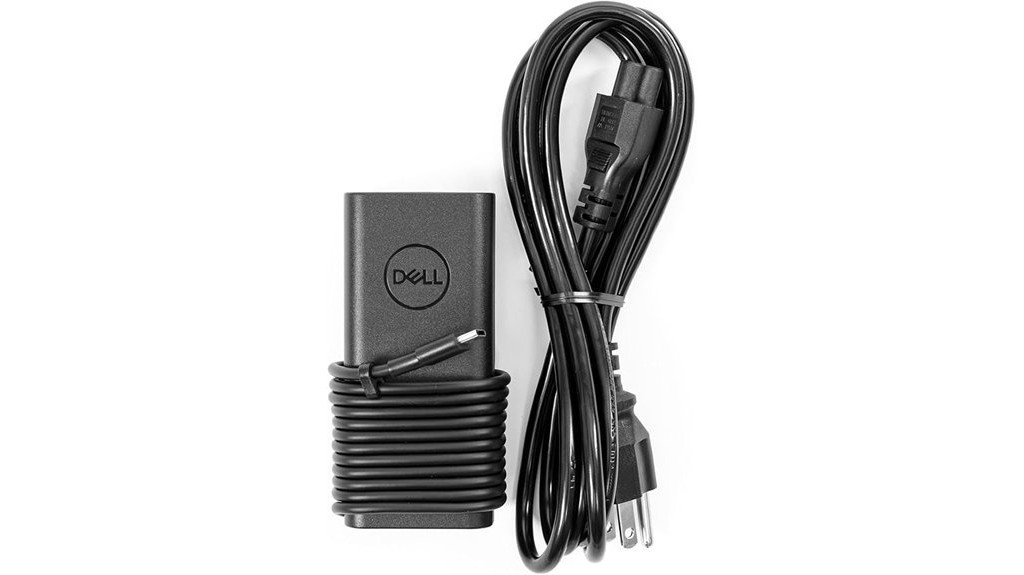
Replacing a laptop charger is simple only when the connector, wattage, and power profile all match your device. The Dell 65W USB-C Laptop Charger (HA65NM190) is a genuine Dell OEM adapter tied to Amazon ASIN B009OYRXBM and designed for compatible Dell systems that accept USB-C power. Its strongest points are a 65W maximum output, multi-voltage USB-C charging profiles, and OEM fit for supported Dell laptops. Its main limitation is compatibility: you should confirm that your exact laptop is designed for a 65W USB-C adapter before buying.
Quick Verdict
Rating: 8.5/10
Best For: Dell laptop and Chromebook owners who need a genuine 65W USB-C replacement or spare charger and can confirm model compatibility.
Bottom Line: This is a strong OEM replacement for supported Dell systems because it delivers up to 65W through USB-C and uses the common 5V, 9V, 15V, and 20V output profiles. It is not the right choice for a laptop that requires more than 65W or does not support USB-C charging.
Overview
The Dell HA65NM190 is a 65W USB-C AC adapter for compatible Dell computers. Certification data for this model lists a 100 to 240V AC input at 50 to 60Hz and USB-C output profiles of 5V, 9V, 15V, and 20V, with up to 3.25A at the 20V profile. That gives the adapter a maximum output of 65W.
The Amazon product tied to ASIN B009OYRXBM is identified as a Dell 65W USB-C laptop charger for XPS and Latitude 5000 systems, with a power cord included. Other supported Dell families may also use a 65W USB-C adapter, but compatibility varies by exact model and configuration.
Before You Buy: Check the wattage and connector on the adapter that originally shipped with your laptop. Dell recommends using a replacement with the same connector and a wattage equal to or greater than the original requirement. A 65W adapter can be underpowered for systems designed for 90W, 100W, 130W, or more.
Key Specifications
| Specification | Detail |
|---|---|
| Brand | Dell |
| Model | HA65NM190 |
| Amazon ASIN | B009OYRXBM |
| Product Type | USB-C laptop AC adapter |
| Maximum Output | 65W |
| Input | 100 to 240V AC, 1.7A, 50 to 60Hz |
| Output Profiles | 5V/3A, 9V/3A, 15V/3A, 20V/3.25A |
| Connector | USB Type-C |
| Included Component | Power cord/cable |
| OEM Status | Genuine Dell OEM product listing |
| Primary Compatibility | Compatible Dell computers that support 65W USB-C charging; listing title highlights XPS and Latitude 5000 |
| Best Use | Replacement charger, second desk charger, office spare, or travel backup for a verified compatible Dell laptop |
What Is the Dell 65W USB-C Charger?
The Dell HA65NM190 is a USB-C power adapter built to supply up to 65W to compatible Dell laptops. Instead of using an older barrel connector, it delivers power through USB Type-C and negotiates among several voltage levels depending on what the connected device requests.
That makes it useful as a direct replacement when your Dell originally shipped with a compatible 65W USB-C adapter. It can also serve as a second charger for a home office, work desk, or travel bag, which means you do not have to move one power brick between locations.
The important point is that USB-C shape alone does not prove compatibility. Your laptop must support charging through that USB-C port, and its required adapter wattage should be 65W or lower unless Dell specifically approves another configuration.
Detailed Features
65W USB-C Power Delivery
The adapter reaches its 65W maximum at the 20V/3.25A output profile. It also supports 15V/3A, 9V/3A, and 5V/3A profiles. These stepped outputs allow compatible USB-C devices to request an appropriate power level instead of receiving one fixed voltage.
Wide AC Input Range
The HA65NM190 certification record lists a 100 to 240V AC input range at 50 to 60Hz. That electrical range covers common mains standards used in many countries. You may still need the correct physical wall-plug cable or a suitable plug adapter for the country you are visiting.
Genuine Dell OEM Positioning
The ASIN is sold as a genuine Dell OEM charger, which is useful if you prefer a Dell-branded replacement rather than a generic adapter. Dell also advises matching the replacement connector to the original adapter and using equal or greater wattage for proper operation.
Cable Included
The product listing identifies a power cord as an included component. That matters because some replacement adapters are sold as the brick only. Check the current seller photos and package description before ordering, since bundle contents can vary by marketplace seller.
Who Should Buy It?
Best For
- Dell owners replacing a 65W USB-C adapter with a genuine OEM option.
- XPS, Latitude 5000, Chromebook, or other Dell users who can confirm their exact model supports 65W USB-C charging.
- Students, commuters, and office workers who want a second charger for another location.
Skip If
- Your original Dell adapter is rated above 65W and Dell does not list a 65W adapter as supported.
- Your laptop uses a barrel connector or does not accept charging through USB-C.
- You need a universal multi-port charger for several brands rather than a Dell-focused replacement.
Design and Portability
The HA65NM190 is a conventional compact laptop power brick rather than a desktop charging station. Supplier specifications associated with this ASIN describe a body around 4.7 x 2 x 1 inches, which is small enough for a laptop bag, backpack pocket, or desk drawer.
Portability is most useful when you keep a second charger in a fixed place. That setup reduces repeated unplugging and cable packing while giving you a backup if your main adapter is left at home or the office.
Pro Tip: Check the label on your original Dell charger before ordering. Match the USB-C connector and wattage first, then confirm your laptop model in Dell support or the current seller compatibility list.
Charging Performance
For a Dell laptop designed around a 65W USB-C adapter, the HA65NM190 has enough rated output to power the system and charge its battery under normal supported use. The 20V/3.25A profile provides the full 65W ceiling, while lower voltage profiles support devices that request less power.
Performance changes when the laptop needs more than the adapter can supply. On a higher-power system, you may see a low-wattage adapter warning, slower battery charging, reduced performance, or battery drain while the laptop is under load. That is a compatibility problem, not a reason to push the charger beyond its rating.
Compatibility and Safety
The safest way to choose this charger is by exact laptop model and original adapter requirement, not by the presence of a USB-C port alone. The Amazon title for this ASIN highlights Dell XPS and Latitude 5000 systems, and related listings also identify compatible Dell Chromebook and Inspiron models. Because model families include many configurations, verify the specific service tag or model before purchase.
The electrical input range is 100 to 240V AC at 50 to 60Hz, but international use still requires the correct wall connection. A travel plug adapter changes the physical plug shape only. It does not change your laptop’s wattage requirement or make an unsupported device compatible.
Stop using the adapter if the cable, connector, or housing is damaged, if the plug fits loosely, or if the laptop reports an adapter-recognition problem that you cannot resolve. For hardware-specific warnings, use Dell’s support documentation for your exact model.
How It Performs in Real Use
For Daily Work and School
On a supported 65W Dell laptop, this adapter is well suited to routine work such as documents, web browsing, video calls, and school tasks. Because the charger is rated for the system’s expected power level, you can use the laptop while charging without relying on an underpowered phone charger.
For Travel and Commuting
The compact brick and wide 100 to 240V input range make it practical for travel. Pack the correct power cord or plug adapter for your destination, and verify your laptop’s charging requirement before leaving so the travel charger is not your first compatibility test.
For Office Backup Use
A second OEM charger works well at a permanent desk. Leaving one at work and one at home reduces cable wear from daily packing and lowers the chance of arriving without power.
For Higher-Power Laptops
This is the weak use case. If your Dell shipped with a 90W, 100W, 130W, or higher adapter, a 65W unit may not meet the system’s demand. Choose the wattage Dell specifies for that configuration instead of buying the smaller adapter only for convenience.
Setup Tips Before First Use
Start by reading the output rating on your original Dell adapter. If it is a 65W USB-C charger, compare your model number or service tag with Dell support information and the current product listing. If the original unit uses a different connector or higher wattage, verify compatibility before connecting the replacement.
After plugging in the adapter, check the laptop for charging status and any BIOS or operating-system power warning. A warning that the adapter is unknown or underpowered is a reason to stop and confirm the model, cable, and charger rating rather than ignoring the message.
Keep the cable from being sharply bent at the USB-C plug or power brick. Repeated strain near the connector can damage any charging cable over time, so route the cord with enough slack at the laptop.
Pros and Cons
Pros
- Genuine Dell OEM product listing for buyers who prefer an original-brand replacement.
- 65W maximum output with 5V, 9V, 15V, and 20V USB-C power profiles.
- 100 to 240V AC input range supports common mains voltages used internationally.
- Compact enough to keep as a travel, school, or office spare.
- Power cord is included according to the product listing.
Cons
- 65W is not enough for Dell laptops that require a higher-wattage adapter.
- USB-C connector shape does not guarantee that every Dell or non-Dell laptop is compatible.
- Seller bundle and warranty details should be checked on the current listing before purchase.
Is It Worth the Price?
The Dell 65W USB-C Charger is worth considering when you value OEM compatibility more than the lowest possible charger price. For a supported Dell system, you get a known 65W power profile, Dell branding, and a charger intended for laptop use rather than a generic USB-C power brick with uncertain system recognition.
The value is strongest as a direct replacement or second charger for a verified compatible laptop. It is not the best fit if you need more than 65W, several charging ports, or one charger that you can confidently move across many different laptop brands.
How It Compares to Alternatives
Compared with the newer Dell 65W USB-C GaN AC Adapter, the HA65NM190 is the more traditional 65W OEM charger design. The newer GaN option is worth comparing if you want a more compact current-generation Dell charger and your laptop is listed as compatible.
If your system needs more power, a Dell 100W USB-C adapter or the exact higher-wattage adapter specified for your model is the better comparison. The HA65NM190 makes the most sense when 65W is already the correct rating for your laptop.
Concluding Thoughts
The Dell HA65NM190 65W USB-C Charger is a practical OEM replacement for supported Dell systems. Its 65W maximum output, four USB-C voltage profiles, and wide AC input range cover the core needs of a laptop charger without adding unnecessary features.
The deciding factor is compatibility. Confirm the exact laptop model, USB-C charging support, and original adapter wattage first. When those details match, this charger is a sensible choice for home, work, school, or travel backup use.
Frequently Asked Questions
What model is the Dell charger sold under ASIN B009OYRXBM?
Product and certification records tie ASIN B009OYRXBM to Dell model HA65NM190. It is a 65W USB-C laptop AC adapter.
Which Dell laptops can use this 65W USB-C charger?
The listing highlights Dell XPS and Latitude 5000 systems, and related listings name additional Dell Chromebook and Inspiron models. Because compatibility differs within each family, confirm your exact model and original charger rating before purchase.
What output voltages does the HA65NM190 support?
The certification record lists 5V/3A, 9V/3A, 15V/3A, and 20V/3.25A outputs. The 20V/3.25A profile provides the full 65W maximum output.
Can I use it if my original Dell charger is rated above 65W?
Do not assume that 65W is enough. Dell advises using a replacement with wattage equal to or greater than the original adapter requirement, so a higher-power laptop should use the adapter Dell specifies for that model.
Can the charger be used internationally?
Its input range is 100 to 240V AC at 50 to 60Hz, which covers common mains standards in many countries. You still need the correct physical plug or power cord for the destination and a laptop that is compatible with the charger.
Does a USB-C port automatically mean this charger will work?
No. Some USB-C ports do not accept laptop charging, and some laptops require more than 65W. Check your laptop’s charging specification rather than relying on connector shape alone.
Does the package include a power cord?
The product record lists a cable or power cord as an included component. Confirm the current seller’s package description before ordering because marketplace bundles can change.
Who should skip this charger?
Skip it if your laptop needs more than 65W, does not charge through USB-C, or cannot be confirmed as compatible. It is also not ideal if you want a multi-port universal charger for several devices.
The Bottom Line
The Dell HA65NM190 65W USB-C Charger is recommended for Dell owners who can confirm that 65W USB-C is the correct charging specification for their laptop. Its main strengths are genuine OEM positioning and a verified 65W multi-voltage output, while its main limitation is that it is not suitable for every USB-C laptop or higher-power Dell system.
Buy it as a replacement or spare when your model matches. Skip it when your original adapter requires more than 65W or uses a different charging connector.
Ready to Buy?
Check the latest price, seller details, and compatibility notes before you decide.

