Disclosure: As an Amazon Associate, we earn from qualifying purchases. If you click a link on this page and make a purchase, we may receive a small commission at no extra cost to you.
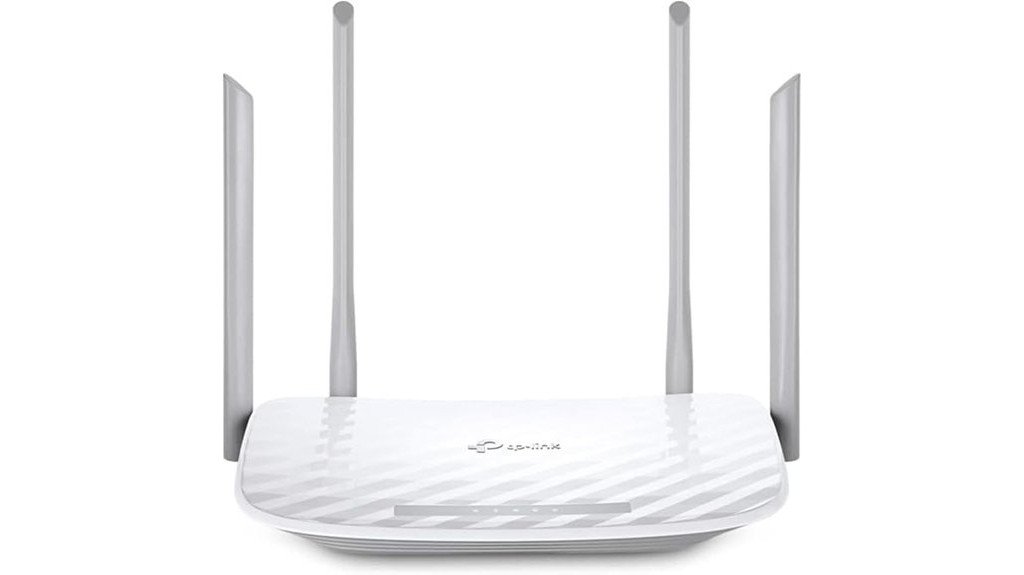
Choosing a budget router can be tricky because low price often comes with real tradeoffs. The TP-Link AC1200 WiFi Router (Archer A54) gives you dual-band Wi-Fi, four external antennas, app control, and useful IPTV support for everyday home use. It is a practical pick if you want simple wireless coverage without paying for premium Wi-Fi 6 hardware. The main limitation is its 10/100 Mbps Ethernet ports, which can hold back wired speeds for users with faster internet plans.
Quick Verdict
Rating: Recommended with caveats
Best For: Small homes, apartments, casual browsing, streaming, and basic dual-band Wi-Fi upgrades.
Bottom Line: The Archer A54 is a strong value if you need affordable AC1200 wireless coverage and easy app management. Skip it if you need gigabit wired ports, advanced router controls, or the latest Wi-Fi 6 performance.
Before You Buy: This router has Fast Ethernet 10/100 Mbps wired ports, not gigabit Ethernet. If your internet plan is faster than 100 Mbps and you connect devices by cable, this model may limit wired speed.
| Specification | Detail |
|---|---|
| Brand | TP-Link |
| Model | Archer A54 |
| Product Type | AC1200 dual-band Wi-Fi router |
| Wireless Bands | 2.4GHz and 5GHz |
| Combined Wireless Speed | Up to 1200 Mbps combined, with 300 Mbps on 2.4GHz and 867 Mbps on 5GHz |
| Antenna Design | Four external antennas |
| Wired Ports | 10/100 Mbps Ethernet ports |
| Security | WPA2 wireless security |
| App Control | TP-Link Tether app |
| Modes and Features | Router mode, Access Point Mode, parental controls, IPTV support with IGMP Proxy/Snooping and VLAN tagging |
| Best Use | Everyday browsing, HD streaming, small-home Wi-Fi, apartments, and basic home networking |
Overview
The TP-Link AC1200 WiFi Router (Archer A54) is a dual-band router made for buyers who want better wireless coverage than an old single-band router can provide. It delivers a combined 1200 Mbps bandwidth by using both 2.4GHz and 5GHz Wi-Fi bands. The 2.4GHz band is better for range and basic devices, while the 5GHz band is better for faster short-range streaming and browsing.
Four external antennas help the Archer A54 spread wireless coverage through a small home, apartment, or office. That makes it useful for phones, laptops, streaming sticks, tablets, smart TVs, and other common Wi-Fi devices. It also supports IPTV-related features, including IGMP Proxy/Snooping and VLAN tagging, which can help if your internet provider or TV service needs those settings.
The router is not designed for high-end networking. Its wired Ethernet ports are limited to 10/100 Mbps, so it is not the best match for fast wired gaming PCs, NAS devices, or high-speed internet plans that need gigabit ports. For basic wireless use, though, it offers a balanced mix of price, features, and simple setup.
What Is the TP-Link Archer A54?
The TP-Link Archer A54 is an AC1200 dual-band Wi-Fi router. It is built to replace a basic router or extend a wired network through Access Point Mode. You can use it as the main router for a modest home setup or as a simple wireless access point where a wired connection already exists.
The key appeal is simple: you get dual-band Wi-Fi, four antennas, WPA2 security, app-based management, IPTV support, and parental controls without moving into a premium router category. It is best for everyday tasks like browsing, video calls, streaming, schoolwork, emails, and light smart-home use.
The Archer A54 is less appealing if you need heavy wired performance. The lack of gigabit Ethernet is the clearest tradeoff, especially if you pay for fast internet or use wired devices that need strong local network speed.
Who Should Buy It?
Best For
- Small homes, apartments, dorm rooms, and light office setups.
- Users upgrading from an older single-band router.
- Families who want dual-band Wi-Fi, parental controls, and simple app management.
Skip If
- You need gigabit Ethernet for wired PCs, game consoles, or network storage.
- Your internet plan is faster than 100 Mbps and you want full wired speed.
- You want Wi-Fi 6, advanced customization, or a premium mesh system.
Detailed Features
The dual-band router offers 2.4GHz and 5GHz connections, giving you more flexibility than a single-band model. The 2.4GHz band can support devices farther from the router, while the 5GHz band is better for faster nearby connections. This split helps you keep older smart devices, phones, laptops, and streaming devices on the band that fits them best.
The Archer A54 provides a combined bandwidth of 1200 Mbps, with 300 Mbps on the 2.4GHz band and 867 Mbps on the 5GHz band. Those numbers describe wireless link speeds, not guaranteed real-world internet speed. Walls, distance, interference, device limits, and your internet plan can all affect actual performance.
Four external antennas are one of the router’s most visible features. They help improve signal direction and coverage compared with many compact internal-antenna routers. For best results, place the router in an open central area instead of hiding it in a cabinet or behind a TV.
The router supports WPA2 wireless security, which covers standard home network protection. It also includes Access Point Mode, which lets you turn an existing wired connection into a wireless network. IPTV support through IGMP Proxy/Snooping and VLAN tagging adds value for homes that use compatible provider services.
Management is handled through the TP-Link Tether app, which makes basic setup and control easier for non-technical users. You can use app-based controls for common tasks, including checking connected devices and managing basic settings. Advanced users may still find the interface limited compared with higher-end routers.
Wireless Performance
For normal household use, the Archer A54 makes the most sense as a budget dual-band upgrade. You can put high-demand nearby devices on 5GHz and leave lower-demand or farther devices on 2.4GHz. This can reduce crowding compared with using one band for everything.
Streaming, video calls, browsing, and online schoolwork should be within its comfort zone when your home size and internet plan match the router’s limits. It is not the best choice for crowded homes with many 4K streams, large downloads, and latency-sensitive gaming happening at the same time.
Pro Tip: Put streaming devices, laptops, and phones near the router on 5GHz when possible. Use 2.4GHz for smart plugs, older devices, and rooms farther from the router.
Wired Ports and Speed Limits
The biggest limitation is wired speed. The Archer A54 uses 10/100 Mbps Ethernet ports, so wired devices may not get the full speed of modern internet plans. This matters most if you connect a desktop computer, console, smart TV, or switch by Ethernet cable.
If your internet plan is 100 Mbps or below, this limit may not bother you. If your plan is 300 Mbps, 500 Mbps, or faster, you should look at a router with gigabit Ethernet. The wireless side may still be useful, but the wired ports create a real bottleneck for some setups.
App Control and Ease of Use
The TP-Link Tether app is one reason this router works well for everyday buyers. You do not need to be a networking expert to handle basic setup and management. The app gives you a simpler way to manage the router compared with logging into a browser interface for every small change.
Parental controls via the app add another practical benefit. You can manage basic household access needs without needing a separate subscription or complex firewall setup. Still, buyers who want detailed traffic shaping, advanced VPN features, or deep network customization should consider a more advanced router.
IPTV and Access Point Support
The Archer A54 includes IPTV optimization features such as IGMP Proxy/Snooping and VLAN tagging. These features can help with smoother IPTV performance when your service provider requires them. Not every household needs IPTV settings, but they are useful if your internet or TV service depends on them.
Access Point Mode is also helpful. If you already have a main router but need Wi-Fi in another area with a wired connection, the Archer A54 can work as a simple access point. This gives the product extra flexibility beyond basic router use.
Setup Tips Before First Use
Place the router in an open area, away from thick walls, metal shelves, large appliances, and enclosed cabinets. A central position usually gives better coverage than a corner room. Keep the antennas upright or angled based on your room layout, then test signal strength in the rooms where you use Wi-Fi most.
During setup, connect the router to your modem with an Ethernet cable and follow the Quick Setup wizard or the TP-Link Tether app. Use a strong Wi-Fi password and change the default network name if needed. If you have many devices, give the 2.4GHz and 5GHz bands clear names so you can choose the right band easily.
How It Performs in Real Use
For Everyday Browsing
For emails, web browsing, social media, and light work tasks, the Archer A54 is a practical fit. Dual-band Wi-Fi helps separate basic devices from faster nearby devices, which can make the network feel more organized.
For Streaming
The 5GHz band is the better choice for nearby streaming devices because it supports higher speeds than 2.4GHz. If you stream in HD and keep the router within a reasonable range, the Archer A54 should be enough for many small-home setups. Heavy 4K streaming across several devices may call for a stronger router.
For Smart Home Devices
Many smart home devices work well on 2.4GHz because they need range more than raw speed. Smart plugs, bulbs, basic cameras, and older Wi-Fi devices can use the 2.4GHz band while phones and laptops use 5GHz. This keeps your network easier to manage.
For Wired Devices
This is where the router’s limits become clear. A wired desktop, game console, or smart TV will be limited by the 10/100 Mbps Ethernet ports. If wired performance is a major reason you are buying a router, this model is not the best choice.
Pros and Cons
The TP-Link AC1200 WiFi Router presents a clear mix of strengths and weaknesses. Its dual-band capability helps with everyday wireless use, while four external antennas support stronger coverage than many basic routers. WPA2 security covers standard home needs. The main drawback is the lack of gigabit Ethernet, which can limit wired speed.
| Pros | Cons |
|---|---|
| Dual-band 1200 Mbps bandwidth | Lacks gigabit Ethernet ports |
| WPA2 wireless security | Potential wired connection bottleneck |
| IPTV optimization with IGMP Proxy/Snooping and VLAN support | Limited advanced customization |
| Parental controls via app | Basic management interface |
| Access Point Mode adds setup flexibility | Not ideal for heavy multi-device households |
These strengths and limits make the router easier to judge. It is a smart buy for basic Wi-Fi needs, but not a full-performance router for demanding wired networks.
Is It Worth the Price?
The Archer A54 is best viewed as a budget-friendly dual-band router. You get AC1200 Wi-Fi, four antennas, app control, parental controls, Access Point Mode, and IPTV support without paying for a premium model. For everyday wireless use, that gives it strong value for the price.
The value drops if you need fast wired connections. The 10/100 Mbps Ethernet ports are the main reason some buyers should skip it. A gigabit router will be a better long-term choice if your internet plan is faster than 100 Mbps or you use wired devices heavily.
For small homes and apartments that mostly rely on Wi-Fi, the Archer A54 is worth considering. For large homes, serious gaming setups, and high-speed wired networks, it is better to compare stronger alternatives.
How It Compares to Alternatives
Compared with a basic single-band router, the TP-Link Archer A54 is a clear upgrade because it offers both 2.4GHz and 5GHz Wi-Fi. Compared with higher-end Wi-Fi 6 routers, it is more limited in speed, device handling, and future-proofing.
If you care most about low cost and simple Wi-Fi, the Archer A54 makes sense. If you care more about gigabit ports, faster wireless standards, and advanced features, compare it with TP-Link’s higher-tier Archer models or other Wi-Fi 6 routers before buying.
Concluding Thoughts
While the TP-Link AC1200 WiFi Router offers a compelling blend of features for the average consumer, its technical limitations may deter users seeking high-end performance. It balances essential functions with cost-efficiency, yet lacks the throughput and gigabit ports many tech-focused buyers want.
- Performance: Adequate for general use, but limited by 10/100 Mbps Ethernet ports.
- Security: Provides WPA2 wireless encryption for standard home protection.
- Management: User-friendly control through the TP-Link Tether app.
- Flexibility: Access Point Mode and IPTV features help with adaptable setups.
This router suits buyers who prioritize affordability, simple setup, and dual-band Wi-Fi over premium performance. It is a practical everyday router, not a high-end networking centerpiece.
Related Guides
Frequently Asked Questions
How do I set up the TP-Link AC1200 for the first time?
To set up the TP-Link AC1200 (Archer A54), connect it to a modem with an Ethernet cable. Then use the Quick Setup wizard through a browser or follow the steps in the TP-Link Tether app.
Is the TP-Link AC1200 compatible with my existing devices?
Yes, the Archer A54 is broadly compatible with common Wi-Fi devices because it supports both 2.4GHz and 5GHz bands. Older devices can usually connect to 2.4GHz, while newer phones, laptops, and streaming devices can use 5GHz when supported.
Can the TP-Link AC1200 handle multiple devices streaming simultaneously?
Yes, it can handle multiple everyday devices when your internet plan and home layout are a good match. The Archer A54’s dual-band AC1200 throughput, with 300 Mbps on 2.4GHz and 867 Mbps on 5GHz, helps manage streaming and multitasking, but heavy 4K streaming across many devices may need a stronger router.
Does the TP-Link AC1200 support VPN connections?
The Archer A54 does not advertise built-in VPN server or VPN client features. Some WAN connection types may include PPTP or L2TP for ISP authentication, but that is not the same as native VPN server/client support.
What is the warranty period for the TP-Link AC1200 router?
In the U.S., TP-Link home Wi-Fi routers purchased on or after Sept. 1, 2023 carry a 2-year limited warranty. Warranty terms can vary by region, seller, and purchase date, so check the policy that applies to your order.
Does the Archer A54 have gigabit Ethernet ports?
No. The Archer A54 uses 10/100 Mbps Ethernet ports, which can limit wired speed. Choose a router with gigabit ports if you use fast wired devices or a high-speed internet plan.
Where should I place the TP-Link AC1200 for better coverage?
Place it in a central, open location away from cabinets, thick walls, metal objects, and large appliances. Keep it elevated if possible, then test both 2.4GHz and 5GHz connections in the rooms where you use Wi-Fi most.
The Bottom Line
The TP-Link AC1200 WiFi Router (Archer A54) is a good choice if you want affordable dual-band Wi-Fi, four external antennas, app control, and simple home networking. It is best for small spaces and everyday wireless use. Skip it if you need gigabit Ethernet, Wi-Fi 6, or stronger performance for a busy multi-device home.

