As an Amazon Associate I earn from qualifying purchases.
As you prepare for fall driving in your Honda CR-V, a dedicated dash cam can help protect you from disputes, capture unexpected road incidents, and give you more peace of mind when your vehicle is parked. These two options are built around Gen6 Honda CR-V models from 2023–2026, focus on front 4K clarity, and aim to blend into the cabin with an OEM-style look.
This guide is best for CR-V drivers who want a clean behind-the-mirror install instead of a universal suction-cup camera. You will also see where each model is strongest, what to check before buying, and which trade-offs matter most for daily commuting, road trips, parking mode, app control, and rear-camera wiring.
Quick Verdict
Choose the KuTaiTai 4K dash cam if you want the cleanest OEM-style front setup, strong daytime front video, and a phone-first workflow with Wi-Fi/app control.
Choose the Mangoal Honda CR-V dash cam if you want a fuller feature set with front 4K and rear 1080p coverage, GPS module, app control, and extra built-in hardware features.
Before you buy: confirm your CR-V model year, trim, mirror housing, region, and selected camera variant on the Amazon listing because custom-fit dash cams depend on the exact mirror-cover design.
Top Picks
|
Category |
Product |
Best For |
Editorial Fit Score |
|---|---|---|---|
|
🏆 Best Overall |
Clean OEM-style front setup |
92/100 |
|
|
⚡ Best Feature Set |
Front and rear coverage |
82/100 |
How We Chose These Dash Cams
You want a dash cam that fits your CR-V without looking like an aftermarket add-on, captures useful detail, and keeps working when you are away from the vehicle. We prioritized compatibility with Gen6 Honda CR-V 2023–2026 models, front 4K video resolution, rear coverage where included, parking monitor support, G-sensor event locking, built-in Wi-Fi, app access, included storage, installation style, night-use expectations, and overall value for CR-V owners.
We also weighed common owner concerns such as rear-camera wiring effort, app setup, clip fitment, low-light footage, and whether the camera blends neatly behind the rearview mirror.
Before You Buy: Fitment Checklist
- Confirm the listing supports your exact 2023, 2024, 2025, or 2026 Honda CR-V model.
- Check whether your CR-V is gas, hybrid, or a regional trim with a different mirror cover.
- Verify whether the kit you select is front-only or front-and-rear.
- Check whether parking monitoring needs a hardwire kit, fuse tap, reading-light adapter, or included power cable.
- Plan extra time for rear-camera cable routing through the headliner and liftgate area.
- Format the memory card in the dash cam before recording important footage.
KuTaiTai 4K Front Dash Cam (CR-V Fit)
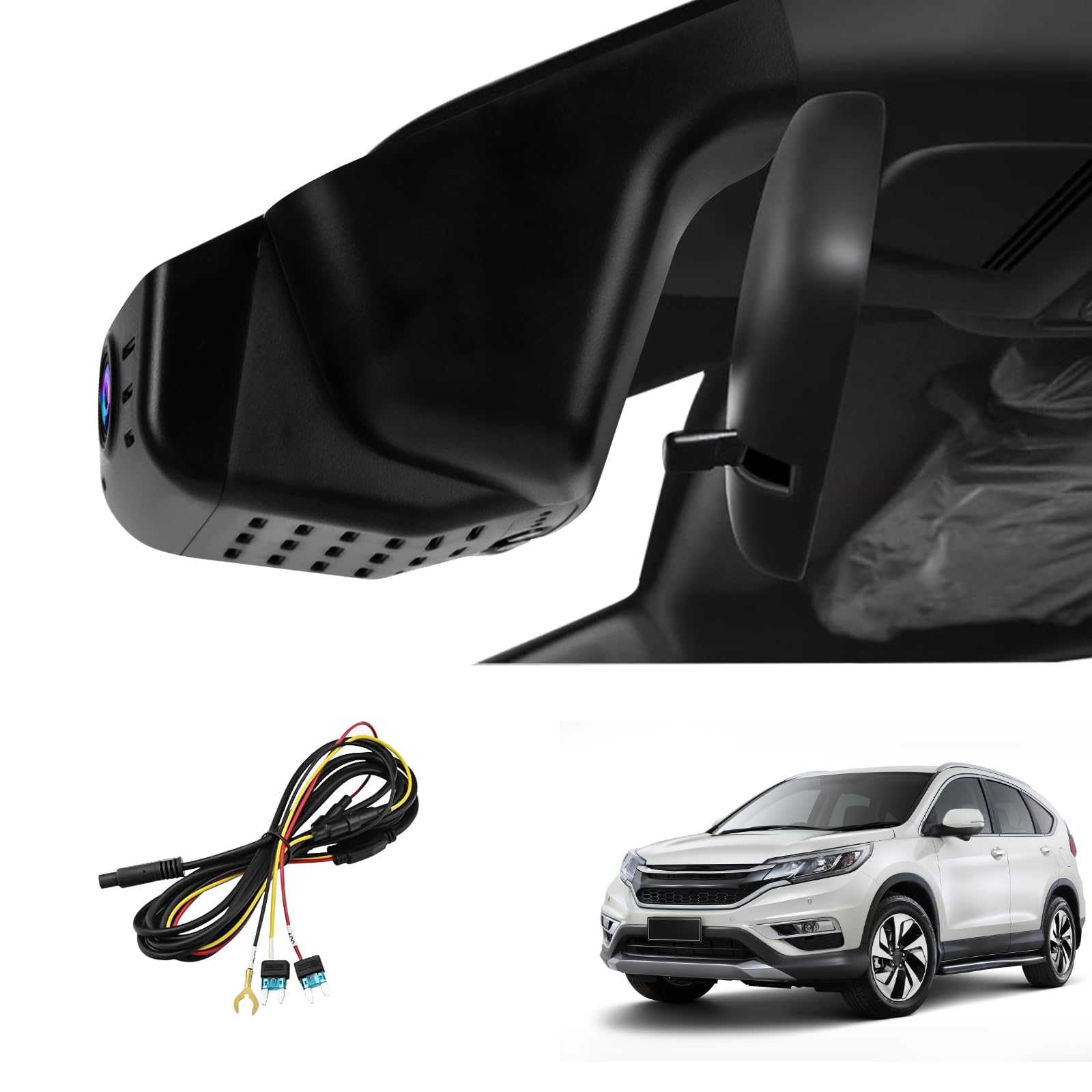
If you drive a 2023–2026 Honda CR-V and want a dash cam that looks like it belongs there, the KuTaiTai model is the cleaner-looking pick. It is designed to sit near the rearview mirror area, so you avoid a bulky suction mount on the windshield and keep the cabin closer to factory style.
The main appeal is the front 4K recording. During daylight driving, that extra resolution helps with license plates, road signs, and lane detail when conditions are good. Built-in Wi-Fi and app access make it easier to preview and download clips without removing the memory card every time.
For daily use, this is a strong choice for commuting, school runs, fall road trips, and keeping a record of unexpected road events. Parking monitor support and G-sensor locking can help preserve important clips when impact or motion events happen, but setup and power requirements can vary by kit and vehicle trim.
A few buyer cautions matter. Rear coverage may depend on the exact variant you choose, app-only controls mean there is no built-in screen to adjust settings, and low-light rear footage can be less sharp than daytime front footage. Check the live Amazon listing carefully before ordering so you know whether your selected kit includes rear coverage and the power accessories you need.
Pros and Cons
|
Pros |
Cons |
|---|---|
|
✅ OEM-style design fits neatly behind the mirror area |
❌ Rear-camera coverage can depend on selected kit or variant |
|
✅ Front 4K recording helps capture useful daytime detail |
❌ Rear wiring, if included, may take extra installation time |
|
✅ Wi-Fi and app control make clip access easier |
❌ No onboard display means settings are handled through the app |
|
✅ Loop recording, G-sensor, and parking monitor support add protection |
❌ App connection quality can vary by phone and firmware |
|
✅ Clean fit is ideal for drivers who dislike dangling dash cams |
❌ Always verify trim and mirror-cover compatibility before buying |
What People Say
Owners tend to like the factory-style appearance, clear daytime front footage, and the convenience of Wi-Fi/app control. The most common cautions are rear-camera installation effort, app quirks, and lower detail in difficult night conditions.
Overall Sentiment: Positive, with fitment and app setup as the main things to double-check.
🗣️ Buyer feedback theme
Drivers often highlight the clean OEM-style look, useful front 4K detail, and easy app-based access to footage.
🗣️ Installation feedback theme
Front setup is usually the easier part, while rear-camera wiring can take more patience if you want a hidden cable route.
Ease Of Use
|
Feature |
Ease Level |
|---|---|
|
Installation (Front) |
Easy to moderate |
|
Installation (Rear Wiring) |
Moderate |
|
App Setup & Wi-Fi |
Easy after pairing |
|
Daytime Recording Quality |
Strong |
|
Parking Monitor |
Moderate, depending on power setup |
Durability
The hidden, mirror-area design keeps the unit protected from casual bumps and helps the cabin stay tidy. Long-term durability depends on heat exposure, memory-card health, wiring quality, and whether the camera is installed without stressing the plastic cover or clips.
Who Should Buy This
- You want the cleanest-looking front dash cam for a Gen6 CR-V.
- You prefer app-based viewing instead of a visible screen.
- You care most about front 4K daytime evidence and a discreet cabin look.
- You want parking monitor and G-sensor features without a bulky universal mount.
Who Should Avoid This
- You need a large built-in screen on the camera.
- You want the easiest possible rear-camera installation.
- You do not want to rely on a phone app for setup and clip review.
- You cannot confirm your mirror-cover fitment on the product listing.
Why You’ll Like It
- OEM-style look that blends with your CR-V interior
- Sharp front 4K video for useful daytime evidence
- Built-in Wi-Fi and app support for easier downloads
- Loop recording support for everyday driving
- Parking monitor and G-sensor features for extra protection
Mangoal Honda CR-V Dash Cam (4K Front)
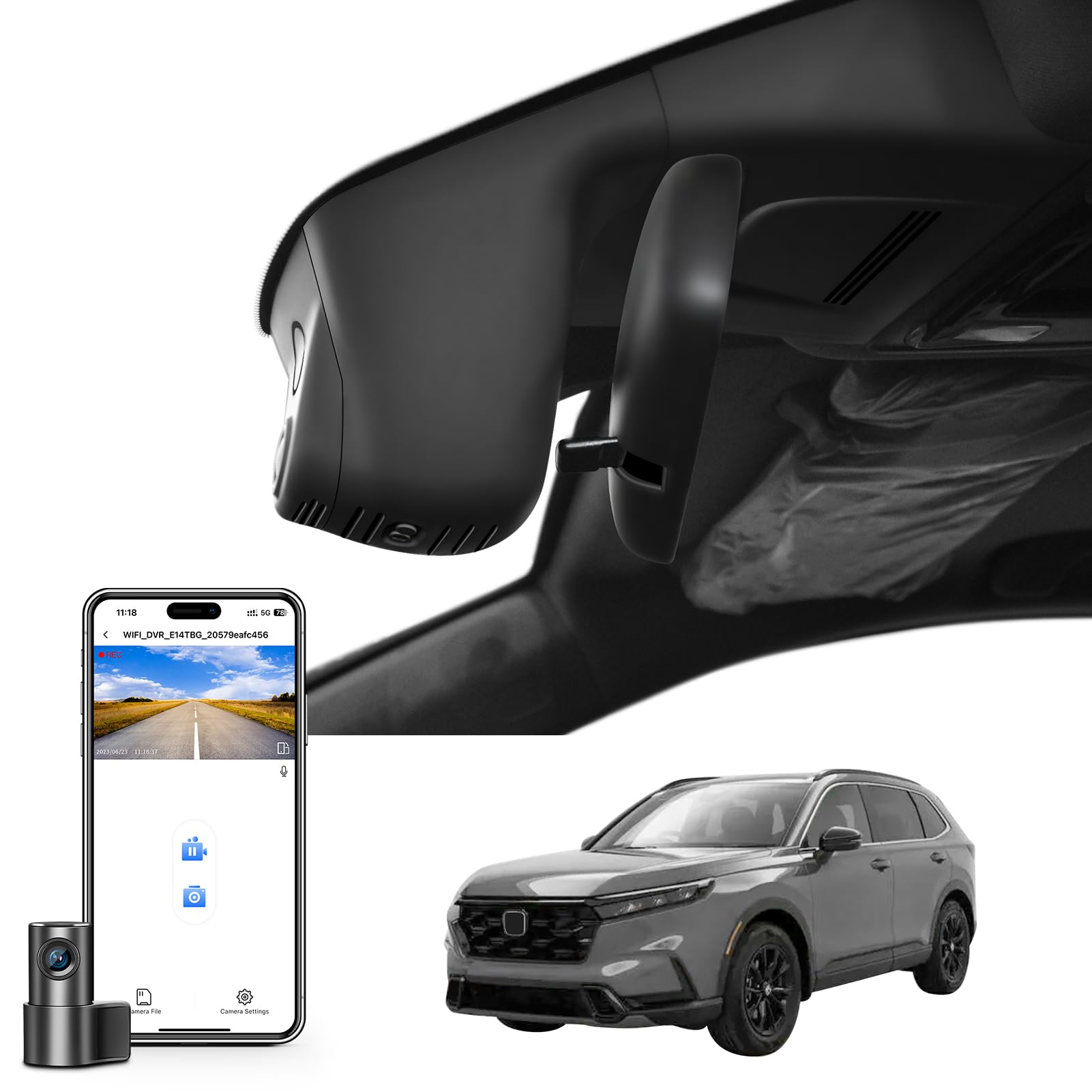
If you want a custom-fit CR-V dash cam with both front and rear coverage, the Mangoal unit is the stronger feature pick. It is designed to tuck behind the rearview mirror for a cleaner OEM-style appearance while adding a rear 1080p camera for extra context behind your vehicle.
The front camera records in UHD 2160p, which is useful for daytime commuting, highway clips, and evidence capture when lighting and camera angle are favorable. The rear camera adds valuable coverage, but it also makes installation more involved because you need to route the cable neatly toward the back of the vehicle.
Built-in Wi-Fi and app control help you preview and download footage from your phone. The listed kit also emphasizes useful extras such as a GPS module, microSD storage, G-sensor locking, loop recording, and a reading-light style power adapter, making it a more complete package for drivers who want extra features.
The main trade-offs are installation patience and fitment care. Rear wiring can be time consuming, plastic clips should be handled gently, and night footage may not always capture plates clearly at distance. If you want front-and-rear protection with a factory-style look, Mangoal is the better feature-rich option here.
Pros and Cons
|
Pros |
Cons |
|---|---|
|
✅ Blends into the cabin with an OEM-style look |
❌ Rear-camera wiring and routing can be time consuming |
|
✅ Front 4K and rear 1080p coverage give more complete evidence |
❌ Some users may need extra care with tight clips or trim pieces |
|
✅ Wi-Fi and app make clip access straightforward |
❌ Rear night footage can be less useful for distant plates |
|
✅ GPS module and memory card are listed with the kit |
❌ App pairing and firmware behavior can vary by phone |
|
✅ G-sensor, loop recording, and parking monitor support add protection |
❌ You should confirm the exact selected style before checkout |
What People Say
Owners appreciate the factory-fit installation, clear daytime front footage, and the convenience of app control. The biggest cautions are rear-camera cable routing, fitment details around clips, app quirks, and mixed results in difficult night conditions.
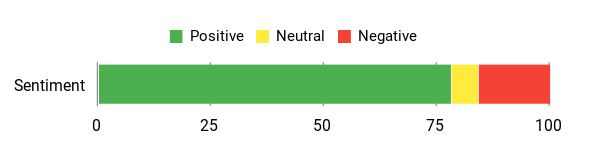
Overall Sentiment: Positive, especially for drivers who want front and rear coverage in one custom-fit kit.
🗣️ Buyer feedback theme
Drivers often like that it installs behind the mirror area and looks closer to a factory piece than a universal dash cam.
🗣️ Use-case feedback theme
Buyers value the front-and-rear setup because it can provide more context during accidents, parking events, and daily driving.
Ease Of Use
|
Feature |
Ease Level |
|---|---|
|
Installation (Front) |
Easy to moderate |
|
Installation (Rear Wiring) |
Moderate |
|
App Setup & Wi-Fi |
Easy after pairing |
|
Daytime Recording Quality |
Strong |
|
Night Recording Quality |
Moderate |
Durability
The electronics package is built for a hidden, integrated-style installation, but the long-term experience depends on heat, wiring, memory-card care, and clip handling during install. The camera hardware is useful for daily driving, while the mounting and rear-wire routing are the main areas where careful installation matters.
Who Should Buy This
- You want front 4K and rear 1080p coverage in one CR-V-specific kit.
- You want app access, GPS support, loop recording, and G-sensor locking.
- You prefer an integrated look instead of a universal windshield-mounted camera.
- You are comfortable spending extra time on rear-camera wiring or hiring an installer.
Who Should Avoid This
- You want the simplest front-only setup.
- You do not want to route a cable to the rear of the vehicle.
- You need guaranteed plate readability at night in every condition.
- You cannot confirm that the listed style matches your exact CR-V trim and mirror housing.
Why You’ll Like It
- OEM-style fit keeps your windshield clean and factory looking
- Front 4K and rear 1080p coverage provide more complete footage
- Built-in Wi-Fi and app control make clip review easier
- GPS module and storage are listed with the kit
- G-sensor and parking monitor support help protect important clips
FAQ
Which Dash Cam Is Best For Your Honda CR-V This Fall?
You are choosing between two custom-fit CR-V options rather than universal dash cams. Pick the KuTaiTai 4K dash cam if your main goal is a clean OEM-style front setup with front 4K video and app-based control. Pick the Mangoal Honda CR-V dash cam if you want front 4K plus rear 1080p coverage, GPS support, and a more complete feature package.
Both are better suited to buyers who value a hidden mirror-area look, parking monitor support, loop recording, and G-sensor event locking. Before buying either one, confirm the exact kit style and fitment for your CR-V model year, trim, and mirror cover.
How Difficult Is Installation And Will It Affect Your Car’s Interior?
The front camera install is usually easier because it fits around the mirror area and keeps the windshield clean. The rear camera, if included, is the harder part because you need to tuck a cable through the headliner and route it toward the liftgate area. Use trim tools, avoid forcing clips, and test the fit before snapping covers fully into place.
If you are not comfortable working near trim panels, airbags, fuse areas, or power connectors, professional installation is the safer choice. A careful installation should keep the interior looking clean, but rushed installation can lead to loose panels, rattles, or damaged clips.
What Can You Expect From Nighttime Footage And App Connectivity?
You should expect the strongest detail during daytime driving from the front 4K camera. Low-light footage, especially from a rear 1080p camera, may look grainier and may not always capture license plates clearly. Keep the lenses clean, angle both cameras carefully, reduce vibration, and check app settings for exposure or low-light options.
Built-in Wi-Fi is useful for live view and downloads, but app performance can vary by phone, operating system, firmware, and distance from the camera. If pairing fails, restart the camera and phone, connect close to the vehicle, update the app if available, and format the memory card in the dash cam before recording important clips.
Do You Need A Hardwire Kit For Parking Monitor?
Parking monitor support depends on how the dash cam receives power while the vehicle is off. Some kits use a fuse power cable, some use a reading-light style adapter, and some may need an additional hardwire kit for full parking-mode behavior. Check the exact listing contents before buying so you know whether the kit includes the power accessories you need.
Will These Dash Cams Fit Every 2023–2026 CR-V?
They are marketed toward Gen6 Honda CR-V models, but custom-fit dash cams still depend on mirror-cover shape, trim, region, and selected product variant. A gas model, hybrid model, or region-specific CR-V may have small differences around the mirror area. Always compare the product photos with your own mirror housing before checkout.
Drivers Top Picks
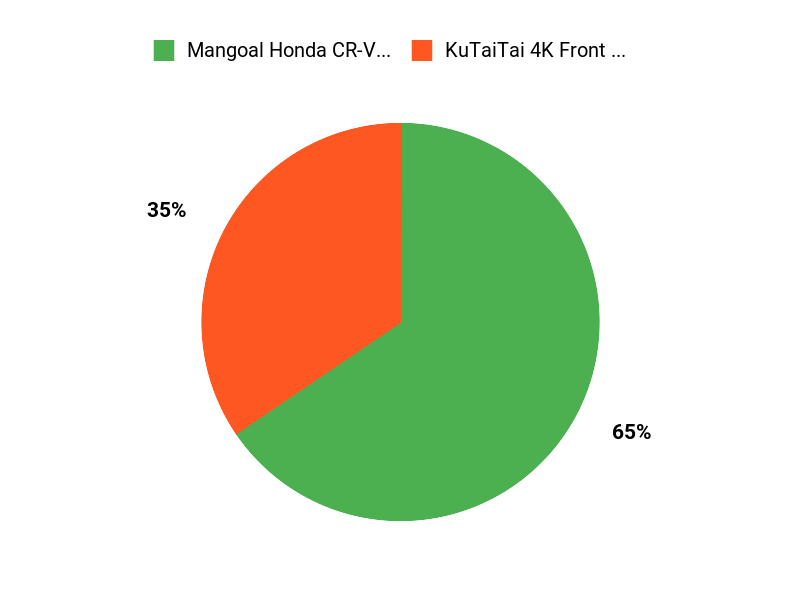
When choosing between the KuTaiTai 4K dash cam and the Mangoal 4K front-and-rear kit, focus on how much coverage you want and how much installation effort you will accept. KuTaiTai is the cleaner front-focused choice for drivers who want a simple OEM-style look. Mangoal is the better feature pick if front and rear recording, GPS support, and a fuller accessory kit matter more to you.
Wrapping Up
If you want the best balance of clean fit, front 4K video, and simple CR-V integration, choose the KuTaiTai 4K dash cam. It is the better match for drivers who want a discreet front camera without a bulky windshield mount. If you want more coverage and a stronger feature set, choose the Mangoal Honda CR-V dash cam because it adds rear 1080p coverage, GPS support, and a more complete kit.
Either way, confirm the exact fitment and current kit contents before buying. A custom-fit dash cam can be a smart upgrade for your Gen6 CR-V, but the best choice depends on your mirror housing, power setup, rear-camera needs, and comfort with installation.
| 4K Dash Cam for Honda CRV 2023-2026 | Honda CRV Dash Cam Front 4K & Rear 1080p | |
|---|---|---|
 |
 |
|
| Best For | Clean OEM-style front-camera setup | Front and rear coverage with more features |
| Video Capture Resolution | Front: 4K; rear coverage depends on selected kit | Front: 4K, Rear: 1080P |
| Connectivity Technology | Wi-Fi / app control | Wi-Fi / app control |
| Fitment Focus | Gen6 Honda CR-V 2023–2026 mirror-area integration | Gen6 Honda CR-V and CR-V Hybrid 2023–2026 mirror-area integration |
| Special Highlights |
|
|
| Main Trade-Off | App-first controls and variant-dependent rear coverage | More rear-camera wiring effort |
| Check Product Details on Amazon | Check Product Details on Amazon |
This roundup is reader-supported. When you click through Amazon links, we may earn a referral commission on qualifying purchases at no extra cost to you.

