
Some Toyota RAV4s have a driver-viewable front camera, but several different cameras can be found around the vehicle and they do not all serve the same purpose. A front parking camera is normally part of an available surround-view or terrain-monitoring system, while the camera mounted near the windshield supports driver-assistance features and usually does not show a live image on the multimedia screen.
Quick Answer
Some Toyota RAV4s have a driver-viewable front camera, but it is not standard on every trim. It is usually included with a Panoramic View Monitor, 360-degree camera, Multi-Terrain Monitor, or parking-assistance package. Availability changes by model year and country, so verify the window sticker, build sheet, or owner’s manual.
Key Takeaways
- A rearview camera does not mean the RAV4 also has a front parking camera.
- The front parking camera is generally one part of a multi-camera Panoramic View Monitor or similar system.
- Camera availability depends on the model year, market, trim, drivetrain, and option package.
- The visible parking camera is different from the Toyota Safety Sense camera near the windshield.
- Camera images are supplemental; you must still check mirrors, windows, and the area around the vehicle.
What Is the 360-Degree Camera System in the RAV4?

Toyota commonly calls its surround-view system the Panoramic View Monitor. On equipped vehicles, images from cameras at the front, rear, and sides are processed to create multiple views of the area immediately around the RAV4. Toyota UK describes the current system as using four cameras to provide a near-360-degree view while parking.
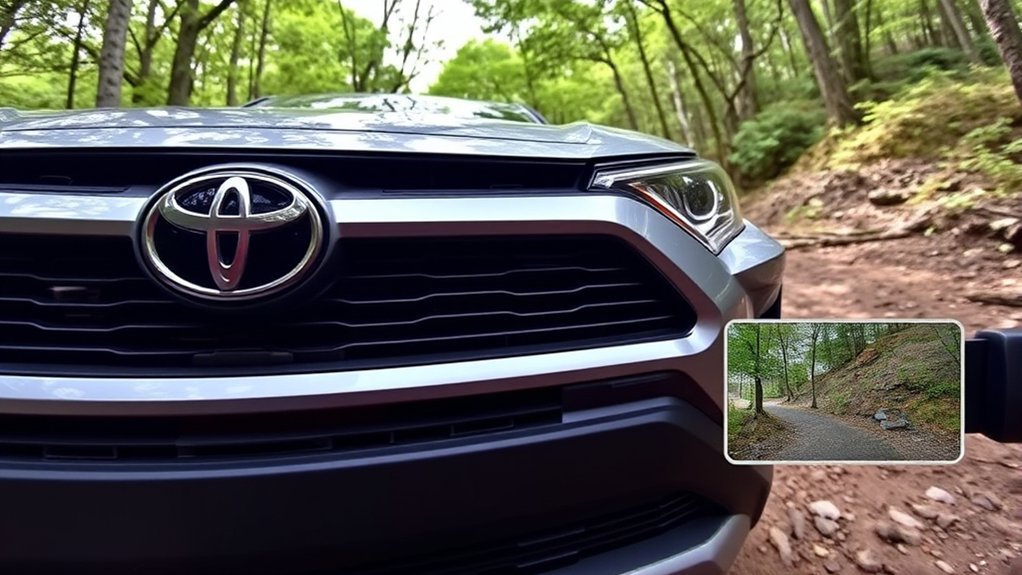
The front exterior camera is normally mounted in the grille or emblem area, although its exact position varies by generation and market. Side cameras are typically integrated into the exterior-mirror housings, while the rear camera is near the liftgate handle or license-plate area.
The bird’s-eye image is not filmed by a camera floating above the vehicle. Software stitches together several wide-angle images to create a simulated overhead perspective. This can make parking easier, but seams, distortion, and small blind areas may appear where the camera images meet.
| Camera or System | Main Purpose | Live Image for Driver? |
|---|---|---|
| Rearview camera | Shows the area behind the RAV4 when reversing | Yes |
| Front parking camera | Shows low obstacles and the area directly ahead during slow maneuvers | Yes, when equipped and operating within system limits |
| Side cameras | Help create side and overhead views | Yes, through selected surround-view modes |
| Toyota Safety Sense camera | Supports functions such as lane and pre-collision assistance | Normally no driver-viewable live feed |
| Accessory or factory dash camera | Records events ahead of the vehicle | Model-dependent |
Note: In the United States, federal rules require a compliant rearview image on applicable light vehicles manufactured on or after May 1, 2018. The rule does not require a front parking camera. See 49 CFR 571.111.
How the 360 Camera Enhances Parking and Maneuverability
A surround-view system is most useful during low-speed maneuvers where the hood, body corners, wheels, or nearby curbs are difficult to see directly. Depending on the RAV4’s equipment and settings, the screen may offer a front view, rear view, side views, wide-angle views, or a simulated overhead image.
- The front view can reveal a low curb, parking stop, post, or object hidden below the hood line.
- Side views can help you judge wheel position near curbs and narrow garage entrances.
- The overhead composite can help center the vehicle in a parking space.
- Dynamic guidelines may estimate the vehicle’s path as you turn the steering wheel.
- Automatic activation may display a camera view when you shift into reverse or slow near an obstacle.
The display can reduce guesswork, but it does not provide perfect depth perception. Wide-angle lenses can make objects appear farther away, closer, wider, or more curved than they are.
A surround-view image is a parking aid, not a substitute for looking through the windows, checking the mirrors, and confirming that the path is clear.
Limitations of the RAV4 Camera Features
RAV4 camera systems can make nearby objects easier to see, but every camera has limitations. Image quality and accuracy may be affected by:
- Dirt, mud, road salt, snow, ice, wax, or water on a lens
- Darkness, glare, direct sunlight, reflections, or rapidly changing light
- Heavy rain, fog, or blowing snow
- Wide-angle distortion and image-stitching seams
- Objects that are very low, thin, close to the bumper, or outside the camera’s field of view
- A loaded vehicle, steep slope, uneven terrain, or changed suspension height
- Camera misalignment after a collision or body repair
The displayed guidelines are estimates. They may not account perfectly for every obstacle, slope, wheel position, or change in vehicle loading. Use extra care around children, animals, bicycles, drop-offs, and objects that can move unexpectedly.
Warning: Never move the RAV4 solely by watching the camera screen. Check the full area around the vehicle before moving and continue using direct vision and mirrors throughout the maneuver.
Which RAV4 Trims Feature a Front Camera?
There is no single trim answer that applies to every Toyota RAV4. Availability changes by country, model year, powertrain, production date, and option package. A trim that includes the system in one market may omit it or make it optional somewhere else.
This distinction is especially important for the 2026 redesign. Toyota identifies the 2026 model as the sixth-generation RAV4, and the current U.S. range uses trims such as LE, XLE Premium, SE, Woodland, XSE, and Limited. Older references to trims such as Black Edition, Excel, or Dynamic should not be treated as a current global equipment guide. Review the current Toyota RAV4 page and the exact specifications for your market.
How to Check Whether Your RAV4 Has a Front Camera
- Inspect the grille or emblem area. Look for a small camera lens facing forward. Do not confuse it with radar hardware or decorative trim.
- Check below and around the exterior mirrors. A surround-view system normally also requires side-facing cameras.
- Look for a VIEW, PVM, camera, or monitor button. Its label and position vary by model.
- Shift into reverse while safely stopped. Equipped systems may show selectable front, side, wide, or overhead views in addition to the normal rear image.
- Review the original window sticker or build sheet. Search for Panoramic View Monitor, Bird’s Eye View Camera, 360-degree camera, Multi-Terrain Monitor, Advanced Park, or similarly named equipment.
- Check the correct owner’s manual. Toyota provides model-specific manuals through its owner-manual portal.
- Ask a Toyota dealer to decode the VIN. This is more reliable than assuming equipment from the exterior trim badge alone.
Pro Tip: When shopping for a used RAV4, ask the seller to photograph the live camera screen and the exterior lenses. A generic trim listing may omit a factory option or incorrectly assume that every vehicle in that trim has it.
How the Trail Camera Helps You Off-Road

Some RAV4 configurations have offered terrain-oriented camera views through a Multi-Terrain Monitor or a market-specific surround-view system. It is more accurate to use the manufacturer’s system name than to call every front camera a “trail camera.”
Availability is limited and should not be assumed simply because a RAV4 has all-wheel drive, an off-road appearance package, or a terrain-selection dial.
Enhanced Visibility Over Terrain
At low speeds, an available terrain-monitoring view can help you see rocks, ruts, changes in surface height, and other obstacles near the front corners. This information is valuable when the hood blocks your direct view of the ground immediately ahead.
Some systems may present a composite or previously captured view of the area near or beneath the vehicle. That display should not be interpreted as proof that a physical camera is mounted under the RAV4 or that the image shows every obstacle in real time.
Navigating Obstacles With Confidence
Use the monitor to supplement careful spotting and path selection. Move slowly, keep the wheels within a safe route, and stop whenever the image is unclear. On difficult terrain, a passenger or experienced spotter outside the vehicle may provide information that no camera angle can capture.
Camera views can be especially helpful when approaching:
- A rock or rut hidden below the hood line
- A narrow passage with limited clearance on either side
- A crest where the ground ahead briefly disappears from direct view
- A tight turn near a tree, bank, or trail edge
Improved Traction and Control
The camera itself does not improve traction. Instead, it can help you choose a smoother path and avoid placing a tire on a slippery, sharp, or unstable surface. Tire grip, AWD operation, braking, and traction-management systems are what control wheel slip and distribute driving force.
For the best results, combine the available camera view with an appropriate drive mode, low speed, gentle steering, and gradual accelerator input. Never enter terrain that exceeds the RAV4’s clearance, tire capability, water-wading limits, or other specifications in its owner’s manual.
Real-World Experiences With the RAV4 Camera System
Drivers commonly find surround-view cameras most helpful after learning how the screen’s perspective relates to the RAV4’s actual dimensions. The overhead image can initially look unfamiliar because it combines several wide-angle views rather than showing a single natural perspective.
Parking Assistance Experiences
During parking, the strongest benefits are usually easier curb positioning, better awareness of the front bumper area, and a clearer sense of whether the vehicle is centered between the lines. These advantages are most noticeable in narrow garages, crowded car parks, drive-through lanes, and spaces bordered by high curbs.
Practice in an empty parking area can help you learn:
- Where the displayed guidelines place the wheels and bumpers
- How close an object appears at different distances
- Where stitched images create distortion
- When the front view activates or switches off
Visibility Challenges Encountered
A camera cannot eliminate every visibility problem. Drivers may still misjudge a curb during a sharp turn because the rear wheel follows a tighter path than the front of the vehicle. The overhead image can also make a thin post, curb edge, or dark object difficult to distinguish from the pavement.
Turn slowly, use the side views when available, and leave more clearance than the screen appears to require until you understand the system’s perspective.
Tips for Using the RAV4’s Camera System Effectively
- Clean every exterior lens. Use a soft, damp cloth and avoid abrasive products that could scratch the lens cover.
- Learn the controls while parked. Identify the camera button and available view modes before entering a tight space.
- Move slowly. Low speed gives you time to compare the display with direct visual checks.
- Use the right view. A front view may help with a parking stop, while a side view may be better for a curb.
- Do not treat guidelines as exact measurements. Leave a safety margin around every obstacle.
- Check the image after repairs. A replaced grille, mirror, liftgate, camera, or related body panel may require inspection or calibration.
- Investigate a blank or frozen image. Restarting the vehicle is not a substitute for diagnosing a recurring fault.
- Check for open recalls. U.S. owners can search by VIN through the NHTSA recall lookup and Toyota’s recall portal.
What Optional Packages Include the 360 Camera System?
The package name varies too much to provide one reliable list for every RAV4. Depending on the year and country, the surround-view system may be:
- Standard on a high-level trim
- Included in an advanced technology or parking package
- Bundled with parking sensors or automatic parking assistance
- Combined with premium audio, a larger multimedia display, a panoramic roof, or other unrelated features
- Unavailable on otherwise similar trims because of drivetrain or regional differences
Historical package combinations should not be used to predict a current vehicle’s equipment. Toyota also notes that options and packages may not be offered separately or in every region. Check the exact vehicle rather than relying only on a trim-comparison article.
Addressing Visibility Issues With the RAV4
If you find the RAV4 difficult to position near curbs or obstacles, start with the basic driving setup before relying more heavily on the cameras:
- Adjust the driver’s seat high enough to see the hood line comfortably without compromising pedal control.
- Set both exterior mirrors to reduce overlap with the interior mirror.
- Learn where the front bumper and rear wheels track during tight turns.
- Use reference points in the windshield and side windows when parking.
- Keep windows, mirrors, headlights, sensors, and cameras clean.
- Stop and get out to inspect the space whenever clearance is uncertain.
If a camera image is consistently crooked, blurry, unavailable, or poorly aligned after cleaning, have the system inspected. A damaged bracket, changed ride height, collision repair, software fault, or calibration issue may affect the displayed view.
RAV4 Camera System vs. Competing Models
Surround-view systems are available on many compact SUVs, so the useful comparison is not simply whether a vehicle advertises a “360 camera.” Compare the actual functions offered on the trim you plan to buy.
| Comparison Point | What to Test |
|---|---|
| Availability | Whether the system is standard, optional, or restricted to the highest trim |
| Image quality | Resolution, brightness, glare control, and nighttime clarity |
| View selection | Front, rear, side, wide, wheel, overhead, and terrain-oriented modes |
| Activation | Dedicated button, automatic obstacle activation, reverse activation, and speed limits |
| Guidelines | Whether lines move with steering and clearly represent the vehicle’s path |
| Cleaning | Lens position, exposure to road dirt, and any available washer system |
| Repair considerations | Calibration requirements, replacement cost, and warranty coverage |
Test the camera in a real parking space before buying. A system with more advertised views is not automatically better if the screen is small, the controls are slow, or the images are difficult to interpret.
Related Guides
Frequently Asked Questions
Can the front camera be used while driving?
It is generally intended for parking and other low-speed maneuvers. Depending on the model, the view may activate only below a set speed and may switch off automatically as the RAV4 accelerates. Consult the owner’s manual for the exact operating limit.
Is the front camera adjustable or fixed?
The factory exterior camera is mounted in a fixed, calibrated position. Drivers can select available display modes, but they should not physically reposition the camera. If its alignment appears wrong, have the system inspected rather than adjusting it yourself.
How does the front camera perform in low-light conditions?
Performance varies. Vehicle lighting and image processing may make nearby objects visible, but darkness, glare, reflections, rain, snow, and a dirty lens can reduce detail. Always confirm the area directly instead of assuming the screen shows every hazard.
Are there maintenance tips for the camera system?
Keep each lens clean with a soft, damp cloth. Do not use harsh solvents, high-pressure spray at close range, sharp tools, or abrasive materials. Have the system checked if the image stays blurry, misaligned, frozen, or unavailable.
Can the front parking camera detect pedestrians or cyclists?
Do not assume that it can. The driver-viewable front parking camera is primarily an imaging aid. Toyota Safety Sense uses separate forward-sensing hardware and software for applicable pre-collision functions. Neither system guarantees that every person, bicycle, or obstacle will be detected.
Is the front parking camera the same as the camera near the rearview mirror?
No. The exterior front parking camera supplies a nearby view for maneuvering. The forward-facing camera near the top of the windshield supports driver-assistance functions and normally does not provide a selectable live video feed on the multimedia display.
How can I tell whether a used RAV4 has the 360-degree camera?
Look for front and mirror-mounted camera lenses, a camera or VIEW button, and selectable overhead or side views on the multimedia screen. Then confirm the equipment through the original window sticker, VIN build record, or model-specific owner’s manual.
Conclusion
The Toyota RAV4 can have a front camera, but the accurate answer is configuration-dependent. A driver-viewable front image normally comes from an available Panoramic View Monitor, Multi-Terrain Monitor, or related parking system rather than from equipment fitted to every RAV4.
Before buying or relying on the feature, confirm the exact vehicle’s model year, market, trim, packages, and VIN equipment record. Once you know which system is installed, learn its controls, keep the lenses clean, understand its low-speed and visibility limits, and continue checking the area around the vehicle directly.
Sources
- Toyota USA — 2026 RAV4 — current U.S. model and trim information.
- Toyota USA Newsroom — 2026 RAV4 — sixth-generation introduction and current grade structure.
- Toyota UK — RAV4 — Panoramic View Monitor description and selected-grade qualification.
- Electronic Code of Federal Regulations — 49 CFR 571.111 — U.S. rear-visibility requirements.
- National Highway Traffic Safety Administration — Recall Lookup — VIN-specific safety-recall checking.
- Toyota Owners — Manuals and Warranties — model-specific operating instructions and system limitations.
