Disclosure: As an Amazon Associate, we earn from qualifying purchases. If you click a link on this page and make a purchase, we may receive a small commission at no extra cost to you.
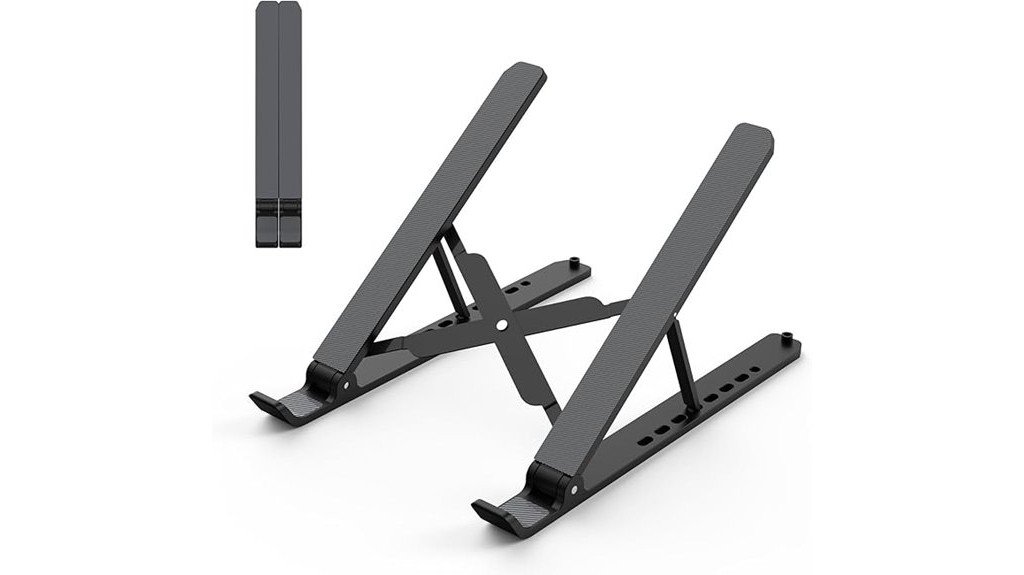
A laptop stand can make your desk feel cleaner, but the real question is whether it can raise your screen enough without making your laptop feel unstable. This Laptop Stand for Desk is a compact, foldable riser made for 10 to 15.6-inch laptops, with seven height settings and a lightweight ABS+Silicone build. It is best for students, remote workers, travelers, and anyone using a lighter laptop at a desk, coffee shop, or shared workspace. The main tradeoff is simple: it is easy to carry and adjust, but heavier laptops may not feel as steady as lighter devices.
Quick Verdict
Rating: Recommended with caveats
Best For: Lightweight 10 to 15.6-inch laptops, portable work setups, and users who want a simple ergonomic lift.
Bottom Line: This laptop stand is a practical choice if you want a portable riser that helps lift your screen and reduce desk clutter. Skip it if you use a heavy laptop and need the firmest possible support.
Before You Buy: This stand is made for laptops from 10 to 15.6 inches. If your laptop is heavy, thick, or gaming-focused, check the fit and stability carefully before relying on it as your main desk stand.
Overview
The Laptop Stand for Desk is a foldable laptop riser designed to lift your screen from desk level to a more comfortable viewing height. It uses an adjustable seven-level design, so you can raise your laptop between 2.78 inches and 6.5 inches depending on your desk height, chair position, and typing setup.
Its lightweight ABS+Silicone construction keeps the stand easy to carry, and the folded size of 10.5 x 1.96 x 0.92 inches makes it small enough for a laptop bag. At 0.57 pounds, it is more travel-friendly than many metal desk stands. The article-supported compatibility range is 10 to 15.6 inches, including common laptop brands such as Dell, HP, and Microsoft Surface.
That buyer feedback supports its appeal as a simple, affordable laptop stand, but the design is still better suited to light and medium-weight laptops than bulky models.
Key Specifications
| Specification | Detail |
|---|---|
| Product Type | Adjustable laptop stand for desk use |
| Material | ABS+Silicone |
| Height Adjustment | 2.78 inches to 6.5 inches |
| Adjustment Levels | 7 levels |
| Folded Dimensions | 10.5 x 1.96 x 0.92 inches |
| Weight | 0.57 pounds |
| Compatibility | Laptops from 10 to 15.6 inches |
| Support Design | Triangle support structure |
| Grip Features | Anti-slip pads for added laptop protection |
| Best Use | Portable work, desk ergonomics, study setups, and light office use |
What Is the Laptop Stand for Desk?
The Laptop Stand for Desk is a compact ergonomic riser that raises your laptop screen so you do not have to look down as much while working. It is not a full docking station, monitor arm, or heavy-duty metal stand. Instead, it focuses on portability, simple adjustment, and basic desk comfort.
The design uses ABS+Silicone, which helps keep the stand light while giving your laptop contact points that are less likely to slip. The seven-height setup gives you more control than a fixed laptop riser, especially if you move between a home desk, office desk, dining table, dorm room, or travel workspace.
Because the stand lifts the laptop body, it can also improve airflow under the device. That can be useful for everyday browsing, writing, video calls, and office tasks. For heavier laptops or high-performance gaming laptops, stability is the main point to check.
Who Should Buy It?
Best For
- Remote workers who want a simple laptop lift for daily desk use.
- Students who need a lightweight stand for dorms, libraries, or shared study spaces.
- Travelers who want a foldable stand that fits easily into a laptop bag.
Skip If
- You use a heavy gaming laptop and need a stronger, more rigid stand.
- You want a stand for multiple devices at the same time.
- You need a permanent desk setup with maximum stability over portability.
Detailed Features
When evaluating the detailed features of the Laptop Stand for Desk, its ergonomic and adjustable design stands out. The stand elevates your device to seven different heights, which can help you place the screen closer to eye level. That matters if you spend long periods reading, writing, editing, or attending video meetings.
The triangle support structure is designed to keep the laptop steady during normal use, while the anti-slip pads help protect the laptop from shifting. The smooth edges also make the stand easier to handle when opening, folding, packing, or adjusting it.
| Feature | Description |
|---|---|
| Material | ABS+Silicone |
| Height Adjustment | 2.78” to 6.5” (7 levels) |
| Dimensions (Folded) | 10.5” x 1.96” x 0.92” |
| Weight | 0.57 pounds |
| Compatibility | Laptops 10-15.6 inches |
Design and Build Quality
The biggest design benefit is portability. A folded size of 10.5 x 1.96 x 0.92 inches means you can store it in a laptop sleeve, backpack pocket, desk drawer, or travel pouch without taking up much space. At 0.57 pounds, it adds little weight to your work bag.
The ABS+Silicone material keeps the stand light, while the silicone contact points help with grip. This is useful if you move your laptop often or work on different surfaces. Still, plastic-based construction may not feel as firm as a heavier aluminum stand, especially under larger laptops.
Pro Tip: For the most comfortable setup, raise the laptop screen with the stand, then use a separate keyboard and mouse when possible. This helps you avoid typing at an awkward wrist angle.
Ergonomics and Height Adjustment
The seven-level height adjustment is the main reason to consider this laptop stand. You can set the laptop between 2.78 inches and 6.5 inches high, which gives you more flexibility than a flat cooling pad or a fixed riser. A higher screen position can reduce the need to bend your neck downward.
This does not mean the stand automatically fixes every posture issue. Your chair height, desk height, screen distance, and typing position still matter. For best results, your laptop screen should sit closer to eye level, and your shoulders should stay relaxed while you work.
Stability and Laptop Support
The stand uses a triangle support structure, which is a smart design choice for a foldable stand. It gives the laptop a more secure base than a thin, flat strip alone. The anti-slip pads also help reduce movement when the laptop is placed correctly.
The key limitation is laptop weight. The article notes that some users report instability with heavier laptops. That means this stand is better for slim work laptops, school laptops, and lighter everyday devices. If your laptop has a thick chassis, large screen body, or heavy cooling hardware, test the stand carefully before long work sessions.
Portability and Storage
Portability is one of the strongest reasons to buy this stand. The folded profile is slim enough for daily carry, and the low weight makes it practical for people who do not work from the same desk every day. It can fit into a backpack without feeling like a full-size accessory.
This also makes it useful as a backup stand. You can keep one in your work bag for coffee shops, hotels, classrooms, coworking spaces, or office hot desks. It is a simple way to improve screen height when you do not control the desk setup.
How It Performs in Real Use
For Daily Desk Work
For everyday tasks such as email, writing, spreadsheets, web browsing, and video calls, the stand gives your laptop a cleaner and more upright position. The adjustable height helps you match the screen to your seating position, which can make long desk sessions feel less cramped.
For Remote Work and Video Calls
Raising your laptop can improve webcam placement because the camera sits closer to face level. That can make video calls feel more natural than looking down at a laptop sitting flat on the desk. The stand also helps free some desk space under the laptop area.
For Travel and Shared Workspaces
The folded size and 0.57-pound weight make this stand useful for travel. It is easy to carry between workspaces, and it sets up quickly when you need a better laptop angle away from home. This is one of its clearest advantages over heavier desk-only stands.
For Heavier Laptops
With heavier laptops, the stand may feel less secure. This does not make it useless, but it does mean you should avoid aggressive typing directly on the laptop keyboard when it is raised. A separate keyboard and mouse can reduce movement and make the setup feel more stable.
Setup Tips Before First Use
Start with a lower height setting and raise the stand one level at a time until your screen feels comfortable. Make sure both sides of the stand are locked evenly before placing your laptop on it. Uneven adjustment can make the laptop feel wobbly.
Place the stand on a flat, dry surface. Avoid soft surfaces like beds, couches, or thick fabric because they can reduce stability. If you are using a larger laptop, set it down slowly and check that the anti-slip pads contact the laptop properly.
If you type for long sessions, pair the stand with a separate keyboard and mouse. This setup lets the screen sit higher while your hands stay at a more natural height on the desk.
Compatibility and Safety
This stand is listed as compatible with laptops from 10 to 15.6 inches. That includes many common laptops from brands such as Dell, HP, and Microsoft Surface. Screen size alone is not the only factor, though. Weight, thickness, bottom shape, and how you type all affect stability.
The stand is not designed to hold multiple devices at once. Using it with more than one device may reduce balance and increase the risk of slipping. It is also not water-resistant, so keep it away from spills and clean it with care.
Because it supports electronics, use basic safety habits. Check that your laptop sits flat on the support points, keep charging cables from pulling against the laptop, and avoid placing the stand near the edge of a desk.
Cleaning and Maintenance
The stand is simple to maintain. Wipe the ABS+Silicone surface with a damp cloth and mild soap when needed. Avoid harsh chemicals because they may affect the finish or reduce the grip of the silicone pads.
Let the stand dry before placing your laptop back on it. If the anti-slip pads collect dust, clean them gently so they can keep doing their job. Store the stand folded when you are not using it to protect the support arms and save space.
Pros and Cons
Pros
- Seven height levels let you raise the laptop from 2.78 inches to 6.5 inches.
- Folded size of 10.5 x 1.96 x 0.92 inches makes it easy to store or carry.
- Lightweight 0.57-pound design is practical for travel and shared workspaces.
- Anti-slip pads help protect the laptop from shifting during normal use.
- Compatible with many 10 to 15.6-inch laptops.
Cons
- May feel unstable with heavier laptops.
- Not designed for multiple devices at the same time.
- Not water-resistant, so it should be kept away from spills.
Is It Worth the Price?
This laptop stand offers strong value for the price if your main goal is a portable ergonomic lift. It gives you seven height options, a light folded design, and simple anti-slip support without the bulk of a permanent desk stand.
It is a smart buy for everyday use if you work with a lightweight laptop and move between different desks. You get the most value if you care about portability, compact storage, and quick setup.
It is not the best fit if you need heavy-duty support for a large gaming laptop or workstation laptop. In that case, a heavier metal stand may be worth comparing.
How It Compares to Alternatives
Compared with fixed laptop risers, this stand is easier to adjust and carry. Compared with heavier aluminum stands, it is lighter and more travel-friendly, but it may not feel as solid under a heavy laptop.
If you want a permanent desk setup, a larger metal stand may be better. If you want a simple foldable option for school, work, travel, and small desks, this Laptop Stand for Desk makes more sense.
Concluding Thoughts
Considering the Laptop Stand for Desk, its strengths lie in its ergonomic design and portability. Its adjustable features can improve screen height and make your workspace feel more organized. The main limitation is stability with heavier laptops, so it works best with lighter devices.
| Feature | Strength | Consideration |
|---|---|---|
| Ergonomics | Reduces neck strain | Limited stability with heavier laptops |
| Portability | Lightweight and foldable | Best for travel and flexible desks |
| Overall Rating | See reviews on Amazon | Strong buyer feedback |
Frequently Asked Questions
How do I clean the laptop stand?
Wipe the stand with a damp cloth and mild soap. Avoid harsh chemicals, and let the stand dry before placing your laptop back on it.
Is the stand compatible with gaming laptops?
It supports laptops up to 15.6 inches, so some gaming laptops may fit by size. The concern is weight, because heavier gaming laptops may feel less stable on this foldable stand.
Can the stand hold multiple devices at once?
No. The stand is designed for one laptop at a time. Using multiple devices can reduce balance and may make the setup unsafe.
Does the stand require assembly?
No assembly is needed. The stand arrives ready to unfold, adjust, and place under your laptop.
Is the stand water-resistant?
No. The ABS+Silicone material can handle normal cleaning, but the stand should not be exposed to spills or moisture.
What laptop sizes does it support?
The stand is made for laptops from 10 to 15.6 inches. For best results, also consider laptop weight and thickness, not only screen size.
Should I use a keyboard and mouse with this stand?
A separate keyboard and mouse are recommended for longer work sessions. This lets you raise the screen while keeping your hands and wrists in a more comfortable position.
Who should skip this laptop stand?
Skip it if you need a heavy-duty stand for a large gaming laptop, workstation laptop, or multi-device setup. It is better for lightweight laptops and portable workspaces.
The Bottom Line
The Laptop Stand for Desk is worth considering if you want a light, foldable, adjustable riser for a 10 to 15.6-inch laptop. Its best strengths are portability, seven height levels, and simple ergonomic support. Its main limitation is stability with heavier laptops, so buyers with bulky devices should compare sturdier options.

1 thought on “Laptop Stand for Desk: A Comprehensive Review”