Disclosure: As an Amazon Associate, we earn from qualifying purchases. If you click a link on this page and make a purchase, we may receive a small commission at no extra cost to you.
TP-Link Archer AX21 (AX1800) Wi-Fi 6 Router V4 Review
A budget Wi-Fi 6 router has to do more than advertise fast numbers. You need steady coverage, enough wired ports, safe security options, and simple setup without paying for features your home may not use. The TP-Link Archer AX21 V4 is an AX1800 dual-band router built for everyday apartments, small homes, and many mid-size homes that need reliable Wi-Fi 6 on a reasonable budget. It offers full-gigabit wired ports, WPA3, OFDMA, beamforming, Smart Connect, and mesh expansion through TP-Link OneMesh/EasyMesh, but it is not the right choice if you need multi-gig internet support or a USB storage port.
Quick Verdict
Rating: 8.6/10
Best For: Budget-focused homes that want Wi-Fi 6, four gigabit LAN ports, WPA3 security, and easy setup.
Bottom Line: The TP-Link Archer AX21 V4 is a strong value router for typical 300 to 800 Mbps internet plans, streaming, remote work, and casual gaming. Skip it if you need a multi-gig WAN port, USB sharing, or advanced VPN client features.
Overview
Wi-Fi 6 (802.11ax) gives the AX21 more capacity and better efficiency than many older Wi-Fi 5 routers. In practice, that means smoother 4K streaming, steadier Zoom or Teams calls, and fewer slowdowns when phones, laptops, smart TVs, and smart-home devices are active at the same time.
The Archer AX21 V4 is an AX1800-class dual-band router with rated wireless speeds up to 574 Mbps on 2.4 GHz and 1201 Mbps on 5 GHz. It also includes four high-gain external antennas, beamforming, OFDMA, Smart Connect, Airtime Fairness, and device-based QoS. These features matter because they help the router handle several connected devices more efficiently instead of forcing every device to compete the same way on a crowded network.
It also works with Alexa and carries Amazon’s “Certified for Humans” badge for simpler setup. The V4 hardware supports OpenVPN/PPTP VPN server (server, see notes), WPA3 security, guest networks, and OneMesh/EasyMesh for adding compatible extenders when one router cannot cover the whole home.
Key Specifications
| Specification | Detail |
|---|---|
| Brand | TP-Link |
| Model | Archer AX21 V4 |
| Product Type | Dual-band Wi-Fi 6 router |
| Wi-Fi Standard | Wi-Fi 6 (802.11ax); backward-compatible with 802.11a/b/g/n/ac |
| Radio & Streams | Dual-band 2.4 GHz + 5 GHz; 4-stream AX1800 class |
| Rated Wireless Speeds | Up to 574 Mbps (2.4 GHz) + 1201 Mbps (5 GHz) ≈ 1.8 Gbps combined |
| Coverage Hardware | 4 high-gain external antennas, beamforming, OFDMA |
| Mesh / Roaming | TP-Link OneMesh™ / EasyMesh compatible |
| Security | WPA/WPA2/WPA3; SPI firewall; guest networks (2.4 GHz + 5 GHz) |
| VPN | OpenVPN & PPTP Server on V4; VPN client support may vary by firmware/model |
| Wired Ports | 1× Gigabit WAN + 4× Gigabit LAN |
| Processor / QoS | AX-class CPU; Device-based QoS, Airtime Fairness, Smart Connect |
| Working Modes | Router mode, Access Point mode |
| Dimensions | 10.3 × 5.3 × 1.6 in (261.1 × 134.5 × 41 mm) |
| Power | 12 V ⎓ 1.5 A |
| Voice / Smart Home | Works with Alexa; “Certified for Humans” |
| In the Box | AX21 Router, Power Adapter, RJ45 Ethernet Cable, Quick Installation Guide |
What Is the TP-Link Archer AX21 V4?
The TP-Link Archer AX21 V4 is a dual-band Wi-Fi 6 router made for home users who want better capacity than an older Wi-Fi 5 router without moving into premium mesh or multi-gig hardware. It combines a 2.4 GHz band for longer-range everyday devices with a faster 5 GHz band for streaming, gaming, video calls, and newer phones or laptops.
The router uses four external antennas plus beamforming to focus signal toward connected devices. OFDMA helps it communicate with multiple compatible devices more efficiently, which is useful if your home has smart speakers, TVs, tablets, phones, laptops, consoles, and IoT devices running at the same time.
The AX21 also gives you practical wired flexibility. Its 1× Gigabit WAN and 4× Gigabit LAN ports let you hardwire devices like a desktop PC, smart TV, game console, or network switch for better stability than Wi-Fi alone.
Who Should Buy It?
Best For
- Homes upgrading from an older Wi-Fi 5 router to Wi-Fi 6.
- Users with typical 300 to 800 Mbps internet plans.
- Families that need four gigabit LAN ports for TVs, PCs, or consoles.
- Buyers who want WPA3, guest networks, and simple app-based setup.
Skip If
- You pay for gigabit-plus internet and want a multi-gig WAN port.
- You need a USB port for local storage or printer sharing.
- You need guaranteed VPN client support instead of VPN server support.
Before You Buy: The AX21 has a 1 Gbps WAN port, so it is not built to take full advantage of internet plans above gigabit speeds. It also does not include a USB storage port.
Design and Build Quality
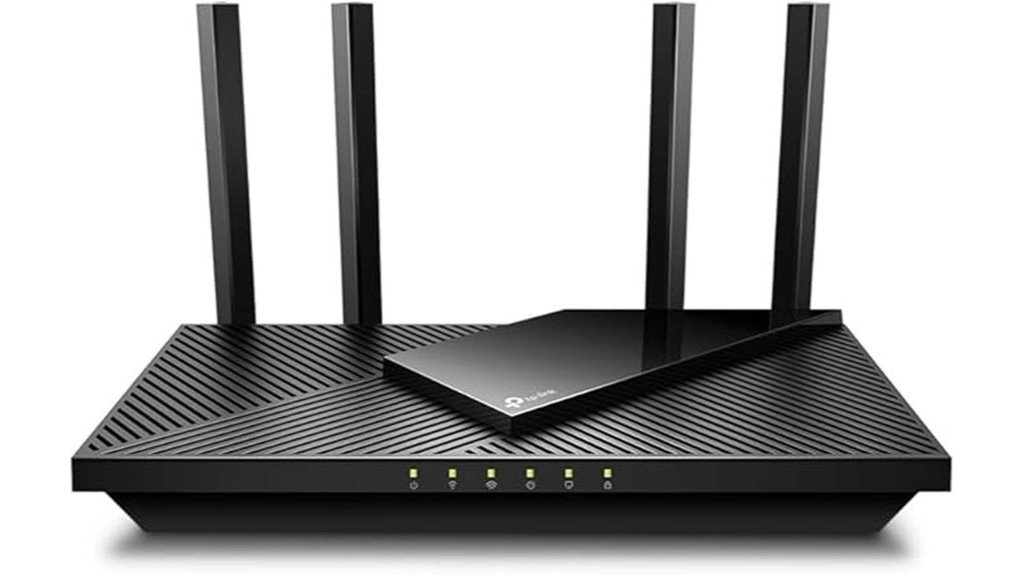
The Archer AX21 uses a traditional flat router design with four external antennas. At 10.3 × 5.3 × 1.6 inches, it is compact enough for a desk, shelf, TV stand, or small network cabinet, but it still needs open space around it for airflow and better signal spread.
The four high-gain antennas are a practical benefit in homes where devices sit in different directions from the router. You can adjust the antennas to improve signal reach, but the best placement still matters. A central, open location usually performs better than hiding the router behind a TV, inside a cabinet, or near thick walls.
Wireless Performance
The AX1800 rating combines the 2.4 GHz and 5 GHz bands, with up to 574 Mbps on 2.4 GHz and up to 1201 Mbps on 5 GHz. Those are theoretical wireless rates, not guaranteed real-world speeds, but they tell you the AX21 is aimed at everyday home internet rather than multi-gig networking.
For most home use, the 5 GHz band is the one you will want for fast laptops, phones, streaming devices, and gaming consoles near the router. The 2.4 GHz band is better for longer range and many smart-home devices, but it is usually slower and more crowded.
OFDMA and Airtime Fairness help when several devices are active. They do not make a weak internet plan faster, but they can help the router manage traffic more efficiently when people are browsing, streaming, taking video calls, and using smart devices at the same time.
Coverage and Mesh Expansion
Four external antennas and beamforming help the AX21 cover most apartments and many mid-size homes. Coverage still depends on your layout, wall materials, router placement, and wireless interference from nearby networks.
If you have dead zones, the OneMesh/EasyMesh support is important. You can pair the AX21 with compatible TP-Link extenders to create better roaming across a larger space. This is useful for long homes, multi-level layouts, or rooms separated by dense walls.
Pro Tip: Place the AX21 in an open, central spot and keep it away from thick walls, large metal objects, microwaves, and enclosed cabinets. Better placement can improve coverage more than changing advanced settings.
Wired Connectivity
The AX21 includes 1× Gigabit WAN port and 4× Gigabit LAN ports. That is a strong layout for a budget Wi-Fi 6 router because you can connect several important devices directly by Ethernet.
Hardwiring a gaming console, desktop PC, smart TV, or streaming box can reduce latency and avoid wireless congestion. The tradeoff is that the WAN port tops out at 1 Gbps, so buyers with internet plans above gigabit speeds should compare routers with 2.5G or faster WAN ports.
Security and Network Controls
WPA3 support is one of the AX21’s stronger modern features. WPA3 can improve wireless security compared with older standards when your devices support it. The router also supports WPA and WPA2 for backward compatibility.
Guest networks are useful for visitors and smart-home devices because they keep your main network more private. SPI firewall support, device-based QoS, Smart Connect, and Airtime Fairness give you practical controls without turning the router into a complex business network device.
VPN Support
The V4 hardware supports OpenVPN and PPTP Server. This can help if you want remote access back into your home network, but it is different from VPN client support, where the router sends all home traffic through a commercial VPN provider.
VPN client support may vary by firmware or model, so do not buy the AX21 only for router-level VPN client use unless you have confirmed the exact firmware menu you need. For many buyers, this is a key difference between “VPN server” and “VPN client.”
Setup and App Experience
You can set up the AX21 through the TP-Link Tether app on iOS or Android, or by using http://tplinkwifi.net in a browser. The setup process is designed for home users, and Alexa support can help with simple smart-home integration.
Smart Connect is worth enabling for most users because it lets the router guide devices to the best available band. If you prefer full manual control, you can still separate the 2.4 GHz and 5 GHz bands, but most households will prefer the simpler setup.
How It Performs in Everyday Use
For Streaming and Multitasking
The AX21 can handle multiple 4K streams plus general browsing on typical 300 to 800 Mbps internet plans, assuming your ISP connection and device placement are solid. The 5 GHz band is the best choice for TVs, streaming sticks, and laptops that are close enough to the router.
For Video Calls and Remote Work
OFDMA, beamforming, and Smart Connect help keep Zoom, Teams, and browser work stable when several people are online. For the most reliable work setup, use one of the gigabit LAN ports for your main desktop or docking station.
For Casual Gaming
The AX21 is a good fit for casual gaming when the console or PC has a strong signal, but Ethernet is still better for competitive play. Device-based QoS can help you prioritize important devices, but it cannot remove lag caused by a weak ISP connection or overloaded internet plan.
For Whole-Home Coverage
Four antennas and beamforming can cover most apartments and many mid-size homes, but large homes or difficult layouts may still need an extender. In that case, a compatible TP-Link OneMesh/EasyMesh extender can help reduce dead zones and improve roaming.
For Wired Reliability
The 4× Gigabit LAN ports are useful for smart TVs, PCs, game consoles, and streaming devices. The main limit is the 1 Gbps WAN port, which means gigabit-plus internet plans will not fully benefit from this router.
For Network Security
WPA3 and guest networks are straightforward to enable. Keep firmware updates active when possible so your router receives the latest fixes and stability improvements.
Pros and Cons
Pros
- Strong value Wi-Fi 6 performance for busy homes
- WPA3, guest networks, and robust firewall options
- OneMesh/EasyMesh support for roaming with compatible extenders
- Full-gigabit ports for fast wired devices
- Simple setup through the Tether app; Alexa-friendly
Cons
- WAN tops out at 1 Gbps, with no multi-gig port
- USB storage port is not present on AX21
- VPN client features vary by model and firmware; V4 advertises VPN server
- Advanced settings may feel technical to first-time router buyers
Quick Setup & Tips
- Connect your modem to the AX21’s WAN port, then power on the router.
- Use the TP-Link Tether app (iOS/Android) or
http://tplinkwifi.netto run the setup wizard. - Enable WPA3 if your devices support it, and create a guest network for visitors or IoT devices.
- Turn on Smart Connect so devices can use the best band automatically.
- Place the router in an open, central area instead of inside a cabinet or behind a TV.
- For whole-home coverage, pair it with a compatible OneMesh/EasyMesh extender.
Common Mistakes to Avoid
Do not place the AX21 on the floor, inside a closed cabinet, or directly behind a large TV. These spots can block signal and make the router feel weaker than it really is.
Do not expect the combined AX1800 speed number to equal the speed of one device. That number combines both wireless bands under ideal conditions. Your real speed depends on the device, distance, interference, internet plan, and band being used.
Do not confuse VPN server support with VPN client support. If your goal is to run your whole home through a paid VPN service at the router level, confirm the exact firmware feature before buying.
Is It Worth the Price?
The TP-Link Archer AX21 V4 is best understood as a budget-friendly Wi-Fi 6 router for everyday homes. It gives you modern wireless features, WPA3, mesh expansion support, and four gigabit LAN ports without moving into premium router pricing.
It is worth considering if you have a typical cable, fiber, or DSL plan below gigabit speeds and want a practical router for streaming, remote work, browsing, smart-home devices, and casual gaming. The value is strongest for buyers upgrading from an older Wi-Fi 5 router.
It is not the best fit if you need multi-gig internet support, a USB port, or advanced router-level VPN client features. In those cases, a higher-end router will make more sense.
How It Compares to Alternatives
Compared with many older AC routers, the AX21 gives you Wi-Fi 6 efficiency, WPA3, OFDMA, and better handling for busy homes. Compared with premium routers, it keeps the price lower by skipping multi-gig ports, USB storage, and higher-end tri-band hardware.
If you want stronger whole-home coverage from one system, a full mesh kit may be better. If you want advanced networking features, multi-gig internet, or heavy VPN client use, a higher-tier router is worth comparing. The AX21 makes the most sense if you want practical Wi-Fi 6 performance at a budget-friendly level.
Related Guides
Frequently Asked Questions
Does the AX21 V4 support VPN?
Yes. V4 supports OpenVPN and PPTP Server. VPN client support is not guaranteed on AX21 and may not appear in V4 firmware, so check your firmware notes and the “VPN” menu on your router before relying on that feature.
Can I use it with my ISP?
Yes. It works with major ISPs such as Comcast/Xfinity, Spectrum, AT&T, Verizon, Cox, and many others. Most cable, DSL, and fiber services still require a separate modem or ONT.
Is the TP-Link Archer AX21 good for gigabit internet?
It can work with gigabit internet because it has a gigabit WAN port. It is not ideal for gigabit-plus plans because the WAN port tops out at 1 Gbps and there is no 2.5G or faster WAN port.
Does the AX21 have a USB port?
No. The AX21 does not include a USB storage port. Choose another router if you want to connect a USB drive or use router-based file sharing.
Can I expand coverage with mesh?
Yes. The AX21 supports TP-Link OneMesh/EasyMesh with compatible extenders. This can help with dead zones in larger homes or rooms far from the router.
What about power use?
The included adapter is rated 12 V ⎓ 1.5 A. Real-world consumption is typically well below the 18 W nameplate, and you should leave updates enabled for security and stability fixes.
Should I use router mode or access point mode?
Use router mode if the AX21 is your main router connected to your modem or ONT. Use access point mode if another router already handles routing and you only want the AX21 to provide Wi-Fi coverage.
Who should skip the AX21?
Skip it if you need multi-gig WAN, USB storage, tri-band Wi-Fi, or confirmed VPN client support. It is better for everyday Wi-Fi 6 value than for advanced home networking.
The Bottom Line
The TP-Link Archer AX21 V4 is a smart buy if you want an affordable Wi-Fi 6 router with full-gigabit wired ports, WPA3, simple setup, and mesh expansion support. It is best for typical homes with internet plans up to gigabit speeds, and it is especially useful if you are upgrading from an older Wi-Fi 5 router.
You should skip it if you need multi-gig internet support, USB storage sharing, or guaranteed VPN client features. For everyday streaming, work, browsing, and casual gaming, the AX21 earns its recommended-with-caveats rating.
Note: Wireless rates are theoretical; actual throughput and coverage depend on your clients and environment.

1 thought on “TP-Link AX1800 WiFi 6 Router Review”