Disclosure: As an Amazon Associate, we earn from qualifying purchases. If you click a link on this page and make a purchase, we may receive a small commission at no extra cost to you.
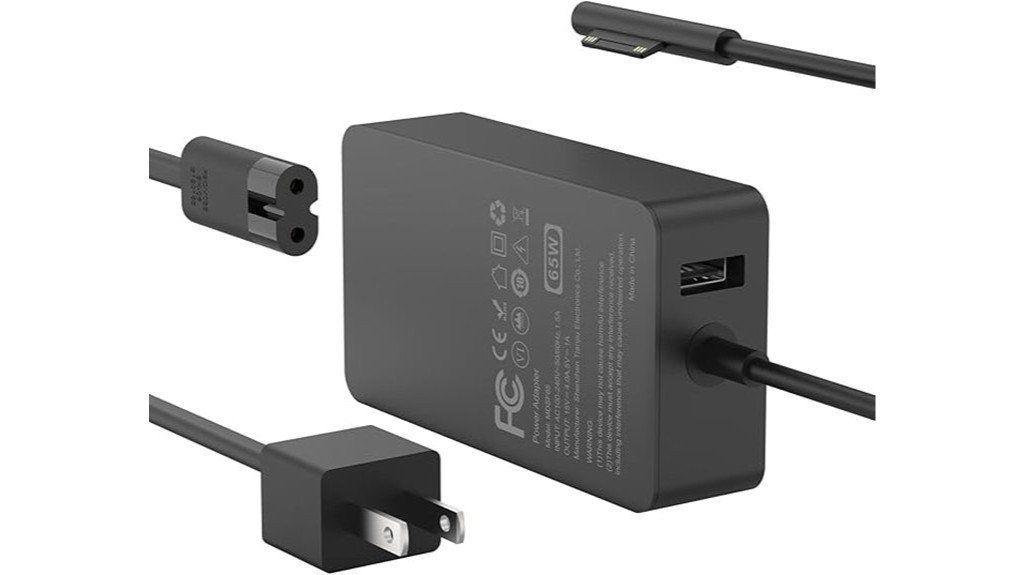
Choosing a replacement Surface charger can be confusing because wattage, port type, cable length, and device compatibility all matter. The 65W Charger for Microsoft Surface devices is made for Surface models that use the Surface Connect port, with a long 10-foot cable and support for Microsoft’s fast-charge behavior on supported devices. It may be a practical pick if you want a spare charger for a desk, bedroom, office, or travel bag. The main point to check before buying is whether your Surface uses Surface Connect and whether this specific model’s input voltage fits where you plan to use it.
Quick Verdict
Rating: Recommended with caveats
Best For: Surface owners who need a 65W Surface Connect charger with a longer cable.
Bottom Line: The MARSDOCK MDSF65 is useful if you want broad Surface Connect compatibility, a 10-foot reach, and 65W charging support. Skip it if your device charges only by USB-C or if you need a charger confirmed for 220–240V international use.
| Specification | Detail |
|---|---|
| Brand | MARSDOCK |
| Model | MDSF65 |
| Product Type | 65W AC power adapter for Microsoft Surface devices |
| Connector Type | Magnetic Surface Connect plug |
| Cable Length | 10FT cable |
| Dimensions | 3.54 x 1.97 x 0.79 inches |
| Weight | 6.3 ounces |
| Charging Support | Supports Microsoft fast-charge behavior, up to about 80% in about 1 hour on supported Surface models |
| Compatibility | Surface Pro 11/10/9/8, Surface Laptop 7–1, Surface Book 3/2/1, Surface Studio (i5), and Surface Go 4/3/2/1 models that use Surface Connect |
| Input Voltage Note | The article-supported listing detail notes 110V input, so check voltage needs before international use |
| Safety Features | Built-in protection against overcharging, overheating, overcurrent, and short circuits |
| Indicator | Blue LED charging indicator |
Overview
The 65W Charger for Microsoft Surface is a replacement or spare power adapter for Surface devices that use the Surface Connect port. It is currently sold on Amazon under the MARSDOCK brand, model MDSF65. Its compatibility spans many Surface generations, including Surface Pro 11/10/9/8, Surface Laptop 7–1, Surface Book 3/2/1, Surface Studio (i5), and Surface Go 4/3/2/1 models that use Surface Connect.
The charger supports Microsoft’s fast-charge behavior, which can charge supported Surface devices up to about 80% in about 1 hour when the device and charging conditions support it. Its listed size is 3.54 x 1.97 x 0.79 inches, and its listed weight is 6.3 ounces. That makes it small enough for daily carry, though some buyers may still prefer a smaller USB-C PD charger if their Surface supports USB-C charging.
The most useful everyday feature is the 10-foot cable. That extra reach helps when your outlet is behind a desk, far from a couch, or not close to your bed. The magnetic Surface Connect plug and blue LED indicator also make it easier to attach and confirm charging without checking Windows battery status every time.
Before You Buy: Confirm that your Surface model uses the Surface Connect port. Also check the input voltage if you plan to use this charger outside 110V regions, because this article-supported listing detail notes 110V input.
What Is the MARSDOCK MDSF65 65W Surface Charger?
The MARSDOCK MDSF65 is a 65W AC power adapter built for Microsoft Surface devices that charge through the magnetic Surface Connect port. It is not a generic USB-C charger. That matters because a USB-C-only laptop, tablet, or phone will not plug into this charger unless the device also has the correct Surface Connect charging port.
For many Surface owners, this type of charger works best as a second charger. You can keep your original charger in your bag and leave this one at your desk, office, bedroom, or travel setup. The 10-foot cable is the main day-to-day advantage because it gives you more placement freedom than shorter cables.
This charger also includes basic protection features against overcharging, overheating, overcurrent, and short circuits. Those protections are useful for normal charging safety, but they do not replace common care habits, such as keeping the adapter away from excess heat, liquid, and cable strain.
Who Should Buy It?
Best For
- Surface users who need a 65W replacement or spare charger for a Surface Connect device.
- People who want a longer 10-foot cable for desks, couches, beds, dorm rooms, or offices.
- Buyers who own compatible Surface Pro, Surface Laptop, Surface Book, Surface Studio, or Surface Go models.
Skip If
- Your device charges only by USB-C and does not have a Surface Connect port.
- You need a charger clearly rated for 100–240V international travel.
- You prefer the smallest possible travel charger and your Surface supports USB-C PD charging.
Detailed Features
Equipped with practical features, the 65W Charger for Microsoft Surface stands out for safety, reach, and simple daily use:
- Protection Mechanisms: Built-in safeguards against overcharging, overheating, overcurrent, and short circuits help support safer everyday charging.
- Battery Safety: The charger is designed to protect your device while charging, but it does not double battery lifespan or repair worn battery cells.
- Cable Length: A 10FT cable offers extensive reach and flexibility, which is useful if your outlet is far from where you use your Surface.
- Magnetic Plug & LED Indicator: The magnetic Surface Connect plug pairs with a blue LED to indicate charging status.
Charging Performance
The 65W output is the key reason to choose this charger over lower-wattage Surface chargers. On supported Surface devices, it works with Microsoft’s fast-charge behavior, which can reach up to about 80% in about 1 hour under the right conditions. That makes it useful when you need to top up your Surface before class, work, travel, or a meeting.
Charging speed still depends on the Surface model, battery level, temperature, and what you are doing while charging. For example, charging while running heavy apps, video calls, or external displays may be slower than charging while the device is idle or sleeping. That is normal for laptops and tablets.
Design and Build
The charger measures 3.54 x 1.97 x 0.79 inches and weighs 6.3 ounces. That size is reasonable for a 65W Surface Connect charger, but it may feel less compact than some modern USB-C wall chargers. The longer cable also adds convenience, but it can take more space in a small pouch or tech organizer.
The Surface Connect plug uses a magnetic attachment, which helps reduce stress if the cable is pulled by accident. The blue LED indicator gives a quick visual cue that the connector is seated and charging. For daily use, those two details make the charger easier to live with than a basic adapter with no status light.
Compatibility and Safety
This charger is intended for Surface devices that use the Surface Connect port. The article-supported compatibility list includes Surface Pro 11/10/9/8, Surface Laptop 7–1, Surface Book 3/2/1, Surface Studio (i5), and Surface Go 4/3/2/1. Before ordering, match your exact Surface model and charging port to the listing details.
Microsoft recommends using genuine or Microsoft-licensed accessories for best compatibility and safety. This charger may still be a practical aftermarket option, but you should inspect the adapter, cable, and connector before use. Do not use it if the cable is damaged, the plug feels loose, or the adapter becomes unusually hot.
Pro Tip: Check the bottom or rear of your Surface for the model name, then compare it with the charger’s compatibility list before buying. Surface devices can look similar across generations, but charging support may differ.
How It Performs in Real Use
For Desk Setups
The 10-foot cable is especially useful at a desk where the wall outlet or power strip is not close to your laptop stand. It gives you more freedom to route the cable behind a monitor, under a desk, or along a wall without pulling the adapter tight.
For Home and Bedroom Use
At home, the longer reach makes the charger easier to use near a couch or bed. You can keep the adapter plugged in and still use your Surface while charging. The tradeoff is that a long cable can create clutter if you do not coil or route it neatly.
For Office or School Backup
This charger makes sense as a backup adapter for work, school, or a second location. Leaving a spare charger at your desk can reduce the chance of forgetting your main charger at home. It is most useful if your Surface is one of the compatible Surface Connect models.
For Travel
The listed 6.3-ounce weight is light enough for a bag, but the 10-foot cable may feel bulkier than a short travel cable. If you travel internationally, the input voltage detail needs extra attention because the article-supported listing detail notes 110V input.
Setup Tips Before First Use
Before using the charger, inspect the adapter, cable, and Surface Connect tip for visible damage. Plug the charger into the wall first, then attach the magnetic connector to your Surface. Check for the blue LED indicator and confirm that Windows shows the device is charging.
Keep the cable away from chair wheels, sharp bends, and tight knots. A longer cable is convenient, but it can also be easier to trip over if it crosses a walking path. For the cleanest setup, route it along the edge of a desk or wall.
Pros and Cons
Pros
- 65W output supports fast charging behavior on supported Surface devices.
- Wide compatibility with many Surface Connect models.
- 10-foot cable gives more reach than many standard laptop chargers.
- Magnetic Surface Connect plug is simple to attach and remove.
- Blue LED indicator helps confirm charging at a glance.
Cons
- Not useful for devices that charge only through USB-C.
- The long cable may feel bulky for compact travel packing.
- Input voltage should be checked carefully before 220–240V international use.
Is It Worth the Price?
The MARSDOCK MDSF65 is worth considering if you need a Surface Connect charger with 65W output and a long cable. Its value is strongest for buyers who want a second charger for a fixed location, such as an office desk, bedroom, classroom, or home workstation.
It is not the best fit if your Surface already charges well through USB-C and you want the smallest possible travel adapter. It is also not ideal if you need a charger with clearly stated worldwide voltage support. For compatible Surface Connect users in the right region, though, it can be a smart buy for everyday use.
How It Compares to Alternatives
Compared with lower-wattage Surface chargers, this 65W model is better suited for users who want stronger charging support on compatible Surface devices. Compared with compact USB-C PD chargers, it is less universal because it uses Surface Connect, but it may be more convenient for Surface models built around that magnetic charging port.
Microsoft’s official Surface power supplies may be better for buyers who want the safest first-party option. A USB-C PD charger may be better if your Surface supports USB-C charging and you want one charger for several devices. The MARSDOCK MDSF65 makes the most sense if you specifically want a Surface Connect charger with a longer 10-foot cable.
Concluding Thoughts
While the 65W Charger for Microsoft Surface has both strengths and limitations, its overall performance leans favorable for compatible Surface Connect devices. The charger balances useful power, broad Surface compatibility, and everyday convenience, especially because of its 10-foot cable.
The 65W Charger for Microsoft Surface offers efficiency and adaptability for devices with Surface Connect, complementing Microsoft’s fast-charge behavior on supported models.
- Compatibility: Supports a wide range of Surface models that use Surface Connect, including Surface Pro 11/10/9/8, Surface Laptop 7–1, Surface Book 3/2/1, and Surface Go 4/3/2/1.
- Performance: Works with Microsoft’s fast-charging behavior, up to about 80% in about 1 hour on supported devices.
- Safety: Incorporates standard protections, including overcurrent, overheat, and short-circuit protection.
- User Experience: Long 10-foot cable and LED indicator improve day-to-day convenience.
In summation, this charger presents a reliable, efficient solution for many Microsoft Surface users. Just confirm your device uses the Surface Connect port and that the input voltage matches your charging location.
Frequently Asked Questions
Is this charger compatible with Surface accessories like the Dock or Pen?
The charger powers your Surface device through the Surface Connect port. It does not directly power accessories like a Dock or Pen, which connect or charge through their own supported methods.
Does the charger support international voltage standards?
The article-supported Amazon listing detail for this specific model, MDSF65, lists Input Voltage: 110V. If you plan to use it in 220–240V regions, verify the seller or manufacturer specs or choose a charger rated for 100–240V and bring the correct plug adapter.
Can this charger be used with power banks?
This AC charger is designed for wall outlets. It is not intended for USB power banks unless the power bank provides an AC outlet through an inverter.
Can I use a USB-C PD power bank instead?
Some Surface models support USB-C charging with a sufficiently rated USB-C PD charger or power bank. This MARSDOCK charger is different because it uses the magnetic Surface Connect plug, so check your Surface model before choosing either option.
How durable is the charger cable?
The included 10-foot cable is convenient for reach. As with any AC adapter, avoid sharp bends, tight wrapping, pulling, and excessive strain to help preserve the cable.
Is the charger covered by a warranty?
Warranty terms are set by the seller or manufacturer. The Amazon page provides a “Product Warranty” link with details, so review those terms before purchase.
Will it charge every Microsoft Surface model?
No. It is intended for Surface devices that use the Surface Connect port and match the supported model list. If your Surface charges only by USB-C, this charger is not the right connection type.
Is the 10-foot cable worth it?
The 10-foot cable is worth it if your outlet is far from where you use your Surface. It is less ideal if you want the most compact charger setup for a small travel bag.
The Bottom Line
The MARSDOCK MDSF65 65W Charger is a good fit if you need a Surface Connect charger with broad compatibility, fast-charge support on supported Surface devices, and a long 10-foot cable. Skip it if your device charges only by USB-C or if you need a charger clearly suited for 220–240V regions. Its biggest strength is everyday convenience, while its biggest limitation is compatibility and voltage checking before purchase.
