Only a handful of iPhone pairs truly share cases. Two iPhones can have the same screen size, or even identical height and width, and still need different cases because the camera bump, button layout, or thickness changed. This guide goes model by model, using Apple’s published dimensions and reported fit tests, so you know which older case will work on your phone and which one will not.
Quick Answer
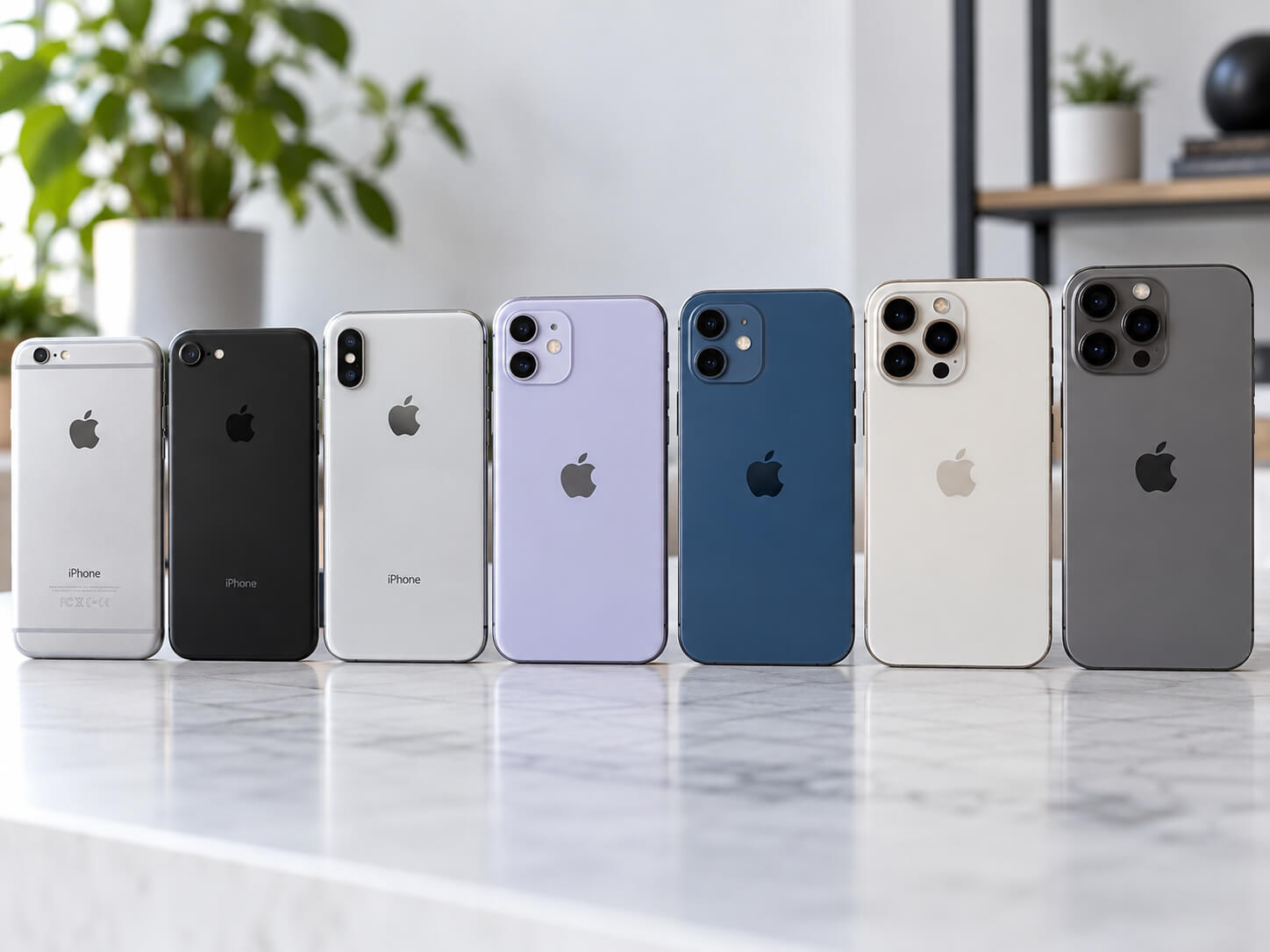
The iPhones that reliably share cases are: iPhone 6 and 6s; iPhone 6 Plus and 6s Plus; iPhone 7, 8, SE (2nd generation), and SE (3rd generation); iPhone 7 Plus and 8 Plus; iPhone X and XS; iPhone 12 and 12 Pro; and iPhone 16e and 17e. iPhone 17 Pro and 18 Pro cases fit each other in hands-on tests, but Apple does not officially call them compatible. Almost every other pair, including XR and 11, 12 and 13, and 15 and 16, needs its own case.
Key Takeaways
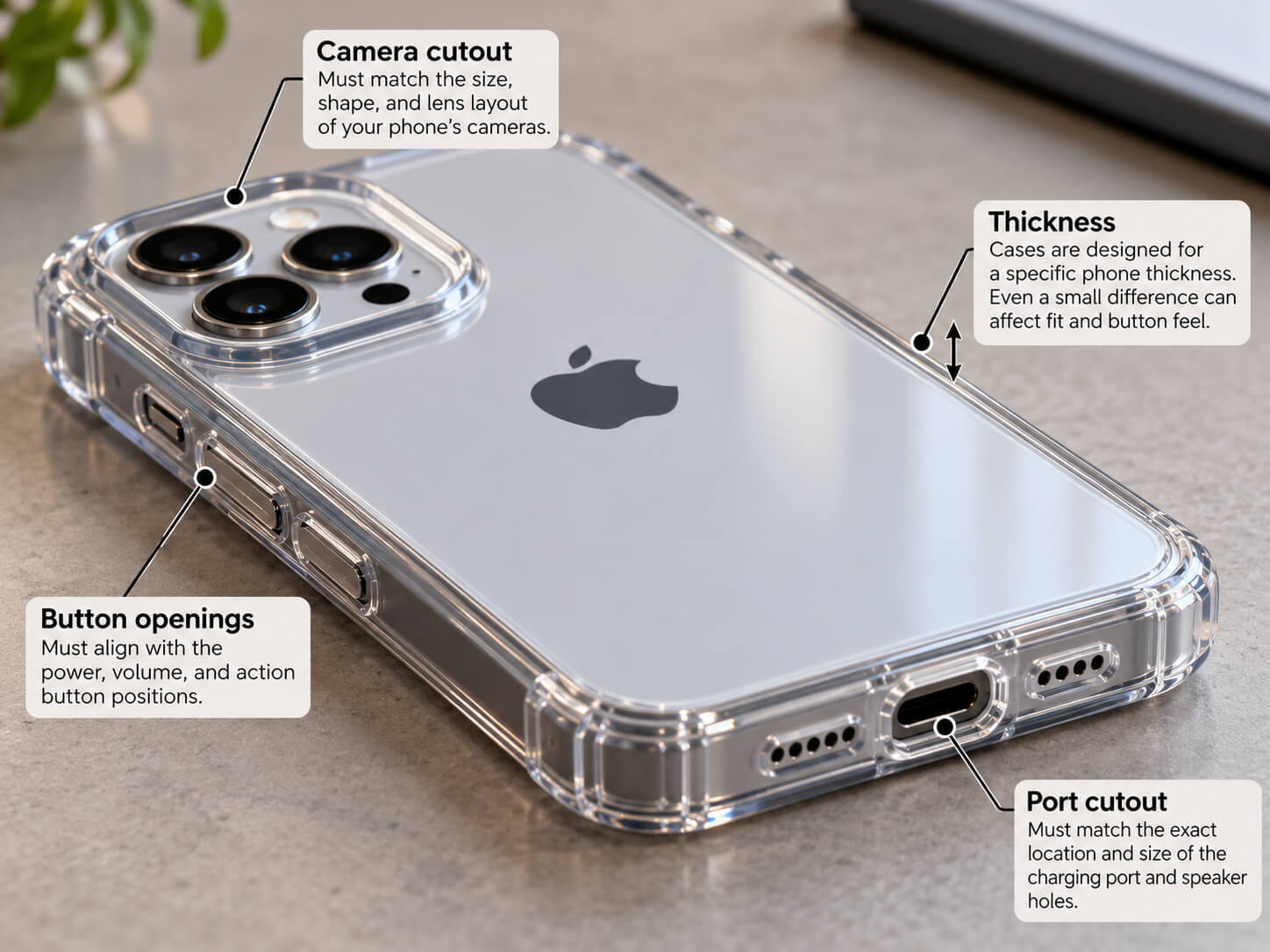
- Matching height and width is not enough. The camera cutout, button openings, thickness, and port all have to line up.
- A change of a few tenths of a millimeter in thickness, or a new camera layout, is usually enough to break compatibility.
- The Action button (iPhone 15 Pro and later) and Camera Control (iPhone 16 and later, except 16e and 17e) need matching openings or covers.
- If you use MagSafe chargers, wallets, or mounts, pick a case with built-in magnets made for your model.
- The safest rule: buy a case whose listing names your exact model.
As an Amazon Associate, I earn from qualifying purchases.
Spigen for iPhone 16 Pro Case, Ultra Hybrid MagFit (Clear)
A slim, clear MagSafe-compatible case for the iPhone 16 Pro. It is made for the 16 Pro only, so it will not fit an iPhone 16, 16 Pro Max, or 17-series phone.
Deal tip: Upgrading your phone? See our October Prime Day phone and tablet deals on the Pixel 10, Galaxy S26 and 11-inch iPad.
iPhone Case Compatibility Chart
The chart below lists each pairing people commonly ask about. Dimensions are height x width x depth in millimeters, taken from Apple’s tech specs. Depth does not include the camera bump, which is often the part that decides whether a case fits.
| Models | Dimensions (mm) | Share cases? | Why |
|---|---|---|---|
| iPhone 5s and iPhone SE (1st gen) | 123.8 x 58.6 x 7.6 (both) | Yes | Same body design and dimensions. |
| iPhone 6 and iPhone 6s | 138.1 x 67.0 x 6.9 / 138.3 x 67.1 x 7.1 | Yes | Near-identical body, camera, and buttons. |
| iPhone 6 / 6s and iPhone 7 / 8 | Close (see rows above and below) | No | The iPhone 7 has a larger camera lens placed closer to the edge, a bigger flash, and a larger bottom speaker grille, so 6s cases do not fit it properly. |
| iPhone 7, iPhone 8, iPhone SE (2nd gen), iPhone SE (3rd gen) | 138.3 x 67.1 x 7.1 (7) / 138.4 x 67.3 x 7.3 (8, SE 2, SE 3) | Yes | Same external design. Only a logo window on the back of some cases may not line up on the SE models. |
| iPhone 6 Plus and iPhone 6s Plus | 158.1 x 77.8 x 7.1 / 158.2 x 77.9 x 7.3 | Yes | Near-identical body and camera. |
| iPhone 7 Plus and iPhone 8 Plus | 158.2 x 77.9 x 7.3 / 158.4 x 78.1 x 7.5 | Yes | Same dual-camera layout and button positions. A 6s Plus case will not fit either, because the dual camera needs a much larger cutout. |
| iPhone X and iPhone XS | 143.6 x 70.9 x 7.7 (both) | Yes | Identical dimensions and button placement. |
| iPhone XS and iPhone 11 Pro | 143.6 x 70.9 x 7.7 / 144.0 x 71.4 x 8.1 | No | The 11 Pro is slightly larger and has a square triple-camera module. The same applies to XS Max and 11 Pro Max. |
| iPhone XR and iPhone 11 | 150.9 x 75.7 x 8.3 (both) | No | Same body size, but the XR has a single camera and the 11 has a larger square dual-camera module. An XR case will not clear the 11’s camera. |
| iPhone 12 and iPhone 12 Pro | 146.7 x 71.5 x 7.4 (both) | Yes | Same body. Apple and most case makers sell one case for both. Check that the camera opening is sized for the 12 Pro’s triple camera. |
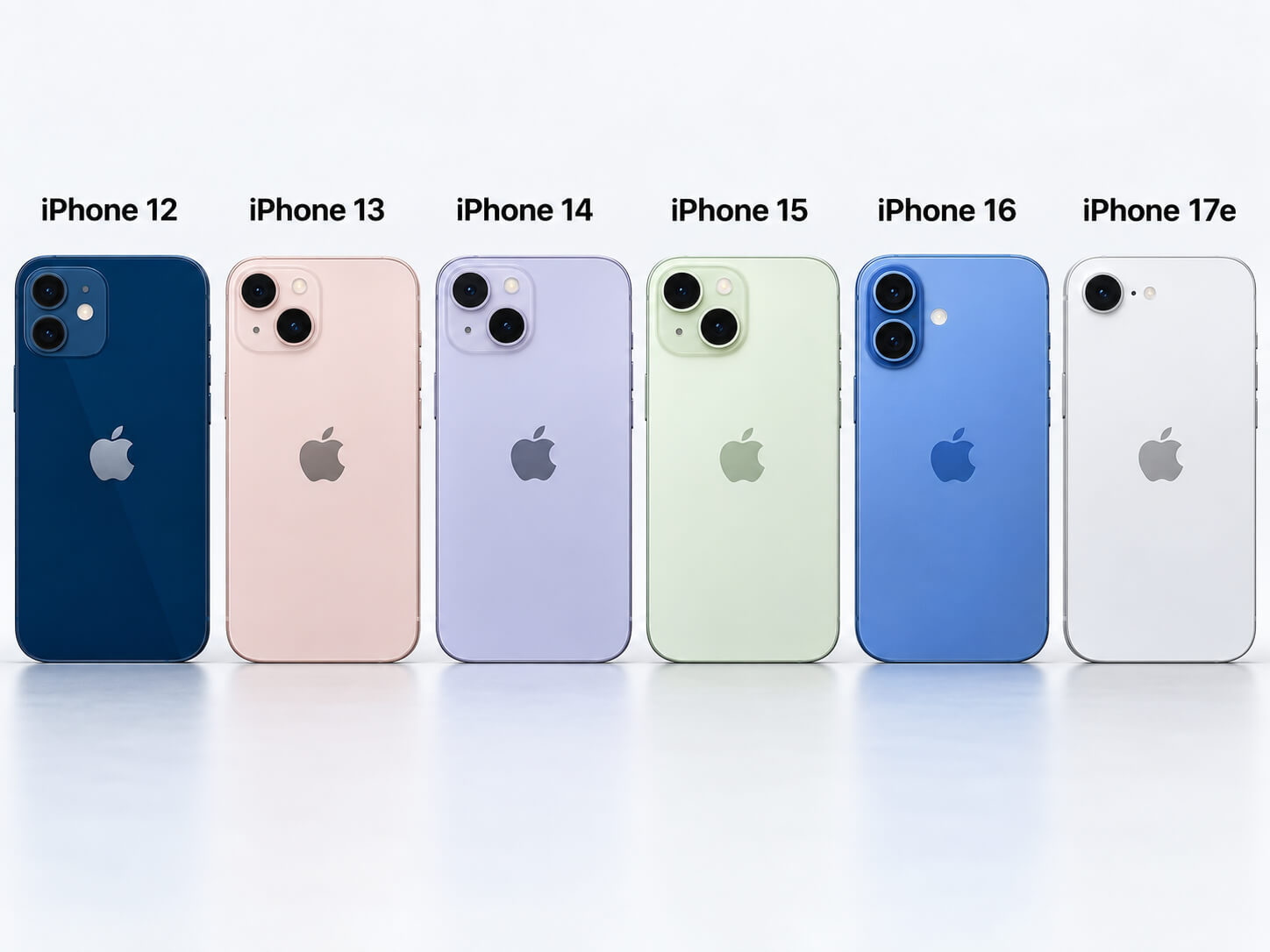
| iPhone 12 and iPhone 13 | 146.7 x 71.5 x 7.4 / 146.7 x 71.5 x 7.65 | No | The 13 is thicker and moves its two cameras to a diagonal layout. The same is true of the 12 mini and 13 mini (both 131.5 x 64.2 mm). |
| iPhone 13 and iPhone 13 Pro | 146.7 x 71.5 x 7.65 (both) | No | Identical body size, but the 13 Pro’s triple-camera module is much larger. |
| iPhone 13 and iPhone 14 | 146.7 x 71.5 x 7.65 / 146.7 x 71.5 x 7.80 | Only if listed | Very close, but the 14 is slightly thicker, has a larger camera bump, and its side buttons shifted slightly. Some cases are sold as fitting both; a case made only for the 13 may not fit the 14 well. |
| iPhone 16e and iPhone 17e | 146.7 x 71.5 x 7.80 (both) | Yes | Identical dimensions and buttons. The 17e adds MagSafe, so a magnetic 17e case is needed for MagSafe accessories. |
| iPhone 14 and iPhone 16e / 17e | 146.7 x 71.5 x 7.80 (all) | Loose fit only | Same outer size, but the 14’s dual-camera cutout does not match the single camera on the 16e and 17e, which leaves a gap and less lens protection. |
| iPhone 14 and iPhone 15 | 146.7 x 71.5 x 7.80 / 147.6 x 71.6 x 7.80 | No | The 15 is slightly larger, has contoured edges, a bigger camera, and a USB-C port instead of Lightning. |
| iPhone 15 and iPhone 16 | 147.6 x 71.6 x 7.80 (both) | No | Same size, but the 16 has vertically stacked cameras, an Action button, and Camera Control. 15 Plus and 16 Plus (160.9 x 77.8 x 7.80) differ in the same way. |
| iPhone 15 Pro and iPhone 16 Pro | 146.6 x 70.6 x 8.25 / 149.6 x 71.5 x 8.25 | No | The 16 Pro is taller and wider and adds Camera Control. The same goes for 15 Pro Max (159.9 x 76.7) and 16 Pro Max (163.0 x 77.6). |
| iPhone 16 / 16 Pro and iPhone 17 | 147.6 x 71.6 x 7.80 / 149.6 x 71.5 x 8.25 / 149.6 x 71.5 x 7.95 | No | The 17 is 2 mm taller than the 16. It matches the 16 Pro’s height and width, but it is thinner and has a different camera layout. |
| iPhone 16 Pro and iPhone 17 Pro | 149.6 x 71.5 x 8.25 / 150.0 x 71.9 x 8.75 | No | The 17 Pro is thicker and has a much larger full-width camera plateau. The same applies to 16 Pro Max and 17 Pro Max. |
| iPhone 17 Pro and iPhone 18 Pro (and 17 Pro Max / 18 Pro Max) | 150.0 x 71.9 x 8.75 (both Pro) / 163.4 x 78.0 x 8.75 (both Pro Max) | Fits, but not official | Body dimensions are identical, and hands-on tests found the cases fit. Apple says they are not case-compatible because the 18 Pro camera plateau is slightly thicker (measured at about 0.1 mm), which slightly reduces lens clearance in an older case. |
| iPhone Air | 156.2 x 74.7 x 5.64 | No | No other iPhone shares its size or thickness. Use an iPhone Air case only. |
| iPhone Duo (foldable) | 117.8 x 84.1 x 11.3 closed | No | A folding design with its own shape. It needs cases made specifically for it. |
Pro Tip
Not sure which model you have? Go to Settings > General > About and check the Model Name. Then search for a case using that exact name, such as “iPhone 16 Pro” rather than “iPhone 16” or “6.3-inch iPhone.”
Why Most iPhones Cannot Share Cases
Apple changes small physical details almost every year. Even when the front of the phone looks the same, the back and sides are often different enough to need a new case.
- Body dimensions: A case is molded to fit tightly. A difference of even 0.15 mm in thickness (iPhone 13 at 7.65 mm vs iPhone 14 at 7.80 mm) or a millimeter in height can make a case too tight or too loose.
- Camera bump size and position: This is the most common reason cases do not cross over. The XR and 11, and the 13 and 13 Pro, have identical bodies but different camera modules.
- Button placement: The Action button replaced the mute switch starting with the iPhone 15 Pro. Camera Control, a new button on the lower right side, arrived with the iPhone 16 lineup and is also on the iPhone 17, iPhone Air, 17 Pro, and 18 Pro models. The iPhone 16e and 17e have the Action button but no Camera Control.
- Port: iPhone 15 and later use USB-C; earlier models use Lightning. The bottom opening needs to fit your cable.
- MagSafe alignment: MagSafe started with the iPhone 12 lineup. A MagSafe case has a magnet ring positioned for one model, so a case from a different model may hold accessories off-center or weakly. The iPhone 16e does not support MagSafe; the iPhone 17e does.
Warning
Do not force an iPhone into a case that feels tight. A poor fit can press buttons constantly, strain the frame, scratch the finish, or leave the camera and corners exposed in a drop. A case with a camera lip that sits too low can let the lenses touch the table.
iPhone Dimensions by Size Group
These groups show how close many models are in size, and why size alone does not tell you whether a case fits. All figures are from Apple’s tech specs (height x width x depth, in mm).
| Model | Dimensions (mm) |
|---|---|
| iPhone 12 mini / 13 mini | 131.5 x 64.2 x 7.4 / 131.5 x 64.2 x 7.65 |
| iPhone 12 / 12 Pro | 146.7 x 71.5 x 7.4 |
| iPhone 13 / 13 Pro | 146.7 x 71.5 x 7.65 |
| iPhone 14 / 16e / 17e | 146.7 x 71.5 x 7.80 |
| iPhone 14 Pro | 147.5 x 71.5 x 7.85 |
| iPhone 15 / 16 | 147.6 x 71.6 x 7.80 |
| iPhone 15 Pro | 146.6 x 70.6 x 8.25 |
| iPhone 16 Pro | 149.6 x 71.5 x 8.25 |
| iPhone 17 | 149.6 x 71.5 x 7.95 |
| iPhone 17 Pro / 18 Pro | 150.0 x 71.9 x 8.75 |
| iPhone 12 Pro Max / 13 Pro Max / 14 Plus | 160.8 x 78.1 x 7.4 / 7.65 / 7.80 |
| iPhone 14 Pro Max | 160.7 x 77.6 x 7.85 |
| iPhone 15 Plus / 16 Plus | 160.9 x 77.8 x 7.80 |
| iPhone 15 Pro Max | 159.9 x 76.7 x 8.25 |
| iPhone 16 Pro Max | 163.0 x 77.6 x 8.25 |
| iPhone 17 Pro Max / 18 Pro Max | 163.4 x 78.0 x 8.75 |
Notice that the iPhone 12 Pro Max, 13 Pro Max, and 14 Plus share the same height and width, yet each has a different thickness and camera module, so their cases are not interchangeable. The 14 Pro Max and 13 Pro Max are also close in size, but the 14 Pro Max is narrower, thicker, and has a larger camera bump.
OtterBox iPhone 16 Pro Defender Series Case (MagSafe)
A multi-layer, MagSafe-compatible rugged case for the iPhone 16 Pro with port covers. It is shaped for the 16 Pro only, so buy the matching Defender version if you have a different model.
How to Choose the Right Case
Start with compatibility, then think about how you use your phone each day.
- Exact model name: Match the full name, such as iPhone 16 Pro Max, not just iPhone 16.
- Camera cutout and lip: The opening should match your lens layout and flash, with a raised edge so the lenses do not touch flat surfaces.
- Button access: Confirm the listing supports the Action button, mute switch, or Camera Control on your model. Camera Control cases either leave the button open or use a conductive cover that passes touches through.
- Charging port: Make sure the bottom opening fits a Lightning or USB-C cable, including thicker cable ends.
- MagSafe: Choose a case with built-in magnets if you use MagSafe chargers, wallets, stands, or car mounts.
- Protection level: Rugged cases with raised edges and thick corners suit people who drop their phone often or work outdoors. Slim cases suit people who want a lighter feel.
- Material and grip: Silicone is grippy but collects lint. Hard plastic is slim but can be slippery. Hybrid cases pair a firm back with flexible edges. Some clear cases yellow over time.
- Return policy: Buy from a seller that accepts returns in case the fit is wrong.
Note
Some sellers list several iPhone models in one product title, such as “for iPhone 16 15 14 13.” These are often separate case versions sold under one listing, not one case that fits all of them. Select your exact model in the listing’s options before you order.
Popular Phone Case Brands
OtterBox is known for rugged designs. Its Defender series is aimed at people who care most about drop protection and port coverage.
Spigen offers everything from slim clear cases to tougher hybrid designs, and it appeals to people who want a balance of protection, grip, and a slim profile.
Apple’s own cases are made for one specific model at a time and have built-in MagSafe magnets on MagSafe iPhones. They are not the most rugged option, but they fit precisely.
Wallet cases carry cards but add bulk and can weaken MagSafe. Battery cases extend runtime but add weight. Waterproof cases help around water or snow, but they can muffle speakers and make buttons harder to press.
Quick Fit Test After Your Case Arrives
- Slide the iPhone in without forcing it and check that all four corners sit flush.
- Press every button, including the Action button and Camera Control if your phone has them.
- Open the Camera app and make sure no lens or the flash is blocked, and take a flash photo to check for glare.
- Plug in your charging cable to confirm the port opening is wide enough.
- Test MagSafe charging or accessories if the case claims MagSafe support.
- Lay the phone face down and camera side down on a flat surface to check that the screen and lenses do not touch.
Pro Tip
Keep the packaging until you finish testing the case. Many sellers require it for an easy return or exchange.
Frequently Asked Questions
Which iPhones use the same phone case?
The pairs that reliably share cases are iPhone 5s and SE (1st gen); iPhone 6 and 6s; iPhone 6 Plus and 6s Plus; iPhone 7, 8, SE (2nd gen), and SE (3rd gen); iPhone 7 Plus and 8 Plus; iPhone X and XS; iPhone 12 and 12 Pro; and iPhone 16e and 17e. iPhone 17 Pro and 18 Pro cases fit each other in hands-on tests, though Apple does not list them as compatible.
Can the iPhone SE use the same case as other iPhones?
It depends on the generation. The first-generation iPhone SE uses iPhone 5s cases. The second- and third-generation iPhone SE use the same body as the iPhone 8, so most iPhone 7 and iPhone 8 cases fit them.
Do iPhone XR cases fit the iPhone 11?
No. Both phones measure 150.9 x 75.7 x 8.3 mm, but the iPhone 11 has a larger square dual-camera module, so an XR case will not clear its cameras.
Will an iPhone 13 case fit an iPhone 14?
Not reliably. The two have the same height and width, but the iPhone 14 is slightly thicker (7.80 mm vs 7.65 mm), has a larger camera bump, and has slightly shifted buttons. Only use a case whose listing names both models.
Do iPhone 15 cases fit the iPhone 16?
No. The dimensions are the same, but the iPhone 16 has vertically stacked cameras, an Action button, and Camera Control, which iPhone 15 cases are not designed for. iPhone 15 Pro cases do not fit the iPhone 16 Pro either, because the 16 Pro is larger.
Do iPhone 16e cases fit the iPhone 17e?
Yes. Both measure 146.7 x 71.5 x 7.80 mm with the same button layout. The iPhone 17e supports MagSafe and the 16e does not, so if you want to use MagSafe accessories, choose a MagSafe case.
Do iPhone 17 Pro cases fit the iPhone 18 Pro?
In hands-on tests, yes. Both have identical body dimensions (150.0 x 71.9 x 8.75 mm for the Pro, 163.4 x 78.0 x 8.75 mm for the Pro Max). Apple, however, says they are not case-compatible because the iPhone 18 Pro camera plateau is slightly thicker, which leaves slightly less lens clearance in an older case.
Are there universal cases that fit all iPhone models?
Not in a way that protects the phone well. Cases that claim to fit many models tend to leave gaps, block ports, or reduce camera protection. A case made for your exact model is the safer choice.
Does MagSafe work through any iPhone case?
MagSafe chargers may still charge through some thin non-magnetic cases, but the magnetic hold will be weak or missing. For a firm hold with MagSafe chargers, wallets, mounts, and battery packs, choose a case with built-in MagSafe magnets made for your model.
Sources
- Apple iPhone: the current iPhone lineup.
- Apple iPhone Technical Specifications: official dimensions for every iPhone model.
- Apple: Compare iPhone models: side-by-side dimensions, buttons, and features.
- Apple: Identify your iPhone model: how to confirm your exact model before buying accessories.
- Apple Cases & Protection: Apple’s model-specific iPhone cases.
- MacRumors: iPhone 17 Pro vs iPhone 18 Pro case compatibility.
- AppleInsider: An iPhone 16e case will still fit the iPhone 17e.
- 9to5Mac: Do iPhone 16 cases fit the iPhone 17?
- 9to5Mac: Will iPhone 13 cases fit the iPhone 14?
- Macworld: iPhone 6s cases won’t fit the iPhone 7.
