Disclosure: As an Amazon Associate, we earn from qualifying purchases. If you click a link on this page and make a purchase, we may receive a small commission at no extra cost to you.
Slow Wi-Fi can make a fast internet plan feel wasted. When several devices compete for bandwidth, gaming, video calls, and 4K streaming all suffer. The TP-Link AXE5400, also sold as the Archer AXE75, tackles this with Wi-Fi 6E and a dedicated 6 GHz band that keeps your traffic away from crowded frequencies. This review covers where it fits, what it does well, and what to check before you buy.
| Product Name | Best For | Key Spec | CTA |
|---|---|---|---|
| TP-Link Archer AXE75 AXE5400 | Busy homes that want Wi-Fi 6E without paying for Wi-Fi 7 | Tri-band Wi-Fi 6E, up to 5400 Mbps, 2.5 Gbps port | Check Price |
Overview
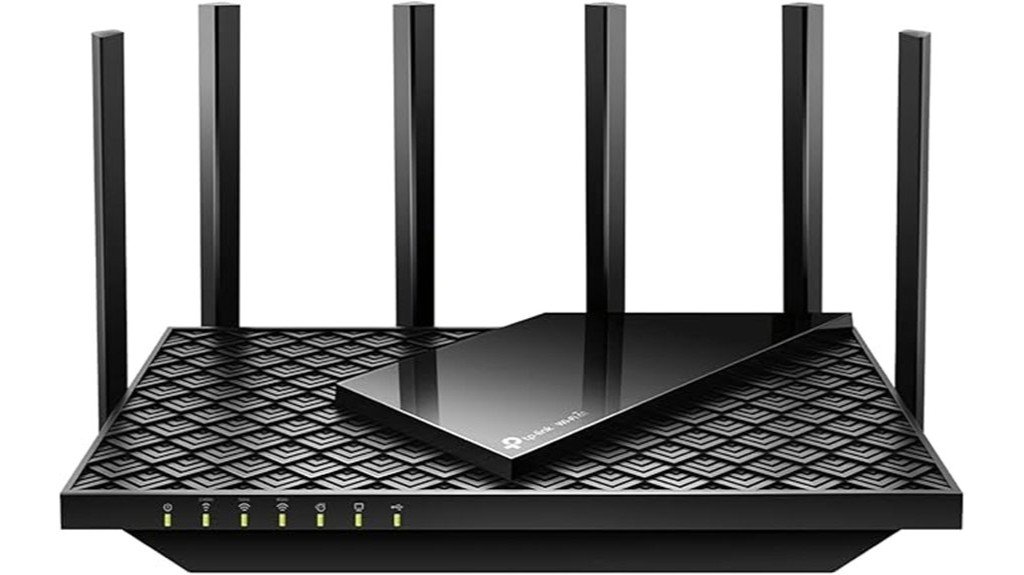
The TP-Link AXE5400, also sold as the Archer AXE75, is a tri-band Wi-Fi 6E router built for modern home networks. It runs three separate bands: 2.4 GHz, 5 GHz, and 6 GHz, with a combined rated Wi-Fi speed of up to 5400 Mbps. The 6 GHz band matters because it’s brand new spectrum: no older devices are using it yet, so it stays clear of the congestion that slows down 2.4 GHz and 5 GHz in crowded neighborhoods or apartment buildings. A 1.7 GHz quad-core CPU and 512 MB of memory keep the router responsive when many devices are connected at once.
Detailed Features
The Archer AXE75 focuses on wireless speed, device capacity, and simple home network control. Rated speeds are 574 Mbps on 2.4 GHz, 2402 Mbps on 5 GHz, and 2402 Mbps on 6 GHz. OFDMA lets the router talk to more Wi-Fi 6 and 6E devices at the same time instead of handling them one by one, which helps in homes with a lot of phones, laptops, and smart home gadgets. It also supports WPA3 encryption, TP-Link’s HomeShield security tools, VPN server and client modes, and setup through the TP-Link Tether app or a web browser.
| Feature | Details |
|---|---|
| Model / Series | TP-Link Archer AXE75 (AXE5400) |
| Wireless Standard | Wi-Fi 6E (802.11ax), tri-band (2.4/5/6 GHz) |
| Max Rated Throughput | Up to 5400 Mbps (2.4 GHz: 574 Mbps, 5 GHz: 2402 Mbps, 6 GHz: 2402 Mbps) |
| Channel Width | Up to 160 MHz on supported bands and compatible client devices |
| CPU / Memory | 1.7 GHz quad-core CPU and 512 MB memory |
| Antennas | 6 fixed high-performance antennas with beamforming, per TP-Link’s product page |
| Ethernet Ports | 5 ports total: 1 x 2.5 Gbps WAN/LAN, 1 x 1 Gbps WAN/LAN, and 3 x 1 Gbps LAN, per TP-Link’s current product page. Some older retail listings simplify this as “5 ports, 1000 Mbps,” so confirm the hardware version on your specific listing if the 2.5 Gbps port matters to you. |
| USB Support | USB 3.0 port for Apple Time Machine backups, FTP server, media server, and Samba server use |
| Security | WPA3 and TP-Link HomeShield. Some HomeShield features, like HomeShield Pro, need a paid plan. |
| Mesh Compatibility | EasyMesh, per TP-Link’s current product page. A few retail listings still reference the older OneMesh standard, so check your hardware version if you’re planning to extend coverage with a second unit. |
| VPN | VPN server and VPN client support: OpenVPN, PPTP, and L2TP |
| App / Management | TP-Link Tether app for iOS and Android, plus web page management |
| Dimensions (Body) | 10.7 x 5.8 x 1.9 in (W x D x H) |
| Mounting | Wall or ceiling mountable with screw-head slots |
| In the Box (US) | Router, power adapter, RJ45 Ethernet cable, and quick installation guide |
| Warranty (US) | 2-year limited warranty for eligible US Wi-Fi routers purchased on or after September 1, 2023 |
Pick this if: You want Wi-Fi 6E, a dedicated 6 GHz band, and easy app-based setup, without paying Wi-Fi 7 prices.

Is It Right for Your Home?
The AXE75 is easiest to recommend for a single-floor apartment or a mid-sized house where one router can reasonably cover every room. If you’re on a gigabit or multi-gig internet plan, the 2.5 Gbps WAN port lets you actually use that speed instead of capping out at 1 Gbps, which is where a lot of older routers fall short. If you live in a larger or multi-story home, plan on pairing it with a second EasyMesh unit down the line rather than expecting one router to reach every corner. And if none of your current devices support Wi-Fi 6E yet, you’ll still get a solid upgrade on the 2.4 GHz and 5 GHz bands, with the 6 GHz band ready for when you do upgrade a phone or laptop.

Pros and Cons
The TP-Link AXE5400 has clear strengths for homes with many connected devices. You get a separate 6 GHz band, WPA3 security, HomeShield tools, and VPN support, plus a 2.5 Gbps port that’s rare at this price. It works with major internet providers, but most setups still need a separate modem.
A balanced mix of speed, control, and setup limits defines the TP-Link AXE5400.
Pros:
- Tri-band Wi-Fi 6E: The 6 GHz band can reduce crowding for compatible devices.
- 2.5 Gbps WAN/LAN port: Lets you use a multi-gig internet plan without a wired bottleneck.
- Useful home controls: WPA3, HomeShield tools, and VPN support add practical control.
- Good device capacity: OFDMA helps the router manage many Wi-Fi 6 devices at once.
Cons:
- Separate modem usually required: Most ISP setups still need a cable, fiber, or DSL modem.
- Hardware details can vary by listing: Mesh standard and USB details can differ slightly by hardware version, so check the current listing before you order.
Frequently Asked Questions
Can the router replace my modem?
No. The Archer AXE75 is a router, not a modem. Most cable, fiber, and DSL internet plans still need a modem or gateway from your provider.
Do I need Wi-Fi 6E devices for the 6 GHz band?
Yes. Your phone, laptop, console, or adapter must support Wi-Fi 6E to use the 6 GHz band. Older devices can still connect through the 2.4 GHz or 5 GHz bands.
How many wired devices can I connect?
TP-Link’s current product page lists 5 total Ethernet ports: one 2.5 Gbps WAN/LAN port, one 1 Gbps WAN/LAN port, and three 1 Gbps LAN ports. Some older retail listings simplify this to “5 ports, 1000 Mbps,” so check your specific hardware version if the 2.5 Gbps port matters for your setup.
Is the Archer AXE75 good for gaming?
It can be a strong gaming pick when your device supports Wi-Fi 6E and sits within a good signal range. For wired gaming setups on a multi-gig plan, the 2.5 Gbps port is the one to use.
Does it support mesh networking?
Yes. TP-Link’s current product page lists the Archer AXE75 as EasyMesh compatible, so you can add a second EasyMesh router or extender later to cover dead zones. A few older retail listings still reference the previous OneMesh standard, so check your hardware version if mesh support is a deciding factor.
Why Trust This Guide
We built this review by cross-checking TP-Link’s official product page against current retailer listings, rather than repeating a single source’s marketing copy. Where those sources disagreed, such as port details and mesh standard, we call it out directly instead of guessing, so you know exactly what to double-check before you order.
Concluding Thoughts
The TP-Link AXE5400 Archer AXE75 makes the most sense for homes that want Wi-Fi 6E without paying for Wi-Fi 7. It brings tri-band wireless, a 2.5 Gbps port, WPA3, VPN support, and simple app control in one router. The main thing to confirm is hardware-version detail: check the exact wired ports, USB version, and mesh standard on your specific listing before ordering. If those details fit your setup, check the current Amazon offer before you decide.
