Disclosure: As an Amazon Associate, we earn from qualifying purchases. If you click a link on this page and make a purchase, we may receive a small commission at no extra cost to you.
Using a MacBook Air in a coffee shop, airport, classroom, or shared office can leave private messages, work files, and account information visible to people beside you. The Peslv Magnetic Privacy Screen for MacBook Air 13.6/13 Inch is a removable matte filter designed to narrow side viewing without a permanent adhesive layer. The current listing covers MacBook Air models from 2022 through 2026, including M2, M3, M4, and M5 versions with shell model numbers A2681, A3113, A3240, and A3449. This review explains how well its privacy design, magnetic fit, glare control, material, and display tradeoffs match everyday use.
Quick Verdict
Rating: 8/10, Recommended with caveats
Best For: MacBook Air users who need removable side-view privacy in offices, classrooms, airports, cafes, trains, libraries, or other shared spaces.
Bottom Line: The Peslv privacy screen gives you a convenient magnetic way to reduce side visibility while adding a matte anti-glare surface. The main tradeoff is display quality: any privacy layer can make the screen look dimmer, and fit can be affected by cases or an unsupported MacBook Air model.
Overview
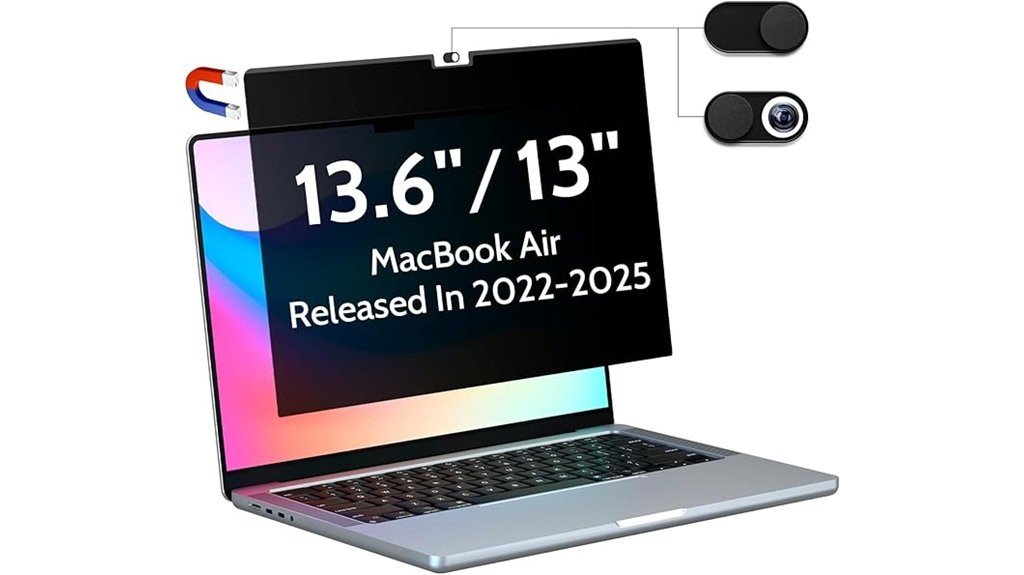
Peslv positions this as a removable privacy filter for the 13.6-inch MacBook Air family. A reinforced magnetic strip attaches along the top bezel, so you can add the filter when privacy matters and remove it when you want the bare display for color-sensitive work, media, or brighter viewing.
The seller states that the privacy field is limited to about ±30° from the center. It also claims 95% blue-light reduction, 92% UV-light reduction, and a matte surface that reduces reflected light. Those are seller claims rather than medical benefits, so the most useful reason to buy this product is still visual privacy and glare control, not treatment or prevention of eye problems.
| Specification | Detail |
|---|---|
| Brand | Peslv |
| Product type | Magnetic privacy screen protector |
| Screen size | 13.6 inches, listed for 13.6/13-inch MacBook Air |
| Compatible generations | MacBook Air 2022-2026, M2, M3, M4, and M5 |
| Supported shell models | A2681, A3113, A3240, A3449 |
| Material | Polyethylene terephthalate (PET) |
| Listed hardness | 9H |
| Privacy angle | About ±30° from the center viewing position |
| Finish | Matte anti-glare surface |
| Blue-light reduction | Seller claims 95% |
| UV-light reduction | Seller claims 92% |
| Installation | Reinforced top magnetic strip, removable design |
| Quantity | 1 count |
| Included storage feature | Privacy-filter storage clip listed by the seller |
| Best use | Public work, travel, school, office, and shared workspaces |
What Is the Peslv Magnetic Privacy Screen for MacBook Air?
The Peslv Magnetic Privacy Screen is a removable PET screen filter made for compatible 13.6-inch MacBook Air models. Its main purpose is to narrow the useful viewing area from the sides, helping reduce casual shoulder surfing when you work around other people.
Unlike a permanent adhesive protector, the top magnetic strip lets you attach and remove the filter as your situation changes. That matters if you want privacy for email, spreadsheets, client documents, schoolwork, or banking pages but prefer the MacBook Air display without a filter for photo editing, video, or other color-sensitive tasks.
The matte surface also helps reduce reflections. That can be useful under office lights or near windows, although the extra layer can still lower perceived brightness or sharpness compared with the bare display.
Before You Buy: Match your MacBook Air shell model before ordering. The current listing names A2681, A3113, A3240, and A3449 for 2022-2026 M2 through M5 MacBook Air models. Do not assume an older 13-inch MacBook Air has the same display shape or magnetic fit.
Detailed Features
[Amazon Products Picked for You]

【COMPATIBLE MODEL】: This MacBook privacy screen is designed for Designed for the 13.6-inch MacBook air released in MacBook Air 13 & 13.6 Inch (2022-2026, M2, M3, M4,M5), (Model: A2681, A3113, A3240) with precise dimensions and a perfect fit. Please check the screen size and model number before purchasing to prevent any purchasing errors.
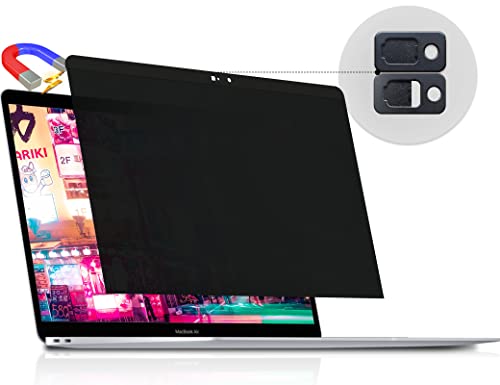
【WIDELY APPLICABLE】Removable design and comes with a MacBook privacy screen protector storage clip that can be taken and used as needed, perfect for various occasions where screen privacy needs to be protected.Like offices, airports, cafes, trains, etc. Compatible with MacBook Pro 13 in (2016, 2017, 2018, 2019, 2020, 2021, 2022, M1, M2) or MacBook Air 13 inch (2018, 2019, 2020, 2021, M1)

【Ultimate Privacy Protection】MacBook Air 13.6 inch privacy filter with unique ultra-thin micro-louver technology, our computer privacy screens limit the viewing angle to approximately 30 degrees on each side. Thus protecting your laptop screen data. (Note: this does not block the view behind you). Additionally, our complimentary sliding camera cover further protects your privacy.
±30° Side-View Privacy
The key feature is the seller-stated ±30° viewing zone. When you sit directly in front of the screen, you keep the intended view. As a person moves farther to either side, the display becomes harder to read. This can reduce casual visual access in a cafe, classroom, airplane seat, shared desk, or waiting area.
A privacy filter is not a complete security system. Someone standing behind you, looking from near the center, or positioned very close may still see information. You should still use normal privacy habits for highly sensitive work.
Matte Anti-Glare Finish
The matte surface is designed to reduce distracting reflections from windows and overhead lights. Peslv also claims the surface intercepts a high percentage of reflected light. In practical terms, the matte finish can make bright environments easier to work in, but it can also soften the crisp look of the MacBook Air display.
Blue-Light and UV Filtering Claims
Peslv claims 95% blue-light reduction and 92% UV-light reduction. Treat these as product claims, not as a medical treatment for eye strain. Your screen brightness, room lighting, viewing distance, text size, and regular breaks still matter for visual comfort.
Magnetic Attachment
The screen uses a reinforced magnetic strip along the top edge. You align it with the upper bezel and press it into place, which avoids a permanent adhesive layer. The removable design is useful when you move between public work and private use during the same day.
PET Material and Screen Protection
The Amazon listing identifies the material as polyethylene terephthalate (PET), lists 9H hardness, and describes an anti-scratch layer. That gives the filter a second role as a physical layer over the display, although you should still handle it carefully because scratches, dust, and pressure can affect viewing clarity.
Who Should Buy It?
Best For
- You use a compatible 2022-2026 MacBook Air around coworkers, classmates, travelers, or the public.
- You want privacy only when needed and prefer a removable magnetic filter over a permanent adhesive layer.
- You value side-view privacy and glare reduction more than maximum screen brightness and unfiltered color clarity.
Skip If
- Your MacBook Air shell model is not listed as A2681, A3113, A3240, or A3449.
- You do color-critical design, photo, or video work and need the bare display most of the time.
- Your laptop case wraps tightly around the display and prevents the magnetic filter from sitting flat.
Privacy Protection
The privacy effect works best when your eyes are centered in front of the display. That makes the product most useful against people sitting or standing off to either side. It is less useful against someone directly behind you or close to your normal viewing line.
You can improve privacy by combining the filter with smart seating. A wall, corner, or seat that limits traffic behind you reduces the number of viewing angles you need to manage.
Matte Finish and Display Quality
The matte finish helps control glare, but privacy filters always involve an optical tradeoff. You may notice lower perceived brightness, slightly softer text, or less punch in photos compared with the unfiltered MacBook Air display.
For writing, research, spreadsheets, messaging, and general browsing, that tradeoff may be acceptable. For photo editing, design review, or video color work, removing the screen gives you a better view of the original display.
Blue Light and UV Light Filtering
The seller lists 95% blue-light reduction and 92% UV-light reduction. Those figures can help you compare this product with other filters, but they should not be read as proof that the screen prevents eye problems or replaces good screen habits.
If you develop persistent eye discomfort, changing brightness, room lighting, viewing distance, or break frequency may help. For ongoing symptoms, professional eye-care advice is more appropriate than relying on a screen accessory.
Magnetic Installation and Removal
The magnetic design is the main convenience advantage. You can attach the filter before opening private work and remove it when you no longer need side-view privacy. There is no permanent adhesive layer to align across the whole display.
Fit still matters. A case that reaches around the display edge can interfere with the filter, and an incorrect MacBook Air generation may not line up properly. If the screen shifts, first check alignment, dust, and case interference before assuming the magnetic strip is defective.
Pro Tip: Clean both the MacBook display and the privacy filter with a soft microfiber cloth before installation. Dust or fingerprints trapped between the two layers can make the image look hazier and can make alignment harder to judge.
Fit and Compatibility
The current listing covers MacBook Air 13.6/13-inch models released from 2022 through 2026 with M2, M3, M4, or M5 chips. The named shell models are A2681, A3113, A3240, and A3449. Checking the shell model is more reliable than ordering based only on the words “13-inch MacBook Air.”
Before buying, confirm the model number in your Mac information or on the hardware label. A filter shaped for another generation can sit unevenly, leave part of the display uncovered, or create pressure around the edges.
Compatibility and Device Safety
This is an accessory that sits directly over a laptop display, so correct fit matters for both privacy and normal laptop use. Do not force the filter into place, wedge it under a tight case, or close the laptop against obvious resistance. If the lid does not move normally with the filter attached, remove the filter and recheck alignment.
For cleaning, keep liquid away from ports and display edges. Lightly dampen a microfiber cloth rather than spraying cleaner directly onto the MacBook or privacy screen.
How It Performs in Real Use
For Coffee Shops and Coworking Spaces
The ±30° privacy design is most useful when strangers or other workers sit beside you. It can make casual side glances less useful while you handle email, spreadsheets, client notes, or personal accounts. You still need to watch the area directly behind you.
For Office and Classroom Use
In a shared office or classroom, the filter helps when people pass by or sit at neighboring desks. Because it is removable, you can take it off when you need to show your screen to a coworker, teacher, or classmate instead of forcing everyone to view through the privacy layer.
For Airports, Planes, and Trains
Travel is a strong use case because seats are close and viewing angles are limited. The included storage clip listed by the seller also gives you a defined place to keep the filter when it is not on the laptop. Store it away from keys, chargers, and hard objects that could scratch the surface.
For Bright Rooms
The matte finish can reduce reflections, but the privacy layer may also make the screen look darker. You may raise display brightness to compensate, which can increase battery use. If maximum battery life matters, test the lowest comfortable brightness rather than automatically running the display at its highest setting.
Setup Tips Before First Use
First, confirm that your MacBook Air matches one of the listed shell models. Clean the display and filter, then align the reinforced magnetic strip with the top bezel and let the magnets seat naturally. Do not bend or force the filter to make it match an unsupported screen.
Next, sit in your normal working position and test the privacy effect from both sides. You should judge privacy from the position where another person would actually sit, not only by tilting your own head a few inches.
If you use a shell case, check whether it pushes against the filter edges. Case interference can prevent a flat fit and may make the filter shift during use.
Cleaning and Maintenance
Use a clean, soft microfiber cloth for routine dust and fingerprints. For stubborn marks, lightly dampen the cloth with water or a screen-safe, alcohol-free cleaner. Do not spray liquid directly onto the filter or laptop.
When the filter is removed, keep it flat and protected. The listed storage clip can help with handling, but you should still avoid storing the screen loose beside metal objects, pens, cables, or chargers that can scratch or press into the surface.
Pros and Cons
The Peslv Magnetic Privacy Screen is most convincing when you actually need privacy in changing locations. Its removable magnetic design and current M2-through-M5 compatibility make it flexible, but you still give up some brightness and unfiltered display clarity.
Choose this filter for removable side-view privacy, not because you expect the MacBook Air display to look exactly the same with an extra privacy layer in place.
Pros
- Removable magnetic attachment avoids a permanent adhesive layer.
- About ±30° side-view privacy helps reduce casual shoulder surfing.
- Current listing supports 2022-2026 M2, M3, M4, and M5 MacBook Air models.
- Matte anti-glare finish helps reduce reflections in bright shared spaces.
- PET construction, listed 9H hardness, anti-scratch layer, and storage clip add practical protection and handling value.
Cons
- The privacy layer can make the display look dimmer or less crisp than the bare screen.
- Cases that wrap around the display can interfere with magnetic placement.
- Compatibility is specific, so older or differently shaped MacBook Air models should not be assumed to fit.
Is It Worth the Price?
This Peslv privacy screen is worth considering if you regularly work in places where people sit close to your MacBook Air. Its value comes from combining removable magnetic installation, side-view privacy, matte glare control, and basic screen protection in one accessory.
You get the most value when privacy is situational. You can keep the filter on during travel, client work, school, or shared-office sessions, then remove it when display brightness and color clarity matter more.
It is not the best fit if you work alone most of the time, own an unsupported MacBook Air, or need an unfiltered display for color-critical work. In those cases, the privacy benefit may not justify the optical tradeoff.
[Amazon Products Picked for You]

【360° Comprehensive Privacy Screen】: Halloive has upgraded the anti-peeping angle. This 13.6-inch Macbook pro/Air privacy film allows you to see the screen normally from the front, while the screen will become darker and darker at other angles as the angle increases, fully protecting your privacy.(NOTE: IT DOES NOT BLOCK VISIBILITY DIRECTLY BEHIND YOU, REGARDLESS OF THE DISTANCE. THE PRIVACY SCREEN PROTECTOR FINISH SLIGHTLY SOFTENS THE SHARPNESS AND VIBRANCY OF THE SCREEN.)

【WIDELY APPLICABLE】Removable design and comes with a Macbook air privacy filter protector storage clip that can be taken and used as needed, perfect for various occasions where screen privacy needs to be protected.Like offices, airports, cafes, trains, etc. Compatible with MacBook Air 15 in (2023-2026, M2 M3 M4 M5 Chip) - Model A2941 A3114 A3241 A3448

【360° Comprehensive Privacy Screen】: Halloive has upgraded the anti-peeping angle. This 13-inch Macbook pro/Air privacy film allows you to see the screen normally from the front, while the screen will become darker and darker at other angles as the angle increases, fully protecting your privacy.(NOTE: IT DOES NOT BLOCK VISIBILITY DIRECTLY BEHIND YOU, REGARDLESS OF THE DISTANCE. THE PRIVACY SCREEN PROTECTOR FINISH SLIGHTLY SOFTENS THE SHARPNESS AND VIBRANCY OF THE SCREEN.)
How It Compares to Alternatives
The Kensington UltraThin Magnetic Privacy Screen is a more premium alternative sold through Apple and adds a reversible matte/glossy design on current MacBook Air versions. The StarTech 13-inch MacBook Air Magnetic Privacy Screen is another business-focused option with a ±30° privacy design and reversible surfaces.
The Peslv makes the most sense if you want the verified compatibility listed for A2681, A3113, A3240, and A3449 along with a magnetic removable design and the seller’s stronger blue-light and UV filtering claims. Kensington or StarTech may be worth comparing if reversible surface options or a more established accessory brand matter more to you.
[Amazon Products Picked for You]

【WIDELY APPLICABLE】Removable design and comes with a macbook air privacy filter protector storage clip that can be taken and used as needed, perfect for various occasions where screen privacy needs to be protected.Like offices, airports, cafes, trains, etc. Compatible with MacBook Air 13.6 & 13 inch (Released In 2022-2026, M2 M3 M4 M5 Chip) - Model: A2681 A3113 A3240 A3449

【Customized Design】The Magnetic Privacy Screen is designed to integrate seamlessly with your Macbook Air 13.6 Inch models from the years 2022, 2023, 2024,2025,2026 and those with M2 and M3 /M4/M5 chips. (Model: A2681, A3113) Please note that the 13.6" Macbook Air is sometimes marketed as the 13" Macbook Air. This Macbook Air 13 inch privacy screen is the perfect solution for users seeking a Macbook Air privacy screen 13 inch.

Maintain Your Privacy: Made from premium and durable materials for long-lasting privacy protection.
Practical Tradeoffs Before You Decide
The product solves one clear problem: it makes side viewing harder without requiring a permanently attached privacy film. That is useful when your workday moves between public and private spaces.
The tradeoffs are equally clear. You may see lower brightness or softer image quality, and the filter only works as intended when your exact MacBook Air model and any surrounding case allow a flat magnetic fit.
Related Guides
Frequently Asked Questions
Which MacBook Air models fit this Peslv privacy screen?
The current Amazon listing names 13.6/13-inch MacBook Air models from 2022 through 2026 with M2, M3, M4, and M5 chips. The listed shell model numbers are A2681, A3113, A3240, and A3449, so check your exact model before ordering.
How much side-view privacy does it provide?
Peslv states that the useful viewing zone is about ±30° from the center. It is meant to reduce visibility from the left and right, but it cannot stop someone who is directly behind you or looking from close to your normal viewing angle.
Will the privacy screen make the MacBook Air display darker?
It can. Privacy filters add another optical layer, so the display may look dimmer or a little softer than the bare screen, especially in a bright room. You may need to raise brightness or remove the filter for color-critical work.
Can you remove the screen when you do not need privacy?
Yes. The reinforced top magnetic strip is designed for quick attachment and removal. That makes the filter useful when you need privacy only during travel, office work, school, or specific tasks.
Does it work with a MacBook Air case?
It may work with cases that leave the display edges clear. A tight shell that wraps around the bezel can interfere with the magnetic strip or keep the filter from lying flat, so test the fit before relying on it for daily use.
What material is the privacy screen made from?
The Amazon listing identifies the material as polyethylene terephthalate (PET) and lists 9H hardness. It also describes an anti-scratch layer, but you should still store the filter away from hard objects that can mark its surface.
How should you clean and store it?
Wipe it with a soft microfiber cloth. For stubborn smudges, lightly dampen the cloth with water or a screen-safe alcohol-free cleaner, and never spray liquid directly onto the laptop. Store the filter flat and protected, using the listed storage clip when practical.
Who should skip this privacy screen?
Skip it if your MacBook Air model is not listed, your case prevents a flat fit, or your work depends on maximum brightness and accurate color. It is most useful for people who regularly work around others and can accept a small display-quality tradeoff for privacy.
The Bottom Line
The Peslv Magnetic Privacy Screen is a good match for a compatible 2022-2026 MacBook Air when you need removable side-view privacy in shared or public spaces. Its strongest points are magnetic installation, about ±30° privacy, matte glare control, and current support for M2 through M5 models.
You should skip it if your exact shell model is unsupported or you need the bare MacBook display for maximum brightness and color accuracy. Overall, it remains an 8/10 recommendation with caveats because the privacy convenience is useful, but fit and display tradeoffs still matter.
